
A Day in the Life of a ServiceNow Admin
Last updated on Sep 25, 2026
In today's IT ecosystems, there are few professional positions which are advantageous as the ServiceNow Administrator position. It is because this type of professional is located precisely in the place where several departments intersect, they work both with the business processes of the organization, employees, and customers and solve various problems in cybersecurity and infrastructure. The ServiceNow Administrator is responsible for the seamless work of the entire operating system of the organization and without their efforts, it would be impossible for the organization to operate successfully.
While the job description may seem very simple, it actually involved complex processes that require the Manager to pay attention to details, think strategically, and solve problems with stakeholders. For instance, a simple mistake regarding the ACL can lead to the loss of important payroll information, while an improper SCR can cause a global organization to face many problems.
By examining how ServiceNow Admins spend their days, one can glean valuable insights into how the strategy is translated into practice on a day-to-day basis. Students learning servicenow basic administration online may well find out that the role of an administrator requires much more than just configuring static parameters. After looking into a typical day filled with activities such as checking platform health, troubleshooting, maintaining a project backlog, running sprints together with stakeholders and managing projects, it becomes evident what is needed to run a ServiceNow installation correctly.
Dawn Patrol: Proactive Health, Diagnostics, and Daily Maintenance
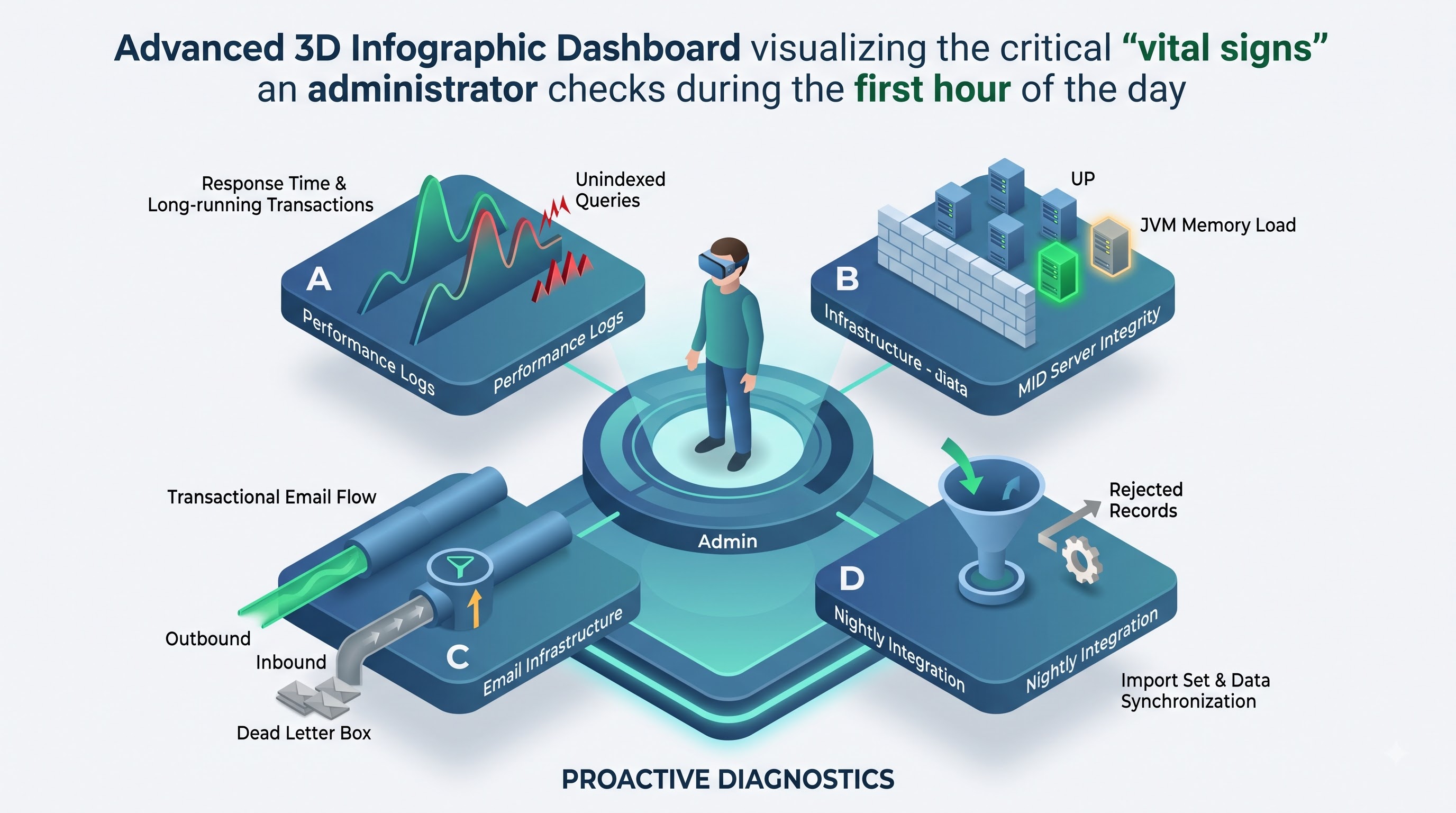
Any ServiceNow Administrator knows that a good day starts before the first order is processed or the first incident is raised. The first hour of the day is reserved for working on diagnosing the platform’s state. The goal is simple—to identify glitches, delays, and mistakes in the configuration before they disturb the process.
The morning ritual is not complete without examining the diagnostic console and system logs. Instead of waiting for significant issues to appear, the administrator checks the vital signs of the system in real time. The logs are channeled for examination of any indications of slow queries, long-running transactions or warning cascades. An unexpected increase in response time on the part of the workers is typically a telltale sign of a malfunction. It could signal the occurrence of a badly indexed search in a huge operational table, an unindexed reference qualifier checking against users or an unconstrained report ordered by a top manager right before his breakfast.
The subsequent phase consists of the testing of essential automated infrastructure. The contemporary business relies extensively on back office work and background processes like scheduling jobs, mid server communication, connections with external API, or data ingestion pipelines. The administrator checks whether the MID Servers are working normally. MID Servers are the lightweight applications developed on Java that function within the corporate firewall. If the MID Server is flagged with the red sign, it indicates failure on the part of automated discovery and suspends Active Directory user actions. Nonetheless, it is important to keep all the connections running and JVM memory utilization on the servers within the tolerable limits in order to avoid issues with the final outcomes.
Attention should also be paid to the operations of the email delivery processes. An administrator will check the email logs for successful outbound email queues as well as for any inbound email activities. Inbound processes can be full of confidential operations problems. For instance, a vendor may change their notification format so that the alerts don’t pass through the classification process or get into the dead letter box or converted into significant alerts. With regards to outbound activities, the administrator makes sure that transactional messages and email alerts about executive approvals and incident resolutions are not suspended in the sending process due to problems with logging in to the email relay.
Another key morning checkpoint is the import set and transform map log. Organizations constantly feed identity and operational information into the system: nightly HR employee updates from their enterprise resource planning systems, asset discovery data from endpoint management applications, and cost center reconciliations from accounting systems. An administrator ensures that imports are accepted without any problems. They check transform histories for rejected records, unexpected data truncation, and empty coalesce fields. Coalesce fields not processed correctly in an HR synchronization can, for example, replicate the profiles of many users unintentionally.
Lastly, the morning routine comprises the audit of the scheduled job execution states. The administrator scrutinizes long-lasting asynchronous jobs that skipped the execution limits. If the reclamation script is blocked in a thread for hours, the administrator determines the cause of the blocking nature of the script, either due to a database lock or the absence of exit condition in the loop of the script.
Once the corporate employees log on to the enterprise system, the administrator has already dealt with the technological problems presented in the system and confirmed the stability of the network infrastructure.
Mid-Morning Operations: Incident Triage, Governance and Platform Operations
The morning is over, and the focus of the administrator changes from automatic diagnostics to the interactions with people, processing on the platform, and immediate assistance for the users.
In several companies, the agents at Tier 1 and Tier 2 help desks screen the initial technical problems. However, issues dealing with configuration of platforms or security access that need workflow integrity are directly reported to his or her administrator. This administrator applies the basic principle to all incoming reports by focusing on solving the current business challenge and not violating the overall architecture.
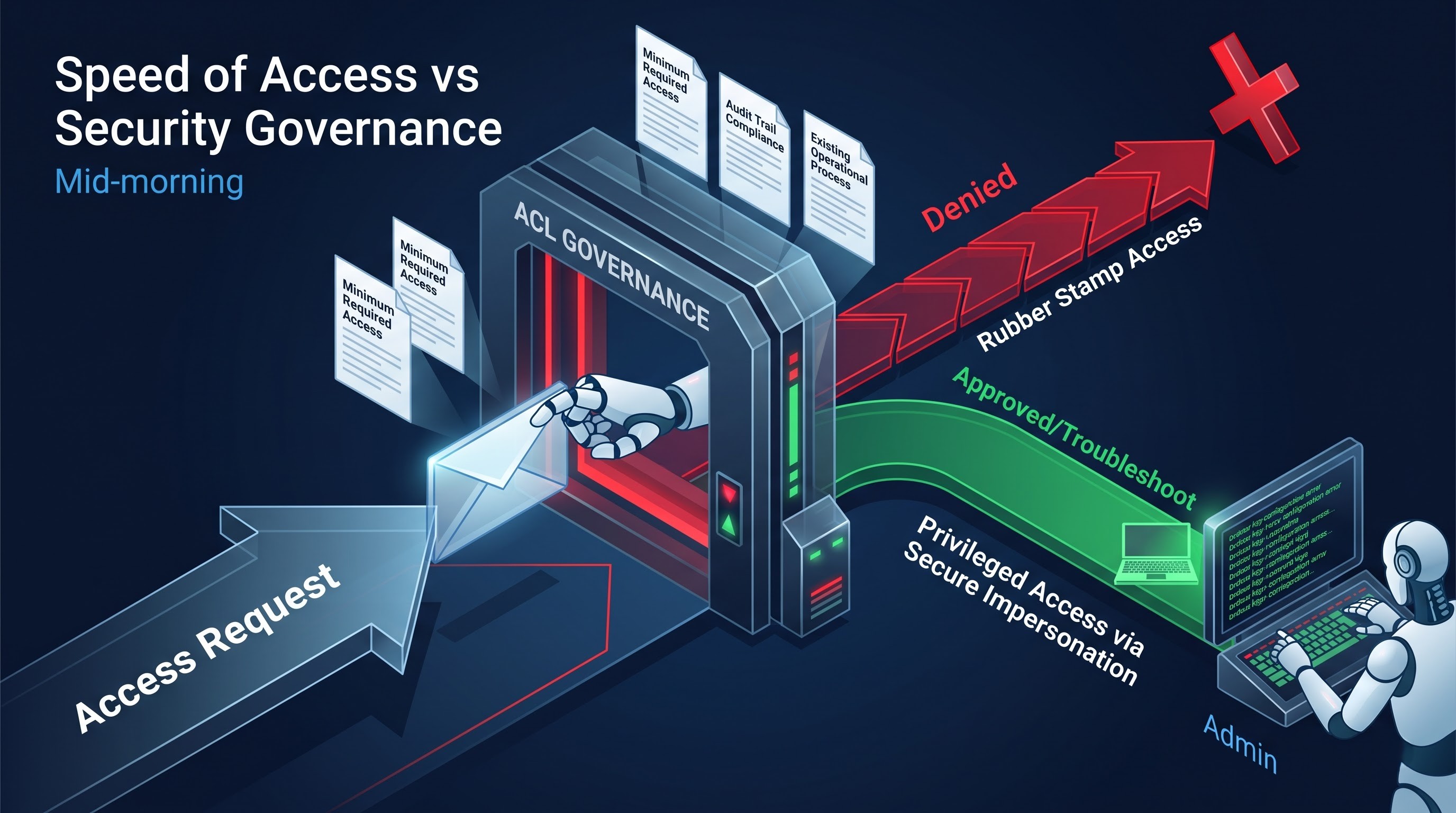
Identity and access management is one of the most common early-morning tasks for the administrator and it also functions as a significant battle of security. There are requests to get certain administrative privileges, access to the change request tables, or membership in some special groups within the organization. An experienced administrator has never been a “rubber stamp” on the access ticket. It means that the administrator applies the principles of access control governance. He or she checks whether the permission request corresponds to the minimum required access. For instance, if someone has requested increased access to production records for changing the value of the field, the administrator checks if there is an existing operational process that can grant this right without violating the rules of the audit trail.
Another important operational tool that emerged during this period is impersonation. The administrator must understand the reason for this malfunction if, based on the comments of the regional manager, the change requests made by the direct reports are invisible or the approval button does not work on mobile devices. With the help of secure impersonation protocols, which are securely and accurately recorded in the access logs, the administrator controls the actions in the system as if he was the current user. The understanding of these troubleshooting methods is one of the main objectives of a well-structured online servicenow administration course, which helps users to quickly determine whether the problem is connected to a misconfigured evaluation condition in the field-level Access Control List, or improperly configured user criteria for the service portal category, or a browser configuration incompatible with the platform.
Operational triage includes dealing with the effects of the enterprise change. The system administrator receives many calls in the morning about failed catalog items, such as when a business department adjusts a local policy and, therefore, causes an error in the workflow of requests. In such cases, an administrator checks the variable set configuration, verifies the working of the dependent drop-down logic, and evaluates the assignment group lookups.
The administrator must fulfill the role of an educator during such morning sessions, as there are instances in which issues identified through a website are nothing more than cases of training deficits and misunderstood IT service management processes. The administrator calmly tells the operations lead who raises a complaint about the closing of an incident ticket without any user intervention about automated closure resolution cycle that follows the life cycle of ticket closure; the administrator explains the actions that were taken based on the business logic that ensures reporting cleanliness and prevents building of stale items in the database.
The administrator does not permit himself to relax during the operational chaos as he has to be able to distinguish independent problems of users from wider microcrises happening across the platform. If three distinct service desk analysts report that the timers of ticket resolution do not work, the administrator knows immediately that there is a malfunction in the SLA engine or a failure in the holiday calendar.
Midday Transition: The Strategy and Art of Backlog Administration
By the time midday arrives, the typical high momentum noise of operational firefighting transforms into a manageable shift allowing the administrator to transition from maintenance to systematic modification of the system: the art of backlog administration.
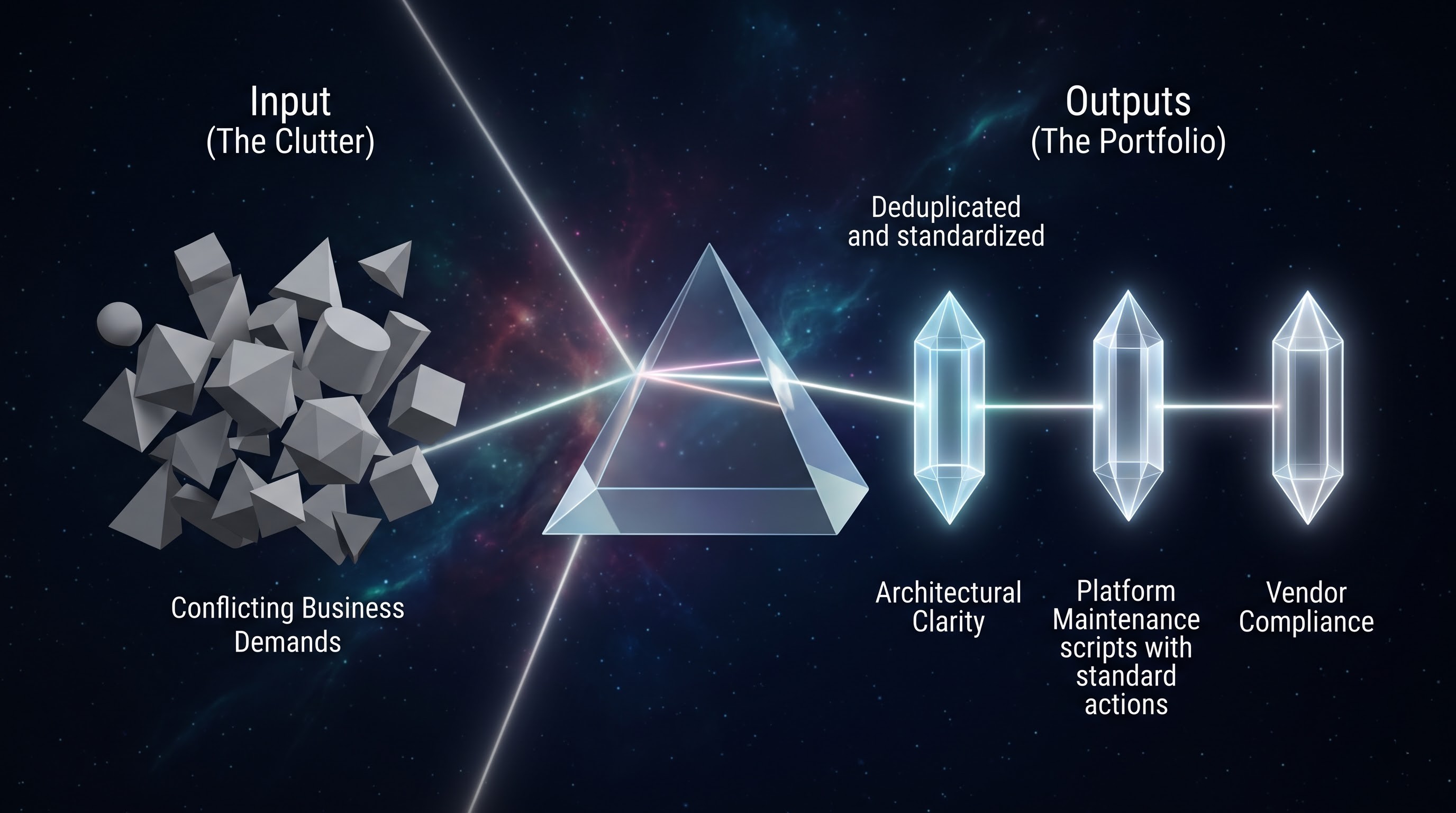
The ServiceNow platform is often indeed a victim of its own success. Due to its flexibility and ability to automate almost any type of workflow in IT, facilities, legal, and HR domains, the business gets excited and inundates the ServiceNow queue with requests for improvement. Without proactive backlog management, the queue rapidly degenerates into a chaotic and depressing loophole with barely discernible ideas and conflicting requirements.
The key role of the administrator in backlog management is that of maintaining architectural clarity, proper alignment of business value, and checking the technical feasibility of the value of the task. Instead of looking at the backlog simply as a list of cases, the administrator treats it as an investment portfolio of the ongoing modernization of the platform.
The grooming process begins with requirement distillation. Stakeholders frequently present enhancement requests in terms of specific technical solutions instead of looking at the underlying business problems. A departmental manager may even present a story that lists five fields that should be custom fields, three mandatory check boxes, and an email alert that should be sent to six executives when something changes in the record state. The administrator will examine this request in-depth to discover the business purpose behind it. Why would we need those fields? What metrics rely on them? Who will act on these automated emails, and will this create email alert fatigue?
In this way, the administrator can save the platform from unnecessary additional components or improvements. The administrator may show the stakeholder that the relevant metric can be collected using the already available audit journals. The administrator may explain that the excessive number of notifications reduces the engagement of users with the platform and encourages them to switch to different dashboard solutions instead.
The categorizing and deduplication of requests represents the next step in the backlog management process. After several weeks of handling requests, it is common for different departments to come up with similar requirements by referring to the same feature with different names. Human resources, facilities management. Global procurement, for example, may come up with requests for an automated document-signing process or a dynamic approver check process separately. A good administrator recognizes these similarities and decides to focus on creating one overall solution instead of three specific applications for each department.
In order to prioritize tasks in the backlog, an administrator should consider both technical feasibility and need for the business. He or she should define whether the new feature will be beneficial for many users, whether it will help reduce time spent by the operational teams, whether it will support the decrease of manual work, and whether it is worth risking technical delays.
It is critical for an administrator to promote the platform too. Stakeholders in business will always put emphasis on improvements to the visual aspect of the platform and introducing new features rather than on its maintenance from a technical perspective. It becomes the administrator’s responsibility to raise the technical debt reduction stories in the backlog of tasks. These stories may include making obsolete catalog variables not active, eliminating rules from the undeveloped business ones, changing complex scripts into standardized actions and checking the tables that are close to being full.
The administrator also analyzes the readiness of the system for upgrade during the backlog analysis process. Due to frequent releases of new versions of the platform, companies need to pay attention to those features they want to add to the system. An administrator checks if it is possible to achieve the aims by means of using the standard functions and abilities of the system or if it needs custom development.
The backlog grooming process has helped to turn old ideas into practical user stories with precisely defined acceptance criteria, relevant business rationale, anticipated levels of complexity associated with implementing the story, as well as testing parameters. Everything is ready to move into action.
The Afternoon Collaboration: Agile Sprint Planning and Cross-Functional Coordination
Platform management does not take place in isolation of the developing sector of the business, being associated with the application of agile approaches to delivery, proper change management, and coordination with business stakeholders. Traditionally afternoon hours are appointed for collaborative sprint planning meetings and stakeholder alignment.
Sprint planning consists of the core platform team: administrators, architects, developers, business analysts, quality assurance specialists, and a product owner. Here the refined stories from the backlog are being selected for upcoming work in the next delivery cycle.
The administrator has a down-to-earth and practical approach in discussions. While the product owner brings in business-related considerations and the developers discuss functional complexities, the administrator makes sure that the actual reality is taken into account. The administrators know how the modifications being discussed can impact real users, day-to-day work processes, and what problems they may cause.
When a new complex approval framework for global purchases is discussed, the administrator takes a step forward to evaluate related dependents. He reminds the group that there might be inconsistent data based on the historical managerial hierarchy of cost centers, which might lead to problems with the execution logic. He is also interested in procedures for dealing with exceptions: What if the approver resigns during the process? What if the approver’s substitute is not in the office? How will the trail of the transaction look like to external regulators?
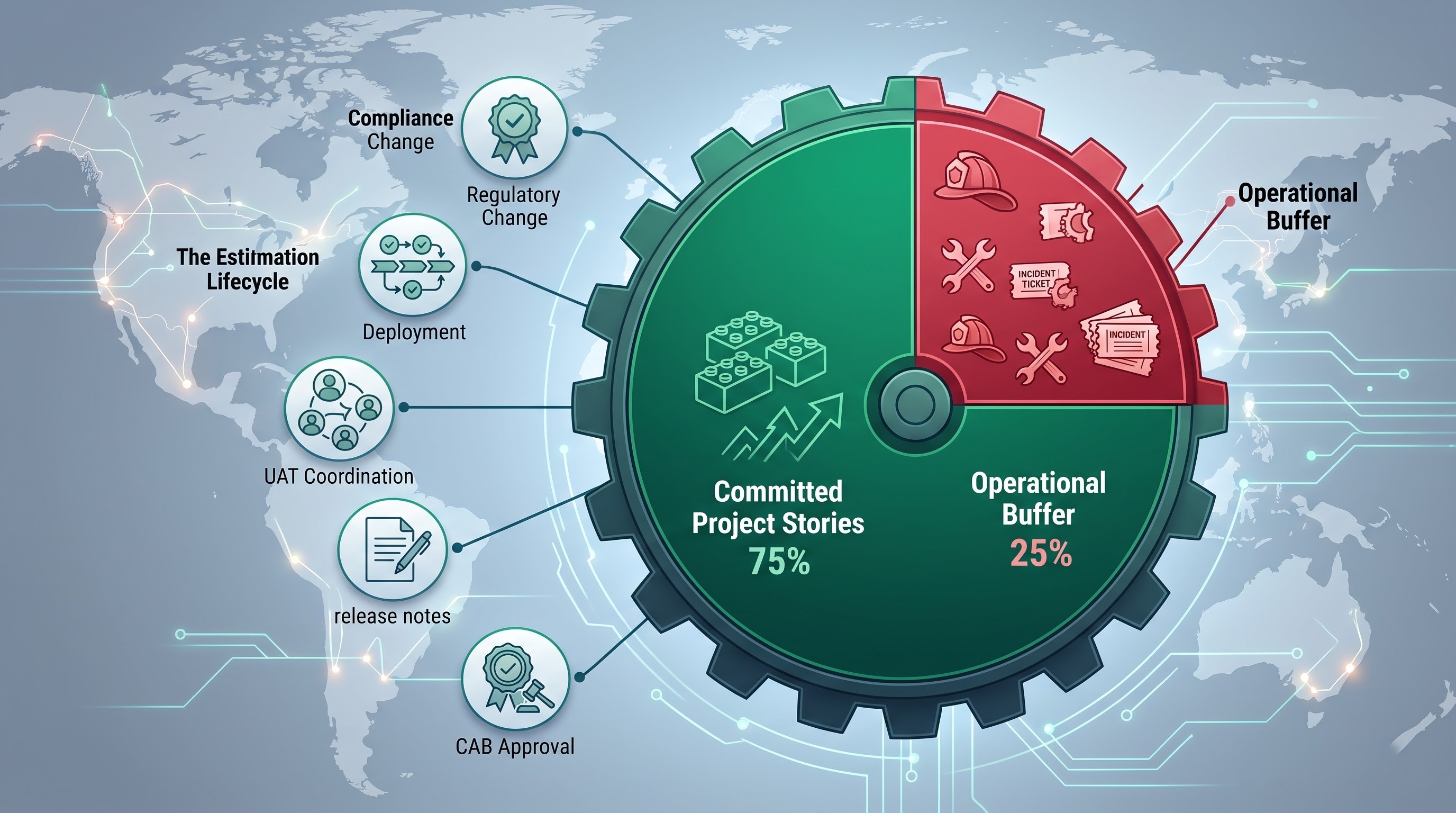
Capacity planning is another important responsibility of a sprint cycle. The administrator cannot allocate all of his/her work capacity towards project stories and new work tasks. He/she needs to define a fixed operational allocation. A competent administrator should keep about 20-30% of his/her available capacity for unplanned work such as incident inquiries, extraordinary security requests, important security updates, regular maintenance, etc. Hence, it is apparent that allocating project improvement resources without taking daily maintenance into account is doomed to fail.
Estimation accuracy is yet another field where the proficiency of an administrator is crucial. In order to estimate a story, one needs to consider a lot more than merely the time spent developing a configuration or designing new processes. The administrator looks at the entire lifecycle of the change:
1. Recording the change in the corporate enterprise architecture system
2. Creating the process of implementation via new technologies and tools that enable automatic deployments,
3. Performing functional tests on software installed in an environment for development purposes,
4. Coordinating user acceptance tests together with business partners, who have no technical background,
5. Writing release notes for the service desk team,
6. Passing through the formal process of getting the proposal approved in the enterprise Change Advisory Board (CAB).
The implementation of a configuration change in a development setting may take only 20 minutes, but when compliance, peer review, documentation, and testing must be taken into consideration, the total effort may reach up to eight hours. It is the administrator's responsibility to reflect such operational realities in the estimation of story size, so that there is no overcommitment made.
After completing a sprint planning meeting in the morning, the administrator may also involve in a variety of meetings through the afternoon with other stakeholders in the organization. For instance, the administrator may meet with a security officer to discuss the governance of the roles; have a meeting with the human resources representative; or hold a conversation with the network operations lead to optimize the rules of event monitoring and intake.
End-of-Day Review: Maintenance of the Platform, Documentation and Balancing Professional Life
As the day comes to an end and operations start coming to a finish, a ServiceNow Administrator comes to an end with the process of checking their performances, getting their work done, updating their documents and getting ready for the next day.
The administrator starts the process of signing off by taking a look at their personal queues and managing dashboards. Any open ongoing incidents that require keeping a close look are updated with clear and detailed notes. If there’s a need to close a ticket but a reply is still awaited from an external vendor or another person, the administrator ensures that the state of the ticket reflects this situation so that the SLAs don’t get falsely counted.
Documentation becomes the biggest priority, rather than simply something to do. An environment that hinges on the memories of one administrator cannot be trustworthy. The administrator spends several hours a day updating wiki pages, configuration records and standard procedures.
Whenever the administrator modifies a complicated business rule, they will record not just what changes have been made, but also explain its structure. The administrator is supposed to indicate the reason behind the use of a different configuration, which cross-table relationships are present within the business process, and who has signed the work operation. In the future, platform administrators and other specialists will analyze these records to solve problems related to the work of the platform and also prepare for next changes within it.
Then, the administrator analyses activities done at night. There are many enterprises' processes done during the night—like discovery sweeps, database indexing, etc. The administrator is checking the queue of activities scheduled for the night and makes sure that jobs are executed properly.
The administrator anticipates events that may occur during the lifecycle of the platform. They check the calendar for imminent quarterly patch cycles, system releases, and the expiration of certificates for third-party API's. By staying ahead of critical milestones, any frantic or stressful fire drills are avoided. The administrator keeps ahead of security patches from the platform vendor so that they can plan for test migrations and prepare for test suites in advance of operational deadlines.
In order to master these various daily tasks—from proactive logging analysis to MID server monitoring to backlog and deployment management—you need a combination of practical experience and guidance from an expert. People who want to gain these real-life skills can join specific servicenow admin online training at OnlineITGuru and acquire the knowledge needed to move from basic IT support to successful enterprise system administration.