
Access Free Azure Cloud Tools and DevOps for Student Projects
Last updated on Aug 24, 2026
These days, the curricula of modern computer science, software engineering, and information technology programs increasingly require students to go beyond the confines of coding in isolation. While practical experience of learning algorithms and data structures on a personal computer is essential in the process, modern software engineering is impossible without teamwork, permanent integration, hosting in the cloud, automated testing, and agile tracking.
In terms of computers, migrating from text editors to cloud-based enterprise applications is intimidating. And this is especially true because students often fear the unpredictable nature of cloud costs and the complicated enterprise structure. Microsoft helps solve this problem by creating educational initiatives that allow students to use the cloud infrastructure for free.
As a result of the partnership between the Microsoft Azure for Students program and Azure DevOps, students can benefit from full assistance in terms of creating, managing and executing projects, which is very helpful for them. There are several online platforms available for those who want to enhance their experience of mastering the azure devops learning using help from a mentor. OnlineITGuru, for instance, is one of such websites offering real, practical assistance to university students while studying their curriculum. In this article, the process of establishing a free account, setting up pipelines and utilizing cloud practices in business will be discussed.
Grasping the Importance of DevOps in Academic Coursework
DevOps brings together software development and IT operations. In an educational setting, it allows uniting of academic programming and real-world work methods.
Traditionally, university assignments were completed in a disconnected manner. A student would write code on their computer, compress the source code files, and send it for assessment via LMS. This process concealed various typical challenges of real-life:
Environment inconsistency. The code running on the student’s computer can fail to function on the instructor’s OS.
Lack of visibility. In group projects, due to the nature of the programming, students created unequal code contributions, faced merge conflicts, and lost their work when sharing code over instant messaging or basic cloud solutions.
Manual testing efforts. Grading and self-assessing one’s work has to be done manually, with the use of test suites taking time away from lab practice.
Lack of cloud knowledge. A graduate does not know anything about hands-on cloud identity management, artifact storage and managing automated pipelines as well as live applications.
The integration of Azure DevOps and Azure cloud resources in the curriculum addresses these challenges. Learners become acquainted with the processes of monitoring requirements using agile boards, using repositories under version control, testing revisions through automated builds, and running online applications through cloud infrastructure. These practical demonstrations enable students to be prepared for contemporary software engineering jobs.
Investigating the Microsoft Azure for Students Program
Microsoft provides targeted programs for the educational sector, with Azure for Students being the main program for students of colleges and universities.
Conditions and Verification
The former is specifically designed for the students of accredited educational institutions.
No Need for Credit Card: Unlike regular commercial cloud trials that require credit card validation, verification of students is based on academic background only and completely excludes the possibility of inadvertent recurring credit card deductions.
Email Verification of the School: Students use their academic email to check their eligibility (emails ending in .edu or institutional domain).
Recurrent Granting: The subscription gives the first grant for twelve months of usage. The subscription may be renewed yearly provided that the student resides in the student and possesses the access to the school email each time.
Key Features and their Importance
The subscription length is divided into a combination of free service quotas and specific credits provided as a help in assisting learners in coursework or independent exploration.
Money cloud credits: learners get a certain amount of money (usually no more than 100 dollars of either US currency or its equivalent in the other countries) that allows them to use the services of Azure for one year. This credit may be used on unique virtual machines, managed databases, container instances, and business intelligence tools.
Service of the free tier: Apart from the money gift, subscription grants access to free services.
Monetary limit: Azure for Students accounts have a non-existent limit while working with the provided credit through the webpage. When the amount of credit gets exhausted, users' cloud activity just stops.
Access to Developers' Tools. The academic site gives access to various tools and software keys.
Important features of Azure DevOps for students
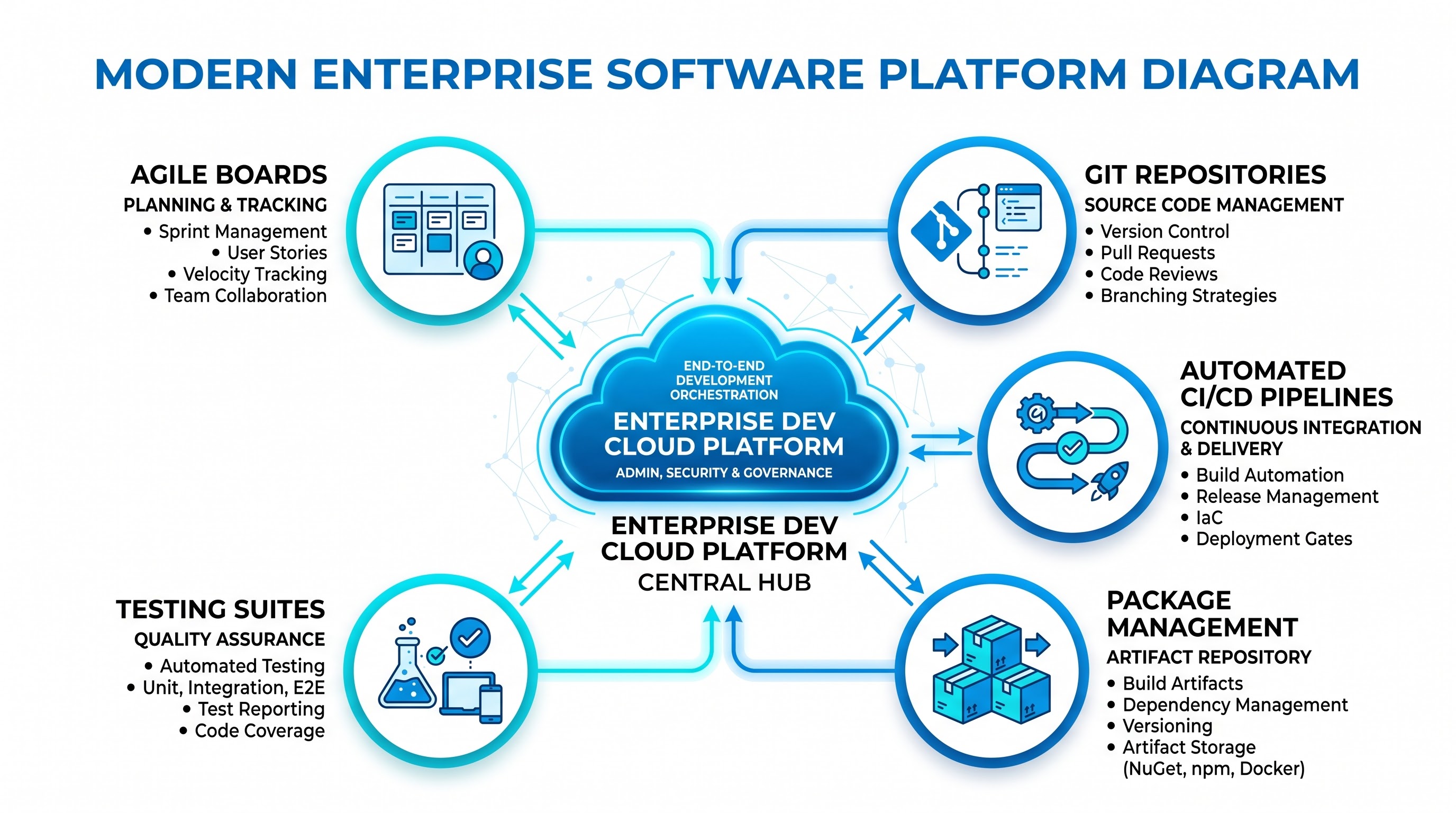
Azure DevOps, offered by Microsoft, is a software-as-a-service platform that touches almost every aspect of the app development life cycle. By getting to know how different components work with each other according to the detailed azure devops syllabus, students will get an opportunity to convert a simple piece of code into a cloud-based game that can be executed by millions.
Azure Boards
Azure Boards introduces interactive tools to manage workflows using Agile, Scrum, or simple project management approaches.
Work Items and User Stories: Students can decompose projects into smaller tasks, defects, and user stories.
Kanban and Sprint Planning: This feature enables teams to allocate their assignments, estimate the amount of work, plan the deadlines for iterations, and track work progress through visual drag-and-drop tools.
Educational Transparency: Professors and teaching assistants are able to measure each student’s work in group projects with the help of work item assignment history and metrics.
Azure Repos
Azure Repos makes companies’ private repositories available with enterprise features for collaboration.
Branch Policies and Branch Protection: Students can create rules that a branch policy must be followed for creating pull requests, taking peer reviews, executing an automatic build before subsequent merger actions on the main production branch.
Code Reviews and Discussions: Repositories allow inline comments on code lines, providing collaborators and students with a possibility of sharing their insights through peer review.
Semantic Search: Search possibilities help students quickly detect functions, classes, or variables reference using built-in search and data processing features.
Azure Pipelines
Azure Pipelines offers cloud-based CI/CD solutions.
Cross-Platform Build Agents: Microsoft provides virtual environments that can run on Windows, Linux, or macOS, so students can implement any technology stack for their software.
Declarative Pipelines: Pipeline is defined with the help of configuration files using plain texts, stored in a repository directly with the source code for compliance with the principles of infrastructure-as-code.
Automated Test Validation: When students push code or open a pull request, the pipeline automatically executes unit testing, integration testing, and static code analysis and reporting.
Azure Artifacts
Azure Artifacts serves as a package management service.
Universal Package Management: Students are able to create their own packages or use packages created by others using various package managers such as NuGet for .NET, npm for Node.js, Maven or Gradle for Java, and Pip for Python.
Modular Coursework: Software engineering students can benefit from commonly used packages that can be accessed through the feed.
Azure Test Plans
Azure Test Plans allows for manual and exploratory testing as well as user acceptance testing which enables students to attain knowledge on common quality assurance techniques in addition to unit test automation.
Step-by-step methods for activating your Azure for Students subscription
Establishing the required cloud environment is very easy if you adhere to the following steps.
Preparing Your Academic Identity
Make sure that you are able to access emails from your college or university. If your school has a single sign-on process for Microsoft 365 or Google Workspace, then be ready to use it.
Getting into the Academic Portal
Use a web browser to visit the official website for Azure for Students and choose the required activation process.
Completing the Identity Certification
You’ll need to enter your school email when asked to log in.
The certification tool authenticates your school, and sometimes sends a verification link or a one-time password directly to your university email box.
If your university has an academic federated single sign-on, you will be redirected to your university's login screen for identity verification.
Accepting the Conditions and Finalizing Subscription
Go through the program agreement. Your cloud resources have to be used only for educational, academic research, and non-commercial academic purposes.
Fill in your profile.
After verification, the system takes you directly to the Azure Portal and the Azure Education Centre revealing your subscription status, remaining credits, and expiration date.
Step by Step: Creating and Setting up Azure DevOps
While the Azure Portal deals with cloud resources, Azure DevOps is a separate web platform. Setting up your DevOps organization will be seamless.
Accessing the Azure DevOps Portal
Go to the Azure DevOps portal and log in using the same Microsoft identity or student account through which you purchased the Azure service.
Setting Up an Organization
If this is your first time using the service, you will be required to input an organization name.
You should be sure to make an organization name that's formal and clean (for example, your username as a student or the name of your project group). The name will be used as a part of your custom web address and hence should be succinct.
Pick an appropriate data center region to minimize the amount of time it takes for Git resources to respond to requests and to run pipelines to get the results you need.
Setting Up Your Project
After you've created your organization, take some time to create your first project:
Project Name: Make use of your course code or topic as your project's title (for instance, Software-Engineering-Capstone).
Visibility: Choose the type of visibility – either public or private. For class activities, the best choice will be making the project private, which will protect your work from being copied.
Version Control: Make the choice of Git as your version control tool.
Work Item Process: Use the template that corresponds to your methodology.
Connecting Your Azure DevOps to Your Azure Subscription
In order to deploy your services accurately on Azure resources, you need to connect your Azure DevOps organization with your Azure subscription.
Creating the Connection for Directory and Billing
On your Azure DevOps organization panel, go to the Organization Settings available at the bottom-left corner of the screen.
Click on the Billing option.
Select the required option for billing setting and choose your active Azure for Students subscription from the list showing on the screen.
Confirming this connection completes the association of your DevOps organization to your student subscription for resource provisioning and makes you eligible for free usage of hosted pipeline capacity.
Establishing Service Connections for Automated Deployment
In order to perform any code-related operation on Azure cloud services, Azure DevOps needs permission, and hence requires the creation of a Service Connection.
Log in to your Azure DevOps project and navigate to project settings.
Under "Pipelines," locate Service Connections and choose to set up a new Service Connection. Choose Azure Resource Manager as a connection type.
Select “Service Principal” as the method of authentication.
Then select your Azure for Students subscription and your respective Resource Group.
Provide the connection with an identifiable name, for example Student Coursework Connection.
Authenticate the connection in order to use it within your pipelines. This will ensure your secure access for performing automated deployment without keeping any secrets.
Structure Assignments and Capstone Project
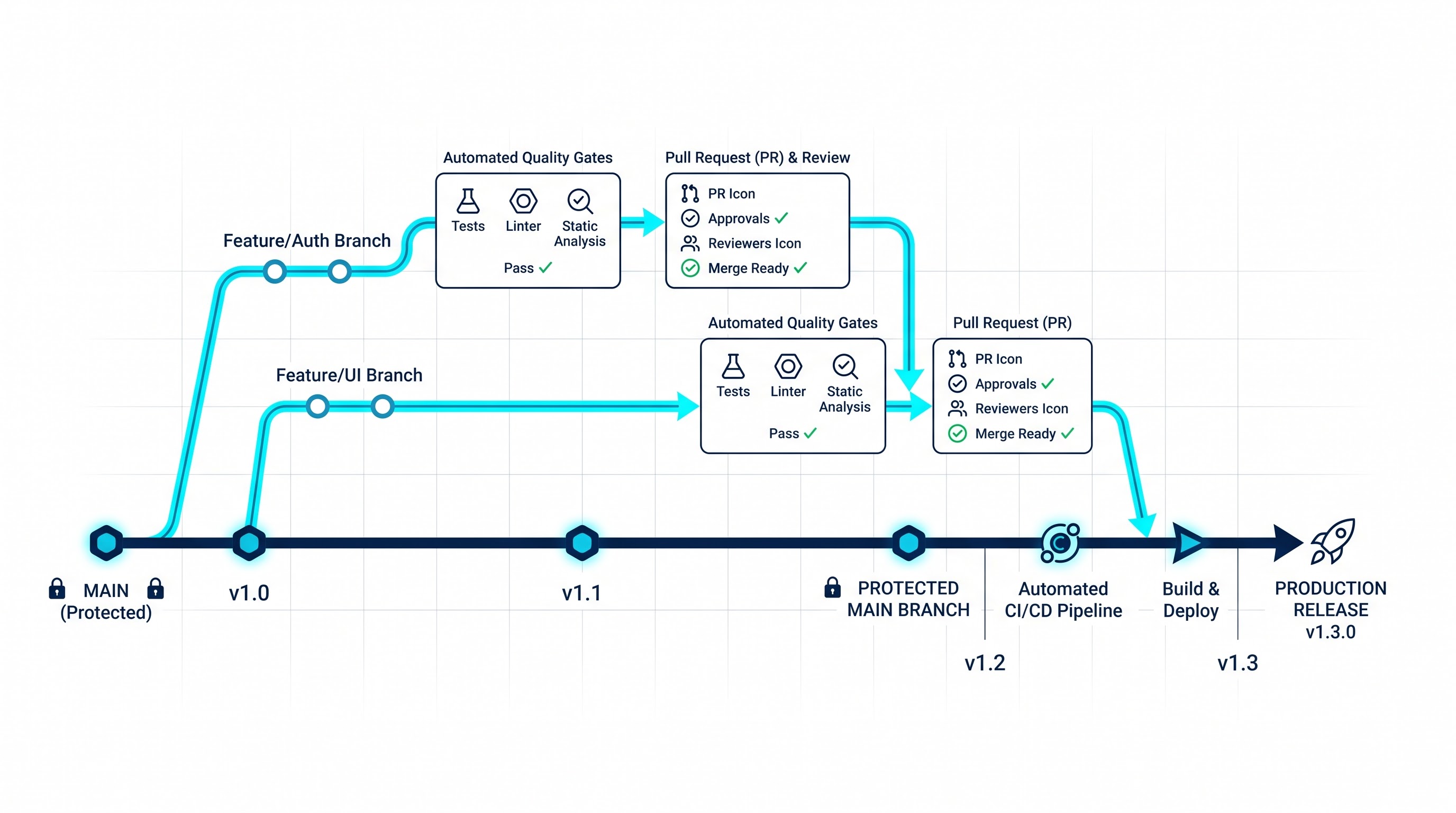
The well-designed structure of the DevOps process provides clarity, accountability, and repeatability for individual as well as group works.
Repository strategizing
In group assignments, members should never push code directly to the master branch of the project. Instead, it would be a good idea to introduce strict feature branch procedures:
Master branch means that it is a stable version of the working assignment that is ready for assessment and deployment.
Dev branch means that this is where the process of integration happens.
Feature branches are created for single assignments, user stories, or bug fixes. Feature branches should have the same structure, such as having the first letters of the developer’s name attached to them along with the corresponding work item number.
Setting up Branch Policies and Pull Request Quality Gates
To avoid the code breaking down to the detriment of the whole team, branch policies should be set for the master branch:
Decide minimum number of reviewers, e.g. tie number of approvals to number of teammates involved in the project by using 1-2 approvals.
Require to link work items. Each code revision should be related to a certain project need or bug report.
Set up automated build validation: modify branch policies so that opening a pull request starts an automated flow. If something goes wrong with the build, addition of code revision will not be possible.
All review comments and discussions must be resolved first before heading for the merge.
Project Task Management and Agiles Sprints
Make use of the following capabilities that Azure Boards offer in the management and tracking of the project milestone for school periods:
Epic: Reflects the overall module of tasks to be performed (for example, the User Authentication System and Database Persistence Layer).
Feature and User Story: Describe individual task requirement from the end-user point of view or system’s.
Tasks: Simple units of work categorized in hours with each being assigned to an individual student.
Sprints and iterations: Synchronize the sprints to the university calendar milestones in the form of labs due every week, and reports due every two weeks for submitting progress.
Designing CI/CD Flows for Homework
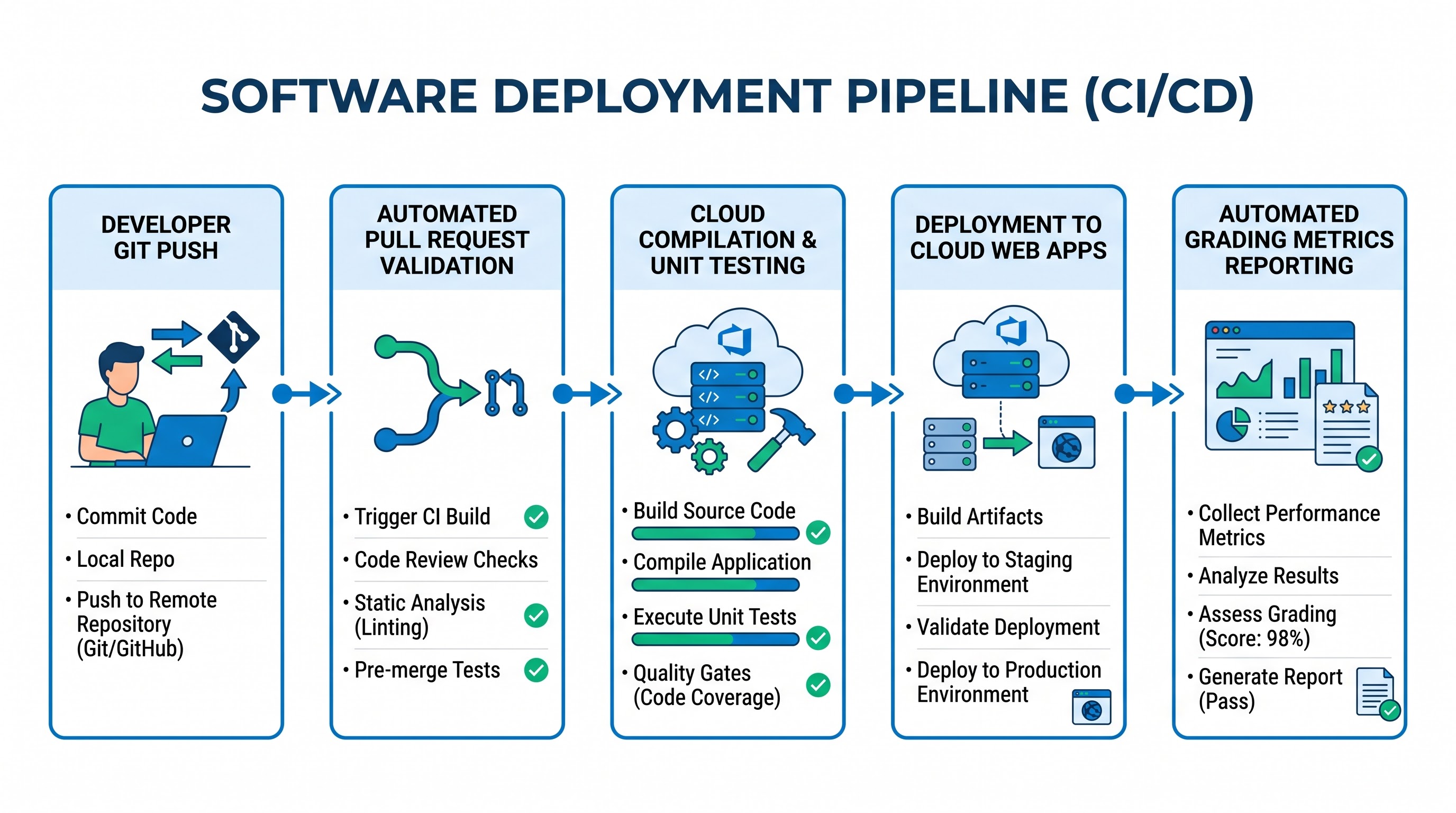
Building the project and running tests converts theory about software engineering to practice – an algorithm to follow.
Continuous Integration (CI)
Continuous integration means that every code change will be compiled and verified in a brand new virtual machine configuration. While creating CI processes for homework projects, one should keep in mind that:
Automated Dependency Retrieval: Your CI process must automatically download and install all additional packages necessary for your application in order to detect all dependencies immediately.
Build and Linting: The agent compiles the project, and then launches static code analysis to ensure coding standards in the team.
Automated Unit and Integration Testing: Computer programs called test runners run a complete test program. Azure DevOps stores the data about the test results automatically, creating interactive charts showing the pass rate, log of failures, and time of execution.
Analyzing Code Coverage: It is essential to use coverage analysis tools that can create reports with a specific percentage of code covered by automated tests so that students could see the paths of logic that were not tested before handing in their assignment for grading.
Continuous Delivery (CD)
Continuous delivery processes simplify further use of checked code on the public cloud hosting platform. Taking advantage of the previously formed service connection:
Artifact Packaging: The given pipeline creates the deployment package consisting of binary executable files, configuration files, and assets.
Target Environment Provisioning: The current pipeline connects to the cloud service offered for free, namely Azure.
Zero-Downtime Deployment: The release process is responsible for sending the object to the cloud server.
Release Approvals: The students working as a team can implement manual checks on the release process.
Collaboration, Roles, and Permissions for Student Projects
Permission management is one of the most important factors that affect the integrity of a group. Building hands-on experience with role-based access control, security regulations, and automation certification is a key competency stressed in any relevant microsoft devops course.
Azure DevOps supports a friendly free tier for small businesses:
First 5 Users Free: The first five user accounts created for an organization are eligible for a Basic license at no cost. This means that the user will have complete access to Azure Repos, Azure Boards, Azure Pipelines, and basic artifact storage.
Unlimited Stakeholder License: There is no limit to the number of stakeholders who can sign up for this service. Stakeholders get to see project backlogs, create and update work items, monitor pipeline status, and update project wikis.
Visual Studio Users: Any student holding a license to Visual Studio through our educational collaboration will be able to access the service for free under the Basic plan without deducting this from the pool of five free licenses.
Construction of Project Security Groups
When using teamwork with classmates and teachers, roles should be assigned carefully:
Project Administrators: This role should be given to the leaders of the team/project. Administrators are in charge of the connection of services, branch policies, pipeline definitions, and group memberships.
Contributors: It is the most common role for the members of the project. Contributors can upload their code to feature branches, create pull requests, generate work items, and start running pipelines manually.
Readers / Stakeholders: It is excellent to give this permission to teaching assistants, professors, external assessors. At this level the graders can see the code, read the discussions of pull requests, confirm the test results, and see the speed of the process without modifying the project structure.
Academic Cases and Practical Application of Courses
The application of DevOps technologies in different spheres shows the universality of the approach.
Scenario A: Web Development Course
In the full-stack web development course students create web applications that include a database, frontend, and backend API.
Work Tracking: Azure Boards is utilized by the learners to track the user stories such as “User Registration,” “Shopping Cart Logic,” and “Checkout Processing.”
Code Management: Code of the frontend and the backend is maintained in different directories or repositories within the same Azure DevOps project.
Continuous Integration: Any code commit triggers a pipeline that performs the code formatting check, tests the business logic, and executes the database migration script.
Continuous Deployment: When the code is merged into the master branch, the backend is automatically deployed to a free Azure App Service, while the frontend is deployed to Azure Static Web Apps, and an URL is provided for grading purposes.
Scenario B: Joint Senior Capstone Project
Several students work together over two semesters creating the whole software solution for one of their industrial partners.
Agile Management: The team works in two-week long iterations and uses Azure Boards for managing the velocities, burn down graphs and the backlogs.
Quality Control: There are policies inside the organization which state that at least two peer-reviews and successful completion of the pipeline test should happen before the software would be integrated. The automated testing process makes integration testing and looks through potential security vulnerabilities in the external libraries.
Documentation: The pre-configured Azure DevOps wiki contains all documentation, diagrams, specifications and minutes of the meetings saved as the markdown documents.
Demonstration Configurations: Different pipelines will deploy builds on the staging server for the customer's approval and production servers during the final presentation.
Scenario C: Contextual Situation
Automated Submission and Validation Teachers and Teaching Assistants could use Azure DevOps for automatic collection and first validation of the student tasks. Examples of the repositories:
Teachers set up the starter repository containing a framework for the assignments, dummy codes and hidden automated testing frameworks. Cloning and Branching: Students copy the repository onto their private Azure DevOps workspaces.
Automated Feedback: As students perform the tasks, their private pipelines run the visible unit tests giving prompt feedback on the correctness of the code before the grading time.
Final Assessment: Students set teaching assistants as project readers to allow the assessment of logs, verify that unit tests are passed on clean agents, and assess the code quality.
Best Ways to Ensure Security and Academic Integrity
Handling a shared cloud environment calls for basic security practices. Applying these principles will get the students ready for enterprise compliance requirements.
Do not Store Credentials in Git Do not keep any API keys, connection strings, passwords or credentials in your Git repositories. You can keep the secret variables in Azure Pipelines or Azure Key Vault.
Use Git Ignore Files: Ensure that the repositories have proper Git ignore files for your programming language and prevent committing of local configuration files, build files, or temporary files.
Repositories should be private only: Your academic repositories must be Private. It is better not to publish the repositories with the solutions to the course assignments to avoid accidental violation of academic integrity and plagiarism.
Multi-Factor Authentication: Make sure multi-factor authentication is enabled for your Azure and Azure DevOps accounts so that your credits, codebase, and project components are protected from others.
Verify all connections: Periodic review of all active service connections and personal access tokens. Handle expired tokens or completed assignment tokens.
Moving Forward: Taking Classroom Experiences to Professional Opportunities
Even if free academic subscriptions represent the best way to learn the basics of the subject, there is still no substitute for the knowledge required by senior positions in the cloud domain that includes process automation, infrastructure as code and releases management. OnlineITGuru is the school that allows you to learn the best azure devops course, master practical exercises, get AZ-400 certified and find an industry mentor that will help you in your career as a cloud engineering professional.