
Architectural Strategies for Handling High Data Volumes in Workday
Last updated on Sep 28, 2026
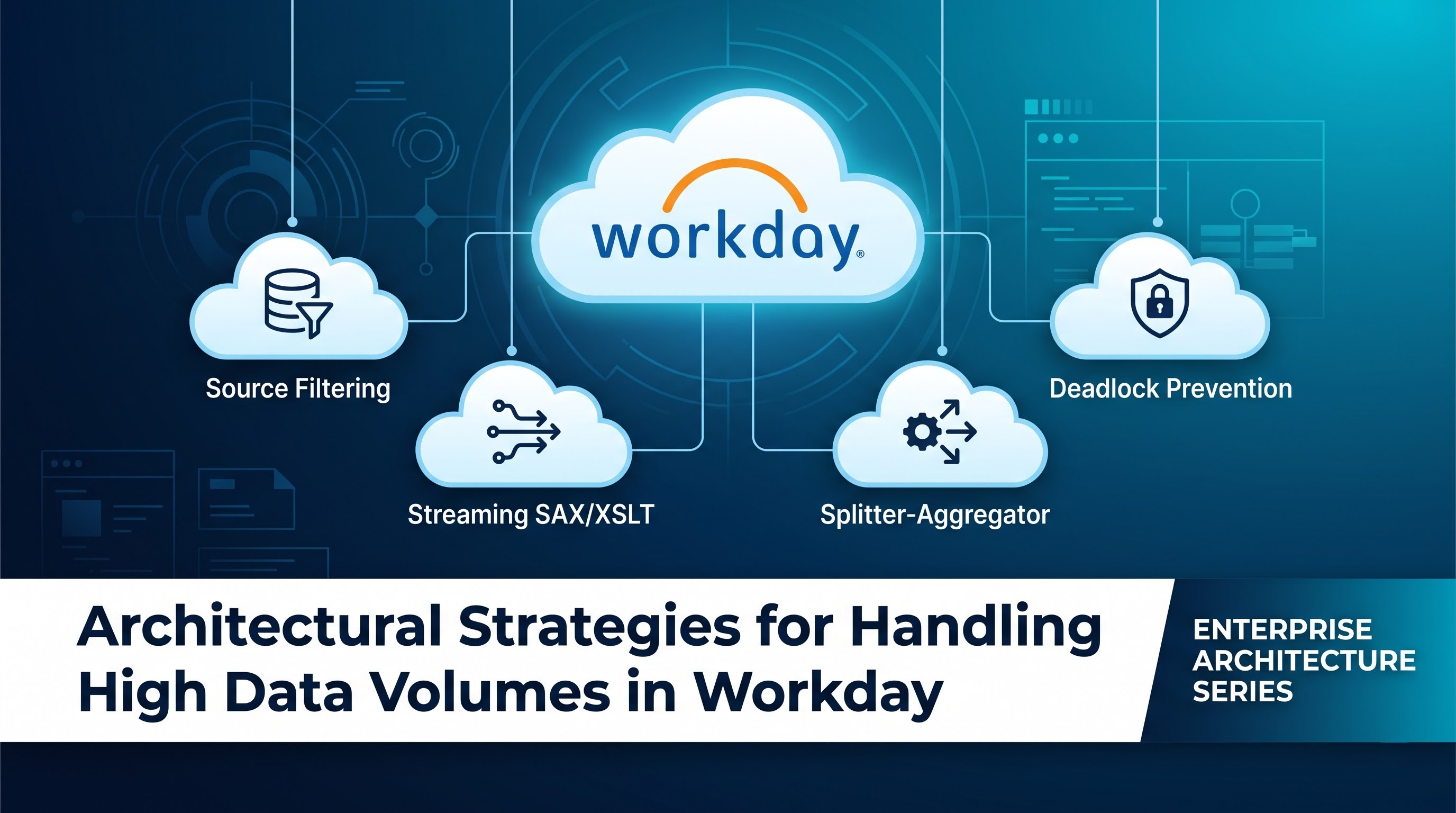
The landscape of enterprise resource planning is characterized by incredible data growth. As global corporations expand their activities, the pool of human resources increases from several tens to several hundreds of thousands. Supply chains convert millions of transactions, and statements of account capture endless streams of journals, invoices, and accounting events. In the context of Workday, this exponential growth presents a severe engineering challenge: how to ensure that data enters and leaves the company without slowing down the performance, running out of memory, timing out, or crashing.
The process of dealing with massive volumes of data in Workday integrations must move from mere configurational approaches towards advanced principles of architecture. Thus, an integration that works perfectly in the environment with five thousand worker records collapses under workloads in enterprises involving two hundred thousand workers, several years of historical auditing, and a number of custom calculated fields. Therefore, the architects and engineers must know the limits of Workday architecture, the execution environment, the specific patterns of inbound and outbound communication channels, and the best practices to control the flow of the data.
Workday Processing Architectural Framework
Dedicated to cloud architecture with multi-tenancy and a strong reliance on an object database in memory, Workday is considerably distinct from regular RDBMS. Unlike conventional RDBMS, which stores intermediate states in memory and sends them to tables on disk, Workday uses its object operational model directly from memory. This approach enables quick navigation through complex data structures such as moving from an employee to the management structure of his/her organization, history of remuneration and cost center allocations, and benefits associated with dependents.
Nevertheless, this operating concept limits the way integrations should be done. To ensure fair performance and healthiness of its services for all tenants sharing the infrastructure, Workday applies stringent resource management. The integration execution process is regulated with strict rules regarding execution time, memory usage, documentation, and message size. For example, the integrations in Workday through Workday Studio rely on independent Java environments, which can terminate the process if too much heap memory is used.
By understanding these structural conditions, the integration design process changes from a basic exercise in mapping endpoints to one that is more engineering focused in terms of managing resources. When millions of records are integrated, the engineer will have to take make sure all aspects of data entry into the integration runtime, transformation of the information and the generation of the output.
Breaking Down the Parts of Data Volume Issues
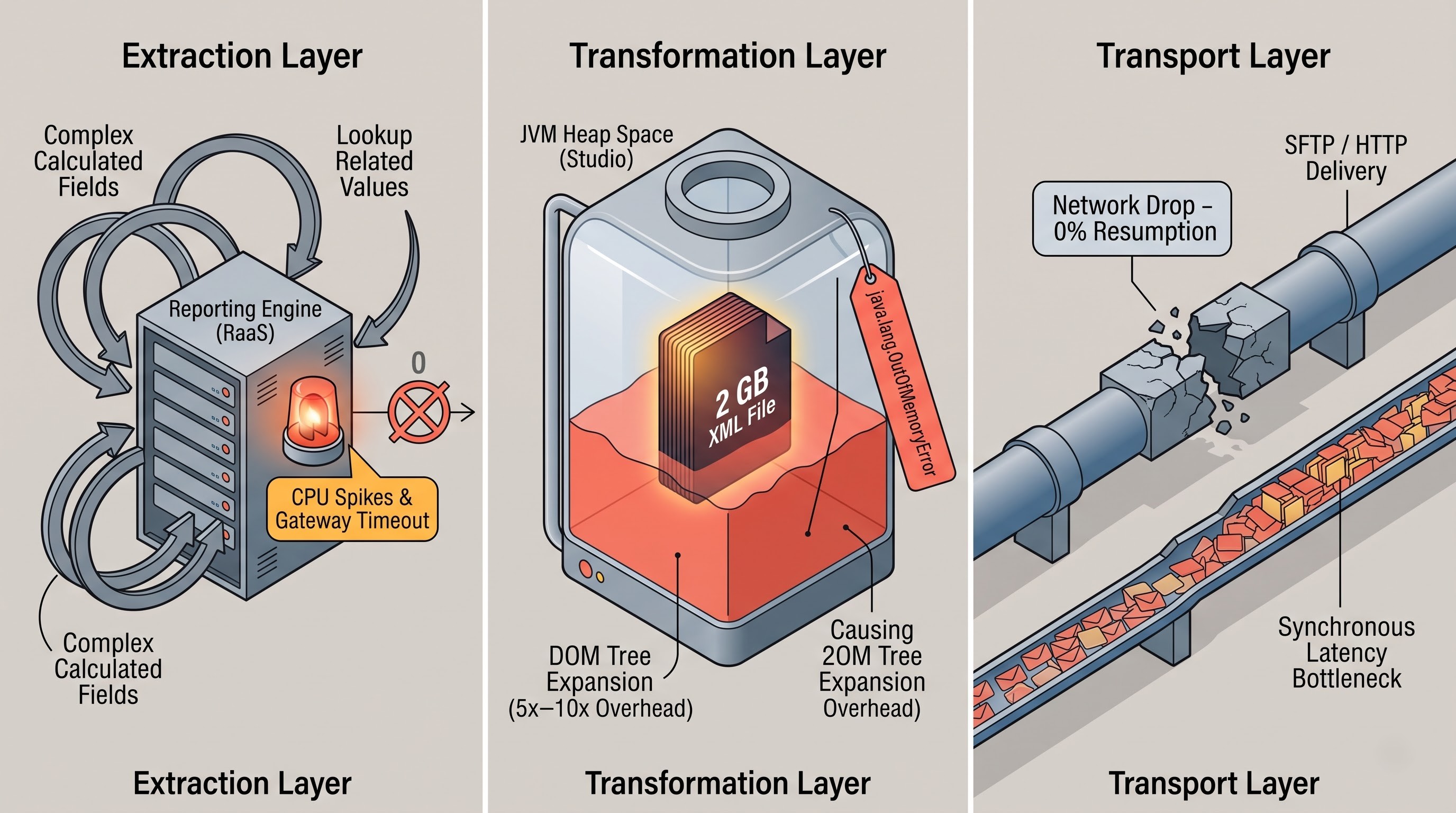
Integration problems appear in three main levels: extraction layer, transformation and mediation layer, and delivery layer.
As far as the extraction layer is concerned, it deals with problems caused either by incorrect report definitions of too broad web service calls. In case when the outbound integration uses Report-as-a-Service to get information, the slow data source or too many complex calculated fields make the reporting engine evaluate millions of relationships. This, in its turn, increases CPU usage and delays integration initialization and sometimes results in report timing out without the first byte being sent to the integration.
The primary cause of failure in the transformation and mediation layer is the expansion of memory usage. Usually, a standard transformation will try to load an entire message into memory so as to produce a full, complex document object model. For example, if something is integrating a huge XML file of two gigabytes in size using an in-memory tree approach, the Java Virtual Machine will have to allocate memory many times more than the size of the file being processed. Once memory consumption crosses the operational limit, the integration will fail. Additionally, numerous recurrent calls to the message logging service in the loops create unnecessary overhead, turning a common batch job into an input-output bottleneck.
In the delivery and transport layer, performance depends on network latency, protocol limitations, and target limitation in the downstream direction. Sending a huge multi-gigabyte document via HTTP or SFTP channels is risky. In case there is a short disruption in a network, the document has to be sent from the beginning again. On the other hand, making a huge amount of small API calls to a downstream system one by one is not practical because it leads to communication lag.
Designing Outbound Integrations for Scalability
Outbound systems must be carefully considered because they dictate the method of transforming and sharing internal Workday data.
Successful outbound extraction begins with optimizing reports. When creating custom reports for Report-as-a-Service, the choice of business object and source of data must be prioritized. Standard data selection often causes real-time security filtering to be applied to every record, which causes processing delays. It is better to use optimized data sources wherever possible so there is a high probability of not scanning all of the relationships.
Calculated fields also play an important part in the delays experienced during the process. For example, various levels of lookups like Lookup Related Value fields can make the process of resolving complex object hierarchies for each record take longer. In order to manage the volume of data, systems must have a process in place to remove unnecessary calculated fields.
Delta processing turns out to be an unrivalled technique for handling data load in outgoing flows. The process of performing full file extracts has many disadvantages. The more employees and transactions are in the given enterprise; the longer it may take to process data.
When various event-driven systems are employed, integrations can track those events, records, or transactions that were not recorded during the last integration process. By applying delta processing, the process of integration may take from several minutes to some hours; its payload will also become significantly lighter.
If the extraction cannot be avoided for technical reasons, such as for the current year reporting or for implementing data warehouse synchronization, then pagination and chunking will become crucial. In this context, paginated web services or partitioned reports can be used to split large datasets into manageable parts. Instead of requesting all the records at once, in this case, a number of records will be retrieved at a time, depending upon the operational parameters applied.
Streaming and Memory Architecture in Workday Studio
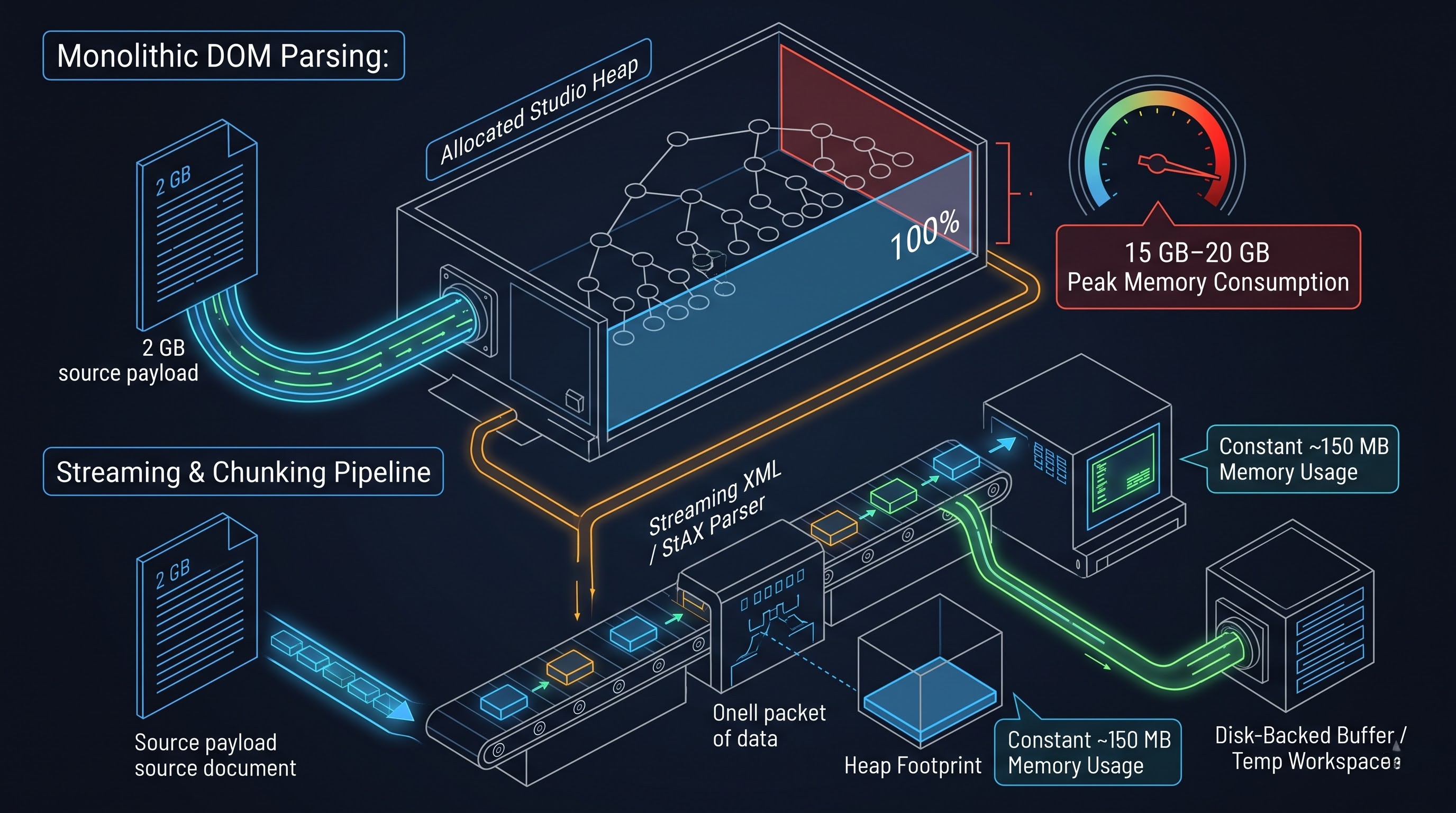
Workday Studio is used as the go-to integration platform for complex enterprise integrations where complex routing and high transaction volume are required. Studio allows users to have the ability to control messaging flows. However, this advantage requires careful management of memory.
A common architecture mishap seen in Workday Studio is that Document Object Model (DOM) is used for parsing big XML files. It takes the whole XML structure and loads it in memory, creating nodes which are ready to be addressed. Although this allows flexible XPath queries, it makes memory consumption grow on average from five to ten times more than just the XML file size. When working with a big volume of data, the integration pattern needs to rely on streaming.
Streaming Architectures like Streaming API for XML or Simple API for XML process incoming information sequentially in the form of a stream of events. For example, instead of keeping the full document in the memory, the engine processes elements sequentially by keeping only minimum context data. Workday Studio has ready-to-use components for streaming transformations including streaming XSLT engines and chunked message splitters.
Splitter and aggregator pattern is a basic feature in scalable Studio design. In this pattern, a large input message gets processed by an XML or delimited splitter, which divides the large payload into smaller units of work. The integration logic processes these smaller units of work in a batch instead of processing the whole batch of 50,000 records in one monolithic memory context. Together with an aggregator component, each block undergoes processes like transformation and staging before the assembly of the new fragments.
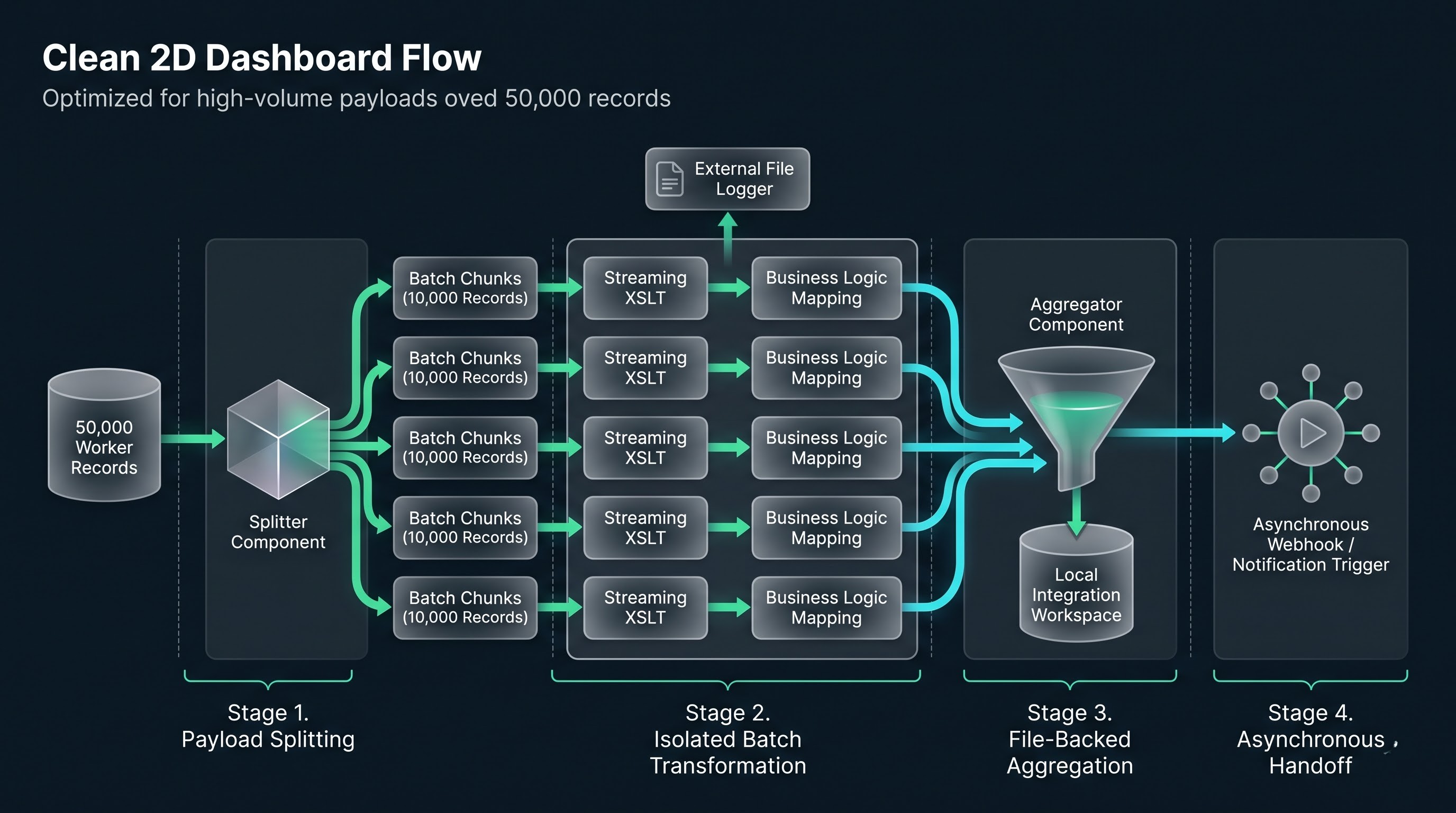
Disk-based mechanisms for buffering messages as well as saving files temporarily can additionally serve as a safety feature in order to prevent memory from running out. If large temporary artifacts are created during processing, they get written into the workspace of local integration, thus ensuring that the heap is not saturated. The components of Workday Studio can work with file-backed streams instead of making use of string-based variables in memory, which makes it possible for large payloads to go throughout the mediation logic without causing heap memory saturation.
In addition, internal looping constructs in Studio workflows need strict governance. Use of simple scripting elements to iterate through tens of thousands of items has the possibility of causing the CPU to run excessively and memory leaks. Engineers must limit the use of in-memory collection maps in scenarios where they plan to run code tightly in loops. Invoking the persistent integration message logger in a tight loop must also be avoided because each time an integration message is logged, an entry is made in the database. Logging and confirming thousands of line items within a loop will definitely hurt performance. Thus, diagnostic and error messaging must be gathered together and stored in an external log document, which can be attached to the integration deliverable at the end.
Mastering High-Volume Inbound Ingestion
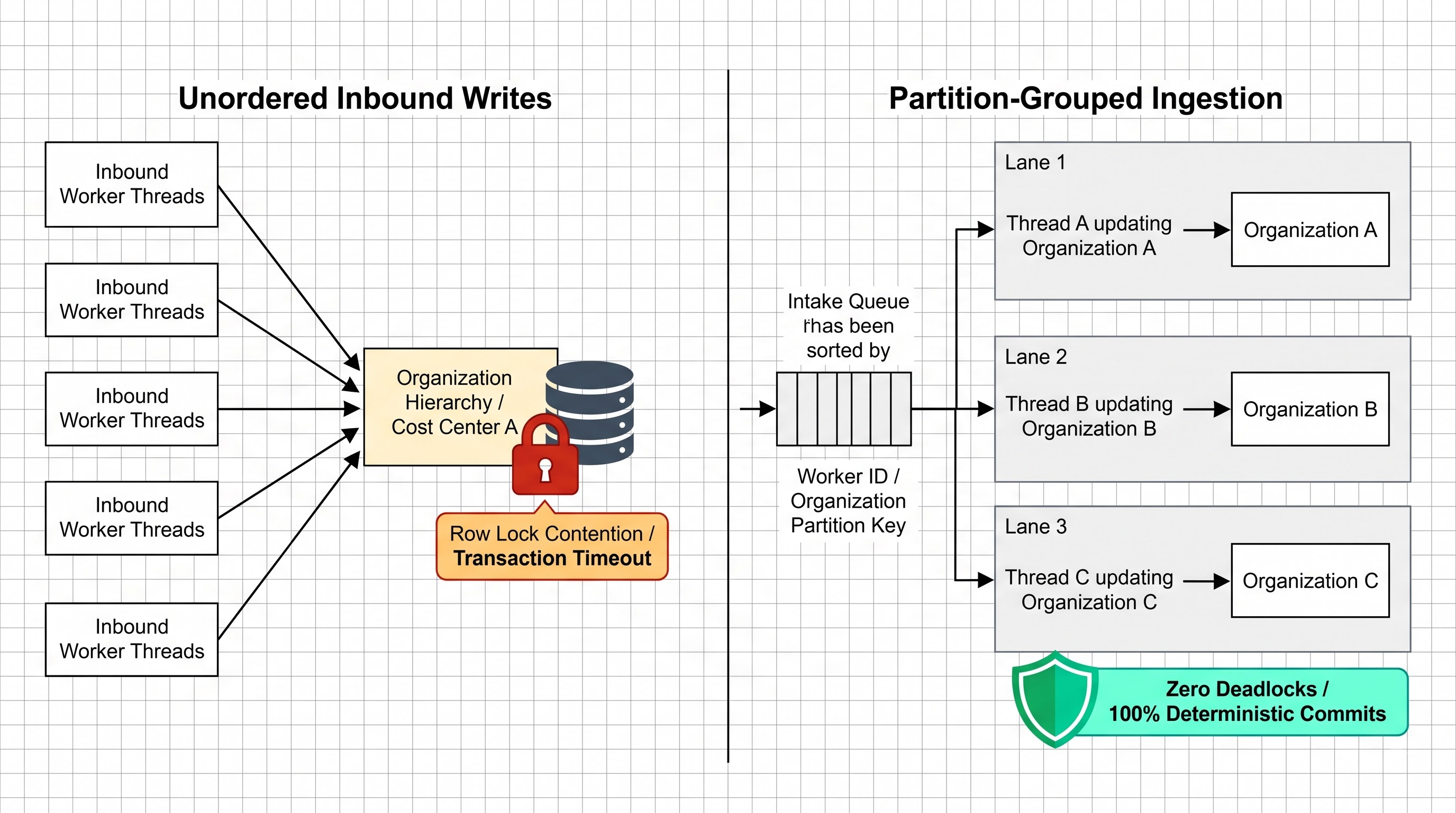
Inbound integration presents various challenges not faced with outflowing integration. When large volume data is flown into Workday as in external payroll actuals, daily banking statements, time tracking records, high-volume customer invoices, and large-scale organizational changes, the integration has to work under the possible constraints of validation rules, business process initiation, and concurrent data handling.
Workday has a range of data input methods, each suited to different usages. While Enterprise Interface Builders are available for user-friendly file uploads using the template specified, they are less effective at high volumes as they are single-threaded in nature. However, if large-scale data input is intended, automated web services applications and Workday Studio must be employed.
The batching of web services is a vital process for receiving data. When records are submitted one at a time through synchronous web services, it creates a very costly round trip over the network. For instance, when updating 10000 worker records individually across standard HTTP channels, a lot of time will be spent waiting at the network stage instead of executing the required data storage process. By batching the records into a single payload, Workday processes them more effectively.
When it comes to large data imports, it is often better to skip typical business process steps in order to successfully import raw data into the database. Typical business process checks, such as approvals, management notifications, and background checks, can slow down incoming data handling. Bulk-load mechanisms like Payroll Batch Ingestion and Inbound Web Service Loaders are created to overcome the time lost in regular processes. For professional consultants dealing with onboarding employees and other organizational changes, training on workday hcm integration training, and practical experience of configuration of these loaders help avoid delays in the processes.
Another significant aspect of mass ingestion is concurrency management since simultaneous updates can initiate locking conflicts in the database. For example, if a data system starts several threads to assign workers to the same organization or update two records within the same purchase order simultaneously, the database will lock the corresponding data to avoid any transactional inconsistency. If there are some threads trying to use the same lock, they will simply timeout. It is important to design inbound data processing systems quickly and correctly; incoming records should be grouped by their parameters like the organization and worker ID so that there are no conflicts in using the same data.
Implementing Enterprise Middleware Technology & Asynchronous Processing
Though the native tools of Workday are highly powerful, integration architecture relies more and more on third-party middleware to take care of complex data processing. Middleware technologies like MuleSoft, Apache Camel, Boomi, and various cloud-based messaging platforms act as a buffer between any operational system and Workday itself.
Moving data processing from Workday Studio to enterprise middleware results in saving important Workday processing credits and execution windows. The processing of complicated tasks—like comparing million-row legacy tables, converting proprietary binary formats to standard XML or JSON formats, deduplicating large volumes of transactions, or sorting huge datasets—can easily be undertaken in dynamically scalable computing clusters of middleware. When necessary, the data is cleaned and structured in the middleware space to be sent to Workday in the correct way.
Asynchronous operation design has to be utilized in the formation of large scale system synchronization. Synchronous communication models, in which the client waits for the server to fulfill its complex request before closing the line of communication, are fundamentally inappropriate for large data amounts. Network timeouts, proxy failures, and gateway dropouts inevitably make the long-term existing connections synchronic excluded.
Switching to asynchronous messaging patterns makes this difficulty vanish. An asynchronous deep is when a request and an exact job is being sent and processed as a background job. At the same time, the requesting system receives the confirmation including a process ticket. After that, the calling system checks the execution status from time to time or, what is even better, invokes the webhook or sets the listener to get a notification when the processing is completed.
Governance, Scheduling and Performance Monitoring
Technical optimization is not enough for ensuring successful operations without adequate governance and performance monitoring arrangements. The integration of large volumes of data is carried out within a unified enterprise calendar in which conflicting tasks can create a problem with resource allocation.
The successful implementation of the integration schedule requires a centralized approach. In an enterprise environment, reporting large amounts of information at the same time as processing payroll and closing the reporting periods can lead to the exhaustion of operational job queues very quickly. In this regard, it is necessary to create non-conflicting time slots of operation for the integration tools. Using the heavy historical extraction and synchronization across the organization should be planned for non-business hours (overnight hours or weekends) to retain sufficient availability during business hours for those processes that require human intervention.
It is also necessary to formulate specific policies regarding documents archives and data retention. The process of integration may create so many documents that it turns into size-consuming history over that time. If all integration processes store gigabytes of source documents, transition documents, and logs indefinitely, lots of storage space is wasted and users have to wait longer to interact with the interface. To overcome this problem, the solution creates regulations for the automatic archiving of documents and document retention.
Performance observability makes it possible to resolve issues even before they become evident. Integration architects should track the performance metrics that show how long it took to carry out the process and what the volume of data that has been processed. The gradual increase in the duration of integration is a signal of the imminent threat of failure due to volume increase that borders on the limits of their plans.
Principles for Strategic Sustainable Growth
The creation of an active capacity plan takes a significant amount of experience. Taking a complete workday integration course in india via OnlineITGuru gives engineers and architects practical examples to help them design profitable and sustainable integrations.
Take into account the impact of volume on the architecture from the beginning. Designing an integration for the initial operational volume will only create technical debt in the future. Integration design must account for three to five years of growth of the organization, in terms of acquisitions, increases in headcount and past performance.
Always filter at the source. The best integration is the one that transfers only the amount of data that is strictly necessary. Every additional attribute, unnecessary stored data or calculated field makes the whole process of data extraction and subsequent processing more computationally intensive.
Implement streaming-based processing. Systems that work with a lot of XML, JSON, or flat files should avoid loading entire document trees into memory completely. Streaming processing, event-based parsing, and the splitter-aggregator pattern should form the basis for all intricate custom mediation steps.
Separate systems through communication that has been asynchronous along with batching. Direct tightly coupled synchronous communication does not work well when it comes to scale. Batching incoming calls and delimiting the threads in order to avoid concurrency lock issues helps store infrastructure from transitory problems.
Distribute the processing tasks in a proper way. Identify the place where native Workday integration tools should stop and hand all tasks over to middlewares, ETL systems, or data warehouses. The use of middlewares is advantageous in that they help with heavy processing and storing of data, while Workday has enough resources to focus on its primary tasks when it comes to processing of the information.
Meeting Enterprise Needs
Managing big data within Workday's integrations is essentially a question of configuring it in the right way and correctly estimating how much data flows through the company. In this sense, the integration layer should be regarded as a helper and not as a choke point of the operation.
If they always follow the process behind Workday's in-memory model, implement compliance with auditing for cloud-based services, and leverage the latest technologies—like stream parsing and chunk aggregation—then developers will be poised to make resilient architectures. In this case, taking organized workday online integration training is essential for developers looking to succeed with implementing the principles of Studio and managing the processing of large-scale data.
Knowing the limits of execution is very important. Through mastery of the building blocks of the workday integration system fundamentals, workers can use their understanding of resource quotas, multi-\tenant limits and execution models to formulate enterprise-grade pipelines.