
Automate branch protection and code reviews in Azure
Last updated on Oct 12, 2026
Software development on a large scale is basically risk management and getting people to work together. As you build up a bigger organization, the volume of code changes, the many things happening at once, and the constant production deadlines will prevent you from properly reviewing everything. Without appropriate control, the quality of important branches deteriorates, architecture drifts, and incidents become common.
qdfwAzure DevOps provides a complete native solution to the above risks through automated branch policies and integrated pull request workflows. Branch policies are not just a checkbox; they are a methodology that organizations use to specify engineering quality. Learning these implementation methods and governance processes through a specialized azure devops course online offered by OnlineITGuru will help engineering teams find the middle ground between basic tools and production-grade automation.
The Strategic Importance of Branch Governance
Today, trunk stability signifies not only a convenience for operation in software delivery, but also the value of Continuous Integration and Continuous Delivery principles. When flawed code is merged into upstream branches that defect spreads to other product teams and delays the release process.
Branch rules eliminate that risk. The rules fulfil three major strategic roles:
Avoiding Regressions and Drift: Automated testing ensures that no untested piece of code, broken dependency or file could reach the main branch.
Maintaining Architecture Consistency: Mandatory peer review ensures that every solution developed complies with internal architecture principles, modularity and security standards.
Ensuring Compliance with Regulations: Nowadays there are standards like SOC 2, ISO 27001, PCI-DSS that require strict separation of duties and audited code review before releasing the software. Branch rules create native immutable audit trail that guarantees that a certain developer will not be able to write, approve and deploy code himself.
In managing the main trunk as a permanent record where modifications can take place only through approved and authenticated pull requests, the engineering teams can shift from firefighting to a delivery method that is rapid and predictable.
Overview: Architecture and Branching Models
Branch policies cannot operate in isolation. Their effectiveness heavily depends on the branching model. Azure DevOps Git repositories support various workflows, but branch policies need to match the operational pace of the team.
Trunk Development vs. GitFlow
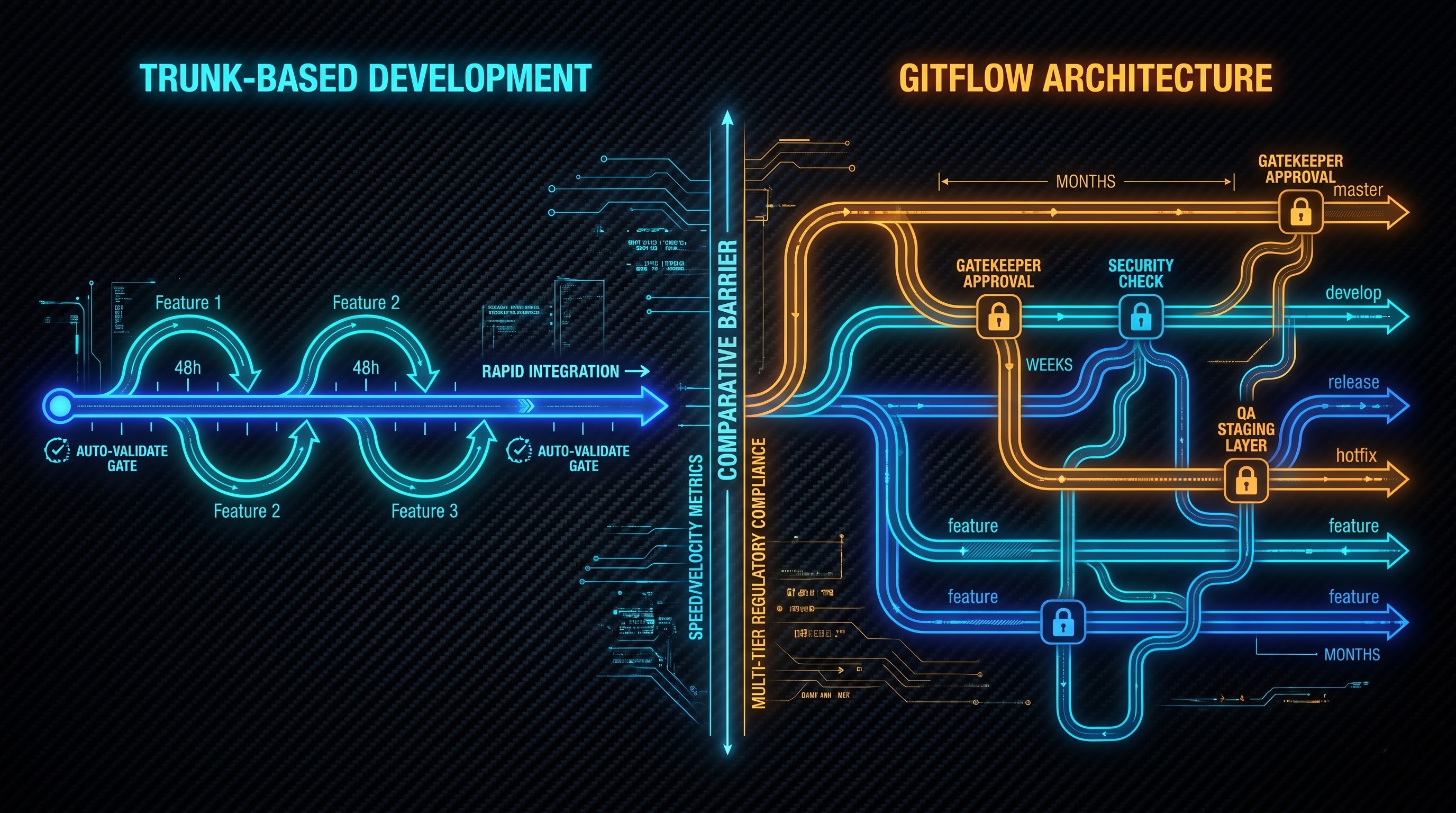
In high-volume continuous delivery operation, trunk development is the most commonly used method. Developers create short-lived feature branches from the main trunk, performing focused work which is merged back into the main trunk in less than two days.
The principles of Trunk-Based Development necessitate that main branch policies should be stringent but smooth. Automated validations like quick compilation, unit tests, and static analysis must take only a couple of minutes for developers because any feedback delay may lead to merge queue and context-switching issues.
GitFlow uses the approach of employing long-lived branches (like develop, release, and hotfix, along with the main branch) and requires different policies based on the level of regulatory stringency:
Development policies should contain rapid regression testing and collaborative peer-review processes.
Release and hotfix branches should involve rigorous procedures such as getting approvals from release management pros, security experts, and QA knowledgeable people, as well as complete end-to-end regression procedures.
Accidental direct push is a common vulnerability of unregulated Git repositories. An engineer might plan to push to a remote or local feature branch but instead pushes some unfinished experiment to the main branch making the build and release pipelines activate without validation.
Branch policies in Azure DevOps mean that the threat is constantly being eliminated. The moment there is a branch policy on the desired branch, Azure Repos revokes direct push to that ref for all contributors and forces changes to go through the pull request process. We can say that direct pushes are rejected by remote hooks, which makes this protection impossible to circumvent.
Branch Policy Mechanisms
It should be noted that the company has split branch policies into several pillars, whose task is the combination of automation processes with code reviews. As a result of the use of these mechanisms, there will be a synergy between developer velocity and strict governance.
Implementation of Code Reviews Approvals Thresholds
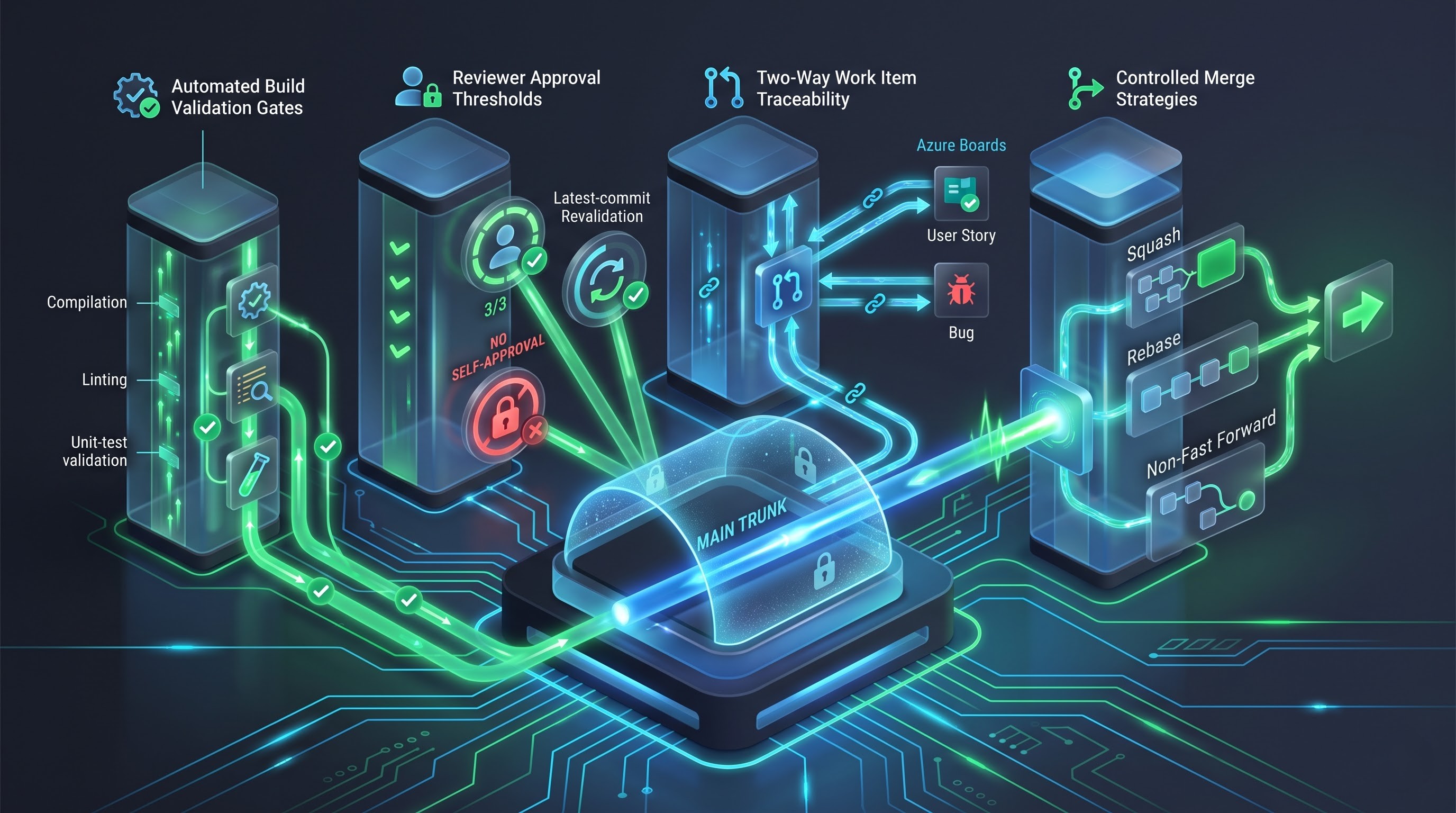
Code Review approvals threshold is one of the most common human validation mechanisms for code in Azure DevOps. Its essence lies in the need to have a certain number of developers to validate changes in pull requests.
The major parameters in the policy configuration:
Approval Quota: Most organizations usually have a guideline set out at the beginning that indicates a requirement of at least 1 to 2 reviewers. Just one reviewer is enough for agile teams; 2 reviewers are common in critical industries.
Must Have an Approval For The Latest Change: Usually, the scenario when a programmer obtains the approval, makes numerous important changes and merges, but fails to obtain the approval once more after that is quite frequent. This parameter reverts the last approval due to new commits.
No Self-approval: There is a possibility in Azure DevOps to forbid self-approval of the pull requests within a company’s policy. It is required for highly-regulated industries in order to maintain a strict separation of responsibility.
Other Approvers Should Not Be the Last Author of Changes: Though the pull request may be issued by one programmer, there still might be other programmers who made changes to the branch of the base repository. This guard ensures that the person who last committed something cannot be the unique approver of the commit.
Automating Quality Gates with Build Validation
Whereas human assessors are good at evaluating the structure and formatting, the traditional methods of compilation, linting and unit tests come with a lag. Structured azure devops online training by OnlineITGuru gives professionals the necessary skills to be able to create the automation needed to build these CI quality gates, status checks and other validations smoothly and easily.
Build Validation automatically queues the defined pipeline when a pull request is initiated or updated. Azure DevOps then carries on development work by preparing temporary virtual post-commit tests and checking the head commit of the pull request to that of the current version. Such an approach enables adding value to various different stages of quality checks when the code is being integrated with the target one.
Besides that, it is important to mention such important parameters as:
Trigger Frequency: Pipelines can be configured to run automatically on updates of any branches or by manual triggers. Performing builds immediately after the change of the code avoids getting outdated results.
Policy Expiry: If the new pull request is merged and the target branch moves ahead, the validation status of the build may be set to expired requiring re-execution.
Mandatory vs. Optional Builds: Core validation pipelines (compilation, unit tests, linters) are to be set as Mandatory. Heavy, resource-consuming suites (deep regression tests, performance benchmarks) may be set as Optional or manually executed when required.
Traceability through Linking of Working Items
Enterprise governance implies having clear traceability connecting business requirements, problems, and technical changes. Azure DevOps allows for that.
When the setting is to Required, developers need to associate a pull request with at least one active User Story, Bug, Feature, or Task from Azure Boards. It leads to the creation of a two-way audit trail: project managers can look into work items to determine which exact pull requests and commits were made to fulfill them while auditors and engineers can go back to any commit in the main to find what business requirement lies behind it.
Resolving Comments and Responsibility for the Discussion
Code review is about talking to each other. Important comments about vulnerabilities, performance, or style should not disappear behind the merge.
The Check for comment resolution policy does not allow pull requests to be completed without resolving all comments by reviewers. Comments of the reviewer and the author should be marked as Resolved, Closed, or Won't fix.
Management of Branch Merging: Merge Techniques
The process of how changes are merged into the destination branch has a significant influence on the historical clarity of the repository and the difficulty of the future rollbacks. In order to help administrators to restrict the types of merging, Azure DevOps provides different types of merging operations:
Basic (Non-Fast Forward) Merge: This operation allows to save all commits on the feature branch and creates a merge commit with several parent commits. Thus, a history of all actions performed in the feature branch remains clear, but it may make the repository log overloaded if the commits are unordered or non-structured.
Squash Merge: The method gathers all the commits included in the source pull request into one commit applied to the target branch. This is the approach which is mainly used in the Trunk-Based Development because it allows maintaining the linear structure of the main branch history.
Rebase and Fast Forward: Involves applying separate feature commits onto the target branch tip in a manner maintaining a strict linear history without making a merge commit. This approach requires feature branch commits to be organized and self-sufficient.
Rebase with Merge Commit: This strategy applies the feature branch onto the target tip and creates a merge commit that allows combining linear mapping of logs with a clear tracking of branch boundaries.
Standardizing on an organizational commit strategy can help eliminate broken commit chains and enable consistent audibility operations across teams.
Targeted Governance: Automatically Assigned Reviewers and Path-Based Approaches
When codebases expand, standard regulations used universally throughout a branch might become inadequate. A minor tweak in the front-end documentation shouldn’t garner the same amount of attention as changes in the core authentication mechanism, database schema migrations, or infrastructure deployment plans.
Fully supporting these nuances allows Azure DevOps to utilize automatically assigned reviewers in addition to path filters.
Fine-tuned responsibilities with help of path filters
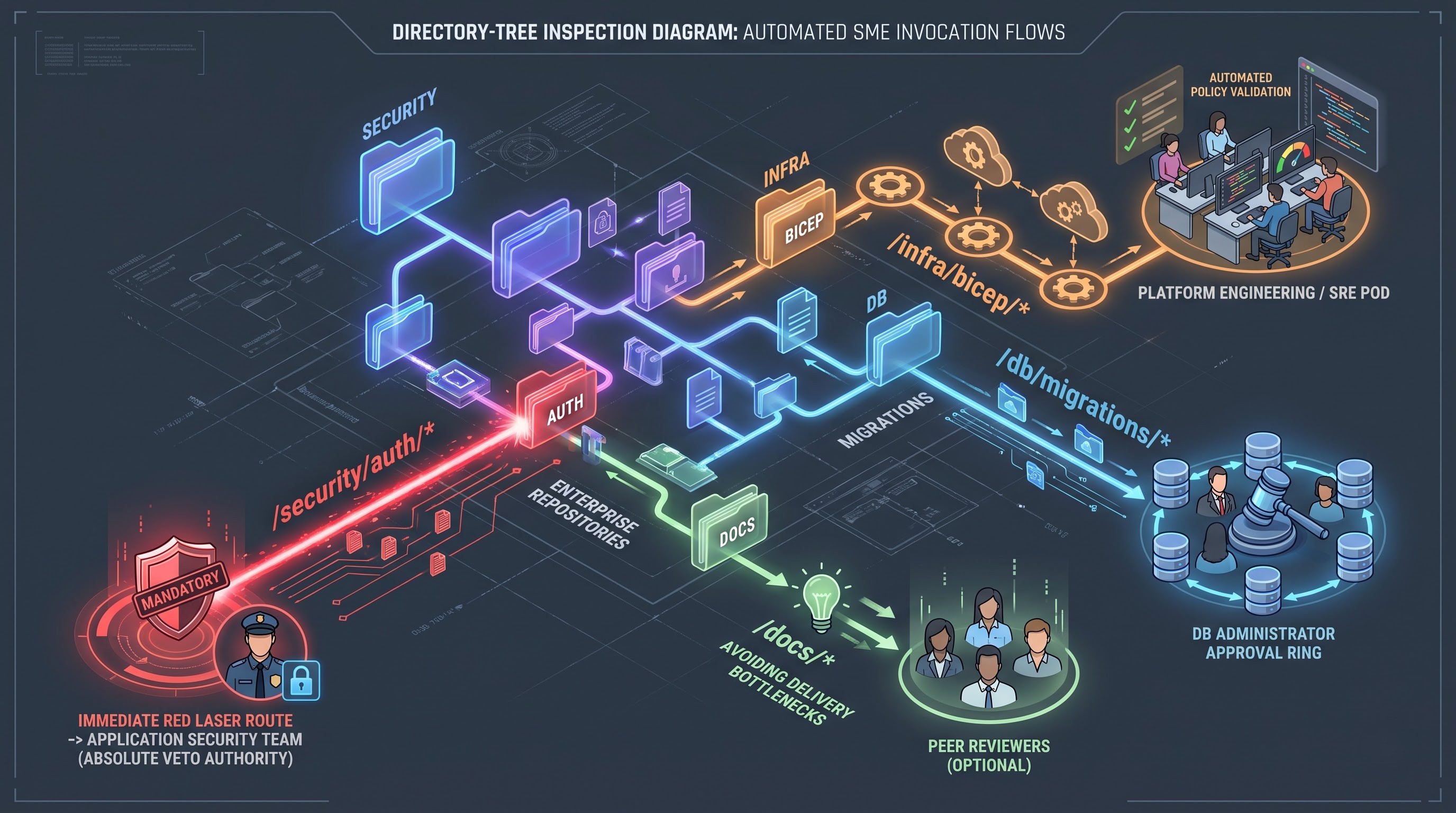
Path-based regulations enable teams to nominate subject matter experts (SMEs) who will automatically be notified about changes made to certain folders or files. For example:
Security boundaries: Any changes influencing cryptographic features, authorization processes, or any folder related to username/password processing will automatically be forwarded for approval to the application security team.
Infrastructure as code: Alterations made to deployment pipelines, container definitions, or plans on cloud resources provision will automatically need to be confirmed by the platform engineering or site reliability team.
Database schemas: Additionally, all alterations made to data access layers, ORM settings, and migration scripts would require confirmation by the database administration team.
Balancing between Mandatory and Optional reviewers
Reviewers that are added automatically can be either Mandatory or Optional:
When they take on the status of Mandatory, they become bearers of infrangible veto rights, which means that the merged pull request cannot go through without their endorsement of approval, no matter how many standard peer approvals were provided.
When they are appointed as Optional, the individuals would be automatically notified when the pull request occurs, but their non-involvement would not impede the process in case standard reviewers have been approved.
This multi-leveled approach enables companies to safeguard the architecture while avoiding bureaucratic hurdles while developing features of low risk with no design complexity.
Getting Verification to Another Level
Contemporary DevOps architectures are characterized with seamless connections with external platforms that conduct static analysis, scanning, vulnerability checking, and perform tests. The Status Checks policy in Azure set a bridge between internal governance of branches and external gates for quality control.
Static Analysis Combined with Security Scanners
Static Application Security Testing (SAST) tools, software composition analysis tools, and code quality analysis tools operate in parallel to Azure pipelines. These tools send reports and updates to pull requests through Azure DevOps REST API.
Status Checks policy allows admins to set up a rule that pull requests can’t pass without specific checks performed by external services. If an automated scanner detects a serious security vulnerability, license issue, or test coverage below a certain level, it produces failure status. Thus, it automatically rejects the pull request and does not allow defective code to enter the protected branches.
Ephemeral Environments and Preview Validation
Status checks are also helpful in delivering new deployment paradigms like the provision of ephemeral review environments. When a pull request is created a pipeline can launch a separate environment with the given code installed. When this environment is up and running, automated tests can be performed and manual testers can check the running of the environment. If everything works successfully after passing all tests, then the status of success will be granted to the pull request, which means that the implementation of such a code is correct, since it has proven to work successfully in practice.
Creating a Culture of Code Reviews
Even when there are technological and procedural instruments that allow us to guarantee code quality through automation processes, it still comes down to people who can review the code and decide whether the software is of high enough quality. In this case, bad code reviews performed merely for the sake of administration can make even well-working processes useless.
From Syntax Checking to Architecture Review
Human reviewers must not squander their brain cycles to examine indentation, format, missing brackets, etc. Linting and formatting and compiling code should not be done by human reviewers but rather by machine checks instead.
Does the code achieve its intended business goal the right way? Has the code taken care of exceptional cases, race conditions, NULL references, and edge cases the correct way?
Design and Simplicity: Is the implementation made more difficult than necessary? Could the implementation be better achieved by making it modular and breaking it down into pieces?
Privacy and Safety: Are user inputs sanitized? Have user access rights been verified? Is the user’s private information blocked from logging?
Performance and Resource: Does the implementation cause bottlenecks in the database and does it waste memory resources?
Maintenance and Testability: Is the testing of both unit and integration done well and effectively? Can another engineer understand the code in six months without involving anybody else?
Clear, Constructive, and Objective Feedback
The way the review comments are written influences the team`s mood and climate. Effective code reviews comply with a few successful patterns.
Separate essential changes from recommendations: Reviewers should separate faults that prevent progress from those that do not. By adding informational tags to feedback such as “Fault” or “Recommendation,” the authors can determine the order of corrections.
Provide an explanation: Reviewers should not simply state that an approach is wrong but provide insights into the reasons behind their judgment. Referring to standard design patterns or documentation used for performance measurement, reviewers educate the authors.
Examine code but not a person. That is, reviewers should avoid sitting that their judgment is a flaw of a programmer. For example, when asking, “Does this function suffer from race conditions in concurrent operation?,” it is much better than saying, “Why didn’t you make this function safe for threads?”
Responsiveness and Context Switching
Slow code reviews are perhaps one of the biggest hindrances in software development. When there is a delay of several days before a programmer gets feedback on Pull Requests (PRs), there is an inevitable scenario of switching contexts, beginning other tasks related to something else, and dealing with the challenges of making merges successfully when the review is finally done.
Successful engineering teams establish service levels clearly internally. The usual features review requires an initial feedback in four to eight hours ideally. The best strategy to facilitate peer review is keeping the size of PRs small.
Achieving Operational Excellence: Auditing, Exceptions, Scalability
When implementing branch policies throughout the entire corporation to achieve compliance, it is important to plan carefully how policies will be returned, how emergency processes will be realized, and how reports of compliance will be created.
At the same time, when scaling corporate governance effectively, policy inheritance can save a great deal of effort in configuring each repo by hand. In large organizations using Azure DevOps with hundreds of projects and repos, configuring branch policies manually makes no sense.
Policies for Branches at the Project Level: Admins can create baseline policies that will function automatically in all the existing and forthcoming repositories of any Azure DevOps project. For example, there can be a general requirement that any branch that meets the condition of “main” in every project repository must have at least one approval, a successful build check, and an associated work item.
Conformance Between Repositories: The policies created at project level do not let new repositories begin functioning without a proper infrastructure, which facilitates group adherence to the relevant compliance agenda.
Handling System Outages: Emergency Bypassing
No matter how beneficial thorough inspections are, natural disasters may happen at any moment when time is of an essence. In those rare occasions, waiting for validation matrices and the second approver is unacceptable.
To this end, Azure DevOps has the option of Bypass rules that can be used during working with pull requests. It should be stressed that the people who can use this privilege should be restricted to a small group of highly qualified specialists in engineering, Site reliability engineers, or release managers.
A pull request specifically records the circumstances of the policy being overridden, as well as the name of the person who gave the authorization for it.
The bypass incident initiates an automatic notification for the audit department in order to inform them about the issue.
After the fact, there should be an emergency investigation into the overridden policy.
A bypass should be accepted as an unusual and exceptional solution, rather than a permanent alternative to slow validation processes.
The policy and processes should be audited regularly to ensure compliance with the expected standards of operation.
Pull Request Lead Time: The overall duration from when a pull request is created to when it is merged. An increase in lead time may suggest larger pull requests or an insufficient review process.
Time to First Review: The duration before a meaningful review happens.
Review Iteration Count: The number of back-and-forths that happen. A high number of iterations generally implies that the design requirements are unclear or that authors did not validate the design before requesting a pull.
Build Validation Failure Rate: The number of pull requests that fail their initial validation. A high failure rate indicates that developers are using the pipeline instead of validating locally.
The integration of these metrics into team retrospectives allows software teams to maximize reviewer distribution, shorten build pipeline time, and identify training requirements. Developers and cloud teams who wish to bridge these gaps and gain knowledge of continuous delivery practices can benefit from the practical experience gained through an azure devops online course by OnlineITGuru on repository safety, pipeline security, and multi-stage release supervision.