
AWS DevOps: Enterprise Pipelines & Infrastructure
Last updated on Jun 29, 2026
Modern Cloud Operations Imperative
Migration from conventional IT operations to DevOps is not just the shift from one set of tools to another but a radical reorganization in the way software is developed, delivered and managed. The legacy IT model is characterized by siloed development and operations. While developers concentrated on efficiency in terms of speed, operations engineers emphasized stability with their stringent change management practices and manually-configured servers. These two contrasting approaches inevitably resulted in a delay in the software delivery process that extended for days and even months.
In the age of cloud native computing, this approach becomes totally outdated. Amazon Web Services have converted infrastructure into software. Servers, relational databases, networks and security domains can now be provisioned, modified and decommissioned with an API call.
Since infrastructure today is code, the same approaches that have been employed in the past for controlling application code need to be employed in managing the cloud environment as well.
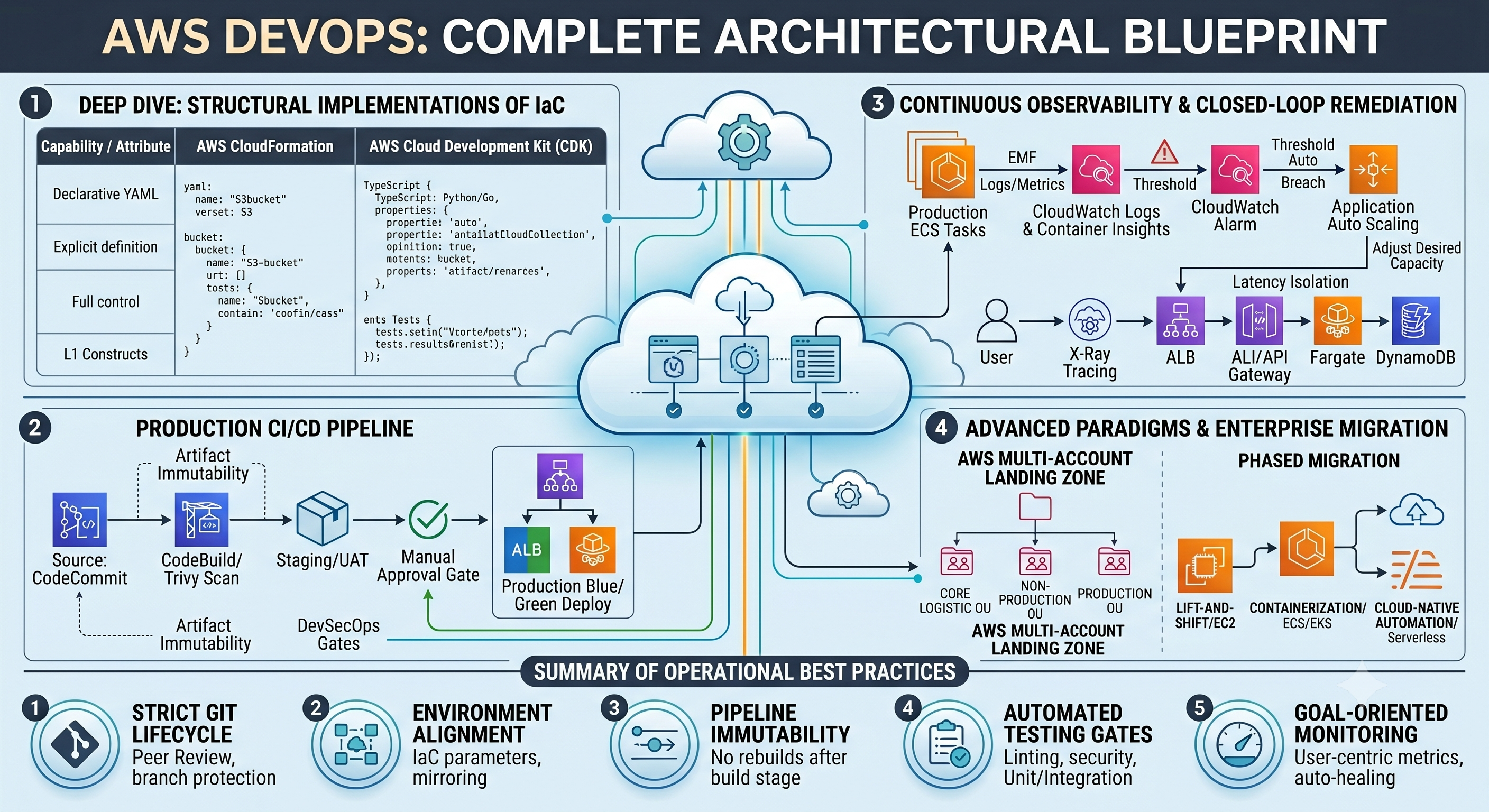
AWS DevOps marks the coming together of this approach with the scalable cloud-based infrastructure. This is a detailed guide to the fundamental building blocks, native architectural styles, automation techniques, and approaches needed to build an AWS DevOps ecosystem.
1. The Architectural Pillars of AWS DevOps
Structural stability and quick execution can only be guaranteed by following five major architectural pillars. Such concepts constitute the architectural foundation of any contemporary engineering team operating within AWS.
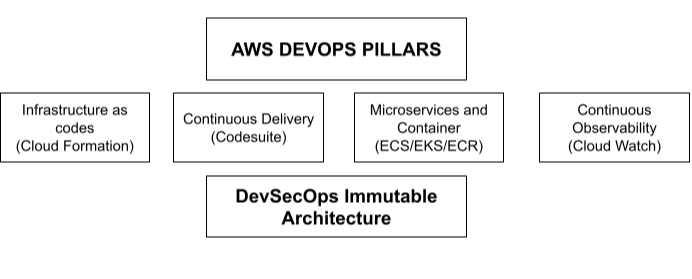
Infrastructure as Code (IaC)
The bedrock of cloud automation is IaC. Rather than logging on to the AWS Management Console and carrying out operations through clicks, modern-day cloud operations teams must learn the art of programmatic automation. Acquiring this training in AWS DevOps training curriculum allows developers to describe their entire infrastructure through declarative and even programmable means.
IaC is characterized by absolute repeatability. The development environment created through code will be absolutely the same as the staging and production environments, thus avoiding the problem of "it works on my machine" type of bugs. Also, since the infrastructure code is in text format, they reside in version-control systems (e.g., Git), which implies that any changes to the network structure, firewall rules, database clusters can be monitored, reviewed and reverted instantly in case of a failure.
Continuous Integration and Continuous Delivery (CI/CD)
Continuous Integration (CI) demands that developers repeatedly merge their code changes back into a common repository, many times a day. Each and every code commit automatically triggers the building and testing process. CI moves bug identification to the very beginning of the software development life cycle, thereby eliminating any possible issues during the integration stage.
Continuous Delivery (CD) goes even further and automates the process of deployment preparation of built artifacts. In a sophisticated CD system, the code that manages to pass all automatic validation checkpoints automatically deploys to either testing/staging environments or to production. Continuous Delivery significantly reduces risks of big-bang software release by decomposing each release into tiny and predictable pieces.
Microservices and Containerization
Monolithic applications suffer from massive scalability and operational challenges; updating just one component requires rebuilding the entire monolith. AWS DevOps promotes a microservices-based architecture whereby applications are broken down into small, isolated, specialized services; each of which interface with one another using lightweight network protocols (e.g., REST APIs or gRPC).
Containerization is critical to cleanly managing these microservices. Containers encapsulate an application in a specific environment containing all the necessary, run-time and system library dependencies as well configuration in one package. This layer of abstraction guarantees that the container will function similarly on a developers laptop, in an AWS CodeBuild environment, or even in a production container cluster.
On AWS, this type of architecture is managed by services such as Amazon Elastic Container Service (ECS) or Amazon Elastic Kubernetes Service (EKS).
Continuous Observability
What you cannot measure, you can not manage. Traditional monitoring systems do not work anymore in a cloud based environment where we have multiple, hundreds of microservices that change very quickly. Collecting three key telemetry streams—metrics, logs, and traces—continuous observability moves the focus of attention from reactive alerting to proactive data analysis.
Deep monitoring is embedded directly in the deployment pipeline and cloud runtime allowing engineering teams to see real-time application health metrics, performance regression and infrastructure bottlenecks so that they can fix failures before they effect any user.
DevSecOps: Immutable Security
Security can not be a first-hand team at the end of a release cycle. In essence, an AWS DevOps model injects security into automation—a step known as DevSecOps—across all layers of the automated workflow.
This means enforcing IAM (Identity and Access Management) least-privilege access rules, automating encryption of data at rest and in transit, as well as embedding modern static application security testing (SAST) and software composition analysis (SCA) tools directly into the CI/CD pipeline.
2. The Native DevOps Toolchain on AWS
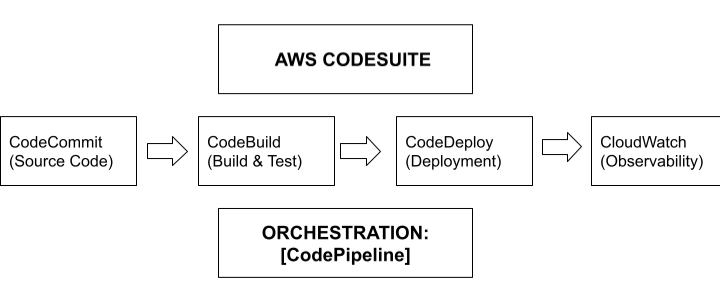
AWS offers a rich selection of tightly integrated, fully-managed services that facilitate the creation, testing, deployment and monitoring of applications, with no operational overhead from having to maintain underlying build servers.
AWS CodeCommit
AWS CodeCommit is a fully managed secure source control service that provides a way to create private Git repositories. Because you no longer need to maintain and scale a separate Git server environment; you will be able to focus solely on developing your application. Key operational capabilities include:
Audit Ability: Organizations can set security controls through AWS Identity and Access Management (IAM) in relation to CodeCommit. With IAM, an organization can apply fine-grained control (like preventing users from merging code into production branches) using standard AWS policies.
Data Protection: CodeCommit provides built-in data protection by automatically encrypting source code, binaries, and metadata at rest using AWS Key Management Service (KMS) keys and while in transit using Transport Layer Security (TLS).
Scalability: CodeCommit is built on Amazon S3 and Amazon DynamoDB, so it can handle large repositories and process thousands of markdown operations simultaneously without performance degradation.
AWS CodeBuild
AWS CodeBuild is a service that offers you, as an AWS Customer, complete control over your continuous integration through a fully managed service known as AWS CodeBuild. CodeBuild compiles source code, runs unit tests, and produces a package of software that is ready to deploy. Unlike traditional services such as Jenkins which require you to maintain building servers that are always running; AWS codebuild does not require you to provide dedicated servers because it runs on a serverless model, using a pay-as-you-go pricing structure.
On demand scaling: AWS codebuild will automatically spin-up a new compute container to build the source code and instantly spin it down when the build finishes. It will automatically scale horizontally so that multiple builds can be processed concurrently with no customer action.
Custom Runtimes: There are a number of pre-configured runtimes available to build your application (Java, Python, Node.js, Ruby, Go and .NET) however if these runtimes do not meet your needs, you can create your own Docker images and surround them with any build-dependencies or security compliances you require for your custom Docker images.
Declarative/Versionable Configuration: You define your entire build sequence in a single
buildspec.yml filewhich resides in the same location as your application source code, allowing you to version your build logic as part of your source control.
AWS CodeDeploy
AWS CodeDeploy is a tool that automates delivering an application (or software) to various AWS compute services. This tool can deploy to Amazon EC2 instances, on-premises servers, AWS Fargate containers, or AWS Lambda functions.
AWS CodeDeploy provides security around unsuccessful deployments by enabling customers to deploy using multi-stage release solutions such as canary deployments and blue/green deployments; thereby providing real-time monitoring of health checks, and triggering automated rollback processes immediately when an error is detected.
AWS CodeDeploy uses a configuration file called the AppSpec file appspec.yml) that provides the capability to execute either validation scripts or another automated process prior to or after routing traffic to a new release.
AWS CodePipeline
AWS CodePipeline serves as the central orchestrator of the DevOps workflow and represents the different stages of a software release process (staging, test, and production) and automates those different stages.
Extensible Architecture: CodePipeline can connect visually to native AWS services (CodeCommit, CodeBuild, CodeDeploy) and also to third-party applications (e.g., GitHub, Bitbucket, Jenkins, SonarQube).
Predictable Progression: It defines how to move an artifact from one stage of the workflow to the next, using strict execution gates to enforce these transitions, for example, a manual approval sign-off or the completion of an automated testing harness before moving the code to production.
3. Deep Dive: Building a Production-Grade CI/CD Architecture
The reference model being used in this scenario is based on using a Docker container to package an application that will run on an Amazon ECS cluster via serverless AWS Fargate compute resources.
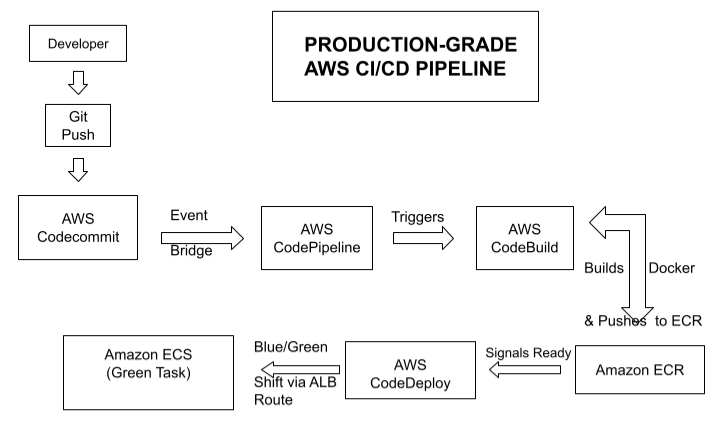
Phase 1: Code and Source Control Events and Triggers
The lifecycle of the executable code begins on a developer's local workstation. Once a software programmer has completed coding on their feature branch (i.e., all feature code is stored in that feature branch), the programmer will create a Pull Request to have their feature merged into the main production branch of an AWS CodeCommit Git repository.
Instead of having a CI/CD pipeline that polls the repository for code changes continuously (which creates delays and extra load on the API), AWS DevOps employs an event-driven architecture. As soon as new branch references are created by merging a feature branch to the production branch, an internal Amazon EventBridge rule automatically detects the updated branch reference(s), causing EventBridge to trigger AWS CodePipeline to run the corresponding CI/CD pipeline with no delay whatsoever.
Phase 2 - Isolated Build and Artifact Creation
To ensure the immutability of your pipeline, CodePipeline locks down your Git Commit Hash when executing builds using an Isolated build environment (AWS CodeBuild) and then passes raw source files into AWS CodeBuild runtime. AWS CodeBuild uses fresh containers for builds and executes application instructions defined in your code repository buildspec.yml file.
An example of a production buildspec.yml file that is enterprise grade and is intended to build an application securely, run tests on this application, validate that there aren’t any vulnerabilities, and build a hardened Docker container image.
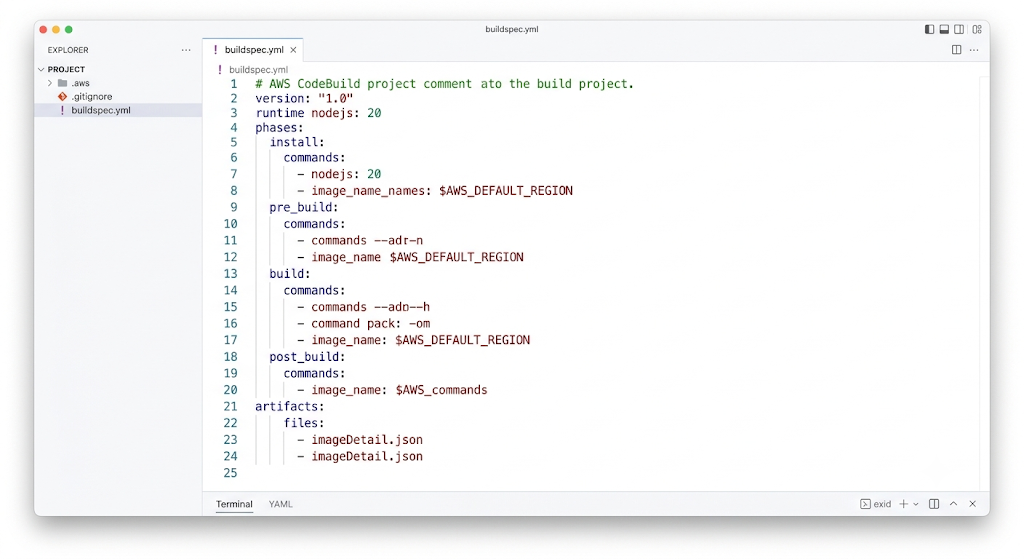
Buildspec Execution Model Overview:
Secure Authentication:During CodeBuild’s
pre_buildphase, it connects to AWS ECR via AWS CLI. Codebuild uses the permissions of its IAM role to securely access AWS ECR to request dynamic authorization tokens for AWS ECR. There are no hardcoded credentials at all in CodeBuild (via any of its environments).
Hard Stop Pattern: During the
post_buildphase, an image security scannerTrivy) scans the compiled container layers; it intentionally exits with code 1 by passing the call flag of--exit-codewhen it finds a severe vulnerability within one of the container’s dependencies. Codebuild immediately stops executing, while CodePipeline cancels the deployment prior to unsecuring a deployed version of the code in either staging or production environment.
Artifact Generation: If all gates are successful, the container will be pushed to Amazon ECR with the tag being the complete Git commit SHA tagged with
$CODEBUILD_RESOLVED_SOURCE_VERSIONallowing complete traceability from line of code to running container.
Phase 3: The Staging Validation Gate
The Staging Validating Gate will be the third phase of building the application. When the build has successfully completed in AWS CodeBuild, CodePipeline will then pass the output configuration artifacts to AWS CodeDeploy so that the software delivery run can occur in the Staging instance of the CodeDeploy System prior to promotion to the next phase of the deployment lifecycle.
CodeDeploy will apply the software application to a pre-production Staging instance, which is a replication of the production system. After the replicating has been done and the environment is set up, CodePipeline will stop further execution of the pipeline at a Manual Approval Gate. The Manual Approval Gate will automatically generate an electronic notification to an Amazon SNS topic. This notification will be routed to the Engineering leads via either email or ChatOps platforms such as Slack.
The notification will include all of the critical execution data that was generated during the execution phases of the application. This notification will allow the System Architect/QA Director to validate the external Integration Testing logs to ensure that all conditions have been met before they manually click on the “Approve” button via the AWS Console or API to execute the final Production Release of the application.
BEFORE SHIFT:
[ALB Production Listener] ──> [Blue Environment] (Live Traffic: 100%)
[ALB Test Listener] ──> [Green Environment] (Validation Testing)
AFTER SHIFT (Linear or Canary):
[ALB Production Listener] ──> [Green Environment] (Live Traffic: 100%)
[ALB Test Listener] ──> [Blue Environment] (Idle / To be terminated)
The Blue/Green release sequence is comprised of very defined, deterministic phases:
Provisioning of the Green Fleet: The current, active production is designated as the Blue Environment. When a new release is created, CodeDeploy creates an identical, isolated, and ongoing running set of containers using the same configuration as the previous version, only running with updated software; this is the Green Environment.
Isolated Verification Testing: For this phase, the Application Load Balancer is managing 2 different methods for ingressing to the application: One method is public (for example HTTPS on port 443), so users use this to access the live environment (Blue), while automated health checking scripts or internal QA testers use the private port to run their validation suites against the Green environment (for example on port 8443).
AppSpec Lifecycle Routing: The governing timing of when to transition, the methods of validation to use in which transition, and any other parameters involved in this transition are contained in the
appspec.yamlconfiguration file created at the same time you deploy the application artifact: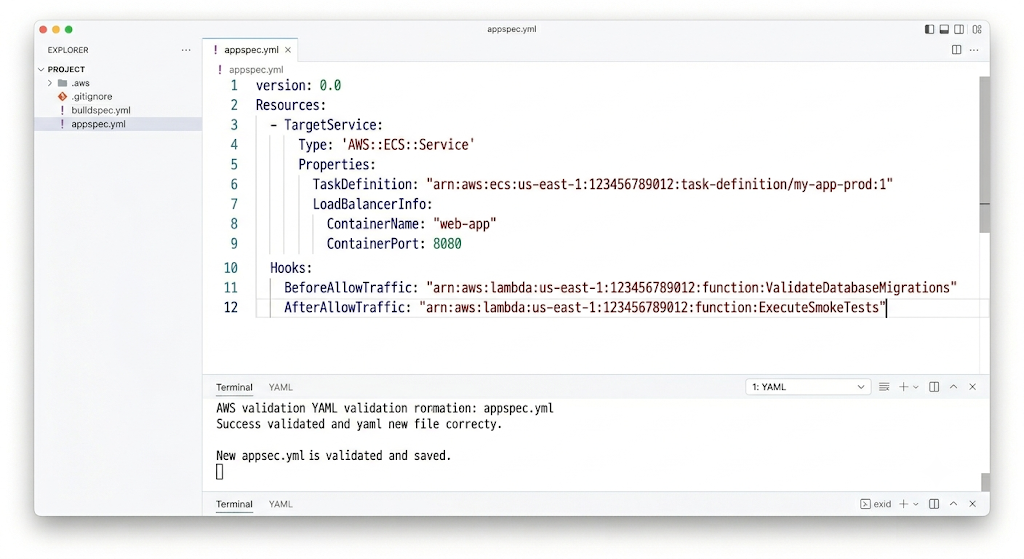
CodeDeploy Invocation of Lifecycle Hooks: As part of moving public user traffic, CodeDeploy triggers a Lambda function through the
BeforeAllowTraffichook. The Lambda function checks if the preconditions exist such as verifying if production relational databases have been migrated to be compatible.
Traffic Configuration Shifts: If the above conditions check out, CodeDeploy then modifies the Application Load Balancer settings to reroute user traffic from Blue to Green. This can be done in many different ways
Linear: Move traffic in specific proportions across intervals (e.g., 10% each 10 minutes until 100% is achieved).
Canary: Wait at once after shift of 5%, after 10 minutes users checks for error, then you can shift from the remaining traffic
All-at-Once: Then you can see 100% of traffic form public users to the Green Environment.
Rollback via Automated Measures: As traffic is being shifted, AWS CodeDeploy continuously monitors for predefined Amazon CloudWatch Alarms. In case there is an increase in the number of HTTP 5XX errors or the memory usage of the containers goes beyond the threshold limit set, then AWS CodeDeploy aborts the entire process and automatically switches the load balancer rules back to the Blue environment.
4. Infrastructure as Code (IaC) CloudFormation vs. AWS CDK
The true AWS DevOps approach never allows any change by hand through the AWS web console on the production level. All infrastructure resources should be provisioned through IaC using AWS CloudFormation or AWS Cloud Development Kit (CDK).
CloudFormation Paradigm – Declarative Determinism
CloudFormation defines the precise desired state for your environment. It is verbose and repetitious but also structurally clear. For example, to create a secure and private Amazon S3 bucket that ensures versioning, uses server-side encryption with KMS, and has a PublicAccessBlockConfiguration to avoid unintentional exposure to the world, there will be explicit code blocks.
AWS CDK Paradigm: Programmatic Abstraction
With the help of object-oriented programming concepts, the CDK introduces a software engineering process for infrastructure. The same secure S3 bucket can be created with fewer lines of code through an L2 Construct (s3.Bucket) that actually creates many security parameters through CloudFormation in a matter of seconds.
In addition to this, the CDK provides support for conditional logic runtimes (like automatically adding a DESTROY removal policy in dev and RETAIN in prod) and testing facilities within the framework itself (like running assertions using Jest on the cloud topology).
The choice of the proper IaC tool is based on your team’s experience, the level of complexity of your applications, and the architecture of your infrastructure. In order to develop these crucial engineering skills, your team may use cloud path blueprints from AWS DevOps Certification.
5. Continuous Monitoring and Closed-Loop Automation
Distributed systems need to have an effective telemetry setup which integrates continuous monitoring with closed-loop automation.
Metrics and Distributed Tracing
Amazon CloudWatch Logs and Container Insights: Works as an ingestion layer in itself. This is done with the aid of the CloudWatch Embedded Metric Format (EMF) or a specific agent that collects the performance logs in an asynchronous manner. There is an ongoing gathering of low-level infrastructure metrics such as memory, CPU, and I/ O.
AWS X-Ray: Required for microservices-based applications, X-Ray inserts a tracing header (X-Amzn-Trace-Id) to the Load Balancer. It traces out the entire execution route of services starting from the API Gateway to ECS containers and DynamoDB tables. Thus, it helps quickly trace down the source of the problem.
Proactive Closed-Loop Remediation
For observability to be maximally useful, it must be coupled with automation of changes to the underlying infrastructure. For example, in case of an unforeseen increase in the traffic on the website:
Incident: The ECS CPU Utilization aggregation exceeds 75% in two consecutive minutes.
Alarm: The CloudWatch Alarm is set to ACTIVE.
Action: An alert triggers an Application Auto Scaling policy.
Scaling: In the process of scaling, the ECS is asked to increase the number of tasks being performed, followed by addition of more containers by the Fargate service in a matter of seconds.
Load Balancing: Port 8080 is checked using the Application Load Balancer (ALB). Once successful, the traffic is load-balanced across the new cluster of instances.
Enterprise Architecture and Migration Paths
GitOps with Amazon EKS
More sophisticated container applications using Amazon EKS often use the GitOps approach instead of the typical push pipeline for their deployment process. ArgoCD and Flux are examples of tools running inside the Kubernetes cluster which constantly check a central Git repository. In case a developer pushes the manifest change, the cluster operator becomes aware of the drift and pulls the changes locally. The approach helps avoid putting credentials in the CI tools.
AWS Multi-account Landing Zones
In order to avoid the problem of blast radius, organizations implement a multi-account landing zones approach with AWS Organizations and AWS Control Tower where an enterprise uses AWS OUs divided into:
Core Logistics OU: Includes the central Logging Account for logging and Security Account for centralized IAM.
Non-Prod OU: Consists of isolated Development and Staging accounts in which engineers can experiment safely.
Prod OU: Consists of locked down Prod Workloads. Human write access is denied; changes will be made only through pipelines using IAM roles.
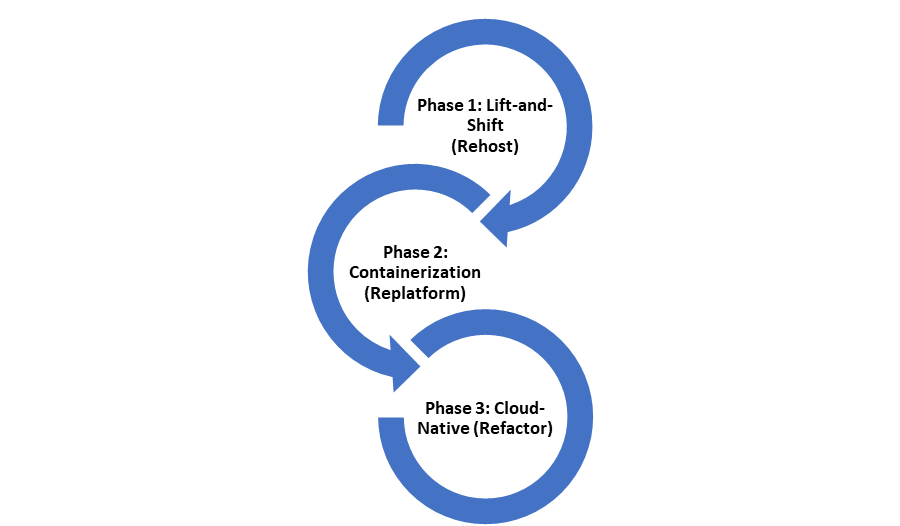
Strategy for Moving Through Three Phases
The shift from a traditional IT environment to a cloud-based DevOps setting must be done in an orderly manner.
Step 1 (Rehost):
The classic virtual machines are transferred to Amazon EC2 with the use of AWS Application Migration Service (MGN) but without too many automated operations and with only a few easy operations like regular backups.
Step 2 (Replatform):
The transition of applications into containers is implemented and is complete. As a result, applications are uploaded into managed environments such as Amazon ECS/EKS and applications databases are migrated to Amazon RDS.
Step 3 (Refactor):
Code is restructured into modular, serverless microservices using AWS Fargate/Lambda, which is entirely automated.
Conclusion
The move towards AWS DevOps changes software release from being a limiting process to a competitive one. For enterprise-level projects to achieve consistent success and reliability in their software delivery process, there is a need to follow these architectural best practices:
Adhere to Strict Git Cycle: The templates for the infrastructure should be treated in the same manner as any other piece of application code. This means that you will need to have branch protection, require code reviews through pull requests, and follow a strict order of testing environments.
Ensure Consistency of Environments: You can maintain consistency in the environments through the use of parameters in your IaC templates.
Focus on Immune Pipelines: Once you have tested the build package or container image for the first time, stick with using the same artifact for all of the remaining steps in the process. Code should never be moved from testing to production environments.
Testing Automation: Ensure that your delivery process is automated by automating the unit tests, linting, and security tests of your builds.
Monitoring Your Objectives: Rather than relying on monitoring the actual CPU measures, use the user-based measures such as calmer API response times and HTTP errors. Combine this strategy with auto-scaling to have self-healing clouds.
In reducing the inefficiencies in the deployment process, the engineering teams will find it easy to move fast and reduce the deployment time. Let the engineering team benefit from the experts of AWS DevOps Course.