
Azure DevOps: From Code Commit to Secure, Automated Deployment
Last updated on Aug 21, 2026
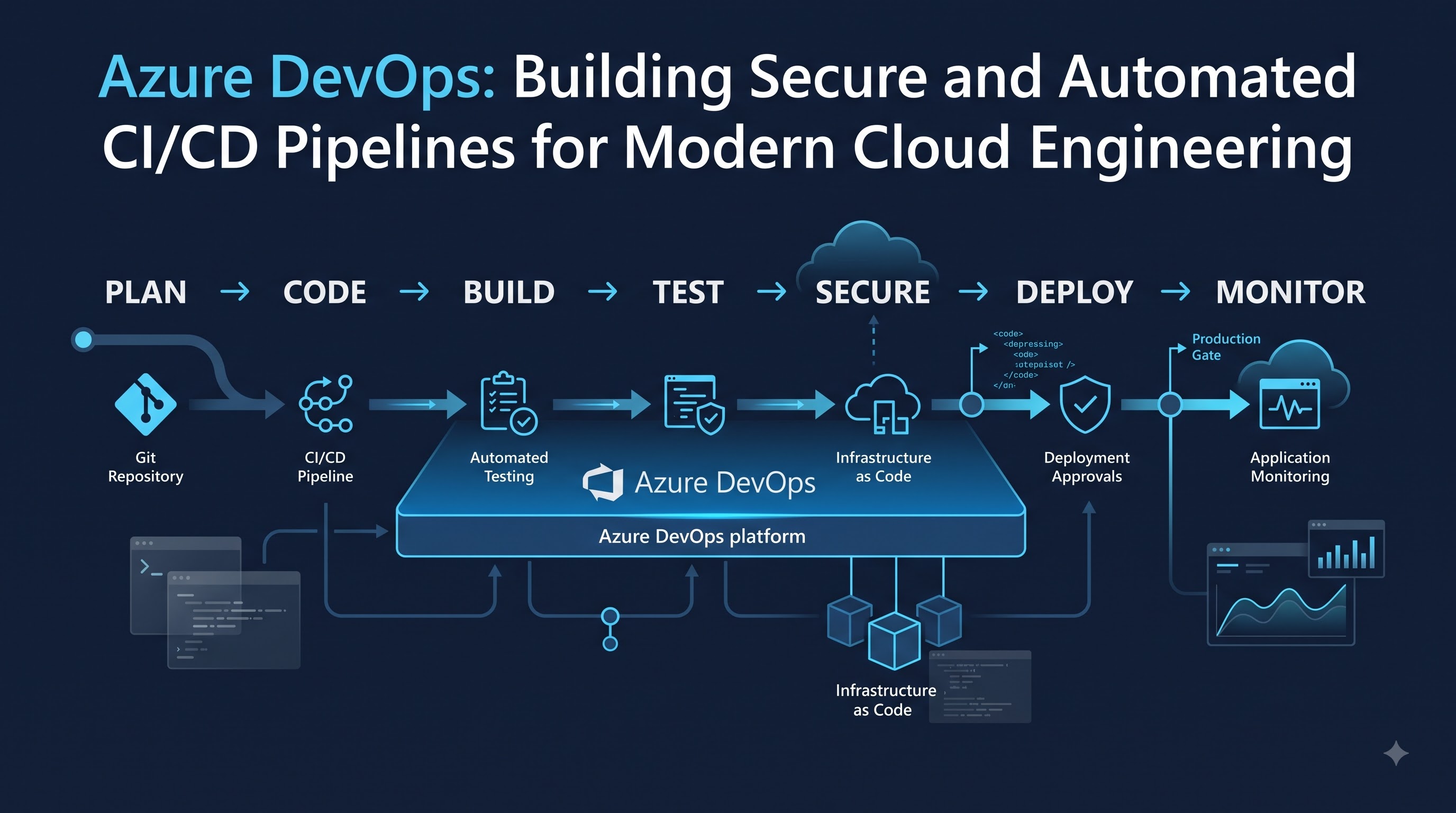
In business, software development has significantly evolved as organizations have shifted their applications and infrastructure toward the public cloud. It is no longer possible for a development team to spend weeks writing an application and then depend on a separate operations team for manual deployment. Clients require frequent updates from their applications; the applications need to be available for use all the time; and organizations must react quickly when requirements change. All this means that automation, cooperation, security, and continuous delivery are the main aspects of modern software development. For professionals looking to understand how these practices are implemented in real-world environments, an azure devops course can provide a structured introduction to the tools and workflows involved.
Azure DevOps is a great assistant in the transformation of organizations that operate within the Microsoft ecosystem. It offers a collection of functions that allow organizations to carry out various activities that are typical of software development work, like keeping source code, creating applications, automating the process of testing, making deployment pipelines, managing releases, and linking development processes with the operations area.
Microsoft Azure DevOps resonates greatly with both Cloud Engineers and DevOps experts. Recently, there have been many instances of having multiple development teams, cloud resources, application platforms, security conditions, automated tests, and timely releases in most delivery environments. As an organization expands, it gets harder to handle all these functions manually. An excellent DevOps approach helps to eliminate repetitive work while at the same time providing the required controls, ensuring that the release process is safe, traceable, and predictable.
It is crucial to realize that Azure DevOps is far more than a simple deployment tool. It is a more advanced engineering philosophy, where developing, testing, securing, supporting, and operating are interconnected. Also, when these elements work together, a feedback loop is formed that enables organizations to develop code, observe its behavior, identify issues, and continuously improve the application and delivery process.
What Is Azure DevOps and Why Does It Matter?
Azure DevOps consists of a series of services developed to ease all the phases of the whole software development process, starting from planning phases and source controlling up to continuous integration and delivery, testing, and deployment. Teams can make use of Azure Boards to manage development work, Azure Repos to maintain Git repositories, Azure Pipelines to carry out builds, deployment automation, and other functions allowing them to handle testing and package management, thus avoiding the multiplication of separate and isolated processes.
The stage of development where the number of people engaged increases becomes particularly important. Let us think of a situation when several engineers work on the application. There are all the necessary functions to manage branches for developers, to validate modifications for reviewers, to run tests, and to be sure that the final product will suit the deployment environment.
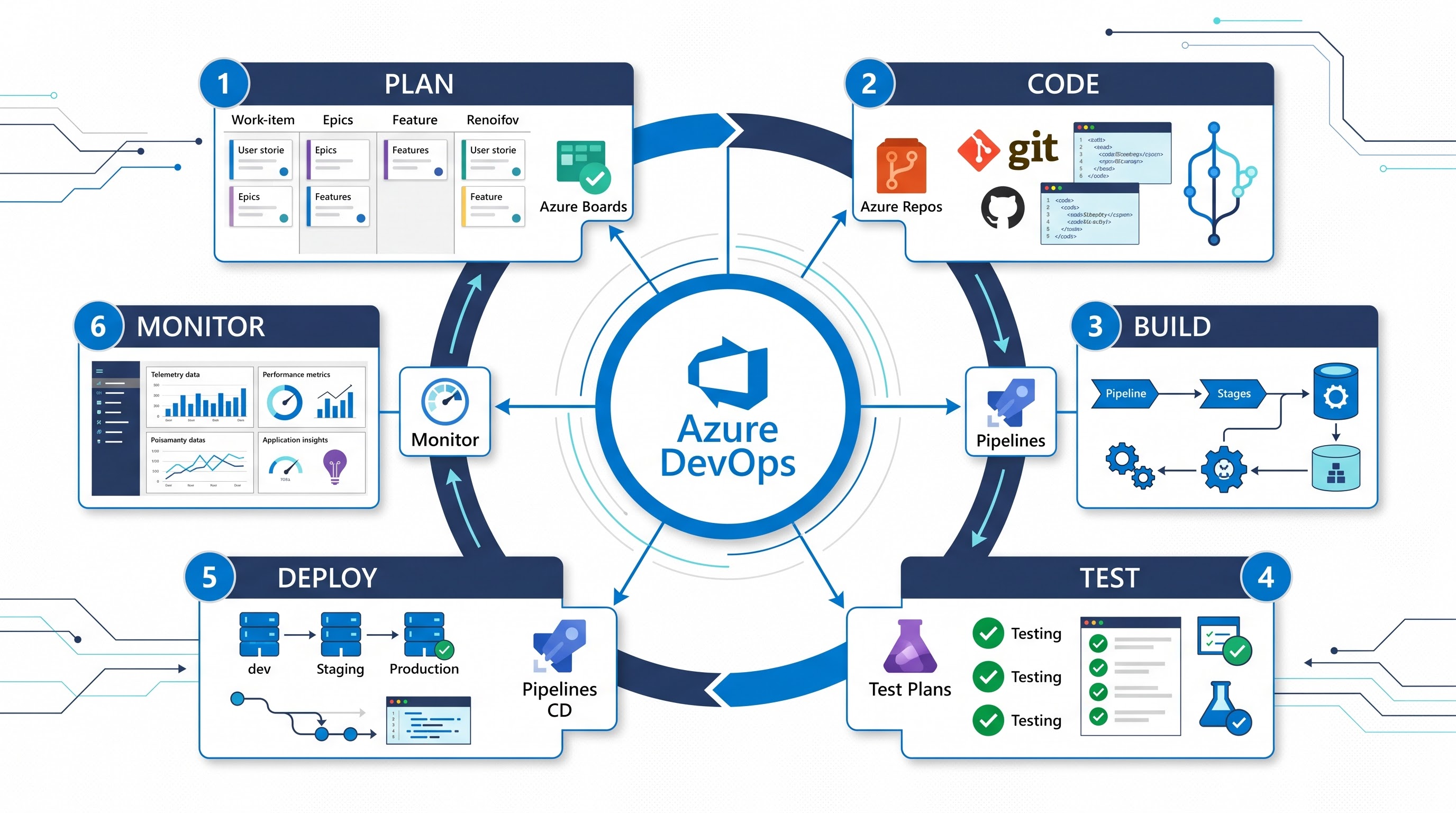
DevOps solves this issue by establishing a new culture and technical environment where cooperation and automation are key elements. Development teams do not just write code anymore; operations teams will have to deal with everything after the development process. In other words, both teams are included in the same delivery process. Security and testing can also participate in this process and do not need to be treated as phases appearing only at the end of the project. Azure DevOps enables these principles by combining work management, source control, automation, and deployment processes. It allows for tracking a feature from a work item to development via a Git branch, through a pull and automated tests, into a build, and finally into an app.
The importance of keeping track of timelines is emphasized when the team has to troubleshoot the application after its deployment, while the number of tasks and changes in the environment is also recorded automatically. Thanks to DevOps, not only can issues be solved, but also the history of improvements made by each team member is saved to bring the team further together. Thus, it is important to understand the value of Azure DevOps for increasing consistency. Manual deployment processes are different from engineer to engineer, where one technician might remember about configuration settings being modified while another activates a different version of the environment without it.
Another important reason Azure DevOps matters is consistency. Manual deployment procedures can vary from one engineer to another. One person may remember to update a configuration setting while another may miss it. One environment may contain a dependency that another environment does not. These small differences can create significant problems later. Automation allows organizations to define processes once and execute them repeatedly, which can improve reliability as applications and teams scale.
This does not mean every process should be automated immediately. Effective DevOps starts with understanding where automation provides genuine value. Repetitive builds, tests, infrastructure provisioning, deployments, and validation are strong candidates because they happen frequently and can benefit from consistent execution. Human decisions can remain where business risk, compliance, or operational judgment requires them.
Building CI/CD Pipelines with Azure DevOps
Continuous Integration (CI) and Continuous Delivery (CD) are critically important processes in contemporary Azure DevOps workflows. CI is concerned with frequently integrating and validating code changes automatically. CD builds on CI processes and involves getting validated software in shape for deployment and passing it through various environments. Together, CI and CD help take software from source code to deployment.
Let’s say that a developer is working on a certain task related to a Web application. Instead of changing the code in the main branch, this developer can use the feature branch to make changes and create a pull request. With the pull request created, the system will execute several automation procedures. The system may build the software, restore necessary libraries, run unit tests, and make assessments about code quality overall. In case of the failure of any test, the developer will know that something is wrong before the code change is merged with the main code.
This method changes the timing of feedback significantly. In traditional development, a bug can exist in the software until it has reached testing or production. In CI, the feedback is delivered much closer to the introduction of the change. However, when a developer can detect a defect quickly, he/she can solve the issue easily due to the fact that the circumstances of the issue are still present and well-understood.
Azure Pipelines is capable of automating a large number of these processes. A pipeline is able to specify all the steps needed to build an application, run tests, create artifacts and prepare the application for deployment process. The way how the process is implemented can vary depending on the technology stack being utilized. However, the underlying approach will remain the same. The concept of an artifact is also important in a CI/CD workflow. After an application has been successfully built and validated, the resulting package or deployable output can be stored as an artifact. That artifact can then be promoted through different environments rather than rebuilding the application differently for every environment. This creates a clearer relationship between what was tested and what was ultimately deployed.
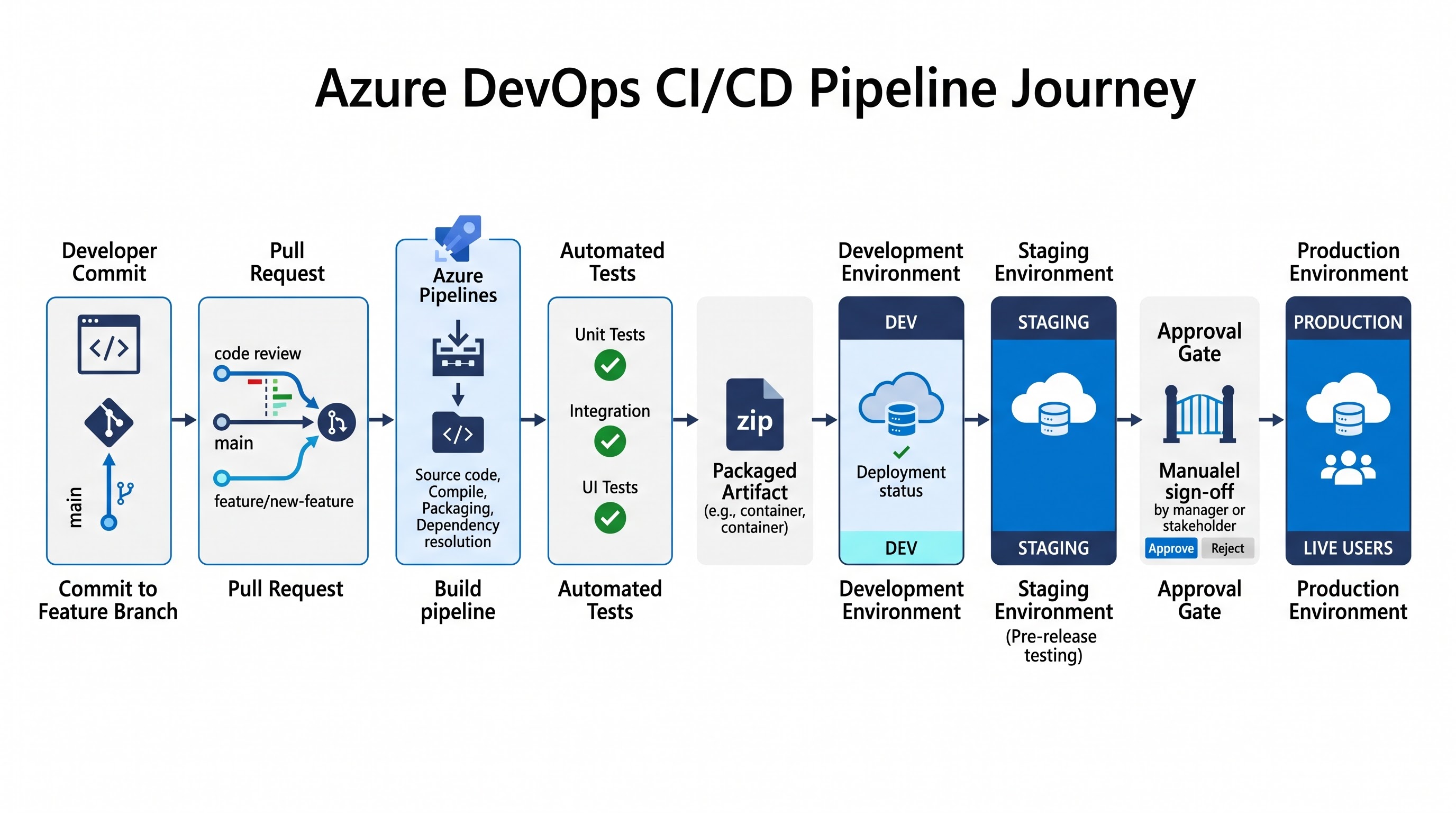
Deployment pipelines can then move the application through environments such as development, testing, staging, and production. Each environment may have different configuration values and access requirements, but the deployment process itself can remain standardized. This is particularly useful for organizations that release software frequently because the team does not need to repeat the entire deployment procedure manually for every release.
However, good CI/CD design is not simply about creating the fastest possible pipeline. A pipeline should provide meaningful validation. If a pipeline takes only a few seconds because it performs no useful tests or checks, its speed does not provide much value. The goal is to create a balance between fast feedback and sufficient validation. Teams should identify which checks are important at each stage and organize them so that obvious failures are detected as early as possible. Branching strategy also affects CI/CD. Different organizations use different models depending on their release cycles and team structures. Some prefer short-lived feature branches and frequent integration into the main branch, while others maintain separate release branches for applications that need longer support cycles. Azure DevOps provides the controls needed to support these approaches, including pull requests, branch policies, and automated validation.
The most mature pipelines also treat deployment as a controlled process rather than simply a command that copies files to a server. Production environments may require approvals, environment checks, security validation, or additional testing. This creates a pipeline that is automated without becoming careless. The system can perform routine work automatically while still requiring human authorization when the potential business impact is high.
Security, Testing, and Quality in the DevOps Pipeline
Speed is often associated with DevOps, but speed without quality can create serious problems. An organization that can deploy an application ten times faster but introduces security vulnerabilities or unstable releases is not necessarily improving its engineering process. The purpose of automation is to make software delivery faster while maintaining or improving reliability, security, and quality. Automated testing is therefore a major part of the CI/CD process. Unit tests can validate individual components of an application, while integration tests can examine how different components interact. Functional tests can validate expected application behavior, and performance testing can help identify issues related to response time, throughput, or resource consumption. Different tests serve different purposes, and a strong pipeline uses them appropriately rather than treating every test as identical.
The biggest advantage of automated testing is repeatability. A developer can manually test an application and confirm that a feature appears to work, but that does not necessarily mean existing functionality has not been affected. Automated regression tests can execute consistently whenever changes are introduced. Over time, the test suite becomes a safety mechanism that helps the team identify unexpected consequences of new development work.
Security should follow the same principle. Waiting until the end of the development cycle to perform security checks can make vulnerabilities more expensive to fix. Modern DevOps practices increasingly integrate security into the development lifecycle, an approach commonly associated with DevSecOps. Security checks can be introduced into pipelines so that potential problems are identified while code is still moving through development and validation.
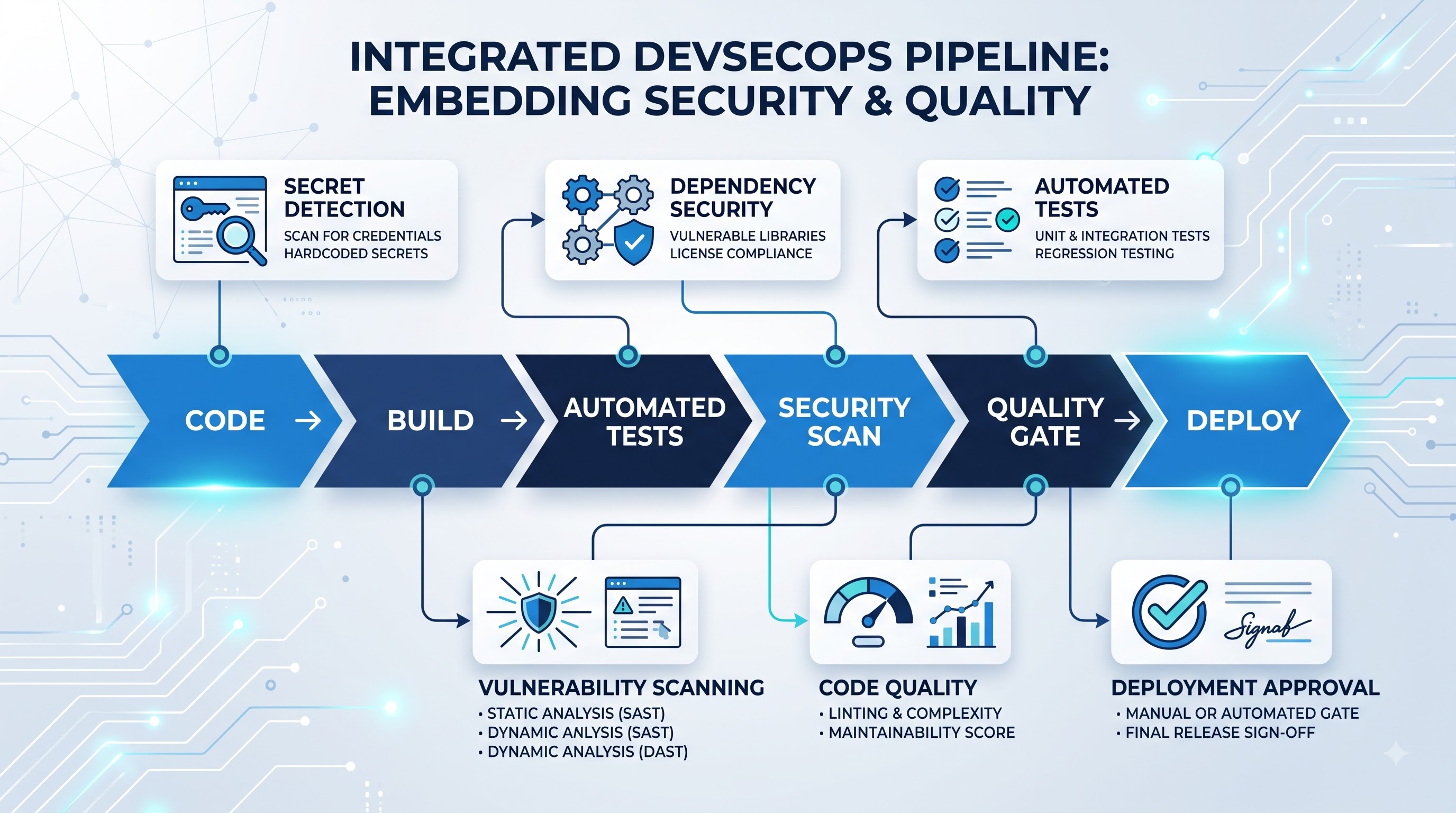
Automated scanning can examine different parts of an application and its dependencies depending on the organization's security requirements. Teams may check for vulnerable libraries, exposed secrets, insecure configurations, or other potential weaknesses. The exact tools can vary, but the principle is consistent: security should become part of the engineering workflow rather than an activity that happens only before production.
Quality gates provide another layer of protection. A pipeline can be configured so that a deployment cannot proceed when important validation requirements have not been satisfied. For example, a build might be required to pass automated tests before it can move to the next stage. A production deployment might also require approval from an authorized person or validation of specific environment conditions.
This approach is particularly important for organizations that operate in regulated industries or manage applications containing sensitive information. Automation does not eliminate governance. Instead, it can make governance more consistent by encoding organizational rules into the delivery process. Rather than relying on someone to remember a required approval or security check, the pipeline can enforce the requirement.
Secrets and access permissions also need careful management. Deployment pipelines often interact with cloud resources, databases, repositories, and external services. Credentials should not simply be placed inside scripts or source-code repositories. Secure handling of secrets, identity, permissions, and service connections is an important part of designing a production-ready DevOps environment.
The broader lesson is that quality and security should not be treated as obstacles to automation. When implemented correctly, they become part of the automation itself. A well-designed pipeline does not simply ask, "Can we deploy this?" It asks whether the application has passed the checks that the organization considers necessary before deployment.
Infrastructure as Code and Automated Environment Provisioning
Application automation is only one side of modern cloud engineering. The infrastructure that runs the application also needs to be managed efficiently. Creating cloud resources manually through a portal can work for experimentation, but it becomes increasingly difficult to maintain consistency when an organization has multiple environments and many resources.
Infrastructure as Code, commonly known as IaC, addresses this challenge by representing infrastructure through code or declarative configuration. Instead of relying entirely on manual actions, engineers define the desired infrastructure in a version-controlled format. That definition can then be reviewed, modified, tested, and used to provision environments through automation.
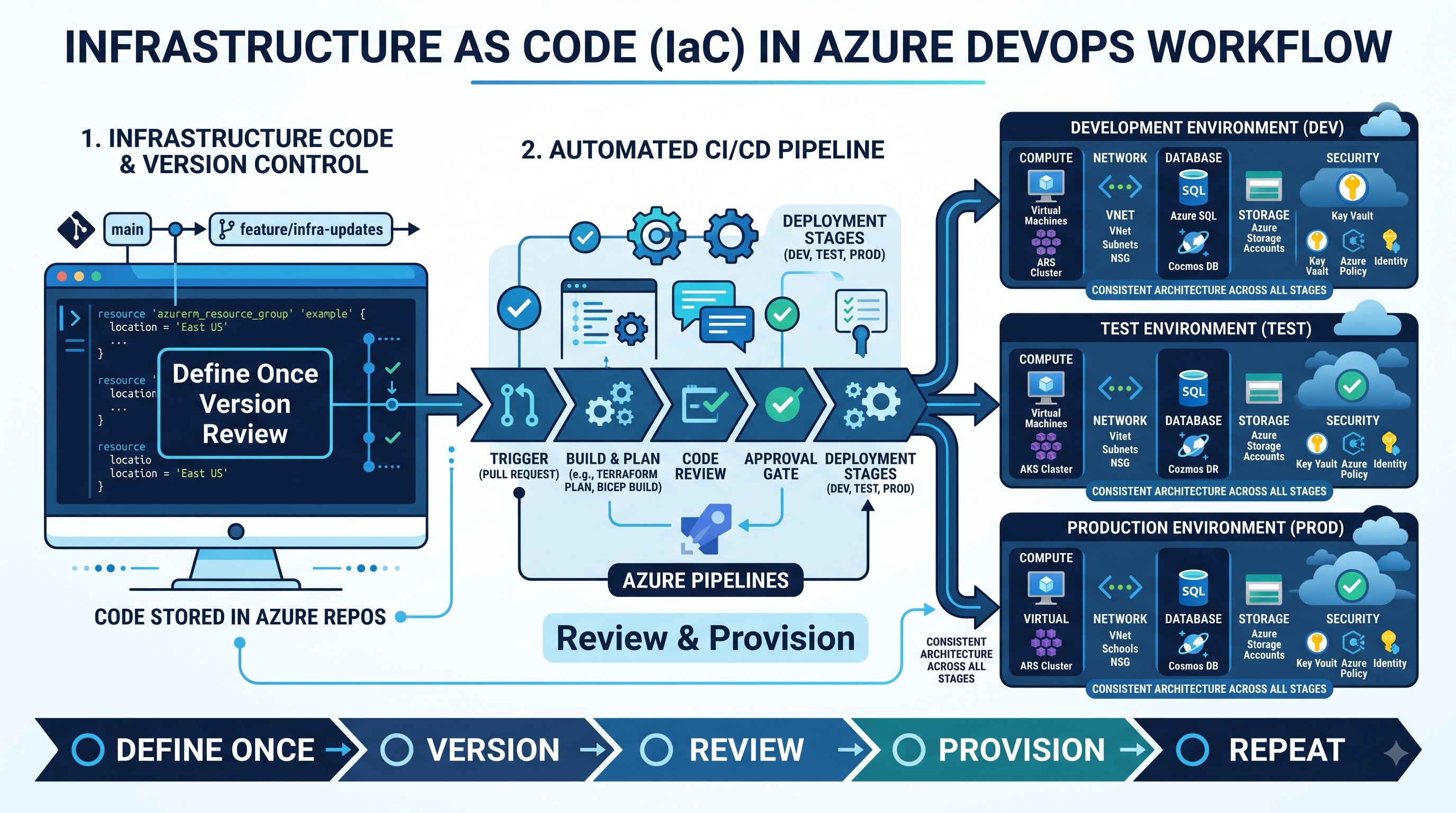
The concept is similar to source control for application development. Infrastructure changes become visible and traceable. If someone modifies a networking configuration or changes a resource definition, the change can be reviewed before it is applied. Previous versions can also provide useful historical information when troubleshooting an environment.
Azure DevOps can play an important role in this workflow by integrating infrastructure definitions into repositories and pipelines. Technologies such as Bicep, Azure Resource Manager templates, Terraform, and other IaC approaches can be incorporated into automated delivery processes. The exact technology depends on the organization's architecture and requirements, but the workflow remains centered on repeatability and controlled change.
For example, an organization might maintain separate development, testing, staging, and production environments. Creating each environment manually can result in differences that are difficult to identify. One environment might have a different configuration, network rule, or resource setting. These differences can create the familiar problem of an application working correctly in one environment but failing in another.
Infrastructure automation can reduce this inconsistency by defining the environment in a repeatable way. Parameters can be used for values that legitimately differ between environments while the underlying infrastructure structure remains consistent. This makes it easier to understand how environments are created and what resources they contain.
IaC also becomes valuable when an environment needs to be recreated. If infrastructure definitions are stored and maintained correctly, engineers do not have to rely on memory to reconstruct the environment. The configuration can be executed through the appropriate process, reviewed, and adjusted as necessary. This is particularly useful in cloud environments where resources may need to be created, scaled, replaced, or modified frequently.
Another benefit is that infrastructure changes can follow the same review practices as application changes. An engineer can create a branch, modify the infrastructure definition, submit a pull request, and allow automated validation to run before the change is applied. This brings infrastructure closer to the standard engineering lifecycle.
The connection between IaC and CI/CD is important because it allows organizations to automate more than application deployment. A mature pipeline can validate application code, provision or update required infrastructure, deploy the application, and then perform post-deployment checks. This creates a broader automation model in which both the application and the environment are managed through controlled processes.
However, infrastructure automation also requires discipline. A mistake in infrastructure code can affect networking, access controls, databases, or other critical resources. For this reason, infrastructure changes should be reviewed and tested appropriately, especially when they affect production environments. Automation should reduce operational risk, not simply make potentially dangerous changes happen faster. For professionals building these skills as part of a devops azure certification pathway, understanding this balance between automation, validation, and operational control is essential for working effectively with real cloud environments.
From Deployment to Monitoring: Managing Applications in Production
One of the most common mistakes in software delivery is treating deployment as the final step. An application can successfully pass a build, complete automated tests, and deploy without errors while still experiencing problems once real users begin interacting with it. Production behavior is influenced by traffic, infrastructure capacity, external dependencies, configuration, and real-world usage patterns that are difficult to reproduce completely in development environments.
This is why monitoring and application performance inspection are important parts of the DevOps lifecycle. After deployment, teams need visibility into whether the application is operating as expected. Metrics, logs, traces, alerts, and application telemetry can provide information about system health and help engineers identify problems before they become larger incidents.
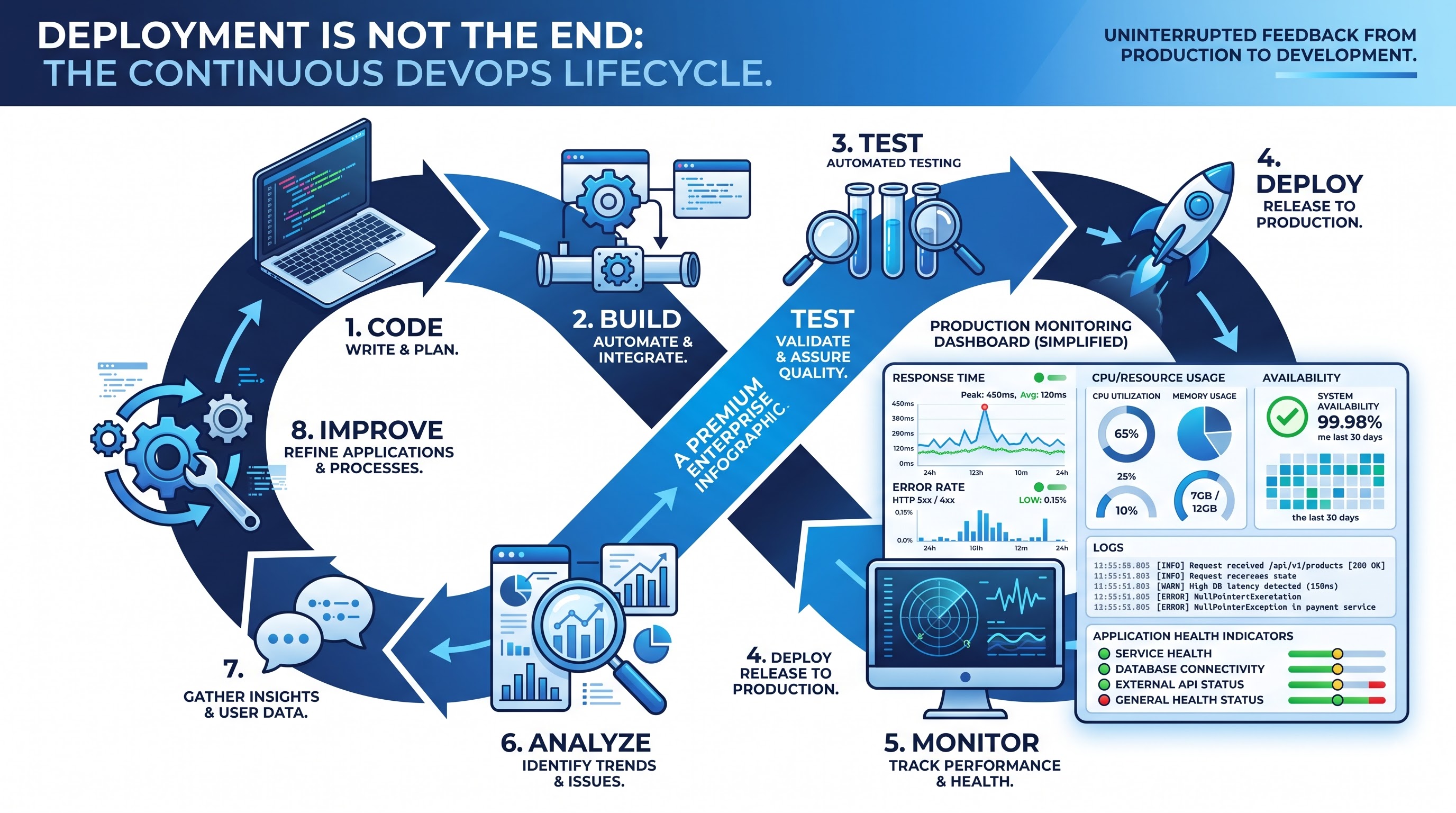
Imagine a new version of an application being deployed successfully. The deployment pipeline reports no errors, but users begin experiencing slow page responses. Without monitoring, the development team may not immediately know that the release has affected performance. With appropriate telemetry, engineers can investigate response times, failed requests, resource usage, and dependencies to understand what changed.
Monitoring also creates a feedback loop between operations and development. Information from production can influence future development work. A recurring performance problem might result in a new engineering task. An unexpected error might lead to additional automated tests. A security event might result in changes to deployment policies. In this way, production information becomes part of the development lifecycle rather than remaining isolated with the operations team.
Deployment strategies can also help organizations manage risk. Instead of immediately exposing every user to a new release, teams may use controlled approaches depending on the application and infrastructure. A release can be introduced gradually, validated, and expanded when the results are satisfactory. The appropriate strategy depends on business requirements, technical architecture, and the organization's tolerance for deployment risk.
Troubleshooting is another important skill in this environment. A failed deployment may be caused by application code, infrastructure configuration, authentication, dependencies, environment variables, networking, permissions, or other factors. Engineers therefore need to understand the complete delivery path rather than focusing only on the application code.
This is one reason practical Azure DevOps knowledge is more valuable than simply knowing how to create a pipeline. A pipeline can be created relatively quickly, but designing one that remains useful when something fails requires deeper understanding. Engineers need to know where to look for evidence, how to interpret logs, how deployment stages interact, and how changes in one part of the system can affect another.
Monitoring also helps organizations measure whether their engineering processes are actually improving. Faster deployment is useful only when the resulting application remains stable. If release frequency increases but production incidents increase at the same time, the delivery process may need improvement. Reliable DevOps therefore considers both delivery performance and operational outcomes.
The ultimate goal is a continuous feedback loop: develop, validate, deploy, observe, learn, and improve. This cycle allows teams to move quickly without treating production as a place where problems are discovered for the first time.
Azure DevOps Skills, Certification, and Career Growth
Learning Azure DevOps can be valuable for professionals interested in cloud engineering, DevOps, automation, infrastructure, and modern software delivery. However, the platform covers a wide range of capabilities, which can make it difficult for beginners to know where to start. A strong learning path should begin with Git, source control, branching, pull requests, and cloud fundamentals before moving into CI/CD pipelines, automated testing, deployment environments, security practices, Infrastructure as Code, monitoring, and troubleshooting. The goal should not be to memorize individual features, but to understand how these technologies work together throughout the software delivery lifecycle.
A structured learning program can help bring these concepts together when it combines theory with practical exercises. Hands-on experience is particularly important because DevOps is highly process-oriented. Creating a pipeline, intentionally introducing a failed test, troubleshooting the failure, provisioning an environment through Infrastructure as Code, or moving an application through development, staging, and production provides a much deeper understanding than simply reading about these concepts. For professionals preparing for an azure devops certification, this practical approach can also make certification preparation more meaningful by connecting exam concepts with real engineering scenarios. Certification can validate foundational knowledge, but it should complement practical experience rather than replace it.
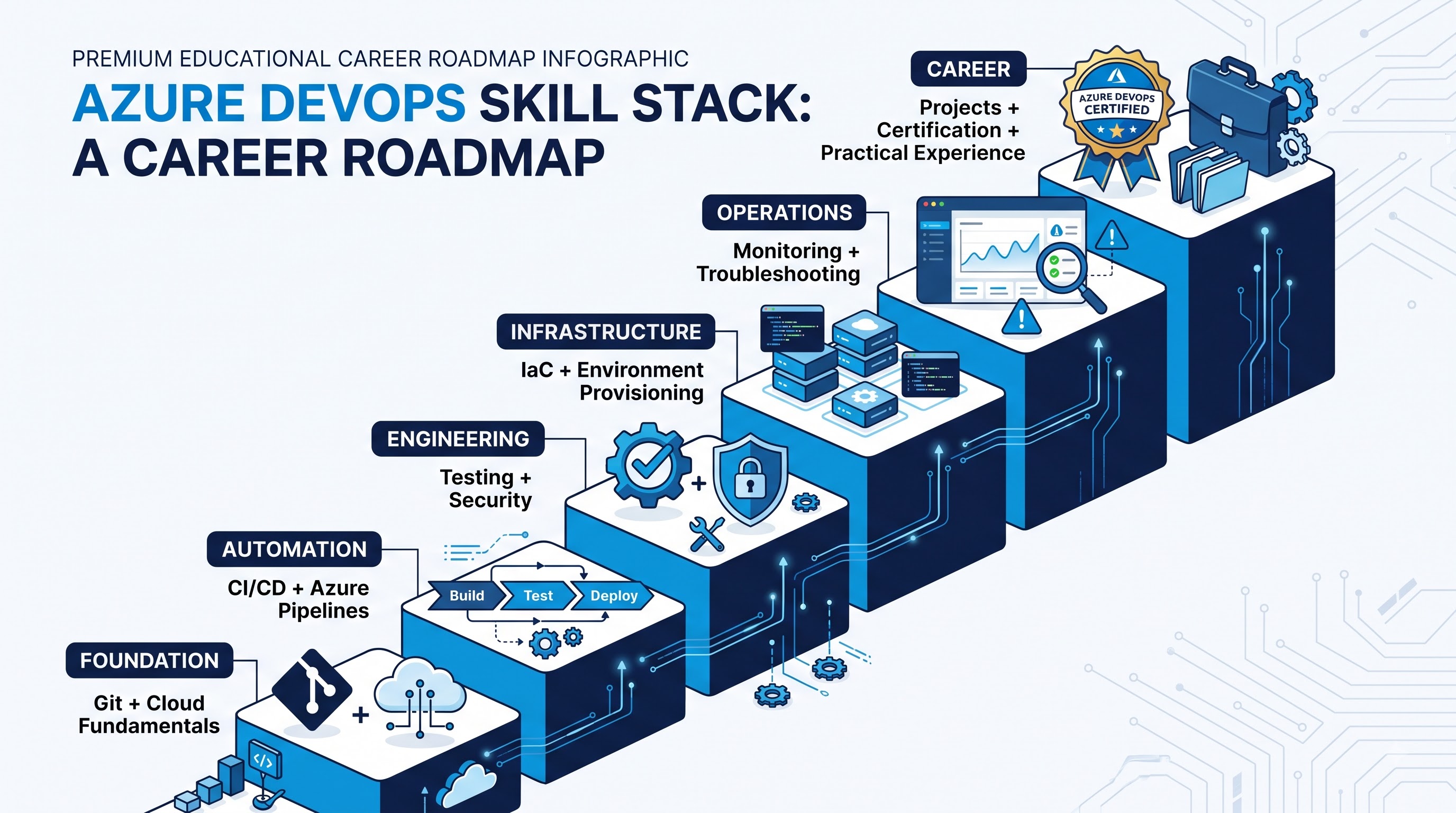
Career growth in DevOps ultimately depends on the ability to solve real engineering problems rather than simply operate individual tools. Professionals need to understand why infrastructure should be version controlled, why security should be integrated into the pipeline, why deployments may require approval, why automated tests should run before code is merged, and why applications need to be monitored after deployment. The most valuable Azure DevOps professionals are not necessarily those who know every platform feature; they are the people who can design practical, secure, automated, and reliable solutions for real software delivery challenges.
Conclusion
Azure DevOps has become an important part of modern software delivery because organizations need more than fast development. They need a reliable way to move changes from an idea to production while maintaining quality, security, visibility, and operational control. The platform provides capabilities that can connect these activities into a single delivery lifecycle, but the technology becomes truly valuable only when teams use it to solve real engineering problems.
The foundation begins with source control and CI/CD. Developers need a reliable way to manage changes, validate code, and produce consistent builds. Automated testing and security checks then provide confidence that those changes meet the required standards before they move further through the pipeline. Infrastructure as Code extends automation beyond application code by making environments repeatable and manageable through version-controlled definitions.
Deployment is only another stage in the process, not the finish line. Once an application reaches production, monitoring and performance analysis provide the feedback necessary to understand how it behaves under real conditions. That information can then influence future development, testing, security, and infrastructure decisions. For professionals building careers in cloud engineering and DevOps, the most important lesson is to think beyond individual tools. Azure DevOps should be understood as part of a larger engineering system where people, processes, code, infrastructure, security, and operations work together. Learning how those pieces connect is what turns basic platform knowledge into practical DevOps capability.
As organizations continue to adopt cloud-native architectures and increasingly automated delivery processes, the ability to build secure, repeatable, and observable deployment workflows will remain an important technical skill. Azure DevOps provides the foundation for that journey, but the real advantage comes from learning how to use its capabilities thoughtfully. The objective is not simply to automate more tasks. It is to create a software delivery process that is faster where it should be, controlled where it needs to be, and reliable enough to support applications as teams and businesses grow.