
Azure DevOps Links Automated and Manual Testing Directly to Requirements
Last updated on Aug 29, 2026

Implementing quality gates that can be verified in today’s continuous delivery world requires a seamless connection between programmatic test automation, exploratory human inspection, and traceability of business requirements. In many engineering teams that release at a rapid pace, there is often a disjointed testing process. Development creates automated tests of browsers with Playwright or Selenium, quality assurance completes manual explorations or manual scripts, while product managers track features through agile boards.
When these three worlds act in silos, risks emerge with deployments. Failures in automated tests are not taken seriously enough as being a business requirement regression but as CI pipeline failure. Exploratory testing gives rise to valuable bug reports that do not have a link back to their respective user stories, and decisions are made about releases without all the metrics being considered. Azure Test Plans have brought together Microsoft’s Azure DevOps functionality within a single unified framework comprising automation pipelines and manual testing sessions allowing firms to adopt and implement an auditable system of quality gate control which requires structured azure devops learning.
Traceability Architecture in Azure DevOps
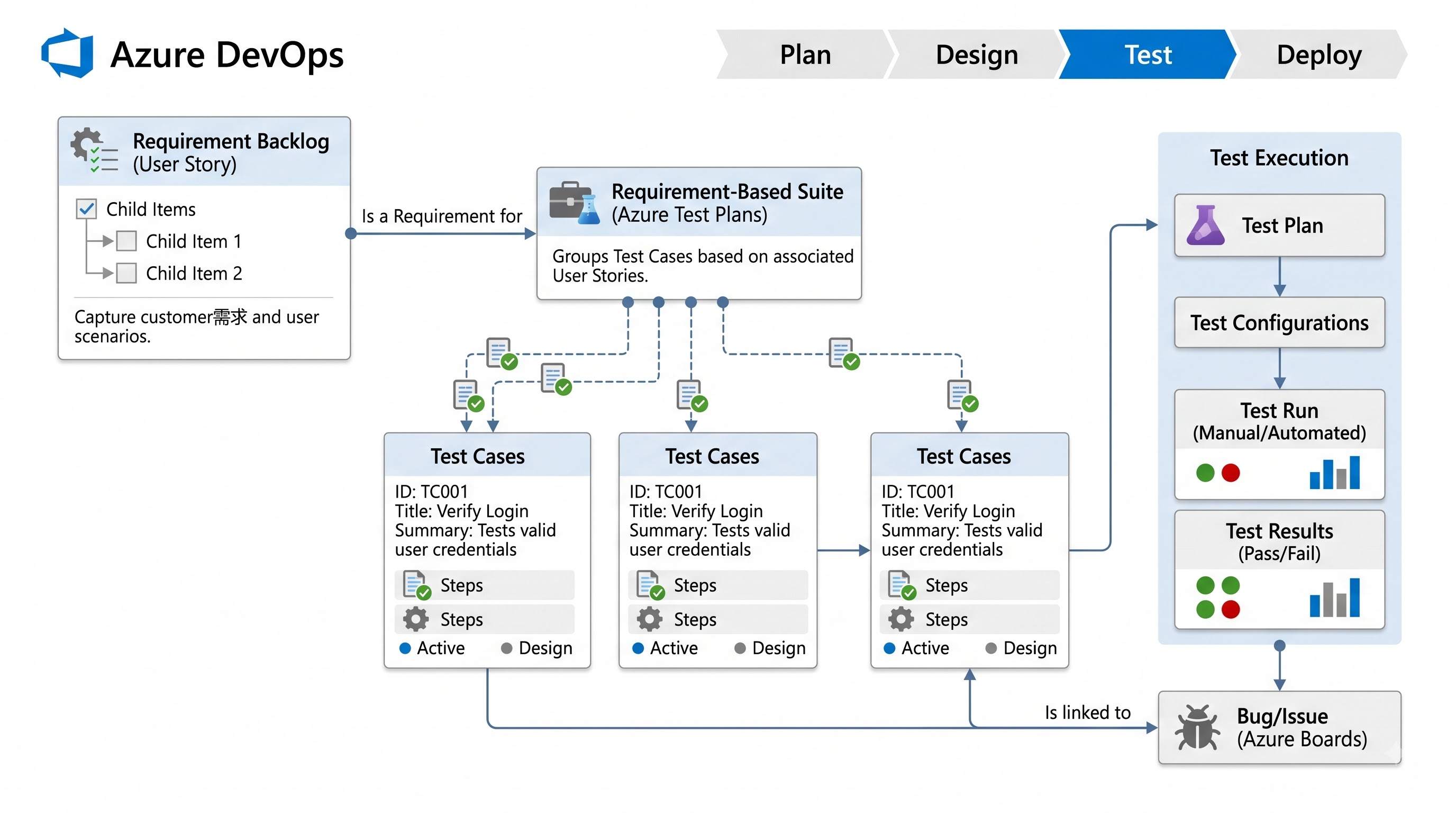
Quality governance is possible only when there is traceability from end-to-end, i.e., every artifact developed during the development lifecycle needs to be mapped to a business requirement. In Azure DevOps, work items are the basis of this traceability matrix. Requirements start off as Epics, Features, or User Stories in Azure Boards.
This architecture is enhanced by Azure Test Plans through custom work item types such as Test Plans, Test Suites, and Test Cases.
Test Plan is the highest level of organization, defined on the basis of milestones, sprints, releases, or functional domains. It defines runtime configurations, target environments, and iteration schedules.
Test Suite is used for organizing testing activities in a test plan. Azure Test Plans provides three different kinds of test suites, namely, Requirement-based Suites, Query-based Suites, and Static Suites. Requirement-based Suites automatically ingest Test Cases linked to specified user stories or backlog items to provide an active link between the scope definition and testing validation.
Test Case is the finest-grained unit of verification. It may have detailed step-by-step manual instructions and expected outcomes, or it could be a mere abstract container for automated scripts.
The linkage between a Test Case and a User Story means that the results of the execution whether through manual execution or automated runs, will be recorded under the User Story. This means that there is clarity in the process of observing the outcome during the review meetings.
Connecting the Current Solutions: Selenium and Playwright with the Test Cases
The use of automation tools such as Playwright and Selenium means that the testers receive quick feedback on bugs and compatibility issues. But when the automated solution provides only raw logs or single test results, it makes it difficult for anyone out of the engineering department to understand what has been verified.
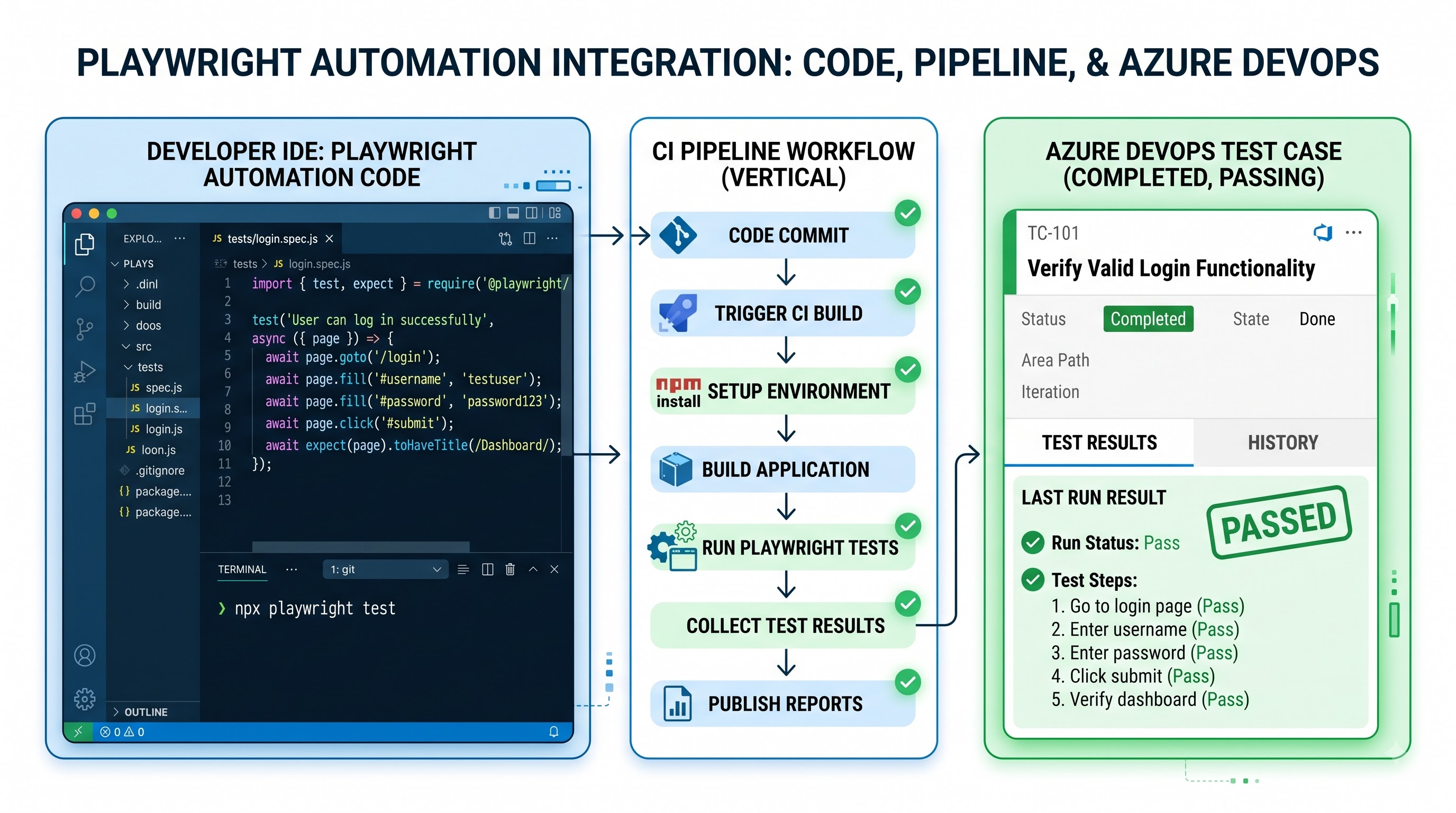
An internal automation state property can be found in each work item referred to as a Test Case. Using Azure DevOps, the teams can connect the automated test functions written in Playwright or Selenium to the specific Test Cases. This can be achieved through a range of development environments such as Visual Studio or through Azure DevOps, which will allow the teams to connect pipeline test results to the Test Cases.
The process looks the following way:
The Test Case changes its status from unautomated to automated.
When triggering CI/CD pipelines to run any Playwright or Selenium tests, the results are posted on Azure Pipelines and linked to the corresponding Test Cases.
Suppose an automated Playwright test does not pass a certain assertion. In that case, Azure DevOps records the failed automation tests as well as marks the respective User Story as degraded, displaying the information about the failure on the common Test Runs dashboard.
This significantly alters the governing model of the automated pipelines. Automated test cases are not treated merely as transient build artifacts anymore.
Exploratory Testing and Observing Humans
Though systems can reliably perform repetitive regression tests, it is impossible to mimic the human insight that is involved in exploratory testing to discover edge cases, assess visual quality, and evaluate usability. Thus, exploratory testing is indispensable for identifying complex errors in a system's operation.
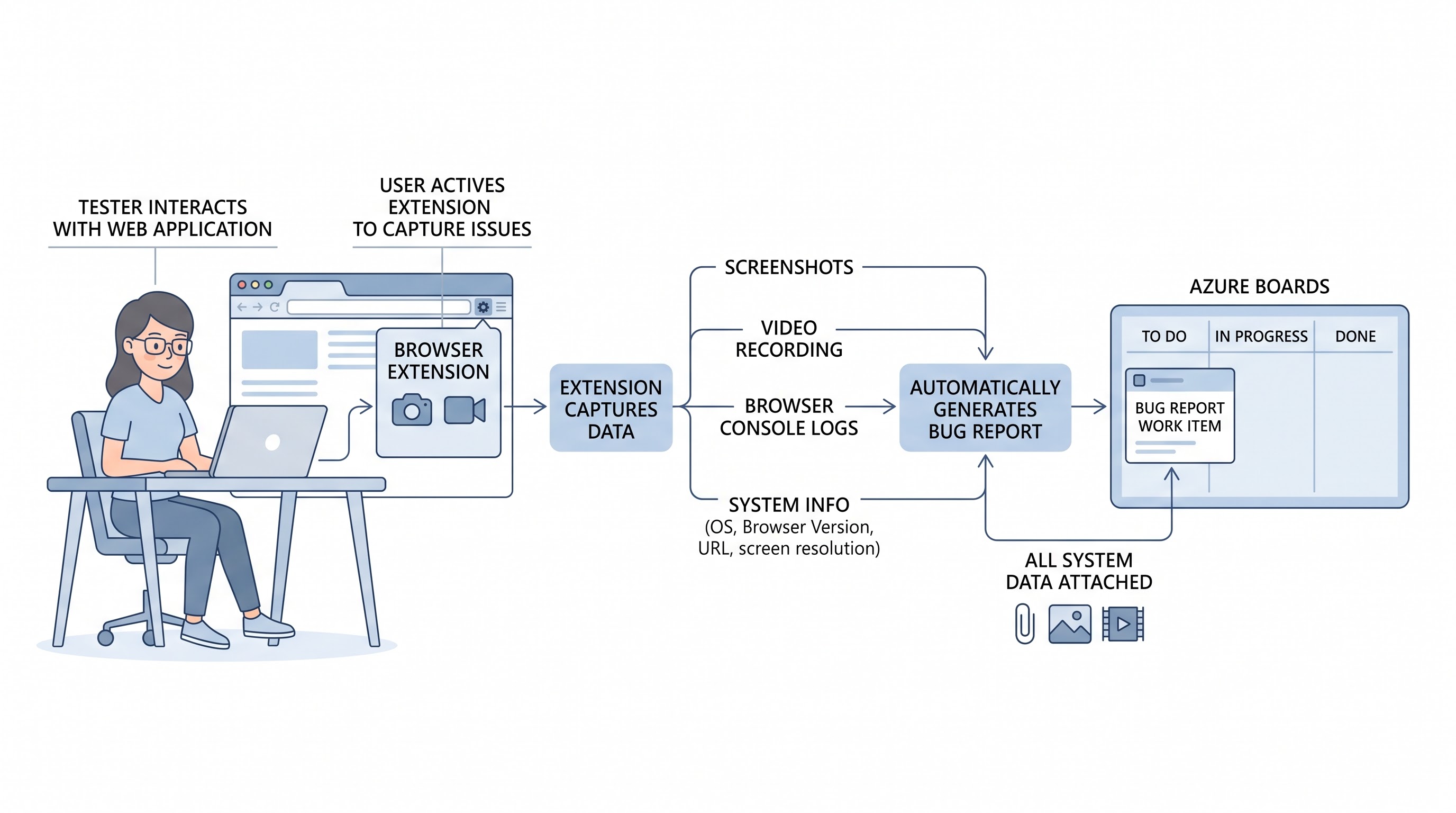
Azure Test Plans has been developed as a special tool for providing exploratory testing to its users. In this case, Azure Test and Feedback Extension for browsers is used to make exploratory testing easier.
The extension helps testers, QA people, project managers, and project representatives to be able to conduct exploratory testing in real systems without writing a very detailed script beforehand.
Some of its main features are:
Session Recording and Artifact Capture: During application testing, it is easy for the tester to grab screenshots, annotate images, capture video sequences, and log console output and trails.
Direct Work Item Linking: The exploratory session can be correlated to a current User Story, Feature, or Test Plan.
Actable Defect Creation: Tester can log a defect in case of any unforeseen behavior during testing, as the fault will automatically inherit the system information, browser data, reproduction steps, and contain a link to the investigated User Story.
Providing Feedback from Business Users: Non-tech stakeholders can take part in scheduled User Acceptance Testing and provide valuable feedback and approvals, which can be added to project reports.
Using unstructured explorations of humans and linking them to the main backlog, Azure Test Plans ensure at quality gates that manual findings are equally important with automated results.
The Development of Strong Quality Gates in Continuous Delivery
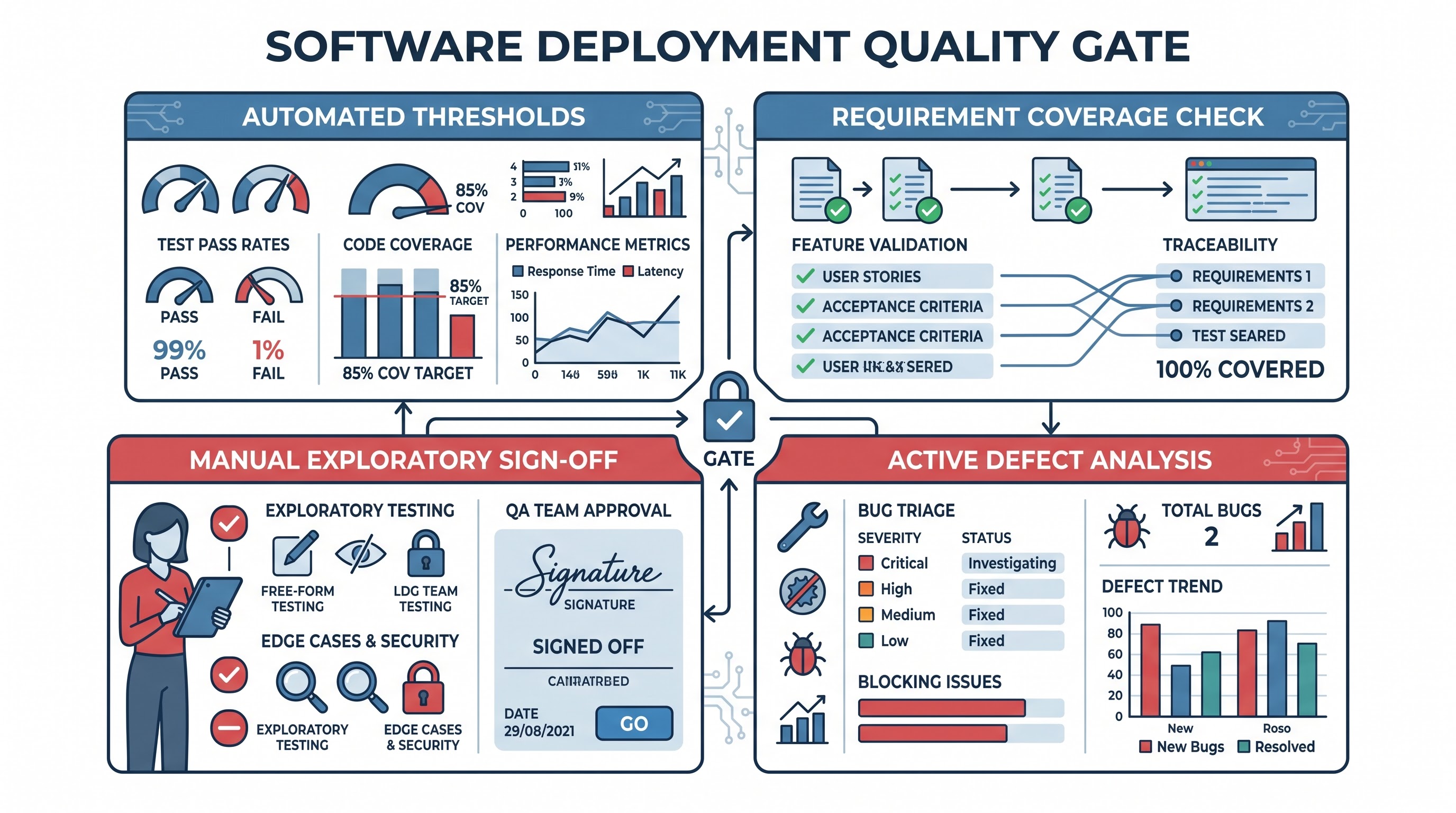
A quality gate serves as a review point implemented before the software passes from one stage in the development process to another—such as Development to Staging, or staging to Production. In a company such as this, an effective quality gate must check multiple factors of a health status at one time.
In Azure Pipelines and release environments, quality gates are implemented through the various types of pipeline stage conditions and automatic approval, and branch policy, and deployment checks.
A well-organized quality gate design considers four main aspects:
Automated Assertion Thresholds: Concerning smoke and regression testing performed with Playwright or Selenium, the completion of the testing suite must pass at a specific rate (the standard is a hundred percent for critical tests and more than ninety-eight percent for non-blocking regression tests).
Requirement Coverage Verification: Each user story for the release must have associated Test Cases that have gone through execution against the candidate release successfully.
Exploratory and Manual Sign Off: Manual validation processes and UAT testing defined in Test Plan must be completed for the presence of open blocker and critical issues.
Active Defects Threshold: The gate checks whether the unresolved defects related to corresponding requirements exceeded the defined limits on importance (for instance, the presence of two or fewer Severity 1 or 2 defects).
As a result of implementing those gates in Azure DevOps release definitions, the deployment engine looks into the relevant data from Test Plans and Pipeline Test Runs when needed. The release pipeline is stopped if Playwright does not pass or acceptance testing is needed.
Preventing Flakiness in Tests and Guaranteeing Test Consistency
One of the biggest risks associated with automated quality gates is test flakiness—flaky tests failing because of environmental latency, network issues, asynchronous rendering delays, resource contention, or any other reason but not product defects. As a result, in the case of triggering false-positive quality gate failures by flaky tests, teams become inclined to circumvent quality gates, losing their trust in the whole automation process.
To maintain reliability of quality gates in the process of running Playwright and Selenium test suites using Azure Test Plans:
Use Auto-wait and Trace Viewing Mechanisms: Avoid random pauses and use Playwright assertions to wait for dom elements to become interactive. In the case of failed tests, publish trace files, screenshots, and videos as an artifact to analyze what causes flaky tests.
Configure Automatic Retries of Failed Tests During Pipeline Runs. Azure DevOps focuses on reliability in tests with the help of analytics tools and marks tests that pass only when repeated as flaking to help teams identify the tests they can refactor without affecting production.
Separate Unreliable Tests using Test Suites: Move frequently failing automated tests from the main test suite to a separate suite so that the main quality gate remains functional while the engineers investigate the failure reasons.
Preserve Complete Execution Configurations: Use Azure Test Plans Configurations to define attributes like operating systems, resolution of screens, and browsers so that pipelines can perform specific runs, helping one to see if the related issues are related to the app.
Agile Teams Implementation Workflow
In order to use a consolidated quality gate system, teams in businesses often take advantage of proven operational lifecycles that are taught as part of a good course on microsoft devops course which cover getting new features from idea to release verification:
Sprint Planning and Testing To begin implementing the process, the product owner prepares a User Story on Azure Boards, allowing the QA engineer and developer to create a Requirement-Based Test Suite in their Azure Test Plan. It allows creating Test Cases that stand for both the automated assurance tests and the exploratory tests to be conducted.
Automation Testing The next stage assumes code development with the assistance of automation engineers and developers who write Playwright or Selenium scripts along with the feature code. The testing methods correspond to the Test Case IDs.
Continuous Integration verification When the pull request is made, basic automated unit and component tests are performed to check the code. As soon as the code is published in the main integration branch, the CI pipeline executes the complete test suite offered by Playwright and Selenium. The results are sent back to Azure Test Plans automatically updating the status of Test Cases.
Executing the Exploratory Testing Phase: The team, which includes testers and product owners, starts the Azure Test and Feedback Extension after putting up the release candidate on a staging site. The testers are required to perform exploratory tests as per the Test Plan. They can report bugs related to the user stories in case the exploratory tests identify any such issues.
Evaluating the Quality Gate: The objective behind evaluating the quality gate is to evaluate the release pipeline before it proceeds to production. The release pipeline checks the analytics of the test runs, checks for automated test labels, ascertains that the manual sign-off was done for the Test Plan, and ensures that there are no critical bugs still pending for release.
Continuously Monitoring the Process and Retrospect: The team will look into Azure DevOps Analytics for the things like the Quality of Requirements, changes of the Test Runs pass rate, and the past Test Duration so as to improve their testing strategy.
Organizational Benefits of Unified Quality Governance
The combination of automated Selenium and Playwright testing along with manual exploratory testing and issues handling in Azure Test Plans leads to tangible improvements in software organizations.
Reduction of Siloed Tools: Using Azure DevOps for testing records saves costs on buying subscriptions to some other test management tools and ensures that engineering, quality assurance, and product management work on the same document.
Auditability and Compliance: For companies in healthcare, finance, or public sectors that require strict compliance, Azure Test Plans provides an unalterable audit trail.
More Rapid Managing of Root Causes: Upon the detection of a defect, developers are provided with immediate reference to build numbers supported through linked records of Playwright trances and informal recordings of videos, along with necessary requirements of the user story. This level of understanding greatly assists in minimizing time required to resolve the issue.
Making Data-Based Releases with Confidence: Release managers of today do not have to collect the status of the release from various sources any longer. Through quality dashboards the states of releases are evident just in time that gives guarantee of their readiness for execution.
The use of the Azure Test Plans for the purpose of central connection of modern web browsers automation technologies, explorations and backlog management provides with reliable protecting gates that ensure the quality of the software at the level of enterprises.
Implementing Quality Gates in Corporate Environments and Microservices
As software architecture transforms from monolithic systems to distributed microservices and cloud ecosystems, quality gate governance must expand without causing delays in delivery. A single end-user business requirement in a microservices architecture may traverse multiple independent services while taking advantage of different repositories and deployment pipelines.
The challenge lies in managing it within Azure DevOps with multi-project Test Plans in place. The teams will be able to centralize their end-to-end integration and user acceptance testing plans in the core governance project while allowing service teams to control their deployment pipelines as well as to use local regression suites in their repositories.
After any downstream service initiates a build, its Playwright or Selenium smoke tests run inside its own dedicated pipeline, and the test results are sent to the central requirement suite through cross-project work item linking.
Such approach results in two levels of quality gates:
Gates at the Component Level: Established within each microservice pipeline, testing isolated units, performing mock-driven Playwright tests, using API contracts, and applying internal limits on defects, would all have to pass before merging is made to the integration branch.
Gates at the System Level: Practiced in orchestration and staging environments where Azure Test Plans initiate holistic journeys through the entire process by using the API gateway, message broker, authentication provider, and any other third-party dependency.
Thanks to the separation of local verification of components from global checking, enterprise companies are able to keep high speed of releases of teams working independently but responsible for their respective parts.
Dealing with repositories of different projects as well as multi-level release gates is one of the main operational aspects studied in advanced microsoft azure devops training courses.
Advanced Defect Lifecycle and Feedback Triage Workflows
A well-known point of failure in software delivery during triage of the defect. After automated UI testing fails or the exploratory tester has unearthed some unusual behavior in the system, the speed of triaging the defect decides whether it will hold at the release gate or not.
Automated Data Collection during Defect Reporting: The automated capturing of data regarding the context of the defects occurs either due to the unsuccessful automation pipeline or the Azure Test and Feedback Extension. The details include build numbers, commits hashes, target branches, OS and browser versions used and video recordings including console log information, and the step-by-step process of recreating the defect.
Automated Work Item State Synchronization: Bug incidents linked to User Stories affect the lifecycle status of its parent work item. For instance, if a blocking bug occurs during exploratory testing, it will result in a degraded quality state being shown in the case of the parent User Story without a need for any manual updating of the information which alerts scrum masters and release engineers about the risks at once.
Regression Testing Cycle: The moment a programmer applies a code modification, the state of resolution results in a directed re-testing cycle taking place. When it comes to automated testing processes, a continuous integration tunnel repeats the designated Playwright and Selenium test case concerning the bug-fix branch. The tester working on exploratory defects receives an alert to conduct the verification of the resolution employing the documented reproduction steps. The defect can only move to a closed state once the connecting test case is successfully passed, which defines the verified fixing process before the gates are opened.
This mechanism of feedback leads to the elimination of incomplete bugs, prevents regression leakage, and ensures that all decisions taken regarding quality gates are based on verified resolution results, and not on the developers’ suggestions.
Analytics, Continuous Improvement, and Quality Metrics
Enforcement of quality gates is more than just a go/no-go decision at the time of implementation; it is an ongoing activity characterized by usage of metrics. Azure DevOps offers extensive analytics and reporting features both via dashboarding, Analytics Service as well as integration with Power BI.
To enhance the quality within the testing lifecycle, the engineering management has to follow due core metrics:
Requirements Quality and Test Coverage: This metric illustrates how many user stories are accompanied with the linked automation or manual tests. Continuous dropping of the requirements coverage is a sign of gaps during the sprint planning, therefore, quality leads will have to take action before the features become CANDIDATES FOR RELEASE.
Test Run Pass Rate and Duration Trends: Long test runs in either Selenium or Playwright tests might slow the CI/CD pipeline and motivate the developers to give up local validation. Understanding the test duration history helps teams identify tests with excessive duration, thus optimizing the parallelization of the browser and removing unnecessary verifications from the process.
Flakiness & Retry Ratio: Tracking the number of times the test fails on the first attempt, but passes in a retry would be helpful to find weak locators, timing problems with asynchronous code, and the issue of unstable testing environments. The following policy could be introduced: all the test suites which have an acceptable flakiness ratio will not be allowed to control the release process until they get stable.
Exploratory Test Yield: Comparing the number of defects discovered through exploratory testing to automated tests will allow us to find out whether it is worth automating or not. An increase in the number of exploratory defects for a module with no exploratory defects in the past indicates the problem with either rigidity or lack of coverage by automated tests for the user interaction cases.
This data can be used for recognizing issues that require improvement and help the team cooperate more efficiently when it comes to their automation process during retrospective and quality meetings.
Cultural Transformation: Fostering Collective Quality Ownership
For successful cooperation between Playwright, Selenium, and Azure Test Plans, there must be a transition from the traditional approach to Quality Assurance into Quality Engineering within an organization.
In traditional business models, testing is a different phase following the development process. Developers share their code with QA specialists so they can run the tests and report bugs in different bug-tracking systems. This brought forth tensions, lengthened time to market, and fostered blame when bugs were discovered in the deployed product.
Creating a single quality gate system in Azure DevOps encourages mutual responsibility among all members of the team.
Developers in the Role of Quality Authors: Developers are involved in writing the scripts for the Playwright automation and also write the actual code for features being implemented. They will also be mapping automated tests to the User Story in the Azure Boards. They own failures in the pipeline on the spot rather than waiting for a QA member to report the issue.
Quality Engineers Acting as Quality Strategists: QA specialists have changed their focus on the repetitive checks being performed and moved it to building architectures for testing, preparing requirement suites, conducting exploratory sessions, and controlling gate efficiencies.
Product Managers as Quality Stakeholders: Product managers are taking advantage of the exploratory feedback extensions and dashboards to be able to approve the business value of the delivered functionality as part of the sign-off for release.
Incorporating effective continuous delivery in engineering functions is possible only when quality tuning ceases to depend on a single division and is henceforth automated and visible. Enrolling in a leading best azure devops course at OnlineITGuru offers individuals practical experience developing end-to-end testing pipelines and quality gates.