
Azure DevOps Skills: The Real Truth About Becoming Job-Ready
Last updated on Sep 17, 2026

Beginner azure DevOps course often define Azure DevOps as a package of applications that enable development teams to plan activities, carry out coding, create applications, conduct software testing, and deploy the product respectively. Although the definition is correct, a person might finish several tutorials on Azure Boards, Azure Repos, and Azure Pipelines, thinking that he/she has understood “Azure DevOps”. In reality, getting acquainted with the platform and getting familiar with DevOps are not the same. Azure DevOps does provide its users with instruments for supporting the execution of DevOps processes, but the proficiency comes from knowing how software gets transformed from idea to code, code to build, build to test and eventually test to deployment.
The distinction is important because Azure DevOps is also not a single technology. Azure DevOps is a system which unites many techniques. For example, Azure Boards can be used for planning and monitoring processes, Azure Repos ensure source control based on Git, Azure Pipelines are used for continuous integration and continuous deployment, while Azure Test Plans help conduct planned tests. Azure Artifacts can also be employed for managing packages and dependencies.These sciences become more advantageous when they are combined into one cycle of delivery and not just learnt separately.
Let’s take a straightforward example of a team developing an app. The developer updates the same app and commits the changes to a Git repository. This action may start a pipeline. The pipeline may compile the application, perform automated testing, carry out a number of checks, produce an artifact, and move the application into development/staging environments. Based on the organization’s approach, other checkpoints may be passed before production. If something goes wrong, the team will have to analyze logs to find out the reason of failure, fix the issue, and possibly roll back the deployment. Overall, this whole process is much more related to real work in Azure DevOps.
This is the mistake many newcomers tend to make. They concentrate on memorizing the unique names of the tools rather than on figuring out what problems these tools help to solve. Simply knowing that Azure Pipelines exists is not enough to be able to design a pipeline, and simply knowing Git commands does not include understanding how policies of branching work, or how to create pull requests, detect merge conflicts, and conduct code reviews. Being familiar with YAML syntax does not mean that the person can make a pipeline that will create projects that can function in different environments.
Also, it is worth recognizing the difference between Azure DevOps and Azure. First of all, Azure DevOps is a set of tools designed to facilitate any kind of planning and execution of projects through the use of source control, CI/CD, testing, packaging, and collaboration capabilities. Meanwhile, Azure is more about a computing platform. In fact, the two platforms can be united in a single project, but this does not mean that they are synonyms.
This is the reason why people engaged in learning Azure DevOps must not think that “I only need to master this platform offered by Microsoft.” A better frame of mind would be to say
“I need to know how modern software is developed, tested, automated, secured, and delivered, and Azure DevOps is one platform I can take advantage of.” Thus, the platform is just a part of the picture; the actual skill is how to apply it to build a successful software-delivery process.
The Skills That Companies Are Really Looking For
One of the most common errors to make while learning DevOps is interpreting the job description as a list of technical tools. A job posting can include Azure DevOps, Git, YAML, Docker, Kubernetes, PowerShell, Terraform, Azure, CI/CD, monitoring and security. For an inexperienced person, the list could bring to the conclusion that it is necessary to memorize every tool from the list. Actually, employers are often looking for candidates who would be able to use those tools together to solve problems related to delivery or infrastructure.
Git is one of the first things to learn because it represents a central piece of modern development processes. Any Azure DevOps expert should be familiar with repositories, branches, commits, pull requests, merges and resolutions of conflicts. Git is not only the tool to master before the interview. It is the means of collaboration between teams and the tool for managing changes. If someone doesn’t understand what happens when several developers change the same part of their application, his knowledge of Azure Repos will be rather shallow.
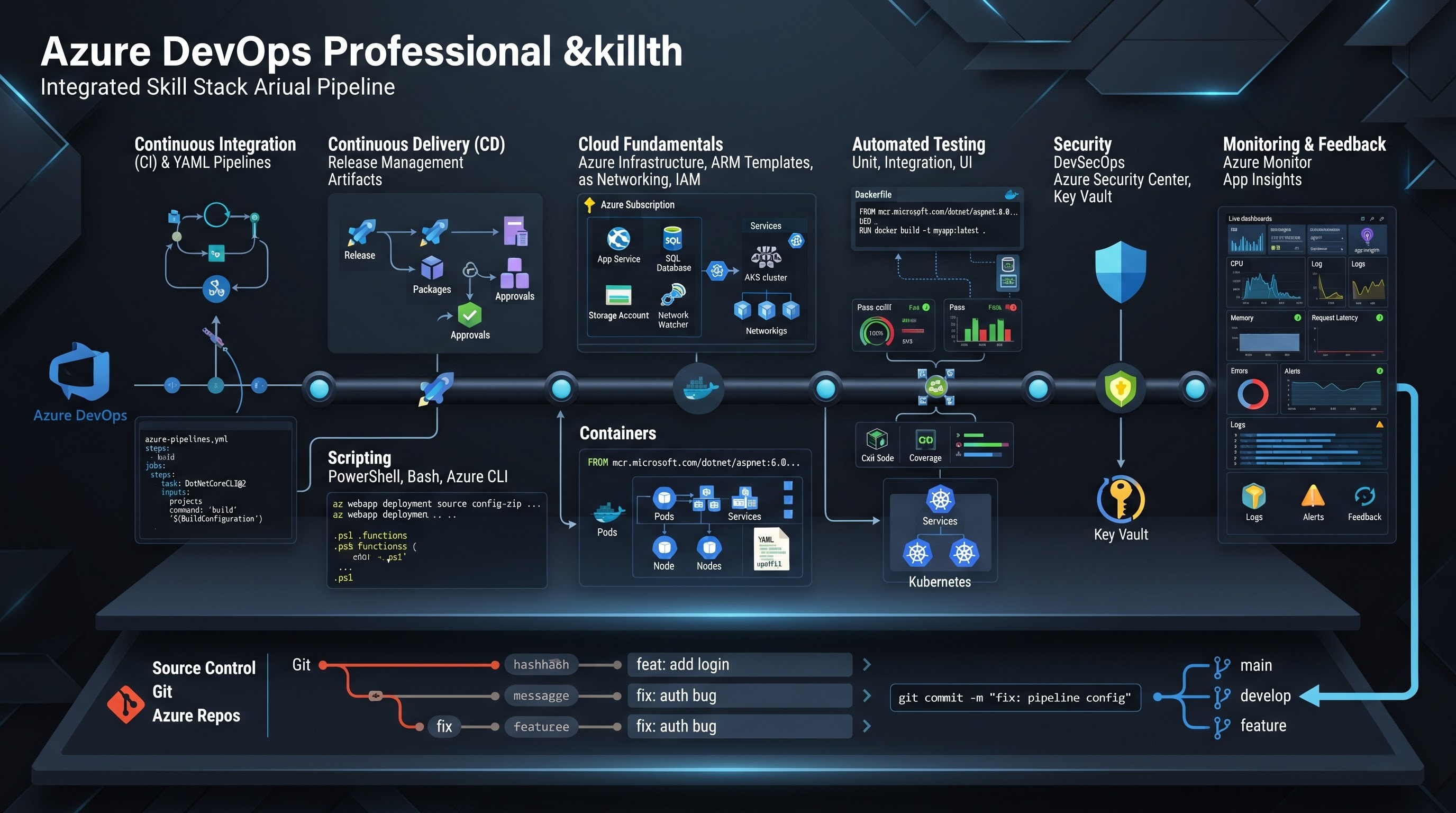
The importance of Azure Repos is understood more effectively when Git terminology is made clear. The important issue is not how to establish a repository, but how to utilize that repository in terms of software development. What is the process of branch creation? What is the procedure for reviewing changes? How do you initiate a validation process after submitting a pull request? What are the consequences of changes made to the code that can disturb operation? How to protect the code against merging include checking processes. All the given questions are pragmatic.
The next stop is Azure Pipelines and CI/CD. In this domain, the difference between theoretical and practical knowledge becomes apparent. Continuous integration can be characterized as fulfilling integration and check-in process regularly through automated instruments. Continuous delivery or continuous deployment means the next stage of the process. Thus, a person who knows the basic principles of CI/CD should be able to present the chain of events starting from the moment when the code is checked in up to the deployment of the resulting artifact.
The increase in dependency on YAML as a language that can express pipelines led to the better awareness of the language. However, knowing the syntax does not mean having DevOps knowledge. Real knowledge goes beyond the notion of pipelines and means understanding stages, jobs, steps, variables, conditions, templates, triggers, environments, dependency, and pipeline design. It is indeed easy to take a code sample from some tutorial. It’s different when the project involves multiple environments (development, staging, production) and requires a deep understanding of the matter.
Scripting is often underestimated by beginners as well. DevOps processes deal with automation, and automation requires some scripting skills. Different environments mean using different scripting languages: PowerShell, Bash, Python, etc. Thus, you don’t need to be a full-fledged software developer but be able to read the code, modify it, pass the parameters, deal with basic conditions, and understand how to troubleshoot failures. As important as cloud fundamentals are, knowledge on Azure-related concepts can make cloud development significantly easier. A deployment pipeline means deploying an item to a specific point. Without understanding the endpoint, the deployment issue will be hard to troubleshoot.
Containers also form a major component of the modern application delivery system. Understanding of Docker will help in finding out how applications and dependencies are packaged in a uniform manner in different environments. Kubernetes comes into play in the companies using container orchestration. Once again, the main aim is not the collection of tech names, but understanding the purpose of containers, how images are constructed and stored and how to deploy and run applications.Testing, safety, and observation are all parts of what makes up the complete picture. A pipeline that only creates and deploys an application should not be seen as a mature delivery pipeline. Automated testing is capable of finding issues prior to deployment. The security measures help safeguard passwords, dependencies, code, and infrastructure. Monitoring enables the team to identify whether or not an application is functioning properly after the launch.
As a result, a wider set of skills is required. While the skills may be applied on the Azure DevOps platform, the main professional advantage emerges from knowing the whole workflow.
The Largest Difference Between Courses and Real Projects
We can say that this is the most serious truth for everyone who wants to begin a career in Azure DevOps: a tutorial can help you understand how things are done, but a real project shows you the reasons why they fail.
In the course, you will see a perfect pipeline. You will have a repository with a clean code repository, structured YAML files, success with build and test, and successful deployment. You will only have to follow the provided instructions to achieve a positive result. However, it is good enough for getting the basics but not enough to get the full understanding of working in the real environment.
Real-life situations are seldom straightforward.
A project may face failure due to an undelivered dependency. A building agent could have a tool missing. A value in a variable might be wrong. Regular permissions of a service connection could not be enough. Environmental differences can cause a test to fail. A rollout could pass in the development stage but fail in the testing phase. Wrong environment settings can be in a configuration file. An absent or wrongly specified secret might present a problem. Interference of a few developers having conflicting changes in their branches might lead to problems.
Even such a common tool as Git may have some complications. Two programmers might work on the same file and create a merge conflict. Someone might mistakenly deploy the wrong change. The validation pipeline may not validate a pull request appropriately. A branch policy might block a merging until all requirements are met. All these things do not happen very often. They occur on a regular basis in collaborative software development.
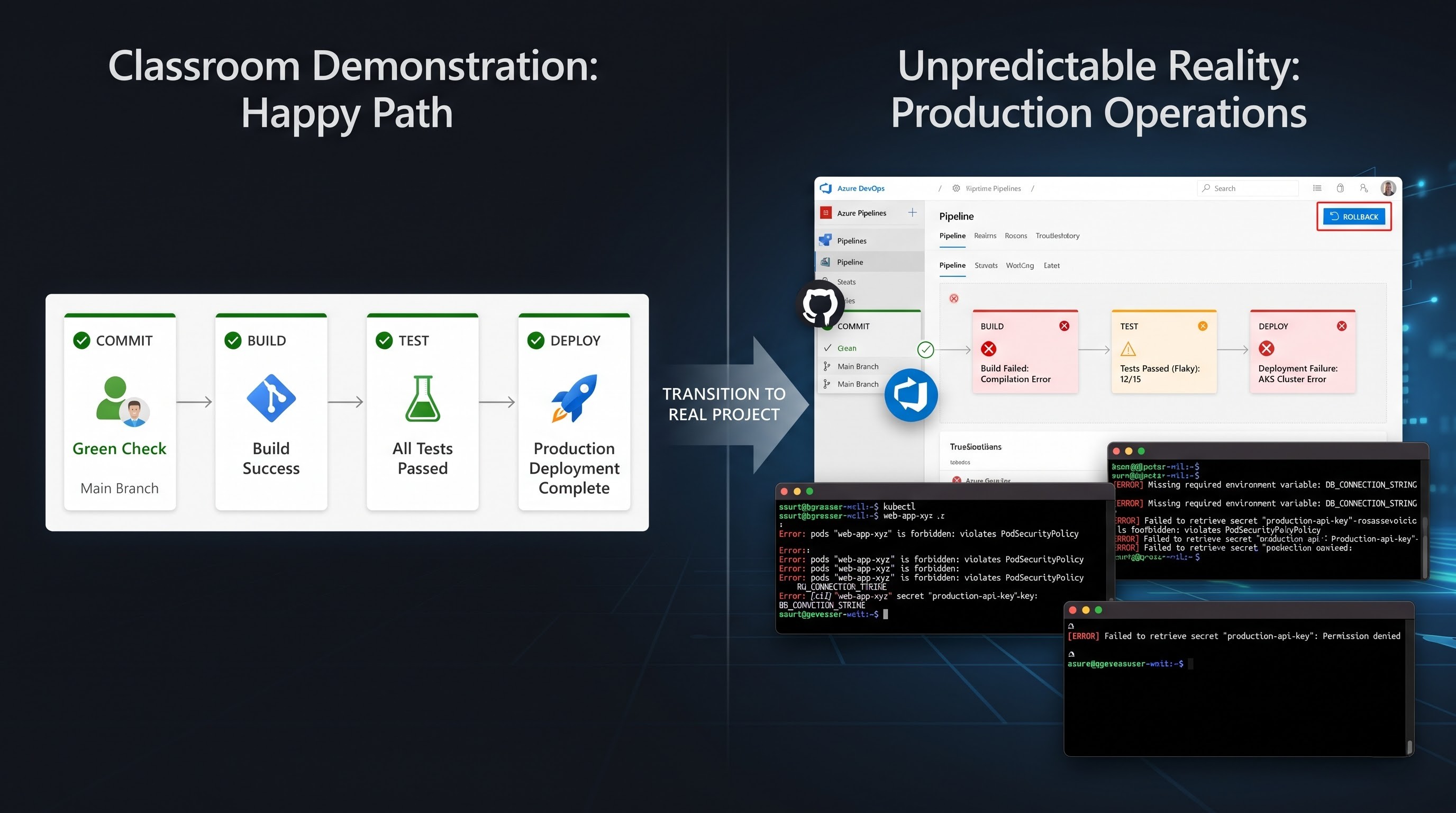
Next is the aspect of the approvals and release processes. Production releases sometimes need approvals from people, performing security checks, implementing a change management process, or other special permissions. However, the goal of these processes is to balance the need for control and speed. Rolback is something that tutorial materials often fail to mention. What will happen if the latest version does a lot of harm? A proper workflow has to have instrumentation to trace what version was deployed and keep track of changes made. The ability to fix a broken deployment can be much more useful than the ability to make one successful deployment.
Training in Azure DevOps does not equal experience in project work. Training is effective because it conveys concepts that may later be useful for executing projects.
Good training involves practicing with failure. You should break the pipeline and fix it. You should create Git conflicts and solve them. You should use different variables for different environments. You should fail your tests. You should set the approval before deployment. You should analyze logs and find reasons for task failure. You should practice changing the pipeline without ruining everything. This approach allows the learner to develop troubleshooting skills that separate someone who has watched DevOps courses from those who actually use DevOps.
Characteristics of the ‘Job-Ready’ Azure DevOps Expertise
Being job-ready does not mean having detailed knowledge about every Azure service or being familiar with hundreds of commands. It implies having the capability to understand a realistic problem related to software delivery and to find a solution
A person can be considered a job-ready learner if they are a pro in taking the source code and tracing its way during the delivery process. The person must know how to create or work with a Git repository, about managing branches, committing changes, creating pull requests, and resolving conflicts. Furthermore, they need to be capable of reading a pipeline, rather than completely relying on using one obtained from the internet. In case there is a failure of a YAML pipeline, they should be equipped with sufficient information to analyze what went wrong and whether it was due to issues with syntax, dependencies, variables, permissions, the environment of building processes, application, or deployment of application.
Another crucial sign of practical knowledge is understanding environments. While a beginner project may have just the development stage, a more realistic project could add staging and production stages. The learner must grasp the concept of how environment settings differ from one another.
They need to grasp the concept of artifacts as well. It means that the process of making a product creates something that could be utilized in deployment, and hence, distinguishing between the source code, build result, and deployed application becomes very important in this situation. Job readiness is about documentation and communication as well. DevOps professionals interact with developers, testers, security teams, infrastructure teams, and business stakeholders. If the deployment fails, then having the capability to give a clear explanation of what went wrong can matter just as much as resolving the technical issue.
Certifications do the job of proving structured learning, but it is incorrect to see them as an alternative to tutorial experience. An individual might pass an exam but still struggle to face a broken pipeline. Another individual might have excellent hands-on skills but lack formal knowledge. In a perfect world, the two approaches would go hand in hand.
This is the point where people who are ready to get their azure devops certification should consider their goal ascertaining that the certificate may facilitate preparation and prove knowledge of the particular area but should complement practical projects instead of substituting them. The better question is not only “What certification should I obtain?” but also “What would I be able to create, automate, troubleshoot, and explain when done?”
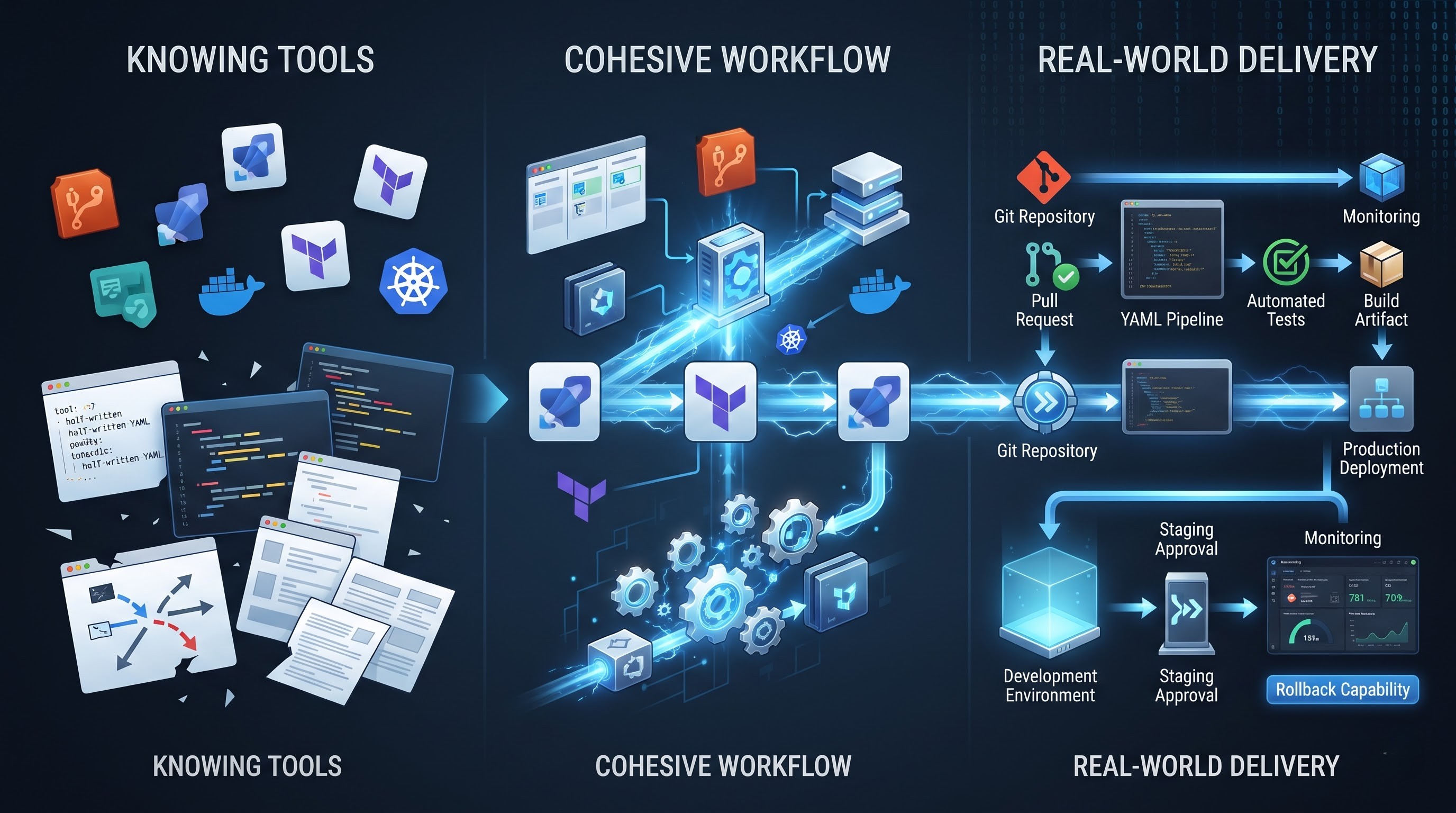
A portfolio project illustrates the lesson of this better than just a series of screenshots showing results. For example, we can take a small web application kept in Git. In this application, the pipeline is automatically builds the application and executes tests with every change made in the code. If the build is successful, then an artifact is generated. The artifact is then deployed in a development environment. The production is represented by a different stage which should be approved first. There are no secret keys placed in the repository but stored separately in a secure way instead. A minimum monitoring system does exist, as well as the rollback process is documented.
Such a project can provide a student with a clear example to discuss in the interview. They will be able to provide a detailed explanation of the architecture, the pipeline, the choices made, as well as any issues faced and resolved.
This is much preferable to simply stating “I know Azure DevOps”.
Azure DevOps + Cloud: Understanding Their Significance
Azure DevOps becomes even more effective when linked with cloud infrastructure, as the process of delivering modern apps does not merely conclude with their construction. Apart from being developed, apps have to be run on servers. Imagine a basic web application launched on Azure. The software developers keep their source code in a Git repository. The pipeline produces the app and runs it through automated tests. After successful testing, the web app can be sent out as well and packed into an Azure environment. Adjustments should be made, secrets managed, and the health and performance of the app can be monitored afterwards.
This is where the knowledge of Azure becomes necessary for a DevOps professional. If a deployment fails due to the unavailability of a cloud resource, someone who knows both the pipeline and the end environment will have a good advantage to solve the issue. Cloud infrastructure includes many additional concepts, like identity and access management, networking, compute resources, storage, databases, scaling, and observability. DevOps is the common thread between many of these because automation is mainly aimed at improving the reliability of the software delivery and operational process.
Infrastructure as Code can take this concept even further. Rather than creating every necessary cloud resource manually through the web portal teams can specify the infrastructure using tools like Terraform or Azure-native tools. Then the infrastructure can be verified, versioned, and used in automation. The change makes difference in work. A specialist doesn’t just install application files anymore. He may as well assist with automating the process of creating and setting up the environment where those applications function. Security tends to matter more as well when DevOps is combined with the cloud. You need to pay attention to rights to access, security pieces of information, identities of services, network configuration, vulnerabilities linked to dependencies, deployment managements, etc. If the pipeline moves too fast but leaks logins and passwords or gives too much access, that’s not a success in DevOps.
The same is true for control. Launching is not the end result of the process. After the launch of the product, the teams have to focus on the functioning of applications, all kinds of mistakes and outages, infrastructure operation, and other signs. When you learn Azure DevOps, but know virtually nothing about cloud computing, there are some gaps left over. You shouldn’t know every single Azure tool, but should understand what particular cloud architecture means for the functioning of your pipeline.
Do you have to learn coding in order to learn Azure DevOps?
The answer is that you do not have to be a full-time developer but you have to get used to working with code even if only occasionally. The essence of DevOps is that it is based on automation, and automation is implemented through some code or configuration. For example, YAML is a basic piece within DevOps’ system. Pipelines usually consist of many pieces that can include stages, jobs, variables, conditions, templates, and instructions of deployment.
Another great asset is PowerShell and Bash since most system administration and deployment activities can be automated using scripts. A DevOps expert can have a task of creating a script that will be responsible for installation of dependencies, configuration changes, checking a service or creating a resource. This doesn't imply that one should possess the same level of understanding about programming concepts as a software engineer would. However, one is expected to know the fundamental principles of programming. Understanding concepts like variables, conditions, loops, functions, error handling, input parameters, files, commands, and APIs could be important for the automation field.
The juxtaposition can be illustrated using a straightforward example. Let's say that in the deployment pipeline, there is a need to ascertain whether some condition is met or not. You don't necessarily have to design the entire application in order to achieve it. What is more important is the possession of skill to understand how the small script is built, why it fails, and how to improve it if the environment has been changed.
Python is a useful language to learn, especially as it is being developed in automation systems. Nonetheless, beginners need not learn all programming languages at the same time. A better plan will be to start from mastering the basics in one scripting environment and then gradually learning how to understand and modify the code used in automated processes. The same logic applies to YAML. You should not necessarily become an expert in YAML, but rather understand the pipeline configuration process and the way all its components work together.
Therefore, one reason the Azure DevOps course must cover practical labs rather than only showing demos. The students must have an opportunity to write or edit YAML, work with Git, create pipelines, set variables, and debug errors. While the devops azure certification program offers a structured learning experience for gaining understanding of key concepts, practical experience is still crucial if a developer wants to use the skills obtained in real projects. The important thing is that coding is one of many DevOps techniques used in practice. Sufficient programming and scripting skills are developed for the automation and operation purposes rather than for a full-fledged development. With the gain of experience, coding capabilities improve, so it is important to cope with coding enough to use it for automation.