
Beginner Workday HCM: Real Projects & Use Cases
Last updated on Oct 24, 2026

Workday Human Capital Management (HCM) is the most common cloud solution adopted by companies to manage their employees. As for students, junior analysts, consultants, and HR specialists entering the ecosystem, the knowledge about Workday terminology could be considered quite academic. Studying the processes related to organizational management, recruiting, calculations of fields and other aspects does not provide you with practical skills of creating functional flows.
Closing the gap between the theoretical aspect and practical application can only be achieved through successful completion of the portfolio assignment. The individual develops functional skills through the process of task application in regard to the realities of the corporate organization. If one feels the need for professional guidance, signing up for workday hr training online helps one reduce the time taken in gaining hands-on experience.
Workday HCM Architecture Building Blocks
Prior to carrying out practical assignments, it is required to know something about the basics of Workday HCM architecture. Workday HCM implements an object-oriented in-memory database where all building blocks are dynamically interconnected. Therefore, it is required to know how the building blocks are interconnected.
Supervisory Organization
The supervisory organization may be considered as an important part of Workday HCM architecture. In contrast to traditional ERP system working on the principle of employees' connection with departments, Workday HCM works with the concept of creating hierarchy among employees via a supervisory organization. The supervisory organization is developed to address the problem of reporting between employees: who reports to whom? Each employee should belong to a supervisory organization and each supervisory organization should have its own manager.
Staffing Models
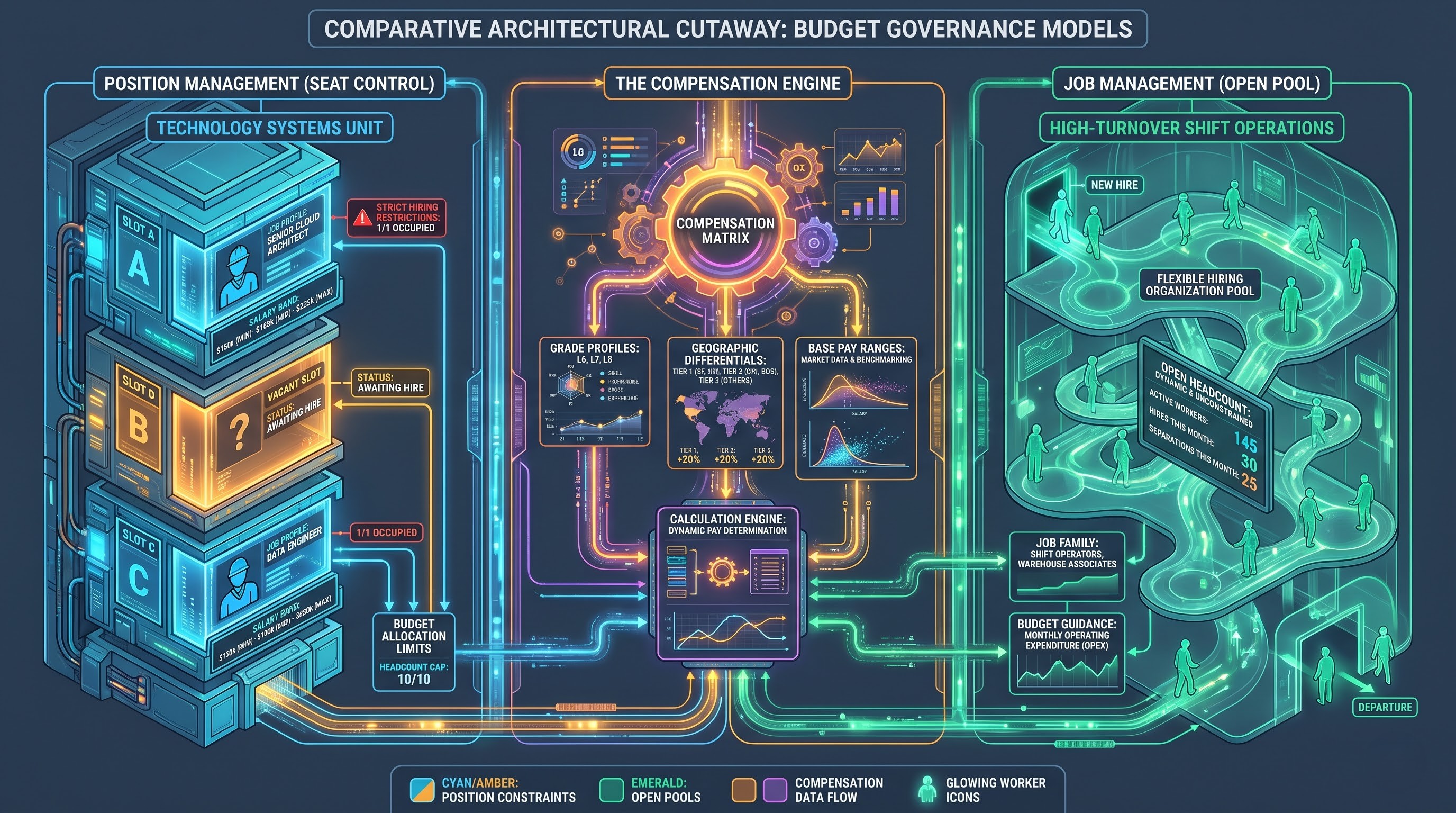
Workday supports two models of Staffing, which are Position Management and Job Management. In the Position Management model, staffing process is tightly controlled since a position should exist before one recruits, transfers or promotes anyone to a position. This is mainly applied in corporate environment, health care and finance industries where budget management is critical. On the other hand, in the Job Management model, recruitment criteria are bound to the organization overseeing recruitment rather than an individual seat position. Therefore, it is very suitable for organizations that experience high turnover rates e.g. in retail, seasonal or shift jobs. For a beginner project, it is advisable to use Position Management due to its prevalence in most enterprise environments.
Job Profiles and Pay Structures
A job profile is basically an aggregation of attributes that describe the job itself. These include, among others, job family, management level, exempt vs non-exempt, standard hours and qualifications. Job profiles connect to pay structures that include compensation plans, pay grades, pay grade profiles and plans (Base Salary, Hourly Pay & Bonus Plans). Proper setup of job profiles enables automatic creation of pay structures when an employee is assigned to a job profile.
Workflow Engine – Business Process Framework
Business Process Framework (BPF) is a workflow engine in Workday. Any action performed with an object (hire, promotion, termination, salary adjustment and others) is done using this element. The business process definition includes process steps, their sequence, security group in charge of the process, conditions, validation and notification. Configuration and customization of business processes is one of the key technical competencies of a Workday consultant.
Practical Exercise 1. Multi-Level Global Organizational Hierarchy
Scenario Description
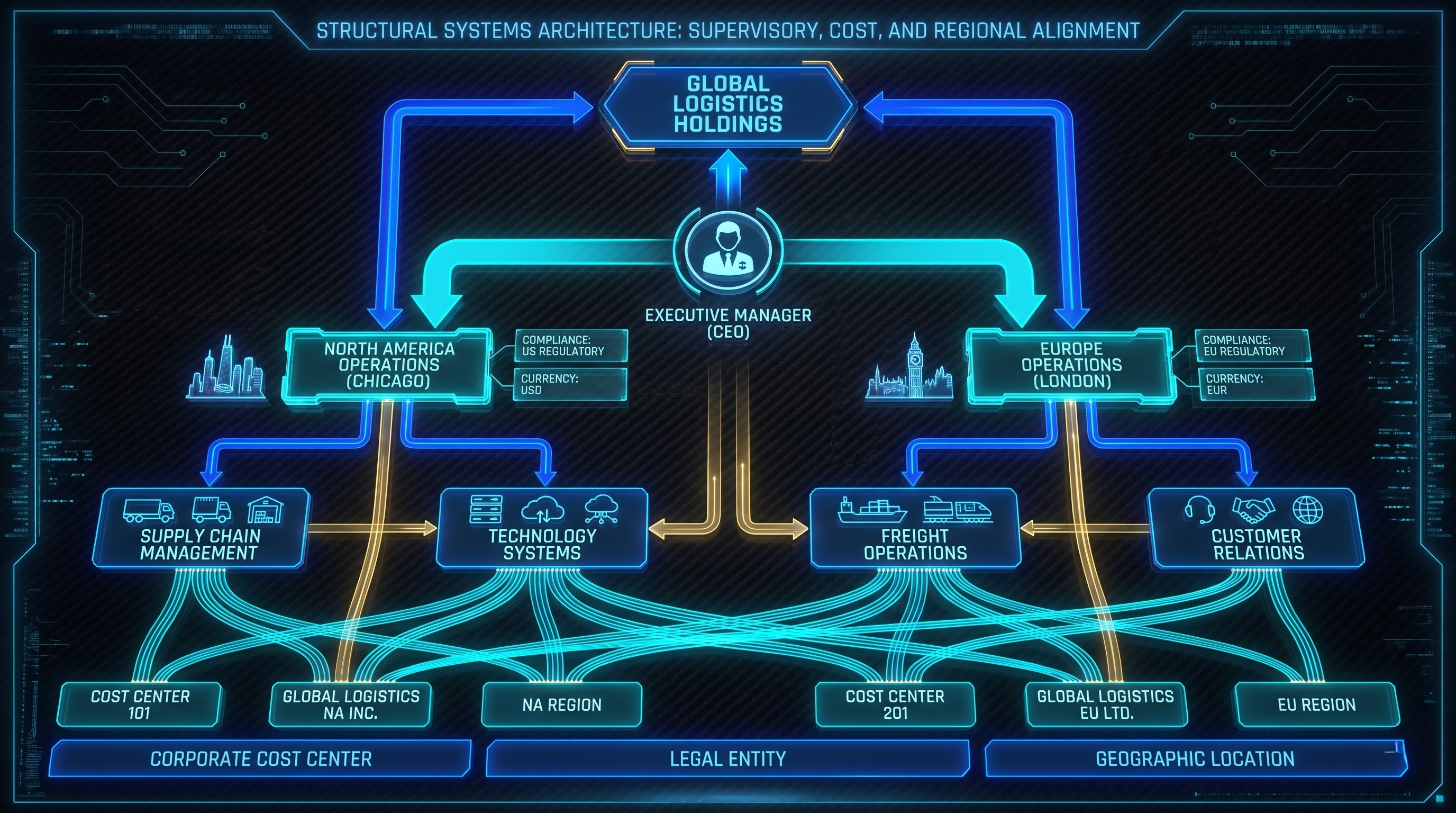
Global Logistics Enterprises is a mid-size enterprise intending to expand its business in North America and Europe. It is necessary to build a multi-level organizational hierarchy that will allow controlling the enterprise by regions and departments and distributing costs.
Configuration Steps
The parent supervisory organization "Global Logistics Holdings" should be configured and the head of the organization should be appointed. Two regional supervisory organizations "North America Operations" and "Europe Operations" should be configured.
Under the North America Operations, create two subordinate organizations to be named as Supply Chain Management and Technology Systems. While doing so, make sure that the properties of organizations are configured properly. The properties of organizations include the type of organization, organizational subtype, main organizational location (Chicago for North America and London for Europe) and supervision of organizational units.
Link each of the supervisor’s cost center, company and region. In the same way, under the Europe Operations create two organizations which should be named as Freight Operations and Customer Relations.
Validation and Verification
Ensure that in the organizational structure of Global Logistics Holdings, there is display of two regional parent organizations beneath the global executive organization together with the two departmental child organizations. Make sure that there are no orphans and cycles in the reporting hierarchy of managers.
Practical Exercise 2: Position Management, Job Profiles, and Compensation Packages
Scenario Description
Two positions should be recruited within the Technology Systems team according to the following job profiles: Senior Cloud Infrastructure Architect and Junior Support Specialist. The job architecture needs to be created. In addition, you need to establish competitive compensation bands for those positions and to publish particular jobs under particular constraints.
Configuration Steps
At first, you need to go to the Job Catalog configuration screen, create new Job Family named Information Technology and two Job Profiles within this family: Senior Cloud Infrastructure Architect and Junior Support Specialist. You should enter a particular job code, classification of worker (for example, regular employee), number of weekly working hours (forty hours a week), level of management and payment method (salary or hourly).
Another task is to configure the compensation system. You need to create new Compensation Package named Enterprise Technology Compensation. In this compensation package, you should establish the compensation grade for two different grades in accordance with geographic location. Configure Base Pay Plan with minimum, midpoint and maximum salary ranges.
Thirdly, move to the supervisory organization Technology Systems and start the process of Create Position. Number of Positions needs to be set to one, Position Management will be used as a staffing model, proper job profile needs to be selected and restrictions on hiring need to be done with the required date of start date of employment, availability date and location of Senior Cloud Infrastructure Architect position. The same procedure needs to be repeated for the creation of Junior Support Specialist position.
Validation and Verification
Move to the supervisory organization Technology Systems and view the Staffing tab. Ensure that the two new positions have the status Vacant (hirable). Moreover, ensure that the two new positions have correct position restrictions; default compensation elements, job profiles and work conditions should be defined.
Practical Exercise 3: Customize the Hire Business Process Workflow
Scenario Description
Default Hire business process workflow does not contain any step except initiation and completion of HR. Nevertheless, according to your corporate governance policy, each new hire needs to be approved by the department manager and then go through compensation review performed by the Total Rewards group and receive an automated notification to Facilities and IT.
Hire Business Process Steps
Locate the Hire business process in the supervisory organization by making use of the exercise 1 and employ business process editor to find out the current steps that exist in alphabetical order from action to completion.
Insert an approval step after the first step in the hiring proposal process. Assign the responsibility of this approval step to Manager security group in the supervisory organization. After that insert the second review step which is all about the compensation in the business process and allocate this step to the Compensation Administrator security group.
To enhance the efficiency of the process insert the following condition to the compensation step: if the offered base salary is lower than the standard grade profile midpoint, then no executive should participate in the process. In case if the opposite situation takes place, ensure that the notification is inserted to Executive Compensation Director.
Lastly, insert the terminal notification event that is going to be automatically activated when the hire receives the 'complete' status. The data that should be provided is the name, start date and desk location of the hired employee for IT Helpdesk and Corporate Facilities security groups.
Validation & Verification
Think about the sandbox/test environment as a tool and think of yourself as the HR Partner to launch the Hire business process for an open job position. Perform all the transactions related to the workflow process. Make sure that all the transactions were submitted to the right inbox and wait for approval from the manager. After that, perform conditional compensation review and final notifications.
Practical Exercise 4: Managing the Entire Worker Life Cycle
Scenario Background
To find out how the information about the employee will be managed during the whole period of his/her work, you need to pass through three important stages of the career of the employee. These stages are Internal Transfer, Lateral Promotion, and eventually, Voluntary Separation.
Configuration Steps
Select any employee of the Freight Operations Organization and launch the “Transfer Worker” business process. Select any destination organization (Supply Chain Management) and specify the reason (Internal Career Development). Select any open job position of the destination organization. Perform all the transactions and notice how automatically the supervisory manager receives notification.
Next, implement the career development plan for mid-year. Conduct the Change Job process on behalf of the same employee. Change the job title of the employee from Support Specialist to Lead Analyst. Then, conduct the 10% base pay adjustment with merit in the compensation section. The next process to conduct is that of promotion through the executive approval process.
Conduct the voluntary termination process now. Implement the Termination of Employment process. Input the reasons for termination (resignation because of career opportunities in other areas). Specify the notice date and last day of employment. Conduct the off-boarding process as per the off-boarding checklist that includes equipment return and severance payment.
Validation and Verification
Go to the history record of the employee and verify the history record in chronological order, for instance, hire, transfer, promotion, compensation adjustment, and termination. Ensure that the status of the employee is terminated and the status of the vacancy in the staffing section is open.
Practical Exercise 5: Report Creation and Calculation Fields
Scenario Description
The operations report that has to be prepared in the human resource department by the management is called Active Headcount and Compensation Distribution Report to calculate the number of years of service of each employee and salary greater than regional thresholds.
Instructions for Configuration
Navigate to Create Custom Report feature. The report should be named Active Headcount and Compensation Analysis. The report type should be advanced and the data source as All Active Employees.
Under the column selection feature, choose the following fields from employee details: Worker Name, Employee Id, Supervisory Org, Job Profile, Hire Date and Base Salary.
For the operational intelligence, create two custom calculated fields. The first one will be date difference. It will give the result of years between the dates of the Worker Hire Date and the Current Date, rounded to get the Years of Service. The second calculated field will be called Evaluate Expression. The rules of setting the values of this field will be the following: if the Base Pay of a worker is more than one hundred twenty thousand dollars in North America or one hundred thousand euros in Europe, then the High Band; otherwise, the Standard Band.
Place both of these calculated fields in the columns of your report. Add filters criteria for contingent workers and contractors. Activate the runtime prompts for the fields of Supervisory Organization and Location in the Prompts tab in order to allow department heads to generate the report for their departments.
Validation and Verification
Generate the report for all the company. Verify whether the calculation of the years of service was made correctly regarding the calendar. Verify whether the flag for the conditional salary was set properly regarding the currency and the geography.
Use Cases for Full-Scale Enterprise Initiatives
Creating enterprise configurations from individual configurations is very similar to how implementations happen in the real world. Here are the examples of use cases which represent typical enterprise scenarios which need to be addressed during enterprise transformation.
Tango
Use Case 1: Organizational Harmonization after Mergers
There are two enterprise entities after mergers which need to harmonize their organizational hierarchy, job grading schemes and compensation plans into one plan.
Business Scenario: Company Alpha buys out Company Beta and finds itself having four hundred employees working in twelve legacy locations under different organizational hierarchy and job grading schemes.
Solution Implementation Approach: In order to successfully implement this initiative, one will have to create an approach which will help design a single supervisory organizational hierarchy with mapping legacy departments into organizational hierarchy of the parent company. One will have to develop a full-fledged Job Catalog with mapping legacy job titles into jobs of the parent company.
Execution Approach: Create supervisory organizations and jobs in bulk using spreadsheets of the Enterprise Interface Builder. Implement cross-entity compensation plans allowing to keep legacy pay schemes of acquired employees and corporate default schemes for newly hired employees.
Use Case 2: Self-service in Enterprises and Reengineering of the Absence Policy
The paper handling of vacation request forms, registration of sickness through e-mail, and personal information storage through paper documents are some examples of such inefficient processes.
Business Scenario: A multinational manufacturing corporation aims at cutting down the usage of HR request forms by introducing self-service capabilities to its employees and managers using Workday ESS and MSS.
Workday Solution: Develop global policies for absence management according to the legislation of the relevant countries, such as statutory paid time off in the UK and not the vacation bank in the USA. Develop self-service processes for the management of personal information, changing one's legal name, setting up direct deposit, and management of emergency contacts.
Implementation Strategy: Develop an approval process so that all time off requests could be automatically approved with sufficient notice beforehand; medical and unpaid time off would go straight to HR absence specialists. Create mobile dashboards for employees' accrual balance management.
Use Case 3: Merit & Compensation Review Process (Yearly)
Processing of compensation differences through several Excel spreadsheets on desktop is exposed to extremely high risk of confidentiality of information and management of versions with errors in calculations.
Business Case: The company providing professional services has three thousand consultants performing cycles of performance and compensation reviews every year relating to differences in salaries, promotions and bonuses in different currencies.
Solution Approach: Deployment of Workday Compensation Management solution. Development of compensation matrix, according to which an employee gets certain percentage of merit increase depending on performance review and his position in salary grade.
Implementation Approach: Establishment of procedures of business process of compensation review, where budgets are distributed from senior executives. The line manager gets certain budget and distributes it among his subordinates in accordance with certain rules.
Best Practices for Testing and Auditing of Workday Configurations
Configuration of the system is only the first half of analyst's task - testing and auditing processes provide for the system reliability and compliance.
Security Roles Assignment and Proxy Testing
Always test the configuration with regular user accounts, not superuser accounts. Enterprise administrator is not subjected to the process steps and security rules and, therefore, provides you with the illusion of flawless functioning of business process. Always utilize Start Proxy to test your workflow from the perspective of real actor like line manager, HR partner, comp specialist or even a new hire. Check if users have access to correct fields, tabs, buttons according to the security role.
Boundary Values and Conditions Testing
While configuring the business process and setting the condition rules in calculated fields, always test the boundary values. For example, if your approval process differs depending on salary amount greater than one hundred thousand dollars, test transactions with amount equal to ninety-nine thousand nine hundred ninety-nine, to one hundred thousand and over one hundred thousand dollars. Make sure there will be no problems with currency conversion, decimal values and empty fields.
Audit Trail and Transaction History
The execution of each and every transaction within Workday produces an irrefutable audit trail. In conjunction with the project validation exercise, review the Process History within all transactions. Review the actual time stamp of transactions, the individuals who perform the action, delegations and routing, and the notifications generated as a result of background processing. Knowledge about the tracking of audit within Workday will help you assist compliance auditors and resolve configuration problems.
Building a Workday HCM Portfolio
In order to highlight your skills to recruiters, consulting firms, and enterprise clients, make sure you document your Workday exercises in a systematic manner:
Problem Statement: Describe the organizational problem, which is getting solved through your Workday implementation, e.g., globalization of organizational structure, automation of the approval process, and compliance visibility issue.
Functional Architecture Blueprint: Highlight the organizational structure of supervisors, the staffing model chosen, job catalogs used, and compensation matrices implemented.
Process Documentation: Describe the business process flow, assign security groups for all milestones, specify conditions created, and the notifications automatically triggered.
Calculations and Reports Blueprint: Specify all business calculations and formulas used, the date differences evaluated, and expressions calculated.
Test Cases and Defects: Provide proof for your test cases done via proxy users, test cases for extreme conditions, defects identified while testing, and configurations changes employed to fix the defects.
It is due to the practice in the activities and the documentation of the decision making from an architectural point of view that the novices convert the theory into practice. If you want to become an expert in this field, with sandbox as well as live mentoring, then you need to enroll yourself for a workday hcm full course at OnlineITGuru.