
Build native Workday apps and integrate external APIs
Last updated on Sep 18, 2026
The Progress in Enterprise Application Strategies
For years enterprise resource management and human resources management systems had followed strict philosophical norms. Companies had to undergo a painful choice between modifying their processes and implementing standardized solutions or taking a risky and expensive custom-built software route. In cases where companies chose the latter, programmers created satellite portals and interfaces as well as specialized web tools that enabled the execution of certain activities manifested by companies.
Although these tools allowed us to solve certain problems that resulted from inefficiencies in the system, they introduced serious overheads into the system. Each added application required a separate infrastructure and hence constant updates, frequent security upgrades, distinct identity management, and bridging systems processes.
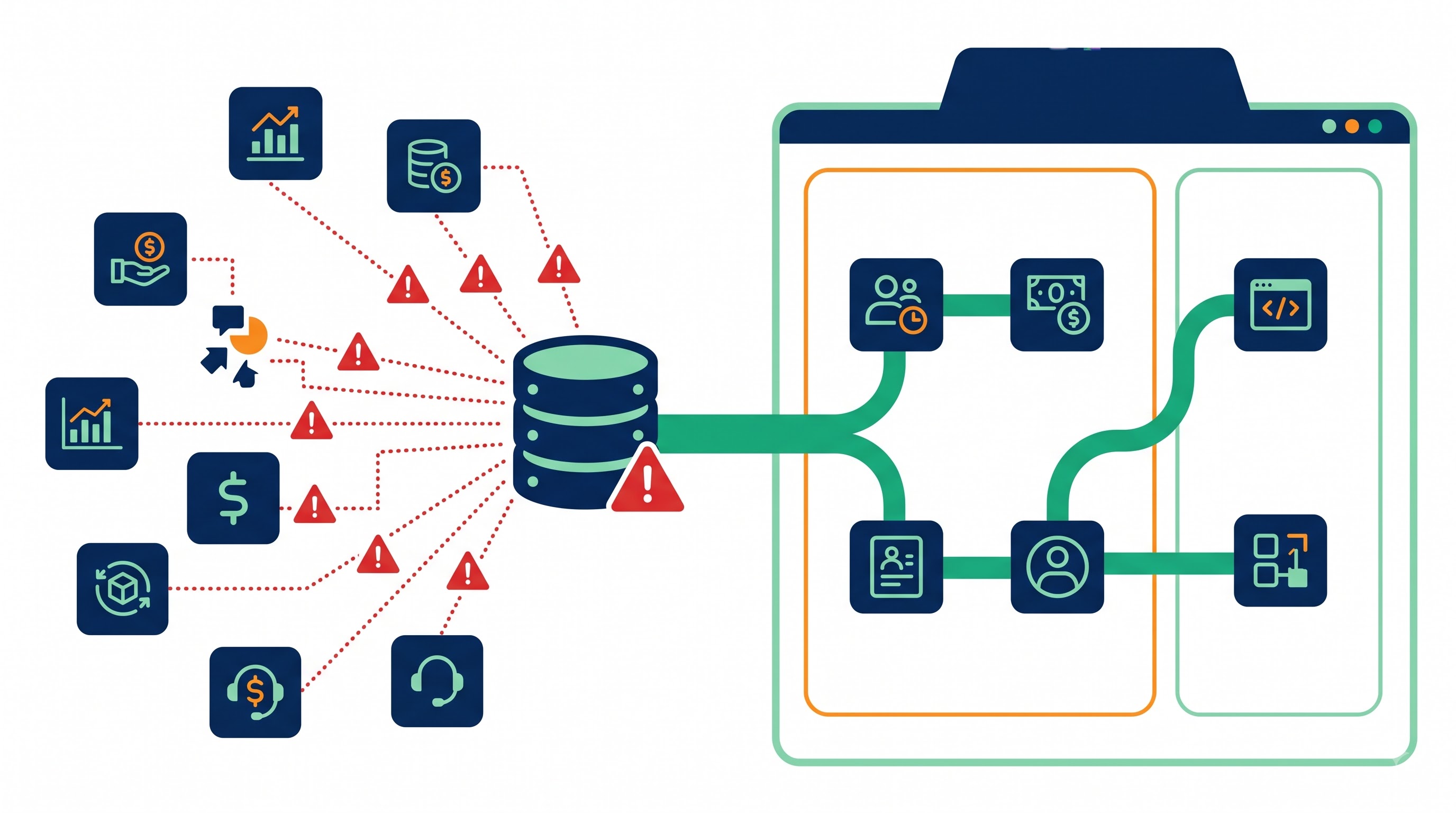
Workday Extend eliminates the divide between the two approaches and offers a solution in the form of a platform-as-a-service layer that works directly within the native Workday Cloud architecture. Instead of having the architectural teams build external systems, Workday Extend provides an opportunity for developers and analysts to create, deploy, and operate their native applications from an existing Workday tenant. Such applications seamlessly interact with all other Workday solutions, such as Human Capital Management, Financial Management, and Student Management. They inherit the platform's enterprise security, are rendered through the native presentation layer, have access to metadata from the core tenant, and are connected to any other third-party interfaces.
The outcome is a single integrated enterprise solution that combines the custom logic, domain-specific data persistence, and connectivity with third-party systems without the challenges of the external application stacks.
Architecture Basics: The Core of Extend Engine
To understand Workday Extend, it is essential to know about its architectural foundations. The common practice in enterprise extensions used to be based on iframes, embedded web wrappers, or external microservices that could only give the same visual appearance. Workday Extend is different because the applications of the Extend framework operate within the Workday runtime environment and use exactly the same metadata-driven architecture as the core Workday modules.
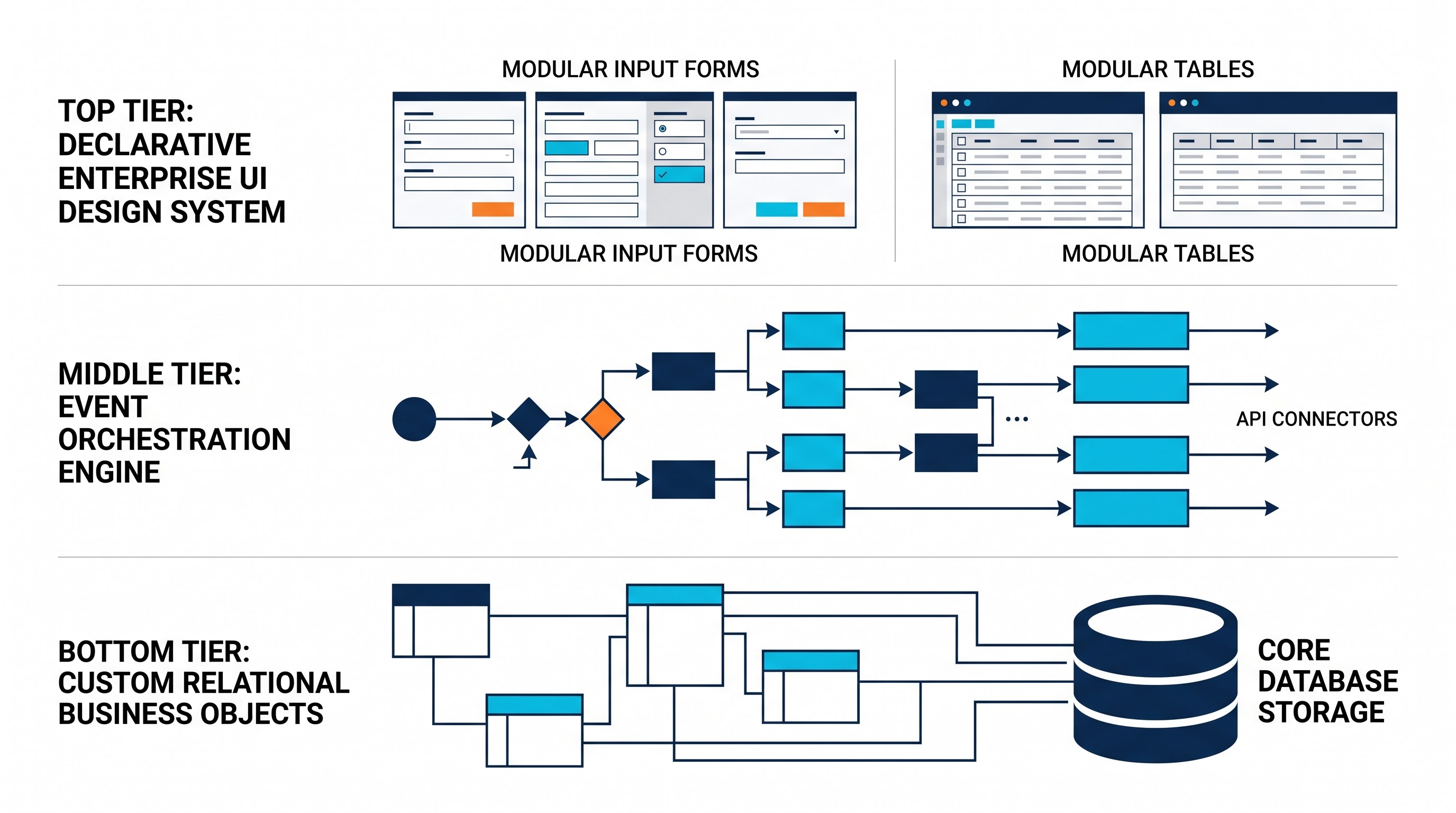
Applications made by Workday represent metadata that is dynamically interpreted by the processes used by the platform. The application of Extend, therefore, is constructed in the same way as the applications of Workday. They consist of metadata definitions submitted to the tenant environments, employing the shared enterprise services, while supporting strict tenant isolation. The architecture of the platform is based on three components: Presentation, Data Model, and Business Logic.
The Presentation Layer and Design System
Cognitive consistency is directly tied to user adoption of enterprise tools. When employees switch between a native enterprise system and a third-party custom extension, the good difference between styles, responsiveness, input validation, and accessibility creates friction. With Workday Extend, friction is removed through the use of a presentation layer built on the Workday Canvas design system.
The Extend user-interface framework provides built-in accessible UI elements such as page layouts, data entry forms, dialog modals, progress indicators, navigational bars, data grids, and interactive detail views. Instead of coding clients’ scripts, configuring unmanaged stylesheets, or running untrusted browser scripts, Extend developers define declarative view metadata using visual page designers or with schema definitions.
In light of the fact that these view components are part of the platform, they appear with identical typography, spacing, and iconography in the same way as usual Workday screens do. Pages built with Workday Extend support cross-device reactivity by appearing in modern desktop browsers and in Workday's mobile application in the same way they appear d in one codebase, regardless of the operating system used. Additionally, the platform automatically takes care of language packs, themes, accessibility, and viewport settings.
Custom Business Objects: Native Data Persistence
Most enterprise workflows require keeping some type of information that the available usual objects do not fit into. For a long time, it was solved either by changing the meaning of some user-created fields or by using an external SQL database or document store.
With the advent of Workday Extend, Custom Business Objects concept has appeared as complete and tenant-residing data objects having all the transactional properties of Workday core objects. Custom Business Objects are not just simple relational tables, they are extensible objects.
The field types can be categorized into primitive field types and complex field types, which consist of text, dates, enumerations, numeric values, and references to documents.
Also, the workday business objects can directly be related with links, where a reference is made to Worker, Organization, Position, Cost center, or Supplier business objects.
Types of relationships that may exist among custom business objects involve one-to-one, one-to-many, and hierarchical self-referential relationships.
The various auditing mechanisms, including inline auditing, tracking of effective dates, and information about changes made to objects are examples of operational metadata tracking.
The workday storage engine makes it possible to avoid latency experienced due to synchronizations since the changes made to the objects happen through atomic transactions handled by the workday storage engine.
Workday Orchestrate: The Engine of Business Logic
The central core of Extend App is Workday Orchestrate, which is an enterprise-grade orchestration as well as integration runtime made for process automation in a declarative manner. Orchestrations serve as a link to the execution process between native services of Workday web, our Custom Business Objects, as well as user interface interaction.
Also, orchestrations are able to be created by the use of drag-and-drop implementations which visually create workflows, as well as through definition files defining the process. This process has a huge set of operational actions including conditional branching, mapping and filtering of collections, simultaneous steps execution, synchronous and asynchronous message processing, as well as execution of error handling.
When talking about Orchestrate, it can be said that it provides operability of multi-system transactions within milliseconds. For example, when a user clicks a button on Extend web interface, an orchestration starts immediately and updates the details for a specific worker. Overall, it allows you to create a Custom Business Object as well as give authorization requests to a third party system at once.
The Unified Security Model and Governance Framework
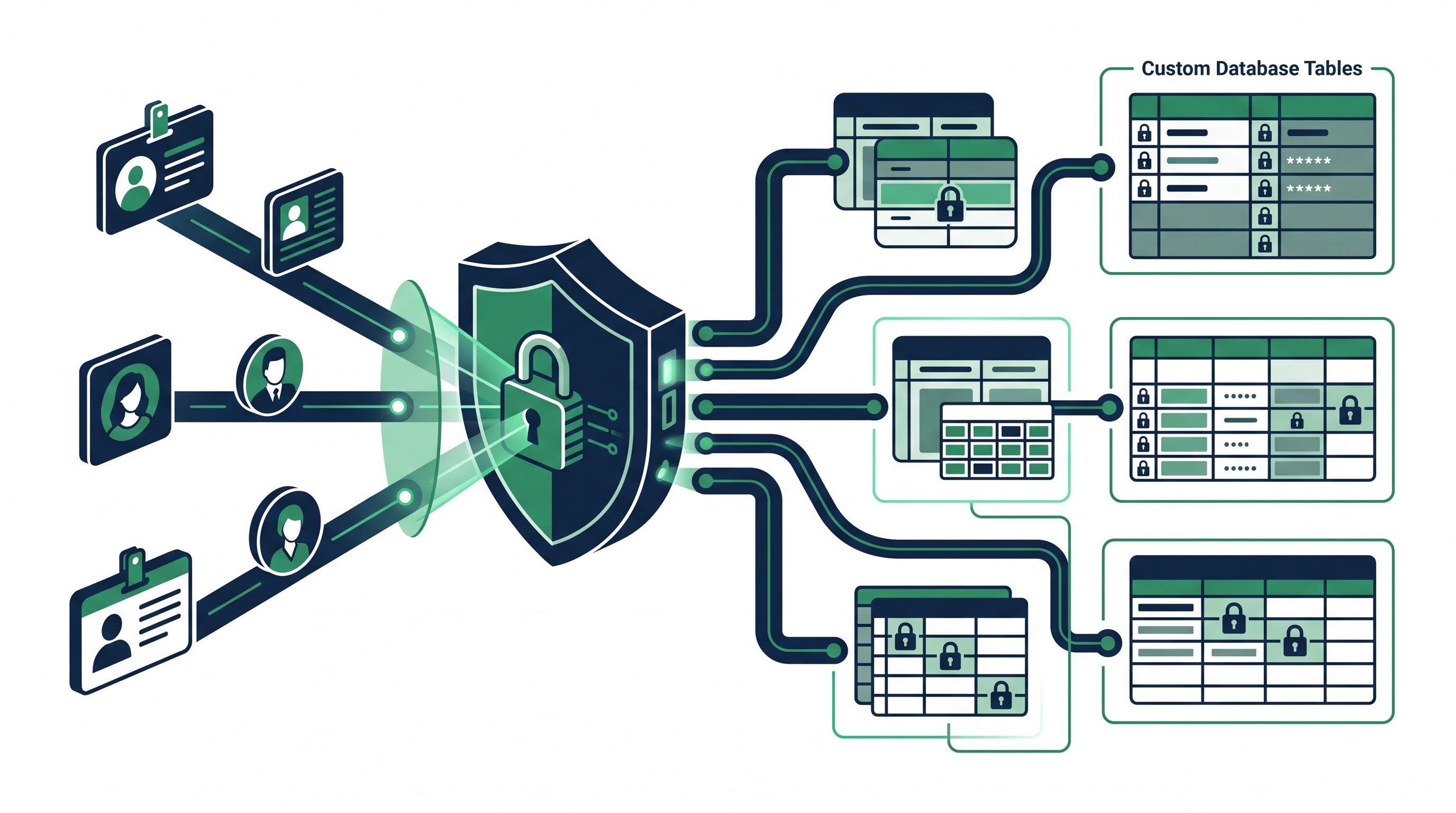
In the field of business app development, the integration of security and governance tends to be one of the hardest challenges in implementing tailor-made solutions. Applications designed by third parties allow for different security measures, such as role assignments, independent API authentication, and sophisticated SSO assertions. Workday Extend eliminates the existing governance issues by keeping custom development within the boundaries of Workday's base Configurable Security Architecture solution.
Domain Security Integration
In Workday's environment, all data access, functional operations, and interface visibility operate within the context of security domains, where either groups of users or roles are defined in Workday Extend applications.
When developers create Custom Business Objects or application pages, they add these entities to the required domain security model. System administrators perform standard security actions in the platform and grant view, editing, and admin rights to security groups/processes (like Employee as Self, Manager, HR Partner, Payroll Administrator) without any special access control mechanisms.
Role Resolution: When an employee uses Extend, the system automatically identifies their company-related information like who they report to, where they belong in the reporting chain, and the physical location of their duties.
Contextual Access: Role Filter ensures that data is filtered as per the user’s role. For instance, a manager gets to see customized performance metrics of his/her staff members, while an individual contributor gets to see only their own metrics.
Granular Field Control: Every single aspect of the Custom Objects can be restricted in its own right, ensuring that those parameters which require high secrecy (e.g., executive decisions or social security numbers) can only be accessed by those whose role allows them to do so.
The Compliance Audit and Lifecycle Governance
Companies operating under supervision are subject to strict compliance audits regarding their data-related activities. Workday Extend platform allows the automatic tracking of every activity taking place with Custom Business Objects’ transactional data.
No collection of server logs is necessary by the compliance teams to detect actions carried out by different user accounts across cloud resources. An administrator looking to audit transactions on Workday Extend will do it using a standard audit report, being able to find out the user behind each event, which data properties were changed, the third-party services used for obtaining data, as well as the timing of the operations.
Furthermore, the application lifecycle management process complies with required enterprise deployment regulations and entails the application following the process from the sandbox tenant through the implementation environment and into the production tenant by using packaging, versioning, and deployment authorizations.
In-Tenant External API Integration: How It Influences Enterprises
Native data storage and processing are very important features; however, the real advantage of Workday Extend arises from the capability of integrating external APIs in the application’s current interface. There are a lot of different software systems in modern businesses that help with process management (transportation, employee’s permissions, travelling, benefits processing, tax calculations, cloud storage). Workday Extend provides a gate for connecting all different microservices and organizing effective and continuous workflows.
Using Workday Orchestrate, the application can create outbound connections to use external services and make it easier for creativity and profits in the company.
Authentication and Credential Management: Modern enterprise authentication methods such as OAuth client credentials, authorization code flows, bearer tokens, APIs, and mutual TLS are used to connect to external platforms. Workday uses its encrypted vault to manage all secrets, client credentials, and access tokens, which protects them from being leaked in custom applications.
Data Transformation and Mapping: External platforms use schemas that do not correspond with any Workday data formats. Orchestration provides declarative transformation nodes that can decode incoming payloads, create outgoing requests, serialize data structures and handle protocol headers.
Error Handling and Fault Tolerance: There will always be some level of failures and timeouts when communicating with other networks. The orchestration process has support for declarative try/catch error boundaries, can specify timeouts, and can configure retry policies.
The Removal of the Middleman from Integration for User-Centric Interaction
Old-style integration processes and systems rely heavily on traditional molecular or batch integration systems that use the enterprise service bus to carry data from one system to another. Although this method allows for the effective implementation of massive batches in the night, the system fails when a worker needs instantaneous verification or a real-time query.
Take, for instance, the case of a worker who needs a specific piece of equipment. With traditional integration processes, the worker submits a request for equipment through the Workday solicitation process. Only much later do scheduled batch integration processes begin to access, change, and put that request into the large warehousing system. If the item is unavailable or if the worker’s shipping information is not correct, it entails that the working procedure needs time-consuming manual intervention.
With Workday Extend, this process can now occur in real-time:
The employee initiates the custom equipment provisioning process on Workday, which starts an orchestration that queries the live inventory management platform, retrieving up-to-date stock levels and delivery estimates.
The employee picks the equipment they want, and the correlating page sends a call to third-party shipping logistics APIs to check that the delivery address format is valid.
Once the employee clicks submit, the system forwards the order to external fulfillment services, gets an order confirmation, and updates the Custom Business Object connected to the employee worker record with the confirmation details.
After this, the employee sees an instant message confirming that the order has been placed and providing tracking coordinates, while Workday inbuilt notifications ensure managers are kept in the loop regarding changes.
Utilization of this method eliminates the requirement for a potential unstable integration and hence minimizes administrative workload. Developers who want to gain proficiency in creating hybrid Real-Time and Scheduled pipelines may consider taking advantage of the specialized workday integration course.
Practical Business Examples
Businesses from many industries make full use of Workday Extend for scenarios that normal software as a service (SaaS) offerings simply cannot cover. With the inclusion of Custom Business Objects, In-Tenant UI, and External APIs, businesses will do away with large spreadsheets, disjointed legacy systems, and costly customizations.
Arranging International Travel and Relocations
Enterprise relocation is made up of many logistical links and processes like corporate travel plans, immigration issues, taxation compliance, and moving logistics. The majority of the time, all of that is done via different emails, Excel workbooks, and loser vendors' portals.
By using Workday Extend, organizations create a complete Global Relocation Management Desktop App inside Workday:
The In-Tenant Experience: When someone gets an international transfer at their workplace, the relocation journey begins in Workday software. This software gives them a specific dashboard that shows everything they must achieve, includes funds for housing, and lets them know if there are sections where they have to submit necessary documents.
Integration with External API: The app connects with different APIs to verify documents in terms of immigration, gets in touch with other companies to provide required housing, and gets the money exchanged.
Native Process Anchoring: The software connects to the Workday profile of the specific employee so that once the relocation process is completed, this employee can get necessary updates regarding his/her relocation procedure.
Vendor onboarding and supplier risk assessment
Organizations using Workday Financial Management often work with complex third-party vendor networks. While procurement processes and invoice payments are done well within the core financials, compliance checks, anti-bribery checks, credit checks, and cybersecurity risk checks often occur outside the supplier.
Supplier Risk Assessment is a process that uses Extend technology to automate the approval process.
The process works like this:
Workflow: The procurement team starts the vendor assessment directly from the Workday Supplier profile.
Orchestration in the Tenant in Real Time: The Extend application makes use of external corporate registries to verify tax identification, consults global credit rating agencies to assess financial stability, and connects with external cybersecurity monitoring systems to get vendor security ratings.
Decisions Made Automatically: The scores obtained through assessing risks are saved in Custom Business Objects related to the supplier record. In case the vendor meets all compliance requirements, the application automatically calls core Workday web services and moves the vendor to the active state.
Recognition of Employees, Giving, and Wellness Initiatives
These days human capital strategies require the need for personalized employee experience with different programs including corporate charitable giving. Buying separate programs from third parties for various initiatives brings challenge and demotivating fatigue in the workplace.
Businesses develop their solutions through the development of proper employee experience portals using Workday Extend. As well as awards and donations, companies often connect custom dashboards with workday learning integrations to automate skills tracking, certifications, and compliance programs:
Online Giving Campaigns: Workers can use the Workday Extend app in their portals to assign their donations to charitable organizations and check their status with specialists from both third-party platforms and Workday Payroll software.
Team Recognition: Employees can propose their colleagues to receive an award during the weekly meeting. With the assistance of Workday Extend software companies can evaluate the nominations and share them with other parties while also offering gits for the awardees.
Management of Field Assets and Physical Devices
In companies with massive employee headcount and complex machinery such as industrial equipment, medical devices, lab facilities or specialized mobile solutions, tracking devices in all stages of an employee's tenure is a challenging task, often prone to mistakes.
Using Workday Extend:
Track Device: Custom Business Objects containing useful information on device profiles, serial numbers, warranty terms and operational permits.
Integrate Lifecycle: The processes of employee transfer, onboarding and offboarding are being managed automatically due to work-flows created by Workday's orchestrate system.
Use External Fleet Telematics: External telematics or Mobile Device Management commands allow businesses to locate, reconfigure and lock their device after an employee is disconnected from the company.
Differences between Extend and Studio and Third-Party Cloud Platforms
The technical staff developing the Workday solution needs to choose the right integration methodology for each use case involving the system. While Workday provides multiple means for integration and configuration, third-party cloud vendors (such as AWS, Microsoft Azure, and Google Cloud) deliver more options for development. Knowing what distinguishes Workday Extend from Workday Studio and third-party cloud PaaS solutions is key to technical governance.
Workday Extend vs. Workday Studio
The Workday Studio software is the most powerful integration development tool of Workday technology. In today's technical world, it is important for professionals to use the right tools like Studio and Learn about Extent features, which is the reason why formal workday integration training is often the quickest way to help bridge the gap between the traditional and future state systems.
Nonetheless, Workday Studio remains a fully headless platform. It has no presentation technology of its own and is unable to create interactive user interfaces in tenants’ web browsers or mobile applications. In addition, Workday Studio can’t save custom object definitions, but only read/write Workday business objects data.
In contrast, Workday Extend can be described as an interactive app framework. It has a complete user interface presentation layer, internal data storage engine (Custom Business Objects), and operation layer that is suitable for using synchronous API calls that are initiated by the user. While Studio may be used for elaborate overnight batch processes that may involve significant database operations, Extend is the appropriate solution for providing a dynamic interface for the employee, checking the validity of their inputs, and permanently saving that information.
Workday Extend versus External PaaS Solutions
Developing an individual app using a cloud platform (like enterprise applications using AWS or Azure) allows for complete flexibility in terms of programming languages, database structures, and website frameworks. When dealing with complicated and resource-heavy systems targeting independent consumers as their market, external PaaS is still the preferred method.
Nonetheless, if an application is developed for enterprise employees, managers, or HR partners, and its key processes rely heavily on the data about the workers and finances, the use of external PaaS would cause a lot of problems:
Re-Architecting Security: External apps necessitate the use of unique single sign-on systems, separate assignment methods for roles, and constant syncing of employee reporting structure for the purpose of preserving access control accuracy. The inherent capabilities of each tenant allow Extend to adopt these methods without difficulty.
API Maintenance and Throttling: External applications must keep calling Workday APIs from the public web, thereby depleting the API usage quota and leading to the necessity of network configuration. On the other hand, Extend operates within the Workday network, thus minimizing the security risk as well as latency in networking.
User Context Switch: Employees have to remember another website, get used to a strange interface, and manage different mobile displays. Extend enables the access to one and the same program inside the familiar Workday system that employees are used to.
Total Cost of Ownership: External custom applications have to pay for hosting infrastructure, database maintenance, security license fees, and funds for developer expenses. Meanwhile, using Workday Extend makes it possible to ensure development, security and hosting within the already functioning SaaS ecosystem.
The Future Vision: Intelligent and Linked Systems of Enterprise
The enterprise application architecture has moved ahead of its time. The traditional differences in contact with the record system and engagement one are being quickly erased. Today’s organizations demand enterprise applications which allow for flexibility, personalization of services, and integration, whereas the IT directors concern themselves with safety and security of the systems, number of the suppliers used and the total operational costs of the application.
With the help of Workday Extend, the two requirements can be fulfilled at the same time. Workday gives way to creation of an open, extensible platform-as-a-service application. This platform becomes a place where people can develop new ideas very quickly.
Whether it comes to creating custom workflows, automating business processes, or allowing for using the tenant application instead of external APIs – all these activities are possible thanks to the Workday platform which provides enterprise companies with excellent solutions.
Enterprise architecture is migrating towards open and native cloud environments, resulting in an increased demand for certified experts with knowledge in both basic connectors and modern applications. If you want to develop competencies in workflow orchestration, custom endpoints management, and data pipeline development, check out OnlineITGuru's workday integration training online.