
Building a RAG App With MongoDB Vector Search and Node.js
Last updated on Sep 29, 2026
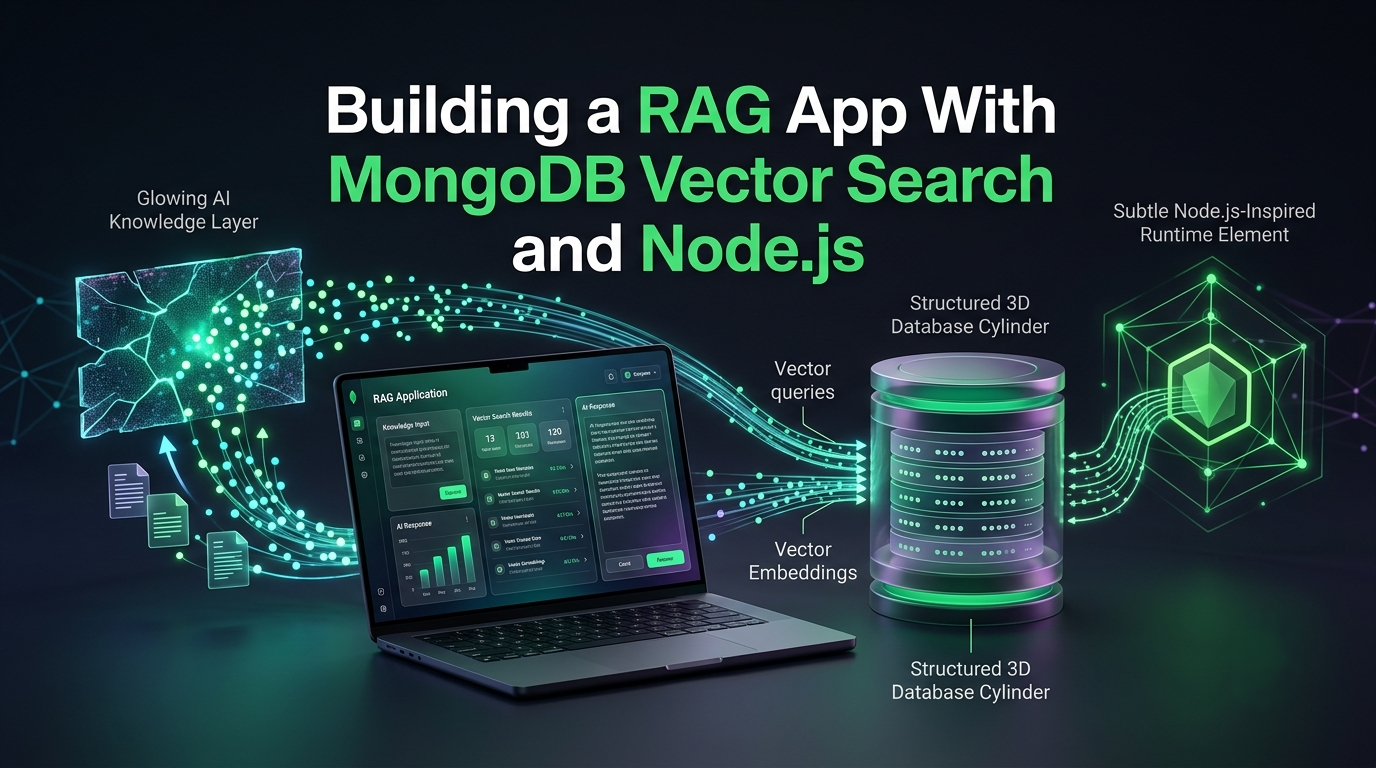
Artificial intelligence applications have fundamentally changed the approach toward modern software development. Rather than building software applications centered around database access, modern applications use AI to deliver answers to arbitrarily complex human questions. If you are a developer familiar with the latest trends in technology, you should be acquainted with the concept of Retrieval-Augmented Generation (RAG). This novel approach to AI-powered applications has quickly become the dominant paradigm due to its ability to produce contextually relevant answers based on the contents of any database. Instead of relying on the information contained within the body of a large language model, the RAG architecture taps straight into your data to find the most relevant information to be used as context for the language model.
By combining the intuitive document model of MongoDB with the speed and simplicity of the Node.js runtime, you can create an ultra-performant backend for a RAG application. MongoDB can store both your operational data and the high-dimensional vector embeddings produced by a vector embedding model. These are joined by Node.js, which streamlines the data access layer of your application. In this article, we will walk through the details of RAG and the rationale behind vector search and show how you can build a RAG application with MongoDB vector search and Node.js.
What Is Retrieval-Augmented Generation (RAG)?
To truly understand the value of RAG, we have to discuss the limitations of the Large Language Models (LLMs). These foundational models for the modern age of AI are trained on a massive corpus of text data from across the internet. While this gives LLMs a staggering amount of general knowledge, it also presents two key problems:
Knowledge cutoff: Since all models are only as good as the data they are trained on, LLMs are not aware of anything that happened after their training cutoff date.
Lack of private data awareness: While LLMs know a lot about the world, they do not
know anything about your data, including your customers and internal processes.
When an LLM is asked questions that require knowledge of private data or events that occurred after the model’s training date, it will either tell the user that it does not know the answer or, worse, make one up. Since these models are so large, it is easy to mistake confidently generated false information for valid knowledge. This phenomenon is often referred to in the AI community as hallucination.
RAG combats the problems presented by LLMs by introducing a retrieval step before the generation step. Rather than feeding prompts directly to the LLM, RAG applications first query an internal database to find relevant documents. The contents of these documents are then used as context for the LLM to produce answers. By using the most relevant documents as supporting evidence for answers, RAG-based applications can deliver highly accurate results without requiring LLMs to be retrained on private data.
Why MongoDB and Node.js for RAG?
A RAG application requires two main components: a database that can store large amounts of data and a backend server that can rapidly process data. There are many possible options for both components, but in this article, we will discuss the advantages of using the MongoDB Vector Search and the Node.js runtime.
The Benefits of Managing Operational and Vector Data in One Place
When building a vector search–enabled application, it was common practice to use two separate databases: a traditional operational database to store user data and a separate vector database to store the vector embeddings of the relevant text documents. Using two databases adds complexity and can result in additional expenses due to the need to maintain two separate database infrastructures.
This problem is solved in MongoDB by using a single database to store both the operational documents and the vector embeddings. By using MongoDB Atlas, you can reduce the complexity of your application significantly and avoid the extra costs associated with using multiple databases. Programmers who want to become proficient in the concepts discussed in this section often take the mongodb classes offered by industry experts. These courses provide valuable insights into the nuances of vector search and the MongoDB data model.
The Benefits of Using Node.js
Node.js has become one of the most popular runtimes in the world due to its asynchronous nature and ease of use. When building a RAG application, your backend will have to perform several I/O operations, including querying a vector database and calling an external API to get the LLM to generate text. These operations are significantly faster in Node.js due to the asynchronous nature of the language. Your application will be able to handle thousands of concurrent requests with minimal delay.
An Introduction to Vector Embeddings
Modern AI applications rely on an innovation called vector embeddings to transform text input into numbers. Since computer processors are not capable of reasoning about words and concepts, they use numbers to represent ideas and perform calculations. Vector embeddings are long arrays of floating-point numbers that can be used to represent words, text, audio, video, and even code.
These large multidimensional vectors can be used to find the conceptual relationships between words and phrases. For example, the word “happy” could be represented by a vector of random numbers. If another word or phrase has a similar vector, it can be assumed that the two words or phrases are similar in meaning. The usefulness of these vectors becomes apparent when we consider how they can be used in a search engine. A traditional search engine will use keywords to find relevant search results. If a user searched for “healthy morning meal,” the search results would include web pages that mention any of the words “healthy,” “morning,” or “meal” in a relevant context. However, a query like this would not return relevant results if the document contained the phrase “nutritious breakfast bowl.”
We can solve this problem using vector embeddings. We can use a vector embedding model to convert the search query string into a vector. Then, we can compare this vector to the vectors of relevant documents to find the ones that are closest in meaning to the query. In a RAG application, the user’s query would be put through the same vector embedding model to produce a vector. MongoDB’s vector search capabilities will then be used to find the documents who’s vector is closest to the query vector. The distance metric can be specified in the query, and MongoDB will use either Cosine or Euclidean distance to find the closest vectors.
Key Elements of the RAG Architecture
A RAG application consists of two main elements: a data ingestion pipeline and a query pipeline. We will discuss both elements below. The Data Ingestion Pipeline The data pipeline consists of several steps that transform raw text data into vector embeddings that can be used by the vector search index. The first step is to ingest the document that will be used for the vector search. This step can consist of a single text file, but it is more common to see this process applied to entire folders of text documents.
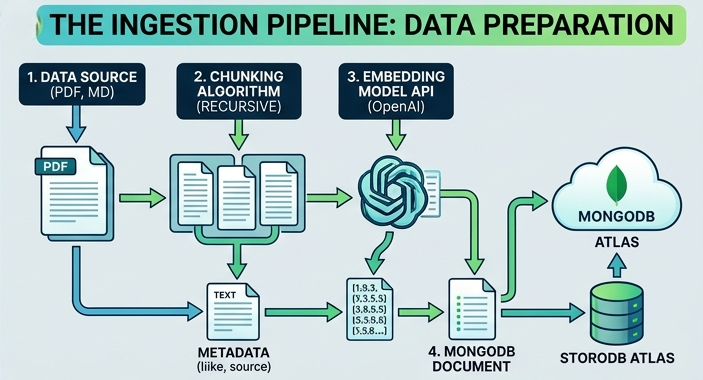
The next step is to split the text into manageable pieces. This step is absolutely necessary because passing an entire book or article to the embedding model will create a vector that contains too much data. Splitting the text into smaller sections allows us to create more focused vector embeddings. There are a few common ways to split text data. The most common methods are to split on paragraphs, tokens, or sentence boundaries. It is also common practice to add a small amount of overlap between sections to prevent important information from being excluded by the split.
Finally, we need to pass the text segments to the vector embedding model. This model will transform the text segments into their vector representations. The output of the embedding model will be an array of floating-point numbers for each text segment. The next step is to insert the text segments, vector embeddings, and any additional metadata into the database collection. It is common practice to store the text segments, vector embeddings, and any additional metadata in a single document. Professionals in the field who want to gain a more profound understanding of the concepts discussed in this section often take the mongodb training courses provided by industry experts. These courses help aspiring developers build an in-depth understanding of vector search and related concepts.
The Query Pipeline
The query pipeline is the process by which a user’s question or request is passed through a vector search index and used to generate a relevant answer.
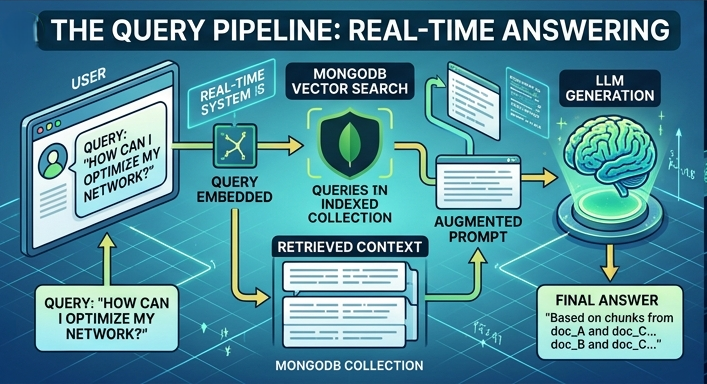
First, the user submits a query string that will be used to search the database. This query string will be passed to the vector embedding model to generate a vector representation similar to the documents in the vector search index. Next, the vector search index will be queried with this vector using MongoDB’s vector search capabilities. We will define the query vector and ask the vector search index to return the most relevant documents.
The next step is to perform any necessary preprocessing on the retrieved documents. This step will depend on the specific implementation but generally consists of formatting the document into a readable block of text. The preprocessed documents will be added to the query string to form a new prompt that will be used to generate the final response. The prompt will then be passed to a LLM, where it will be used to generate a natural language response. The LLM will use the context provided by the retrieved documents to generate a response that incorporates the relevant information from the documents.
Design Considerations for the Data Pipeline
When designing the data pipeline in Node.js, it is best practice to organize your application code into modules. Rather than writing your application code in a single file, you can split your application into modules that represent distinct parts of your application.
Data Ingestion Module
The data ingestion module is responsible for the initial text processing pipeline. This module will load text data from a local file or remote URL. It will then perform the chunking operation and pass the resulting text segments to the vector embedding model. It is common practice to implement the chunking algorithm as a standalone function in this module. This function can split the text data based on paragraph breaks or sentence boundaries. It can also implement a sliding window algorithm to ensure that the segments overlap at the segment boundaries. This technique is useful because it ensures that no information is lost at the edges of the segments.
Embedding Module
The next module is an API wrapper for the vector embedding service that you will be using in your application. It is common to use a third-party vector embedding service such as OpenAI or Hugging Face. This module will accept an array of strings and return an array of floating-point numbers for each string in the input array.
Database Module
The next logical step is to implement the functions that will be used to interact with the vector search database. In this article, we will use the MongoDB Node.js driver to implement the functions that will be used to insert text segments and vector embeddings into the database. The documents that are inserted into the database should follow a simple schema. Each document will consist of an internal ID, the text segment, the vector embedding, and any additional metadata that might be useful.
Indexing Module
The next module will implement the functionality to query the database. This process will involve first loading the appropriate vector search index. The vector search query will be issued using the aggregation framework. We will specify the field that contains the vector embeddings and the distance metric that will be used to compare vectors. The query will include a $vectorSearch stage to perform the vector search. The result of the search will be the text segments that are most relevant to the query.
Document Formatting and Prompt Construction
The next step in the process is to format the relevant documents into a prompt that can be used by the LLM. The exact implementation of this step will depend on the requirements of the LLM that will be used to generate the response. It is generally useful to follow best practices and format the prompt as a system message followed by a question or request.
For example, the following system message and user query prompt can be used to perform a simple Q&A task: You are an expert technical support assistant for Acme Corporation. Please answer the user’s question using only the information contained in the documents below. If the documents do not contain sufficient information to answer the question, please state that you do not know.
{Context blocks will be inserted here}
{The user’s question will be inserted here}
Once your Node.js application has constructed the system message and user query prompt, it can send the prompt to the LLM endpoint. The LLM will use the context blocks to find the information that is most relevant to the user query and will formulate a response based on the information in the context blocks.
Creating the RAG Application
The process of creating a RAG application can be broken down into the following steps:
1. Creating the text chunking and vector embedding pipeline.
2. Configuring the vector search index to query the vector embeddings.
3. Designing the query/response pipeline that will be used by the application users.
In this section, we will take a closer look at the final two steps in the process of building a RAG application.
Indexing Strategy for Vector Search
Storing the vector embeddings in a database is only part of the process. To query the vector embeddings, you will need to create a vector search index. This index will be used to store statistics about the vectors so that the database can quickly determine which documents are most relevant to a given query. The vector search index will use Approximate Nearest Neighbor (ANN) search to rapidly identify relevant documents. ANN algorithms use special mathematical techniques to approximate the nearest neighbors without calculating the distance between every possible pair of vectors. One example of an ANN algorithm is Hierarchical Navigable Small World Graphs (HNSW). The vector search index can be created using the following command:
db.collection.createIndex({ : "vector" }, { } )
There are several important considerations when defining the index options:
1. The field name: This option defines the field that will be used to store the vector embeddings. This field will most likely be named something like ‘embedding.’
2. The number of dimensions: All vector embeddings will have the same number of dimensions. This value will depend on the vector embedding model that you are using. Some common values for the embedding dimensions are 1536, 768, and 384.
3. The similarity metric: The most common options for this metric are cosine and Euclidean distance, but other algorithms can be used.
If your organization wants to invest in more advanced indexing and database administration, enrolling in a mongodb course can be an excellent way to learn more in-depth concepts.
Querying the Index with Metadata Filters
One of the most significant advantages of the MongoDB database system is its ability to perform queries using both vector embeddings and metadata. This capability allows us to rapidly filter the database to find the documents that match our query. In enterprise applications, it is common practice to use metadata filters to narrow down the search results. For example, a company might want to search documents created by a specific department or with a specific permission level.
This requirement can be easily implemented using the metadata filtering capabilities of MongoDB. The metadata filters can be used in conjunction with the vector search query to rapidly identify the documents that match the query. This process is much faster and more reliable than issuing a vector search query and then filtering the results in your Node.js application code. The metadata filters can be specified using a simple JSON query.
Production-Level Considerations for RAG Applications
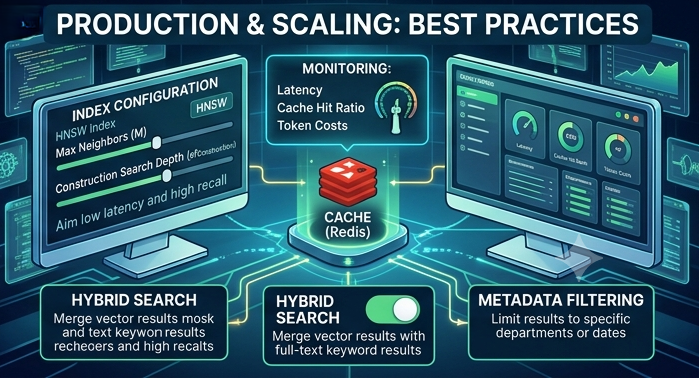
Building a RAG application can be fun, but it is also common to encounter several production-level issues when deploying a RAG application. Some of the most common production-level practices that should be considered when building a RAG application are as follows:
Text chunk optimization: The size of the text chunks is a crucial factor in the performance of the RAG application. Text chunks that are too small will not contain enough information, and text chunks that are too large will reduce the accuracy of the vector search results. It is common to experiment with different chunk sizes and window sizes to find the optimal balance between precision and recall.
Caching: The process of generating vector embeddings and making API calls to the LLM can be both time-consuming and expensive. It is common to implement a cache layer in the application to store frequently used queries or text chunks to reduce the load on the vector embedding model and LLM.
Evaluation and Observability: It is important to monitor the performance of your RAG application to ensure that it is operating as expected. One important metric to track is the precision of the retrieval step, which measures how often the retrieved documents actually contain the information that the user is looking for.
Conclusion
The combination of MongoDB vector search and the Node.js runtime environment provides a powerful set of tools for building RAG applications. These two technologies work in tandem to provide an intuitive, rapid data access layer for modern RAG applications. By analyzing the use case for vector search and RAG in depth, we identified several critical implementation details that should be considered when building a RAG application. We then explored the concepts of vector search and RAG in detail. Finally, we used the concepts to build a RAG application.