
Building Advanced Web Services: Workday Studio Integration Deep Dive
Last updated on Sep 18, 2026

Today, both enterprises relying on Enterprise Resource Planning (ERP) systems as well as the systems themselves rely on real-time information exchange and effective interoperability. For large corporations, Workday is the main record-keeping system for Human Capital Management and financial matters. After workers complete rigorous workday hcm training, they will be able to utilize the system and combine information on Human Resources with important external systems. However, it should be mentioned that no enterprise system can function as an isolated island.
Workday suggests several integration levels that meet mentioned operational needs. Customizable solutions such as Enterprise Interface Builder provide easy ways of integrating simple inbound and outbound data streams. Pre-developed, standardized Core Connectors allow quick integration into a standard third-party solution. However, enterprise systems regularly have edge cases: asynchronous multi-stage conversation protocols, stringent encryption, complicated conditional branching between various business units, and transaction confirmation.
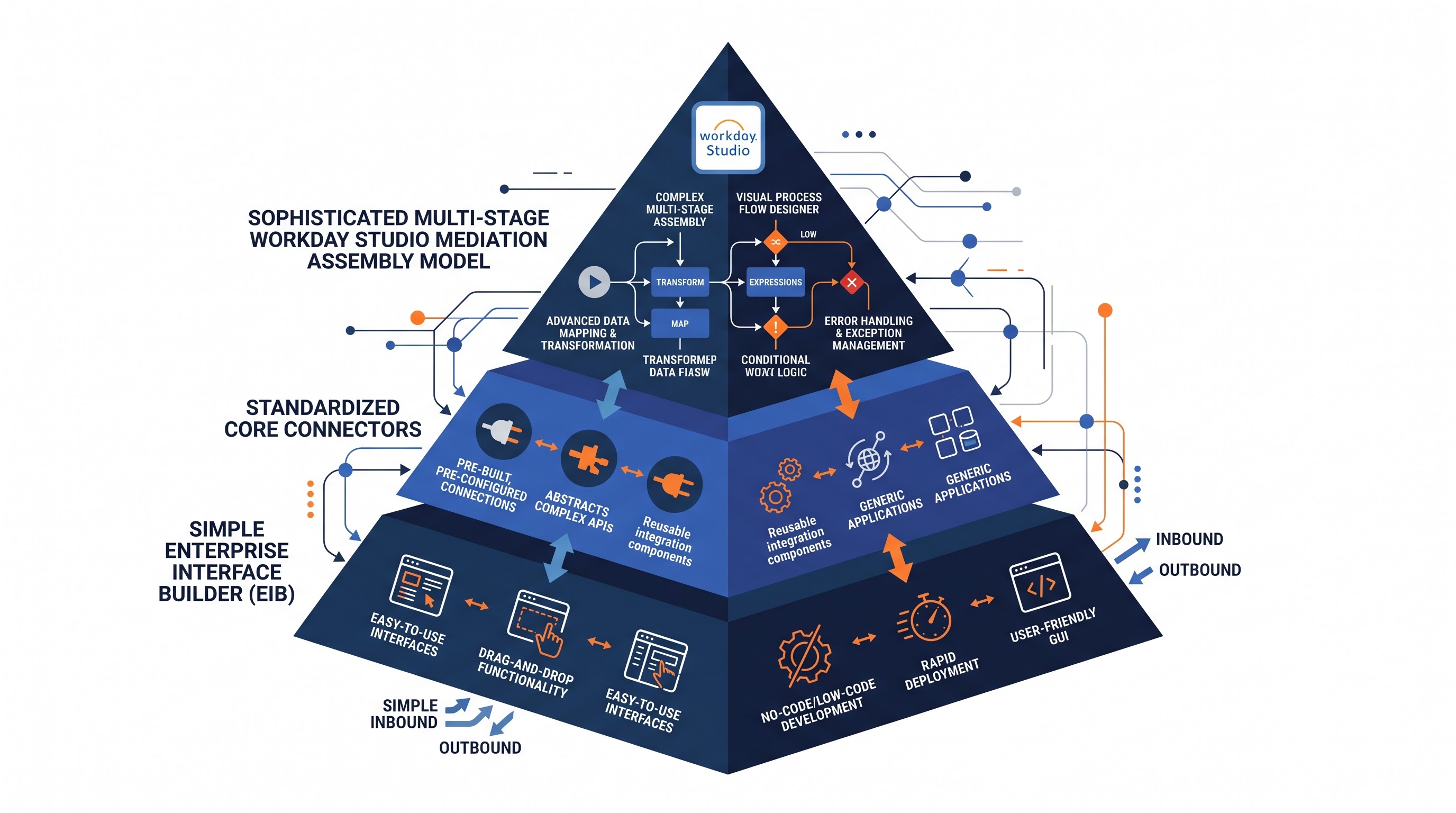
When an operation's specifications exceed the abilities of simpler devices, Workday Studio becomes the preferred engineering framework. Built on an Eclipse operational environment, Workday Studio grants integration developers the necessary degree of control to create, build, test and deploy more complex service-oriented integration within the Workday cloud system.
Designing advanced integrations within Workday Studio requires advanced technical competence in a variety of fields. Developers must be able to deal with specific differences in message processing, event management, data processing, integration memory storage, authentication schemes, and other complex exception handling.
Architectural Principles of Workday Studio integrations
Workday Studio integrations can be defined as processes involving the Workday Integration Cloud, through which they are executed. Unlike typical middleware solutions that work using virtual machines provided by their customers, Workday integrations comply with strict runtime governance principles, are dynamically provisioned, and naturally obey concurrency limits. This context makes the knowledge of Workday Studio integration containers particularly important for achieving high performance of the developed integrations.
The Component-Based Message Processing Model
The way Workday Studio integrations work with the help of Enterprise Integration Patterns. All components are joined into a so-called assembly model on a visual canvas. The integration model consists of several components of different types:
Inbound Transport Endpoints: The points of contact that grant access to the integration for external systems, which receive scheduled triggers for starting the integration process.
Mediations Services: The links between various pieces of code where routing, data processing, and other significant procedures take place.
Outbound Transport Endpoints: The points that reach third-party APIs, upload files to file transfer services, or transmit messages to message queues.
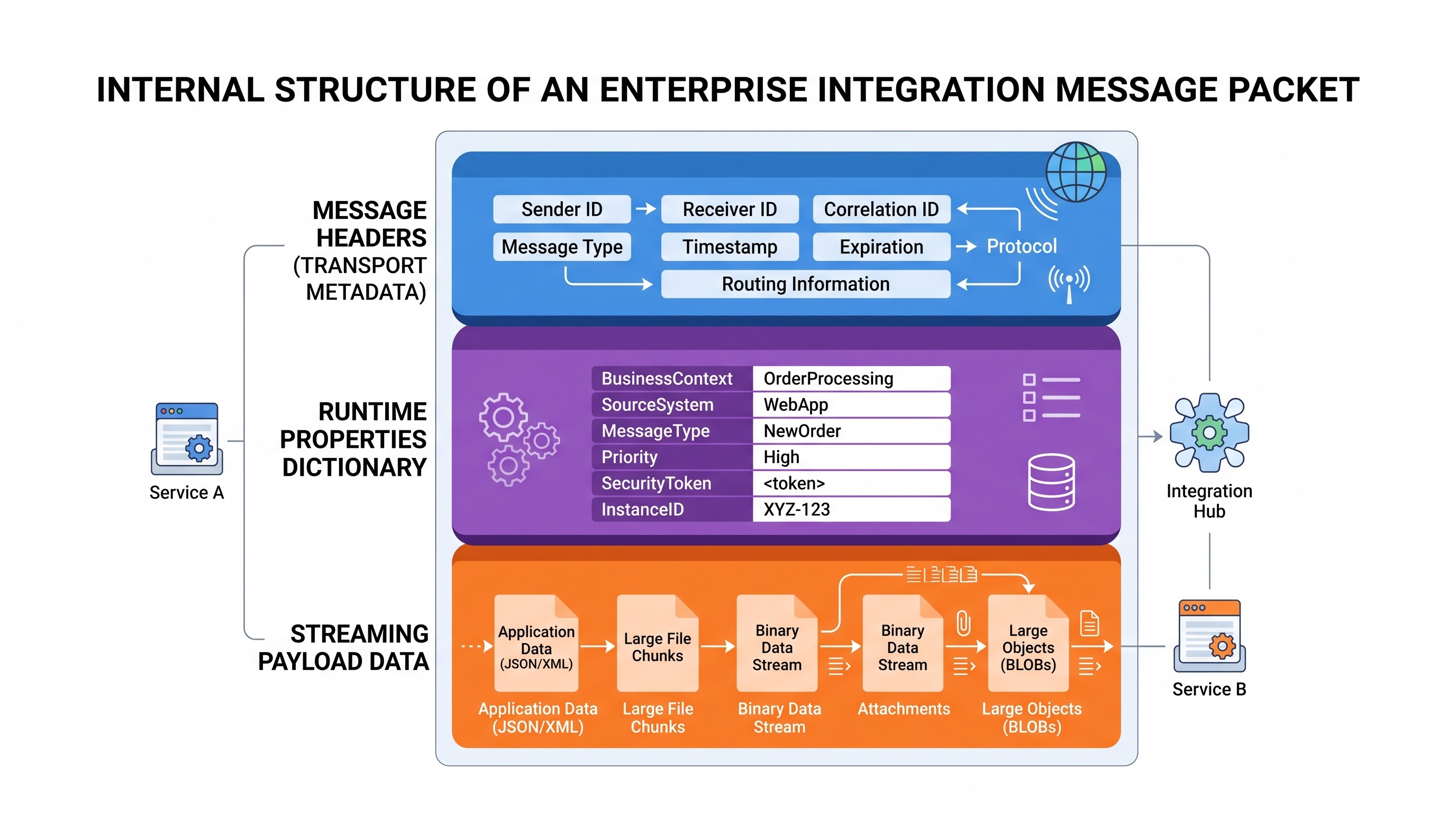
The movement of data in these integrations is performed in a single structure called the Workday Integration Message. Every message in the integration stream has three main components:
Message headers, which have metadata for tracking id, transport configuration, routing flags, HTTP headers, content types, and settings of runtime variables.
Message properties, consisting of variables existing during execution, which allows to save values and states of counters or security context while proceeding through the process.
Message root part or payload, which presents a stream or in-memory data being processed or transferred. Usually it is in such form as XML, JSON, or flat file.
The execution line of Workday Studio integrations is performed in a multi-tenant cloud environment, which implies strict execution limits. Each integration flow receives a certain amount of memory and amount of time for processing. In the situation when an integration flow gathers a significant amount of in-memory data or enters into the infinite processing loop, the Workday management system will stop this process.
Engineers must view heap memory as a valuable commodity. Integration should be designed to enable sending data progressively instead of using a one-off approach for transferring the entire collection at once. Specifications of thread safety, stateless processes, and predictability of resources' disposal must be essential when creating software projects in Studio.
Enterprise Web Services in Workday: SOAP, REST, and RaaS
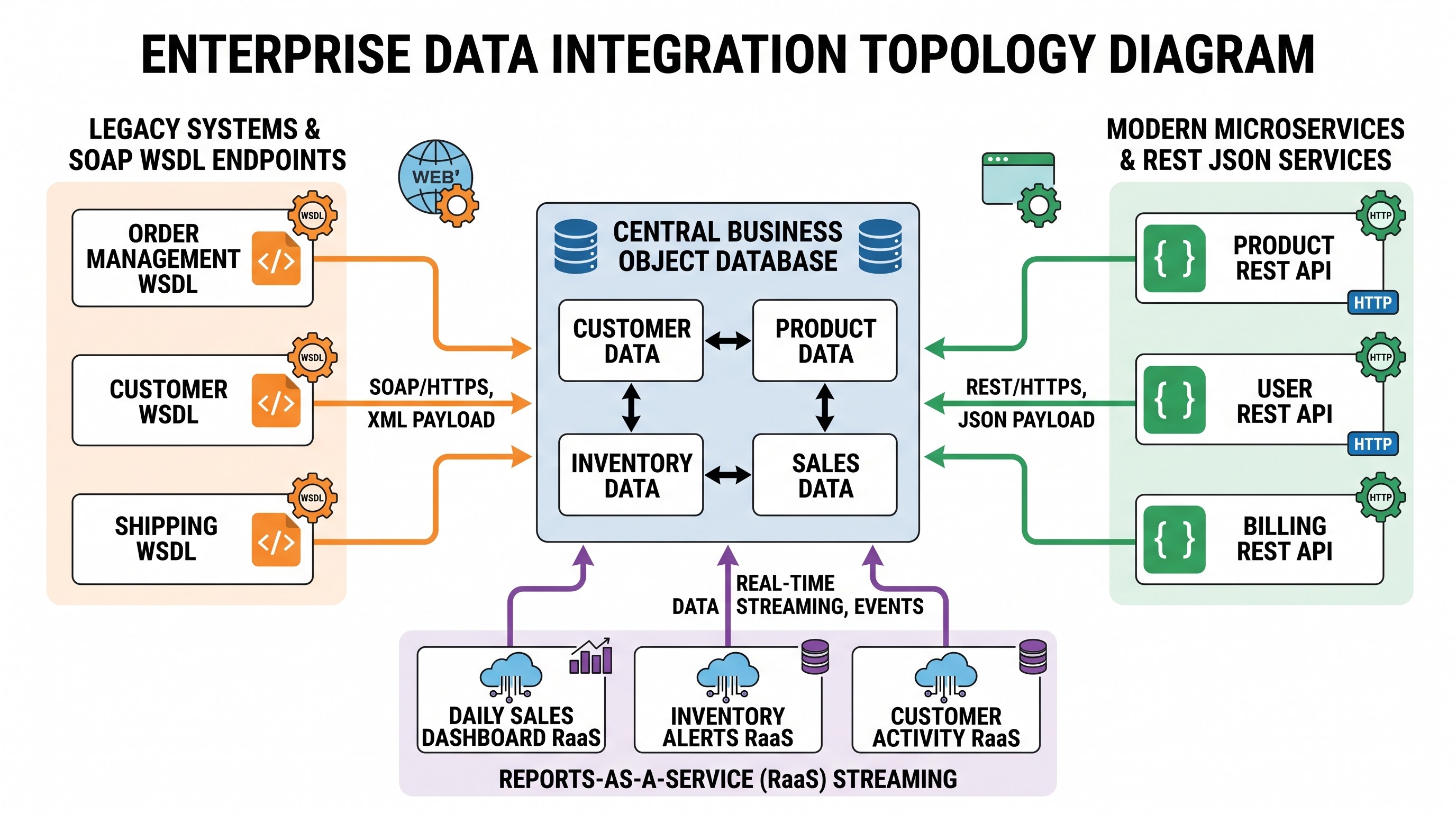
An advanced integration solution is very unlikely to use static data dumps. Rather, it works straight with Workday business objects via proper Web Services protocols. The developer in charge must decide on the type of API that fits the integration specifications the best in terms of speed, volume of transactional activities, and allowable delays.
Workday Public SOAP APIs
One of the most well-known ways of communicating with Workday through programming is its extensive collection of web services based on SOAP. As we learned in the course of specialized workday hr training, Workday provides a variety of business solutions in the areas of HR, compensation, finance, procurement, and payroll.
Schema Strong Typing: Workday SOAP endpoints operate on the basis of a set of Web Services Description Language standards. Schemas are responsible for defining business object types, parameter formats, and field namespaces.
Fine-Grained Functionality: Examples of functionality include Get_Workers, Put_Worker, Submit_Payroll_Inputs, and Import_Journal_Entries.
Filtering Responses and Optimization: Simple data requests through functions like Get_Workers can lead to memory overflow errors because of the significant volumes of dated data linked with worker records. Thus, developers have to use strict transaction logging configurations, limit date ranges, and filter by parameters so they can request only the required slices of data for execution down the line.
Workday REST APIs
Workday offers an innovative and advanced REST API framework enabling straightforward interaction through programming.
Efficient Data Architecture: The data structures used for REST services make them highly efficient in terms of both sending and receiving data.
Timely Delivery: The REST API endpoints can process transactions quickly in real time, such as mobile app integrations and notification delivery.
Flexible Querying Models: The Workday REST API supports data retrieval with ease and without the need for XML processing.
Reporting as a pre-service
Reports as a Service or RaaS, is one of the most effective ways for disbursing data from the Workday data set.
Declarative Data Extraction: Instead of creating intricate multi-service SOAP queries that connect together compensation data, supervisory organizations, and custom-calculated fields, developers can build an Advanced Custom Report through the Workday UI.
Web Service Implementation: When the report is executed as a web service, the data set is generated through a secure URL endpoint that creates XML or JSON whenever required.
Studio Integration: Using Workday Studio, an integration connects to the RaaS endpoint with the help of standard HTTP elements and applies runtime parameters to filter database entries in real-time.
Overview of Core Transformation and Mediation Process
The meaning of any Workday Studio implementation is determined by its mediation workflow, which is concerned with checking, moulding, reconciling, and guiding data.
The purpose of the Extensible Stylesheet Language
Transformations (XSLT) is to facilitate communication through XML data exchange format utilized in Workday's services. Not only does XSLT help in communication but also assists in modification of data messages.
By means of XSLT developers can change huge amounts of data from Workday to third-party XML documents, flat files or fixed-length files.
XSLT Techniques: Skilled programmers create XSLT code so that it does not include any value bridges. Developers simply employ templates for many projects reducing the possibility of creating complicated translation charts, date formatting solutions and currency conversion features.
XSLT Scalability: Standard XML document trees can quickly consume the working memory of the JVM. Advanced engineers are able to employ technology allowing transformation of each message in the bulk data.
Expression Language and Dynamic Properties
Workday Studio incorporates an advanced Expression Language which allows programmers to monitor the state of messages and take routing decisions in real-time.
Contextual Access: Developers are able to create expressions within the component attributes in order to pull message headers, system time marks, parameters of integration, or dynamic values of response.
Property Allocation: Components like the Set Header and Set Property steps give developers an option of storing certain values extracted from the payload to be reused later. Typical implementation of this involves obtaining a vendor transaction ID from the first API call and saving it as a message property for being used in logging and exception processing subsequently.
Dynamic Routing and Splitting Techniques
Integration workflows in practice must utilize dynamic routing and parallelization and may also utilize various data types.
Content-Based Routing: The Router module assesses every incoming message against certain conditional statements. Based on the assessment, the message is sent to certain mediation subprocesses. For example, the integration could separate foreign payroll messages from local payroll messages and send them through various transformational processes.
Message Splitting and Aggregation: When the upstream report produces one large XML document that includes numerous employee messages, the Studio project is able to split this document into multiple worker messages. Each splitted message is processed individually while the Aggregator component collects the results back into one payload for its delivery.
Sequential Processing vs. Parallel Execution: While splitting facilitates separate treatment of errors in different messages, serialization can lead to high latency. Studio permits the parallel execution of messages for simultaneous processing of multiple records depending on the limitations of the runtime.
The Security Design and User Authentication System
Enterprise safety is uncompromising as far as integration is concerned. Whoever handles the integration wants to take care of some of the most sensitive attributes of an organization, and those are salary data, bank routing numbers, health identifiers, and strategic projections of how many employees are to be hired.
Therefore, when performing integrations in Workday Studio, one has to go through several stages of providing the required security measures.
Users of the Integration System and Security Groups
Integrations in Workday operate by means of the Integration System User’s profile rather than any administrative privilege.
Least Privilege Principle: Users of the Integration System must be assigned the necessary permissions only to complete the needed job with the integration. For example, if the integration only sends the contact information of employees, the security profile does not need to include any salary plans or identity documents. Setting up these boundary policies—one of the main steps within the workday hcm course—provides the compliance with the needs on distributed endpoints.
Integration System Security Groups: Security policies in Workday are assigned to Integration System Security Groups which are assigned to the user. Developers will be responsible for creating Domain Security Policies to control access to data and how it may be modified, and Business Process Security Policies to regulate which transactions can be performed by the integration.
Separation of Duties: Developers should avoid using distributed service accounts in integrations that require different functions. Each integration design should run in its own dedicated user account so that a new audit trail can be created.
Workday Studio offers various authentication mechanisms to enable secure communication with internal endpoints and third-party systems.
OAuth 2.0: The industry standard for authenticating API requests. Workday Studio supports OAuth bearer token operations out of the box, including handling authorization grants, storing tokens, and refreshing tokens automatically before calling the intended REST service.
Mutual TLS (client-side certificate authentication): For highly regulated industries such as financial services, mutual TLS is used to authenticate hardware. The Workday integration solution and the server that is receiving the data exchange cryptographic certificates before communicating.
Basic Authentication on SSL: Although some legacy vendors, whose products are still around, use username-password authentication over HTTPS, using Basic authentication should be avoided as much as possible.
Cryptographic Process and Protection of Payload
Once data goes outside the physical borders of Workday Cloud, it needs to be safe from eavesdropping, interference, and other threats.
Pretty Good Privacy (PGP): Most external payroll agencies and banking institutions require files to be encrypted through PGP before transferring them. All cryptographic functions are present inside Workday Studio and allow encrypted and signed data through the use of public and private key pairs that are securely kept in Workday’s keystore.
Key Management and Decryption: The incoming integrations make it possible to automate the activities of decrypting files, confirming inward signatures, and ensuring that the source is authentic before entering sensitive data into the Workday system.
Encryption while in transit and in rest: Protection at the transport layer (https/SFTP) and temporary files that were created include features that prevent data leakage when dealing with sensitive data files during their temporary storage.
Performance Optimization and Handling Big Data
In complex integrations, a common reason for failure is the loss of performance under heavy loads in production. An integration that runs smoothly in a sandbox environment with five hundred records, can fail miserably during open enrollment or at year end handling hundreds of thousands of records. Architects of integrations must account for the scale when designing integration solutions.
Memory Use and Streaming
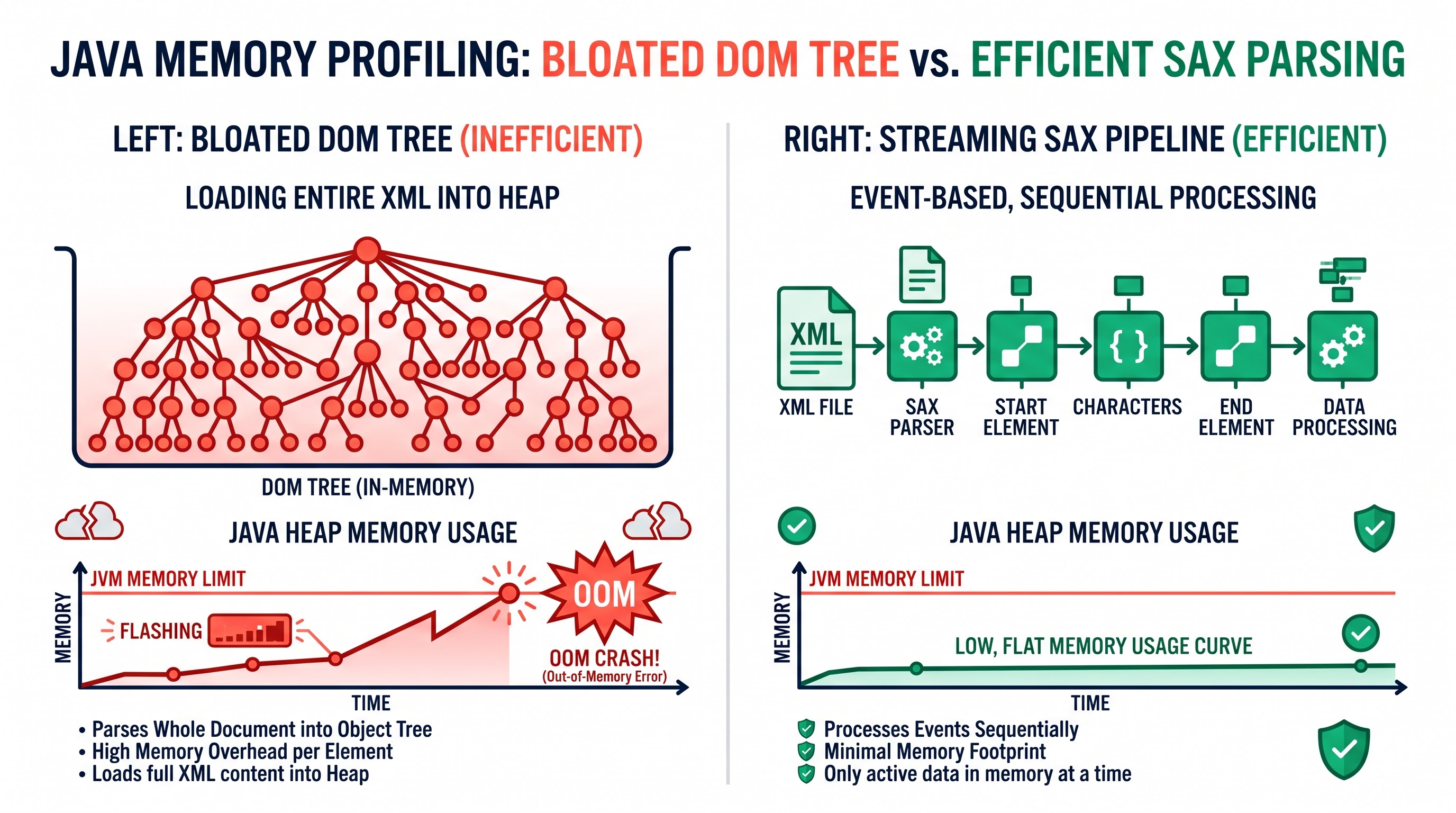
In many cases, inexperienced integration developers make the mistake of using memory-intensive components that work with entire documents. Workday Studio quickly runs into OutOfMemory exceptions.
Preventing Document Object Model Buffering: DOM parsers create a full node tree in the Java heap memory. In the case of extremely large XML files, the memory consumed may be ten to twenty times the original file size.
Streaming XML Pipelines: Some advanced integrations use streaming models instead of DOM processing. With the help of devices such as Splitters in streaming mode or SAX event handlers, the integration processes only small portions of the data.
Paged Web Service Calls: When making requests to Workday web services to obtain large amounts of data, developers have to enforce pagination. Instead of requesting all workers in a single SOAP transaction, the integration should use some predefined limits instead of a single iteration loop.
Transportation Protocols and Network Enhancement
All kinds of effective enterprise data processing also embrace improvements at the transport level of transporting information as set forth below:
Direct Streaming to SFTP: In the course of the formation of flat-file outputs, the transfer of data to the output flow can be conducted directly without any buffering of data in memory.
Compression Pipelines: The incoming and outgoing files should use special compression mechanisms named gzip or zip early in the flow. Compressing the file to minimize the size and number of bytes to be used in the next steps, and save Internet traffic in the process of creating the file.
Resilient Error Handling and Exception Architecture
What distinguishes an integration that is ready for production use is its ability to deal with anomalies. One of the operational failures is when the integration works perfectly under normal operations but fails silently when something unexpected happens, whether it is some wrong character or a network timeout. Workday Studio equips one with invaluable tools for creating protective and robust integration pipelines.
Global and Local Exception Catchers
Just like in enterprise programming languages, Workday Studio has structured exception handling through catch components and error handlers.
Local Error Handlers: One can link specific local error handlers to a specific mediation sub-flow. For instance, if the call to the third-party address verification service fails, the local error handler will intercept the error, replace the address with the unverified flag, and let the main worker continue with its operations.
Global Error Handlers: The global error handler works as the safety net for the entire integration. In case an unexpected error reaches the top level, the global error handler will ensure that the execution completes normally, and the locks are released without leaving ambiguity behind.
Integration Event Log and Auditability
When integration goes wrong, it is important that the administrators and support teams can identify the problem immediately without decompiling the integration assembly.
Logging based on severity: Workday Studio equips its products with logging tools that allow writing events directly into the Integration Event audit trail in the Workday tenant. The developers should write informational messages in case of milestones achieved, warnings about non-fatal issues concerning data formats, and fatal errors in case of severe problems with the operation.
Dynamic log additions: In most integration processes, the failure of the entire file is not required just because some records included wrong values. Reliable architectures offer ways of separating unsuccessful records, generating an error summary report, and incorporating the report into the history of the execution of the integration event while completing the successful records.
Integration status management: After the execution, the assembly should be able to assess its state and determine the final integration event status (Completed, Completed with Errors, or Failed). Knowing the final state will allow using automated monitoring systems with efficiency.
Strategies for Automatic Retrying
Issues like transient network outages, outages in some service networks, and restrictions in speed of communication with some services are not unusual for distributed cloud systems. In this situation, advanced integrations apply automatic retry technologies:
Exponential Backoff: When a downstream web service responds with HTTP 503 Service Unavailable or 429 Too Many Requests, integration should not make numerous requests to the target address immediately. Instead, it should apply an automatic loop that waits for an increasing amount of time and then tries to send the request again.
Circuit Breaker Patterns: When a dependent external service does not respond after several attempts, integration should stop working, mark the corresponding attempt as failed, and inform the administrators.
Testing, Putting Into Practice and managing the lifecycle
Creating high-standard Workday Studio integrations entails applying advanced and effective software development lifecycles. There is a good reason for saying this; risk of any kind of operational trouble due to improper deployment will always be present where integrations touch ongoing enterprise processes.
The Local Testing and Debugging Environment
With Workday Studio, engineers can find all the necessary tools for efficient diagnostics and iterative development processes at their workstations.
The Interactive Debugger: The Studio IDE provides the developers with an opportunity to pinpoint the exact locations of errors by establishing breakpoints at different mediation steps, checking the content of the root message and looking through all message headers.
Local Assembly Execution: Thanks to this functionality, developers can execute components with the help of simulations without downloading them on the tenant environment. The logic of integration will work without the requirement to upload it on a regular basis allowing engineers to check if the XSLT mapping and routing conditions are correct.
Mocking Web Services: Integration may depend on third party systems. In case there are problems with getting access to the endpoint, engineers can create corresponding mock responses.
Mechanics of Deploying Tenants
After an integration has successfully been tested at the local level, the next step is to create an integration archive and deploy it to the Workday tenant.
Integration Systems and Services: The archive uploaded to the Workday tenant is converted into an Integration System. The administrator configures launch parameters, links users to the integration systems, sets scheduling intervals, and enters data unique to the tenant without affecting the code base.
Advancing the Environment: Enterprises should consider that changes follow a specific pathway, first through the Development environment, then through Implementation/Sandbox environments, and finally through Production. Developers need to parameterize the environment variables like URLs and certificates to provide for the fact that integration will be performed without modifying artifacts.
Integration with Source Control: Enterprise Integration teams should refrain from using the Workday tenant exclusively to store their codes. Workday Studio projects must use regular source control tools like Git. Using source control allows one to keep track of the operations, collaborate with teammates, branch and merge codes, and revert back to a previous version in case something went wrong.
In summary, Workday Studio is the result of having mastered programmatic integration capabilities in the Workday environment. This highly useful software enables developers not only to extract data but also to create scalable, efficient, and safe integrations that are fit for the demands of today’s corporations.
To be successful in Workday Studio, one must know much more than just the how to drag and drop elements. A proper understanding of distributed systems design, data streaming, security strategies, and error handling methods is crucial. When built with those in mind, integration solutions developed in Workday Studio become long-lasting digital lines for sharing data between any enterprise data and external systems.
If you are looking for an example of using the functions of Workday Studio, including assembly processes, launch parameters, and deployment activities, visit the practical workday courses at OnlineITGuru where you can go through realistic examples of working, testing, and deploying business-grade integration procedures by means of the necessary elements of the Studio UI.