
Building Reusable Workday HCM Integration Frameworks
Last updated on Nov 25, 2026
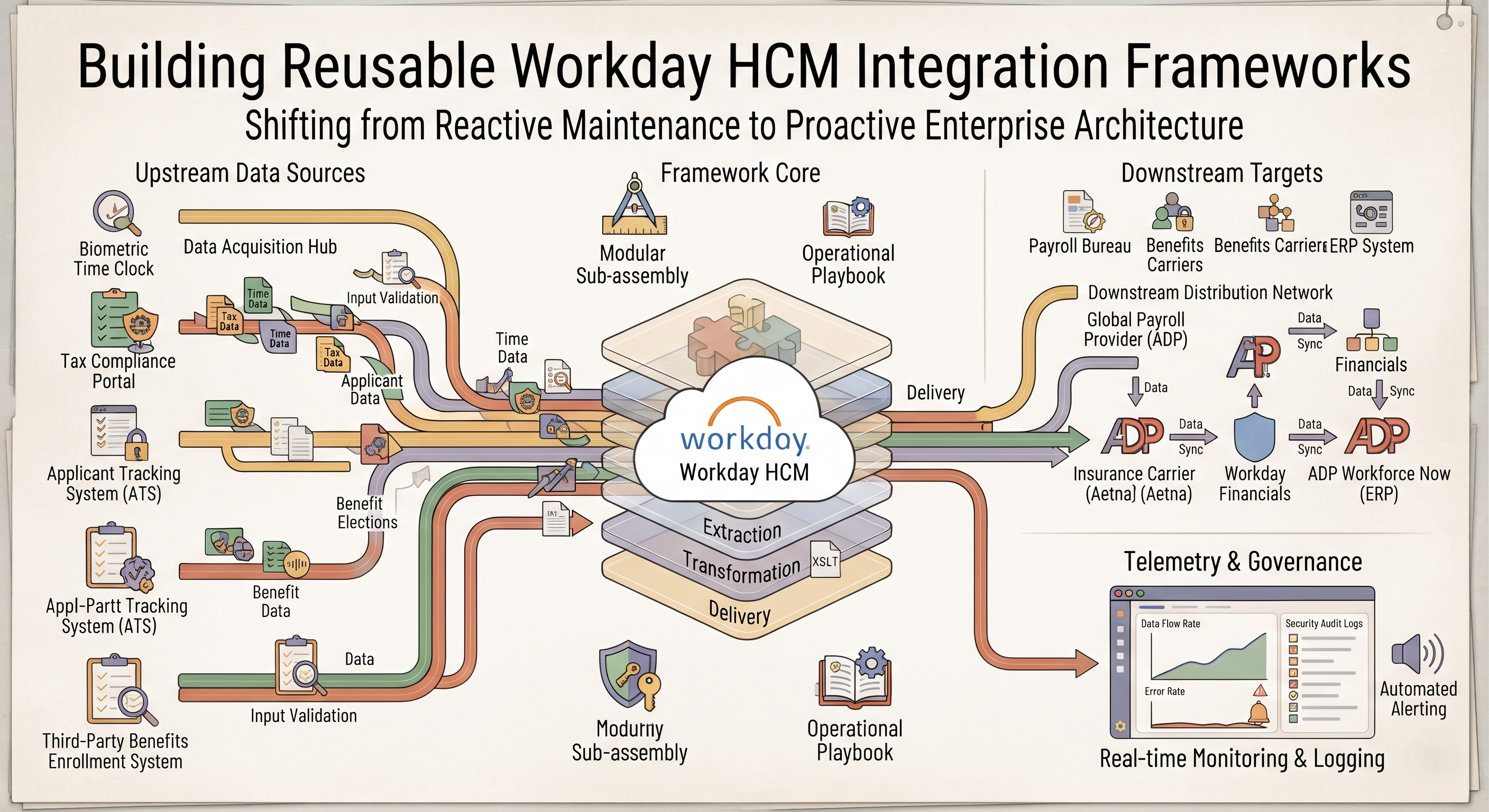
Enterprise Human Capital Management transformations rarely fail due to the underlying platform lacking capability; they fail when the surrounding ecosystem of peripheral connections becomes brittle, opaque, and unmanageable. Typically a mid-market Workday Human Capital Management rollout will connect to between ten and twenty downstream and upstream systems, whereas a global enterprise rollout that includes core human resources, payroll, talent, benefits and financials will often require thirty to fifty distinct integrations. These links synchronise worker demographics, organisational hierarchies, compensation adjustments, absence accruals, time records, and recruiting outcomes across payroll bureaus, benefits carriers, tax engines, identity providers, and enterprise resource planning systems.
Technical debt starts piling up the moment implementation teams treat each interface as a custom, standalone engineering task. Developers copy/paste assembly logic between Workday Studio projects, hard-code tenant-specific endpoints, re-invent error handling routines, and spread transformation rules between custom reports and spreadsheets. This ad-hoc approach might appear to speed up early build sprints in early implementation phases, but it creates a severe maintenance bottleneck once the system is in production. Each biannual Workday release comes with schema updates, new required attributes and deprecated web service operations that require regression testing across the integration landscape. Without a common architectural baseline, fixing a single production failure or onboarding a new regional vendor takes weeks of dedicated engineering time.
By building a reusable integration framework, an organization shifts from reactive interface maintenance to proactive enterprise architecture. A reusable framework is not a single monolithic piece of software, but a coherent set of design patterns, modular sub-assemblies, standard configuration schemas, security governance models and operational playbooks. Before you write a single transformation rule, an integration architect builds common patterns. Common capabilities like authentication token management, delta change detection, payload encryption, exception logging and automated alerting are engineered once, hardened through testing and reused across dozens of interfaces.
Understanding the Workday Integration Eco-system and Tool Selection
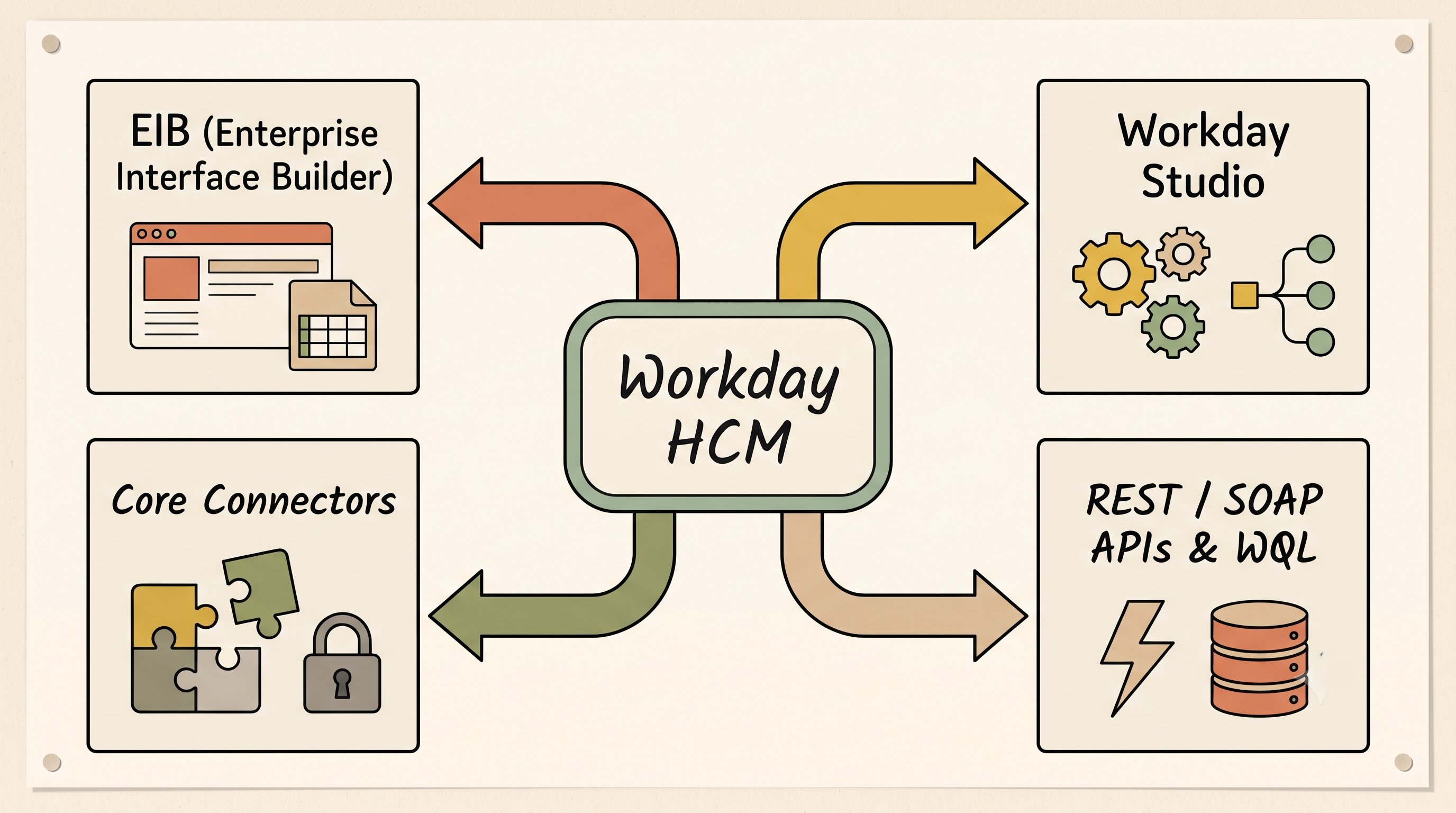
One of the foundational pillars of any reusable Workday integration framework is enforcing strict discipline in tool selection. Workday has a complete set of native integration tools, each designed for specific data volumes, transformation complexities and latency requirements. A mature framework will have clear decision boundaries so that developers and functional analysts pick the simplest, most maintainable tool that will satisfy the business requirement.
Enterprise Interface Builder
Enterprise Interface Builder is Workday's declarative, configuration-driven tool for easy inbound and outbound batch data transfers. An outbound flow Enterprise Interface Builder integration is usually a combination of a custom report exposed as a web service and a standard delivery mechanism such as Secure File Transfer Protocol, Hypertext Transfer Protocol or cloud storage endpoints. For inbound flows, it uses spreadsheet templates or structured Extensible Markup Language payloads to call public Workday web services in bulk. The Enterprise Interface Builder is the recommended pattern for low complexity interfaces in a reusable framework A place where business analysts can keep their field mapping capabilities without any programming of custom procedures. The professionals that wish to build a foundation in workday integration system fundamentals will start from declarative tools.
Cloud Connect Packages and Core Connectors
Core Connectors and Cloud Connect packages are pre-built, Workday-delivered integration templates for specific functional domains—such as Core Connector Worker, Payroll Interface, and Cloud Connect for Benefits. Unlike custom builds, these connectors leverage Workday’s native change detection engine to automatically track effective-dated transactions, retroactive corrections, and historical audit trails across worker business objects. A reusable framework uses Core Connectors for standard payroll, benefits and third party vendor feeds to maximise their use, extending their output through Document Transformation stylesheets instead of re-inventing change detection.
Workday Studio
Workday Studio is an Eclipse-based development environment for building complex, multi-step, high-volume, or orchestrational integrations. Unlike the Enterprise Interface Builder or Core Connectors, Workday Studio does not offer any opinionated internal structure out of the box. It provides developers with programmatic control over message routing, conditional branching, chaining of web services, parallel processing and customised transport protocols. Workday Studio is very flexible and as such it is the most prone to architectural drift. Therefore, A majority of a reusable framework for integration is dependent on the standardization of structure, parameterization, and governance of Workday Studio projects. The attendance of the Workday Integration course in India will enable the developers to understand the patterns of Workday Studio by example.
Workday REST APIs, SOAP Web Services and Workday Query Language
Modern enterprise architectures are increasingly requiring real-time, event-driven synchronisation on top of traditional nightly batch runs. Workday offers Simple Object Access Protocol web services for complete transactional coverage and Representational State Transfer application programming interfaces for low latency and lightweight interactions. Also, Workday Query Language gives a structured, SQL-like syntax to query business objects directly without having to build custom reports which are heavy with overhead. A forward-looking integration framework provides standard wrapper patterns to call these interfaces, manage pagination, adhere to tenant rate limits, and consistently handle token lifecycles across internal Workday Studio assemblies and external integration platforms as a service.
Basic Architectural Principles for Reusable Frameworks
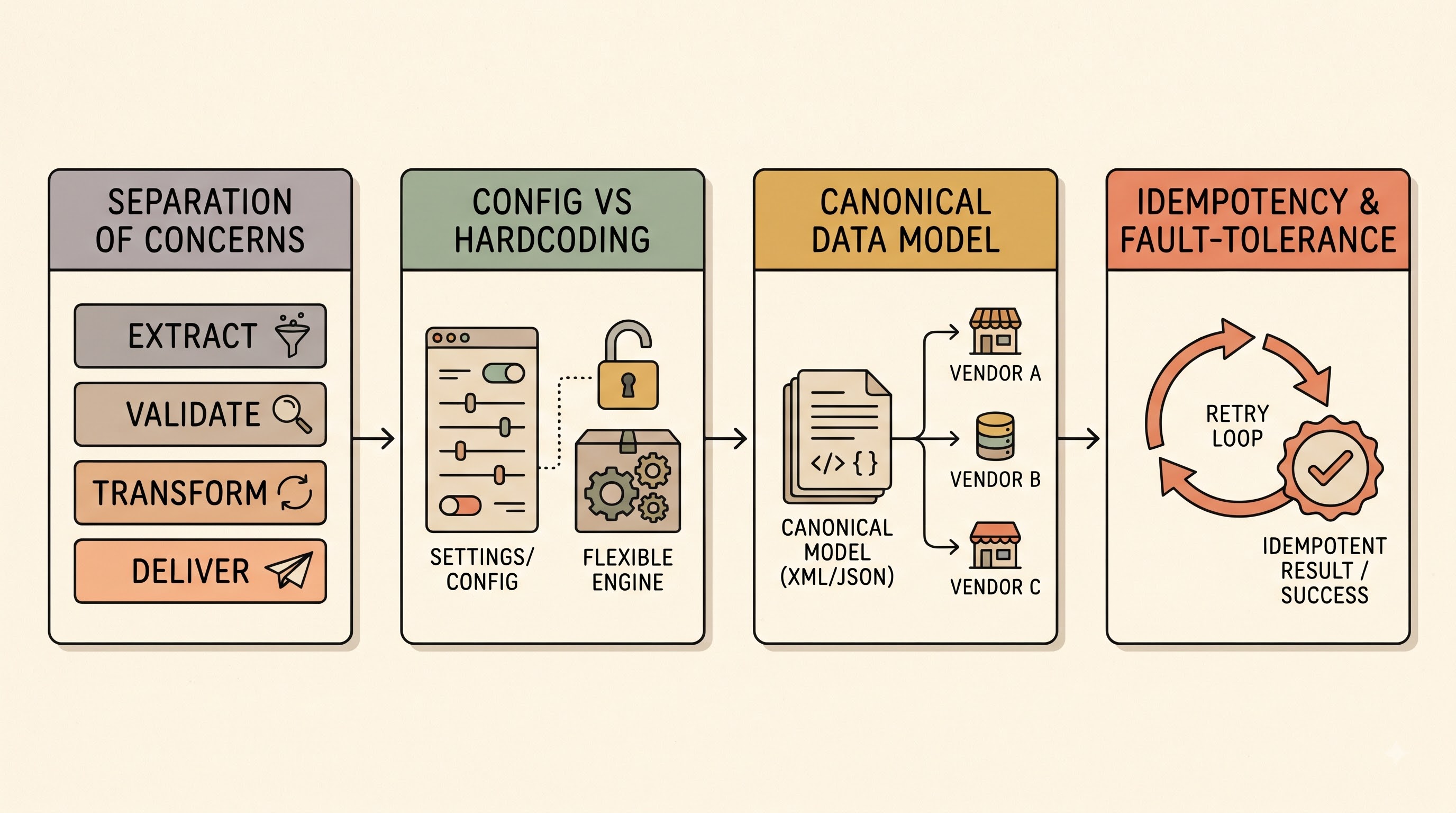
Architects should build their Workday integration framework on four software engineering principles, adapted to enterprise cloud ecosystems, to avoid integration sprawl and enable long-term maintainability.
Separation of Concerns
Each integration flow should be broken down into discrete, single responsibility stages: data extraction, business rule validation, schema transformation, delivery of transport and operational telemetry. If extraction logic and target-system formatting rules are packaged together in a single, monolithic stylesheet or assembly, any change to the vendor’s file layout could cause the underlying Workday query to fail. Teams can change a vendor’s comma-separated values layout or switch transport protocols without having to change the core data extraction logic by separating each stage into a separate module.
Configuration vs Hardcoding
A truly reusable integration artefact must be completely agnostic of the tenant environment and vendor specific parameters. Do not embed Uniform Resource Locators, Secure File Transfer Protocol hostnames, directory paths, credentials, Pretty Good Privacy encryption keys, email distribution lists, or business filter criteria in assembly diagrams or transformation stylesheets. Instead, all environment specific and integration specific variables should be externalised into Workday Integration Attributes, Integration Maps, or centralised configuration objects. This means that the same compiled archive can be promoted without any issues from a development tenant to a sandbox tenant, and finally to production by changing only configuration values.
Canonical Data Models
Point-to-point transformations create a combinatorial maintenance burden in complex environments where worker demographics, job profiles, and organisational assignments need to be syndicated to dozens of downstream consumers. The internal canonical data model or a standardised Extensible Markup Language or JavaScript Object Notation representation of core human capital entities across the enterprise creates a layer of abstraction between Workday’s internal object schema and external vendor formats. Common extraction module extracts the canonical payload once and lightweight vendor-specific transformation modules map that canonical structure to the schema required by each target system.
Idempotency and Graceful Fault-Tolerance
In distributed cloud operations, network timeouts, external server maintenance windows, and transient application programming interface throttling are unavoidable. Failure is built in from day one in a reusable framework. All inbound and outbound flows must be idempotent - if an integration is re-run after a partial failure the end state is exactly the same, with no duplication of worker records, no double-payment of allowances and no corruption of historical effective-dated stacks.
Workday Studio Designing Layers (Modular)
Workday Studio doesn't inherently enforce architectural layering, so framework architects must define a standardised reference blueprint for all custom assemblies to follow. Organising Studio projects in four logical tiers (orchestration, extraction, transformation and delivery) ensures predictable behaviour and fast developer onboarding.
The Orchestration and Initialisation Layer
Each standardised Studio integration starts with a lightweight main orchestration flow that is only responsible for lifecycle governance. When the system starts, this layer creates a unique correlation identifier for end-to-end traceability, loads all Integration Attributes and Integration Maps into message context variables, verifies that mandatory configuration parameters are populated, and checks if another instance of the same integration is already running concurrently. If the pre-flight checks fail, the orchestration layer will immediately stop execution and emit a structured initialisation alert before any downstream processing.
Data Extraction Layer and Input Handler
The extraction layer handles all communication with Workday’s internal data sources, which can be via Report-as-a-Service endpoints, Workday Query Language queries, Core Connector output files, or paginated Simple Object Access Protocol web service calls. Complexity that developers otherwise duplicate inconsistently is addressed by a reusable extraction module. This includes iterating through paginated web service responses, flattening deeply nested multi-instance worker attributes, resolving reference identifiers across different integration system IDs, and validating that the extracted dataset meets minimum row-count thresholds before proceeding. This layer normalises the output to a clean and predictable intermediate payload, insulating downstream modules from the way the data was fetched.
Business Logic and Transformation Layer
The transformation layer takes the raw extracted worker data and transforms it into the format needed by the target system. Complex conditional routing, lookup translations and data cleansing rules are decoupled from pure structural mapping in a reusable framework. Workday country codes, marital statuses, or pay group identifiers converted to Vendor specific codes are all lookups. These lookups are completely driven by Workday Integration Maps, not hard-coded conditional statements within stylesheets. This allows functional administrators to maintain code crosswalks directly in the Workday user interface without having to involve developers or code deployments.
The Outbound Connector and Delivery Layer
The delivery layer abstracts the mechanics of sending the data to external end-points and ingesting the responses. The delivery layer offers a uniform interface to the calling integration, regardless of whether the target requires Secure File Transfer Protocol upload with Pretty Good Privacy encryption, Representational State Transfer application programming interface posting with Open Authorisation bearer tokens, or Simple Object Access Protocol message submission. Developers supply a payload, destination key, and references to security profiles; the shared delivery assembly automatically handles connection retries, exponential backoff, cryptographic signing, and transport-level acknowledgements.
Creating a Common Library of Utility Sub-Assemblies
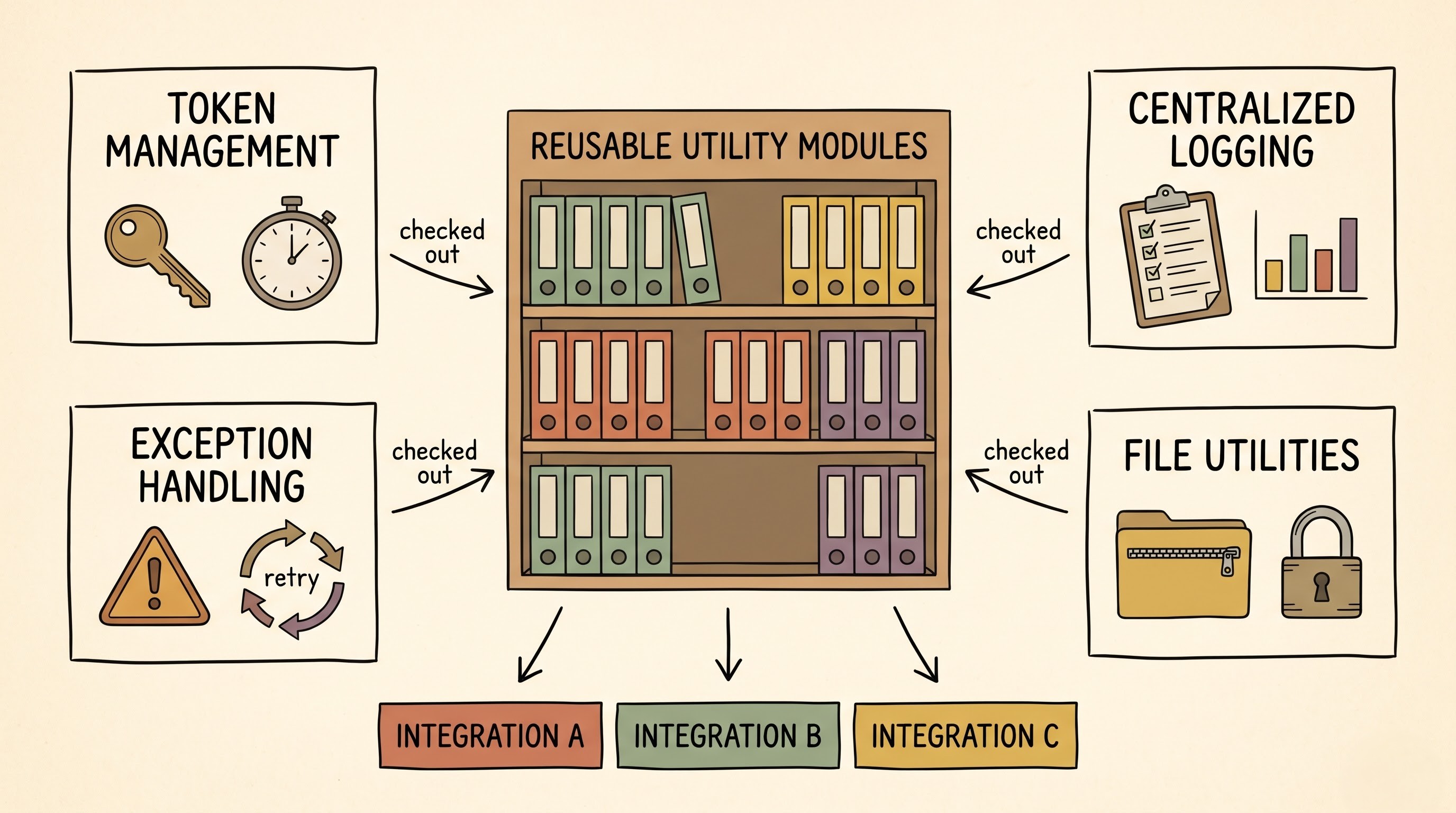
Any Workday Studio framework is accelerated by having a centralised repository of reusable utility sub-assemblies. Instead of creating monolithic Studio archives with duplicated utility logic in each project, teams keep a versioned core library that each integration imports or references individually.
Token Lifecycle Management and Authentication Standardisation
Short-lived modern Software-as-a-Service integrations often use Open Authorisation client credentials, refresh tokens, or JSON Web Tokens that expire in as little as sixty minutes or less. Expired tokens mid-stream during long-running batch synchronisations involving tens of thousands of worker records have caused catastrophic job failures. This reusable authentication sub-assembly centralises token acquisition. It caches active tokens in memory with their expiration time stamps, and proactively refreshes tokens before they expire. It also standardises the mutual Transport Layer Security certificate handling, and credential retrieval from encrypted integration attributes in Workday.
Sub-Assemblies for Telemetrization and Centralised Logging
In native Workday environments, troubleshooting integration failures usually requires downloading massive raw execution logs and sifting through unstructured stack traces. A reusable logging subassembly ensures a common telemetry standard across the entire enterprise. During execution, integrations log standard logging checkpoints: start times, extracted record counts, filtered record counts, validation warnings, and transmission timestamps. At the end of the run, the utility creates a clean, readable report summary, attached directly to the Workday Integration Event with machine-readable structured logs for forwarding to external observability platforms.
Unified Retry Orchestration and Exception Handling
There are two types of errors that each integration will face, transient infrastructure faults and persistent business data exceptions. Transient faults (network blips, external server rate-limiting responses, temporary lock contention on a worker record) should trigger automated, bounded retries with exponential backoff. Persistent data exceptions such as an invalid national identifier, no cost center mapping, or a terminated supervisor assignment will never succeed on retry and must be quarantined immediately so that they do not block valid worker records in the same batch. A common exception-handling subassembly automatically categorises errors, executes retry loops for transient codes, routes quarantined records into a structured error file for functional remediation, and accurately sets the overall Workday Integration Event status to Completed with Warnings or Failed based on configurable severity thresholds.
File Packaging, Compression, and Cryptographic Utilities
Human capital integrations often deal with very sensitive personally identifiable information such as government tax identifiers, banking routing information, salary figures and health benefit elections. A standard file-packaging utility standardises Pretty Good Privacy encryption, signature verification and archive compression and dynamic file naming conventions. By building automated checksum generation into a single utility module, and by enforcing timestamped, sequence-numbered file-naming patterns, the risk is eliminated that vendors will overwrite unprocessed files or ingest truncated transmissions.
Standardisation of Data Access and Delta Change Detection
One of the steepest learning curves for integration engineers is to efficiently extract data from Workday’s object-oriented, effective-dated architecture. A reusable framework encapsulates proven patterns for querying data and detecting incremental changes without degrading tenant performance.
RaaS vs WQL vs Core Connectors: Which One to Choose?
You do not need to do a full historical state comparison for every outbound integration. When an interface just needs a quick snapshot of the active workers and their current primary job attributes, a custom report exposed as a web service provides quick development and transparent filtering. If an integration needs to query across specific business objects at high speed with a small payload, Workday Query Language provides much faster response times and less memory usage than heavy Simple Object Access Protocol web services. However, if you have a downstream payroll or benefits system that needs to know exactly what changed between two points in time, including retroactive salary changes, rescinded hires, and future-dated terminations, then Core Connector change detection is the required framework pattern.
Realisation of Robust Delta Watermarking
In case of custom integrations that can't use Core Connectors, watermarks must be carefully managed to track incremental changes. A reusable delta-tracking pattern stores the exact timestamp of the last successful integration run -- along with the effective-as-of date -- in persistent integration attributes or custom business objects. The framework does not rely on the wall-clock start time of the integration, which risks missing transactions committed during execution. Rather, it captures the exact transaction log cutoff timestamp when the extraction phase starts, and commits that watermark only after confirming downstream delivery. This means zero data loss from one scheduled run to the next.
Efficient Dating and Retroactive Corrections Handling
Workday’s effective-dated data model allows human resources administrators to enter transactions with an effective date in the past, present or future. Naïve integrations that only query current worker state often miss future-dated hires necessary for identity management systems for early account provisioning, or do not pick up retroactive compensation adjustments required by payroll engines. A mature integration framework will define explicit temporal window parameters (e.g. configurable look-ahead days for onboarding, and look-back windows for retroactive corrections) that allow each integration to declare its temporal sensitivity via configuration, not custom query rewrites.
Security, privacy and governance by design
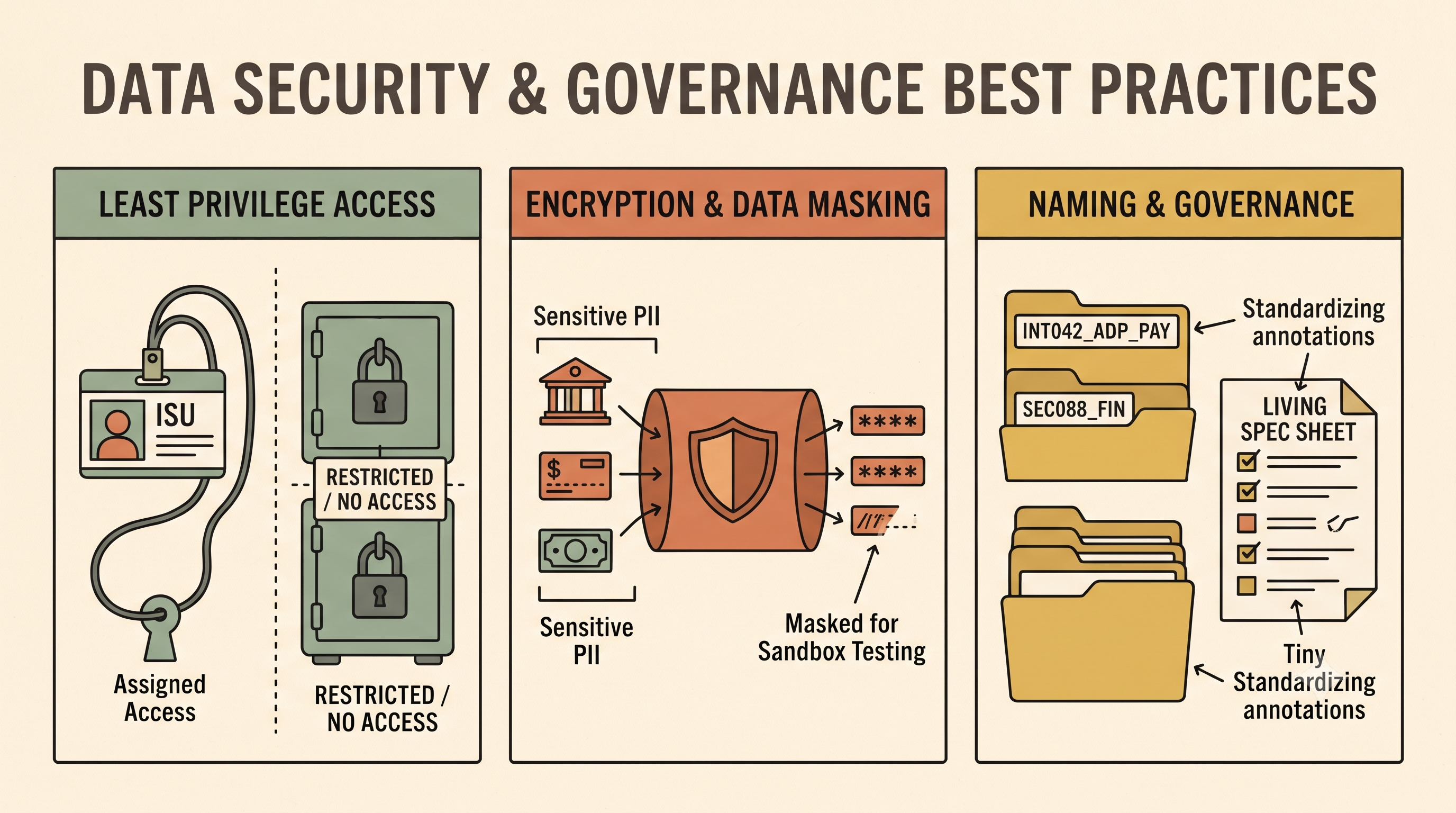
Because Human Capital Management integrations handle the most sensitive workforce data in an organization, security can’t be retrofitted after development. Each integration blueprint embeds a reusable framework with strict governance controls.
Integration System Users and Security Groups of Least Privilege
Every integration must be run under a dedicated Integration System User account associated with a constrained Integration System Security Group. Sharing one super-user account across multiple integrations breaks audit compliance and creates catastrophic blast radius if the credentials are compromised. It provides a repeatable security provisioning checklist: create a dedicated system user for each integration or tightly coupled functional domain, assign read or modify permissions only to the specific business process domains and report data sources required, and Use non-expiring passwords along with other security measures such as X.509 certificates or OAuth clients. It is essential to understand the above-mentioned security parameters to clear the workday integration core certification.
Transport Encryption, Tokenisation and Data Masking
Sensitive fields such as national insurance numbers, bank account details and pay rates need to be secured in transit and at rest. The framework requires the use of modern Transport Layer Security protocols for all network communications and Pretty Good Privacy encryption for all file-based exchanges. Plus, automated data-scrambling or masking routines make certain that real employee personal information is never exposed to external vendor test servers or unauthorised developers when integrations move data into non-production sandbox environments for testing.
Naming Conventions and Metadata Tagging & Documentation Standards
If you have dozens of active flows in an integration catalogue, discoverability becomes an important operational factor. A reusable framework demands a deterministic naming convention for all Workday artefacts: Integration Systems, Custom Reports, Calculated Fields, Integration System Users, Sequence Generators and Business Process notifications. Administrators can track any calculated field or security group instantly back to its parent integration by prefixing every artefact with a standardised integration identifier, like a unique numeric code paired with the target system acronym and functional domain. All integrations must, in addition to naming, have a living technical spec outlining data lineage, scheduling cadence, rate-limit expectations, and escalation contacts.
End-to-End Testing, Deployment and Release Management
A reusable integration framework goes beyond runtime architecture to the software delivery lifecycle, making sure code quality, tenant migrations and bi-annual platform upgrades are smooth.
Automated Validation and Regression Tests
It's not sustainable to manually test dozens of integrations every sprint or platform upgrade. Framework teams create standard test harnesses that inject synthetic canonical payloads into transformation modules and assert the exact structure and field values of generated outputs. During end-to-end integration testing, teams work through a curated catalogue of core human capital business scenarios—new hires, international transfers, supervisory organization reorganisations, leaves of absence, compensation changes, and terminations—to verify that all downstream integration handles the transactions generated correctly.
Cross Tenant Migration and Configuration Promotion
For example, moving integrations through the Workday tenant hierarchy, from Implementation to Sandbox Preview, Sandbox and Production, often results in human error where manual steps are involved. This clear separation of compiled code archives from environment-specific Integration Attributes and Maps allows teams to package deployments using Workday’s Configuration Package tools or automated migration pipelines. A standardised deployment runbook verifies post migration connectivity, checks certificate expiry and runs smoke tests in read-only or suppressed delivery mode prior to enabling live external transmissions.
Navigating Workday’s Biannual Release Cycles
Workday releases major feature and schema updates twice a year, typically in March and September. Each release provides updates to web service versions, the retirement of old endpoints, and sometimes changes in the behaviour of standard reports and business processes. Because a reusable framework aggregates web service calls, authentication routines and utility assemblies into shared libraries, upgrading an entire integration landscape becomes dramatically simplified. Engineers don’t need to update web service versions in forty different Studio projects. They update the shared extraction and web service sub-assemblies once, run regression tests against the Sandbox Preview tenant and promote the updated library enterprise-wide.