
Business Rules in ServiceNow: Types, Uses, and Best Practice
Last updated on Nov 20, 2026
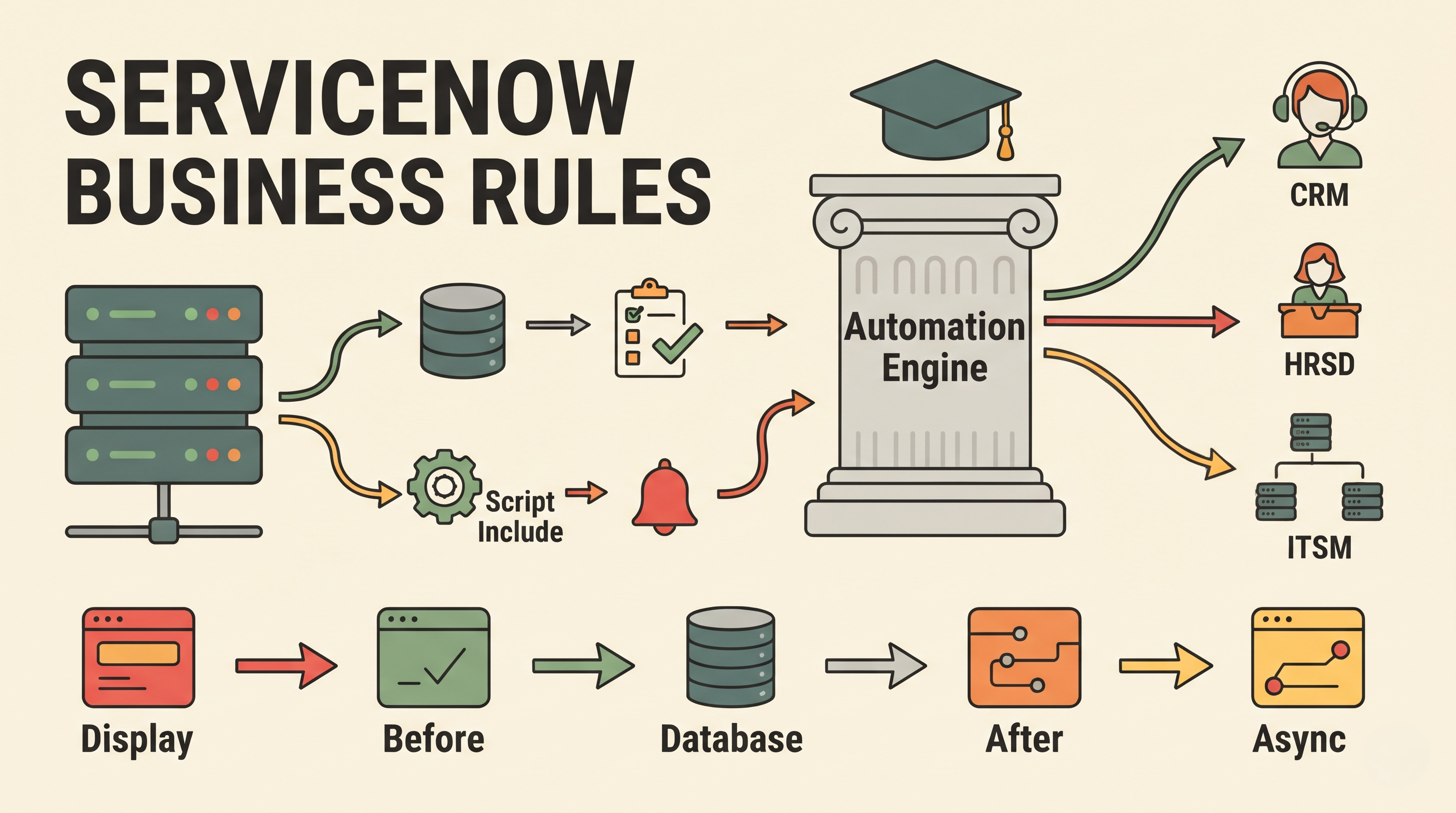
In today's enterprise environment, operational efficiency depends on workflow automation and data integrity. ServiceNow is a leading cloud-based platform for digital workflows and is heavily dependent on server-side logic to enforce organisational policies, automate repetitive tasks, and keep clean databases. This server-side automation engine is based on Business Rules.
What is a Business Rule in ServiceNow? A Business Rule is a server-side script or configuration that is set to run when a record is displayed, inserted, updated, or deleted, or a table is queried. Business Rules run completely on the ServiceNow application server. Client Scripts run in the user's web browser in response to user interface actions such as clicking a button or changing a field value on a screen. They run at the database transaction layer, so they run no matter how the data is accessed or changed – whether it’s via a standard web form, a mobile app, a web service integration, an import set or a background script.
The knowledge of architecture of business rules, various use cases and architectural guidelines that will assist in maintaining high performance is essential for ServiceNow administrators, developers and architects. Developing architectural confidence is one of the main goals of systematic servicenow administrator training once they get hands-on experience in building server-side logic.
The Anatomy of a Business Rule and Its Implementation
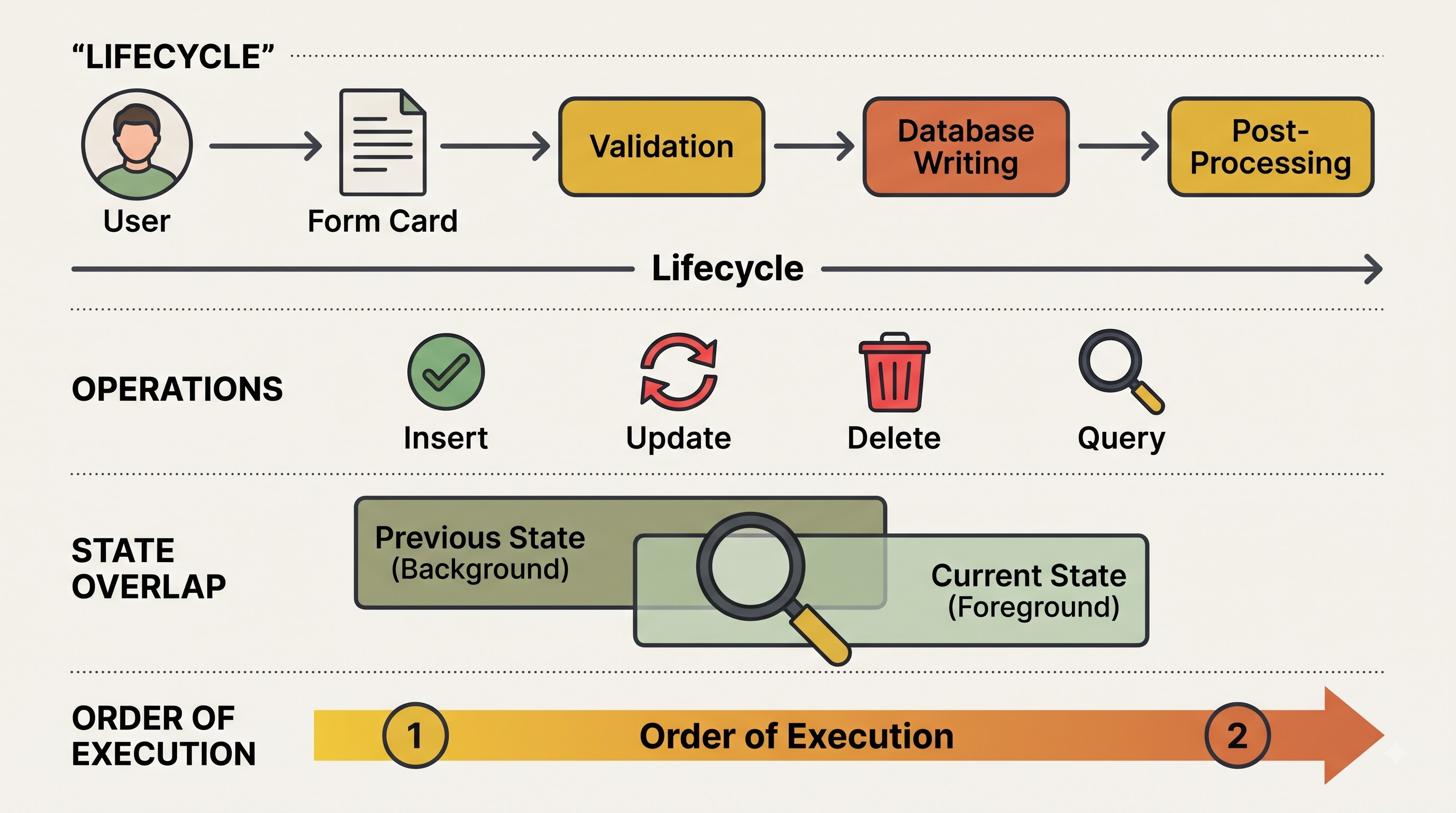
To be an expert in Business Rules, you need to know when and how the platform fires them during a database transaction. The ServiceNow platform begins a defined lifecycle when a user or an automated system interacts with a ServiceNow table.
When a user opens a form the system looks up the database for the details of the record. When a user submits a new record or saves changes to an existing record, the platform goes through a thorough sequence of validation, database writing and post-processing. Business Rules capture those exact points in time.
The platform has two basic conceptual objects for evaluating data inside the Business Rule engine: the current state of the record and the previous state of the record. The object now is the data as it is being submitted or viewed, including any new edits. The previous object represents the values in a database before the transaction began. By comparing these two states, administrators and developers may know precisely what changed in a transaction (e.g. an incident’s priority was raised, or a task was assigned to a different support group).
In addition, the four major database operations control Business Rules:
Insert: Fires when a new record is being created and added to a table for the very first time.
Change : Fires when an existing record is changed and saved back to the database .
Delete: Occurs when a record is removed from a table permanently.
Question: Fires immediately before the record retrieval request to the database.
In addition to defining the kind of activity to take place in the database, the system administrator will assign order numbers to the Business Rules that have been defined. In case there is more than one rule defined to be executed on the same level for a particular table, the ServiceNow will execute the rules depending on their order numbers from the smallest to the largest.
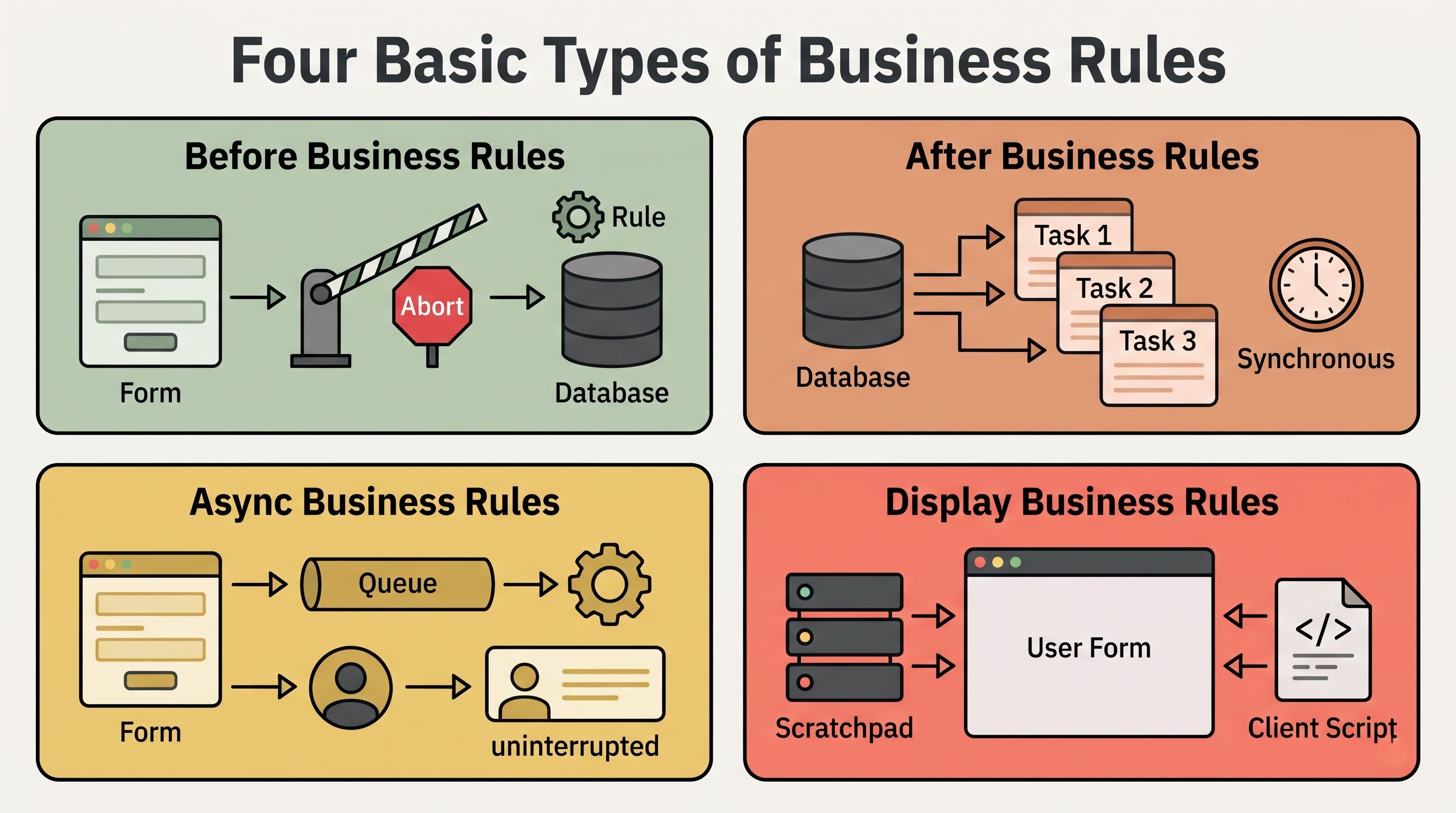
Four Basic Types of Business Rules
ServiceNow classifies Business Rules into four types based on the precise point they run within the database transaction. The most important decision in designing server-side logic is when to do it.
1. Prior to Business Rules
Before Business Rules run after a user or system submits a form or begins a database action, but strictly before the changes are actually written and committed to the database.
The record has not yet been saved to the underlying database tables and rules have direct access to the incoming data payload in memory. Any changes you make to the fields of the current record in a Before rule are automatically part of the pending database transaction. After the Before rule completes, ServiceNow saves the user’s original inputs and the rule’s automated adjustments to the database as a single save.
Before Business Rules also have the special ability to abort a database transaction completely. A Before rule can stop the saving process if incoming data violates an important organisational policy or does not pass server-side validation. It can also show a helpful error message to the user, and keep corrupt or unauthorised data from ever reaching the database.
Special Subtype: Before Query Business Rules The Before Query Business Rule is a special variation of the Before rule. Instead of firing when a record is saved it will fire right before ServiceNow queries a table for a list view, populating a reference field lookup, or loading a report. It intercepts the database query and adds extra filter conditions automatically. This means users only see records that fit certain criteria, for example, restricting non-IT users to only see incidents that they have opened themselves, without showing security constraint messages at the bottom of list views.
2. Then business rules
Business Rules run synchronously immediately after the record has been saved, updated or deleted successfully in the database. The main database transaction is complete at this stage of the life cycle, and the newly generated system identifiers, timestamps, and field values are permanently committed.
The data is now in the database . Officially . Business Rules are great for things that rely on the fact that the record exists ( or does not ) or is in its final state . However, because the After rules execute synchronously, the user's browser session must wait for all After Business Rules to finish executing before the screen is refreshed or reloaded. This means any heavy or slow operations inside an After rule will directly impact the end-user experience by introducing noticeable delays when they click Save or Submit.
3. Async Business Rules
Async rules, also known as Asynchronous Business Rules, also run after a record has been inserted, updated or deleted in the database. But Async rules are not run immediately in the user's active interactive session, as After rules are.
Instead, when the database transaction is complete, ServiceNow places an execution entry in a queue of the background scheduler. Control is immediately given back to the user’s browser so they can continue working without delay. Meanwhile a background worker node sees the job in the queue (usually within seconds) and does the business logic on it separately.
The one important technical difference with Async Business Rules is that they do not retain access to the previous state of the record. However, the rule is executing in a separate background thread which is not attached to the original user session, so the historical snapshot of what the fields looked like pre-update is no longer available in memory. What this means is that all of the conditions that check to see if a given field has changed must be checked when the rule is queued, and not in the background execution script itself.
4. Show Business Rules
Display Business Rules operate on a completely different lifecycle axis than Before, After and Async rules. They execute when a user requests to open a form, immediately after the record has been read from the database, and immediately before the form is rendered and sent to the user's web browser.
The main purpose of a Display Business Rule is to fill the gap between the server and the client. Client-side browser scripts frequently require server-side information such as system properties, user group memberships, parent record attributes, or the existence of attachments on the record to dynamically hide fields, display warning banners, or make inputs read-only. If you don’t have a Display rule, the client script would need to call the server asynchronously after the form loads, which can result in visual flickering or delays.
Display Business Rules solve this by collecting all the server-related facts needed at the time of the first page load and packaging them in a shared memory object called the scratchpad. When the form comes to the browser, Client Scripts can immediately read those pre-fetched values from the scratchpad without having to make an additional trip back to the server.
Real-World Examples and Core Practical Uses
The Business Rules determine the majority of micro-interactions in IT Service Management (ITSM), Customer Service Management (CRM), HR Service Delivery (HRSD) and in customized applications. For a better learn servicenow administration it would be much simpler to look at the connection between the rules and their application in practice.
Data Auto Population and Standardisation
Organisations depend on clean, standardised data to report and route accurately. Before Business Rules are often used for cleaning and enriching incoming data before it arrives at the database. For instance, a Before rule could automatically calculate a due date based on the selected priority when an incident is created, populate a hidden tracking field, format text strings into consistent uppercase or lowercase conventions, or assign a default support group when a specific configuration item is selected.
Server- Side Data Validation and Policy Enforcement
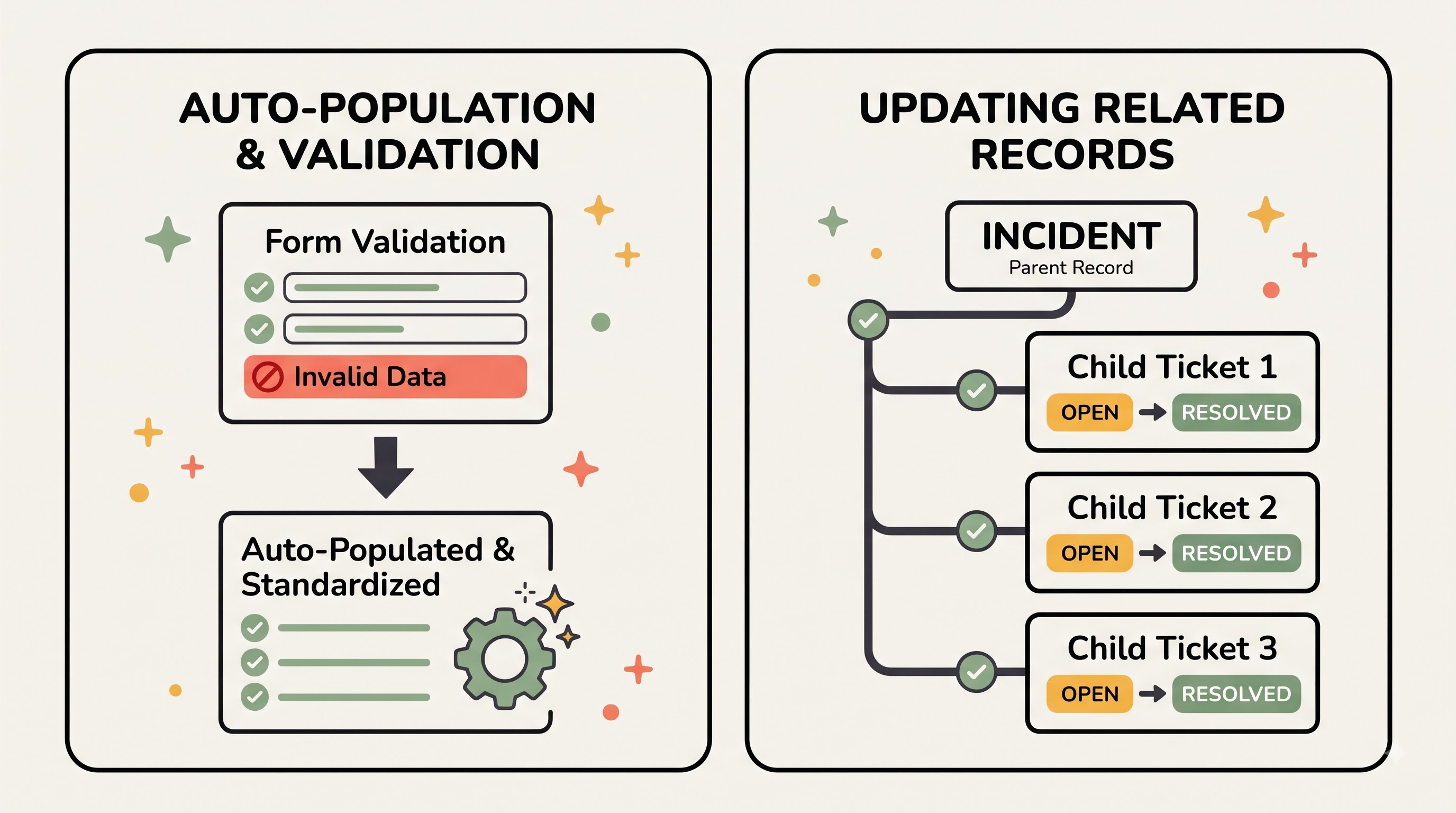
Browser-based rules can prompt users to complete required fields, but client-side validations can be easily bypassed through integrations, list editing or API calls. Business Rules are the ultimate gatekeeper for data integrity. For example, a Before rule on the Change Request table can validate a planned start date is not in the past, or validate that a high risk emergency change has a valid justification attached before allowing the record to proceed to an approval state. If the condition is not met, the rule aborts the save, keeping the database accurate.
Updating Related Records and Propagating Changes
Enterprise records almost never stand alone. A parent task will often control multiple child tasks . Business Rules are great to propagate updates to related tables once the primary record is safely stored. For example, when a major Problem record is resolved and closed, an After Business Rule can query all linked Incident records and automatically update their states to resolved as well, copying the root cause notes down to every affected ticket so service desk agents do not have to update dozens of records manually. Similarly, an After rule can automatically trigger the next task in sequence in the project plan when a parent project task is closed.
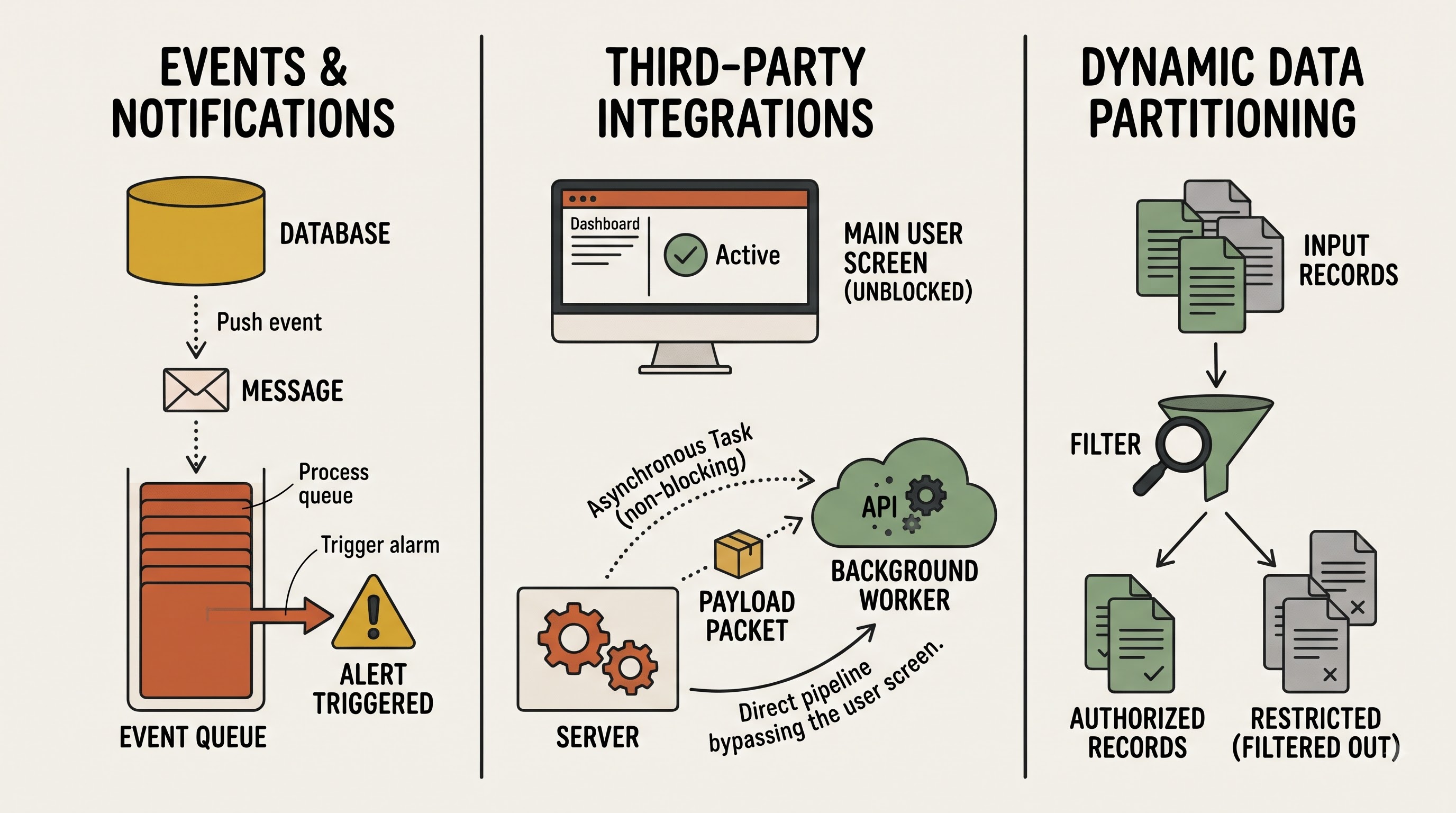
Making Events and Notifications for the System
Email notifications and system audit events should only be generated after an action has been committed to the database. If you send an email before saving the record, you might end up notifying stakeholders about a transaction that later fails validation and is rolled back. Standardly After and Async Business Rules are used to fire system events that trigger notifications. For instance, if a high-priority outage is logged, an After rule places a system event in a queue that immediately dispatches alert notifications to major incident managers.
Third Party Integrations and Heavy Background Processing
In modern enterprises, ServiceNow does not work in silos. It is constantly communicating with other platforms like Jira, Azure DevOps, SAP, Workday, Slack, etc. The outbound REST or SOAP web service calls to external systems can take anywhere from several hundred milliseconds to several seconds depending on the network latency. If you perform an external integration in a synchronous Before or After rule, the user’s screen will hang until the external server replies. Async Business Rules are the solution for outbound integrations. When a user updates a record, the Async rule queues the integration payload in the background, letting the user move on immediately while the server does the external API handshake quietly behind the scenes.
Improving Load Time of Forms
In complex service desk environments, forms often need to adapt based on contextual metadata that does not live directly on the current record. For example, an incident form might display a red banner if the caller is a VIP executive, or lock down certain financial fields if the parent department budget is frozen. A Display Business Rule checks the caller’s profile or the department record on the server when the form opens, passes a simple true or false flag to the client via the scratchpad, and allows the browser to adjust the user interface immediately.
Dynamic Data Partitioning
In many cases, administrators of shared ServiceNow instances that serve multiple departments, subsidiaries, or even external clients will use Before Query Business Rules to silently partition data visibility. For instance, when a human resources agent opens a list of cases, a Before Query rule checks the agent’s assigned region or security clearance and silently filters the database query so that the agent only sees employee cases within his or her authorised jurisdiction.
Top ServiceNow Business Rule Best Practices
Another reason for platform sluggishness, infinite loops and maintenance nightmares are Business Rules. Business Rules are run right on the server every time there are database operations. Following the well-established best practices of engineering, your instance will remain fast, upgrade-safe, and scalable.
1. Never call explicit updates within Before or After rules
The most famous golden rule in ServiceNow development is probably not to call an explicit database update method on the current record inside a Before or After Business Rule.
In a Before Business Rule an explicit update call is completely redundant as the platform is already working on saving the record. Calling update manually causes an extra, unnecessary write to the database before the first one is complete. Worse, if you call update on the current record in an After Business Rule, the entire update lifecycle starts over again. That second update fires the same After Business Rule, which again calls update, creating an infinite recursive loop that eats server memory, locks database threads, and deteriorates instance performance until the platform forcibly kills the transaction. Any changes to the current record should always be done in a Before Business Rule without an update method.
2. Always state the trigger conditions
Each Business Rule has condition builders and filter criteria to determine whether the rule should execute. Leaving the conditions blank means that the ServiceNow server will have to evaluate and execute the rule for each and every insert, update or query on that table, even if you change completely unrelated fields.
Always use the native condition builder to narrow the scope of execution as tightly as possible Specify exact field transitions, for example, the State field must change to Resolved or the Assignment Group field must not be empty. Evaluating declarative conditions in the condition builder is far faster than loading the JavaScript engine to evaluate conditional logic inside a script body.
3. Choose the Right Timing of Rules for the Job
Timing misalignment results in unnecessary bottlenecks. Use a clear framework to make decisions:
Use Before rules only to change field values in the record being saved or to validate data to abort invalid submissions.
Use After rules only when you want to update related records immediately so that the user sees those updated child or parent values immediately when the screen refreshes.
For everything else that happens after the save, default to Async rules. This includes sending notifications, calculating metrics, updating audit logs and calling external web services. Async is great for perceived responsiveness of a user interface because you can offload work that isn’t so urgent.
4. Keep business rules small, modular and focused
A Business Rule should have single responsibility: each rule should implement one clear, well-defined business requirement. Don’t write a monolithic business rule that has hundreds of lines trying to validate data, update 5 different tables, calculate SLA’s and trigger notifications all in one place.
If you have complex logic, move that heavy lifting into a reusable Script Include and just call that Script Include from the Business Rule. This keeps the Business Rules clean, readable and easy to debug, and allows multiple rules, scheduled jobs or workflows to share the exact same underlying logic without code duplication.
5. Delete Global Business Rules
In ServiceNow, administrators can choose Global as the target table for a Business Rule. Nevertheless, the legacy practice of creating Global Business Rules severely affects the system performance. Global rules are loaded into memory and run against every single transaction on every single table across the entire platform, regardless of whether they are needed or not. Always keep reusable functions in Script Includes instead of Global Business Rules, as Global Business Rules are loaded into memory on demand only when explicitly invoked.
6. Never Write Scripts Outside of Functions
When writing scripted Business Rules, all logic should be contained within the default self-executing function block of the platform. When you write loose script statements outside of a function, the variables are put into the shared global server namespace. If 2 different Business Rules running in the same transaction happen to use the same generic variable name (let's say a standard database query variable), one rule might inadvertently overwrite the other's variable in memory, causing erratic data corruption that is nearly impossible to diagnose. Function scoping safely limits variables to the execution of that single rule.
7. Know When Not to Use a Business Rule
Business Rules are extremely flexible, but they are not always the appropriate tool for the job:
Security Enforcement: Do not use Before Query Business Rules as the sole means of protecting sensitive data. Before Query rules filter list views cleanly, but some server-side queries can get around them. ACLs are the only way to really enforce platform security. ACLs check permissions at the row and field level on every single entry point into the system.
Orchestration With Multiple Steps: Whenever your orchestration process contains any steps involving approvals, timers, branching across many teams, or even multi-step orchestrations, then chaining Business Rules is not recommended for you. Rather, use the Flow Designer for this kind of orchestration, because Flow Designer offers you all these features: traceability, built-in error handling, and easy maintainability in low code that cannot be offered by Business Rules.
Interface Manipulation: It is not advisable to use Business Rules to manipulate the look of your interface, to make some of the fields in your form invisible, or to create any dynamic prompts.
8. Use Clear Naming Conventions and Documentation
After a few years of use, it is easy to have dozens of active Business Rules on tables such as Incident, Change Request and Task in a mature ServiceNow instance. Make sure your development team adheres to a strict naming convention (e.g. by including the timing and purpose of the rule in the title), and always fill in the description field to explain why the rule exists and what business requirement it satisfies. Good documentation saves future administrators a lot of time when upgrading the platform or trying to troubleshoot.
Pulling It All Together
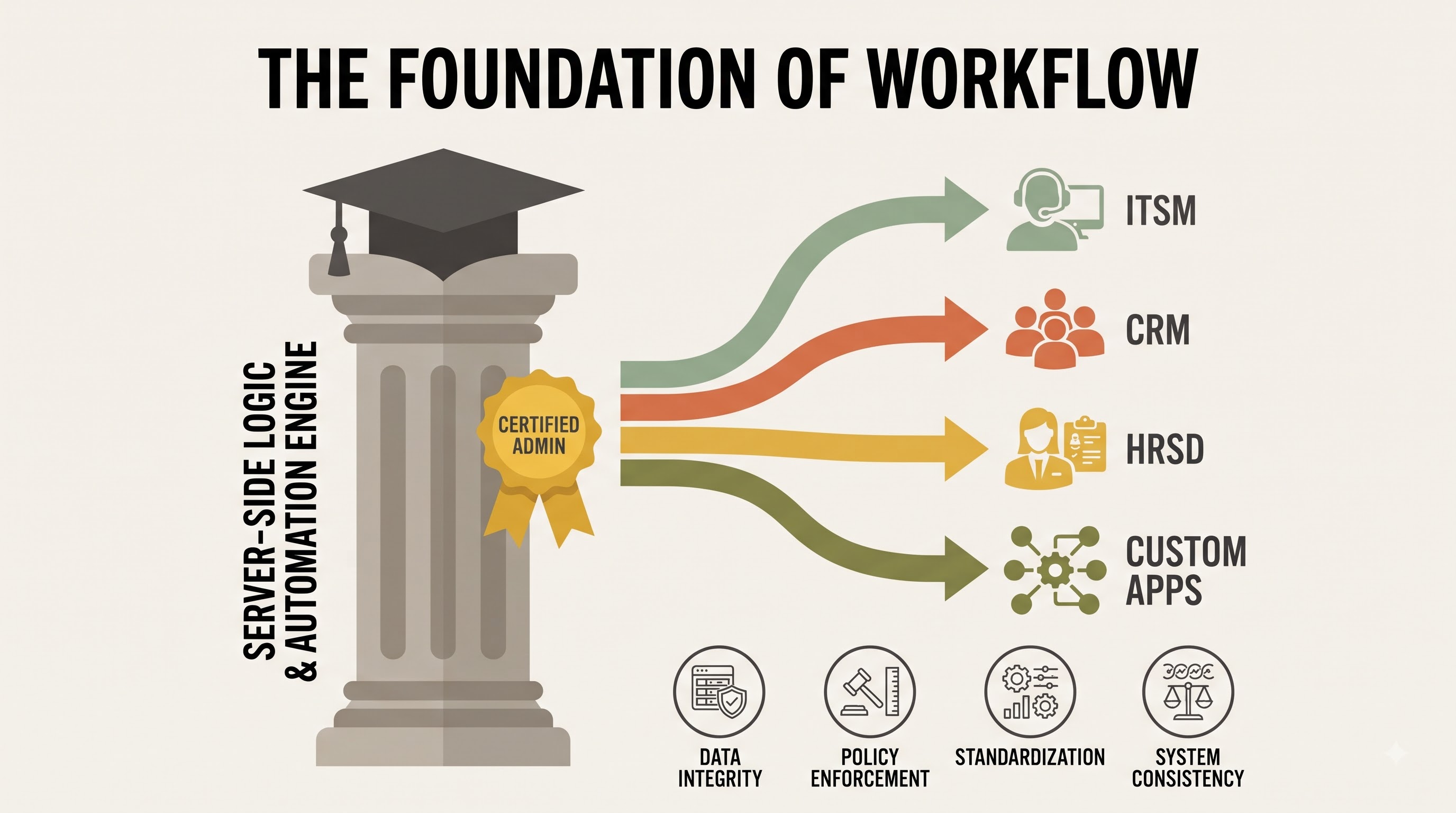
It continues to be one of the essential building blocks in the ServiceNow architecture framework. It deals directly with the server and database transaction and makes sure there is consistency when it comes to applying business rules, validations, and automations despite the way data was entered. Thanks to the knowledge of how Before, After, Async and Display rules work, coupled with engineering disciplines such as trigger conditions, non-recursive updates and modular Script Includes, ServiceNow professionals can create applications on a larger scale for enterprises as the company grows. Getting the basics of the server from the servicenow admin training makes practitioners very competent in managing the enterprise instance of a firm.