
Common Workday Studio Security Challenges and Solutions
Last updated on Oct 6, 2026
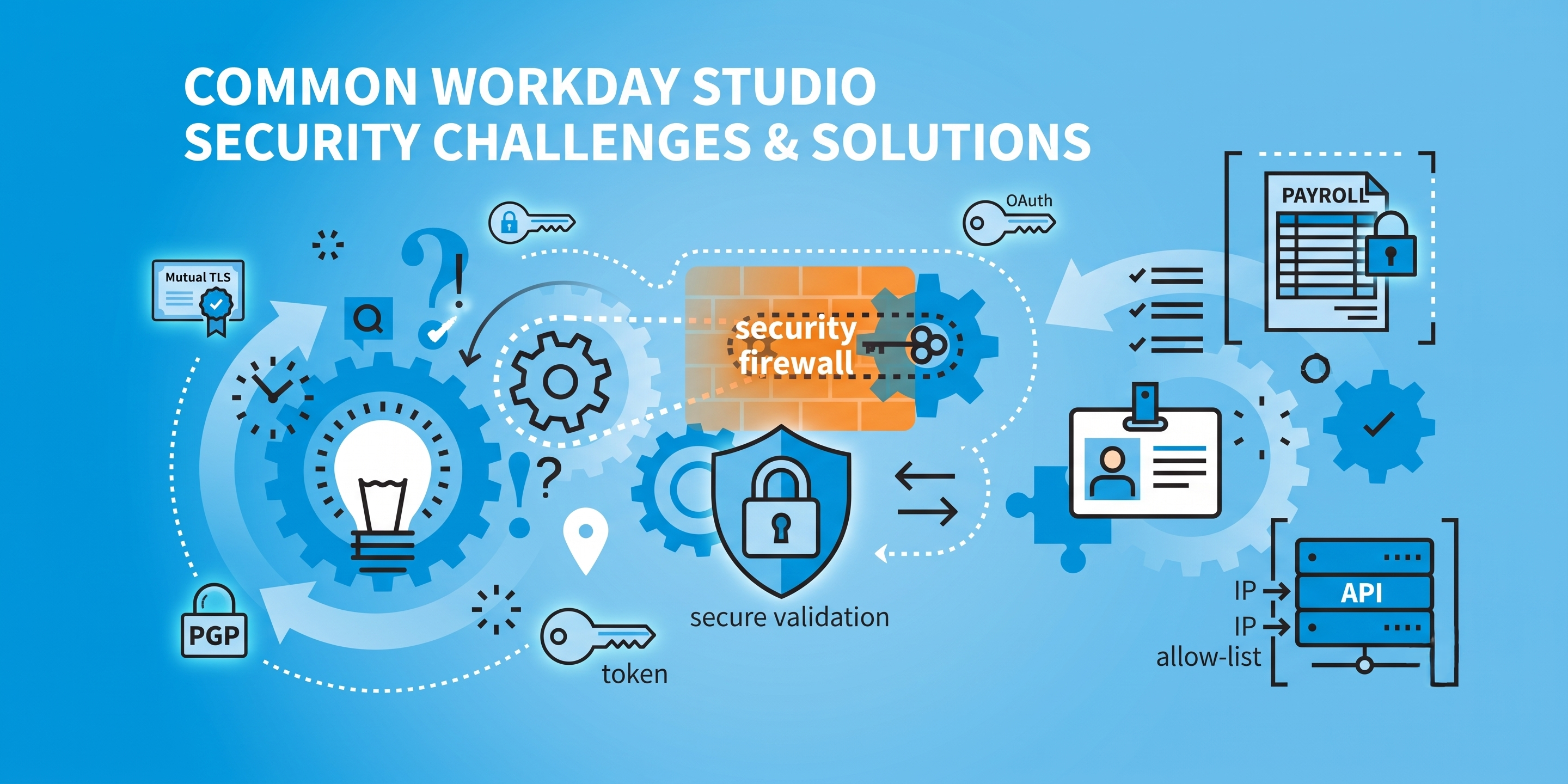
How to Navigate the Integration Threat Landscape Today
Workday is the central Nervous System for thousands of enterprise organisations worldwide, housing sensitive human capital, executive compensation, confidential financial records and operational telemetry. With Workday Studio, enterprise architects can connect this core platform to external benefits providers, legacy accounting engines, corporate banking networks and niche cloud applications.
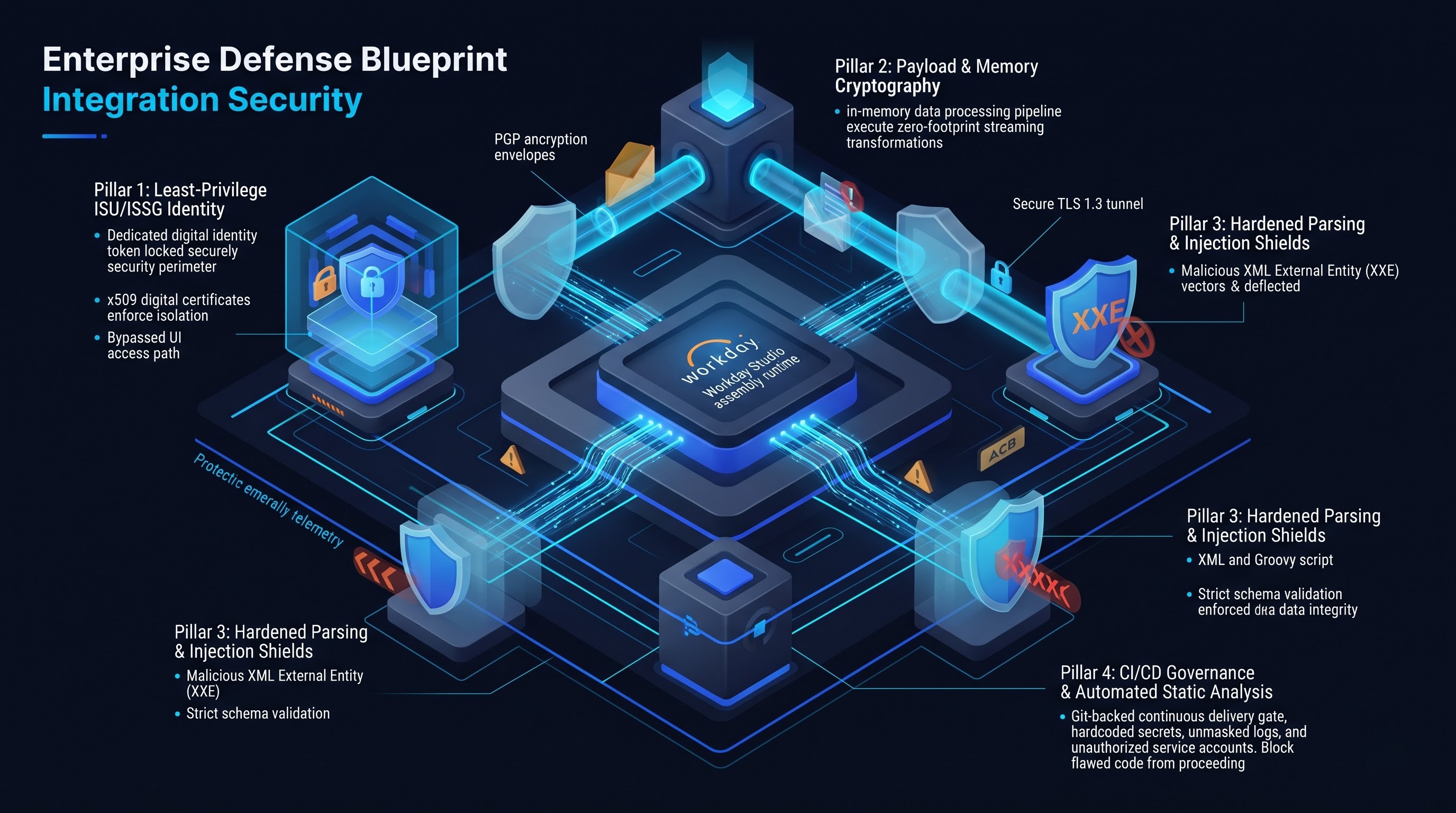
Workday Studio is not just an orchestration wizard, or a simple data mapping tool. It is an industrial strength, Eclipse based IDE that can perform complex algorithmic transformations, parallel processing, dynamic transport routing and bi-directional manipulation of data.
Enterprise-level pipeline construction necessitates the need for practical knowledge of runtime and security considerations. This is because, in most cases, the out-of-the-box templates do not provide the necessary tools to develop an effective solution to meet custom requirements. In most cases, the developers will have to undertake proper Workday Studio training from a site such as OnlineITGuru.
This design gives you unprecedented integration flexibility, but it also turns integration development into a full-scale software engineering discipline. Because Studio assemblies execute inside the Workday processing fabric and interact with third-party networks, any architectural weakness or security lapse can bypass core security perimeters.
The standard Workday security model administration is built around role-based security groups, domain policies, and user profiles. But Studio integrations are run independently in background execution pipelines. They receive, process, prepare and send out the raw data of the corporation, often without using the normal operational controls.
Workday Studio security is a multi-layered approach that involves developer workstations, tenant runtime environments, network perimeter firewalls, and data repositories. This deep-dive breaks down the key security issues that go with Workday Studio integration engineering – and production-hardened technical solutions, defensive patterns and enterprise governance approaches.
The User Dilemma of Identity, Authentication and the Integration System
All automated processes in Workday are executed as an Integration System User that is mapped to an Integration System Security Group. These service accounts never browse user interfaces or answer manual multi-factor authentication challenges in the same way human users do. Consequently, they are prime targets for attack by bad actors seeking deep lateral movement into corporate systems.
The Risk of Over-privileged Integration Service Accounts
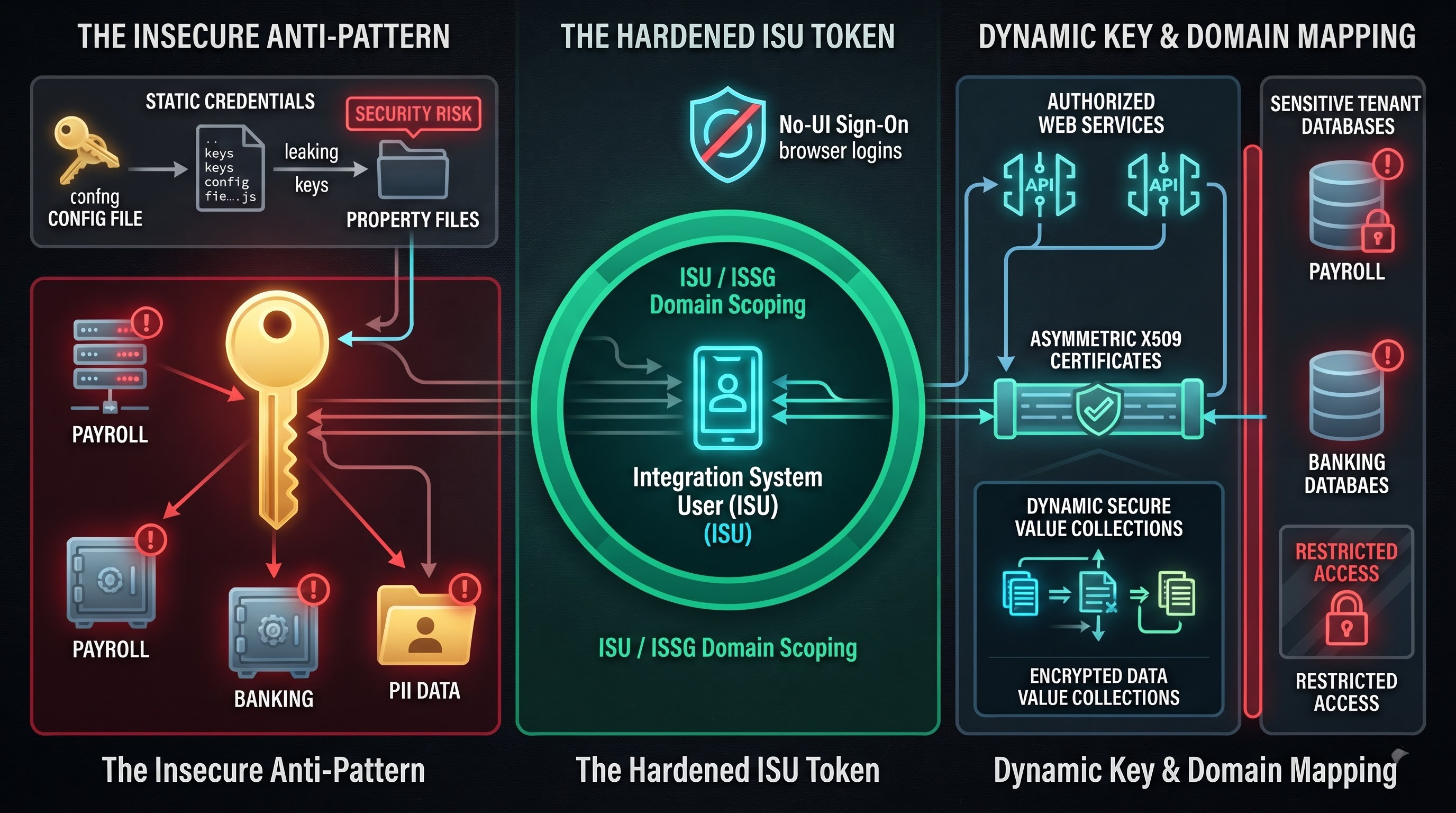
Developers building Studio integrations under tight delivery schedules often report authorisation failures when trying to access certain web services, report definitions or business process domains. The most common quick fix is to give the Integration System Security Group wide-ranging permissions, for example, the System Auditor, Integration Administrator, or general HR Partner security roles.
This practice goes against the principle of least privilege. A Studio integration that pulls employee business email addresses for an office directory never should have had read access to national identifiers, home addresses, salary schedules, or banking details. If an Integration System User has elevated domain access across the tenant, an insecure script or compromised assembly can expose all data records across the company.
Static Credential Sprawl and Unsafe Storage
Another big weakness is the practice of embedding static credentials directly into Studio projects. Sometimes developers embed database passwords, API secret tokens, basic authentication headers or sensitive encryption passphrases inside integration property files, XML transformation stylesheets or custom initialisation scripts.
Studio code repositories are dispersed across local workstations, centralised source control branches, and multi-developer staging environments, allowing embedded credentials to propagate quickly across unmanaged environments. One compromised workstation or public code branch and enterprise credentials are exposed directly to unauthorised eyes.
Architectural Solutions for Identity and Access Hygiene
Domain Scoping and Dedicated Security Allocations: Use a rigid one-to-one mapping rule where each unique integration assembly is assigned a dedicated Integration System User and isolated Integration System Security Group. Do a deep discovery to find out exactly what Workday web services, report elements and integration attributes you need. Avoid combining different integrations, e.g. payroll dispatch and training compliance, under a shared service user.
Native Workday Account Hardening: Require explicit security controls to be enabled for all integration user accounts. Mark the Integration System User account with the flag that prevents standard graphical interface sign-on. This prevents bad actors from accessing service account credentials through normal browser sessions.
Move from static passwords to asymmetric cryptography: Eliminate legacy username and password authentications at all endpoints. Go fully to Public Key Infrastructure with strong x509 digital certificates and OAuth client credentials. Workday supports certificate-based authentication for inbound WS calls and transport pipelines outbound.
Dynamic Key Management with Secure Value Collections Never hard-code access tokens or cryptographic passphrases in Studio project files. Use the tenant’s Workday Secure Value Collections and Integration System User Password mechanisms. Secure transport configurations let the studio components query these dynamic references at runtime, with sensitive passphrases shielded inside encrypted tenant memory.
Data at Rest, in Transit and in Volatile Memory Exposure
Studio acts as a data pipeline and can accept thousands of records, converting payloads to and from JSON, XML, CSV, and fixed-width files, and providing output payloads to downstream recipients. On that journey, data passes through several layers of processing: transit lines, volatile runtime memory, temporary operational storage and permanent log repositories. At each stage there are points of exposure if security parameters are not kept.
The Myth of Perimeter Security
Engineers often assume that since communications are initiated from within a secured cloud ecosystem, outbound traffic is automatically protected. But, integrations often communicate with external third party SaaS vendors, on-premise corporate mainframes or cloud buckets over unencrypted or poorly configured network pipes.
Transferring sensitive data over unencrypted FTP, disabling transport layer security validation, or accepting expired self-signed certificates exposes the organization to man-in-the-middle interception attacks. In multi-tenant environments, when unencrypted payloads are routed over public channels, financial assets and employee data are exposed to packet sniffers and compromised external gateways.
Data Remnance in Temporary File Storage & Local Memory
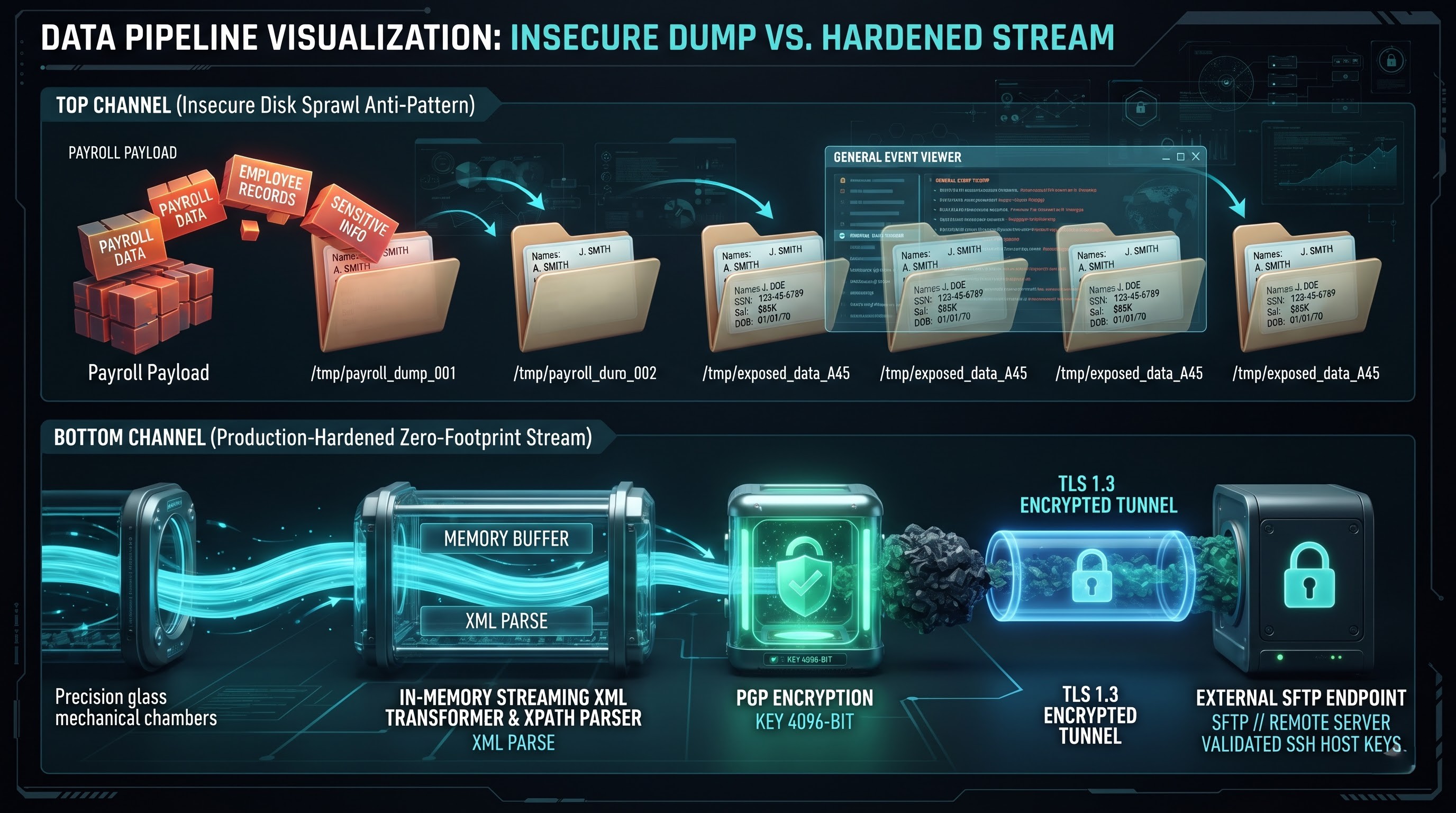
Workday Studio assemblies run in virtual execution containers. If data sets are too large to process within execution limits, Studio splits incoming payloads into smaller chunks or dumps portions of processing segments into temporary disc caches.
When processing large datasets, such as an annual payroll batch of thousands of tax and banking records, poorly designed assemblies write unencrypted payload chunks to integration document stores or intermediate system repositories. If these intermediate files are not cleaned up immediately after processing completes, unencrypted data remains in tenant document attachments and is exposed to anyone with general integration-event viewing permissions.
Architectural Solutions for Robust Payload Cryptography
Strict Transport Layer Security Enforcement: All outbound network transports (e.g. HTTP Out, Web Service Out, SFTP endpoints) must enforce Transport Layer Security with modern, robust cypher suites. Disable legacy protocols like TLS 1.0, 1.1 and SSL 3.0 explicitly. Turn off any bypass flags that are silently accepting certificates or ignoring mismatches in hostname validation.
Payload Level PGP and S/MIME Encryption: don’t rely on network encryption at the pipe level. Deploy payload level encryption in the Studio message pipeline using open PGP and S/MIME standards. The data is encrypted even if intermediate files are written to working disc space, by carrying out PGP encryption in the assembly right after the transformation step. The payload moves through networks as an encrypted blob, which can only be decrypted by the downstream recipient with the corresponding private key.
Zero-Footprint Processing and In-Memory Streaming: Design Studio architectures around pure streaming pipelines, not repeated intermediate disc serialisation. Studio continuously processes data streams in memory, using streaming XML transformation engines and streaming XPath parsers, and does not store raw records in temporary integration documents that are not encrypted.
Logging, Diagnostics, and Information Disclosure for Integration Events
To debug enterprise integrations, you need visibility into runtime events, processing metrics and structural exceptions. But unlimited diagnostic logging is still one of the most common vectors for unintended data leakage in Workday Studio deployments.
The Over-Verbosity Anti-Pattern
Developers also commonly dump full raw payload messages into the Workday Execution Event Log via components such as Put Integration Message or standard script logging tools during development and sandbox testing. Often these integrations are deployed to production with those diagnostic hooks still turned on.
Consequently, in the full message, social security numbers, banking routes, medical insurance classifications, and performance reviews in general event attachments are included in the integration execution events. Hundreds of administrative users and junior analysts with permission to see integration run histories have full access to these operational payloads, totally bypassing field-level security constraints.
Custom Error Handlers Vulnerabilities
Uncaught system exceptions, transport failures and schema validation crashes can accidentally leak system architecture details. By default, unhandled error messages may contain raw database schemas, internal tenant uniform resource identifiers, remote hostnames and stack traces.
These verbose error prints can be parsed by malicious actors or unprivileged internal personnel to reverse-engineer enterprise system architecture, identify active internal library versions, and devise targeted exploits against known framework vulnerabilities.
Secure Operational Auditing Architecture Solutions
Payload Sanitisation and Field-Level Data Masking : Add automatic payload masking to error-handling and diagnostic routines. Scrub or hash sensitive data (government identifiers, compensation markers, account numbers, etc.) before sending log entries to the Workday Integration Message repository.
Separation of Operational Metadata from Payload Data: Integration logging to output contextual metadata rather than actual record data. For example, on processing failures, log only the non-sensitive employee identification number, the internal correlation token and the specific failure reason, rather than the entire employee record.
Dynamic Environment Aware Logging Profiles: Support for configuring Studio assemblies to dynamically read operational log levels from tenant-based launch parameters. Integrations should default to minimal error-only logging in normal production use. Allow for higher level debug and info logging for limited controlled troubleshooting sessions with automatic timeouts back to the assembly silent production mode.
Code Injection, Payload Tampering, Dynamic Scripting Threats
Workday Studio includes rich dynamic transformation capabilities, allowing developers to run custom code using Groovy scripting, JavaScript, XSL transformations and XML path queries. These dynamic engines have serious execution vulnerabilities when assemblies parse external data without validation.
XML External Entity (XXE) and Injection Attacks
As XML is the fundamental working format in the Workday architecture, Studio integrations handle, convert and create large volumes of XML payloads. An inbound Studio integration might process an untrusted external XML document with insecure parser settings and might be vulnerable to an XML External Entity injection attack.
In an attack scenario, a maliciously crafted payload causes the underlying XML parser to resolve external entity declarations, process local system configuration files, consume arbitrary memory allocations or execute unauthorized internal network requests. It may cause denial of service, exhaustion of memory or internal system compromises.
Insecure Dynamic Scripting with Groovy and JavaScript
Studio assemblies typically contain Groovy scripts that implement complex business logic, process data structures, and control custom routing conditions. However, it is difficult to write dynamic code that will execute at runtime concatenation of unvalidated input values, creating serious injection vulnerabilities.
If an inbound parameter (e.g. external search string, vendor invoice reference, system command) is passed directly into a dynamic script without validation, bad actors can break out of string literals and execute arbitrary code within the Studio engine. Uncontrolled scripts can also get into infinite loops consuming tenant compute threads and impacting concurrent enterprise integrations.
Architectural Solutions for Safe Dynamic Processing
XML Parser Hardening and External Entity Disablement All XML parsers, schema validators and XSL transformation components should be configured to explicitly disallow external document type definitions (DTDs). Turn off general external entities and external parameter entities for all parser configurations. This disables the resolution of external resources, thereby preventing XXE and internal resource exhaustion exploits.
Input Validation via Strict Schema Enforcement: Enforce strict schema validation at the integration ingest boundary. Validate inbound payloads against explicit XML schema definition (XSD) or JSON schema validators before any dynamic transformation or scripting component. Rejection should be immediate at the perimeter of any payload with undeclared tags, unexpected data structures, or malicious characters.
Safe Scripting Guardrails and Parameter Binding When developing Groovy or JavaScript components in Studio, string evaluation at runtime and code concatenation must not be used. Always use strongly typed parameter binding and input validation. Set strict processing limits, such as maximum iteration counts or explicit time-out allocations, to avoid resource exhaustion and denial of service.
Enterprise Source Control, CI/CD and Development Lifecycle Shortfalls
The security posture of a Workday Studio integration is largely dependent on how it is written, reviewed, tested and promoted across environments. Without controls in place for the software development lifecycle, security risks can creep into production well before an integration is deployed to the tenant.
Bug: Shadow Development and Manual Deployment
In many Workday deployments, integrations are built locally by individual developers and deployed directly to non-production and production tenants using the Eclipse IDE plugin. This workflow bypasses the enterprise source code repositories, version control gates and peer review gates
With developers managing custom Studio projects locally on their laptops without centralised source management, organisations lose visibility into what code is running in production. This practice impairs the auditing of historical changes, the isolation of the introduction of malicious or insecure logic, and the ability to respond effectively during incident investigations.
Lack of Environment Isolation and Sandbox Contamination
One common source of data control failures is the progression of integrations through environments—from Implementation and Development tenants to Sandbox and Production. Test environments are often refreshed using production data to enable testing.
Studio integrations in those sandboxes may expose real records if non-production tenants have unsanitized production data. For instance, an integration in a development environment that connects to a test endpoint from an external vendor may inadvertently send real corporate banking, personal or salary records over unsecured development channels.
Lifecycle & Delivery Governance Architecture Solutions
Centralised Source Repositories and Automated CI/CD Pipelines All Workday Studio source projects must be stored in a centralised, enterprise-grade version control system such as Git. No direct manual Studio code deployments from developer workstations to production tenants. Automate Continuous Integration and Continuous Deployment pipelines that package, validate, test and deploy integrations into destination tenants using dedicated deployment service accounts.
Automated Static Code Analysis – Integrate static application security testing directly into source code management pipelines. Automated scanners should check project files, XML templates, and Groovy scripts for hardcoded secrets, insecure XML parser configurations, unmasked logging components, and high-privilege service account references before any Studio integration can be merged into a deployment branch.
Mandatory Peer Review and Dual Authorisation: All integration changes should be subject to mandatory peer review. The assembly design shall be reviewed by at least one certified integration architect before changes are merged to production. This review verifies that least-privilege service group constraints are enforced, error handling follows data masking rules, and transport paths enforce strong encryption.
Automated Test Tenant Data Masking and Endpoint Virtualisation: Enforce strict data sanitisation rules across all sandbox and implementation tenants. When production data is refreshed into non-production environments, run automated scrubbing scripts to mask real social security numbers, banking information and compensation figures. 7. Configure mock transport endpoints in non-production environments so that test runs are unable to route records to real external systems.
Past the stages of toolchain and automatic gateways, the ultimate security boundary lies in human know-how. It takes specialized developer skills to prevent cases of shadow code commit, hidden log statements, and mis-configured parser rules. Seeking practical Workday Studio training through OnlineITGuru guarantees that developers get adequate skills to create any Workday Studio integration while meeting enterprise security and compliance requirements.
Boundary Security and Third-Party Transport Endpoints
Workday Studio integration are seldom standalone solutions. They are mainly used to move data across institutional boundaries, linking Workday to third party endpoints. Integrations inherit the security risks of any external system they interact with.
Insecure third party SFTP deployments
Even today, SFTP remains a prevalent means of exchanging data within an enterprise, particularly legacy environments in banking, payroll, and benefits management. However, most configurations of external SFTP present severe vulnerabilities.
Such vulnerabilities include default or simple passwords, outdated SSH server daemon, which may be vulnerable to known exploits, weak Host Key validation, and shared landing directories, where uploaded files from different external sources are accessible. In case of a file being placed in such a shared directory by a Studio integration, containing sensitive employee records without folder isolation or payload level encryption, any user of the same server may access the data.
Unauthenticated inbound listeners & webhooks
Whereas most Studio integrations tend to retrieve data, assemblies may be designed with inbound transports, which serve as an API for receiving third-party events and webhooks in real time.
An exposed Workday endpoint that is accessible to anyone on the Internet through unauthenticated inbound transport is susceptible to denial of service and data injection attacks. Such attacks may cause invalid data payload to be pushed through the endpoint and consume all tenant processing threads.
Architectural Solutions for Robust Perimeter Communications
Improved SSH Host Key Validation Outbound SFTP transports on Workday Studio need to specify and validate known host keys. Never let any Studio connections accept new or unknown host keys as it avoids man-in-the-middle attack scenarios where files might be redirected to spoofed external storage nodes since the verified public host keys will be stored within the tenant.
Mutual TLS (mTLS) for API Transports: Ensure mutual TLS for all inbound and outbound communication channels for web services. The calling client and the receiving server should authenticate each other by presenting the digital certificates signed by recognised certificate authorities. This prevents spoofing and unauthorised access to make sure only the authorised and authenticated systems can send and receive data.
Network Allow-listing and Secure Gateway Proxies: IP allow-listing of the Workday tenant and destination systems. Ensure that the outside systems only accept traffic coming from the published IP ranges of Workday data centers instead of making external API calls via enterprise security gateways and API management platforms capable of rate limiting, deep packet inspection, and threat detection.
Upskilling of Integration Teams in Terms of Secure Configurations for Long-Term Enterprise Safety
Security configurations implemented within an assembly can be only as strong as the engineers who configure them. Though automation of security rules and static analysis may help avoid many mistakes, advanced protection from injections, session hijacks, and leakage of sensitive information is impossible without specific skills in developing secure code.
In order to gain such skills as a developer, HRIS analyst, or consultant, one can take advantage of online learn workday studio from OnlineITGuru which will help bridge the gap between abstract notions and practice. Being highly detailed in terms of assemblies, custom connectors, XML/XSLT transformations, and implementing least privilege security rules, the course provides engineers with the skills needed to develop any integration with Workday Studio.