
Comprehensive Guide to Workday Enterprise Integration and Governance
Last updated on Aug 31, 2026
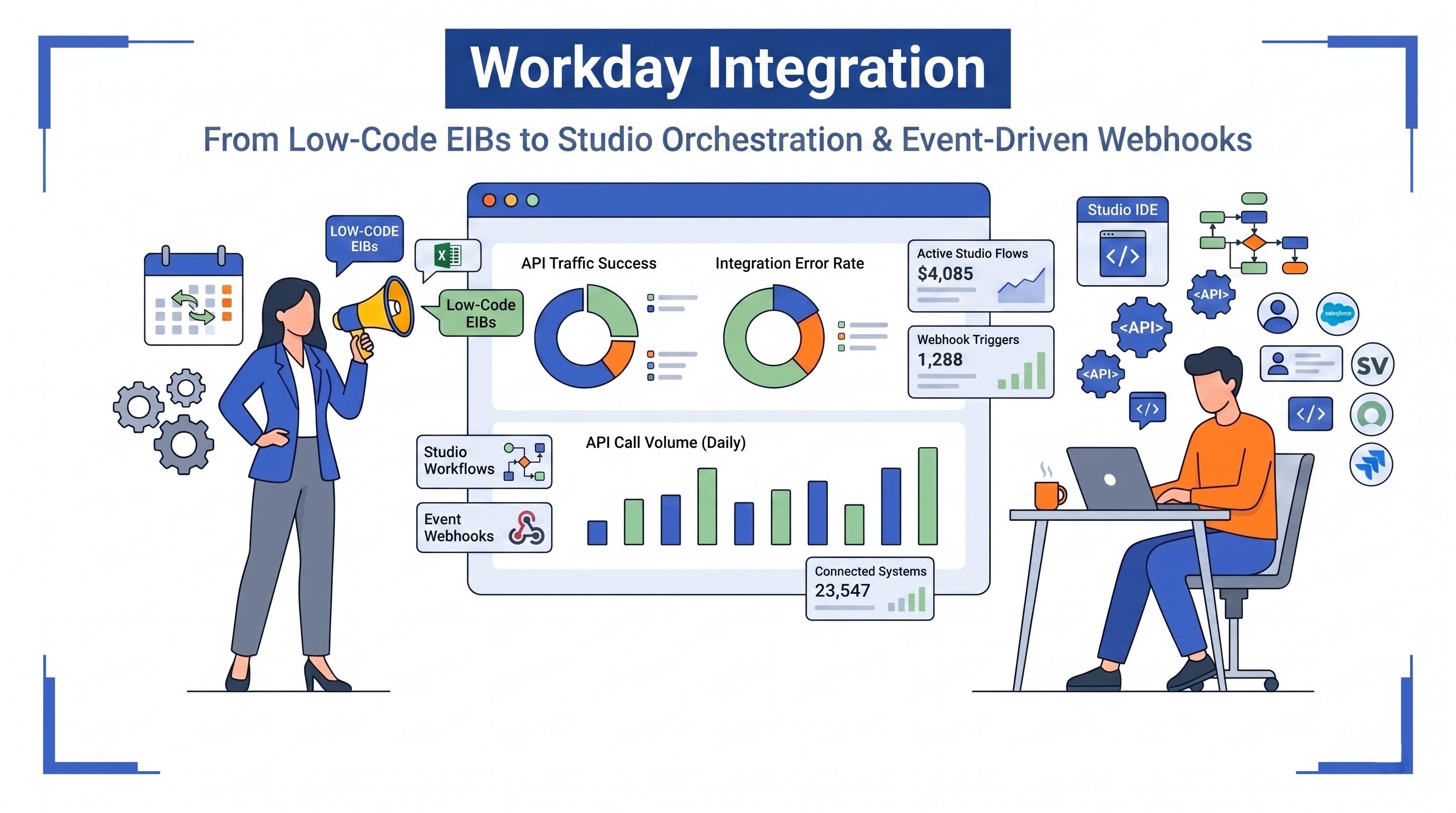
The integration of Workday is crucial to present-day enterprise architecture as it links essential human capital management, financial management, payroll, and planning processes with outside applications, legacy systems, as well as specialized third-party cloud-based solutions. Today, businesses do not use a single monolith system. They rather rely on various systems for applicant tracking, learning, expense management, benefits administration, enterprise resource planning, banking, and identity management. To eliminate the need for manual data entry, achieve regulatory compliance, and establish a single, definitive source for employee and finance data, companies require consistent Workday integration solutions that can integrate all the necessary information. Given the growing demand for corporate integration experts across the globe, taking a detailed Workday Integration course in India can offer professionals the knowledge to develop and implement such systems.
Main Elements and Principles of Workday Software
The design of Workday software is cloud-based and multi-tenant using an object-oriented database. It is essential to say that this architecture is different from traditional database ones where the data is divided among tables and is dependent on primary and foreign keys.
Workday claims that all information is seen as being both non-destructive and point-in-time. This means that when alterations to employee records occur, earlier versions of the records remain intact as all previous states of data with transaction information, effective dates, and time stamps remain in the Workday system. Gaining full knowledge of these basic principles along with the operation of workday integration system fundamentals and developers to create well-functioning and compliant data pipelines.
Security is the basic principle of the integration process in Workday. Namely, access control is provided through the use of Integration System Users and Integration System Security Groups. With these account credentials, users do not have to go through MFA, but they have to work strictly within the permissions provided in the assigned domain and the organizational policies. In this case, data privacy is provided to the integrations that deal with demographic data by giving them access only to non-critical worker domains while restricting access to financial systems for companies dealing with financial records and allowing only right financial organizations to participate in transactions.
Spectrum of Workday Integration Toolset
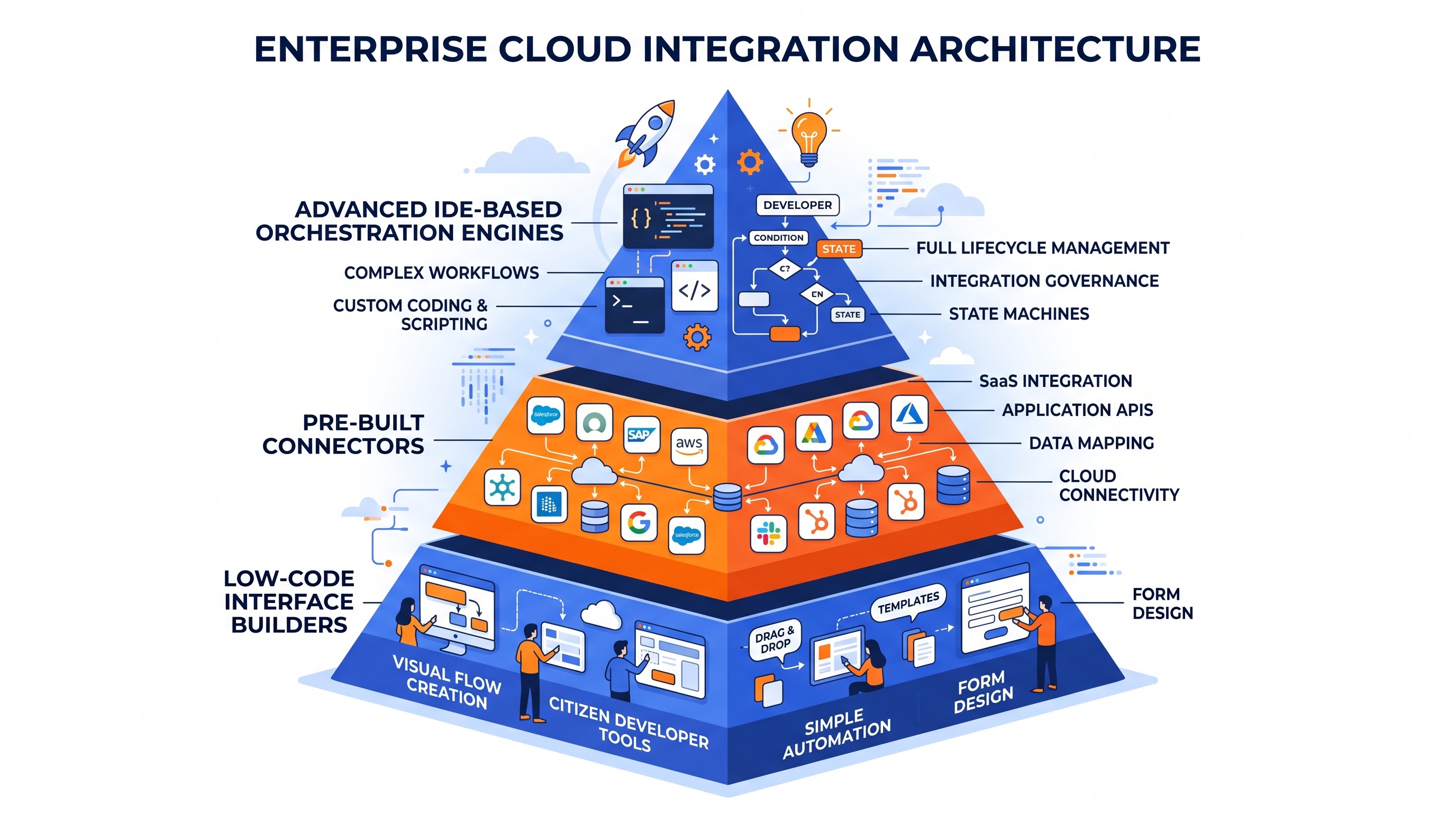
Workday's integration tools come in a variety of formats to accommodate the different levels of complexity present in the data and the number of processes involved in it. Picking the right tool is very important because it keeps the system running efficiently, reduces maintenance costs, and solves the problem of scalability. Having a good amount of experience with workday online integration training helps developers get the hang of the wide range of formats available, from EIB and Document Transformation to advanced Workday Studio orchestration.
The basic level of this spectrum is represented by Enterprise Interface Builder, which is a configuration-based tool created for simple incoming and outgoing data. The tool can be configured through the Workday interface with no need for an external IDE. When it comes to outgoing processes, it uses custom reports as sources of information that change the data into the required format and transfers it via standard methods. For the incoming processes, the tool relies on web service templates that allow getting bulk transactions into the system.
In the middle tier, there are the Workday Connectors that comprise the Cloud Connect and Core Connectors. These integrations consist of vendor-supported and pre-made templates for specific areas of business such as payroll providers, benefits administration, third-party retirement accounts, and background screening vendors. The connectors contain pre-defined models of business rules and data models for specific domains. Furthermore, the connectors can detect the changes since the last run, thus eliminating unnecessary data processing and minimizing payload sizes. Additionally, there are tools like the Document Transformation engine that help the developer obtain the raw outcome of the connector and make transformations based on the schema to make the files look like the templates provided by the vendor.
The highest level is called Workday Studio which uses Eclipse as its base in order to create a platform for complex integrations. The main features of this platform are the ability to monitor execution logic, have several data sources available, allow for multiple routing and filtering options among ones, executed through sophisticated ways of aggregating data and creating error types of messages. Workday Studio is the only option when one needs to develop a system that handles complex integrations between different APIs or process gigantic sets of data.
Integration Technologies and Protocols
Workday supports among others the standard communication protocols and modern ways of data exchange between the system and its users. An application programming interface of the Workday system can be divided into service-oriented API and more modern REST API.
In Workday, application programming interfaces are divided into two categories, namely service-oriented architecture interfaces and modern representational state transfer interfaces. Workday Web Services or SOAP is the scalable standard for enterprise interactions. SOAP services consist of a wide range of operations based on different areas including Human Resources, Payroll and Financial Management. SOAP services perform operations using a given schema ensuring strict regulation for inbound and outbound messages.
SOAP services in Workday are supplemented by REST APIs capable of sending lightweight JSON payloads. These endpoints are ideal for many real-time applications, such as self-service portals, mobile applications and identity management systems that require fast lookups with low latency. The authentication process for Workday REST APIs is performed via standard authentication protocols and aims at exposing endpoints based on distinct resources.
Transport protocols for outbound and inbound services make sure messages run smoothly throughout corporate and public networks. Among standard protocols are the Secure File Transfer Protocol, which relies on both password and public-key verification methods, Hypertext Transfer Protocol Secure, Simple Mail Transfer Protocol for keeping up-to-date on status and Java Message Service for asynchronous messaging. The encryption functions of Pretty Good Privacy allow protecting sensitive files with hidden information concerning salary, social security numbers and banking data from unauthorized access to all the stages of the document processing cycle.
Integration Process and Life Cycle
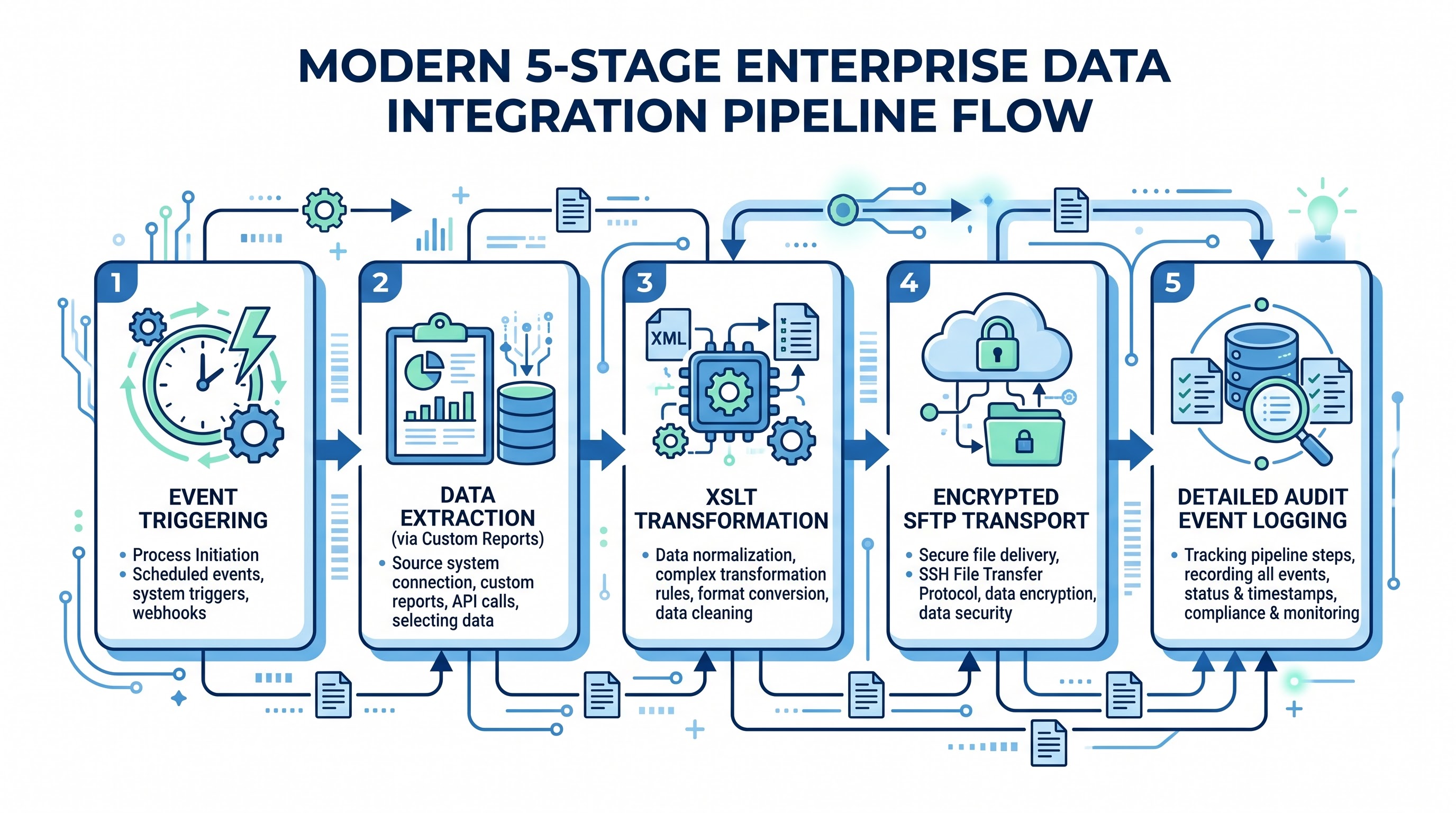
When using Workday for integration purposes it is vital to follow strictly into its life cycle that involves plenty of phases starting from the launch and finishing with auditing.
The cycle starts with triggering. The user can either set up a routine schedule for integration or can run it in an automatic mode as an element of the Workday process.
When invoked, the integration starts the process of getting data. The outbound integrations launch a query of the Workday data layer using the configured data sources, custom report definitions, or web service operations. While using custom reports as a data source, the developer has to apply the calculated fields that could essentially result in the execution of any dynamic lookup, the evaluation of conditional expressions, parsing of the dates, concatenation of the strings, or extraction of the nested object references. The data manipulation is transferred to the Workday reporting engine which performs the data retrieval before the integration engine formats the output data.
After this, the transformation process occurs when the data is shaped in accordance with the specifications of the target system. The transformations are done using Extensible Stylesheet Language Transformations in the Enterprise Interface Builder integrations or basic CSV formatter in the others. In the case of Workday Studio integrations, the transformation process may involve the usage of the stylesheet transformations, Java mediation logic, Groovy scripts, and stream readers.
During the delivery stage, the processed payload is sent to the external endpoint based on the transport protocol. If it is an inbound integration, the integration engine will reverse the process by fetching the external document where it then decrypts, processes and verifies the contents based on the business schema, maps the values to the appropriate Workday business process, and sends the transactions to its core.
Finally, the execution information is recorded in the Workday integration event log. In the log of the integration events, execution logs, launch parameters, execution duration, attached file, and number of transactions are recorded. All errors, warning messages, and system notifications are also recorded along with appropriate error numbers.
Regular patterns of integrating different systems in organizations
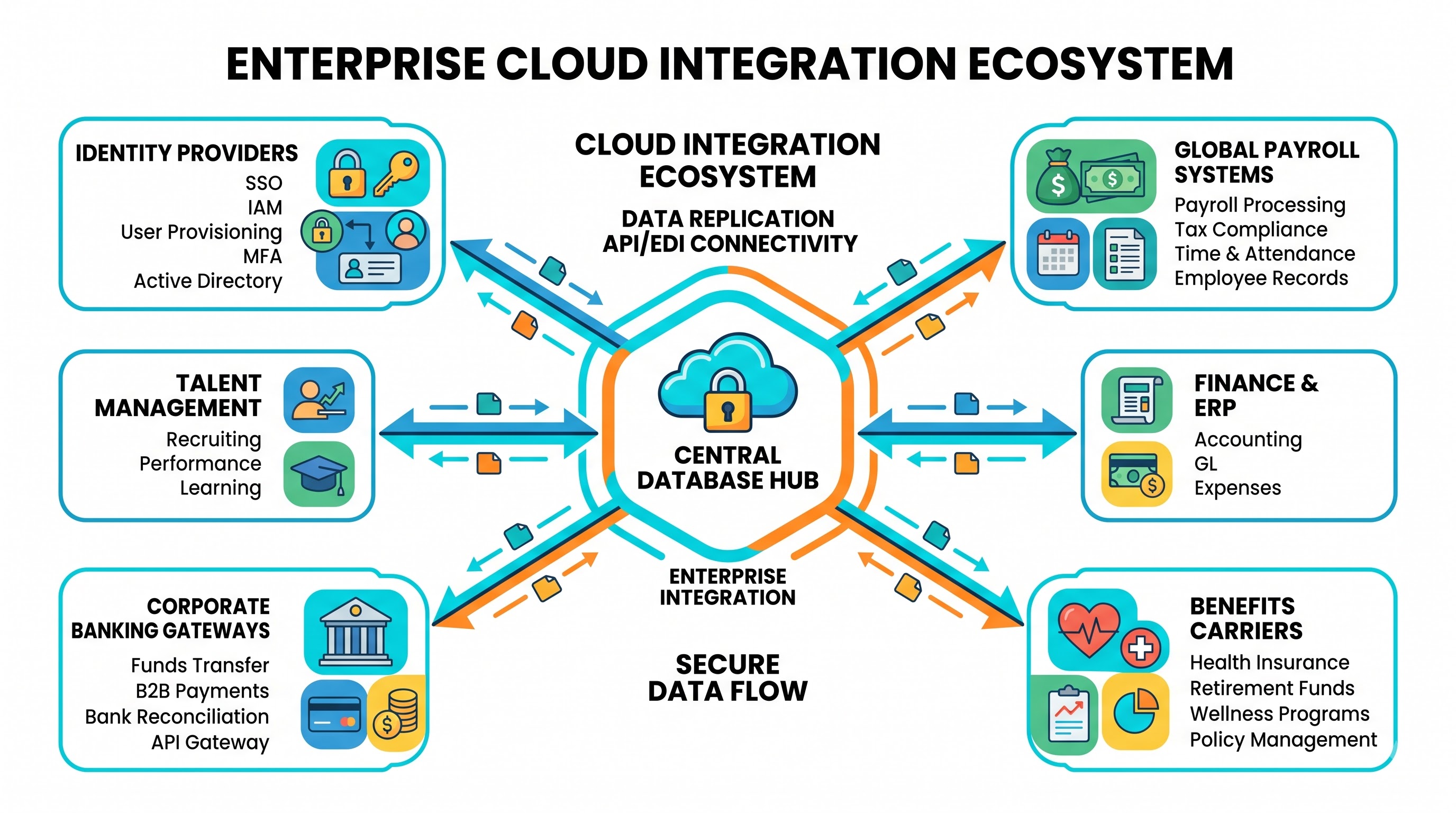
Enterprise implementations usually utilize a variety of integration patterns in different stages of the operational lifecycle of employee records and financial records.
An enterprise integration model that is most frequently used refers to Worker Lifecycle Synchronization or Identity and Access Management Integration. When an employee is hired, moves, gets promoted or is terminated, Workday functions as the main authority in that aspect. Professionals enrolling in specialized workday hcm integration training understand the importance of these kinds of full-fledged employee lifecycle workflows which link core HR data with subsequent directory and provision systems.
Another very important integration pattern is the Benefits Administration Data Pipeline. The organizations provide medical care, dentistry, vision care, life insurance, and retirement plans that are managed by external insurance companies. The Workday Core Connector for Benefits gets the enrollment events, demographics, coverage levels, and details about dependents in the family. The data is used for finding updates, creating benefit enrollments in accordance with industry standards, encrypting it, and sending it to the insurance companies on a weekly/monthly basis.
Global Payroll Integration is another vital process. Multi-national corporations have to follow the trend of centralizing the use of Workday Human Capital Management (HCM) and hiring local payroll companies in each of the regions in which they are working. The payroll integrations consist of gross-to-net numbers, additional earnings, retroactive pays, and hours worked from the time-tracking software. The provided information is converted to a local format, sent to the outside payroll provider and back to Workday through the use of financial journals.
Aside from payroll integrations, there is also a process of Financial and Operational integrations that regulate the process of exchanging records of sales, accounts payable files, purchases through corporate cards and banking paperwork. An example of this process can be seen in inbound integrations that pick up bank statements from the banks around the world, extract the information from the statements and put it into Workday. In the same way, outcoming payment integrations take the prepared payment files and sign them.
Leading Event-Driven Structures and Instantaneous Webhooks
Although batch file processing is still utilized in dealing with payroll, insurance rosters, and reconciling banks, present-day business scenarios require real-time and near-real-time occurrences. Workday satisfactorily answers the situation due to the event-driven features, outbound messaging triggers, and methodical integration, bringing about a cancellation of delays in data polling processes and creating opportunities for timely data integrations from the microservice standpoint.
Outbound messaging capabilities can be a part and parcel of the business processes definition. When the significant business event is over (like the approval of the vacancy or fulfilment of the onboarding process for a new employee), Workday sends out the outbound message to the external endpoint/enterprise service bus. The outbound message contains the identification number of the business process and enables other systems to perform the operation theoretically.
Likewise, Workday incorporates webhook notifications which inform outside middleware when certain worker or financial events take place. Paired with API management layers and innovative event streaming technologies, event-driven integrations enable business ecosystems to reach immediate operational integration. For example, an urgent termination of a position in Workday may cause an immediate revocation of credentials in every physical badge access space, VPNs and cloud services; all of which could be accomplished instantly and in a manner incomparable with the bounty of traditional batch processing options.
Inbound Integration Approaches and Data Migration Regulations
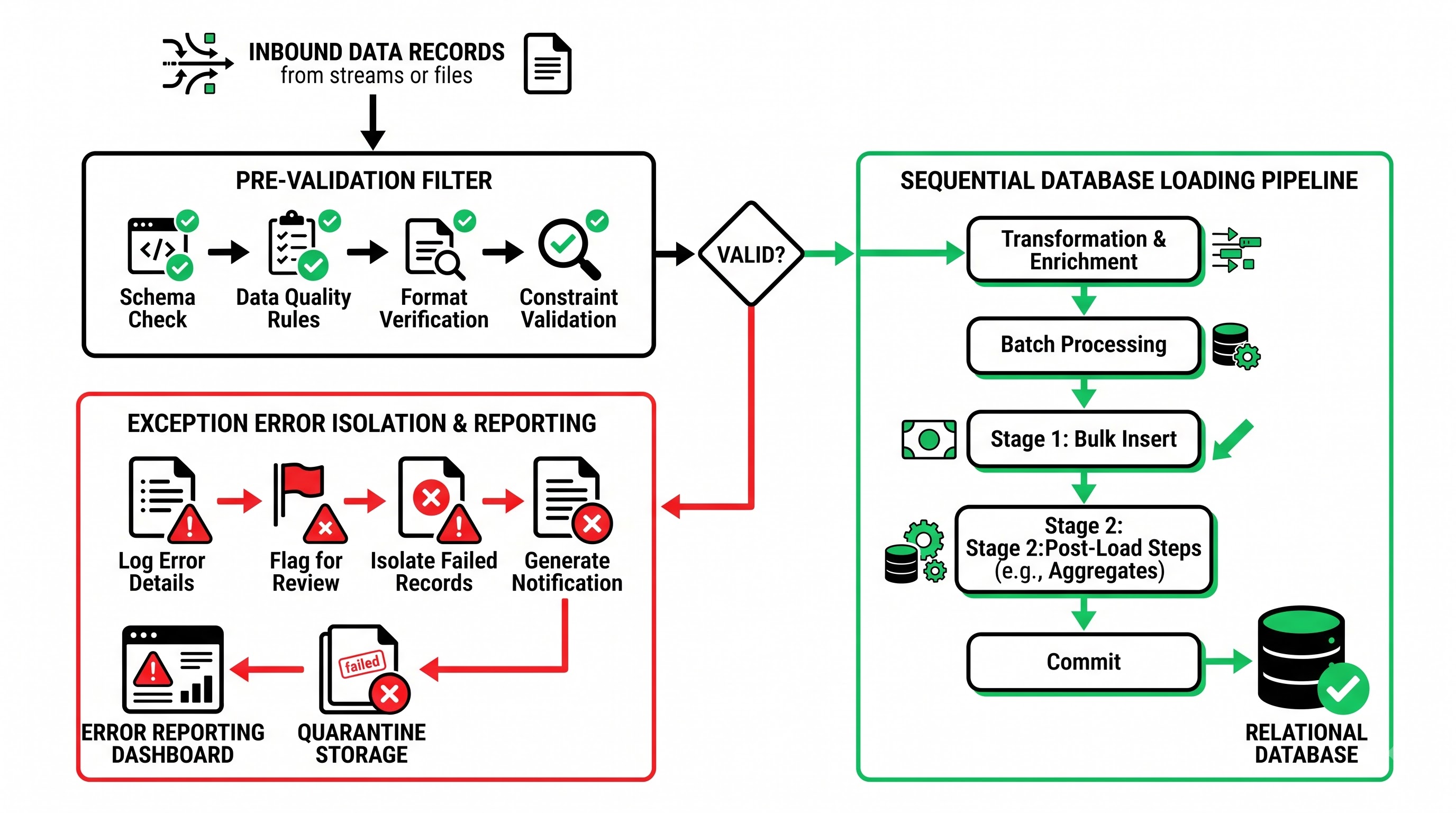
Inbound integration approaches need a separate design concept which is aimed at ensuring proper data validation, limiting the process of implementation and allowing proper and smooth management of errors without compromising the integrity of the core system of record.
One of the major features of an inbound strategy is staging methodologies and validation layers. The complexity of Workday Studio solutions has made it possible to check input data against business logic as well as against internal references and mapping parameters before submitting it to Workday web services. The validation process provides the possibility of receiving complaints about missing cost centers, obsolete supervisory organizations, and incorrect job classifications before the submission process. The integration enables the separation of erroneous information into an exception report while allowing the other records to be submitted successfully without any problems; thus, it prevents the failure of an entire batch of thousands of records due to faults in certain records only.
Data migration and large updates is a second example of a high-volume inbound use case. Workday provides specific web services and bulk-loading tools to handle the ingestion of very large historical data files such as compensation over many years, historical review ratings, asset register records, and data from older accounting ledgers. Managing this data migration process requires strict sequence to make sure that all required objects are ready before the next one is loaded. For example, organizations and locations must be fully loaded before the instances of the worker position can be created, and worker positions must be loaded before the compensation plans and benefits enrollment step. Using structured, multi-stage loading pipelines helps to ensure that objects get correctly associated, thus avoiding reference mismanagement.
Management of Master Data Across Systems and Mapping Identifiers
In order for modern technology applications to function, it is necessary to ensure that data is synchronized between systems that may have different naming conventions, data dictionaries, and identifiers. Master data management practices in integrations within Workday make it possible to ensure that these issues are resolved, thus contributing to the creation of distinct boundaries across the areas of human resources, monetary management, IT operations, and operational tools.
Workday uses Universal Unique Identifiers, along with Integration IDs and Reference IDs, in order to ensure that the processes of ensuring referential integrity across the systems can be successfully implemented. For example, in case an external system generates some entity like a candidate in a recruiting tool or a supplier in a specialized supply chain system, this identifier is recognized in Workday as an external reference ID. In turn, when Workday creates a worker profile or order, the internal reference ID of the system is sent to the external systems. The processes of the identifier mapping help to ensure that after any update, it would be possible to refer to the same record that was updated correctly across all interconnected systems.
In addition, the governance of master data is critical in determining which system has control over certain data characteristics. In most cases, Workday is the recognized entity of record for employee data, company structures, and wages. Nevertheless, other systems could act as the authority for additional attributes such as professional email addresses, software licensing categories, employee identification numbers, or local taxation certificates. It is essential that integration schemes specify either one-way or two-way synchronization protocols that prevent data loss, safeguarding against faulty updates in dependent systems that disrupt primary data managed by Workday.
Best Practices for Integration and Performance Improvement
To develop efficient Workday integrations systems, it is crucial to follow effective design principles to minimize any conflicts in the systems and also avoid extra costs and ensure stability.
Volume management is key while working on big data. When developing applications, programmers must adopt change capture that records only the items being changed rather than using the full file. With full-file processing, the whole system sends all active records each time, which extends processing time and increases network load. However, with the proper setting of criteria in transaction logs or the definition of date ranges, a system is able to process only records that changed since the previous checkpoint.
When programming Workday Studio applications that work with great amounts of data memory management should be planned. Having the whole file sent as one XML through the XML parsers may lead to emptying the heap memory and failure of the application. Instead, it is necessary to work with iterators that process huge files piece by piece streaming the information without any threat to memory utilization.
Effective reporting design is also important to integration performance. When custom reports are used for integrations, report fields and filters have to be designed properly. For example, using calculated fields that are costly to compute in the case of deeply nested multi-instance relations can negatively impact performance. Developers must simplify the filter process, avoid unnecessary calculating fields, and ensure that main business objects have the required detail level for integration content.
Also, we have to note that error processing and operational monitoring must be set up in a way that would allow us to separate minor data validation alerts from serious system errors. The integration process must log meaningful messages which will show employee ID, position code, or invoice number in case the record is not processed properly.
Security, Governance, Lifecycle Management
Effective maintenance of an enterprise ecosystem requires ongoing governance, strict segregation of security functions, and thorough testing methodology.
Integration security is governed by the principle of least privilege. Integration System Users should not get assigned extensive administrative security groups. Instead, segregated unique security groups should be established for each integration, permitting access to domain policies, business process activities, and custom report elements needed for particular integration processes. In addition, Integration System Users must also be configured with defined ranges of allowable IP addresses and be exempt from the usual password expiry policy applicable to human users, so none of the jobs fail due to credentials expiry.
The use of change management protocols is essential for implementing integrations in tenant environments. Companies commonly keep a number of permanent tenants and sandbox tenants in addition to their principal production environment. Integrations should be registered and exported between tenants with the use of Workday solutions or some migration package. It guarantees that the updates are thoroughly tested in all instances based on realistic datasets prior to putting them into production.
The governance processes are supplemented by the Workday semiannual update cycle. Twice a year Workday issues platform updates with new functionalities, updated web service operations, and improved frameworks. The integration team is responsible for proactive regression testing before every major release. This means running the end-to-end tests to confirm that all important integrations work properly, checking the compatibility of both SOAP and REST web service versions in use, making sure that the reports are initiated correctly, and ensuring that vendor connections are unaffected.
Summary of Architectural Value
The integration of Workday redefines the use of enterprise software from a mere collector of data to a well-functioning business tool. With its wide-ranging development possibilities, such as easy-to-use interface designers and advanced orchestration systems, Workday enables IT specialists to adjust the complexity of integration to the requirements of particular business tasks.
Following the latest practices of changes detection, payload streaming, secure credentials management, notifications triggered by events, and proactive governance guarantees the proper functioning of integrations. The multiplication of enterprise software and cloud-based solutions imposes the need for strict and scalable integration practices that facilitate business operations and ensure compliance and reliable governance.