
Comprehensive Strategy for Protecting Sensitive Information in Azure DevOps Repositories
Last updated on Oct 3, 2026
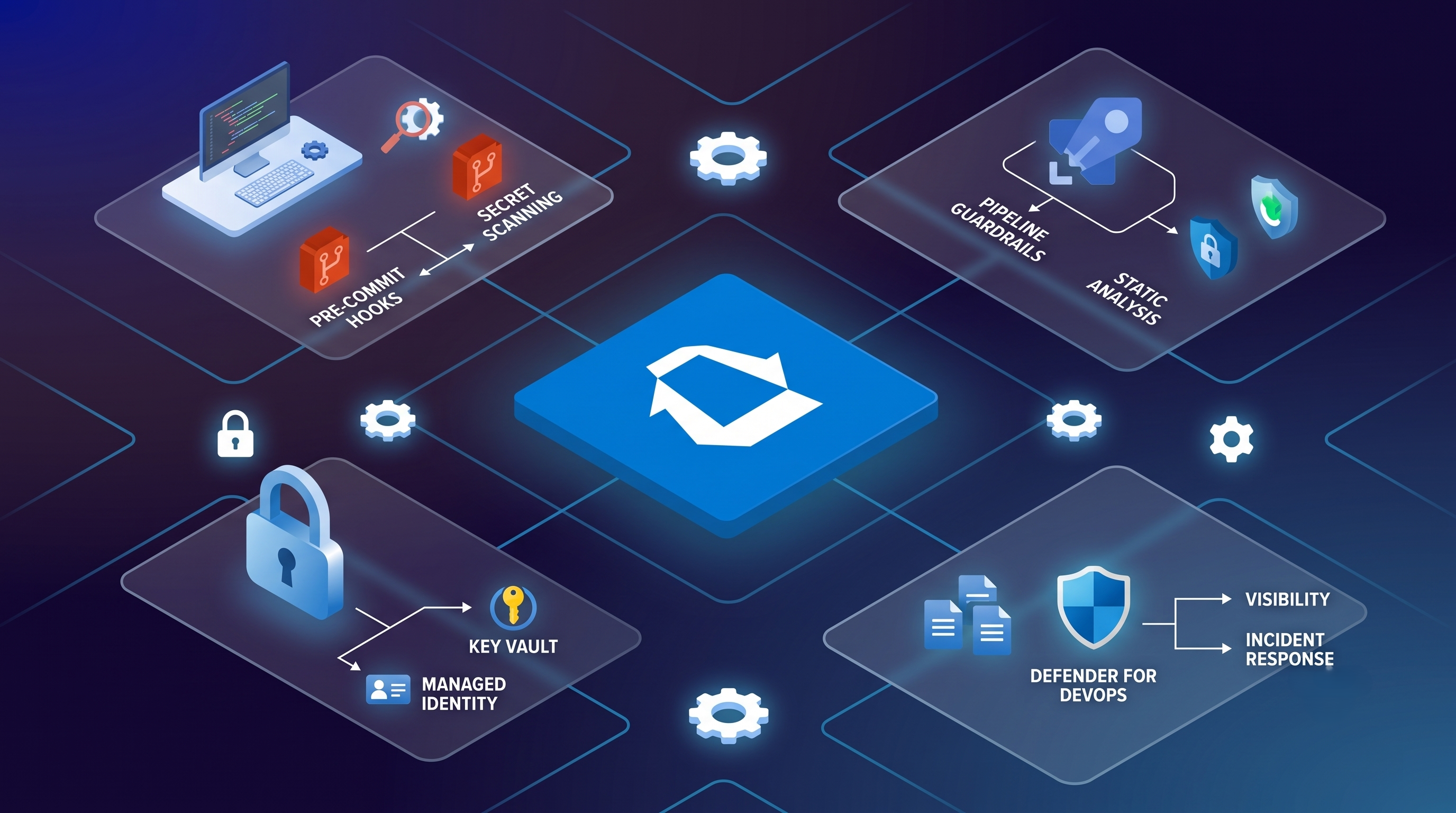
The Structure of Exposure in Source Control
Source control repositories are the nerve center of contemporary software engineering, where every application logic, cloud architecture detail, operational deployment script, and configuration parameter takes the form of a centralized pipeline. However, distributed version control systems like Git enable people to commit without forgetfulness due to their collaborative nature and history of operations. Azure Repositories showcase how the unintentional introduction of secret information can have devastating consequences for entire cloud environments, company databases, and the trust of customers.
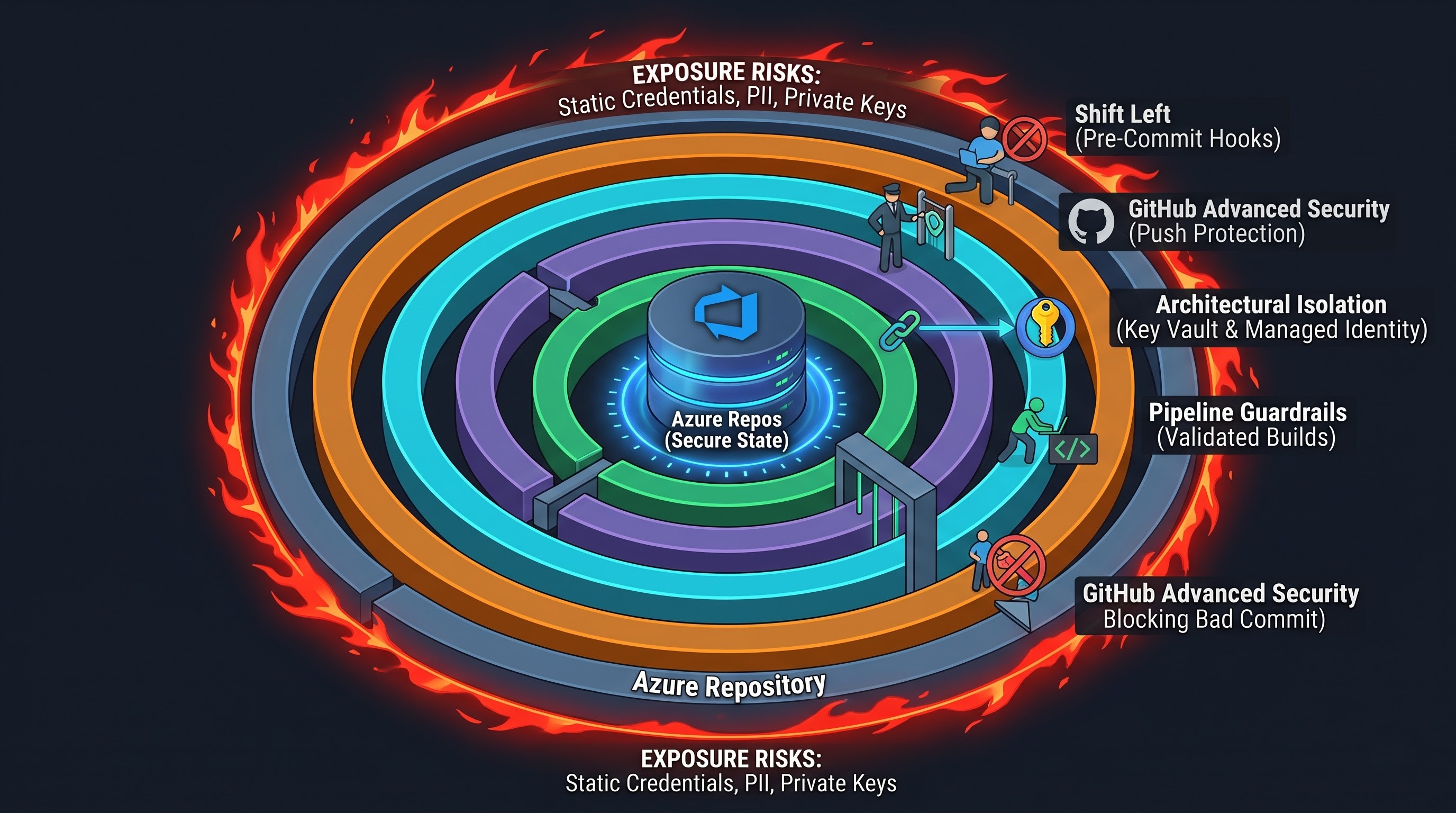
This kind of confidential data takes many forms. It includes static credentials, which consist of database passwords, third-party software API keys, shared access signatures, cryptographic keys, client certificates, and cloud provider service principal credentials, but also personally identifiable information, unique algorithms, the addressing of internal networks, and proprietary documents. The boundary between internal activities and leaks can be easily crossed when an engineer enters an operational connection string into a configuration file to quickly deal with an immediate problem or openly introduces an access token in order to get a particular pipeline done.
Git maintains a record of the entire tree's history. To delete the secret details from the working tree simply creates another checkpoint; the uncovered information continues to exist within the commit history and could be reconstructed at any time by anyone allowed to access the project. The unique structure of Azure DevOps projects may also lead to the participation of third-party services, automatic building tools and synchronization mechanisms, thus, any exposure of a secret in a repository should be regarded as an instant compromise. Thus protecting confidential information within Azure Repositories implies the use of complex mechanisms involving the creation of separate architecture, identity federation mechanisms, native scanning features, strict governance procedures, and a disciplined approach to incidence management.
Shifting Left: Prevention on Developer Workstations
The best way to deal with a secret leak is to ensure that it was never allowed into the repository. As soon as the developer enters private information into the editor and proceeds with local committing, the coverage of the leak starts reaching beyond the repository’s boundaries.
One of the fundamental safeguards entails diligent application of ignore rules. In every case of starting a new repository, the Git ignore file must be set in a comprehensive manner and enforced in standard templates used within the company. The set of rules should include files generated when working on a project, local runtime variables, build output files, file stores, bundle of certificates, personal files, as well as logs saved locally. Although having an ignore file forms a good practice, relying on it alone isn’t justified, since it does not provide 100% reliability, as even a single wrongly specified path in a file or an officially added file would allow ignoring the rule.
To reinforce diligence with the automation process, businesses can have pre-commit hooks added into the workflow of developers. The software on a client’s side blocks commits and checks modified files, patches, and components for the presence of known signatures before making the commit in Git. The mechanism of verification makes use of regular expressions, entropy checks, and pattern matching against known signatures provided by firms.
Entropy analysis helps in identifying character sets with a high degree of entropy associated with hash functions and other such features that help in recognizing unstructured credentials that would be missed by conventional regex patterns. In the event that a programmer tries to commit an artifact with a combination of characters that qualifies as a credential or highly improbable string, the local hook prevents the action and the programmer knows immediately.
Standardising pre-configured hooks across different machines in the organisation, making hooks an intrinsic part of widely-used developer environments, and streamlining implementations through installation scripts developed during team onboarding are ways to simplify the usage of pre-commit tools. Azure devops training by OnlineITGuru goes a long way in embedding these preventive practices across engineering teams because they ensure that the developer learns about the repository protection at the start of their career. Introducing local protection as a practice can reduce the risk of leaks significantly before the code gets into the ecosystem.
Inherent Defense: GitHub Advanced Security for Azure DevOps
Even though workstation-level safeguards provide a critical early line of defense, company security cannot rely solely on the security of distributed independently configured client endpoints. In today’s software world, there is a very crucial need for centralized, enforced software safeguards that cannot be modified or turned off by a certain user. In the Microsoft framework, the inbuilt protections are provided through GitHub Advanced Security for Azure DevOps with seamless protection of secrets directly in Azure Repositories.
Push Protection
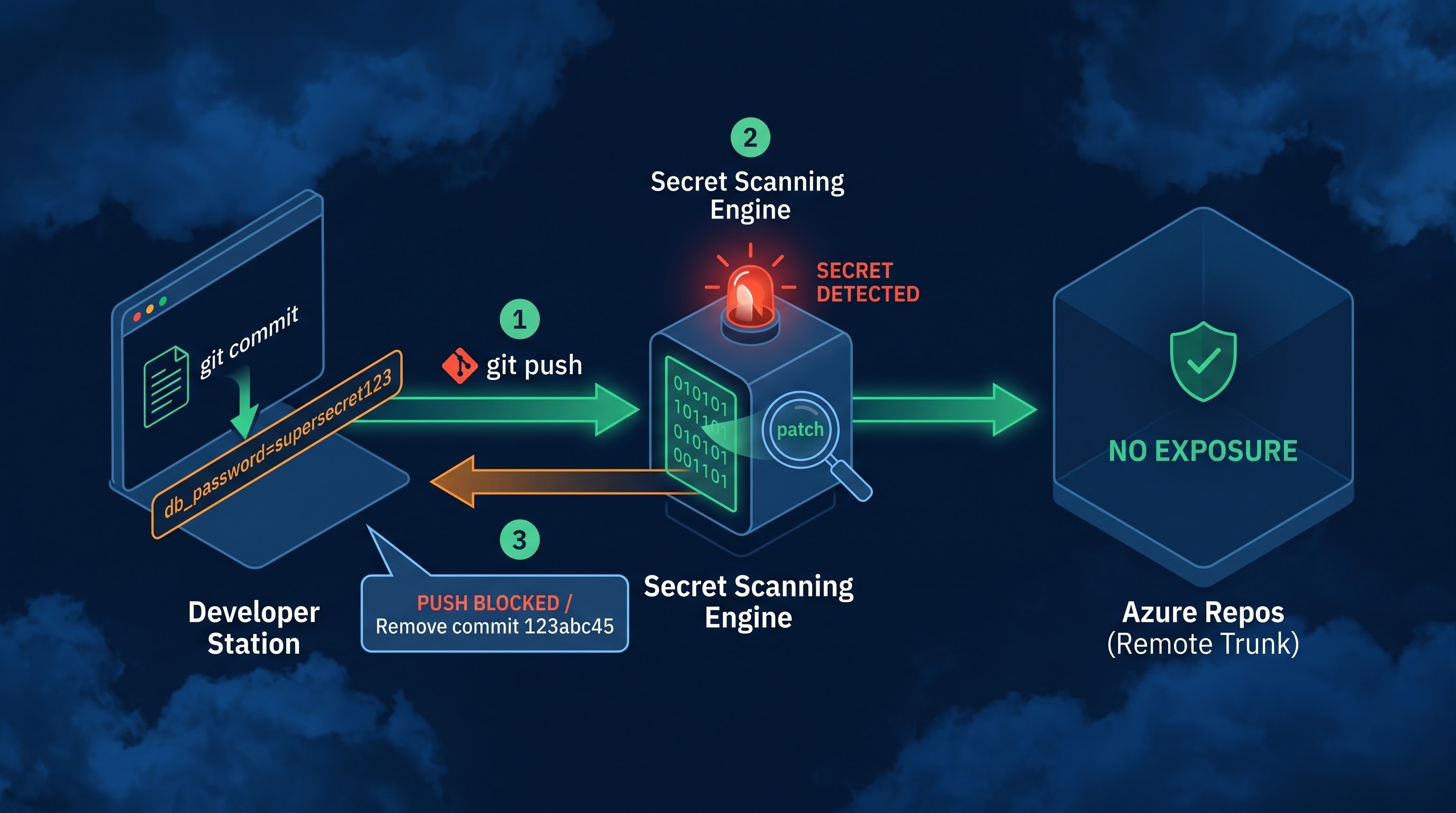
Push protection acts like a gatekeeper at the entry point of any repository. Once an engineer performs the push operation through the network or gets directly involved in the Azure DevOps platform, the push protection evaluates the incoming updates in real time checking the patch against a separate catalog with the details of millions of triggering patterns.
In the event the engine recognizes an unmistakable secret signature, the remote service entirely denies the upload and stops the network transfer before the commit is included in the repositories. The platform sends back a clear diagnostic notification that shows the commit hash, file path, and secret type to the user with instructions to delete the local commit and retry the operation.
If there are rare cases in which a flagged entity is deemed to be an intended sample, a harmless name, or a known false positive, dedicated administrative escape workflows can be created. Still, the built-in push protection ensures that the entire development team follows a strict approach in terms of security.
Secret Scanning of Repositories
Push protection analyzes incoming updates, but old codebases, previously imported enterprise repositories, and historical branches may contain some unknown loopholes. Secret scanning of repositories works like a huge search engine scanning the whole project.
Once the system is launched, the scanning tool catalogs all the repositories, branches, tags and past activities from the zero commit point onwards. It tracks defunct connection strings, invalid certificates and hidden confidential data from the past.
An added benefit of native scanning solutions is their tight integration with verification tools for partner credentials. When a recognized credential is discovered, the scanning engine not only checks its validity but also whether it is usable, obsolete or rejected. This saves time for managing false alarms and allows security centers to concentrate on solving dangerous security issues.
Architectural Isolation: Moving Configuration and Identity Information out of Source Code
The most effective way of securing secrets in source control is simply removing secrets from the source code. The practice of storing configurations in the same place as application code is an ongoing design mistake. By removing credentials and configuration data, the system makes functionality and privilege access independent.
Integration of Azure Key Vault
Secrets must be in a dedicated hardware-enabled cryptographic enclave. Azure Key Vault offers this indent for storage of application tokens, database logins, encryption keys, and certificates away from the code object.
Instead of storing a connection string inside a configuration file in a repository system, the source code only holds the architectural reference to the vault resource. When the application is started in either the dev, staging, or production system, it dynamically queries the key vault through encrypted channels, obtaining the necessary parameters into the temporary memory of the runtime system without writing them to the disk or using them in version control.
Dynamics of externalization makes operational governance easy. Rotation of the application login no longer entails the process of making changes in code, creating pull requests, building and deploying code.
Managed Identities for Cloud Resources
While keeping secrets in an off-site vault protects the secret key, it raises yet another question: does your application authenticate securely with the vault? If you need to expose a static credential or client secret to do that, you are at risk of having it affected by a disclosure.
Managed identity technology provides a solution to this problem. By opting for a user-assigned managed identity or system-assigned managed identity, the underlying platform will take care of authentication through Microsoft Entra ID. The infrastructure runtime then issues to your application tokens directly for only a limited amount of time.
The Azure repository only indicates an intention of being able to authenticate via the native identity context. No passwords, client IDs, or shared keys are present in the repository, on the developer's workstation, or in the configuration files. Access to your infrastructure is regulated solely through Azure RBAC, which disconnects source control from access management.
Managed Identities for Cloud Resources
While keeping secrets in an off-site vault protects the secret key, it raises yet another question: does your application authenticate securely with the vault? If you need to expose a static credential or client secret to do that, you are at risk of having it affected by a disclosure.
Managed identity technology provides a solution to this problem. By opting for a user-assigned managed identity or system-assigned managed identity, the underlying platform will take care of authentication through Microsoft Entra ID. The infrastructure runtime then issues to your application tokens directly for only a limited amount of time.
The Azure repository only indicates an intention of being able to authenticate via the native identity context. No passwords, client IDs, or shared keys are present in the repository, on the developer's workstation, or in the configuration files. Access to your infrastructure is regulated solely through Azure RBAC, which disconnects source control from access management.
Pipeline Governance and Continuous Integration Guardrails
Despite having workstation pre-commit hooks and server push protections in place, extensive defense-in-depth necessitates that constant integration pipelines behave as automated enforcement systems. Automated build processes evaluate code on their own using clean and segregated compute runners, thus making sure that no unauthorized information has gone past the established boundary.
Build Validation and Static Analysis
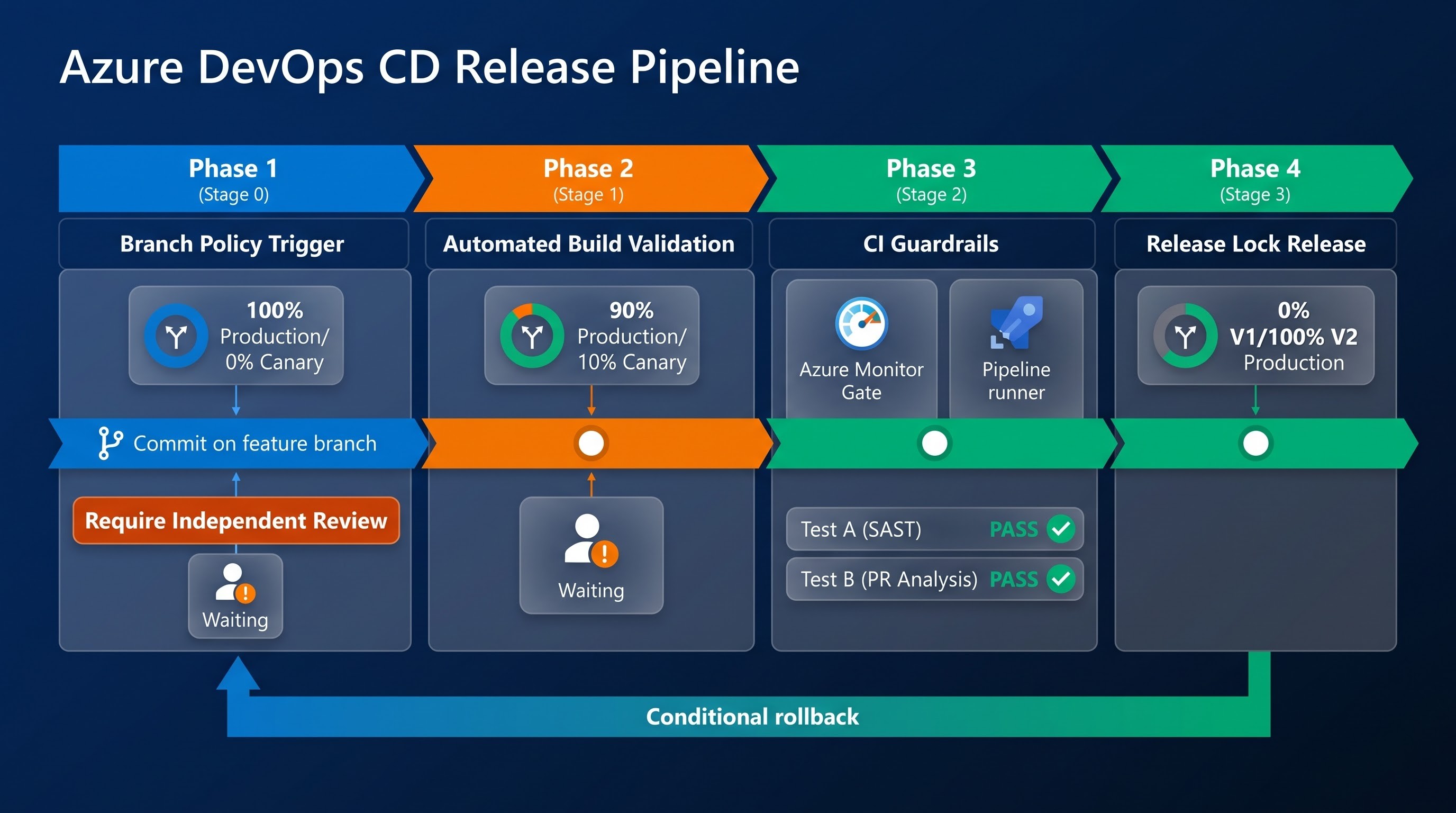
Azure Repositories provide companies with the ability to set strict branch policies for production branches and mainline trunks. The key policy achieved through this effort is forming the obligation to validate builds after each change. Before the code change appears in the form of a pull request, it must pass automatic construction as well as static analysis checks.
Adding credential discovery technology along with static application security testing to this pipeline lets one make sure that any code change request meets all of the automated rules. Thus, pipeline processors analyze each pull request being submitted, identifying the newly created string patterns, badly configured environment templates, unencrypted infrastructure configuration manifests, and nested file archives.
If any pipeline variable consists of secure connection details, functional settings, or software key, it has to be recognized clearly as secrets in order to make sure it wouldn’t appear in unencrypted logs.
It is necessary to enforce the rule prohibiting the use of echoes or validation logs throughout the deployment scripts in order not to allow secrets to leak into public logs.
It is preferable to use variable groups which make it possible to pull the required settings from the vaults immediately as variables do not need to be stored on the platform.
Access to the pipeline should be organized according to specific scenarios of service connection permissions given the fact that unprotected feature branches are not allowed to run scripts with high resource privileges.
Self-hosted build managers which are based on ephemeral containers should be erased between the execution processes.
Authority, Permissions, and Governance of Repositories
In order to protect the repository's content, it is necessary to ensure strict control over the access to the repository. Poorly designed access controls can foil even the finest secret-scanning technology and compromises codebases to unnecessary discovery, modification, and exfiltration. Access management within Azure DevOps should follow the rule of minimum privilege.
Rule of the Minimum Privilege and Access Control Based on Role
Access rights to the Azure DevOps organizations and their projects must be assessed constantly. Each team member should receive only the privileges that are necessary for performing their duties. General-purpose security groups must be replaced with more specific ones based on function and objective.
Permissions at the project and repository levels must not be equated. Permission to access a repository must not equal permission to administer branches, change the history of the repository, check the audit logs, or work with pipelines.
Implement Strict Branch Policies
Branch policies make version control an audited, peer-reviewed engineering workflow. No direct pushes to primary trunks, release candidates, and production branches are to be allowed. All changes must be made in a pull request which is subject to required branch policies:
Require a minimum number of independent, qualified peer reviews of the proposed code changes before merge approval.
All automated build validation checks must pass without error or warning.
All security comment resolution, automated scan warnings, and peer review feedback must be resolved prior to the merge lock being released.
Automatically reset review approvals when new commits are pushed to the source branch so that unauthorised changes can’t slip in after the initial clearance.
Use linear history policies (squash merging or rebase merging). These condense complex local commit trees into clean, reviewable historical records, removing nested, exploratory local commits and often obfuscating secrets.
Improve access: Entra ID and Conditional Access
The security of a repository is tied to the identities that have access to it. Azure DevOps instances should be linked to enterprise Microsoft Entra ID tenants. This synchronisation allows security teams to centrally govern enterprise identity for all development assets.
All accounts that interact with Azure Repositories must use mandatory multi-factor authentication (MFA). When configuring conditional access policies, consider the connection context. For example, block authentications from unmanaged devices, from unauthorised geographic locations, or traversing anomalous network paths.
Organisations also need to tightly control Personal Access Tokens, which developers frequently generate for command-line Git operations and third-party tooling. Personal Access Tokens are a major security threat as they can circumvent interactive multi-factor authentication, outlast identity session expirations and offer wide-ranging access across an enterprise profile when compromised.
Organisations should limit personal access tokens with tight administrative lifetimes, scoping their functionality, requiring project administrator consent, and moving to Microsoft Entra access tokens or secure SSH keys.
Auditing, Visibility & Threat Monitoring
The act of securing source control repositories is an iterative process that requires ongoing real-time situational awareness and threat monitoring. Security teams need to monitor administrative activity, code volume trends, authentication anomalies and scanning alerts for all repository assets.
Audit Log and Log Streaming
Azure DevOps generates detailed audit logs that record significant events within the organization. These logs include permission changes, project deletions, repository creation, personal access token creation, branch policy overrides, and security scanning changes.
To stay compliant and to support forensic investigation, organisations must stream these audit events to an enterprise security information and event management system like Microsoft Sentinel or persist them to a centralised Azure Log Analytics workspace.
This telemetry should be monitored by automated correlation rules for suspicious operational activities such as:
Fast, bulk cloning of repositories done outside normal business hours.
Unexpected rise in project-level permissions or unauthorised changes to branch validation rules.
Multiple long-lived personal access token generation across developer accounts.
Systematic administrative circumvention of push protection mechanisms through escape overrides.
Microsoft Defender for Cloud integration
The integration of Azure DevOps with Microsoft Defender for Cloud brings together visibility for organisations running hybrid and multi-cloud environments. Defender for DevOps aggregates operational intelligence from distributed version control systems to unify secret scanning alerts, dependency vulnerabilities, and infrastructure-as-code misconfigurations into a single security console.
Defender can evaluate potential attack paths across software engineering pipelines and runtime cloud resources using its cloud security graph. If a secret is exposed in an Azure Repository that enables authentication to an internet-facing storage account or a production database, Defender will surface the exposure as a lateral movement risk with critical severity.
This in-context prioritisation turns isolated code scanning results into a holistic architectural view, allowing security engineers to remediate the most dangerous exposure points before they are exploited.
Incident Response: Remediation of Exposed Secrets
If the prevention fails, and a sensitive asset is committed and pushed to an Azure Repository, then fast, decisive and methodical incident response is needed. Incomplete or flawed remediation can lead to increased exposure, creating a false sense of security for teams while the credential remains vulnerable to active exploitation.
Immediate invalidity and revocation
The basic rule for credential compromise is that once a secret has been pushed to a remote repository, it’s compromised for life. Removing the file or the line or purging the repository does not protect the leaked secret. Bad actors, internal caching systems, distributed developer clones and automated webhooks may have already read the token.
The primary operational response should be to the target infrastructure, not the repository:
Immediately rotate or revoke the exposed secret at its authoritative source (e.g. the database provider, identity authority, or third-party service).
Use secure, randomised infrastructure provisioning routines to generate a replacement secret.
“Push the new credential straight into an enterprise key vault, or deploy it with an identity-backed orchestration service.
Upgrade runtime components that are part of the production to the new credential with no impact to continuous availability of service.
Search the target service’s access logs for the compromised credential to see if it was used to access data, exfiltrate data, or move laterally during the time it was exposed.
Historical Removal from Git Trees
Once the compromised secret is rotated and the target system secured, the development team needs to remove the sensitive string from the repository’s historical record. A simple commit that removes the text from the current working tree is not enough, the credential is still visible in the repository's commit history.
To remove the secret the Git history of the repository has to be rewritten for all affected branches, references and tags:
Teams will need to use specialised repository cleaning tools, like the open-source BFG Repo-Cleaner or native Git filter-repo extensions, to scan the entire tree and scrub the target string, replacing it with an inert placeholder in all historical commits.
For this, the standard git filter-branch utilities should generally be avoided, as they are slow, error-prone on large repositories, and can corrupt historical metadata.
When the historical rewrite is complete, force push the cleaned repository branches to Azure Repositories. Since branch policies typically forbid history rewrites and force pushes, a project administrator must remove these protections temporarily to complete the operation.
Azure Repositories stores cached references, pull request diffs and loose commits in the backend. Administrators should coordinate with platform support or start backend garbage collection routines to make sure dangling commits with the secret are completely wiped out from the remote infrastructure.
Tell all team members with active clones to re-clone the repository from the clean remote origin, to avoid accidentally pushing old locally cached commits back into the project.
In order to master the entire lifecycle of cloud security, which ranges from automated pre-commit hooks to identity isolation and advanced pipeline governance, you need to develop actual practical administration skills. Learn the whole process related to version control and automated CI/CD pipelines and take a look at the accurate azure devops course syllabus at OnlineITGuru.