
Data Engine Architecture: Getting Beyond Fundamentals in IBM DataStage Coursework
Last updated on Sep 29, 2026
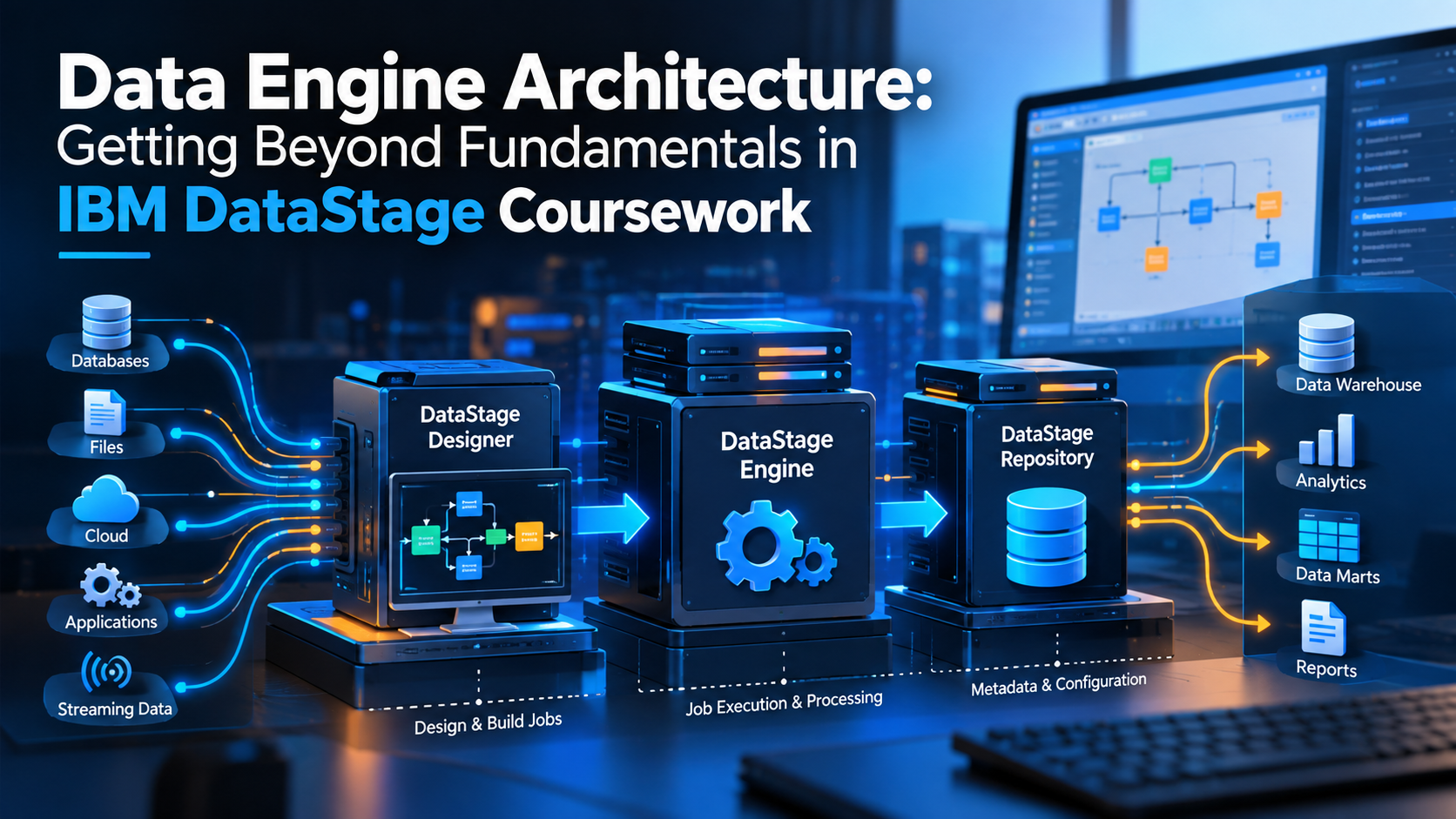
When it comes to enterprise technology, it is surprisingly easy to design a data pipeline that works brilliantly in theory. You take a source, apply a couple of transformations, do some rudimentary field mapping to your data warehouse and call it a day. When you test it out with a couple of thousand rows, it takes a matter of seconds to process. It is all very elegant and simple.
But when it comes to production, where you need to process millions of records per hour from various enterprise silos like mainframes, cloud object storage, relational databases and streaming platforms, it starts choking at the first hurdle. Memory gets exhausted, network timeouts occur, disk I/O becomes a bottleneck and what used to take seconds to process now takes hours, rendering your enterprise data pipeline unviable according to SLAs This is why there is a big difference between fundamental ETL script-writing and full-scale enterprise data engine architecture. When it comes to processing huge volumes of data on hybrid cloud, generic procedural programming and query optimization techniques fail to deliver.
That is where IBM DataStage comes in.
It has been a staple of enterprise data pipeline construction for years because it has been purpose-built to handle intense processing needs by utilizing high-performance parallel data processing capabilities. For this reason, any aspiring data engineer looking to advance their fundamental skills in ETL scripting and move onto complex data pipeline design and optimization should look into studying the inner workings of DataStage architecture.
The Real World Bottleneck: Why Standard Pipelines Fail at Scale
To understand why DataStage is structured the way it is, you need to understand why conventional data integration techniques fail at scale. Most traditional ETL approaches rely on procedural execution. Data is read row by row or batch by batch, processed through a set of logical functions and subsequently written to some form of target storage or database. This approach works well in smaller environments but when volume increases and data needs to be processed at the level of terabytes and petabytes, three physical bottlenecks usually appear:
CPU Saturation: A single CPU core feeding records one by one will quickly saturate, irrespective of how fast that specific processor is.
Memory Overrun: Storing big lookup sets or staging large data sets in memory will cause aggressive paging, memory leaks or outright system crashes.
Disk I/O Thrashing: Frequently reading from and writing to temporary disk space between processing steps will slow the total throughput to a crawl.
When engineers start to see these physical walls appear, the knee-jerk reaction is often to write custom code or try to hand-craft SQL queries that execute in parallel While that can work, sometimes it leads to production environments with spaghetti logic that has poor error recovery and lacks standardization and proper error recovery. This is where enrolling in a structured datastage course can offer a plethora of valuable information to engineers that want to understand how native parallel frameworks eliminate the need for custom coding hacks and simplify complex throughput operations.
DataStage tackles these physical limitations by decoupling job design from actual execution. When you design a flow in DataStage, you're not instructing a processor what to do but rather you're defining a logical data flow graph. The actual execution is handled by the DataStage Parallel Engine that splits, distributes and streams your data across all available system resources.
Anatomy of Speed: Deconstructing the Parallel Engine
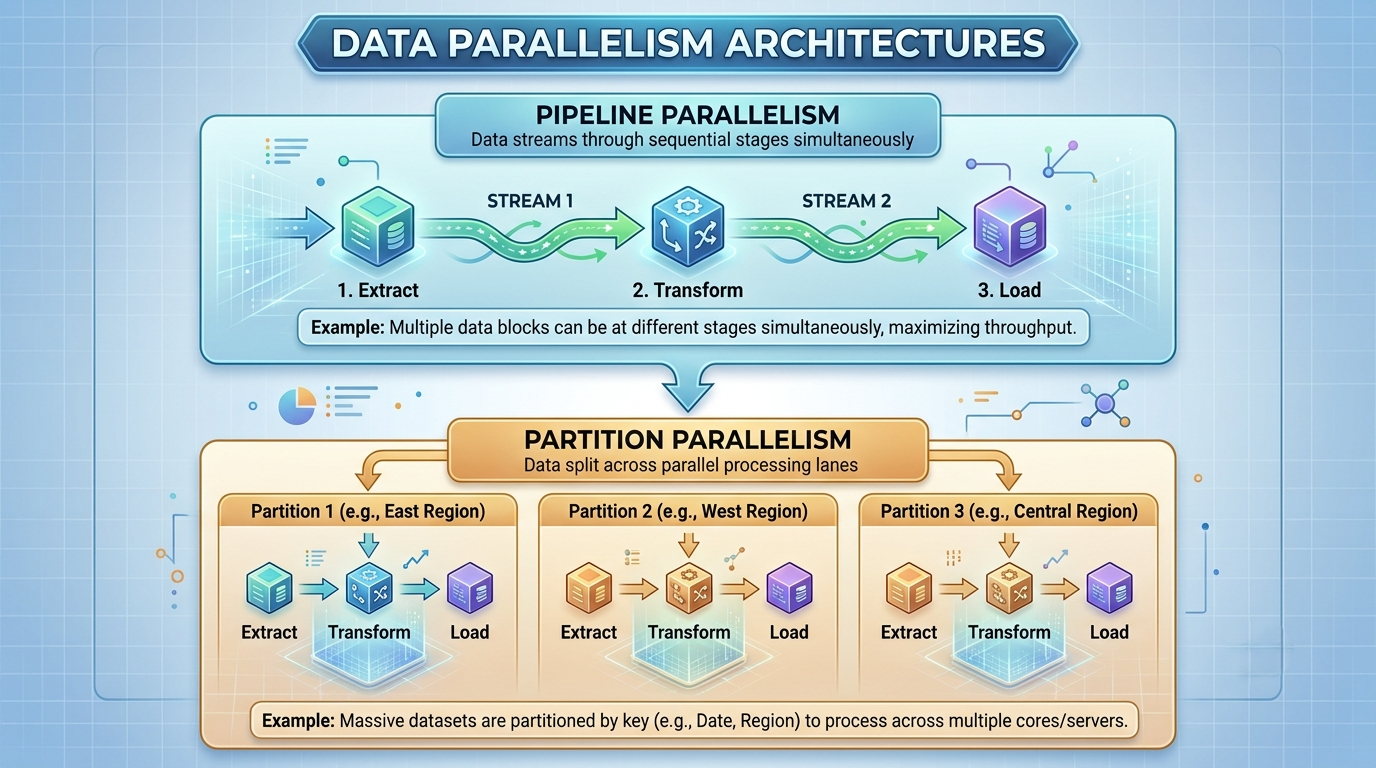
Dealing with DataStage’s sheer performance power is the famed Parallel Engine, also known as Orchestrate or PX Engine. To achieve the level of processing power it has, the engine uses two key concepts related to its architecture: Pipeline Parallelism and Partition Parallelism. Although the two might be mentioned in the same breath, they have nothing in common and address completely different aspects of the engine’s workings.
Pipeline Parallelism: Continuous Data Streaming
In a traditional step-by-step ETL approach, Step B only commences after Step A has been completed. Consequently, when extracting fifty million records from a database, for instance, a standard software tool would extract all fifty million rows of data, save it to a temporary file, then read the file to perform transformation tasks. After transformation, the software writes the results to another temporary file and subsequently reads the file a third time to load it into the data warehouse.
Pipeline Parallelism completely eliminates the need for these delays
Pipeline Parallelism allows a continuous stream of records to pass through all processing stages.
This is done by letting the transformation stage start working on the first set of extracted data while the source stage is extracting the next set of data. While the transformation is taking place, the target stage could be writing the first set of transformed records into the warehouse. In essence, data is passed from one stage to the other without being written to or read from a temporary file because it is all done in memory. It is like having a conveyer belt where data flows continuously and simultaneously through all stages of processing.
Partition Parallelism: Splitting the Load Across Lanes
While Pipeline Parallelism is about processing data vertically (i.e., row by row), Partition Parallelism splits the data horizontally (i.e., dividing a huge amount of data into small sets or partitions) and processes them across different CPUs or nodes. Consider a highway with multiple lanes. Suppose there is a traffic jam because all the cars are in one lane. Even if the cars could drive at high speeds, little progress would be made because of the traffic congestion. Partition Parallelism is about avoiding traffic jams by allowing the cars to merge into different lanes and each car proceed on its own. Similarly, if the data processing engine has four nodes, it would divide a huge data set of one hundred million rows evenly and process it in four partitions. Each partition would contain twenty-five million rows.
Smart Partitioning Algorithms
The primary challenge of parallelism is ensuring that data is split across processors properly. Ideally, the data should be partitioned in such a manner that every processor has the same amount of information. Otherwise, if some of the processors receive more data than others, the ones with a surplus will perform significantly more operations than others, resulting in an effectively skewed data distribution. To address this scenario, DataStage contains a set of built-in partitioning algorithms.
Hash – utilizes hash functions to partition data on specified columns (keys) and is most useful when further operations require grouping or aggregation of information on a key since all of its instances will be found on the same partition.
Round Robin – simulates the most basic form of partitioning in which data records are simply distributed in turn to whatever partition is available. It is best suited for cases where no particular grouping of data needs to be respected.
Same – retains the same partitioning scheme as in the previous stage, which helps avoid unnecessary repartitioning operations.
Range – partitions the data in accordance with ranges of values specified by the user for each key. It is most beneficial in scenarios where further operations require sorted data.
Entire – employs the entire dataset across all partitions. It is best utilized when small reference tables need to be distributed across the processes as it creates a copy of itself for every partition.
Understanding the nuances of each method is crucial to any engineer that wishes to achieve high performance and avoid data skew in DataStage, and enrolling in a datastage training course is the best way to become well-versed in the concepts of parallelism and partitioning.
The Control Room: The Developer & Administrator Toolkit
While the Parallel Engine is doing its grunt work invisibly in the background, developers can be found using a collection of client components to help them separate out the concerns of design, execution, and administration to specific areas of operation. The importance of understanding how these components fit together cannot be overestimated if we are to create well-structured, performant integrations.
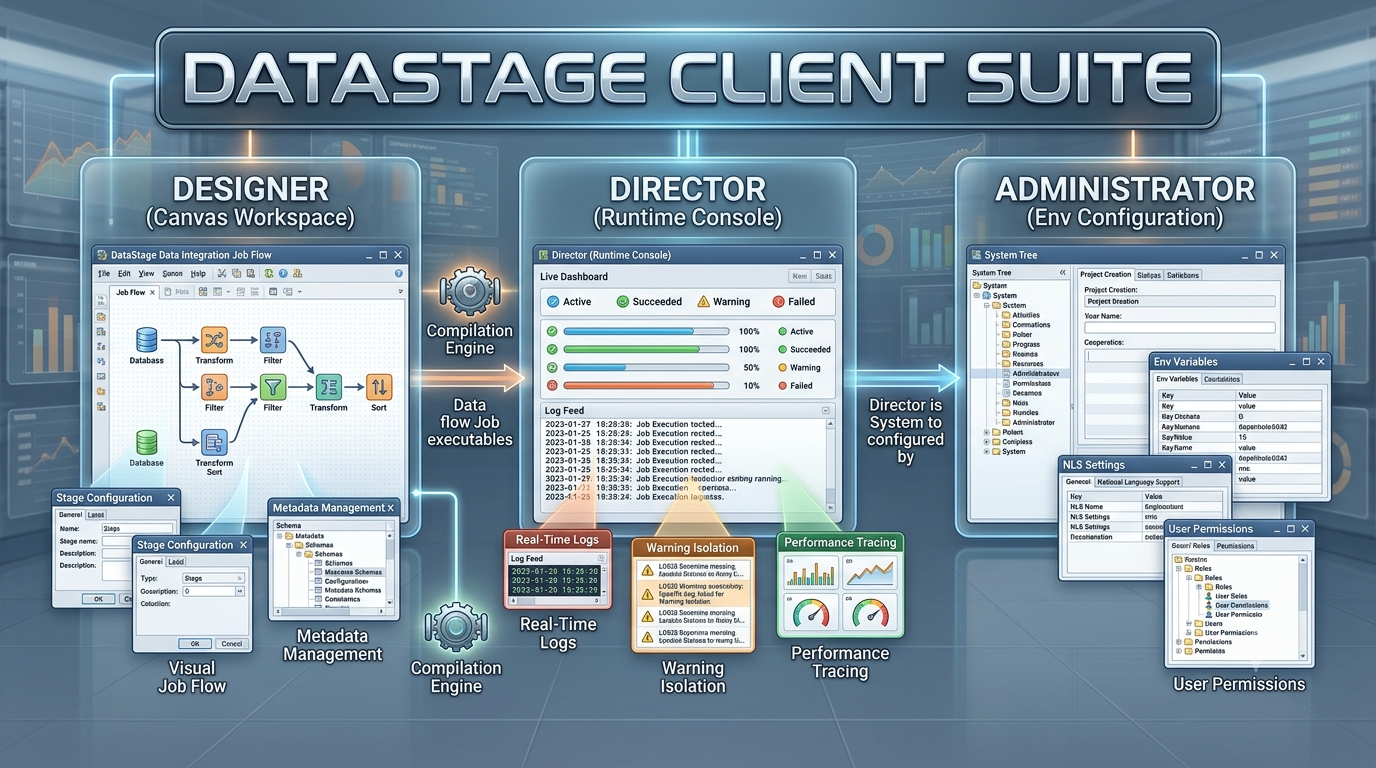
The Designer allows developers to design visually complex sets of actions without writing extensive, long-winded scripts or layers of SQL code. The primary benefit of the Designer is in the separation of the business logic from the context of execution. By dragging in a Transformer stage or an Aggregator stage onto the canvas the developer is focusing on the transformations that need to occur, the column mappings, the business logic, the filtering of bad records, and the field formatting. None of that requires hard-coding of hardware-specific instructions or the count of available CPU threads or memory on the machine where the stage will execute.
Moreover, the Designer compiles these visually designed sets of transformations into C++ binaries which are then executed as native binaries on the host operating system, offering the maximum performance. A DataStage job is not interpreted at run-time like a Python or Perl script would be, but rather compiled into a stand-alone executable binary that can take advantage of host-specific optimizations.
The Director Console: Real-Time Operational Insight
After jobs are built, the responsibility for viewing, scheduling, or controlling job execution is given to the DataStage Director. It acts as a mission control tower for monitoring and managing the job. During job execution, the director provides real-time logging of all individual records and partitions. In the case of a job failure or a performance warning, the director identifies the exact stage, node, and record that caused the issue. Besides reading thousands of log lines in standard text format, developers can use the director to view performance warnings, trace memory allocations, analyze CPU usage patterns, and tweak job parameters at runtime to eliminate bottlenecks.
The Administrator: The Environment for Maintaining Stability and Controlling the Environment
Behind every successful project environment is the Administrator client. The tool deals with system-level configurations, project settings, environment variables, security permission, and the definition of database connectivity. Through the Administrator interface, engineers could set global environment variables that are applied to all jobs within a particular project. The variables define the memory allocation limits, temporary storage directories, maximum parallel node, and buffer sizes. This way, the project team does not need to set the features on every job design; they set it once, at the platform level, and it applies to everything. To gain the ability to fully utilize all three data management environment modules, developers could participate in an ibm datastage training course and acquire an in-depth understanding of the tools during the designing, implementation, and maintenance phases.
The Decision Matrix – Choosing the Right Stage for Performance
One of the most common performance errors in a DataStage job is choosing the wrong stage for the specific purpose. For instance, if you need to perform a basic join of two datasets, DataStage offers 3 primary stages: Lookup, Join, and Merge. Although they seem to perform the same task at first glance, each has an entirely different approach to memory consumption and usage. Picking the wrong stage in a particular scenario can turn a 10-minute job into a several-hour process.
In IBM DataStage, the choice between join techniques is dictated by the volumes of data and available resources as each stage uses a different memory strategy. These strategies determine the join mechanisms used in each stage:
Lookup Stage: This is the preferred option when the primary dataset is large while the reference dataset is comparatively smaller. The stage has a memory-intensive strategy which stores the reference table in-memory as a hash table for faster lookups. This makes it suitable for enriching or supplementing a dataset with smaller dimensions such as code lookups or dimension tables.
Join Stage: This stage is used when both datasets to be joined are large. The stage uses a disk-based sorted strategy to join two presorted or streamed data sets. Unlike the Lookup stage, this method does not require memory to join large datasets. It is the preferred option when joining two huge datasets especially on transaction data streams.
Merge Stage: This stage falls between the Lookup and Join stages in terms of memory requirements and is used when merging datasets with different sizes. The Merge stage uses a streaming approach on presorted keys to avoid using too much memory during the merge process. It is the preferred option when merging master data with large volumes of reference or transaction data to perform operations such as insertions, updates, and rejections checks.
The Lookup Stage: In-Memory Speed
The Lookup Stage is ideal for joining an absolutely massive stream of primary data against a relatively small data set. When executing, a Lookup Stage will load the contents of the reference dataset into physical RAM memory as a hash table, enabling the matching and enrichment of incoming fields with near-light speed performance.
When to use it: You have a reference dataset that will fit comfortably within available memory (e.g. postal code lookups, product category descriptions, account status keys)
When to avoid it: You have a reference dataset containing tens of millions of records. Forcing such a large data set into memory may cause system paging and crashes.
The Join Stage: High-Scale Disk-Based Merging
When you need to join two giant data sets, where neither will comfortably fit into system memory, the Join Stage becomes your new best friend. Unlike the Lookup Stage, the Join Stage makes no attempt to buffer data sets into memory. Both input streams are sorted by the designated join keys (potentially utilizing parallel disk sorting), then streamed past each other, matching records merged as they are encountered.
When to use it: When joining two large data streams, neither of which will comfortably fit into memory. (e.g. fifty-million record sales transactions joined with thirty-million record customer updates.)
When to avoid it: You need to join a giant data stream with a tiny reference dataset. The overhead of joining two sorted streams will be much greater than simply loading a small reference dataset into memory.
The Merge Stage: Carefully-Controlled Master Data Operations
The Merge Stage is similar to the Join Stage, in that it operates on two sorted input streams. However, the Merge Stage provides specialized features for performing UPSERT operations, along with options for managing un-matched master and update records. In a Merge Stage, you designate one input stream as the Master stream, and the other (or others) as Update streams. The stage will compare the contents of these streams, allowing you to define your own custom logic for handling un-matched master records, un-matched update records, and bad records that failed simple validation rules.
When to use it: To perform master data operations, including complex UPSERT logic or to route un-matched records to reject files for audit and correction. When to avoid it: When you simply want to enrich a data stream.
Minimizing Overhead in ETL through Careful Stage Selection
While combining data is important, the other major way to improve pipeline throughput is to minimize the amount of work being done by resource-heavy stages. Whenever possible, it is best to defer database queries, drop unneeded columns, and filter out dirty records as close to the source as possible. Millions of irrelevant or corrupt rows pushed through complicated Transformer stages will require unnecessary CPU cycles, memory buffers, and disk space to be devoted to a process that will ultimately throw the data away.
By pushing simple Filter stages in front of complex Transformer or Aggregator stages, the overall demand on the system can be drastically cut. Completing an ibm datastage course can teach developers how to think through these issues and make intelligent decisions about which stages to use and where so that their ETL processes can handle the maximum possible data per second.
Next-Gen Modernization: DataStage on Cloud Pak for Data
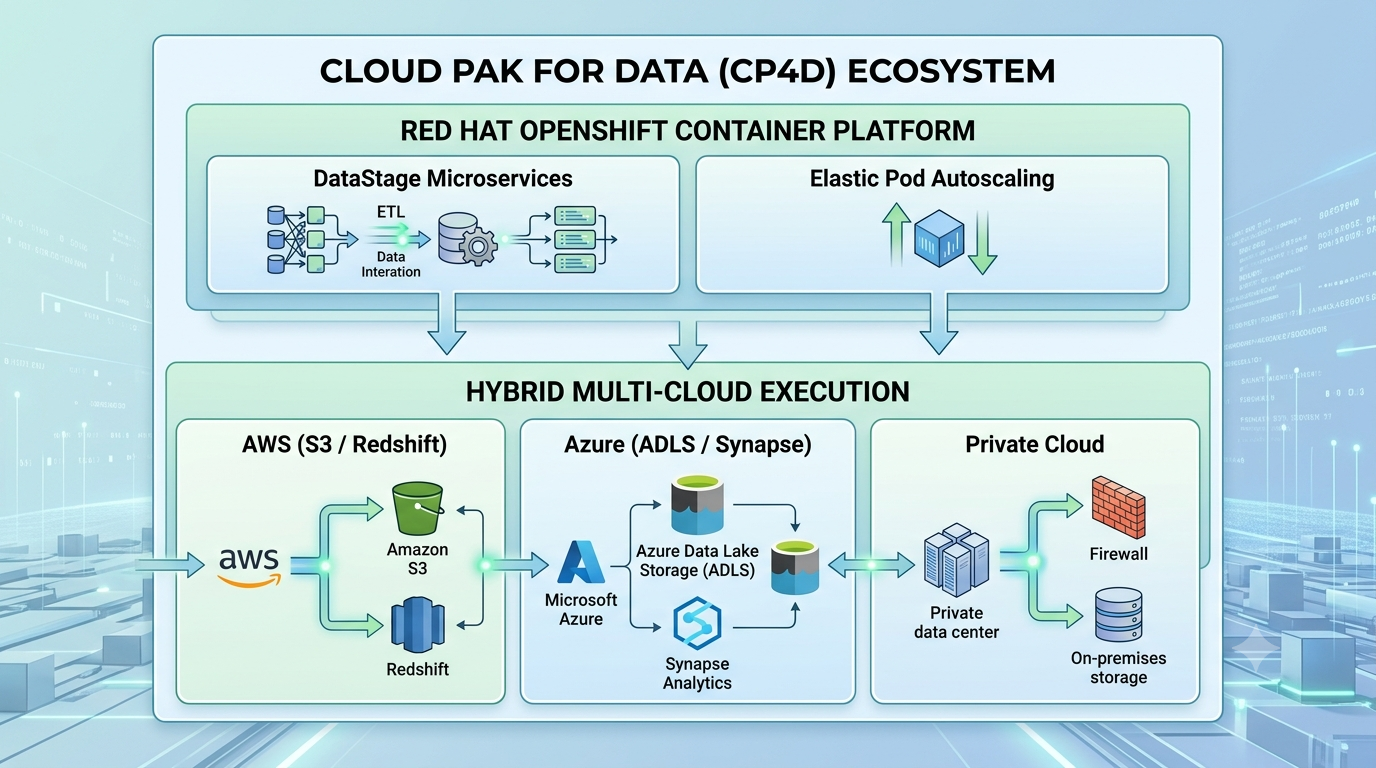
DataStage is no longer just a monolithic server on-premises. With the need for enterprises to migrate towards cloud native solutions, DataStage is now a containerized microservices application in IBM Cloud Pak for Data (CP4D). This allows for better development, management and orchestration of jobs in a multi-cloud environment.
Containerization with Red Hat OpenShift
In the cloud era, DataStage is deployed as containers orchestrated by Red Hat OpenShift. You no longer configure dedicated physical servers with a certain amount of CPUs or RAM allocated for your instance. Instead, you scale the execution pods up when a large job is launched, and down when it is completed. The resource-intensive processes are handled by the cloud, only being used when there is a relevant workload to process.
Seamless Hybrid Multi-Cloud Architectures
In most cases, companies do not store all of their data in one repository. Some of it resides in relational databases on-premises, some – in the log files stored in AWS S3 buckets, while others are stored in cloud data warehouses, such as Snowflake or Azure Synapse Analytics.
DataStage on CP4D can be utilized to create end-to-end data pipelines between your on-premises and cloud data sources without having to write complex code or perform extensive networking configurations. The same DataStage stages are used in hybrid environments, which simplifies developing jobs that utilize different cloud services. Since execution engines are hosted closer to data, moving information between repositories is not as expensive or time-consuming as before.
CI/CD and Modern Tooling
Modern data engineering practices promote using version control systems for DataStage projects. With recent updates, developers can use Git to store not only the code of their DataStage jobs but also perform code reviews and CI/CD procedures. This way, projects stored in Git can be deployed to different environments with automated unit testing, facilitating the continuous delivery of new pipeline stages or replication jobs. You can define your job specifications in API-friendly code descriptions and have them automatically tested and compiled into executable DataStage jobs with the help of CI/CD tools. This approach simplifies building and maintaining pipelines by applying modern software engineering practices.
Conclusion: Build Pipelines That Scale
There is more to developing DataStage pipelines than meets the eye. After learning the principles of the Parallel Engine, its capabilities, and limitations, one can estimate how to best structure their ETL processes to be the most efficient in terms of resource allocation and execution speed. Understanding the role of the core client applications, learning which stages are most suitable for processing in-memory data or utilizing the CPU resources to their maximum potential, and deploying jobs in environments that best match their requirements are all useful skills to create efficient and scalable data pipelines.