
Declutter Salesforce pages effortlessly using Dynamic Forms and Dynamic Actions
Last updated on Aug 29, 2026

The principle of Salesforce data presentation architecture has remained almost the same for the last twenty years. The records were created using the traditional Page Layout Editor, which manages the entire field of any object as well as related lists in a rigid two-column layout. Although this method works perfectly, it has a fundamental problem because everyone who has access to a particular layout view will see the same thing.
With the increasing complexity of business processes, organizations struggled with page bloat. The Opportunity or Case object that would normally generate dozens to hundreds of fields. In order to capture certain information needed by users in different departments, administrators have faced an undesirable situation.
The first option adopted consisted of creating different Page Layouts and Record Types for each combination of role and stage and allocating them to various profiles. The result of this was an immense administrative burden. A small change, like modifying a single label of a certain field or adding some organic tracking date, needed multiple Page Layouts to be modified, usually about ten up to twenty layouts.
The second option was even worse – that was to put all of the fields on one or two large layouts, thus leaving users to scroll indefinitely, suffer from visual distress, and deal with the interface overflowing with unnecessary information.
To resolve this issue of a fundamental nature, Salesforce came up with Dynamic Forms and Dynamic Actions. Designed directly in the Lightning App Builder, these declarative features separate fields, sections, and action buttons from traditional page layouts. The independence of fields and buttons on a component-by-component basis using visibility rules gave Salesforce a clean, adaptive, and contextual interface to be provided to admins. This is an essential part of salesforce admin training course, which helps in making the connection between conventional database management and the contemporary user interface design.
Getting to Grips with Dynamic Forms
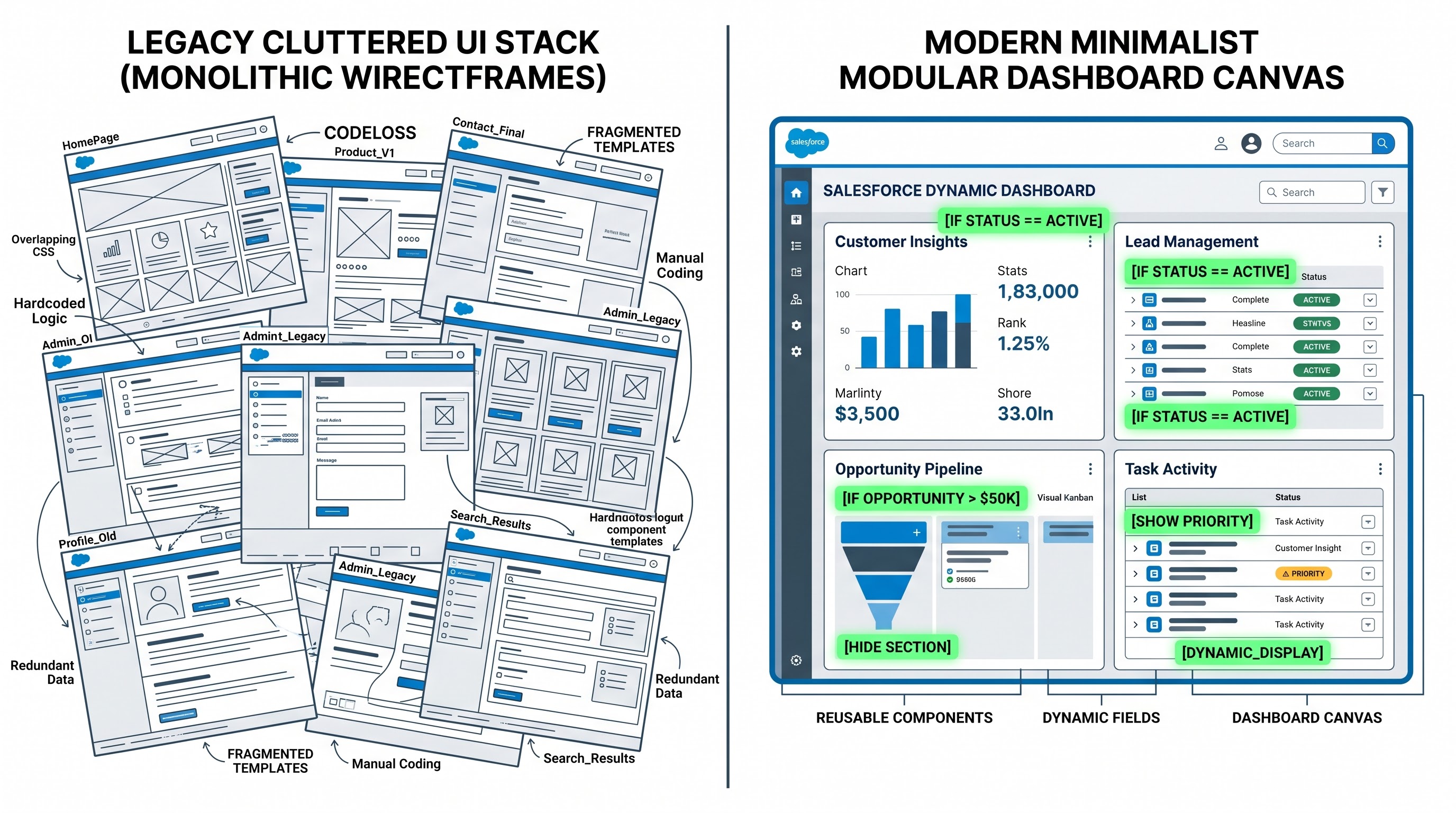
Dynamic Forms revolutionizes the structure and display of page details. In traditional Salesforce, the whole "Record Detail" box was one complete entity. If the box was added to a Lightning Record Page, it would bring across an entire Page Layout from the Setup.
Dynamic Forms has replaced the Record Detail box with Field Section and Field elements.
When a Lightning Page is upgraded to Dynamic Forms, the system imports fields and sections from the Page Layout behind the scenes and gets them directly into the canvas of the Lightning App Builder. Once the process takes place, these elements can work in ways that were impossible before in the world of Salesforce:
Granular Field Placement: Users are unrestricted by the two-column formation within the main container. Fields and sections may now be added to be contained in tabs, accordion sections, sidebars, or sub-tabs or any place on the web page canvas, respectively.
Component-Level Visibility Rules: Each individual field and section can just have an assigned declarative filter logic. Visibility that is subject to be changed can remain dependent on the state of fields of the current parent record, data of a logged user, role ownership, user’s login account.
Dynamic Required and Read-Only Overrides: Users can mark a field required or read-only at the Lightning page level without affecting universal field security.
Reduced Layout Sprawl: Users are able to combine many complex layouts into one unified Lightning page that changes dynamically.
Gaining Insight into the Functioning of Dynamic Actions
In contrast to the Dynamic Forms feature, which helps to deal with the issue of field clutter, Dynamic Actions assist with the problem of action clutter. In traditional scenarios, actions such as Edit, Delete, Clone, Log a Call, Create New Task, and custom quick actions were set up in the Actions section of Salesforce Mobile and Lightning Experience Actions.
Action bars, like fields, dealt with problems of clutter. For instance, a sales representative trying to find the action known as "Send Proposal" might have to sift through an unmanageable list of actions, trying to filter out such unimportant actions as "Submit for Approval", "Escalate Case", or "Generate Invoice”.
Dynamic Actions feature the same visibility mechanism as the Dynamic Forms do, but the only difference is that Dynamic Actions work with action buttons available in custom and standard objects:
Page-Level Action Orchestration: Actions are all set up straight away through the Highlights Panel component or the different sections of the Dynamic Form.
Context-Based Action Ribbons: The buttons can be there or go away based on the specific triggers in the processes. For example, the quick action related to closing a deal could be absent until all relevant milestones are fulfilled.
Role-Based Action Governance: Such actions as “Initiate Refund” or “Override Pricing” could be accessed only by users with specific user rights.
Best Practices for the Foundations Architecture and Establishment
When an enterprise moves from legacy page design to dynamic page building, there is always detailed planning prior to action. Dynamic actions and forms are not just ornamental components; these constitute a major shift in the way information is shared. Professionals doing salesforce administrator training online are taught to build these architectures systematically before getting into production systems.
1. Single vs. Multiple Pages
Think about whether your organization has a requirement for a single globally assigned Dynamic Page across the organization or different Dynamic Pages assigned by Application or Profile before developing dynamic rules. In most cases, Dynamic Forms eliminate the necessity for multiple pages. However, if two user groups such as CCA (Call Center Agents) and FT (Field Technicians) use the same object for totally different business processes, utilizing separate Lightning pages adapted specifically for their preferred layouts exceeds the efficiency and viability of a single page that includes various conditional rules.
2. Handling Rule Sophistication and Persistency
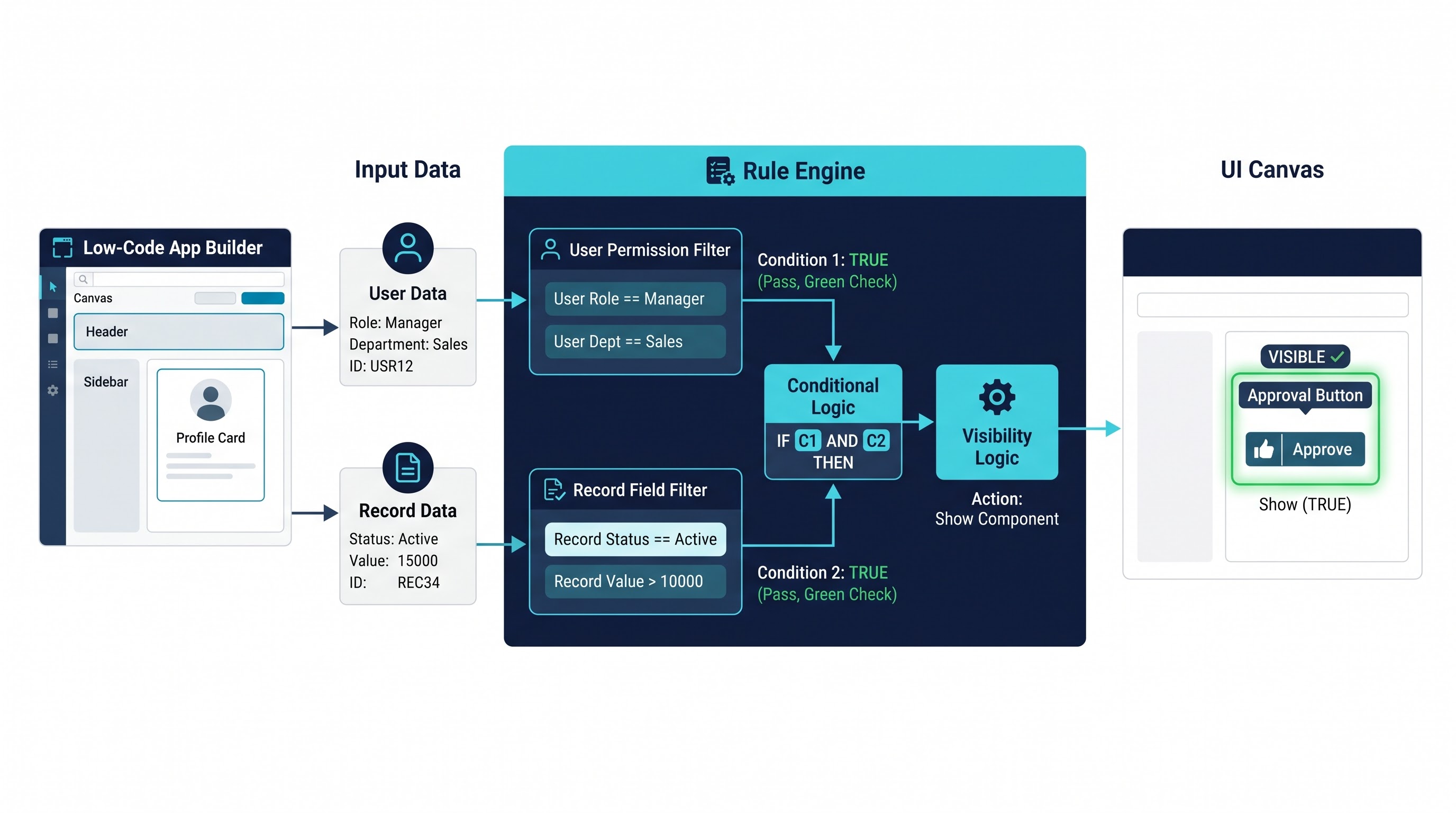
Rules should be developed with long-term maintenance in consideration. When you have many fields with multiple periodic visibility functions, then fixing conflicts may be problematic.
Enclose similar fields in the same Field section and apply the visibility rule to an entire Field section instead of each field separately.
Use permission sets and custom permissions instead of hard-coding visibility to user profiles or their IDs in order to avoid issues when employees leave the company.
Make the rules as straightforward and positive as possible (e.g., implementing “status is equal to active” instead of five not-equal-to rules).
3. Ensuring Support for Mobile Usage
Dynamic forms and actions are compliant with mobile usage for almost all basic and customized objects, but administrators need to check the behavior of mobiles. Investigate how efficiently your dynamic sections are designed for mobile and refrain from saturating mobile sections with complicated conditional rules as this may cause delays in the process of rendering.
Use Case 1: Enhancing Opportunity Management in Sales
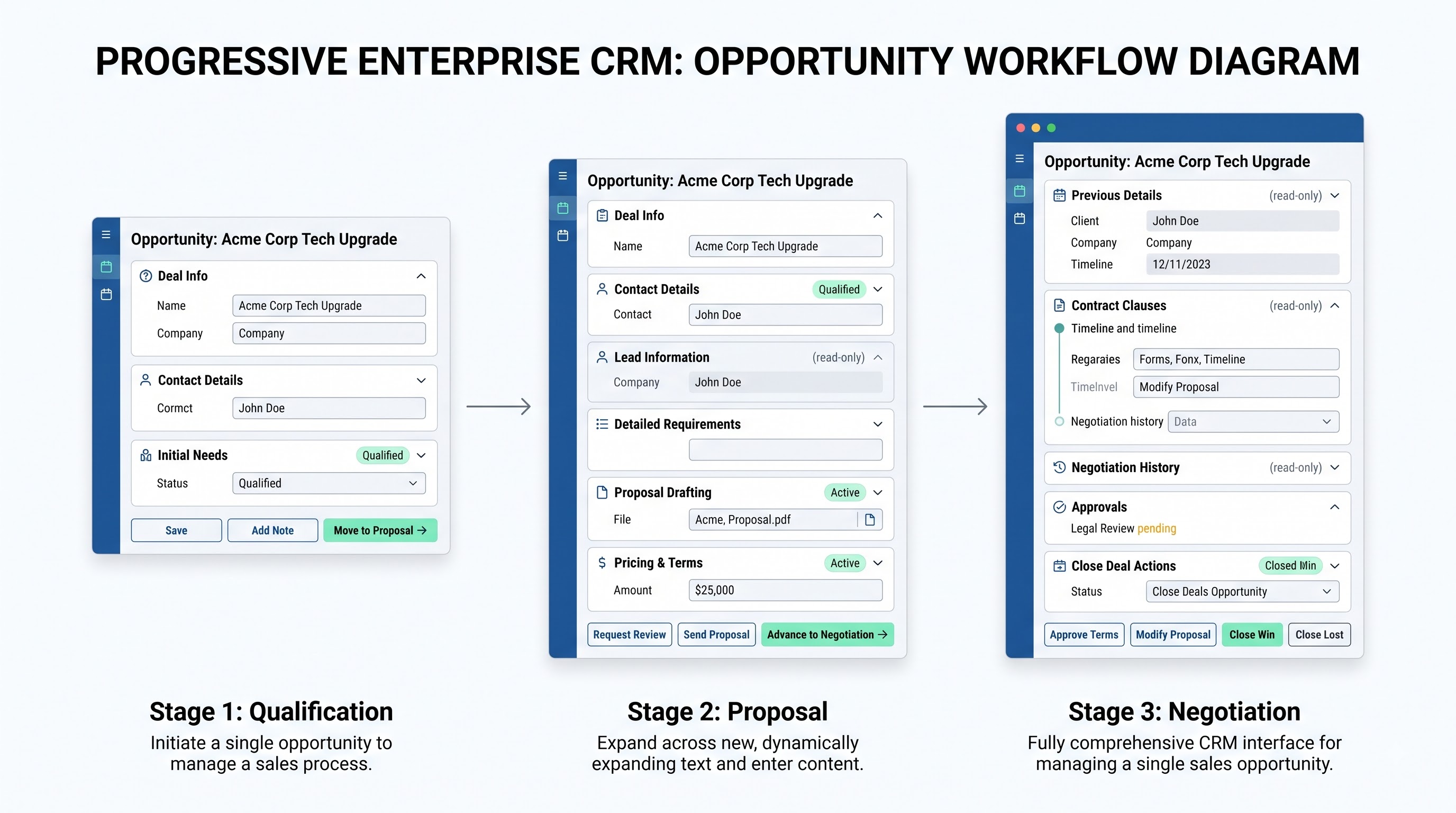
The B2B sales process tends to be affected by interface overload due to its various stages. While moving through the stages of Opportunity including Prospecting, Qualification, Needs Analysis, Proposal, Negotiation, and Closure, the data collected keeps on increasing significantly.
Conventional Problem
In a conventional setup, the layout for an Opportunity has to include fields for wherever required, throughout all stages. When a salesperson is at the initial "Prospecting" stage, he/she sees many empty fields like "Legal Review Sign-Off," "Billing Frequency," "PO Number," "Contract Start Date," and "Executive Sponsor Identification." This results in interference in thought process and entry errors.
Smart Solution
Dynamic Forms and Dynamic Actions help make the interface adaptable to the situation.
Early Stages (From Lead to Qualification):
The main screen reveals a condensed "Lead & Qualification Info" area with the four most important discovery fields – Lead Source, Primary Pain Point, Budget Range, and Initial Timeline.
There are only a few buttons for high-speed discovery actions: the buttons are called “Log Call,” “New Meeting,” and “Edit Qualification Details.”
All advanced commercial, legal, and operations sections are hidden.
Middle Stages (Proposal & Value Proposition):
When the stage changes to “Proposal,” a new Dynamic Section called “Solution Architecture & Pricing” shows up on its own.
This section includes such fields as “Selected Product Tier,” “Discount Justification,” “Implementation Scope,” and “Competitor in Play.”
A Dynamic Action called “Generate Quote” appears in the Highlights Panel, while the general “Edit” button can be made read-only in certain baseline fields in order to avoid mid-cycle disruption.
Last Stage (Negotiation to Closed-Won):
In the "Negotiation/Review" stage, the interface then displays the "Contract & Legal Governance" section. This will make fields such as "Master Services Agreement Attached", "Payment Terms", "Special SLA Clauses", and "Finance Sign-Off" available.
The "Discount Justification" field, which was optional previously, now turns dynamically identified as required whenever the discount percentage goes beyond set standard thresholds.
Dynamic Actions feature shows the button "Submit for Executive Approval" when the deal reaches certain enterprise tiers and it has not been approved yet.
This stage-driven dynamic approach ensures sales agents always experience a simple interface targeting their current operational priorities with no unnecessary visual noise.
Use Case 2: Improvement of Support Operations and Case Management
The realm of customer service calls for swift responses and visual clarity, along with fast access to context. Support personnel receive many incoming tickets and they often represent different issues ranging from password reset to serious enterprise failures.
The Conventional Problem
If Case page layout is designed for diverse issues, like hardware faults, billing problems, integrations with API, and requests for features, the tab of record details turns into hell. Thus, an agent dealing with a billing issue has to scroll through multiple hardware diagnostic fields (e.g., “Firmware Version,” “Serial Number,” and “RMA Tracking”) before reaching “Invoice Number” and “Disputed Amount.”
Smart Solution
Dynamic Forms gives an issue-oriented workspace for case management.
Historical Categorization:
The agent must select "Case Category" from the top segment of the Case detail page.
Once the Category has been set to "Billing Problem," the Dynamic Forms feature retrieves the "Billing Issue" section, which includes "Invoice Identity," "Billing Time," "Date of the Transaction," and "Requested Refund."
If the category is "Technical Issue," the billing information will not be shown, while the "System Diagnostics" section will show "Operating System," "API Payload," "Browser Version," and "Process of Reproduction."
Speed and Escalation Mechanism:
The case classified as "Critical - Level 1" will produce an alert section displayed in accordion view with special instructions, emergency contacts, and SLA info.
Dynamic Actions menu will show, immediately from the moment, an "Escalate to Engineer On-call" option that will not be visible for Low and Medium classified cases.
Resolution and Conclusion:
Once the Case Status moves to "Pending Closure," the section with case resolution details appears.
The Root Cause Category and Resolution Summary fields are automatically set to Required so that agents cannot close the ticket without providing critical information for knowledge transfer and reporting.
As a result, support agents do not waste any time looking for fields or moving through unnecessary operating sections of the system.
Use Case 3: Role-Based Users’ Experiences on the Account Object
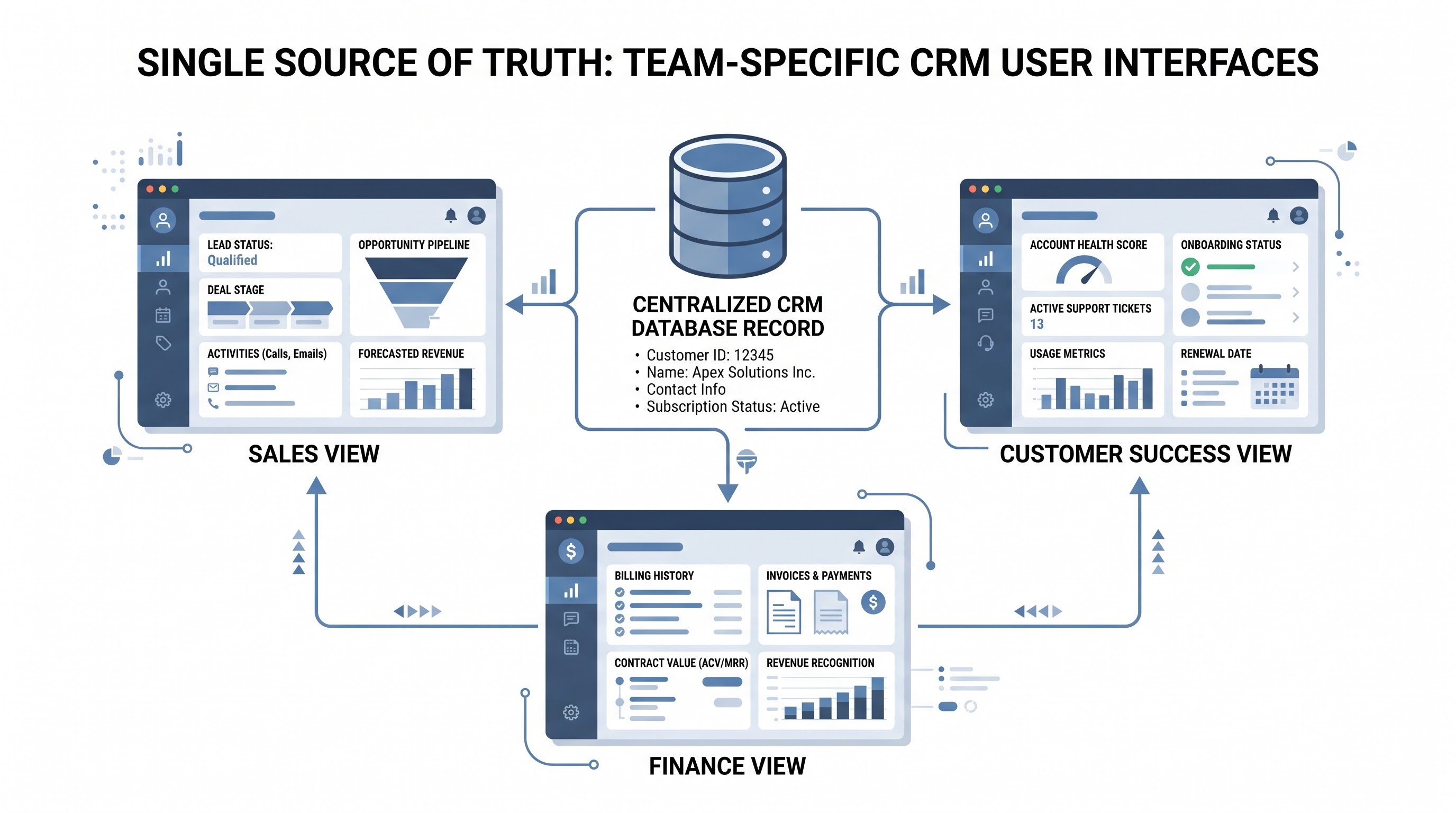
The Account object is the central point of CRM information shared between Sales, Customer Success, Finance, and Executive Leadership. Each of these roles utilizes the Account object in various ways according to their own needs.
The Traditional Problem
In the past, sales departments focused on whitespace, buying signals, and contract renewal dates. Customer Success was focused on product adoption, health scores, and remaining milestones in the onboarding process. The financial team had credit limits, tax ID, billing contact information, and payment terms. For each of the four roles, the companies needed either four different Page Layouts depending on several profiles or one complex layout that covered everything.
The Dynamic
Using dynamic forms that are based on user-level requirements, it becomes possible to make a Lightning Record Page be different depending on the role of the user and special permissions assigned to him/her.
Sales Perspective:
From the Sales Representative point of view, the most important part of the primary tab is called "Account Growth & Expansion".
The important segments which one can see here are "Target Market Segment," "Current ARR," "Parent Enterprise," "Competitive Footprint," and "White Space Opportunities."
The Highlights Panel has done an effective job by introducing the Dynamic Actions including "Create New Deal," "Assign Partner," and "Log Executive Meeting."
The Customer Success Perspective:
According to the viewpoint of a Customer Success Manager, the functioning of the dynamic engine enables bringing to the forefront the "Customer Health & Adoption" section.
Some of the visible segments here include "Net Promoter Score," "Product Utilization Rate," "Onboarding Status," "Dedicated CS Tier," and "Renewal Risk Rating."
The Dynamic Actions include buttons to “Schedule Business Review”, “Log Health Check” and “Flag At-Risk Account”.
Solution for Finance and Operations:
"Credit and Billing Compliance" checks in with him/her when someone from Operations and Finance departments has to access the same account.
This is how a list of common fields are created such as “Tax Exemption ID”, “D-U-N-S number”, “Payment Terms”, “Invoicing Email”, and “Credit Hold Status”.
Dynamic Actions also reveals options like "Approve Credit Limit" or "Lock Account for Non-Payment," which are completely off limits for ordinary sales or success users.
With the help of User and Permission-based visibility filters, the company does away with the need for layout replication and has set a unique interface for every department.
Use Case 4: Human Resources and Regulations on Confidential Data
For companies, internal documents like employee data, onboarding processes, and payroll information involve complex rules for data privacy and governance.
The Conventional Issue
In the case of sensitive information (e.g., salary, assessment of performance or results from background checks) access is limited to certain groups of people such as recruiters, legal departments, or managers of the HR sphere.
In view of this feature, in a traditional environment it is necessary to either resort to Field Level Security or create advanced restricted Page Layouts connected to entirely separate profiles. Nevertheless, Field Level Security only allows to impose restrictions on the quality of information users can see but does not ensure that the appearance of the empty pages of records is also hidden from those who cannot see their content.
The Dynamic Solution
Dynamic Forms provides organizations with the ability to handle sensitive information naturally in regular business workflows without experience empty interface frames:
Executive Remuneration and Assessment:
On an internal Job or Position record, a part called "Compensation and Bonus Banding" is set with view access granted only to users possessing the "HR Compensation Administrator" Custom Permission.
Thus for normal employees or hiring managers this section does not just seem empty or disabled, it does not exist in the DOM.
Progressive Background Checks:
As soon as a Candidate record reaches the "Background Verification" stage, there appears a special "Compliance Verification".
In case it turns out that there is something problematic and escalation is required, there appears an "Escalate to Legal" Dynamic Action available only for Senior Compliance Officers.
Thus, this method enhances the organization security policy, as it eliminates interface indicators of embossed data while allowing for a centralized layout management in terms of single declarative structure.
Use Case 5: Complicated Product Implementation and Project Lifecycles
Businesses that run post-sales deployment through Salesforce—like consulting companies, onboarding departments in SaaS businesses, or manufacturers logistics teams—have to use complex project tracking objects.
The Typical Problem
The project lifecycle goes through several different stages: Intake, Scoping, Environment Provisioning, Data Migration, User Acceptance Testing, and Final Go-Live. Each step in the process may have from fifty to hundreds of specialized operational data points that need to be gathered. The result is that putting all 300+ fields on a single page is overwhelming for implementation consultants. Besides, many steps are skipped, projects are followed incorrectly, or bad data management is used.
The Solution that Works
With Dynamic Forms, Salesforce administrators are capable of providing a “wizard-like” experience right within the Lightning Record Page without even writing any custom code. Such hands-on implementations are always a part of modern salesforce admin classes, which demonstrate how declarative solutions can address complex issues spanning multiple departments.
Phase-Driven Visibility:
The web page employs either multi-tabbed or accordion styles. Whenever there is a shift in the project phase field from "Scoping" to "Provisioning," the section that represents the "Scoping" phase will either collapse or get shifted to an archive tab while the "Environment Provisioning" phase section takes central position on the screen.
All fields that relate to the provisioning process like “Sandbox Tenant ID,” “SSO Configuration Status,” “Data Center Region,” and “API Limits Allocation” become functional and mandatory.
Milestone Actions Completion Process:
Dynamic Actions shows only the main action for each phase: "Complete Scope Review," "Verify Environment Provisioning," and "Sign Off Migration."
The completion of each milestone action modifies the status/background fields and brings the next necessary section onto the screen automatically.
Governance and Effectiveness
Dynamic Forms and Dynamic Actions deliver remarkable operational flexibility, but employing them across an enterprise needs to be managed appropriately if performance issues and lack of management shall not occur.
Page Performance Optimization
Dynamic rule execution on a Lightning page leads to involvement of client-side processing. Whenever a record is loaded, the framework of Lightning Component checks the visibility criteria across all fields, blocks, and actions.
Reductions of Rule Chaining: It is better not to create any visibility rules that involve a multilevel query on the relationship, for example, checking the field of a User’s Manager’s Department’s Parent Role. The longer the query the bigger the delays in page loading.
Awareness of Component count: Creation of more simple builds enhances the design, however, it is not a good idea to create a counterproductive process of fifty separate field blocks with distinct visibility rules. It is better to combine several fields into one section whenever possible.
Using Page Analysis tool: The tool “Page Analysis” can be found in the Lightning App Builder. It analyzes the performance of the page and determines heavy components and complex distribution of fields.
Declarative Governance and Maintenance
To guarantee long-term scalability throughout teams of administrators:
Use Consistent Naming Era: Clearly indicate Field Sections and Dynamic Action buttons. For those sections that are dependent, provide an administrative name for the same in Setup (e.g., “Section: Legal Approval [depends on walking step]”).
Use Standard Custom Permissions: Do not use any dynamic visibility criteria based on locked profile names (e.g., Profile Name=”Custom Sales Users”). Profiles are no longer in use, and hence changing your dependency criteria from Profile names to Permission Set and Permission Set groups is the modern way.
Keep Your Visibility Matrices Current: You should have a matrix that clearly depicts fields, sections, and actions that work in certain situations.
Important Lessons for Modern Day Salesforce Administrators
Transitioning from Static Layouts to Dynamic Forms and Dynamic Actions represents an important move in Salesforce administration.
As a result of eliminating the need to have too many page layout creations, visual clutter, and providing fields and actions depending on context, role, and stage of lifecycle of users, administrators are able to develop consumer-grade applications.
Appropriate use of such tools alleviates the cognitive workload of the users, lowers the risk of making any data entry error, increases the efficiency of task completion, and limits the risks of accumulating technical debt. By joining an industry-relevant salesforce administrator course online, both existing and future Salesforce administrators can learn the necessary skills to evolve from mere data handlers to workflow architects.