
Dell Boomi Guide: Unleash Enterprise Data & Cloud Automation
Last updated on Oct 3, 2026
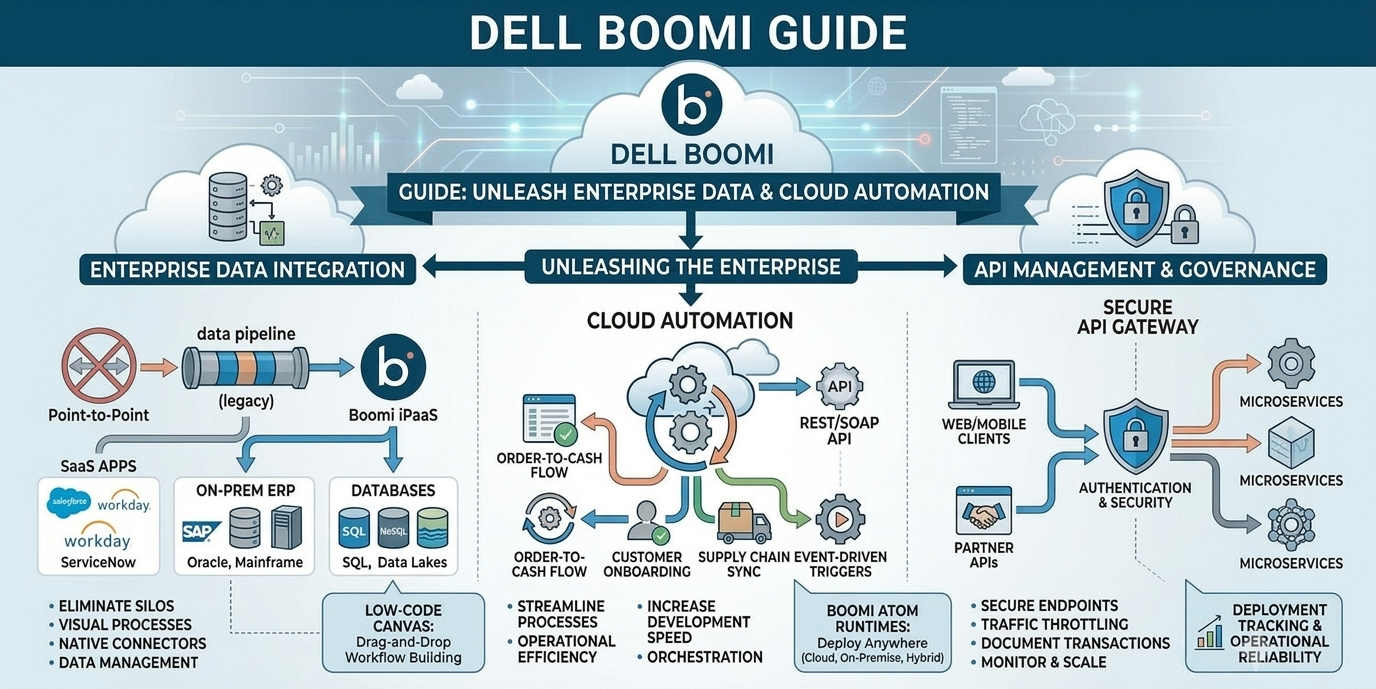
enterprise environments often look like disconnected digital ecosystems. Revenue accounting teams use ERP systems, sales departments keep live customer data in Salesforce, human resource systems run on cloud platforms like Workday and warehouse fulfillment platforms use separate supply chain databases. When these separate business applications work alone companies face manual data entry, higher costs and unclear records between departments. Enterprise integration is no longer something only big IT projects can do—it is the part of business operations that helps companies stay fast, keep data safe and make quick decisions.
The detailed dell Boomi course gives integration developers, cloud architects and systems engineers a plan to learn how to use enterprise Integration Platform as a Service (iPaaS). By using visual workflow tools, made cloud connections, smart data mapping and simple engines Boomi makes it easier to build software. This guide shows how enterprise professionals create, grow, launch and manage real-world integrations using the Dell Boomi platform.
The Enterprise Integration Paradigm and the Evolution of iPaaS
To understand the goal of modern cloud integration tools we need to look at how the design has moved away from point‑to‑point custom connections. In the past linking two enterprise databases meant that engineering teams had to write special Java, Python or C# scripts. These scripts would ask each endpoint, for data read the data and send updates through custom web services. That method worked for internal links but point‑to‑point design falls apart quickly when an organization grows. If one new application is added to a group of ten systems it is necessary to change separate codebases and endpoints. This creates point‑to‑point chains that often break when software is updated.
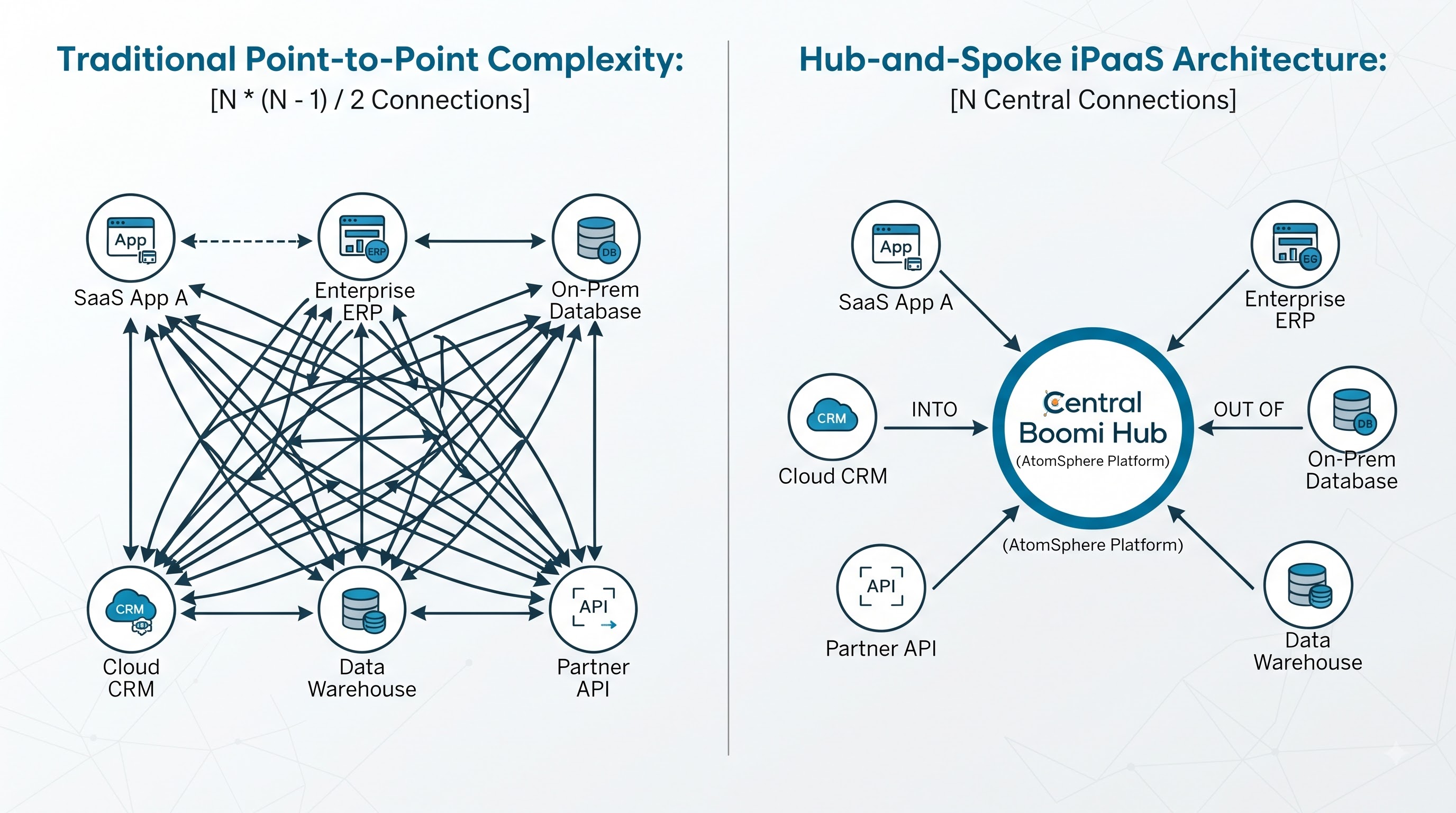
Enterprise iPaaS solutions combine separate data connections into one central hub-and-spoke management layer. By creating a custom adapter for each destination developers set up a standard connection between each enterprise endpoint and the central iPaaS core. This central management approach is the foundation of dell boomi training programs. Enterprise developers learn how to design integration patterns, simplify API authentication and greatly reduce software maintenance costs across dynamic hybrid cloud environments.
Platform Architecture: Deconstructing the Boomi AtomSphere Core
At the heart of the Dell Boomi platform is AtomSphere. It is a native system built to keep integration management separate from the actual data processing. Boomi runs on a -tenant cloud control plane. Developers can build, set up documents and test integration flows in a standard web browser. This approach is different from middleware systems. Those older systems often forced business data to pass through external vendor servers. Boomi avoids that by separating the process setup from the data transport. The result is a more flexible architecture that gives users better control.
Key Architectural Components
The Boomi Atom: I see the Boomi Atom as a small stand‑alone Java engine that runs integration tasks. The Boomi Atom holds all the connector information, encryption keys, schema checks and data transformation rules that let it work on its own.
The Boomi Molecule: I think the Boomi Molecule is a group of Boomi Atoms that live on redundant servers. The Boomi Molecule gives availability balances load across the enterprise and provides fail‑over for many transactions.
Atom Cloud: I find Atom Cloud to be a shared runtime. A private cloud runs. Atom Cloud lets a company run processes, without having to set up its own local servers.
The separation of the configuration platform and the execution runtimes presents security advantages. When a Boomi Atom is installed on-premises behind a firewall it makes outbound connections to the Boomi Cloud to obtain the latest workflow configurations. The customer's real data is contained within the corporate network at all times. It is never exposed to the Boomi cloud unless it is specifically routed to an external SaaS application.
Low-Code Visual Process Development: From Logic Shapes to Execution Pathways
One of the reasons Boomi's so popular in many companies is the low‑code canvas that lets engineers build processes. By typing thousands of lines of code for simple tasks like calling a REST service or parsing XML, Boomi gives a nice set of visual blocks named Shapes. You can. Drop these shapes to build processes, which makes development fast and easy. With these building blocks users create logic by linking shapes in a flow so that complex business processes become simple to build through configuration. This approach cuts down on the coding required to implement a set of logic. It also lets teams focus more on business logic and less on implementation details. As a result the move from logic to an executable process is simple, intuitive and easy to manage.
Core Categories of Boomi Shapes
Execute Shapes: These are parts that are used to ask for change or send data documents that come in (like Connector, Map, Set Properties, Data Process, Decision and Branch shapes).
Logic Shapes: These are shapes that check details about a transaction and decide which way the data should go (, like Route, Cleanse, Business Rules and Stop shapes).
Preparation & Management Shapes: These are tools that help to get data ready, save it or break it apart (like Document Cache, Combine and Split shapes).
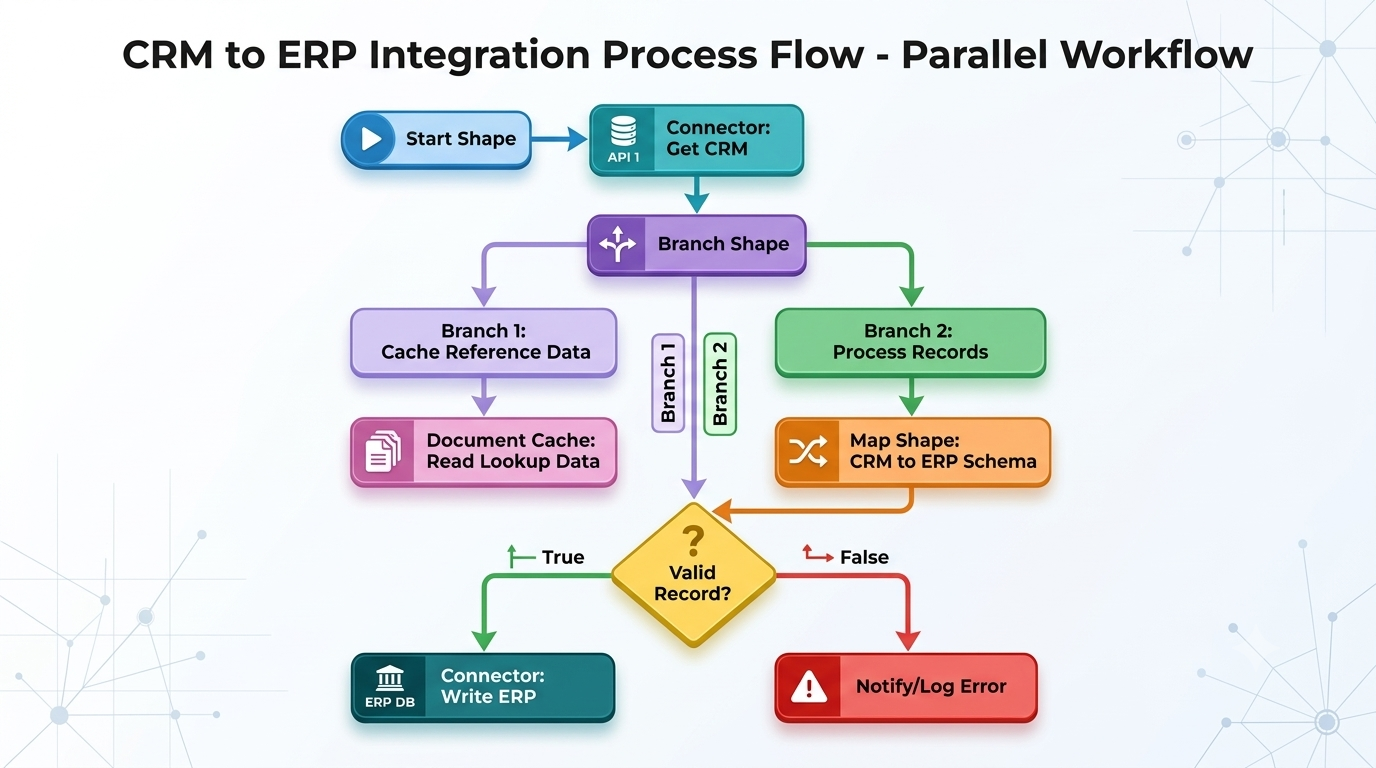
During execution data travels through a Boomi workflow in packages called Documents. A Document is a payload—such as an XML purchase order, a JSON customer profile, a CSV row or a flat database record. As Documents move along visual shape pathways, the Atom tracks execution status and keeps track of tracking properties. Validates structural schemas at every step. Through hands‑on training and Boomi coursework, developers build workflow templates, use document caching techniques and create high‑performance data pipelines capable of handling million‑record batch transformations.
Advanced Data Transformation and Complex Mapping Schema Design
Data systems rarely speak the same language. A legacy SAP ERP instance might export customer records formatted in XML structures whereas a target REST API expects incoming payloads as flat JSON objects. Resolving these discrepancies without data loss requires precise transformation rules. Boomi simplifies complex field transformations through its drag-and-drop Map Editor. Developers import source and destination Profiles—which define the field layouts of XML, JSON, Database or Flat File components—and visually link fields from the source profile to corresponding attributes, in the destination layout.
When standard point-to-point field mapping is not enough Boomi offers transformation logic through Map Functions.
Lookup Functions let you query SQL databases or document caches in real time during transformation. This helps add missing data that isn’t available in the original payload.
You can also use String & Math Manipulation to change data on the fly. This includes truncating text converting formats or performing calculations on payload variables.
For complex needs, Custom Scripting allows you to run custom JavaScript or Groovy code directly inside map steps. This is useful for handling business rules conditional logic or parsing nested arrays.
Boomi Suggest is an AI- assistant that helps with mapping. It analyzes anonymized mapping data from millions of points to recommend the field links, with high confidence. This makes the mapping process faster and more accurate.
Enterprise API Management, Web Services and Microservices Architecture
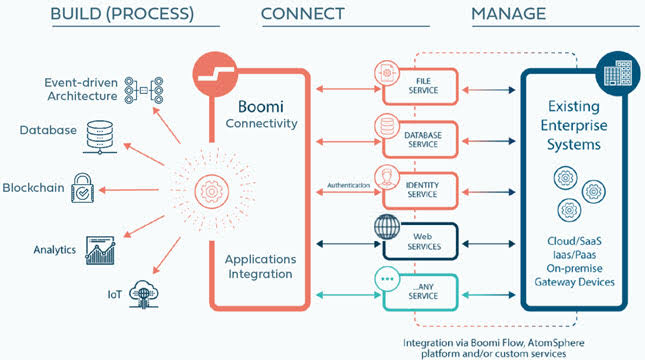
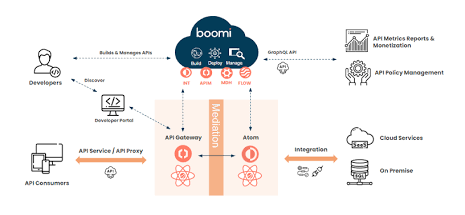
Modern enterprise IT does more than scheduled batch tasks and file syncs. It depends heavily on event‑driven APIs. The dell boomi course covers the API lifecycle. It lets developers turn internal integration workflows into fully documented REST or SOAP endpoints. Enterprise API Management is, at the core of this approach. Web Services and Microservices Architecture become easier to manage when APIs are designed with the lifecycle. The Boomi API Management suite helps organizations have detailed control over how they share APIs how they protect them and how they track their performance.
API Service Definition: Create custom REST paths HTTP methods like GET, POST, PUT and DELETE and set rules, for query parameters using a tool.
API Gateway Deployment: Send traffic through API Gateways that are built to handle a lot of traffic. These gateways separate the parts of the API from the internal systems that run the code.
Security & Access Policies: Use ways to check who is using the API. These include OAuth 2.0 API keys, SAML and checking client certificates.
Traffic Governance: Set rules to control how much traffic comes in. This includes limiting how many requests can happen in a time controlling tokens and only allowing certain IP addresses to access important databases.
Operational Reliability: Error Handling, Logging and Event Monitoring
In enterprise environments, runtime errors are an inevitable reality. External application APIs sometimes stop working for periods. Cloud databases may suffer from network timeouts. Inbound transaction documents can arrive with data profiles. A production‑grade integration
Advanced Error Mitigation Strategies
Try/Catch Shapes: Try/Catch Shapes are implemented at the beginning of integration procedures to trap document level or execution level errors without halting the operation.
Automated Retry Logic: Automated Retry Logic is programmed to retry short‑lived connection failures with a schedule that increases the waiting time between attempts.
Dead Letter Queuing: Dead Letter Queuing is implemented to send documents that can’t be processed or are malformed to long‑term message queues such as Boomi Event Streams, JMS or AWS SQS to allow personnel to review and reprocess them.
Operational Alerts: Operational Alerts are programmed to generate automated email alerts, SNMP traps or direct Webhook messages to dashboards such as ServiceNow, Datadog or Slack upon any error occurrence.
Curriculum Breakdown: What You Will Learn in the Boomi Certification Track
Comprehensive boomi training programs prepare professionals for the attainment of official Boomi Certifications attesting to their expertise in enterprise cloud integration. Below is an overview of the competencies covered in the training modules;
Module 1: Platform Basics and Infrastructure
This basic module introduces the structure of the Boomi AtomSphere system. Developers understand the differences between single-tenant Boomi Atom execution engines and clustered, multi-node Boomi Molecule environments that are made for high availability and load balancing. In addition to choosing the runtime, the training includes setting up the environment, giving users their roles, and making administrative settings. For their task, learners set up a local Atom execution engine either on-premises or in a cloud VM and create secure outgoing management connections back to the Boomi AtomSphere cloud control system.
Module 2: Core Process Building
This module focuses on building workflows. It covers the parts that help in creating Boomi processes. Developers learn about the types of Start Shapes like Data Passthrough, No Data, and Connector-driven starts, along with important execution shapes. The course looks at enterprise connectors such as HTTP Client, FTP/SFTP, Disk, and Database connectors to move data between different places. As a task, participants create an automated process that takes files from a remote server, processes the data and puts it into a target database.
Module 3: Maps and Transformations
Data transformation is the part of enterprise integration. This module goes into making and managing source and destination Profiles for XML, JSON, CSV and EDI formats. Developers look at point-to-point mapping, advanced Map Functions like string manipulation, math functions and database lookups Document Caching for fast cross-referencing and custom Groovy scripting for special business needs. In the exercise learners map complex multi-nested customer XML data into clean, structured normalized ERP JSON records without any data loss.
Module 4: API and Web Services
Moving from batch integrations to real-time event systems this module focuses on creating, publishing and protecting web services. Participants learn to set up REST and SOAP API Service components, put endpoints through the Boomi API Gateway and make sure access rules are followed using OAuth 2.0 SAML and API keys. The module also includes managing traffic with rules like throttling and rate-limiting. For their hands-on task developers create, send and test a rate-limited REST API endpoint that deals with live inventory questions from outside web apps.
Module 5: Exception and Reliability
Creating integrations means making sure there is fault tolerance and handling errors properly. This module gives a plan for dealing with problems using upstream Try/Catch shapes, custom Notify loggers and automatic business alert routing. Developers look at how to recover from errors using exponential backoff retries and how to handle bad data with dead-letter queuing. As a hands-on project learners create an automated failure-handling system that catches runtime issues, logs details and tells monitoring teams through email and webhooks.
Module 6: Administration and Monitoring
The last module helps system engineers and cloud architects manage the software development process, within Boomi. Topics include Atom Management keeping track of engine performance, setting up Environment Extensions so that credentials and paths change automatically between Dev, Test and Production and looking at audit trails. To finish the course participants put together a set of integration processes, set up extension variables in environments and watch live transactions using the main AtomSphere dashboards.
Real-World Enterprise Use Case: Streamlining Order-to-Cash Automation
I see how these technical ideas come together in life when a large e-commerce company wants to automate its Order‑to‑Cash process.
The Operational Challenge
I notice that when a customer puts an order on the website the Order‑to‑Cash process has to update customer data, in Salesforce CRM send a request to the SAP ERP system for order fulfillment, refresh inventory records in a local warehouse SQL database and email shipping notifications. Manually handling these steps in different systems caused data entry mistakes, slowed delivery and created inventory problems.
The Boomi Integration Solution
Event Capture: The e-commerce store sends a real-time JSON payload to a hosted Boomi API Gateway endpoint.
Logic Routing: The process validates incoming order data using a Business Rules shape and splits line items into discrete Documents.
Data Transformation: A Map shape converts JSON payloads into target SAP IDoc XML structures while checking cached lookup data to attach warehouse location codes.
Parallel Execution: A Branch shape pushes customer updates to Salesforce CRM, creates a sales order in SAP ERP, and updates the local SQL warehouse database simultaneously.
Audit & Notification: The process formats a shipping notification email and logs the transaction status inside central monitoring dashboards.
Best Practices for Scalable Production-Ready Boomi Deployments
Building integrations that're ready for production means following proven ways of designing systems. Standard ways to keep Boomi setups reliable and professional include:
Use Process Extensions: Do not put variables that change depending on the environment (like database passwords, API keys, server addresses or folders where files go) into the parts of the integration. Use Environment Extensions so that the way the process works can change when it moves from Development to Testing to Production.
Create Small Sub-Processes: Do not make one integration flow that does everything. Split complicated tasks into parts that can be used again. Call these parts using Process Call shapes. This makes it easier to read helps with testing and makes sure the same logic is used by everyone on the team.
Use Document Caching Well: Reduce the number of times the integration has to ask a system, for data. Use the Document Cache shape. Get the data you need once at the start of the process. Then look it up quickly in memory while mapping data.
Set Strong Security: Always make sure important parts of the process are encrypted. Keep passwords. Keys safe. Use Role-Based Access Controls (RBAC) to make sure only the right people can manage Atom in the system.
Learning these ways of building integrations helps architects, developers and engineers get rid of data that is stuck in one place cut down on extra work and create systems that work well together across the whole company.