
Demystifying Azure DevOps Core Tools with Everyday Metaphors
Last updated on Oct 9, 2026
The Friday Release Nobody Wants to Remember
It’s 6:47 on a Friday evening. Half the office has gone home. The other half is hunched around one laptop, watching a progress bar crawl across the screen while someone copies files onto a production server by hand. Somebody whispers, “Wait, did we include the database change?” Nobody answers. Everybody’s stomach drops at the same moment.
If you’ve worked anywhere near software, you’ve lived some version of that scene. The code was fine. The people were smart. What failed was the factory around the code: no clear record of what was being built, no certainty about which version was the right one, no proof it had been tested, and no dependable way to get it to customers without a quiet prayer attached.
Now picture the opposite. A developer finishes a change at three in the afternoon, pushes it, and goes to make tea. By the time the cup is empty, that change has been built, inspected, packaged, and gently placed in front of a small group of real users. Nobody stayed late. Nobody held their breath. That calm isn’t luck, and it isn’t a rarer kind of talent. It’s a different kind of factory.
Azure DevOps is Microsoft’s way of building that factory. And the easiest way to understand it, I’ve found, is to stop thinking about software for a few minutes and think about kitchens, libraries, assembly lines, and warehouses instead. Come on in. Wear a hard hat.
Why a Factory? The Idea Behind the Metaphor
Software feels like magic because we never see it being made. A car factory shows you everything: the steel arrives, robots weld it, a person checks the paint, and a finished car rolls out of the gate. Software hides all of that behind a screen, so teams end up improvising the process every single time, and improvisation is expensive. DevOps, stripped of its jargon, is simply the habit of treating the making of software as something worth designing. Development, the people who create, and Operations, the people who keep things running, stop living on opposite sides of a wall. Work travels from idea to customer along a path everyone can see, and every step on that path can be repeated.
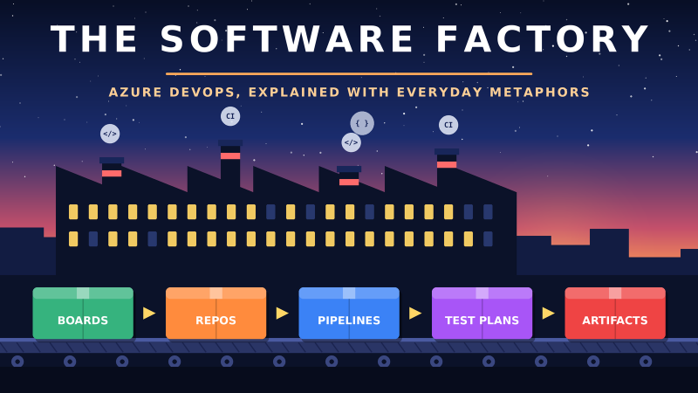
Azure DevOps packages that path into five core services. Azure Boards plans the work. Azure Repos stores the code. Azure Pipelines builds and delivers it. Azure Test Plans checks its quality. Azure Artifacts keeps the packages and parts it depends on. You can use them separately, and plenty of teams mix them with GitHub or other tools. Together, though, they behave like departments in one factory, and that’s the picture we’ll hold onto.
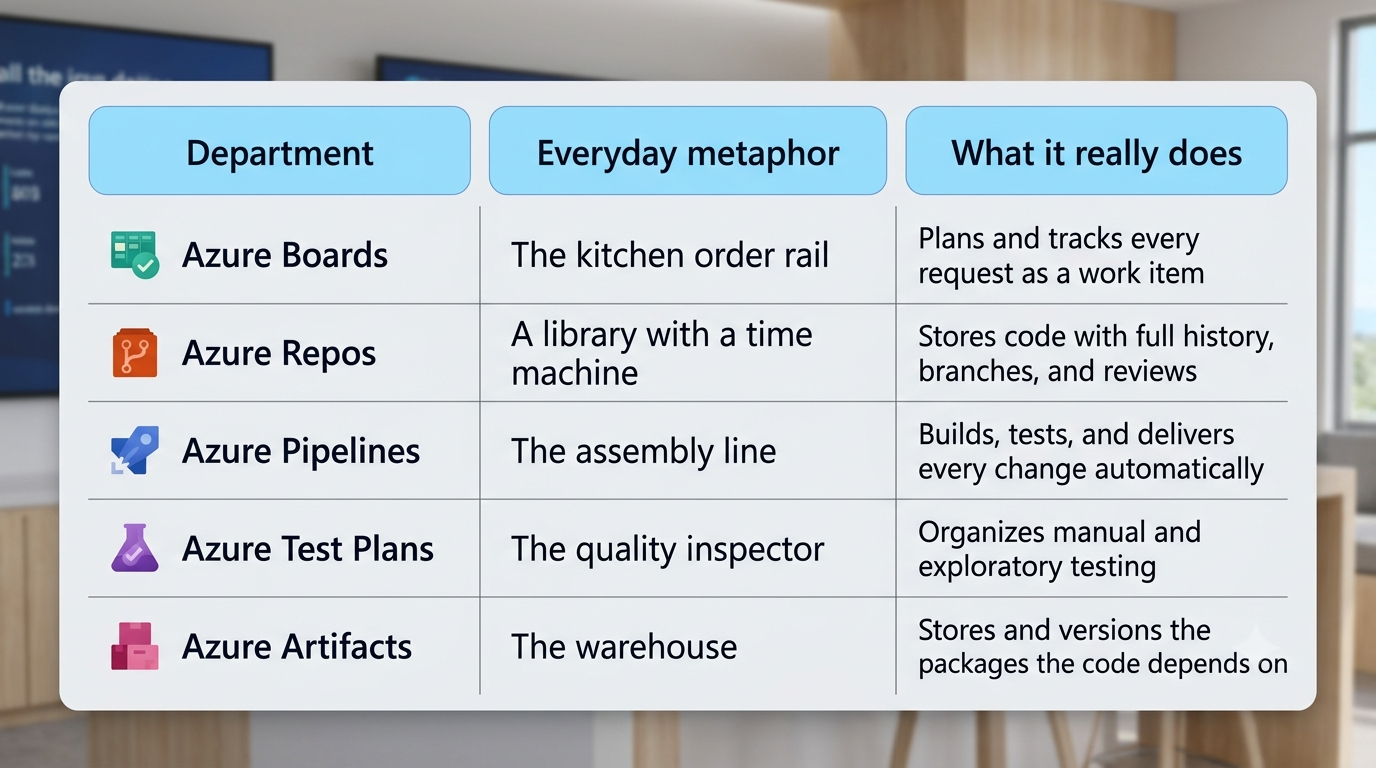
There’s a reason this matters beyond tidiness. Tools are easy to memorize and surprisingly hard to understand. You can recite every menu in a portal and still freeze when something breaks, because nobody ever showed you how the pieces relate. That’s why the best azure developer training doesn’t open with commands. It opens with a mental model, a map of who hands what to whom, so the commands have somewhere to land.
Azure Boards: The Order Rail
Walk into a busy restaurant kitchen and look up. Above the pass there’s a metal rail holding paper tickets. Table 12: two pastas, one allergy note. Table 4: dessert, rush. The rail is the kitchen’s memory. The cooks don’t depend on someone shouting orders across the room, because the orders are right there, in sequence, with names on them. That’s Azure Boards. Every request that enters your team, whether it’s a new feature, a customer complaint, or a nagging technical chore, becomes a ticket, which Azure DevOps calls a work item. Each one has an owner, a description, a priority, and a state that moves from To Do to Doing to Done. Arrange them in columns and you get the Kanban board most people picture. Group them into time boxes and you get sprints. Zoom out and you get a roadmap.
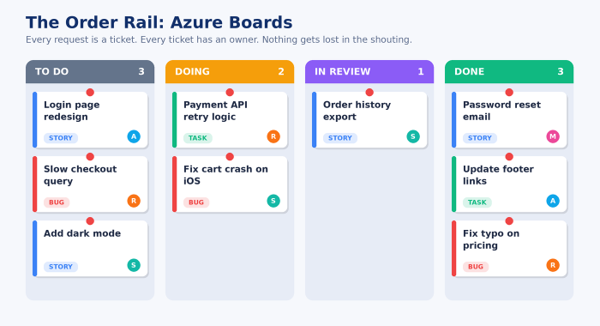
What I like about the order rail is what it prevents. Without one, work lives in people’s heads, in chat threads, in half-remembered hallway promises. Someone asks, “Are we building the export feature?” and four people give four different answers. With a board, the answer is a glance. The ticket exists, Priya owns it, it’s in review. Conversation over, back to work.
There’s a small psychological trick hiding in here as well. Humans carry unfinished tasks around mentally, and that low hum of “I should remember to do that” quietly drains attention all day long. Writing a task down in a place the whole team trusts lets your brain finally put it down.
A good board isn’t bureaucracy. It’s relief.
Boards also gives you the same hierarchy a kitchen has. An epic is the banquet, a big goal. Features are the courses. User stories are the individual dishes, and tasks are the chopping and plating. Everyone can see how their small task connects to the banquet, and that turns out to be more motivating than any pep talk a manager could deliver.
Azure Repos: The Library with a Time Machine
Imagine a library where nobody is ever allowed to write in the original books. Instead, when you want to change one, you photocopy it, scribble your edits on your copy, and hand it to a librarian who compares both versions page by page. If your edits are good, they’re merged into the master. If they aren’t, your copy is quietly shredded and the original never even knew.
That’s roughly how Azure Repos works. It hosts your code in Git repositories, and Git’s central idea is that history is sacred. Every change is recorded as a commit, a labeled snapshot with a timestamp and an author. Nothing gets overwritten; things are only added. So the library doesn’t just hold the current version of your code. It holds every version the code has ever been, which makes it, quietly, a time machine.
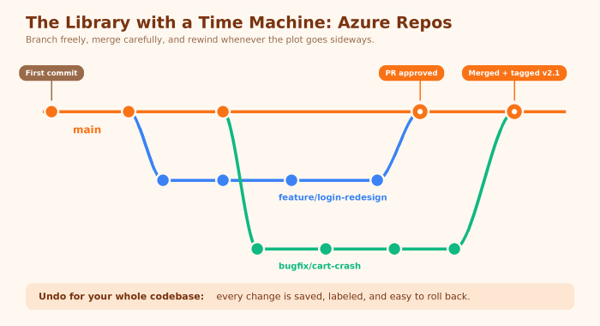
The photocopy is a branch. Want to redesign the login page without breaking the live site? Create a branch, work freely, make mistakes. The main branch stays untouched. When you’re ready, you open a pull request, which is the librarian’s review. Teammates read your changes line by line, leave comments, ask questions, and either approve or send it back.
Azure Repos lets you make that review mandatory through branch policies. You can decide, for instance, that nothing merges into main without two approvals and a successful build. It sounds strict until you think about what it replaces: the low-grade fear that someone, somewhere, pushed something untested at 5:55 p.m. Policies move trust out of people’s memory and into the system itself. And then there’s the part that makes experienced engineers smile. When something breaks, you don’t have to guess what changed. You can ask the library: show me everything that changed since Tuesday. Who touched this line, and why? Roll it back. The question “what happened?” stops being a murder mystery and becomes a search query.
Azure Pipelines: The Assembly Line
Now we reach the part of the factory that makes visitors stop and stare. Raw material goes in one end. A finished product comes out the other. In between, machines do the repetitive work, identically every time, without anyone needing to remember the steps.
Azure Pipelines is that conveyor belt. You describe the stages in a file, usually written in YAML and stored right beside your code, and every time someone commits a change, the line starts moving. The first station typically builds the code: compile it, fetch what it depends on, produce something runnable. The next stations run automated tests. Then comes packaging, and finally release, where the package is delivered to wherever it lives, whether that’s a web app, a container registry, or a cloud function.
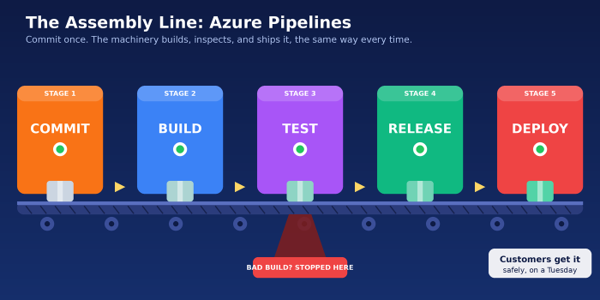
Developers call the first half of this continuous integration, or CI, and the second half continuous delivery, or CD. The names sound intimidating, but the ideas are plain. CI means merging small changes often and letting a machine check each one right away, so problems surface in minutes instead of weeks. CD means that if a change passes every check, delivering it should be a button press, or better still, not a human act at all.
Notice the red chute under the test station in the picture. It’s the most important feature of any assembly line, and the easiest to overlook. A good line stops the bad part before it reaches the customer. When a build fails, nobody has to be the villain who noticed. The belt simply stops, the lamp turns red, and the whole team looks at one clear place to find out why.
If you’re in the middle of az 204 training, this is where the pieces you’re studying start to connect. App Service, Azure Functions, containers, and the rest of the compute and storage world are the places your finished product gets delivered. The pipeline is the dependable courier that takes your work there, the same way on the hundredth release as on the first, which is precisely why teams stop dreading Fridays.
Pipelines does one more thing that’s easy to miss: it makes the process teachable. A new developer doesn’t need to be handed the secret order of seventeen manual steps. The steps are written down, as code, versioned in the library. The factory documents itself.
Azure Test Plans: The Quality Inspector
Even on the best assembly line, somewhere along the way there’s a person in a white coat holding a clipboard. Machines are wonderful at checking what you told them to check. Humans are wonderful at noticing what nobody thought to ask: a button that feels strange, a screen that technically works but would baffle a first-time visitor.
Azure Test Plans is the inspector’s clipboard. It’s where teams organize manual and exploratory testing: writing test cases, grouping them into suites, assigning them to testers, and recording results as passed, failed, or blocked. When a tester finds a bug, they can file it straight from the test run, with screenshots, the steps they took, and system details attached. It lands on the order rail as a ticket, linked back to the very test that caught it.
That linking is quietly powerful. A failed test points to a bug, the bug points to the story it affects, and the story points to the code that changed. Months later, when someone asks, “Did we ever verify this?” there’s an actual trail to follow instead of a shrug.
A fair point belongs here: automated tests, the ones running inside the pipeline, matter enormously, and you should write plenty of them. But inspection by a curious human isn’t a leftover from the old days. It’s a different kind of seeing. Machines confirm the car has four wheels. People notice the seat feels wrong.
Azure Artifacts: The Warehouse
Every factory has a warehouse, and every warehouse exists for the same reason: you don’t make every part yourself. Bolts, bearings, and circuit boards arrive from suppliers, get stored, and are pulled out when the line needs them. Your own finished sub-assemblies go onto those shelves too, so other teams can use them without rebuilding from scratch.
Azure Artifacts is the software version. Modern applications are assembled from reusable packages: libraries for handling dates, for security, for talking to databases. Some come from the public world, through ecosystems like npm, NuGet, Maven, and PyPI, and your own colleagues write some. Artifacts gives your organization a private, controlled shelf for all of it, called a feed.
Why bother? Imagine a supplier quietly changes the size of a bolt overnight and your whole line grinds to a halt. In software, the equivalent is a public package changing or vanishing without warning. A feed can hold an approved copy of what you depend on, so tomorrow’s build uses the same parts as today’s. It also lets you version your own shared code, so one team can publish version 2.3 of a common library and another can adopt it when ready, instead of being ambushed by it.
It’s the least glamorous department, and the one you’ll miss most when it’s gone. Warehouses never get applause. They simply make sure the line never runs out of parts.
A Week in the Life of One Small Feature
Let’s send one request through the whole factory, because the departments only make full sense in motion.
Monday. A customer writes in asking whether they can download their order history as a spreadsheet. The product owner creates a work item on the board, writes two lines of description, and the team pulls it into the sprint.
Tuesday. Rahul picks it up. He creates a branch named after the ticket, writes the export code, and pulls a well-known spreadsheet library from the team’s private feed. He commits a few times, then opens a pull request. Two colleagues review it over the afternoon, and one asks a sharp question about very large exports. Rahul adds a limit.
The moment he pushes, the pipeline wakes up. It builds the app, runs three hundred automated tests, and packages the result. One test fails, an old assumption about date formats. The belt stops. Rahul fixes it before his chai goes cold.
Wednesday. The build lands in a staging environment, and Meera, the tester, works through a plan: exports with zero orders, with ten thousand orders, with customer names that contain accents. She notices one column header is cut off, files a bug straight from the test, and it’s fixed within the hour.
Thursday. The pipeline’s release stage rolls the feature out to production, gradually, starting with a small group of users. Nobody stays late. The ticket on the board slides to Done by itself, because the pipeline moved it. A customer gets their spreadsheet and never learns how many hands, human and mechanical, were involved.
Five tools, one thread. The ticket, the commit, the build, the test, and the package are all linked, so months from now anyone can trace the story backwards from the finished feature to the original request. That traceability is the quiet superpower of keeping everything under one roof.
The Human Side of the Factory
I want to step away from the machinery for a moment, because the most interesting thing about these tools isn’t technical. It’s psychological. Teams without a visible process tend to run on anxiety. Nobody is sure what’s safe to change, so they change as little as possible, and releases become rare, enormous, and terrifying. Big releases fail more often, which confirms the fear, which makes releases even rarer. It’s a loop, and it feeds itself.
A factory like this breaks the loop by making small steps safe. When you can undo any change, when a machine inspects your work within minutes, when failure is caught on the belt instead of in front of a customer, you can afford to try things. Mistakes get smaller, cheaper, and a lot less personal. That last part matters most. When a failing build is simply information, nobody has to be blamed for it, and teams that don’t spend energy on blame spend it on building. There’s a name for this: psychological safety. Research on high-performing teams, including Google’s well-known study of its own, keeps circling back to it. Tools won’t create it on their own. But a pipeline that fails without drama, a pull request culture where questions are normal, and a board where everyone sees the same truth are exactly the daily habits in which that safety grows.
Where to Start If You’re New
Don’t try to learn the whole factory at once. Pick a small project, even a toy one, and walk it through the departments in order. Create a free organization in Azure DevOps, add a board with five tickets, push a tiny app to a repository, and write the shortest pipeline you can that builds it. Add one test. Watch it fail on purpose, then fix it. That single loop teaches more than a week of reading, because you feel the departments handing work to each other.
Once the loop works, widen it. Add a branch policy. Add a deployment stage. Publish a small package to a feed. Each addition is one more machine on a line you already understand, which is a far kinder way to learn than memorizing screens. Structured learning helps most when it gives you that same hands-on rhythm. A good azure developer course will have you build, break, and repair something real rather than just watching someone else click through menus, and that’s the quality worth looking for when you choose one. Reading about a conveyor belt is fine. Standing next to one while it jams is how you actually learn.