
Demystifying MuleSoft Mule 4 Event Architecture Message Flow
Last updated on Aug 31, 2026
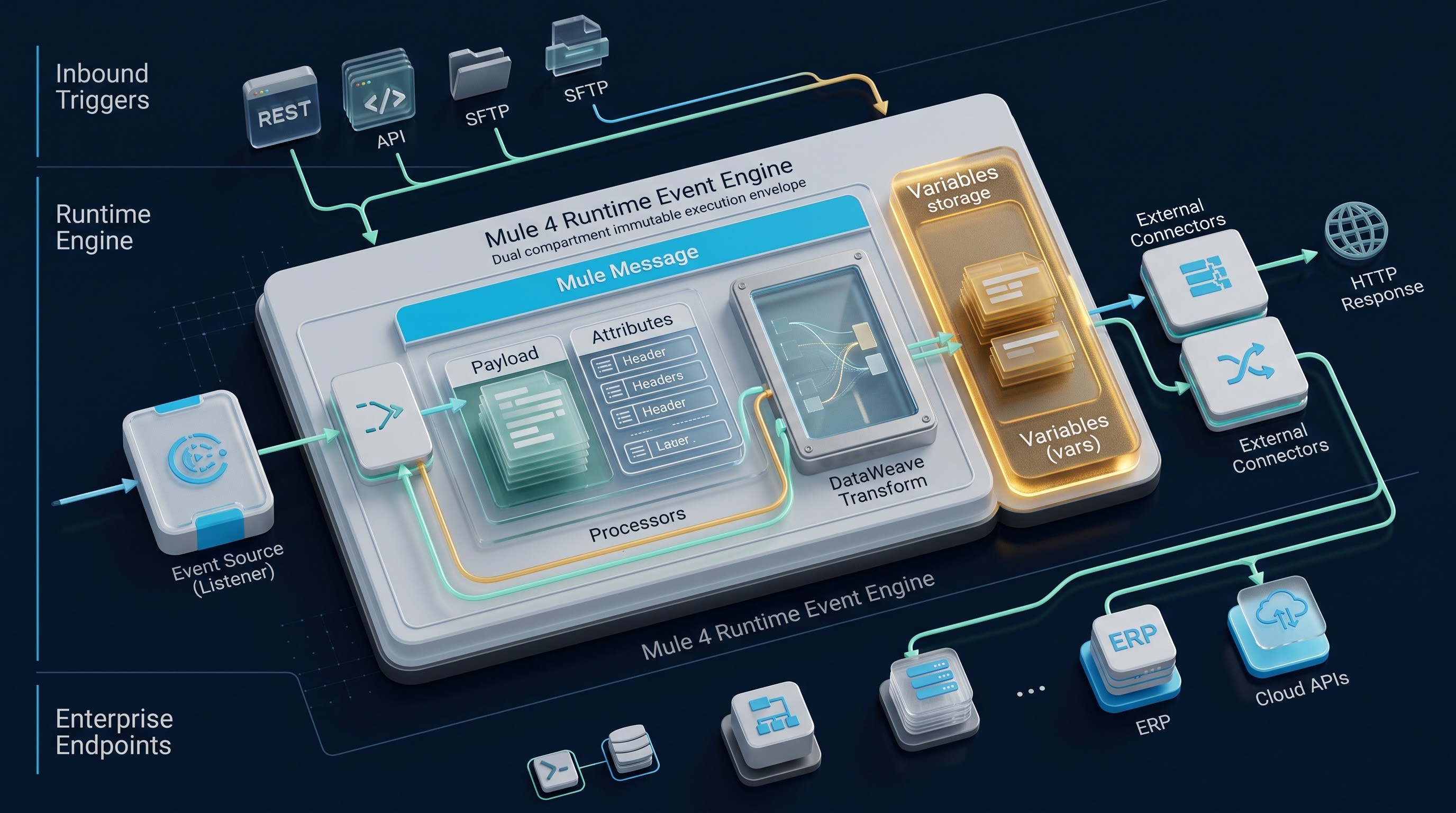
Essentially, an integration engine acts as a refined path of data conversion and transferring. Its primary purpose is to collect data from different sources, change it to different shapes and processes, apply complex business logic, and interface with other applications to validate or enhance data, and send pre-defined information to the customer.
When MuleSoft moved from Mule 3 to Mule 4, the event model was completely reconstructed. The previous model based on several layers of input, output, session, flow variables and record variables caused problems for developers, non-deterministic data lifecycle and too much cognitive burden on them. The new version of the software did away with the different layers of metadata and substituted it with a transparent and unified model which does not change.
Understanding how Mule 4’s event model works and how events are created is important so that taking a structured mulesoft course from OnlineITGuru helps the professionals gain mastery over these data flows.
Fundamental Concepts of the Mule 4 Event
At the core of its architecture is a network composed of interconnected flows, sub-flows, and scopes that are designed to carry out business logic and when an incoming trigger is fired by a third party or when a trigger acts upon schedule, the runtime engine processes incoming technical protocol data into a form known as the Mule Event.
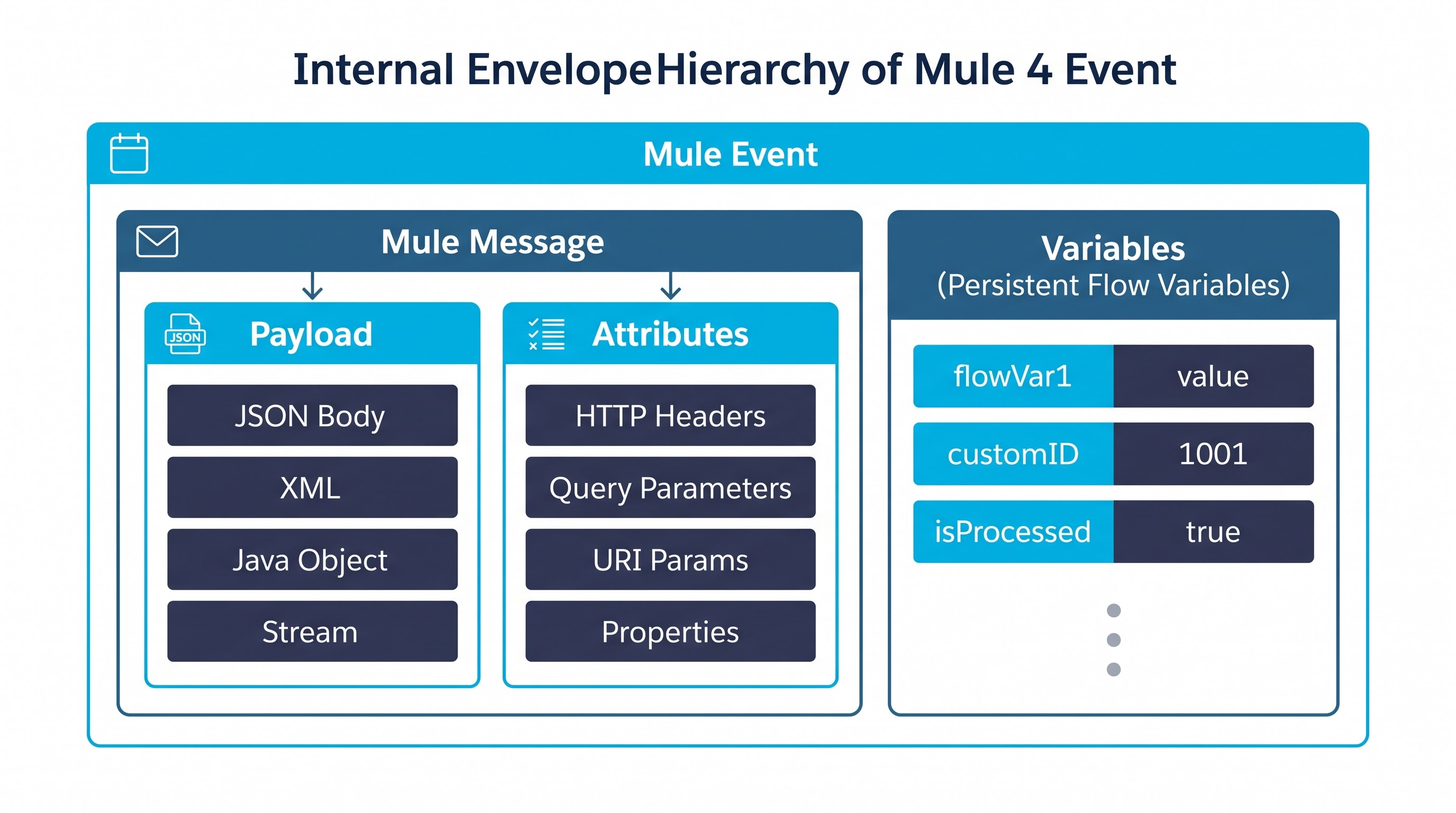
Mule Event is a snapshot of a particular execution context at a specific point in time in a flow. It has two core components known as the Mule Message and Variables.
Mule Message is the physical container that holds the actual business content along with its respective technical metadata. The Mule Message consists of two other tightly coupled entities known as the Payload and the Attributes.
Along with the Mule Message there is a container called variables, which are otherwise referred to as vars within the runtime expressions.
Mule 4’s main architectural philosophy is that Mule Events are treated as being functionally immutable. As an event passes through a message processor, the processor does not destructively modify the original data structure. Instead, the state of the incoming event is analyzed and a new Mule Event instance that represents the interpretation of the process is produced. This characteristic of immutability allows for thread safety in parallel processing activities, prevents race conditions in asynchronous processing, and makes the process of recovering from any failures much easier.
Understanding the Anatomy of Events
To gain a thorough understanding of how events work, it is necessary to look at each individual layer of the event envelope separately in terms of structure.
The first part of the Mule Message is referred to as the Payload. In the context of an event, a payload is the most important business data. It does not contain any metadata related to a particular protocol; it is just specific information which has to be processed. Payload data can be represented in various formats permitted by modern enterprise solutions; for instance, JSON documents, XML trees, comma-separated values, flat text files, serialized Java domain objects, sets of items and raw binary data streams where images or audio files could be stored.
The payload is the most flexible element of the process. In most cases, the transformation component makes changes in the payload which means either that it can make a modification, a substitution or an enrichment of the payload content.
The Attributes container is the second part of the Mule Message. Attributes include the specific metadata about the protocol or connector which gives some context to the payload. The data types and schema of the attributes object are set by the connector or event source that created the message. For example, an HTTP Listener creates the attributes object that contains incoming URI parameters, query parameters, headers, remote client IP, HTTP verb, and the relative path. An FTP or SFTP connector creates the attributes object which describes the name of the file, file size, folder path, timestamp, and permissions of the file. A Database connector creates the attributes that summarize statistics on the executed statements, the number of updated rows, and auto-generated keys. The message queuing connector like JMS or Anypoint MQ creates the attributes which have message IDs, correlation IDs, delivery mode, and custom transport properties.
The Mule 4 technology architecture has a fundamental element, which is the close relationship between attributes and payload. Since both payload and attributes are part of the Mule Message envelope, a new Mule Message produced by a message processor results in the simultaneous replacement of both payload and attributes. The attributes of the previous Connector cannot be incorporated into the new attributes, but rather replaced.
The Mule Event has Variables collection along with the Mule Message. Variables are the memory storage, which the developer can access during the application performance. Unlike attributes that accompany the active Mule Message and disappear with the Mule Message transformations, the variables are independent of such transformations. Therefore, once created for a specific event at the beginning of the flow, a variable will accompany the event during its progress through various message processors, database calls, and web services.
An event's lifecycle consists of several specific phases
Instantiation, sequential processing, contextual routing, error resolution, and response delivery.
The lifecycle of an event begins with the event source, which is defined as a protocol listener located at the entry point of a flow. The event source serves the purpose of a listener, acting as an HTTP endpoint, file directory monitor, or a message broker subscriber. When an event source receives data from a remote client, listening for requests, the event source first analyzes the underlying networking streams as well as extracts transport specific parameters.
In the process of instantiation, the requests' body is linked with the payload, the header, routing token, and protocol specifications are connected to the attributes object, and the variables' container is initialized as a key-value store in the empty state. The event source forwards the formed event to the execution pipeline of the flow.
After entering the flow phase, the experienced event takes the path of sequential processing. This requires advanced processing message processors of the type of altering variables, transformers, filters, and meaning emitting connectors. Each time the incoming event is screened by every processor, some integration operation is executed by the processor which produces an adjusted event with the help of the previous processor.
In case the event passes the entire chain of event processors, processing finishes in the final phase of response construction. The event comes to the end of its main flow and goes back to the source of the outgoing event. The original source evaluates the event state and uses it as a response body while analyzing its properties in order to convert them into response headers, status codes, or acknowledgments. Once the response is transformed and sent back to the client, the event completes its own life cycle. The event reference is released in the database with the help of the connected runtime engine.
Dynamics of data flow through consecutive processors
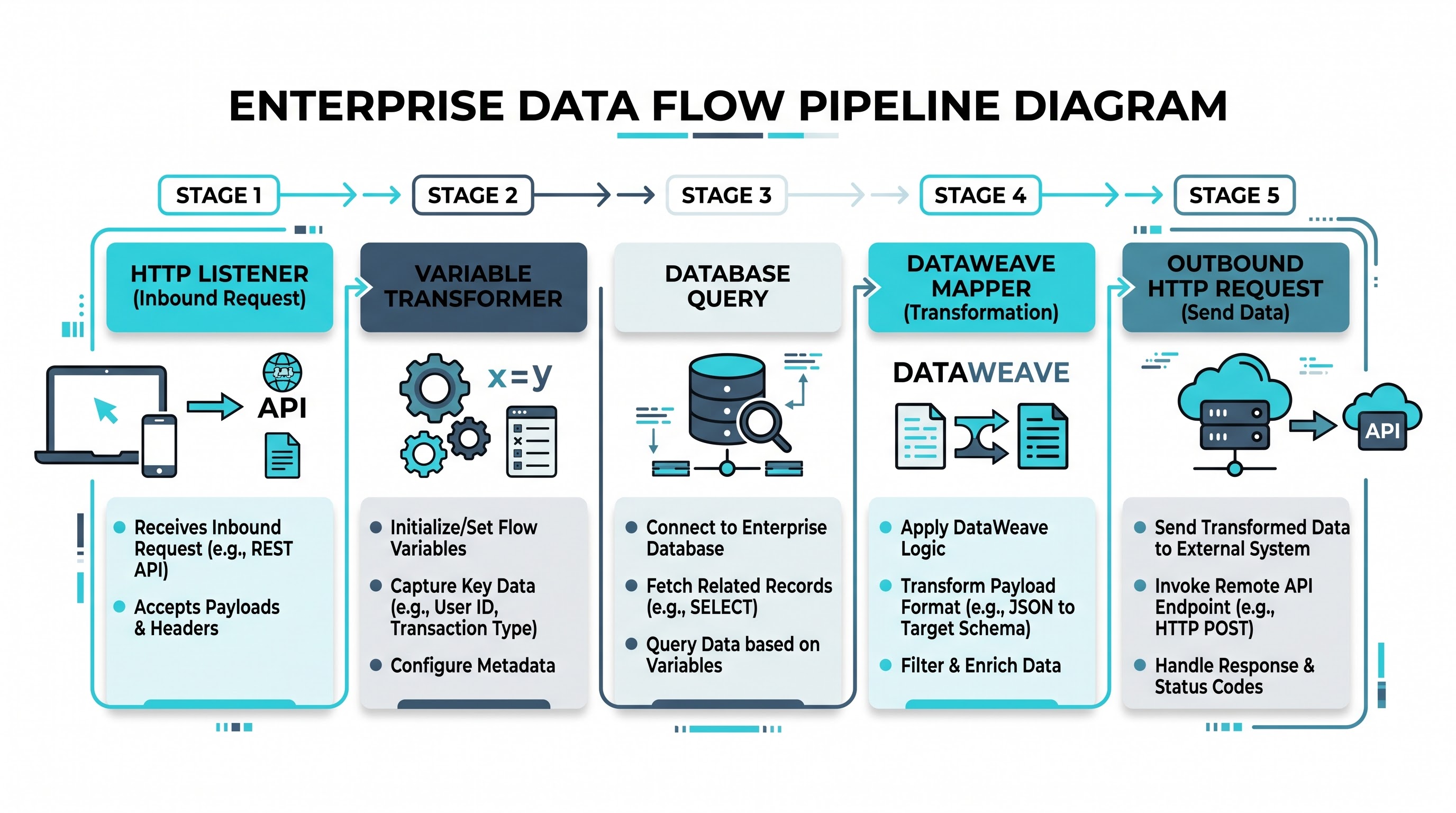
To illustrate how the Mule Event changes as it passes through the application, let’s take an example of an enterprise order validation and fulfillment flow.
It is assumed that a third-party customer started the interaction through an HTTP POST request sent to the endpoint interface of an order API. The request includes query parameters that illustrate the priority of processing, the custom authentication headers, and a JSON body with the items of the order and details of the customer.
Once the HTTP Listener receives the request, it creates an initial Mule Event. The payload is formed from the raw JSON order data. The attributes object stores HTTP query parameters, path details, and transport headers. There is also a variable container that is initialized and currently empty.
The process begins with the first stage in the pipeline, called Set Variable, which is responsible for acquiring and transferring the customer ID from the incoming JSON message. Specifically, the component reads the customer ID from the active message, and saves it under a new key in a variable container. By the end of this operation, the new event comprises the same JSON message, the original HTTP attributes and new variable map in-memory, holding the value of customer ID.
The second component to receive the event is called Database Select. It executes the task of querying a relational database for customers in order to get account status and credit limits. In doing so, the database connector retrieves customer ID from the variable container and executes a structured SQL query on the external database.
As soon as the query returns results from the database, the adapter generates a new message in Mule. The result, which is represented by a series of maps of the rows from the database, now becomes the new payload for this event.
The previous attributes related to HTTP are no longer there; instead, they have been replaced by latest database attributes that provide information on execution statistics.
As for the holding variable, it is still available and continues to consist of the saved customer ID; however, because of the necessity to get rid of the original HTTP attributes, the original HTTP parameter that indicated priority is no longer present. If the developer has to use this parameter during processing in the flow, it is necessary to extract this parameter into a variable before the database transaction оr to use special configuration patterns.
The proceeding event lands at the third processor, which is the Transform Message component that utilizes the DataWeave transformation engine. The Transform Message component is set up for making calculations to determine customer data present in the payload of the database and customer identifier from variables, leading to the creation of the normalized fulfillment request. The process of forming the payload takes place in the DataWeave engine, leading to generating a payload that is completely different from the meaning and structure of existing information. The payload variables and parameters stay the same as before.
After the events go on, the processing action takes place at the fourth processor, which is the outbound HTTP Request connector that is responsible for launching the web service of the third-party logistic company. The connector sends the payload using an incoming connection and transmits the payload through the connector. The connector updates the payload with a new payload that will replace the attributes of the payload. The variables of the connector stay the same as those before transmitting the order.
In conclusion, we can say that the processing of an event comes to a culmination and the process governs the HTTP listener from which the event was origin. The listener now fetches the latest payload which is a response from the third-party logistics provider and sends that response to the original requestor accompanied by an HTTP 200 response code indicating the successful completion of transaction.
Pervasive Target Variable Pattern and Message Preservation
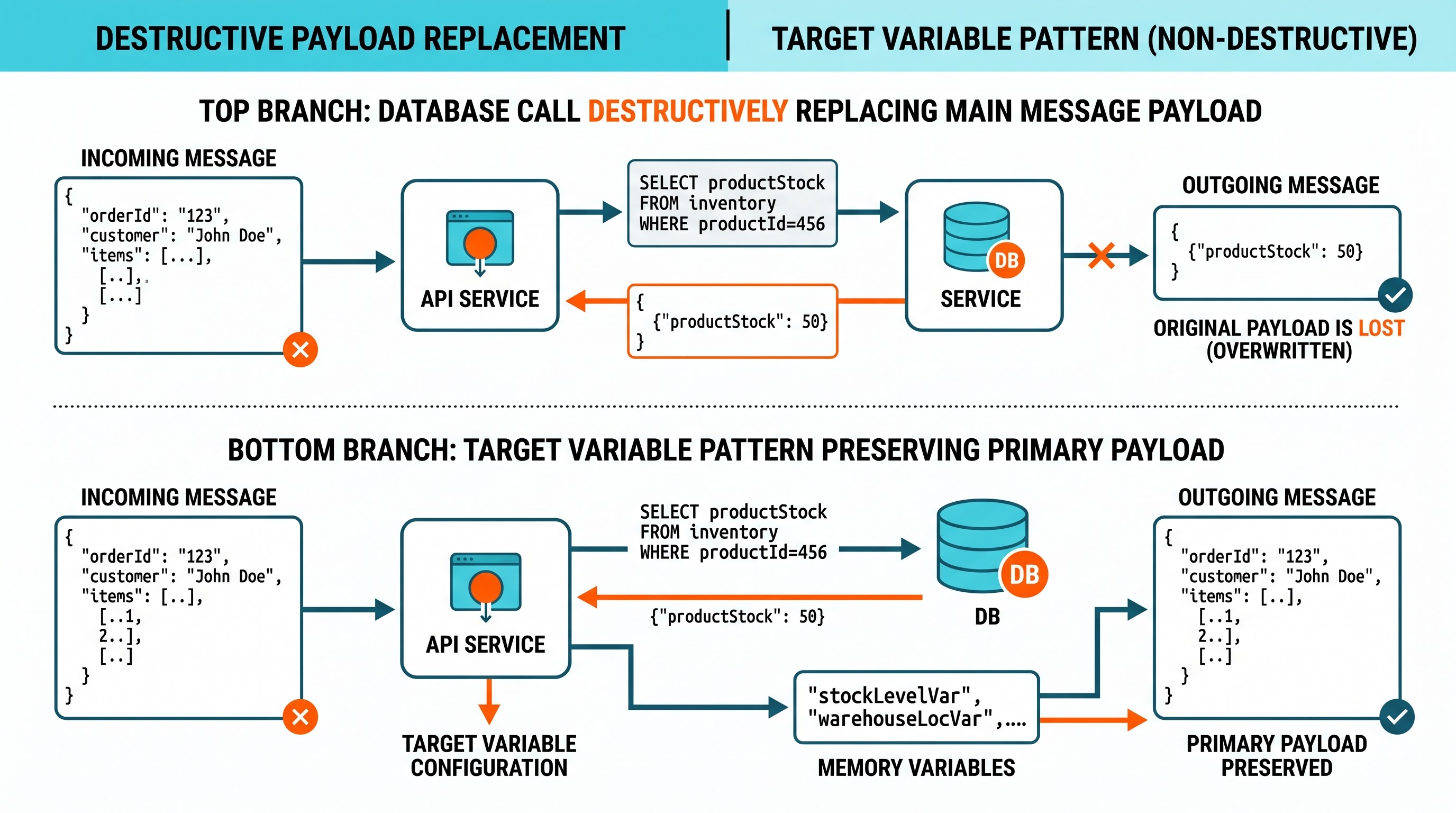
While designing integration solutions, one of the most significant challenges revolves around managing the impact of making calls to external services. There are many integration scenarios in which many applications call external APIs, or search databases or even read an extra configuration file for purposes of validation or gathering of additional information but without disposing of the original business document being executed.
In traditional software development practices and in previous versions of the platform making such calls would mean that the main payload must be overwritten. As a result, developers had to resort to the practice of writing defensive code that preserved the value of the main payload in temporary variables before the external call was made.
The Target Variable pattern in Mule 4 offers a native architectural solution to this problem by providing the Target parameter on all connector-level operations.
When a developer mentions a target name in a connector operation—like database select or HTTP requests—then the event handling mechanism of the runtime will change its default. Instead of putting the output value of the operation in the payload of the active Mule message, the output of the operation will now go to the target variable given by the developer.
In this situation, the incoming Mule message remains untouched. The payload that leaves the connector is exactly the same as the payload that arrived there, and the status of the attributes remains the same. The new information obtained from the remote system is safely stored in the target variable and available for further processing in the DataWeave transformations or routing decisions using conventional variable expressions.
An expression designed to filter or modify the external response before storing it is an option to combine the target parameter with. For instance, a database query can produce a complex series of rows while the application only needs one specific status. The expression lets you extract from the output of the query only that one field while minimizing the quantity of data stored in the target variable. It allows optimizing the use of memory at runtime and keeping the architecture of flows compact.
Variable Scope Across Flow Boundaries and Routing Constructs
It is important to be aware of variable persistence and variable boundaries in different execution mechanisms for all developers. Through comprehensive mulesoft training at OnlineITGuru, you can learn to create and troubleshoot these enterprise integration flows.
Sub-Flows and Synchronous Flow References
In the case when a parent flow performs a call to a Sub-Flow (or another flow) synchronously through a Flow Reference, asynchronous boundaries are not being created. The child flow process continues using exactly the same context for execution and thread state as the flow that executed the call.
Consequently, any variables that have been defined in the parent flow before the flow reference can be accessed from the child flow easily. In addition, any new variable created in the child flow or any modification made to the existing variable will be present when returning to the parent flow. Variable isolation does not exist between flows referenced synchronously.
Parallel and Branching scopes
When a flow enters the parallel routing scope, like the Scatter-Gather router or parallel for-each scope, a copy of the Mule Event is created for each branch of execution.
All the parallel branches in the process receive a clone of the event including all variables available right before the entry to the scope. However, as each branch runs independently, any change to the variable in one branch does not have any influence on the variables of the other branches of execution.
After the completion of all parallel branches, the Scatter-Gather router brings together Mule Messages produced by every branch into one collection message, which becomes a new payload of the parent flow. The variables that were generated during the execution of the branches are not merged back into the parent event.
When the event is processed in an
Async scope, an async event is created, and the processing of that path goes on in a thread pool. Hence, the flow continues to execute immediately, not waiting for the async branch to finish.
The async scope will have access to the copy of event payload and variables at the moment of bifurcation so although the primary and the asynchronous paths are executed in different thread pools, any variable information created or modified in the async scope is invisible in the parent flow.
When a particular circumstance occurs using an external or independent messaging system—like a Virtual machine queue, Anypoint MQ Exchange, or an Enterprise messaging service—the flow boundary is fully crossed through a transport medium in an event-driven fashion. In this case, only the message body and the related transport headers are sent forth through the queue according to the flow diagram with the variables remaining unchanged.
Thus, the variables do not get through the messaging broker’s boundary. When a downstream flow consumes the message, then a new Mule event is created with no variable map. Therefore, if the application needs to pass some state details via a messaging queue, then they should be recorded in the message’s headers, in the message body, or saved somewhere else in the shared external cache like Anypoint Object Store.
Non-Blocking Reactive Architecture and Repeating Streams
The Mule 4 Event Architecture is based on a non-blocking way of doing things which simplifies using the processing power of the server in order to maximize the execution possibilities of the system. The core idea of the architecture is to stream data that makes a part of the Mule Message payload.
The Issue of Stream Resource Consumption
In old Java application environments, outputs received from network or huge disk resources are unused and presented as raw input streams. Input stream serves as a pointer with the sole goal of moving through a stream of bytes, going from the beginning through the end.
When the downstream processor tries to read the stream for the second time, it receives an empty payload or a stream-closed exception since the first read caused the stream to consume itself. In the past, developers were obliged to buffer entire streams into memory as strings or byte arrays in order to allow several processors to process the payload, thus leading to high memory consumption.
Repeatable Streaming Mechanism in Mule 4
Mule 4 solves this problem by wrapping stream-based payloads into transparent repeatable stream proxies. When the event source receives a stream payload, it manages the stream automatically using one of two possible methods: In-Memory Repeatable Streaming or File Buffered Repeatable Streaming.
In-Memory Repeatable Streaming provides a specialized buffer on the Java Virtual Machine heap. As the payload is processed, the stream data are stored in memory by the runtime, enabling multiple processors to access the stream from the beginning. The runtime automatically refreshes the position of the stream for each consuming processor.
File-Buffered Repeatable Streaming is designed for high-throughput transaction processing, where the volume of the payload can exceed what the JVM heap can support. The runtime provides a small, fixed-size buffer in memory to handle the first read operation. The incoming stream will automatically be placed to temporary disk storage, if it is larger than the memory buffer.
Acquiring proficiency in event life cycle management, the use of stream processing, and state management is crucial for gaining a foothold as an integration developer in the industry. If you want to acquire practical skills in the form of hands-on experience in real-world projects, you can enroll in the instructor-led mulesoft online training from OnlineITGuru.