
Design Reusable Salesforce Admins Configs for Enterprise
Last updated on Nov 23, 2026
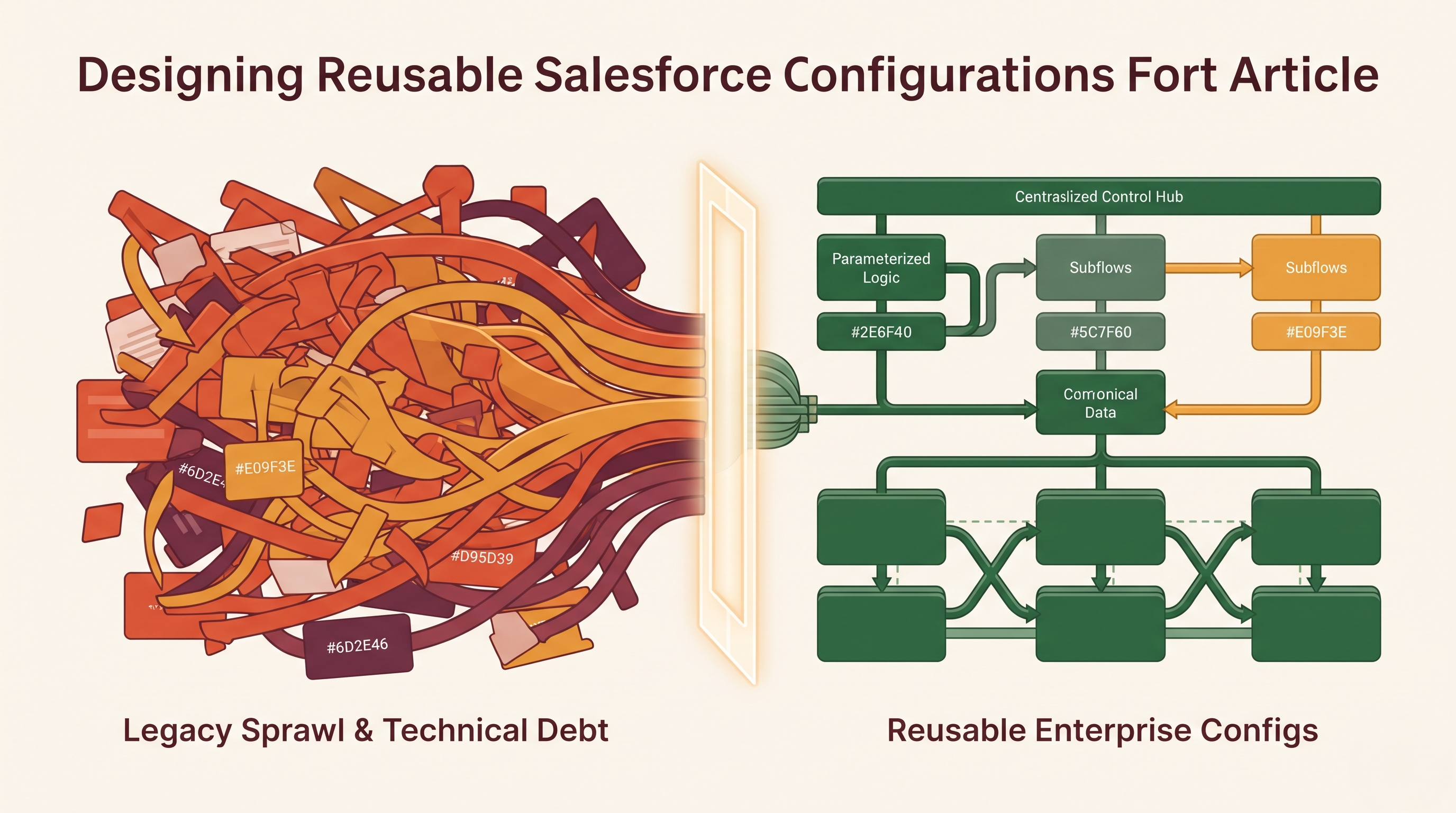
Salesforce-powered enterprises never face a single catastrophic failure. Instead, they are slowly worn down by the weight of replicated automation, region-specific field sprawl, fragile page layouts and hard-coded business rules that only one administrator knows how to work with. As global organisations grow across multiple business units, geographies and product lines, the instinct is often to copy existing configurations and tweak them for each new team. Within two or three years, that convenience becomes serious technical debt, where a small change to a sales stage or tax calc means editing dozens of disconnected flows, validation rules, and permission profiles.
Moving from project-based building to product-based platform engineering is key to building reusable Salesforce configurations. Enterprise architects and administrators should be building modular, metadata-driven, composable building blocks that serve multiple teams without duplication instead of building bespoke solutions for every stakeholder ask. To do this well takes discipline in data modelling, security architecture, declarative automation, Interface development and release management. Knowledge of these fundamentals of module construction are central to the training program for salesforce administration, which helps salesforce admin training from being mere trouble-shooters to developers of the platform.
The Enterprise Orgs’ Architectural Case for Reusability
In a single-team Salesforce instance, speed of delivery often beats structural elegance. If the North American sales team requires a custom approval threshold or a special discount calculation, creating a dedicated record-triggered flow right on the Opportunity object feels quick and harmless. But in an enterprise environment with five regions, three different revenue models and direct and partner channels, that siloed approach quickly fractures the org.
If configurations are not designed for reuse, three operational bottlenecks occur:
Exponential Maintenance Overhead: Each duplicated flow, validation rule or custom field multiplies the surface area that needs to be regression tested during Salesforce seasonal releases or internal enhancements.
Inconsistent Data Semantics: When each business unit builds custom fields to track the same concept (e.g., contract renewal dates, customer health scores), enterprise reporting breaks down and analytics teams spend weeks normalising data outside the platform.
Governor Limit Contention: Uncoordinated automation created by different teams on the same core objects (Account, Contact, Opportunity, Case) compete for execution time and database queries, causing intermittent row-locking errors and transaction failures.
Reusability solves these problems by creating a common basis of canonical data structures and parameterised logic. Instead of building ten variations of a process, enterprise teams build one core engine managed by configuration records, allowing regional or departmental variations to be handled by data, not metadata deployments.
Creating a Canonical Data Model
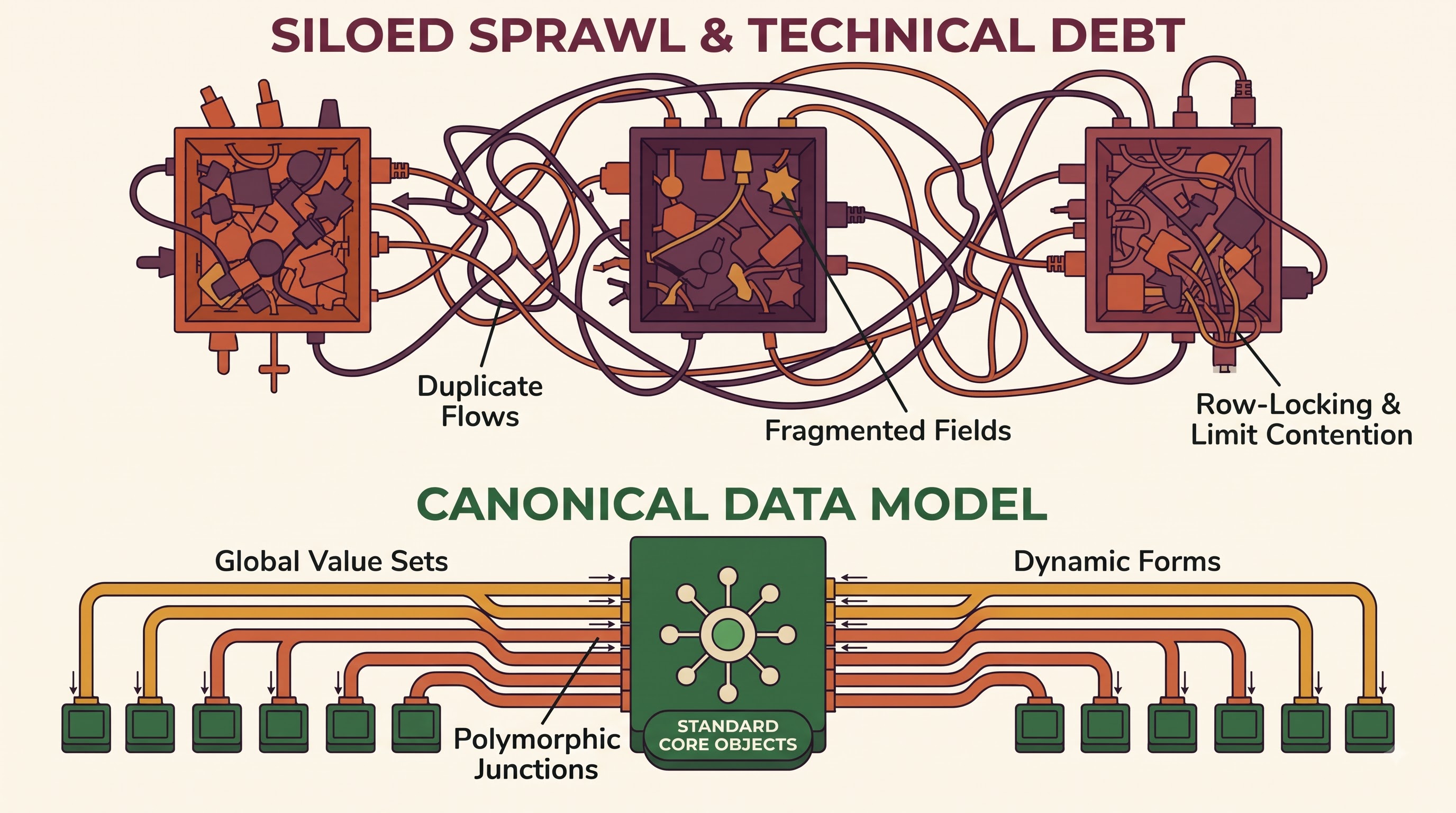
All reusable configurations are based on the data model. No matter how cleverly automated or well-designed the interfaces, if the underlying objects and fields are fragmented, the system will not be modular. Enterprise teams must treat standard Salesforce objects as shared assets of the enterprise, not as departmental sandboxes.
First, Standardise Core Objects Then Extend
Architects should always try to leverage standard Salesforce capabilities before building custom objects or custom fields. Native platform behaviour, forecasting integrations, and ecosystem compatibility of standard objects like Account, Contact, Lead, Opportunity, Case, and Product are hard to duplicate with custom objects. When different divisions ask for separate objects for similar entities (e.g. one team asks for a custom “Partner” object and another asks for a “Vendor” object), the architecture team should consolidate them on the Account object using Account Record Types or classification picklists.
Design of Object-Agnostic Junctions and Polymorphic Patterns
Enterprise workflows often need to attach supporting records, such as compliance documents, audit logs, regional tax identifiers, or stakeholder roles, to multiple parent objects. When you create separate child objects for each parent object like Account Compliance, Opportunity Compliance, and Case Compliance, you end up duplicating fields, layouts, and automation.
Rather, teams should build generic child or junction objects that can be reused across business processes. With clear categorisation fields and lookup relationships to the relevant core objects, a single Compliance Requirement object can be structured to support the entire enterprise with a single set of validation rules, page layouts, and reporting frameworks.
Global Value Sets and Picklist Governance
Picklists are a common cause of configuration drift. When administrators create local picklists on individual fields for values such as Regions, Currencies, Business Units or Product Lines, then keeping alignment across objects is a manual chore.
Global Value Sets must be used for any domain list that is used on more than one object or is used in automation parameters. This is an enterprise standard. Centralising these lists means adding a new country, or business division, updates every dependent object, report filter and flow condition in one go, removing the risk of spelling mismatches or missing values across departments.
Conscious Use of Record Types
Record Types are powerful tools to segment business processes, picklist values and page layouts but overuse is a classic enterprise anti-pattern. Creating a new Record Type for each team request with slightly different fields locks the organization into rigid silos, because a record can only have one Record Type at a time.
Reusable design uses Record Types sparingly, for only those business lifecycles that are truly different—for example, separating a New Business Opportunity from a Renewal Opportunity, where the sales stages and core processes are different. If you have small departmental differences (e.g., European sales reps need to see different fields than Asian sales reps), then teams need to use Dynamic Forms and permission-based visibility instead of building multiple Record Types.
Architecture for Decoupling Business Logic Using Metadata
The defining feature of an enterprise Salesforce configuration is that the logic and configuration parameters are separate. In traditional builds, business rules – regional routing criteria, discount approval thresholds, or service level agreement timers – are hard-coded within flow decision elements or validation rule formulas. Whenever a business manager changes a threshold from ten percent to twelve percent, an administrator has to open the automation, make the change in a sandbox, test it, and deploy metadata to production.
Use Custom Metadata Types Instead of Hard-Coded Values
Custom Metadata Types move automation from rigid structures to reusable, configurable frameworks. Instead of hard-coding specific region rules into a flow, the architect defines a Custom Metadata Type, storing the rules as records, with fields for Region, Product Line, Minimum Margin, and Approver Role.
The automation is then built once to dynamically query the Custom Metadata Type based on the attributes of the record being processed. If the business is expanding to a new territory or changing pricing policies, Admins can simply create or update a Custom Metadata record. These changes are also deployable metadata themselves (Custom Metadata), so they move cleanly through environments without impacting the core automation and are universally reusable.
Bypass Control and Feature Flags
Also in a multi-team environment, reusable automation needs to be selectively controllable. In many operational scenarios there is a need to temporarily bypass certain validation rules or flows for a specific user, profile or business unit without disabling them for the entire company, for instance during large scale data migrations, third party integration syncs or phased regional rollouts.
Enterprise teams use a combination of Custom Permissions and Hierarchical Custom Settings for reusable bypass frameworks. Each validation rule and record-triggered flow is set up to determine if the executing user has a particular bypass Custom Permission before running. This simple architectural pattern enables integration users or data migration leads to load historical records cleanly without triggering operational notifications or validation errors, all without ever deactivating production configurations.
Salesforce Flow Modular Automation
Salesforce Flow is the main engine for declarative automation and it is easy to create a tangled web of overlapping processes without strict architectural discipline. To make Flow reusable across enterprise teams, organisations need to adopt software engineering principles like single responsibility, orchestration, and modular composition.
Orchestrator and Subflow Pattern
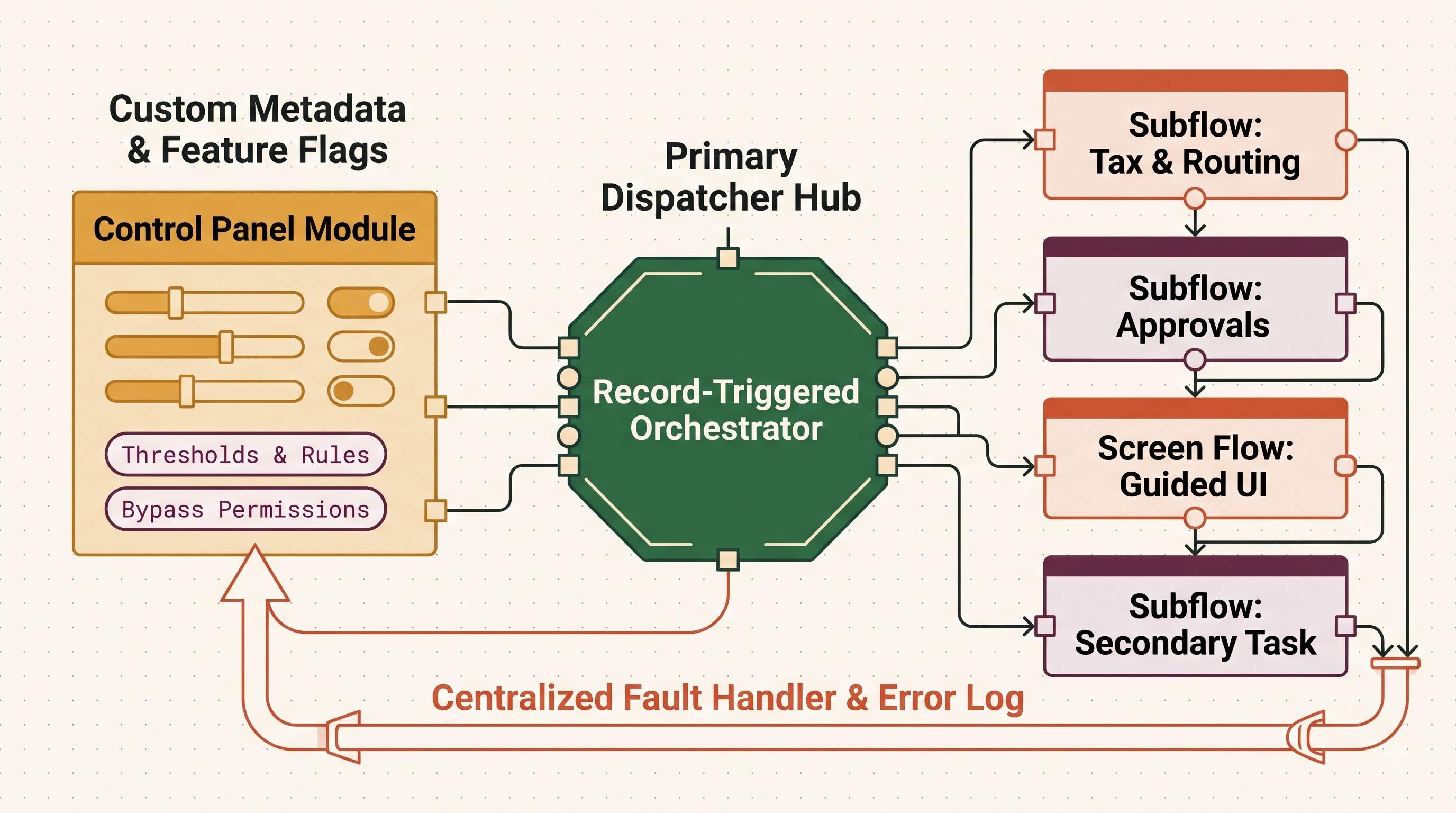
Monolithic flows that try to handle every action when an Opportunity or Case is updated are impossible to reuse and hard to debug. Instead, enterprise teams break automation into two layers:
Record-Triggered Orchestrator Flows: Each core object should have a tightly governed entry architecture: preferably one record-triggered flow per object per context (before-save and after-save) or a tightly scoped set of flows with explicit entry conditions and defined trigger orders. These inflows are strictly dispatchers. They evaluate high-level criteria and delegate the specific work to modular subflows.
Autolaunched Subflows: Subflows are self-contained units of business logic that are designed to accomplish a single task such as calculating tax, assigning a territory owner, creating renewal tasks, or posting a canned notification. Subflows don’t know what object or screen called them, they just take input variables and return output variables. That means the exact same subflow can be called by a record-triggered flow, or a screen flow used by customer support, or an external integration event.
Designing Context-Agnostic Screen Flows
Screen flows guide users through tasks. Designing them for reuse may significantly lower training and maintenance costs. Rather than building five different onboarding wizards for five different departments, teams can build one master Screen Flow that dynamically swaps out screens and choices based on input parameters passed from the Lightning page or quick action.
Screen Flows can show only the relevant parts conditionally by passing the record identifier, user department, or process mode into the flow at launch. They can call shared validation subflows and provide a consistent user interface across desktop and mobile experiences.
Standardised Error Handling & Logging
If you have reusable subflows that are used across dozens of processes, when one piece fails it impacts multiple teams. Enterprise architects build a single reusable Fault Handler subflow, rather than letting flows fail silently or presenting users with generic system error messages.
Every data operation in all flows has its fault path connected to this centralised error handling subflow, sending the flow name, record identifier, running user and fault message details. The reusable handler then logs the error to a custom Error Log object, This system will alert the appropriate support queue and convey an effective message to the user. In order to get such fault-tolerance automation done, one must undertake a lot of practical training, which is why many people opt to take up salesforce admin course online before beginning their work in an organization.
Security Architecture Modular Design
When organisations use Profiles extensively to manage access, security configurations can become messy. In many legacy Salesforce orgs, administrators clone an existing Profile and adjust a few object or field permissions every time a new sub-team is created. This results in hundreds of bloated, slightly different Profiles over time, which cannot be audited or reused.
The Permission Model Based on Persona
Modern enterprise Salesforce architecture reduces Profiles to the bare minimum of login hours, IP ranges, and default app assignments, and pushes all functional and data access permissions into modular Permission Sets.
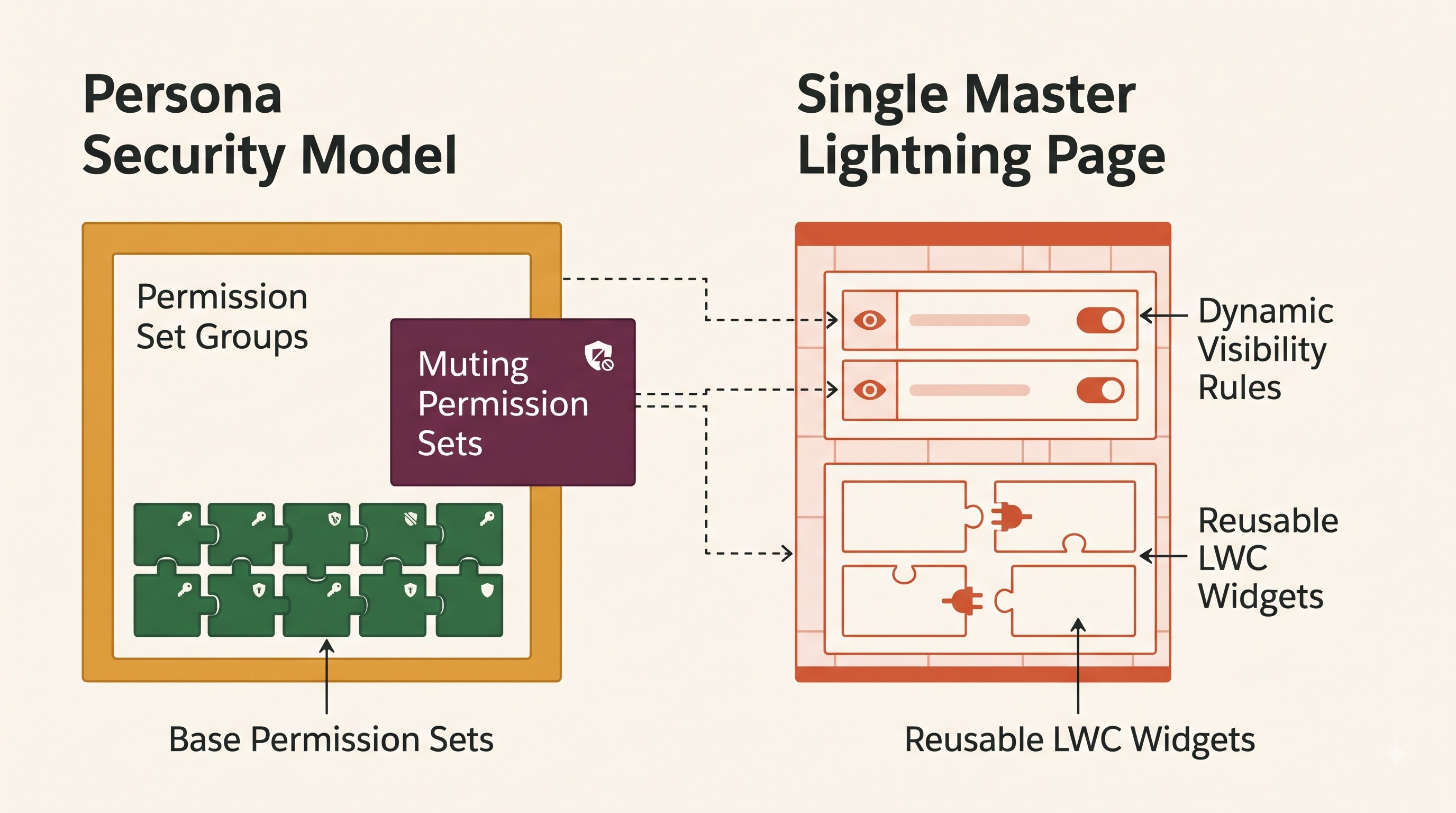
To make security reusable across teams, permissions are modelled in three different layers:
Base Functional Permission Sets: Small, granular Permission Sets that map to specific capabilities or features, for example “Manage Opportunity Discounts”, “Approve Knowledge Articles” or “Execute Mass Data Exports”. They are strictly agnostic to titles.
Role-Based Permission Set Groups Reusable sets of multiple Base Functional Permission Sets mapped to a typical enterprise persona such as “Regional Account Executive” or “Tier 2 Support Specialist.” When a new capability is rolled out to all sales personnel, adding the new Base Permission Set to the Permission Set Group automatically adds access for all relevant users, across all regions.
Muting Permission Sets: If a sub-team needs 95% of the permissions of a standard persona but needs to be blocked from one sensitive action (such as deleting records or viewing financial margins), architects will implement a Muting Permission Set within a specialised Permission Set Group instead of creating a whole new security structure from scratch.
Share & Visibility That Scales
Record-level visibility must be designed with the same principle of structural reuse. Serious performance bottlenecks during organisational reorganisations are caused by dozens of granular, hard-coded sharing rules based on individual user names or sprawling public groups.
Enterprise teams instead align sharing rules with standardised Territory Management models or clean, functional Role Hierarchies. By associating sharing rules with stable organisational properties like territories, account classifications, or standardised team roles, companies can reconfigure sales territories or combine business units without having to rewrite their underlying security model.
Lightning App Builder: Building UIs with Composable Components
User interface sprawl is one of the quickest ways to kill user adoption. Historically each department had its own dedicated Page Layout, so there were 20 different layouts for the Account object. Adding a new compliance field company wide required the administrators to manually edit all twenty layouts.
Layout Sprawl Replaced by Dynamic Forms and Actions
Dynamic Forms and Dynamic Actions change the way interfaces are built fundamentally. Instead of binding fields and buttons to monolithic Page Layouts tied to specific Record Types and Profiles, administrators configure individual field sections and action buttons directly on the Lightning Record Page with granular visibility rules.
This allows a "single master page" approach. With an enterprise edition, you can have a single Lightning Record Page for the Opportunity object that can intelligently show or hide certain field sections, tabs, and quick actions based on the user’s department, custom permission, or the current stage of the record. Common header fields and core activity timelines are set up once and used globally, while specialised regional fields are only shown to the users who need them.
Lightning Web Components that can be reused
If the declarative interface tools are not enough for complex user experience demands, you should build custom Lightning Web Components. However, you should build them as atomic, reusable widgets, not as single-purpose screens.
Enterprise UI developers design components with strict composition principles:
Configuration Over Hardcoding: Components expose public design properties in the Lightning App Builder. This allows administrators to drag the same component to different object pages and configure its behaviour, such as what fields to display, which API endpoint to query, or what title to show, via point-and-click properties instead of having to modify code.
Stateless presentational design: Decoupling visual components from data fetching logic. A reusable alert banner, progress indicator or summary card just takes standard inputs and emits standard events so it can be embedded across sales, service and partner portal experiences with no modification.
Naming conventions, documentation and discoverability
No matter how well engineered a reusable component is, it won’t deliver value if other teams don’t know it exists or can’t figure out how to use it. In large enterprise environments where multiple delivery squads work in parallel, duplication often occurs because builders can’t find existing assets.
Implementing Enterprise Naming Standards
The primary search mechanism in Salesforce Setup is a consistent and predictable naming convention. Names should immediately convey scope, domain, and intent without the use of arcane acronyms or project codenames.
For instance, if you name a subflow after a temporary project initiative (“Project Phoenix Step 2”), you are guarantyd that future admins will ignore it and build a duplicate. Naming it after its functional area and what it does (“Sales – Subflow – Calculate Regional Tax”) makes it findable immediately and also signals that it’s reusable. Similarly, when tagging shared assets, use clear prefixes such as “Core” or “Global” for assets that are used across the enterprise and regional prefixes for assets that are used to extend the core asset for a region. This way there is a clear line of ownership.
Self-Documenting Metadata and Component Libraries
All custom fields, flows, validation rules and permission sets must use the native Description field to describe not only what the component does but why it exists, which teams it serves, and what inputs it takes.
In addition to native metadata descriptions, mature enterprise teams also maintain an internal Platform Component Catalogue. As a part of the architecture review, before any delivery squad starts working on a new feature, they check the catalogue for any subflow, permission set, or Lightning component that can be reused or extended. This catalogue captures inputs, dependencies and product owners, turning the platform configuration into a curated internal library.
Control and Development of Package-Oriented
To be able to be reusable for many years, we need to stop thinking of the Salesforce org as one giant, tangled monolith of metadata. Enterprise teams use modular application lifecycle management to enforce boundaries between shared core configurations and team-specific extensions.
Domain Separation using Unlocked Packages
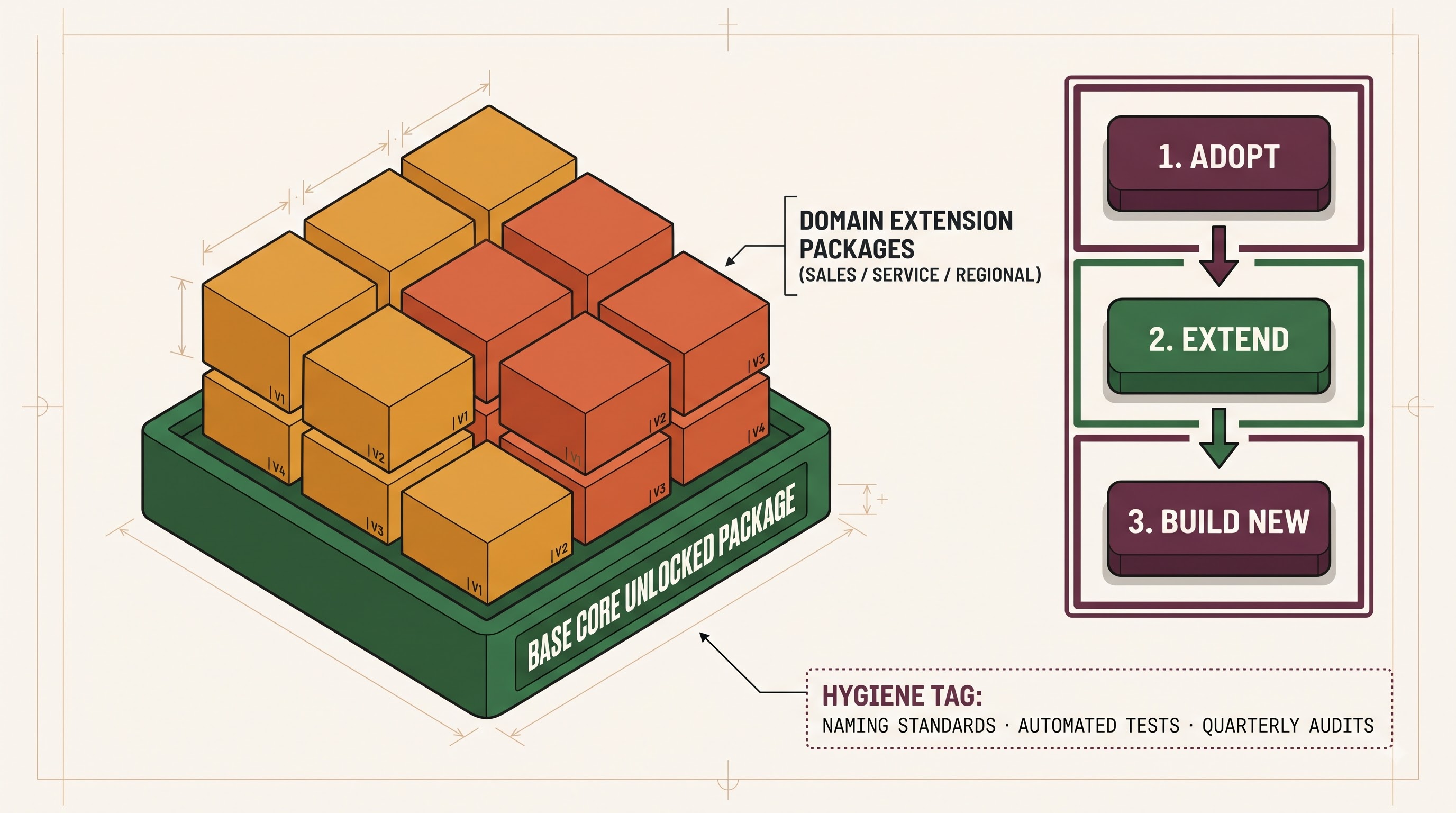
With Salesforce Unlocked Packages, enterprise teams can group related metadata into versioned, modular containers, such as a core error handling framework, a shared address validation module or a sales app for a specific business unit.
By grouping configurations into layered bundles:
The Base Core Package includes custom metadata types enterprise-wide, global value sets, bypass permissions, logging objects and core utility flows. All other teams build on this common foundation.
Domain Extension Packages are built on top of the core package and contain business unit specific configurations such as Field Service, Wealth Management, or European Operations.
Unlocked Packages enforce strict dependency rules, meaning a regional team cannot accidentally modify or break a core enterprise component without going through a formal version upgrade and governance review.
Creation of a Center of Excellence and Design Authority
Reusability is not enforced by technology alone. Governance inside the organization is as important. Enterprise Salesforce programs create a Center of Excellence or Design Authority with lead architects, senior administrators and business domain owners.
This governing body controls the intake of new business requests through a structured architectural triage process:
Adopt: Is it possible to meet the requirement using a standard feature or a reusable component that has already been built, without any changes?
Can I add a new parameter or configuration record to an existing reusable flow, component, or metadata framework to support the needs of the new team without breaking existing consumers?
Build New The Design Authority will only approve building a new component when a requirement represents a genuinely net-new capability. Even then, the squad must design it to meet enterprise reusability standards, so the next team can benefit from it.
Automated regression testing and life cycle hygiene
Reusable components have a bigger blast radius than isolated ones. A failure in a shared subflow affects all business units that rely on it. This leads to enterprise teams investing heavily in automated testing, including Apex unit tests for backend logic, as well as automated UI and flow tests that validate critical paths across all consuming personas before each release.
Following that is the part of managing the technical debt on an ongoing basis. These metadata audits happen once every quarter at the enterprise level, and they help us find the dead code, dead flows, and unused permission sets. This way, we are able to keep the platform lean, reduce the administrative overhead, and make sure that our reusable components stay efficient.
From Bespoke Builds to Platform Mastery
The ultimate goal of creating reusable Salesforce configurations is a discipline of restraint and foresight. It means resisting the temptation for a quick, local hack in favour of careful abstraction, good data modelling and modular composition. Enterprise teams can turn the Salesforce platform from a fragile, departmental customisation into a powerful, scalable engine for ongoing business growth when they embrace metadata-driven rules, Orchestrator and subflow automation, persona-based security, and dynamic user interface. If you want to embrace these architecture patterns and build scalable enterprise organizations from scratch, introduce yourself to our salesforce admin training online which will enhance your knowledge.