
Designing an End-to-End Third-Party Payroll Integration in Workday Studio
Last updated on Aug 3, 2026

Integrations of payroll systems are one of the most operationally essential data transfer systems developed within corporate human resource infrastructure designs. Any failure in an outbound payroll transfer system affects employee salaries, taxation, regulatory information provision, and trust in the company.
Within the Workday framework, simple integration systems, such as Enterprise Interface Builder (EIB) and Payroll Interface (PI) Connectors, do not suffice when payroll providers require sophisticated custom file formats, numerous output files, complex field logic, dynamic encryption methods, or custom REST and SFTP communication.
With Workday Studio, the necessary capabilities for organizing these complex outbound payroll integrations are at hand. Nonetheless, creating an operational third-party payroll assembly requires more than only dragging mediation components onto an Eclipse workspace; it necessitates an architectural design ensuring record-level data integrity, irrefutability, security, error recovery, and controllability requirements.
This structural guidance describes the entire life cycle of creating an organization’s third-party payroll integration through Workday Studio, starting with the collection of information and XSLT transformation and finishing with implementation-related concerns, including the ensuring of security.
Although basic data transfers can be done through Enterprise Interface Builder (EIB), establishing a reliable payroll assembly needs a good amount of technical groundwork. If you want to understand these concepts practically, you should either attend a structured workday studio tutorial or take a complete workday studio course to gain some valuable integration experience.
Establishing Requirements and Architecture of Integration
Before writing MVEL or configuring XML Stream Splitter, the integration architect has to define the boundaries of functional, technical, and regulatory requirements.
Functional Scope
Outbound payroll integration involves extracting data associated with employees’ demographics changes and wages information as well as information regarding changes in benefits deductibles, timekeeping data, and information about bank accounts within the range of definite reporting period (reporting period, semi-monthly period, or daily information).
New Employees: Comprehensive information on the worker's demographic, job, taxation, and direct deposit setup.
Terminations: Termination date, severance payments, payment for PTO left unused, and pay check process information.
Job Changes: Transfers, promotions, reallocations, and changes in salary structure.
Recurrent Deductions – For items such as health insurance, dental insurance, vision insurance, retirement, etc.
One-time Earnings and Deduction: Bonuses, incentive awards, commissions, retro-pay amendments and expense reimbursements.
Architectural and Information Flows
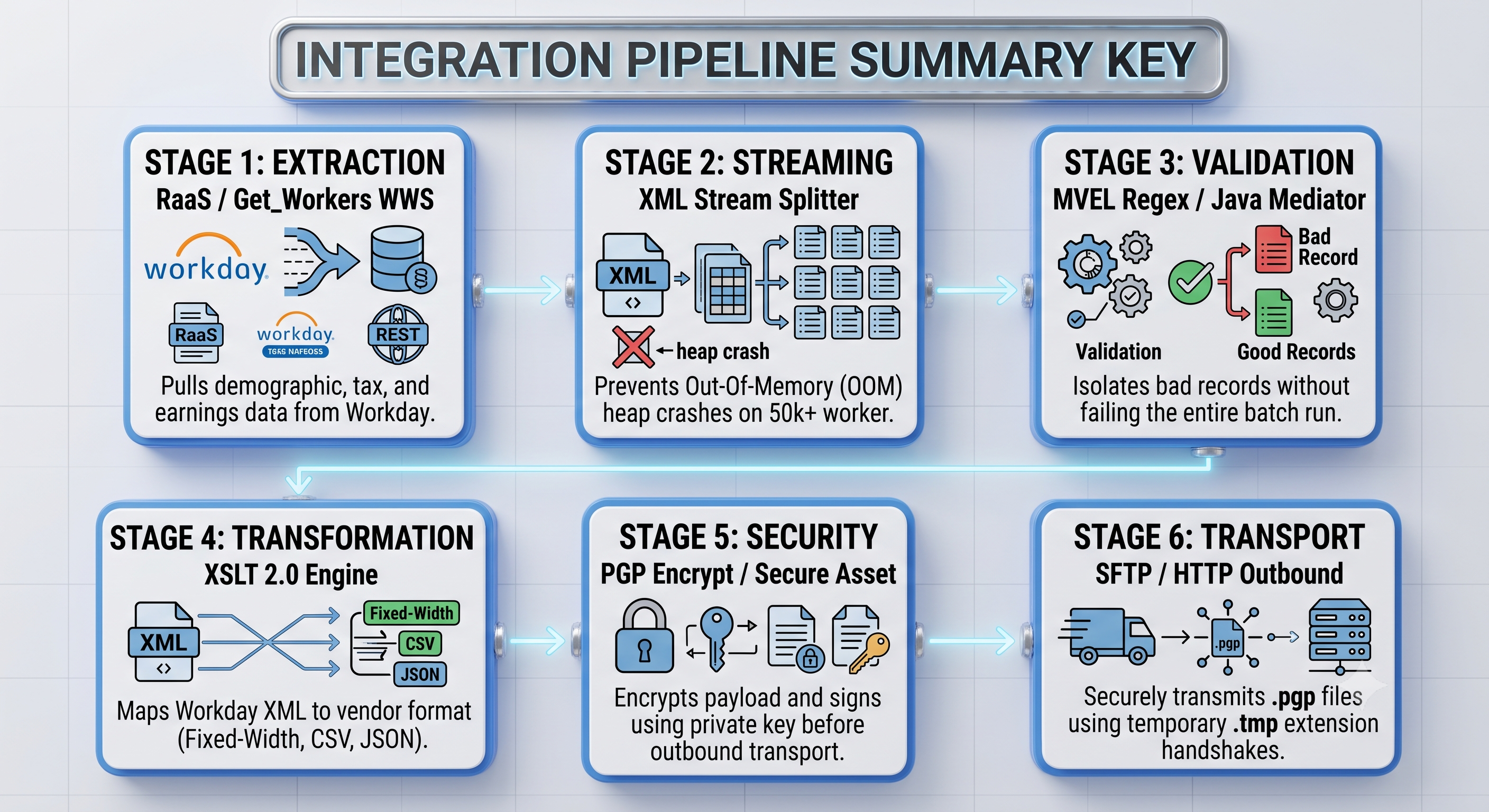
The Workday Studio payroll assembly process is all about a preordained flow:
Start and parameter determination The integration event may be triggered manually, by timing or by business process . Initiation parameters (Pay Group, Pay Period End Date, Execution Mode) are set up.
Data Querying (RaaS/WWS): The assembly makes a Reporting as a Service (RaaS) call or uses Workday Web Services (WWS) to collect baseline workers’ payload.
Validation and Filtering: The in-memory verification confirms that the required fields (e.g., Tax IDs, Bank Routing Numbers) are present and conform with vendor’s formatting requirements.
Data Modification (XSLT 2.0 / Java Mediators): The source XML from Workday is converted to vendor’s format (fixed-width ASCII, CSV, pipe-delimited, JSON).
Audit and Aggregate Reconciliation: The metrics (number of records, gross amounts, hash totals) are calculated and added to the context of execution.
Security Layering (Encryption and Signing): The formatted document is encrypted by PGP encryption and signed by the company’s private keys.
Secure Transfer (SFTP / REST): Payload is sent to the external payroll service provider via a secured mode of transfer.
Post-Execution Notification and Alert: The execution history, the reports of successful execution, or error summaries are sent back to Integration Event and forwarded to business users.
Data Extraction Methods: RaaS versus Workday Web Services
The extraction method that is chosen greatly influences the execution speed, memory footprint, and maintainability of the process.
Reporting as a Service (RaaS) is widely accepted to be the best extraction technique for most of the outbound custom payroll integrations. It enables the functional payroll expert to keep up complex field logic, calculated fields, as well as filtering rules in the custom Workday Advanced Report which works within an intuitive user interface, thus separating the adjustments in functionality from core Studio coding.
When invoking RaaS endpoints in Studio
Authentication should be done by making use of either WS-Security headers or OAuth2 bearer tokens linked to a specific Integration System User (ISU).
As for output format, either JSON or XML can be used in REST URLs for the report.
If any pagination or filtering steps are expected, pass prompt parameters dynamically using query string parameters using MVEL constructs.
Using Workday Web Services Get_Workers
In some cases when deep history files or effective date related timelines are in question or even more if dealing with multiple instances that result in RaaS getting timed out while executing queries, using native calls like Get_Workers from Human Resources service endpoint can help bypass problems of heavy load.
In order to maintain the good performance of data extraction while using Get_Workers it’s advisable to set Response_Filter parameters strictly limiting provided instances to payroll relevant segments (Worker_Data/Payroll_Data, Worker_Data/Personal_Data). Also pagination must be provided so that Page and Count values are set inside while loop in the Studio.
Data Transformation with Large Data Sets and Handling of Memory
Integration of payroll in big businesses (companies employing more than 50,000 employees) produces some huge payloads in the XML format. Trying to use standard DOM parsers or XSLT transformation of large XML files of over a royal in size in memory will lead to the OOM message in Studio during runtime.
Streaming Processing of Data Using XML Splitter
To avoid exhaustion of memory management, it is crucial to use streaming methods for data processing. Studio features the XML Stream Splitter component to split massive RaaS data into smaller data batches and not process the entire document tree in memory.
Algorithm of streaming implementation:
a) Set the authorization after RaaS data retrieval.
b) Indicate the split element using XPath.
c) Select the buffer volume that allows processing of tasks in a micro-batching way.
d) Send each split batch for data mapping and data cleansing.
d) Apply the Aggregator component for reuniting all the individual records into one stream before it is delivered.
The Essential Transformation Techniques of XSLT 2.0
Workday relies primarily on XSLT 2.0 as the technology of choice to convert the Workday XML into the required vendor format. Some of the methods of transformation required for payroll schema mapping are as follows:
Date and Number Formatting
For the date and numeric formatting, payroll systems have very strict standards. In some cases, the date has to be converted from the ISO-8601 format (YYYY-MM-DD) to a vendor-specified format, such as MMDDYYYY or YYYYMMDD. Currencies should not have the decimal points or leading zero.
Thus, in case of using XSLT 2.0, it will be crucial to use its functions:
For date formatting: format-date(xs:date(ws:Hire_Date), '[M01][D01][Y0001]')
For money formatting, e.g., to convert $1,250.50 into 10 digit zero-padded cents: string-format('%010d', xs:integer(round(xs:double(ws:Salary_Amount) * 100)))
Fixed-Width Line Creation
In case of any requirement for constrained fixed-width ASCII output by the payroll engines, it is recommended to utilize XSLT string functions (concat, string-join, substring and padding functions).
Use substring(concat($FieldValue, $SpacePadding), 1, $RequiredWidth) for right-padding text fields.
Also, use substring(concat($ZeroPadding, $NumericValue), string-length($NumericValue) + 1, $RequiredWidth) for left-padding
Validation and Exception Handling on Record Level
Any bad record (e.g., either a missing Social Security Number, a wrong routing number, or a special character inside a name string) should not fail the entire integration process. Records at the production level should perform validation at the record level to keep invalid records away while valid records can continue processing.
Creation of the Validation Pipeline in the Studio
Put a Validation Sub-Assembly between the splitter and the transformation step. The purpose of this sub-flow is to check the worker's compliance to vendor validation rules prior to continuing processing.
During the validation process the following validation checks are performed:
Field Completeness Check: Ensure that all required fields exist (National ID, Date of Birth, Address line 1, Zip Code).
Regex Matching: Using MVEL regex matching expressions, ensure that the zip code, tax id, and phone number contain only allowed characters.
Cross-Field Dependency Checks: Ensuring that when a worker has a Direct Deposit assignment, Routing Number and Account Number are filled at the same time.
Partial Failure Management
When a worker record fails validation, the system needs to do error handling without causing an unhandled exception at the outer level.
The validation procedure includes the following tests: Field Completeness Checks: Checking if mandatory fields are populated (National Id, Date of Birth, Address Line 1, Postal Code).
Regex Pattern Matching: Ensure postal codes, tax ids and phone numbers match the character sets allowed by the vendor using MVEL regex expressions.
Extract and Log Send the invalid worker record to a local error collection stream; Get the Worker ID, Name, Error code and the specific attribute that is missing.
write to logfile: Log cause of error in the personal error csv file, which is maintained throughout the entire process.
Increment Error Count Increment the correct counters in the runtime context.
Invalid Worker Removal: Prevents an invalid worker record from entering the main stream for processing.
Add Error Summary For Event: When assembly done Append error CSV file with details of errors to Workday Integration Event log.
Security Architecture and Encryption
The security of payroll files is of utmost importance, so it must be ensured that data remains secure through all stages of processing (storage, transfer, and processing).
Secure the Integration System User (ISU)
The assembly must operate using a special Integration System User (ISU) that has the minimum necessary privileges.
Create an ISU to be used only for a payroll provider (for example, ISU_Payroll_VendorName).
Link the ISU to the Integration System Security Group (ISSG).
Enable access to view only the domain security policies required for the payroll extraction (e.g. Worker Data: Payroll, Worker Data: National Identifiers, Worker Data: Compensation, Worker Data: Direct Deposit).
Make sure that access to other HR domains (for example, Performance Management, Recruiting Notes) is disabled.
Make sure that the ISU cannot have a direct UI login and restrict the IPs through Workday Authentication Policies.
Payload Security: PGP Encryption and Signing
The payroll payload that has been processed must be encrypted after being consolidated into the final output file stream while in Studio, prior to leaving the bounds of the Workday tenant.
To facilitate PGP wrapping using native security components within Studio:
Obtain vendor public key: The payroll vendor’s PGP public key must be imported into Workday tenant’s Security Assets.
Generate client keypair: An enterprise private signing key pair must be generated or uploaded in Workday for the purpose of non-repudiation.
Configure PGP component: A PGP Encrypt component must be added to the assembly line within Studio just before transport.
Set encryption parameters:
Select a symmetric cipher algorithm (e.g. AES-256).
If the vendor endpoint requires ASCII armor text, Armor output formatting must be enabled.
Private key password must be securely supplied using Workday Secure Messaging/Secure Property methods so that secrets don’t get hard-coded in Studio property files.
The Delivery Procedures and Transport Calls
When done, validated and secured the transmitting of the data to the endpoint of the provider must be performed properly. The Workday platform supports many transport modalities.
SFTP Outbound Endpoints
In the case of payroll systems SFTP is the main communicational channel.
The parameters of the SFTP endpoints are:
The key verification: The public key of the provider must be uploaded to Workday because it is not allowing any MITM attacks.
Authentication: If possible, SSH key pair authentication is preferable to the usage of static passwords and all of them must be stored securely in the system itself.
Dynamic Filename Generation: Proper audit files names must be created with the help of MVEL properties prior to sending them away: concat(‘PAYROLL_EXPORT_’, props[‘var.paygroup’], ‘_’, props[‘var.timestamp’], ‘.csv.pgp’)
Temporary File Extension Handshake: The use of .tmp extension is performed to stop outside scripts from loading yet not 100% uploaded files.
REST and Webhook Outbound Endpoints
For cutting-edge real-time or cloud-based payroll endpoints that depend on API, utilize components for HTTP Outbound Mediation that have been set up using OAuth 2.0 Client Credentials grant flow.
If your assembly makes any API calls, wrap those in retry loops with exponential backoff for transient HTTP 429 (Rate Limit) or 503 (Service Unavailable) status codes, so that the assembly does not fail on the first attempt.
Auditability, Reconciliation Control and Notification Post Execution
The integration needs to generate financial and record control totals for payroll auditors to reconcile output files to Workday source data to satisfy enterprise audit readiness requirements.
Generating Control Totals and Reconciliation Summary Information
Before encryption, have the last payload move through a lightweight calculation mediator that produces summary metadata, which is as follows:
Total Worker Count: Total number of unique employee records found in the file.
Financial Gross Pay Hash: The total of all base salaries, bonuses, and wages in all rows.
Deduction Hash Totals: The total of benefit and tax deductions.
Payload Checksum: Produce an SHA-256 cryptographic hash of the raw file and log the hash string sufficiently.
Insert the summary values into the Workday Integration Event log directly. Also, send a light control manifest file (containing record counts and checksums) along with the primary payload in encrypted form so that the receiving vendor engine can check if the file is ready before starting its ingestion into the internal database.
Alerts and Notifications Automation Plan
Establish a dual-level alerting system based on the global exception handler and conditional notification sending:
Execution with No Errors
Send an informative event to Workday along with attaching the execution summary, and send one notification email with all necessary information for the payroll functional leads including the pay group, the number of records processed, and the total gross dollar value.
Execution with Errors
Initiate a warning notification indicating how many workers were processed successfully and how many failed to get processed. Include the Error Log CSV in the email sent along with the Workday event description for prompt action.
Deadly Assembly Failure (P1 Urgent Notification)
When the transport is unsuccessful altogether (e.g., after maximum attempts, SFTP host is inaccessible), or keys for encryption have stopped working, the Global Catch Error Handler should take over the processing of the route of execution.
- Prepare a detailed diagnostic error stack snippet.
- Create an ERROR level logging for the Workday Integration Event.
- Send an immediate web payload to the enterprise operation monitoring channels (e.g., PagerDuty, ServiceNow, or Slack admin channel) with the name of the Integration system, WID of the event, and description of the failure
Step-by-step process of building the Assembly in Workday Studio
To understand how these architectural principles come together, the following step-by-step process describes the process of creating a high volume, encrypted outbound payroll assembly in Eclipse-Based Workday Studio IDE. If you are not familiar with building integrations from the ground up, it is advisable to look into structured Workday Studio training or specific workday studio courses to learn about components, MVEL expressions, and mediation flows.
Step 1: Initialization of the project and setting Integration launch parameters
Create a Workday Studio Assembly project. Define integration launch parameters in the assembly.xml definition file.
Define pay group as a single-select prompt linked back to instances of Workday Pay Group.
Define pay period end date as a standard date prompt.
Processing mode: Provide a dropdown for specifying whether FULL_RECALCULATION or DELTA_ONLY should be processed.
On the first flow set the local variables
Step 2: Extraction of RaaS Endpoint Data
Add a new HTTP Outbound Mediation activity and pass the Advanced Reports REST URL to it. All the required parameters will be added and this URL will be created dynamically.
Set up the HTTP step to forward standard basic authentication headers using the ISU secure credentials or set up OAuth2 bearer tokens. The Workday response will be saved in the message payload as raw XML.
Stage 3. Build the Streaming Splitter and Validation Loop
The main workflow is enriched with a Streaming Splitter and the XPath expression has to be configured in such a way that it leads to each worker's record in the output document of the RaaS service.
Inside the processing loop of the splitter:
Route the worker micro-payloads through the Validate_And_Transform_Worker local sub-assembly.
Perform checks for various required payroll attributes using an MVEL Java Mediator step (for example, showing that the National Identifier is not null and compliant with the character requirements).
In the event that validation is passed, the worker micro-payload will be routed to the XSLT 2.0 Transformation Mediator step where the worker XML will be transformed to the desired vendor record format (either a CSV line or fixed-width string).
If validation fails, this engages a local route to trigger a thread-safe MVEL string builder instance that creates a log with the worker ID, name, and validation error messages to improve error reporting, and also increments the runtime error counter property.
Step 4: Aggregating the Transformed Micro-Payloads
Once the transformation step is completed at the inner loop level, then the valid transformed strings need to be transferred to the Aggregator component, which is to be configured to collect the transformed data and build a single consolidated stream file. In addition, header and footers must be added if the vendor requires their batch header and footer rows to be set up.
Step 5: Calculate Audit Metrics and Checksums
Use a Script Mediator step to process the combined output payload that has not been encrypted and get the SHA-256 hash for the payload and keep the hash value in a runtime property variable. Keep count of the number of lines in the output payload and store that number in a different property variable.
The result of this process is logged in the Workday Integration Event log using the Put Integration Message component. The parameters used in logging are line count, checksum and time.
Step 6: Signing and Encrypting the Content
After the payload aggregation and audit calculation steps, you need to add a Security PGP Encrypt component. Choose the target vendor PGP Public Key assets in the tenant bindings window. After that select the enterprise PGP Private Key to perform digital signing of the payload. Configure the PGP Encrypt component to allow encrypting of the aggregated payload to get a fully encrypted and PGP protected file.
Stage 7: Setting Up SFTP Delivery with Automatic Retries
Add the SFTP Outbound Transport component to send the encrypted payload of PGP to the remote server of the third-party remuneration company.
Set up the transport parameters.
Connect the host address variable, port, and username variables to the properties of Integration Maps at the tenant level so that the environments are independent.
Set the authentication method to SSH Private Key.
Specify the path of the directory where data will exit and the dynamic file name variable.
Either set the writing options in such a way as to perform the transfer through a temporary file and change the file name to .pgp after the transfer ends.
Place the SFTP transport process in a retry loop with three attempts that is configured to pause for 300 seconds each time.
Step 8: Develop Global Error Handlers and Event Encapsulator
Embed the complete construction architecture under a Global Error Handler framework.
If all processes in the pipeline proceed without major errors, the process moves on to a Success Completion phase. The Integration Event status is changed to Completed, the error log file is attached (if there have been cases of unfulfilled record validation), and the payroll department receives information about the results.
If during the procedure any untrapped system failure occurs (e.g., total extraction failure in RaaS service, PGP key problem, or total network collapse caused by SFTP), the program will immediately transfer to the global failure path. The assembly logs the whole rare failure traceback, modifies the Integration Event status to Critical, posts the detailed description of the mistake in the execution log, and sends an alert about the failure to the integration engineering support team.
Testing, Validation, and Deployment Lifecycle
Since payroll operations are sensitive in nature, the testing should be thorough, iterative, and performed in environments that are separated from each other while using dummy data that has been sanitized.
Testing Methodology and Approach
Four phases of testing will be performed prior to deployment in production:
Unit testing (Studio IDE): Tests individual local sub-assemblies such as XSLT maps, regex validation rules, and MVEL script logic with the help of static XML files in the local testing environment.
Assembly integration testing (sandbox tenant): Execute the compiled file (the .clp file) by transferring it to a Sandbox tenant.
Boundary and edge-case testing: Creating synthetic test workers having edge cases in the tenant:
Workers with different non-English letters in their legal name (for example, accented letters, umlauts, and hyphens).
Workers with zero compensation or negative retro payments.
Workers with several lines in the address or international addresses.
Simulating missing data properties.
Vendor acceptance testing (end-to-end handshake): Transfer the PGP-encrypted output to the test SFTP server of the payroll third-party vendor who is assumed to execute the file with the help of pre-parser in order to prove proper schema.
Conclusion
The design of third-party payroll integrations at Workday Studio necessitates striking a proper balance between clearly defined functional business rules and sophisticated technological architecture. Achieving this objective is accomplished through the introduction of the stream-type XML processing method, segregation of validation from conversion, implementation of strict PGP security protocols, as well as development of all-encompassing audit reconciliation functions by integration designers, as a result of which robust and audit-compliant payroll pipelines that will be able to effectively and safely facilitate operations of international economic entities will be created.
Being skilled in complex end-to-end payroll systems construction is one of the key skills demanded by Workday developers nowadays. If you are getting ready for enterprise integration projects or technical interviews, you can improve your skill set thanks to the specialized workday studio online training offered by OnlineITGuru. You can find everything needed for your training in our course catalog and workday studio tutorials.