
Designing Fault-Tolerant Integrations Using Workday Studio
Last updated on Nov 26, 2026
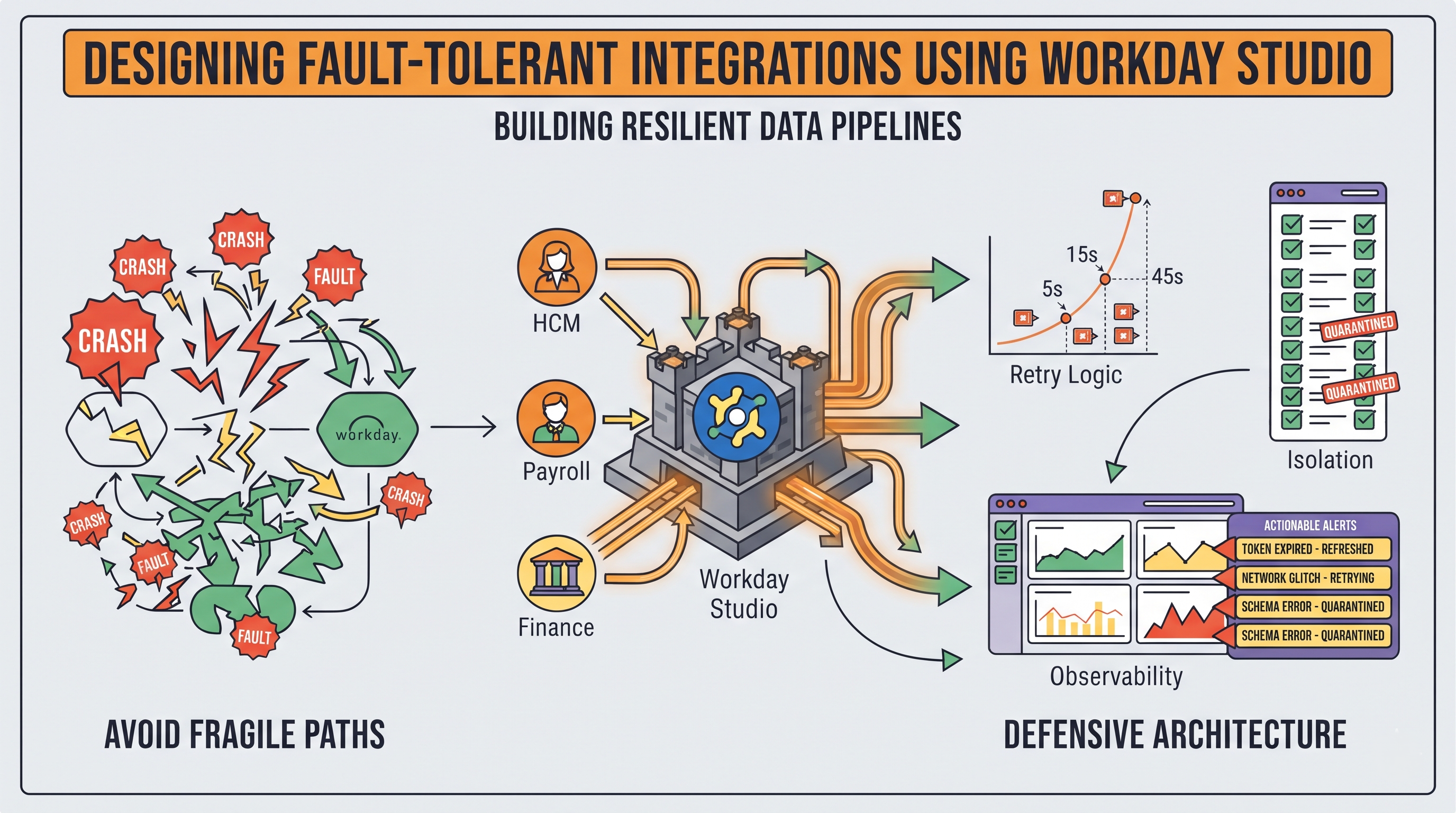
Enterprise ecosystems don’t often fail dramatically or obviously. More often, they suffer from the quiet interruptions — a transient network drop during a nightly payroll run, an expired authentication token mid-batch, an unexpected null value in a third-party vendor payload, or a downstream server throttling requests under peak load. When mission-critical human capital management and monetary systems integrate with external payroll providers, identity platforms, banks and enterprise resource planning tools, a single unhandled exception can halt business operations, delay employee pay or corrupt downstream reporting.
It is an important requirement to know about Workday Studio (refer to the URL of your course here), as it is the primary custom integration development solution for complex orchestration scenarios which cannot be achieved using Enterprise Interface Builders or Core Connectors. Built on the Eclipse framework and running on Workday’s cloud runtime, Studio provides integration architects with granular control for message routing, data transformation, looping, invoking external web services and exception handling. But great flexibility demands great architectural responsibility. Without deliberate fault tolerant design, a sophisticated Studio assembly can become brittle, opaque and difficult to recover from when production anomalies occur.
Building fault tolerant integrations in Workday Studio is a move away from optimistic development where engineers build for the happy path, to defensive architecture. A truly fault tolerant integration expects failure at every boundary, isolates bad records without aborting good ones, recovers automatically from transient failures, is strictly idempotent on retries, and surfaces actionable diagnostics to ops teams.
Understanding the Anatomy of Workday Integration Failures
Before integration teams can architect resilience mechanisms, they need to identify the different failure modes that occur across Workday Studio lifecycles. This way, all failures are equal, and either cause premature aborts on recoverable glitches, or infinite retry loops on permanent data defects.
Temporary infrastructure and network failures
Transient faults are temporary conditions that usually clear themselves without code changes or manual intervention with the data. Short network socket timeouts, temporary DNS resolution failures, HTTP gateway timeouts, HTTP service unavailable responses, and API rate limiting responses when a downstream vendor enforces strict concurrency or requests-per-second thresholds are common examples. Cloud-to-cloud architectures have transient blips, which are statistical certainties. A fault-tolerant Studio design will take care of these shocks automatically with controlled retries, instead of waking an on-call engineer at two in the morning.
Data and Schema Validation Failures
Data level failures happen when payloads don’t meet structure expectations or business rules. If a custom report or Report-as-a-Service output has unexpected special characters, it can break downstream XML or CSV parsing. • An employee record may be missing a required national identifier, cost center code or benefits carrier required effective date. Or an external API could reject one employee payload because of an invalid postal code format, but accept the other five thousand records in the batch. With poorly designed integrations, one bad record leads to a fatal unhandled exception that rolls back or abandons the entire batch.
Security, Authentication, and Expiration Failures
Integrations depend on Integration System Users, security groups, domain permissions, X.509 certificates, PGP encryption keys and OAuth tokens. Long-running Studio assemblies, particularly those that iterate through large pagination loops across tens of thousands of workers, may experience an OAuth bearer token expiration in the middle of execution. Likewise, the rotation of SFTP host keys or the expiry of client certificates causes immediate rejection of connections. Good architectures are built to handle token refresh mid stream dynamically and validate credential health earlier in the execution lifecycle.
State, concurrency, and resource exhaustion errors
Studio assemblies in Workday Cloud Runtime are subject to strict execution and memory limits. This can result in out-of-memory errors when loading large multi-megabyte XML payloads into memory in their entirety during XSLT transformations or recursive Java steps. Race conditions, duplicate outbound transmissions, or record-locking conflicts within Workday business processes may also occur from overlapping integration runs, for example, an hourly scheduled sync that starts before the prior one has completed.
Fundamental Architectural Principles of Fault Tolerance
Graceful Degradation
The five key architectural pillars of resilient Workday Studio solutions. When these principles are consistently applied across an enterprise integration portfolio, fragile point-to-point scripts become predictable, self-healing data pipelines.
Modularity and De-coupling
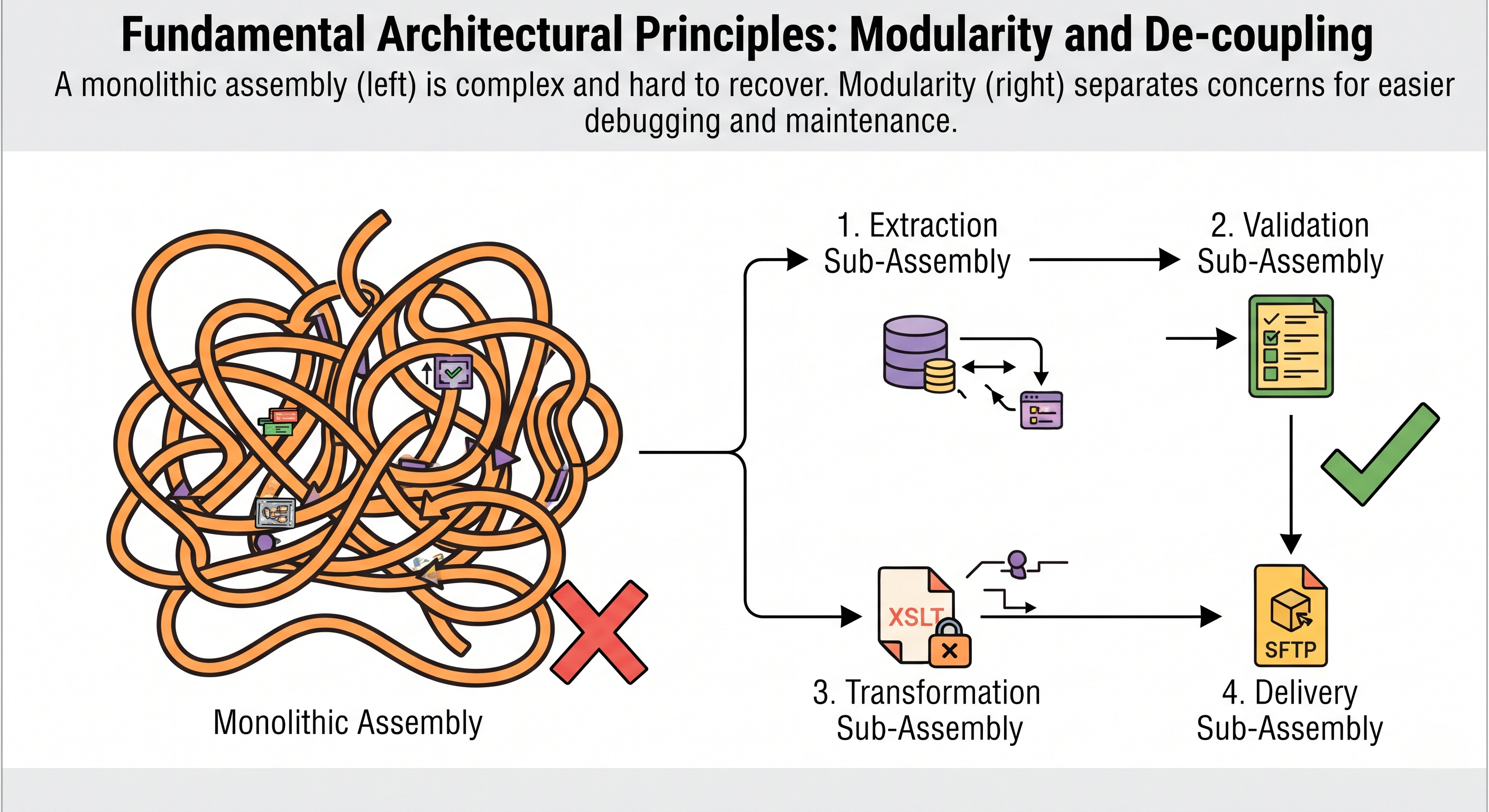
Monolithic Studio assemblies that combine data extraction, complex multi-stage enrichment, transformation and multi-endpoint delivery into a single sprawling canvas are notoriously difficult to debug and recover. Fault tolerant design fosters modularisation through local sub-assemblies and separation of concerns. Architects can separate error-handling policies per phase by putting extraction, validation, transformation and external transport into separate, single-responsibility sub-routines, instead of mixing business logic with transport plumbing.
Graceful Degradation and Record-Level Isolation
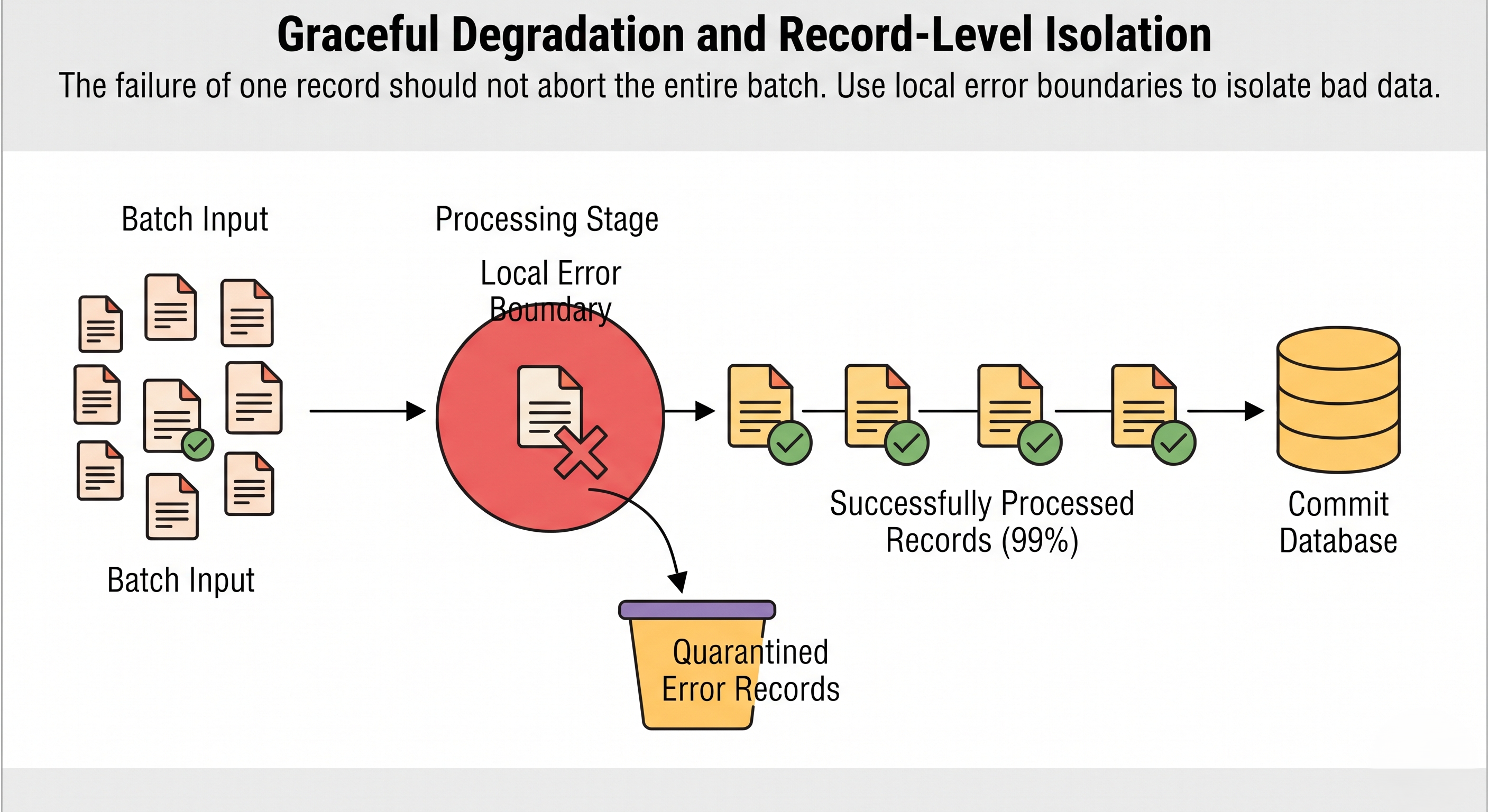
As batch workloads are processed, the failure of one entity should rarely affect the processing of unrelated entities. Resilient designs put localised error boundaries around individual record iterations rather than letting a single record exception bubble up to the global assembly error handler and kill the integration event. Valid records are fully populated and cleanly committed. Defective records are captured and enriched with contextual failure metadata and routed to an error queue or audit log, and are surfaced as warnings on the Workday integration event.
Idempotency of all Operations
A critical part of fault tolerance is the ability to (safely) retry failed operations or re-run an entire integration launch after an outage. If the integration is not idempotent, then re-running it after a partial failure may result in duplicate hires, duplicate payments of vendor invoices, or duplicate payroll adjustments. Idempotency requires that you design lookups before writes, provide unique transaction correlation identifiers to downstream systems, utilise Workday’s effective-dated, event-driven state checks, and keep track of high-water marks so that only unprocessed deltas are sent out on subsequent runs.
Pre-Flight Validation – Fail Fast
Individual record errors can be caught during batch processing, but systemic prerequisites should be verified at launch. A well-designed Studio assembly will do lightweight pre-flight checks before extracting fifty thousand worker records or kick off downstream mutations. These checks verify that the required launch parameters are populated, that target SFTP directories or REST endpoints are reachable, that authentication tokens can be obtained, and that source reports return valid structural headers. Quickly failing on systemic blockers saves runtime compute resources and avoids partial, inconsistent state updates.
Complete observability and actionable alerts
An integration that recovers quietly without an audit trail is almost as dangerous as one that crashes quietly. All retry efforts, skipped records, fallback routes and warning statuses should be systematically logged. More importantly, error messages presented to Workday administrators need to translate cryptic Java stack traces or raw SOAP fault codes into clear business-readable remediation instructions.
Mastering Workday Studio Exception Handling
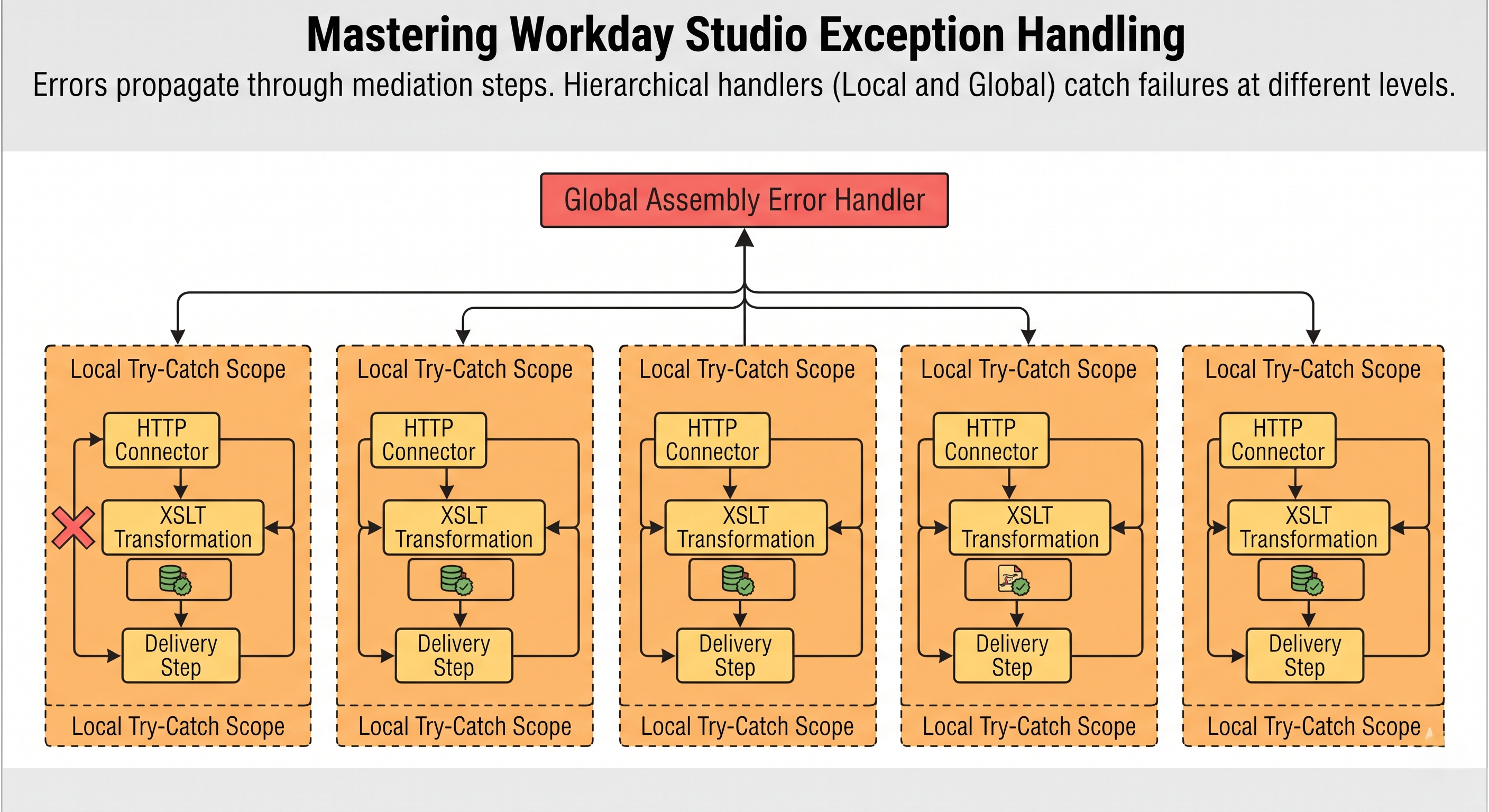
Those who are professionals and are participating in the structured Workday Studio training program get an insight into how they can benefit from the hierarchical exception handling feature offered by Workday Studio during the assembly phase. It is important to understand how errors propagate through mediation steps, sub-assemblies and global handlers to avoid unexpected aborts.
Local try-catch limitations
Within the framework of a Studio assembly, mediation steps can be placed within local error handling scopes, much like try-catch blocks in conventional programming. An exception thrown by an outbound HTTP call, SOAP request or XSLT step inside a localised boundary immediately diverts execution to the attached error path rather than stopping the parent flow. Architects should wrap each external network callout, file I/O operation, and record-level transformation in local error handlers. Within the catch path, the integration can check Workday context error variables (such as exception message, error code, and offending component name) to determine whether to retry, log and skip, or escalate.
Error Handlers (Global Assembly)
In every main Studio assembly there should be a global error handler at the highest level, to trap catastrophic or unexpected failures such as out-of-memory, missing critical launch parameters, or unrecoverable authentication lockouts. When execution reaches the global error handler, the integration has shifted from its main objective of processing data to a new objective of clean teardown and transparent reporting. The global handler makes sure that all temporary files are cleaned up, all open connections are closed, a structured summary log is generated and attached to the integration event, and the Workday integration status is explicitly marked as Failed or Completed with Errors, as per the organisational governance rules.
Distinguishing Fatal Errors from Recoverable Warnings
Workday makes a distinction between an integration event that finishes with a Failed status and an integration event that finishes with a Completed with Warnings status. The key to operational clarity is using these statuses intentionally. A full payroll file that is not successfully transmitted to a banking partner must end with a status of Failed so that downstream schedulers and operators will see it as a critical incident. If, however, ninety nine percent of the employee demographics updates are successful and three of the records are quarantined for missing middle names, then marking the event as Completed with Errors or Completed with Warnings is an accurate representation of partial success and draws attention to the quarantined exceptions.
Mapping and Suppressing Cryptic System Exceptions
Raw exceptions from underlying Java libraries, XML parsers, or Workday Web Services SOAP faults often contain verbose stack traces that swamp HRIS analysts and support personnel. Fault tolerant Studio designs capture raw system exceptions, extract the root cause message and the offending business identifier like Employee ID or Supplier Invoice Number and build clean, standardised diagnostic messages. Separating out the full technical trace in a separate debug log file but keeping concise actionable summaries in the main Workday event log helps both the business analysts and the technical engineers.
Implementing Smart Retry and Backoff Techniques
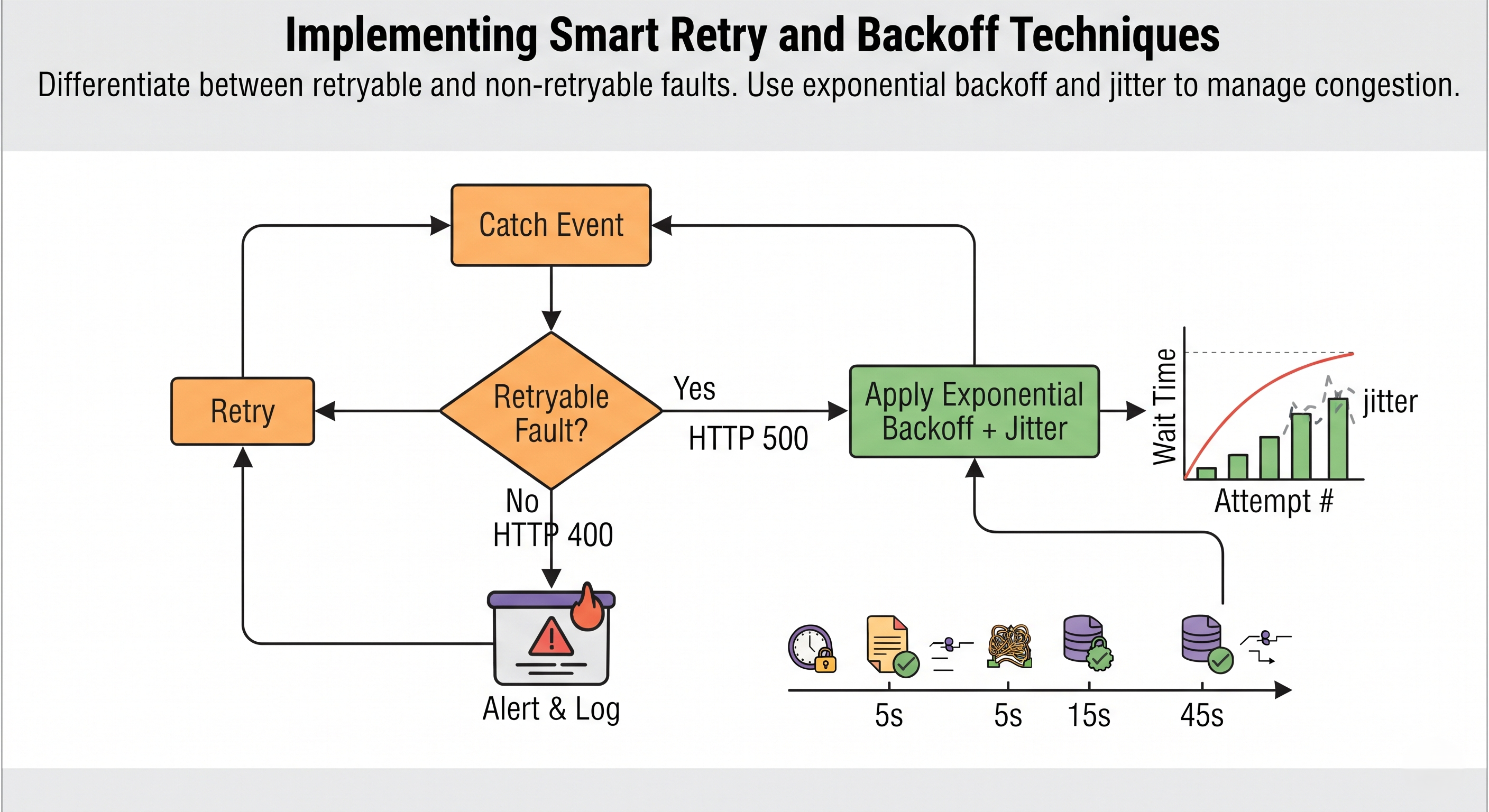
Robust retry logic is one of the highest-value fault-tolerance patterns in Workday Studio because external APIs, cloud gateways, and file transfer servers are prone to momentary congestion on a routine basis. But careless design of naive retry implementations can make outages worse.
Classification of Retryable and Non-Retryable Faults
Before entering any retry loop integration must look at the failure type. Retrying an HTTP 400 Bad Request , HTTP 401 Unauthorised ( with static invalid credentials ) , or HTTP 422 Unprocessable Entity serves no purpose as the server has explicitly rejected the payload structure or permissions . Retrying the same request wastes execution time and may lead to account lockouts . However, network connection resets, socket read timeouts, HTTP 408 Request Timeout, HTTP 429 Too Many Requests, and HTTP 500, 502, 503, and 504 server errors are good candidates for automated retries. Studio routing components should immediately evaluate response status codes and fault strings after a catch event to distinguish between transient errors and permanent rejections.
Exponential Backoff and Jitter
If a downstream system is slow, or returns rate-limit warnings, pounding the system with immediate back-to-back retries only increases the congestion. Instead, Studio assemblies should employ bounded retry counters with exponential backoff. Exponential backoff schedules increase the wait interval by a factor of two or more with each failure, (e.g., wait five seconds after the first failure, fifteen seconds after the second, and forty-five seconds after the third before giving up and declaring the call unsuccessful). In advanced Studio designs, when throttling events occur and downstream APIs return explicit retry-after headers, that header is parsed dynamically and execution is paused for the exact time requested by the vendor. To avoid synchronised waves of retries in case of multiple concurrent integrations, a small randomised delay called jitter is added.
Dynamic Token Refresh in Long-Running Loops
OAuth 2.0 bearer tokens that expire between 15 minutes and an hour are common in modern REST integrations. If a Studio integration loops through tens of thousands of records, the access token obtained at the beginning of the run may expire in the middle of the run, resulting in unexpected HTTP 401 Unauthorised responses. Fault-tolerant designs are built to handle this by trapping HTTP 401 responses in the outbound API sub-assembly, calling the token-refresh routine once for a new bearer token, updating the session header variable, and transparently re-executing the failed business request. This single-attempt counter guarding the refresh step ensures that truly revoked credentials still fail cleanly, and do not loop forever.
Circuit Breaker Pattern for Downstream Failures
If the API of a third-party vendor goes down entirely during a batch sync of ten thousand records, three retries with exponential backoff on every single record would lock the Studio integration for hours until it reaches the maximum runtime limit of Workday. This cascading delay is prevented using a lightweight circuit breaker pattern. It can have an assembly level counter that tracks consecutive failures systemic to the integration . When a threshold is reached ( i.e. , 10 consecutive connection timeouts ) an internal circuit flag can be tripped . Once tripped, the assembly halts any further outbound attempts, logs a clear downstream outage alert, persists the remaining unprocessed records for later recovery and exits cleanly.
Designing for Data Integrity, Pagination, and Memory Resilience
Fault tolerance is not only about network communication. It is also about how data is queried, streamed, validated, and transformed inside the Studio runtime.
Resilient Pagination and Checkpointing
Workday Web Services SOAP and REST endpoints have tight page-size limits, typically returning only a few hundred or a thousand records per page. Not using full pagination loops is a classic cause of silent data truncation. In fault-tolerant pagination designs, response pages are iterated in a systematic fashion using total-page metadata or next-page cursors until all pages have been consumed. Even better, wrapping each page retrieval in a localised retry boundary means that a transient network glitch on page forty-two doesn’t cause the integration to start over on page one. For very large datasets, page-level completion checkpoints allow operators to resume interrupted extractions from the last confirmed page.
Memory Management and Streaming Transformations
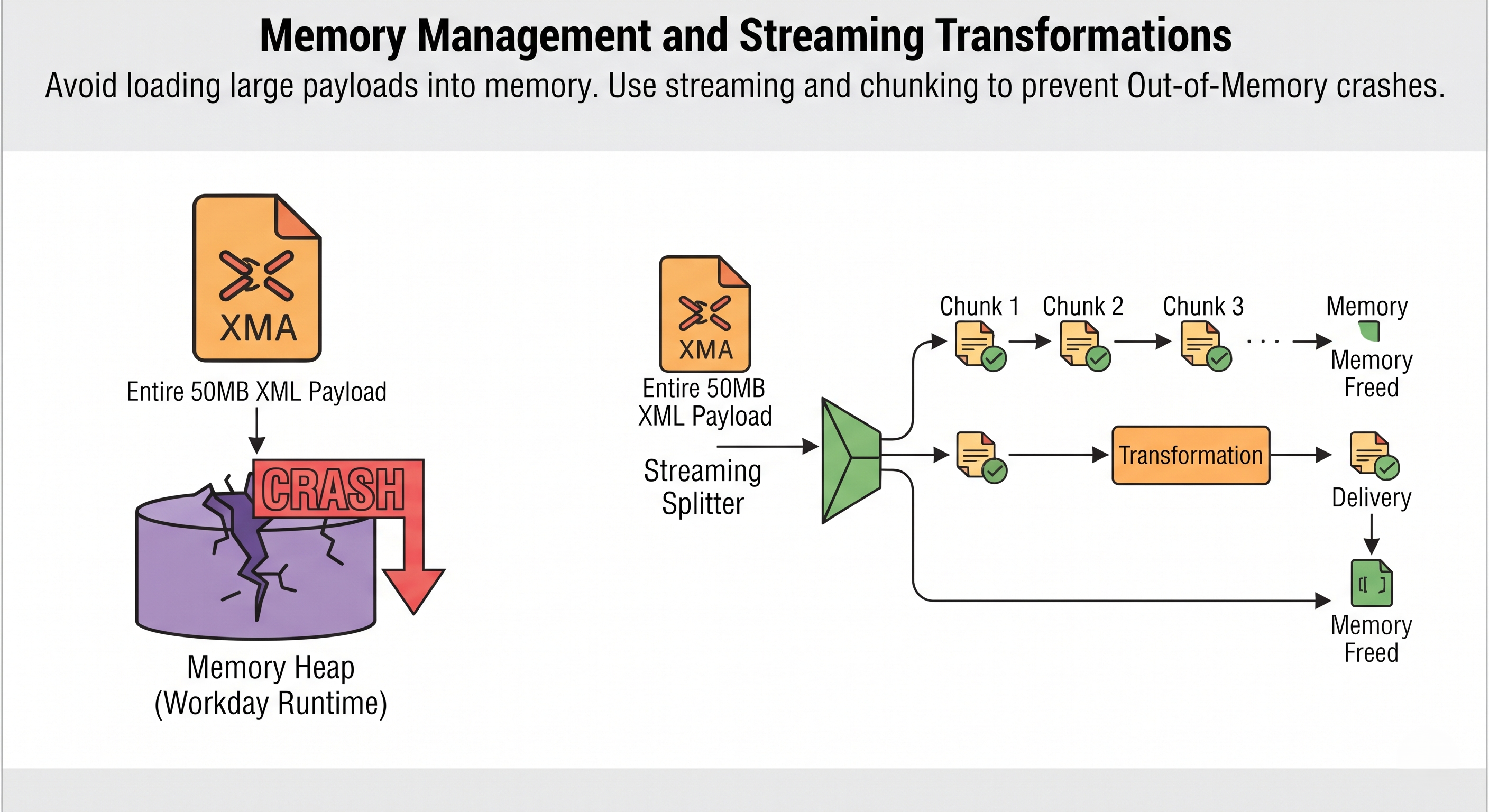
Workday Studio operates inside a managed Java Virtual Machine and has a finite heap allocation. Loading a full 50 megabyte custom report XML into a single DOM based XSLT transformation, or storing massive collections in memory variables, is an invitation to sudden out-of-memory crashes. With Workday Studio, architects can build memory-resilient flows using its streaming capabilities, splitters, and aggregators. XML stream splitters break up the giant payload into manageable chunks or individual worker elements, process each chunk in sequence or controlled batches, transform it with lightweight XSLT stylesheets, write the output incrementally to a temporary storage stream, and free up memory before moving on to the next record.
Schema validation and defensive XSLT
Transformations are a common source of runtime exceptions, with source fields containing unexpected nulls, malformed dates, or unescaped characters. Defensive XSLT design does not assume the existence of nodes. Stylesheets should explicitly protect against empty sequences, normalise whitespace, sanitise control characters that violate target schemas, and apply safe fallback defaults where business rules allow. If you add a validation step of XML Schema Definition or structural check before sending transformed payloads to external systems, you can catch formatting issues inside Workday, where you get immediate diagnostics instead of vague rejection messages from external servers.
Split Batches and Chunked Delivery
Sending ten thousand records in one monolithic payload to external REST or SOAP endpoints carries a high risk of failure: one invalid record bounces the entire payload, and large payloads often exceed gateway size or timeout limits. Breaking outbound data into evenly-sized chunks (batches of one hundred or two hundred records) offers the best combination of network throughput and fault isolation. If one chunk fails validation, only that small subset is quarantined or further broken down into individual record calls to find the exact culprit. All healthy chunks will succeed uninterrupted.
State Management, Idempotency and Recovery Workflows
The real business impact of an integration incident is how fast and safe an operations team can recover it when it hits an unrecoverable error even after automated retries.
Delta Processing and High-Water Marks
Full-file replacements are easy to build, but have serious risk if an incomplete file overwrites a downstream system of record. Delta-based integrations send only the changed records since the last successful run, minimising payload sizes and limiting blast radius. To make delta processing fault tolerant, the integration must only update its high-water mark timestamp after the downstream delivery is confirmed definitively. Workday’s built-in integration attributes or last-successful-run timestamps ensure that if an execution fails partway, the next scheduled run automatically captures all records modified since the last successful checkpoint without any data loss.
Persistent Error Queues and Replay
For mission-critical integrations such as payroll inputs, benefits enrolments or financial journal entries, losing failed transactions in transient log files is not an option. Persistent error storage is used in Mature Studio architectures. In case individual records fail validation or downstream API acceptance, the assembly writes the serialised payload, correlation ID, timestamp and failure reason to a persistent store. Depending on the enterprise architecture, this store could be a dedicated custom Workday object, a persistent staging database, or a structured error file written to a secure repository for automated pickup. With a replay launch parameter and persistent storage, support engineers can correct the underlying data issue in Workday and then run a targeted replay run that reprocesses only the failed records—not already-committed transactions.
Avoiding collisions in concurrent execution
Peak tenant load or high data volumes may cause scheduled integrations to occasionally run longer than expected. If a second instance is started while the first is still running, both instances may query overlapping deltas, lock the same Workday business processes, or overwrite temporary output files. Resilient designs implement locks to ensure single instance execution. When the integration is launched, it checks to see if there is an active instance of the same integration system running in the tenant at the moment. If an active event is detected, the newly started instance logs an informational warning stating the overlap and exits gracefully without mutating state.
Security Hardening and Environment-Independent Configuration
Most production failures are not due to logic bugs but to fragile dependencies on the environment that break when the code is moved from Sandbox to Preview and Production.
Remove hardcoded tenant identifiers
Workday IDs are unique to a Workday tenant and are assigned to reference objects, custom reports, business processes, and integration attributes. Hard coding tenant specific WIDs, endpoint URLs, SFTP directories or email distribution lists directly inside Studio assemblies or XSLT stylesheets will cause failure after tenant refreshes or environment migrations. Fault tolerant Studio solutions externalise all environment-dependent configurations to Integration Attributes, Integration Maps, Launch Parameters or secure credential stores. Reference lookups are done only on stable business keys, like Reference IDs, ISO country codes, or cost center codes, and not on unstable internal identifiers.
User Security & Permissions Management Integration System
Overly strict security permissions result in cryptic authorisation failures and overly permissive accounts result in compliance vulnerabilities. Architects should provision dedicated Integration System Users for each logical integration domain, and assign granular security group permissions limited strictly to required domains and web service operations. Most importantly, authentication policies should exclude Integration System Users from interactive UI password expiration rules while enforcing strong, rotated API credentials or OAuth client secrets or SSH key pairs stored securely within Workday’s native integration security framework.
Together for Resilience
In summary, Workday Studio Fault Tolerance Design is basically an issue of prudent engineering foresight. For one to gain real-world skills in designing, troubleshooting and implementing fault tolerant systems, one may consider enrolling in workday studio integration from OnlineITGuru. When architects appreciate that network timeouts, schema anomalies, credential expirations, and volume spikes are normal operating conditions, not rare edge cases, they can build assemblies that gracefully absorb turbulence. Modular assembly structures, localised error boundaries, intelligent exponential retries, memory-safe streaming transformations, idempotent delta checkpoints and clear reconciliation reporting ensure that when disruptions inevitably occur, enterprise data flows remain accurate, recoverable and trustworthy.