
EIBs vs. Core Connectors vs. Workday Studio: How to Choose the Right Tool
Last updated on Jul 31, 2026

Workday is an important engine in human capital management (HCM), financial management, and operational planning in thousands of companies worldwide. Nonetheless, an enterprise system is only as effective as its ability to help other business applications interface with each other—such as a local payroll provider and an identity management system, as well as many custom systems.
In order to enable data exchange, Workday uses the Integration Cloud Platform, a cloud-based system that runs right on Workday and allows the integration of various systems. Employees in this work use three main integration methods:
Enterprise Interface Builder (EIB)
Core Connectors (and Cloud Connect)
Workday Studio
If an organization chooses an inappropriate integration method, it will face a number of challenges related to either poor performance, inefficient error management, and high maintenance costs. A simple data request executed on Workday Studio results in additional code debt, while implementing complicated necessary multi system interaction using EIB introduces the weaknesses to operations.
This document offers a comparison among Core Connectors, EIBs, and Workday Studio regarding their mechanics, benefits, limitations, and criteria for selection.
Overview of the Workday Integration Cloud Architecture
Before analyzing the features of particular solutions, it is important to understand the platform they run on. All Workday solutions work on the Workday Integration Cloud Engine, which is based on the ESB architecture. It’s not necessary to have on-premise middleware, listening servers, or third-party orchestration systems.
When teams want to develop their in-house knowledge in these different architectural levels, a workday integration training program is needed to help design effective enterprise patterns.
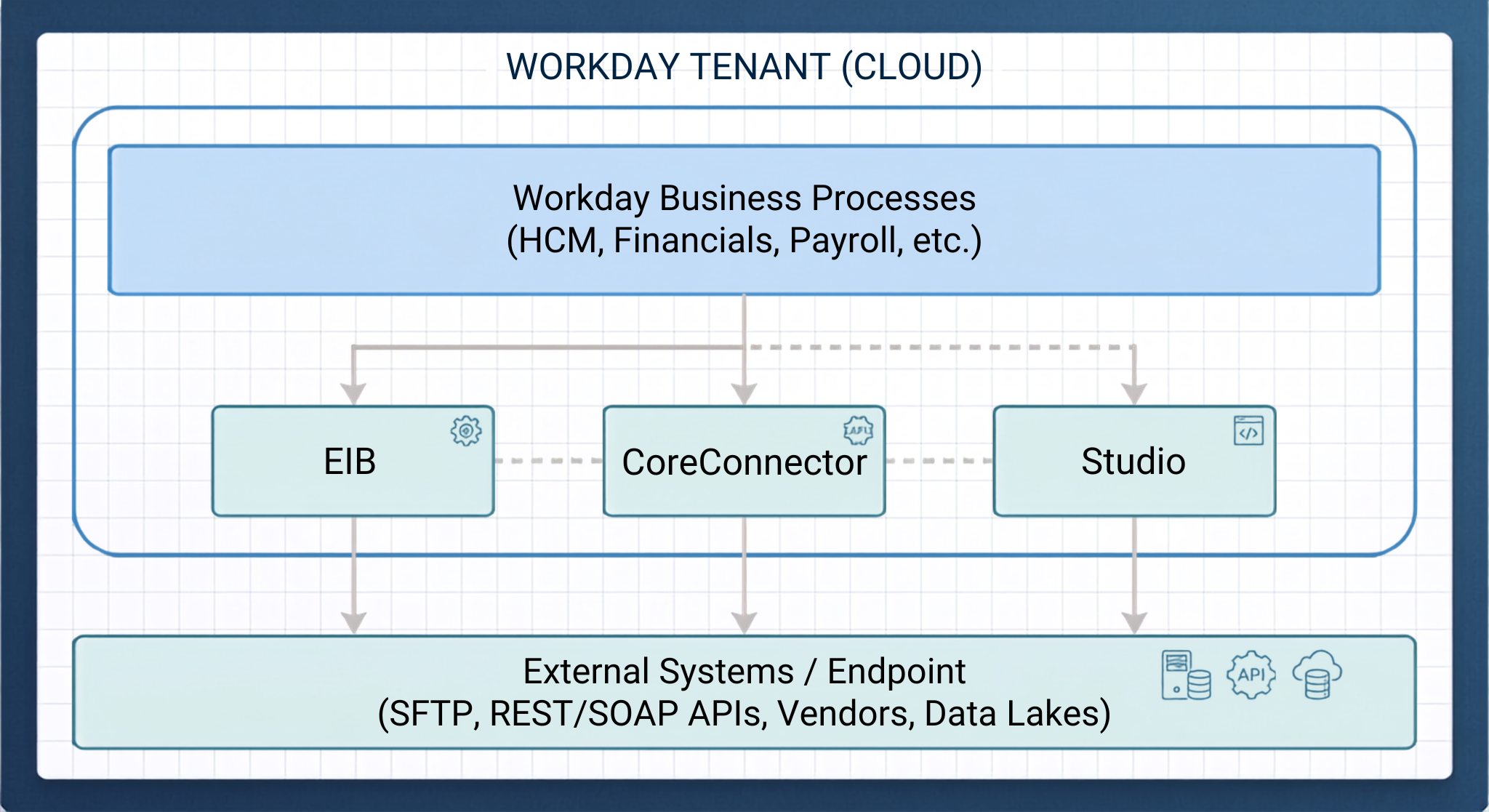
There are three integration engines, and each one provides different levels of complexity, customization, and abstraction of computing:
EIB uses a framework that requires little or no coding for simple batch transfers using one data source, one transformation, and one transport.
Core Connectors provide ready-made and configurable templates that utilize Workday's change detection system based on Integration Change Logs.
Workday Studio offers an IDE running on Eclipse and providing the developers with technology for creating complicated, high-volume, and multi-point orchestrations with the help of custom code, stream processing, iterative processing, etc.
Detailed Description of EIB
Definition of EIB
Enterprise Interface Builder (EIB) is a location-based guided instrument. It enables HR administrators as well as business analysts to create simple integrations in terms of sending or receiving data without writing program code.
Basic Layout and Implementation Steps
Each EIB includes three steps, which should be strictly followed:
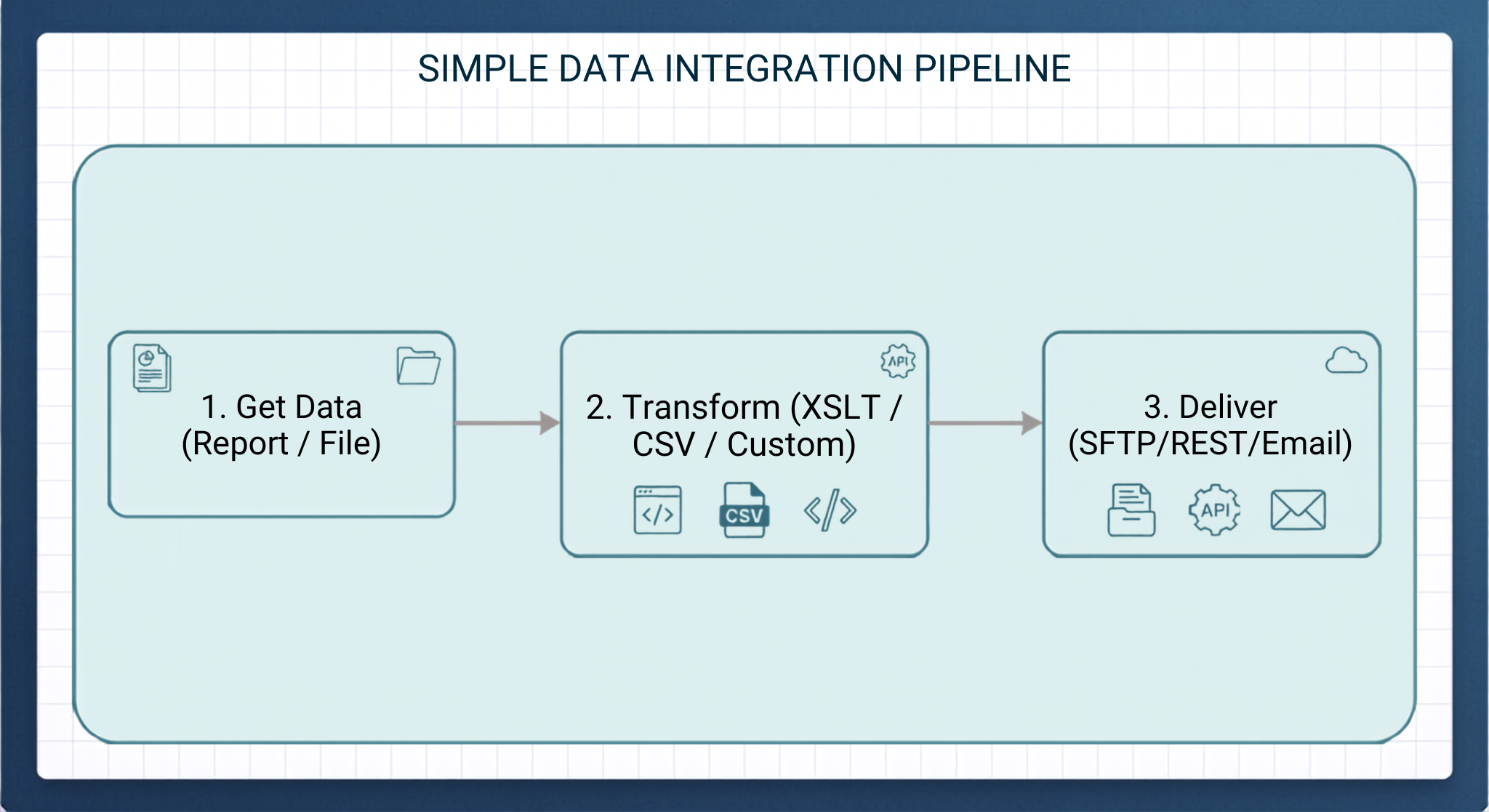
Extract Data (Source):
Outbound: Obtains information using a Workday Custom Report displayed as a Report-as-a-Service (RaaS) or using regular Web Services.
Inbound: Retrieves a document from an outside source (SFTP, HTTP/REST, WebDAV, Email Attachment) or allows an upload by hand.
Transform:
Outbound: Uses transformations based on Custom XSLT (for example, changing XML into a fixed-width text, CSV, JSON, or EDI) or Workday’s built-in Visual Transformer.
Inbound: Changes incoming types of data into defined Workday Web Service (WWS) SOAP XML request structure. Workday makes a standard Excel template for an inbound job as a default.
Present:
The processed payload is then sent to the destination via SFTP, FTP/SSL, HTTP/HTTPS, WebDAV, AS2 or Email.
Benefits:
Rapid Deployment – Standard outbound or inbound EIBs can be built, tested and installed in a few hours.
No Developers Needed: Setup in Workday interface by system administrators or functional consultants directly.
Built-in Security System Integration Users (ISU) and System Integration Security Groups (ISSG) adhere to the Workday security policy framework.
Technical Constraints
1-to-1 Processing Limitation: When an EIB is running, it can only process data from one source to one transport target. It cannot collect data from different independent systems or send the same data to different places at the same time.
No Advanced Error Management: EIBs work on an all-or-nothing or row-by-row approach. If a connection fails before the delivery of the data, the EIB cannot apply any retry mechanisms with exponential back-off.
Memory Constraints: EIB performs the parsing of data by means of using memory If large custom reports generate hundred thousands of records, memory errors will be registered as well as errors in execution.
Deep Dive: Core Connectors & Cloud Connect
Core Connectors
Core Connectors are ready-made integration templates designed and supported by Workday. They are tailored for generic outbound integrations like Third-Party Payroll, Benefits Enrollment, Time Tracking, Financials and Worker Data sync.
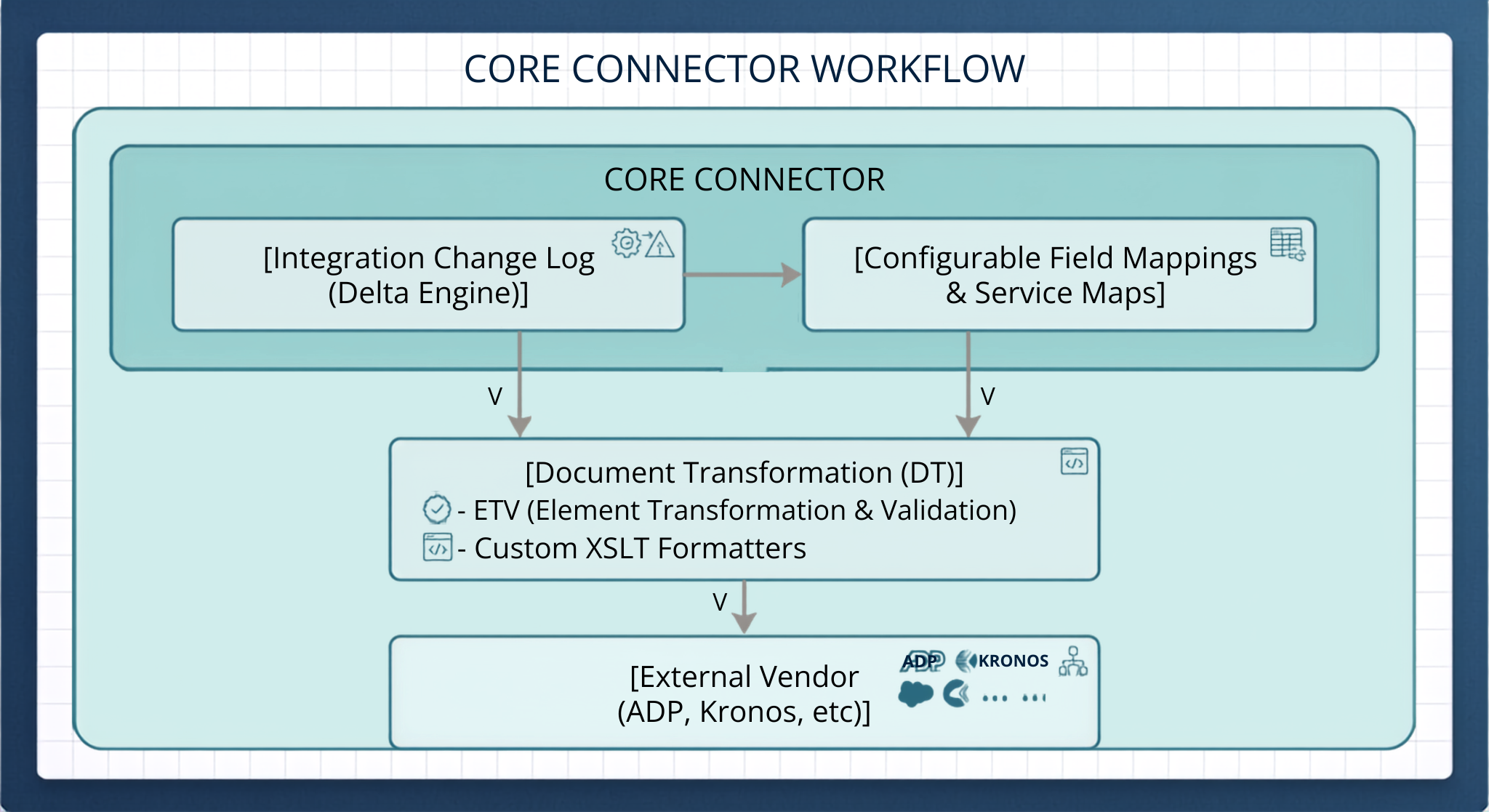
Core Connectors come with pre-defined data schemas and data extraction mechanisms for enterprise software domains, so you don’t have to design integration logic from scratch.
Cloud Connect: The Core Connector Ecosystem
Workday has enhanced the possibilities of Core Connectors with the development of all-inclusive integration solutions known as Cloud Connect:
Cloud Connect for Benefits (CCB): Produces HIPAA 834 compliant files and vendor-specific benefit enrollment output files.
Cloud Connect for Worker (CCW): Pulls details of complete worker profiles and updates about them during their whole employment period.
Cloud Connect for Third-party Payroll: Generates country-specific payroll output for ADP, NGA, CloudPay etc.
Architectural Superpower: Integration Change Logs (Delta processing)
What makes Core Connectors different is their innate integration of Workday Integration Change Log.
It would not be efficient to extract a whole population of workers in order to find out only five address changes have been made. Core Connectors help to solve this by constantly tracing audit transactions:
When the transaction takes place in Workday (for example, a change of compensation or reclassification), the tenant registers the change.
When the Core Connector is activated, it queries the Change Log with the help of Effective Date and Prior Transaction Log baseline.
Integrating Document Transformation (DT)
Document Transformation (DT) is a tool frequently used with Core Connectors. With DT, developers can perform custom processing on the output of Core Connectors by using two main tools:
ETV (Element Transformation and Validation) is a tool that allows the user to format fields, manipulate strings, assign default values, and make use of validation rules without developing XSLT from scratch.
XSLT Extension allows the user to carry out custom XSLT processing for structuring the XML output of the Connector into vendor-specific file specifications.
Major Merits
Vendor & Compliance Maintenance: Workday offers Core Connectors with an update to assist with situation-specific rules required by compliant procedures (i.e. tax rules changing in tandem with environment such as HIPAA formats).
Change Over Time Identification (built-in) No need to develop very complex custom comparison logic for update detection.
Implantability: Various existing structures may be subsequently modified due to Document Transform layers.
Constraints
Fixed Data Models: The Core Connectors extract data from their structures according to pre-determined Workday objects. Any method that falls short of or differs from that framework would be relatively harder to retrieve through Connectors.
Output Limitations: The connectors are mainly outbound data sources while they are not intended for handling incoming transactions.
Overview: Workday Studio
What is Workday Studio?
The Workday Studio is a highly-developed visual programming environment developed on Eclipse IDE. It was designed to cater to complex integration challenges that require more than what configuration-based tools like EIB and Core Connectors may offer.
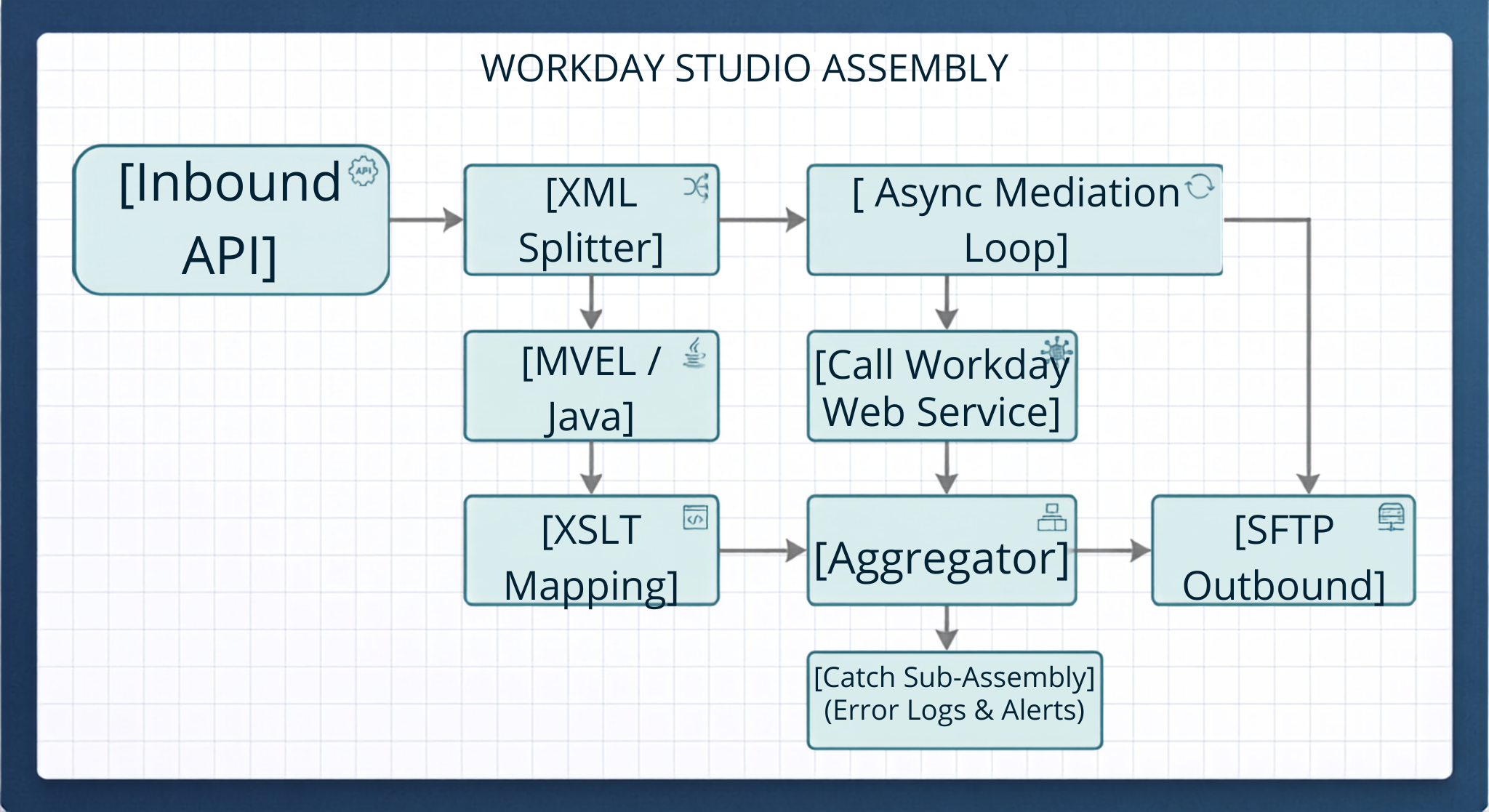
Studio integrations come in the form of visual assembly workflows (assembly.xml) and get deployed straight to the Workday Cloud. These integrations are executed by the Workday ESB runtime system.
Architectural elements of the main
Workday Studio provides a set of graphical building blocks for building customized data pipelines:
Assembly & Components The visual canvas where the development engineers connect the components like the Mediators, Callables, Splitters, and Transports.
Custom Code Blocks: The places where MVEL (MVFLEX Expression Language), Java, and XSLT 2.0/3.0 codes are run directly.
Splitters & Aggregators: The instruments that serve the purpose of fragmenting large files into micro-batches for parallel processing and regenerating files after the transformation is complete.
Sub-Assemblies: The small reusable logic modules such as error handling.
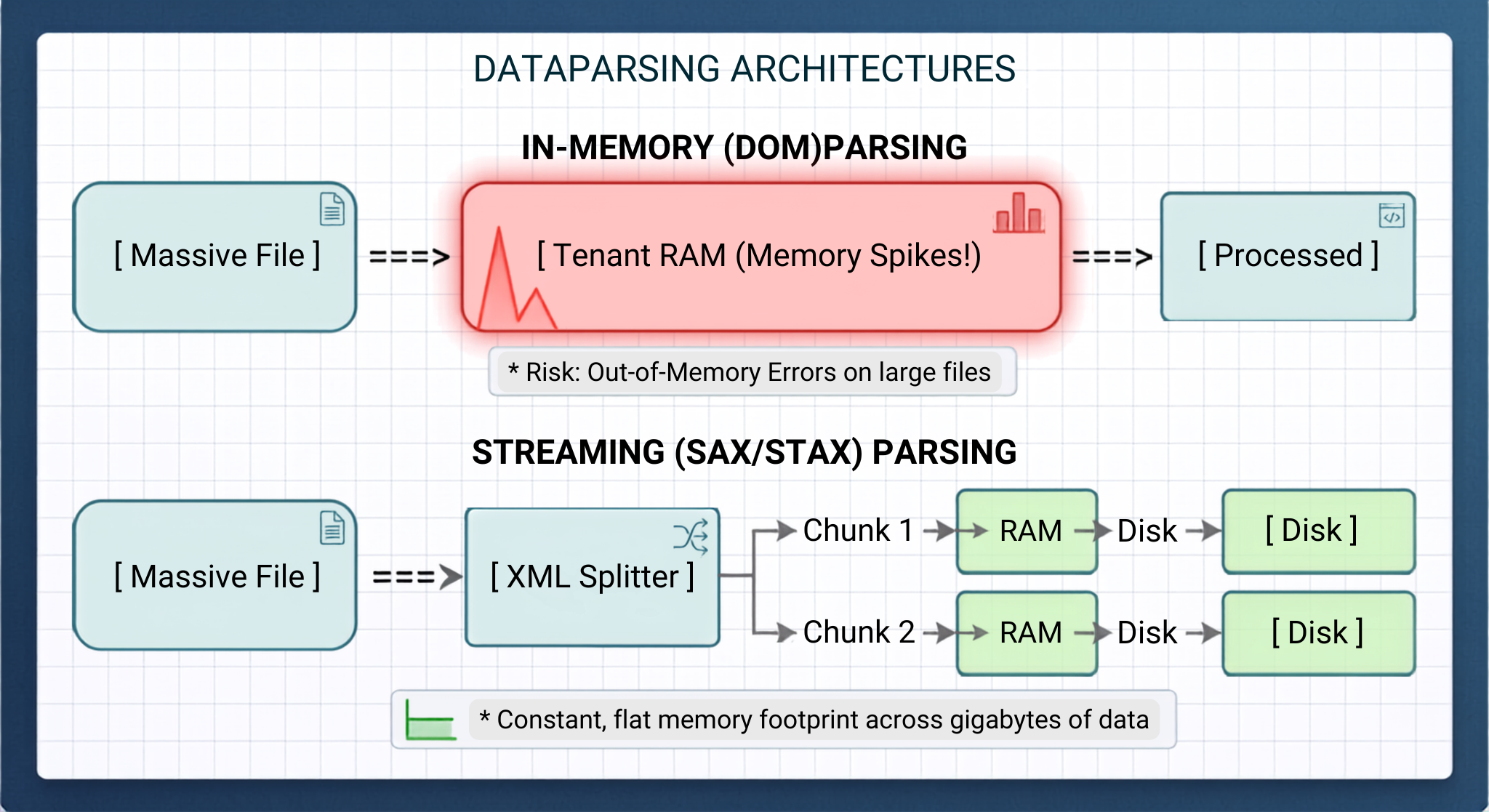
Managing Memory: DOM and SAX/StAX
In order to handle large amounts of data one must use special memory management.
Regular XML transformation tools load everything into the tenant’s memory as a Document Object Model (DOM) tree. Even though it works fine with small file sizes (below 10-20) with the help of the DOM method one would need to stop working on the integration runtime for mega-file processing.
Studio tackles the challenge using XML Splitters and Streaming Readers (SAX/StAX). It is able to stream huge files without an increase in the amount of memory used, regardless of whether one processes 1,000 or one million records.
Advanced Features
Cross-platform Orchestration: One instance of the Studio can invoke a custom Workday report, access third-party web services, summarize responses, carry out database searches, and update various systems using individualized information.
Smart Error Handling: Programmers can create customized catch sub-assemblies to record errors, send out messages, notify users via e-mails, or re-try failed web service calls.
Two-Way Interaction: The Studio is capable of processing incoming web services requests and sending meetings automatically in real time.
Key Advantages
Endless Flexibility: It allows any type of data manipulation.
High Performance: The program is able to handle huge files.
Full Control: It integrates with source control systems (Git) and enables automated website testing.
Technical Drawbacks
The programmers should be acquainted with the technology of XML and XSLT as well as other technologies like Java/MVEL and web services (SOAP/REST) specifications, which can be challenging for many programmers, making them prefer to take structured workday integration classes or going through workday integration training online before trying to design production integrations.
Higher Maintenance Costs: Custom software needs constant maintenance, testing, and documentation during the semi-annual updates from Workday.
Architectural Comparison Matrix
In terms of complexity, development environment, and target audience, the Enterprise Interface Builder (EIB) presents the least barrier to entry. The EIB is embedded in the Workday Web UI, making it a no-code graphical environment, allowing HR administrators and business analyst to execute basic integrations in a few hours to a few days. Core Connectors are in-between. This approach depends on templates that are found within the Web UI, and are designed for Workday consultants and IT integrators. A deployment takes from a few days to two weeks. Finally, a Workday Studio represents the most complex solution, and requires a designated integration developer to write custom code in the Eclipse-based IDE. The project timeframes for building the application may take weeks or months.
When it comes to data transfer patterns, detection of modifications, as well as logic for transformations, Enterprise Integration Bridges (EIBs) operate in a well-defined mode, which presupposes a transfer from a single source to a single target. This approach employs some manual parameters and bespoke reports to find any changes, while standard Visual Transformers or simple XSLT can be utilized for data mapping purposes. On the other hand, the Core Connectors deal with industry-related sources that transfer data to the target, and the key point here is the fact that these connectors have been developed with a specific reference to Workday's Integration Change Log. The latter helps these connectors to capture delta changes automatically. Workday Studio surpasses the other tools due to its ability to provide various forms of connections and to make changes within the data.
The evaluation of execution processing, data volume, error management, and maintenance indicates that EIBs utilize in-memory (DOM) processing mechanism, allowing them to manage smaller payloads up to 200 MB but providing only rudimentary job logging and maintenance requirements. Core Connectors apply standard and pre-defined processing methods to work with medium and large domain datasets in the form of built-in validations and re-processing options and having low maintenance requirements due to Workday managing vendor schemas. Workday Studio promises enterprise-level processing abilities intended to handle huge multi-gigabyte data files due to streaming (SAX/StAX) parsers thus avoiding memory limitations while providing specific catch assemblies, unsuccessful processing options, and automatic alarms. However, this stems from severe demands regarding maintenance of custom code logic.
Organizations not only require HCM and Financials but also automation in employee onboarding, tracking skills, and synchronizing LMS. It is crucial to know the workday learning integrations as well as the Core Connector and Studio which guarantees fluid data interchange between internal learning platform and key worker profiles.
Choosing the Right Tool
The first consideration in selecting the suitable integration tool for a particular project consists of the definition of requirements using this systematic framework.
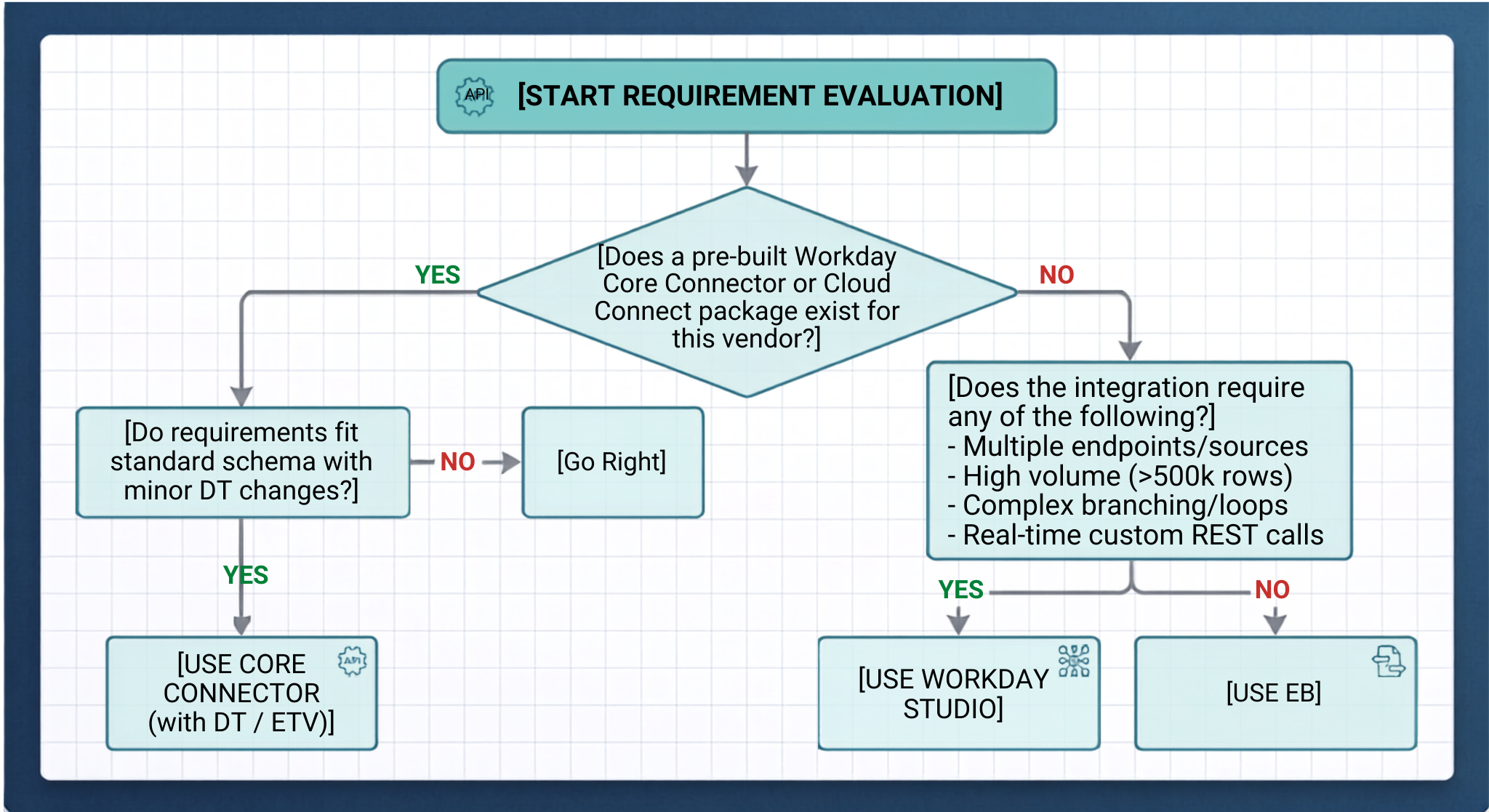
Evaluation of Decision Rules
Rule 1: Opt for simplicity
Go for the simplest type of web service that meets business needs. Avoid creating a Workday Studio integration if the job can be done by an EIB or a standard Connector. It is important to know that too much customized code leads to tech debt in the future.
Rule 2: First check the compatibility of the vendor
In the case of working together with an established platform (ADP, Kronos, Salesforce, Cornerstone, Benefit Vendors), see whether there is a Core Connector pack available. The tools mentioned come already configured with standard mapping of schemas.
Rule 3: Always assess Data Volume and memory profile
Use EIB while dealing with small-to-medium files (up to 100000 records). Use Core Connectors while handling dataset sync of the domain level.
Utilize Workday Studio for working with datasets that are in gigabyte range.
Rule 4: Check Routing and Systems Technology.
If data goes from One Source to One Destination continuously, just use EIB. In case of conditional routing, multi-system aggregation, etc. use Workday Studio.
Real construction processes
Scenario A: Start and Year End Management Bonus Update
Request: HR has an external spreadsheet with the annual bonuses for 15 thousand employees that need to be loaded into Workday.
Selected Approach: EIB inbound
Explanation: This is a series of transactions with one input document for the Request_Bonus_Payment Workday Services, so an EIB is created using a pre-approved template in Workday without custom coding or anything of the sort.
Scenario B: Weekly Transfer of Global Payroll Data to External Vendor
Each week, payroll data and any changes to worker demographics, salary and tax information should be uploaded into an external vendor’s payroll software (i.e. ADP).
Selected strategy: CCW/Payroll + Document Transformation (DT)
Explanation: Updating the data manually would be complex and require complex reports and a huge amount of files. CCW works on the basis of Workday's inbuilt Integration Change Log, which gives it advantages over other solutions. Data transformation allows changing the delta file to form the flat-file format required by the vendor.
Scenario C: Real-time Access Management of Employee Badge and Security
Requirement: Whenever there is an event involving the hiring or firing of an employee within Workday, a corresponding action should take place with regard to their physical access badges in the third-party security system. If the third-party system fails, it is important to note the transaction and try again in five minutes.
Chosen Tool: Workday Studio
On the choice of the tool: This request requires capabilities that are not available with configuration-based tools. Specifically, it entails interaction through REST API.
Working with the best practices for Workday Integration Governance
Integration architects should implement the following rules that will help keep the Workday tenant performing well:
Avoid Hardcoded Endpoints and Credentials
Never hardcode IP addresses or SFTP URLs directly inside XSLT stylesheets or Studio code. Use Integration Attributes, Integration Maps, and Workday Account Security Credentials instead, so you can easily switch between Sandbox, Implementation, and Production tenants without any need to change the code.
Develop Streaming Design Studio Assemblies
Assume that data volume will only keep increasing, and do not load XML into DOM memory structures. Use XML Splitters and streaming parsers to ensure predictable RAM consumption.
Centralize Alerting and Logging
Make sure that there are structured log events of integration errors that get associated with the Workday Event Process. Administrators should be able to diagnose integration failures directly from the Workday UI without needing to use an IDE.
Audit and Prune Change Logs
When employing Core Connectors, create reasonable retention policies for the data in change logs, as accumulated history of change tracking logs may affect the performance of the tenant.
To conclude
In choosing the correct Workday integration tool, the focus should be on aligning technological capabilities with the needs of an organization rather than attempting to find the best overall platform. In that regard, Workday’s Integration Cloud distinguishes three separate technologies; EIB, Core Connectors, and Workday Studio. The major task that IT professionals face is to weigh operational needs against the challenges inherent in each integration project.
EIB, or Enterprise Interface Builder, provides the easiest and most efficient way for simple transfers to take place. EIB is a solution designed for point-to-point batch processing, making it possible for professionals in charge to create the necessary transfer schemes through using ready templates or reports.
Are you prepared to become an expert in Workday integration? Whether you are an analyst creating EIB or a developer learning Workday Studio, check our workday integration course online to acquire job-ready skills based on real tenants’ activities.