
Enterprise Scaling for Azure DevOps: Work Items, Processes, and Governance
Last updated on Aug 12, 2026
In the midst of the digital transformation that is taking place in contemporary companies, software engineering teams are tasked with the challenge of scaling their processes while maintaining speed and compliance. Azure DevOps has risen to become a platform of choice when it comes to lifecycle management of applications within an enterprise environment through provision of various capabilities in areas such as backlog management, version control, build and release pipeline automation, artifact repository storage, and test management. Nonetheless, adopting Azure DevOps at scale involves careful consideration.
Without an intentional approach to scaling, enterprise Azure DevOps environments soon devolve into silos. Each team develops its own processes, duplicate fields, and competing workflows, making portfolio-level visibility from across projects nearly impossible. However, too strict a governance approach stifles innovation, placing undue bureaucratic burden on agile teams that need to deliver customer value fast. Appropriate balancing means knowing three components of Azure DevOps, namely custom work item types, process templates, and governance of enterprises.
Principles of Architectural Strategy: Structuring Teams and Projects
Before defining any custom fields or creating pipeline policies, the enterprise architect should first establish a stable infrastructure of the Azure DevOps system. These basic components of Organizations, Team Projects, Teams, Area Paths, and Iteration Paths form the very foundation on which all the tracking, reporting, and access control systems will rely.
Organizational Structure: Single vs. Multiple Organizational Structures
One of the key decisions that an organization needs to take when implementing Azure DevOps is whether to use a single organization or multiple organizations.
Use of a single organization will maximize cross-boundary collaboration and central administration. It will make it easier to manage the portfolio globally, allow search across all code bases and work items, simplify licensing as well as give one identity provider boundary through Microsoft Entra ID (formerly Azure Active Directory). Additionally, any process templates and custom work item types that are created at the organizational level can be instantly accessed by all the team projects within that organization.
On the other hand, a multi-organization topology could be a requirement due to stringent regulatory compliance, separate geographic data residency regulations, highly isolated administrative requirements, or M&A activities for corporations wherein the merging of Entra ID tenants is not possible. In a multi-organization configuration, process templates sharing is done through manual copying or synchronization via external tools, while portfolio reporting across organizations calls for data consolidation through external data warehouses and Power BI installations. In most enterprise environments, the optimal architecture would entail a single organization, or an extremely limited number of geographic organizations.
Boundaries and Consolidation of Projects
An all-too-common mistake in enterprise adoption is the creation of numerous Team Projects. Traditionally, organizations have had the habit of creating a new Azure DevOps project per software application, microservice, or business endeavor.
Project consolidation is recommended for modern enterprise architecture. The Team Project should cover a wide business area, product family, or value stream but not any particular technical artefact. For example, in the case of a big enterprise banking company, team projects may be formed on the basis of its main value streams, namely, Consumer Banking, Commercial Lending, and Digital Payments. In one consolidated project, a number of feature teams can work independently having common boards, backlog, and reporting mechanisms.
Hierarchy through Area Paths and Iteration Paths
Two kinds of trees (multi-dimensional) can be found in Azure DevOps to classify work items in terms of time and place – these are Area Paths and Iteration Paths.
The Area Paths define a structure of the functional or logical ownership of work. These determine who is responsible for a particular work item, control board visibility, and security boundary. Area Path hierarchy should resemble the enterprise product breakdown structure. For example, Area Paths can have levels from the domain to feature capabilities.
Iteration Paths determine the time rhythm of delivering work. These are sprints, releases, and increments for strategic planning. In order for there to be common portfolio roll-ups, an enterprise needs to have a standard global hierarchy of iteration paths. Even though individual agile teams work on sprint cadences that last two weeks, they need to correspond to increments that are specified at the enterprise level or the quarter plan.
The Process Inheritance Model and Enterprise Process Templates
The work tracking engine of Azure DevOps Boards works on the basis of process templates. A process template consists of the building blocks of work management: work item types, workflow states, forms layouts, custom fields, and business rules. It is crucial to understand how to design such templates.
Process Model Evolution: Hosted XML and Inheritance
Azure DevOps Server (On-Premises), as well as early cloud installations of Azure DevOps, utilized Hosted XML process models, in which administrators extracted XML schema files, made changes locally, and uploaded the changed files using command line utilities. Although XML allowed for a high degree of customization, it posed numerous complexities and challenges in cloud migrations.
The current standard for Azure DevOps Services is Inheritance Process Model. Within the Inheritance Process Model, system processes such as Agile, Scrum, CMMI, and Basic act as unchangeable core processes maintained by Microsoft. Custom processes are developed through inheritance of one of the base templates. Microsoft updates to the system automatically propagate to inherited processes without overwriting any organizational customizations.
Enterprise Core Process Template Design
In order to prevent governance confusion whereby each team creates its own process models, enterprise companies need to create only one primary Inherited Process called the Enterprise Agile Process or the Core Operations Template.
While designing the enterprise core process, begin with using the standard agile or scrum system process template as a starting point. Any changes to it can only include features that are universally useful to the entire enterprise company. For example, creating a global field for compliance tracking, creating standard bug severity category types, or adding some portfolio hierarchy items are features that would work well for all of the business units.
However, when business units have special needs that require special compliance tracking such as the medical device compliance fields that may be needed by the health care division, then administrators should create a child process based on the enterprise core process template.
Designing Custom Work Item Types and Portfolio Hierarchies
Out-of-the-box process templates in Azure DevOps define standard WITs such as Epic, Feature, User Story, Bug, and Task. Although adequate for small software teams, complex enterprise environments usually need customized WITs to capture high-level strategic planning, governance gate items, compliance artifacts, and enterprise architecture programs.
Adding Additional Portfolio Tiers
Enterprise agile frameworks such as Scaled Agile Framework (SAFe) and Large-Scale Scrum (LeSS) demand multi-layered planning levels that go well beyond traditional features and user stories. With Azure DevOps, portfolio backlog level can be modified and set up to accommodate up to five tier levels.
The typical hierarchy of an enterprise portfolio backlog includes the following layers:
Strategic Initiatives or Capabilities: Describes the multi-year investments by the board at the enterprise level cutting across various business units.
Epics: Describes large-scale business solutions or product releases which take several months to complete.
Features: Describes functional capabilities built within a product stream on a quarterly basis.
User Stories/Requirements: Describes functional deliverables which are developed by agile teams within regular sprints.
Tasks & Bugs: Describes day-to-day activities and bug fixes.
Such a hierarchy is implemented using the following configuration: custom Work Item Types such as "Initiative" or "Capability" are defined, and they are mapped to custom portfolio backlogs. As a result of that, the executive leadership can use a portfolio roadmap to extend the Initiative and visualize its implementation all the way to the developer tasks in multiple projects.
Definition of Specialized Custom Work Item Types
Next to structural backlog items, enterprises often create specialized WITs to manage operational, legal, and architectural requirements:
Risk WIT: For recording technical, financial, or security risk. Fields include Risk Probability, Impact Score, Mitigation Plan, and Contingency Plan.
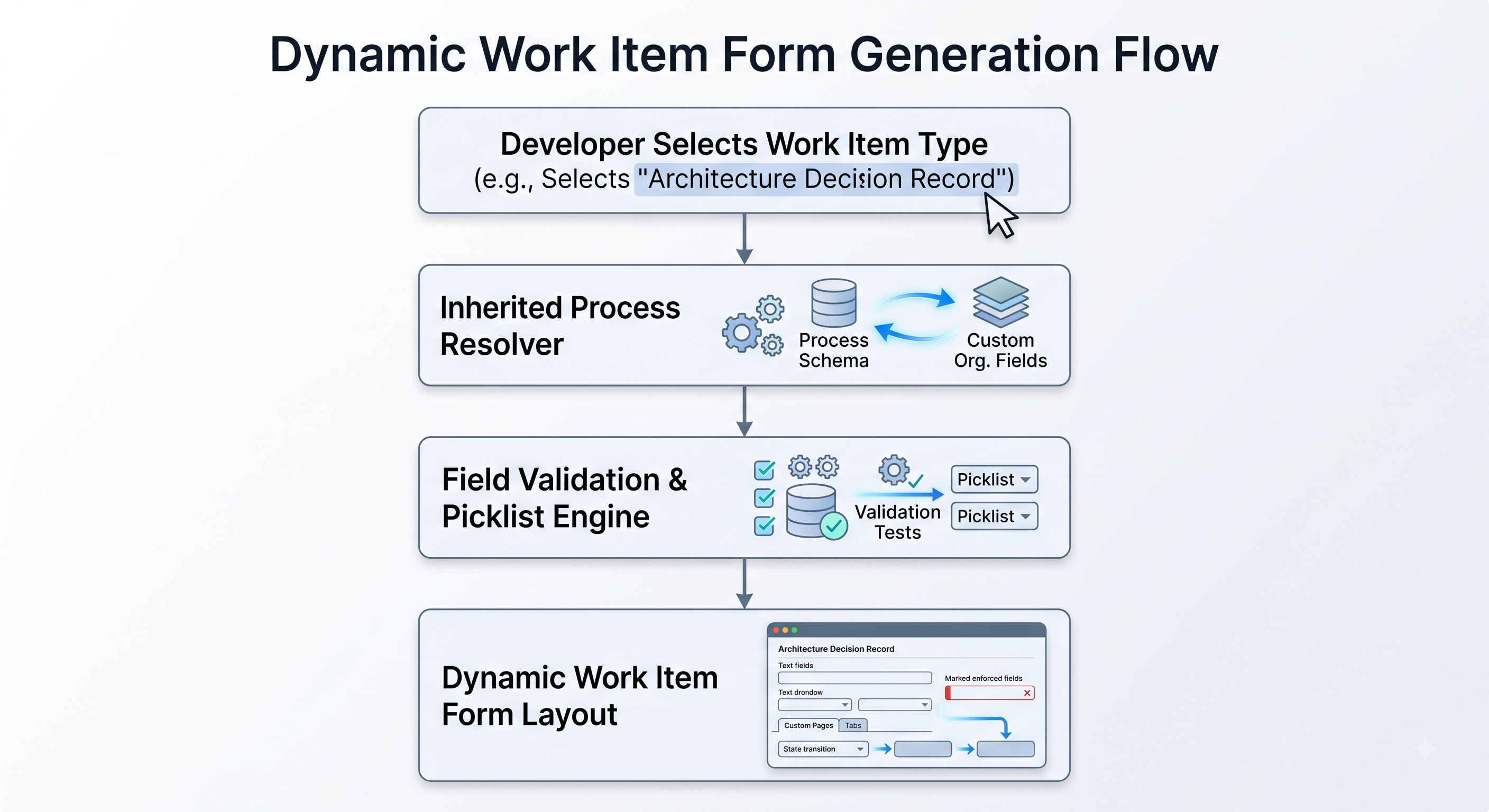
Dependency WIT: For recording external dependencies between teams or vendors. It enables the creation of alerts automatically, when the dependent task is overdue according to the consuming team sprint end date. Architecture Decision Record (ADR) WIT: It records, with regards to software architecture in the organization, important decisions taken in the context, records changes made as well of evaluation results of the technologies.
Compliance/Security Gate WIT: Regulatory approvals (SOC2, GDPR, HIPAA, PCI-DSS) before deployment of the code to the production environment.
Field Management, Custom Picklists, and Form Design
The enterprise administrator needs to practice strict governance when introducing custom fields into existing or new WITs. The custom fields in Azure DevOps have an organizational context. For example, when one team introduces a custom field named "Target Date" as a text field while another team names "Target Date" as a DateTime field, there will be inconsistencies within the schema.
To prevent the contamination of the fields and the occurrence of technical debt:
Implement a common scheme for the naming of specialized fields, which involves using a prefix for governance fields.
Make use of established Picklists for the attributes that will be used in enterprise-level reporting, including such as “Business Unit,” “Regulatory Scope” and “Cost Center”.
Utilize the Identity field for the roles of Assignee and Approver in order to have the possibility of integration with the Entra ID user folder.
Arrange the custom fields into coherent groups on the task form with the help of such tools as custom pages and groups.
Implementation of Rules & Automatic Transitions States
A workflow consists of different workflow states which are New, Active, Resolved, and Closed. Using custom rules, there is a possibility for the administrators to govern the business process in the work item form.
Examples of enterprise rules are:
Field Enforcement: Ensuring the “Root Cause Analysis field” is marked as mandatory for moving a bug to the “Closed” state.
Conditional Visibility: Showing regulatory compliance fields based on conditions. For example, if the “Regulatory Impact” picklist is set to “High.”
Identity Restriction: It means that, for example, certain security groups are allowed to carry out a state transition for the Architecture Decision from “Proposed” to “Approved.”
Automatic Field Populations: Filling approval time stamps and identifying the approver of the change request.
Governance becomes embedded within form rules and results in elimination of administrative hassles and ensuring integrity of data in millions of work items.
Enterprise Governance, Security, and Compliance
Enterprise scale-up of Azure DevOps is not only a governance and security issue, but also a process configuration one. Enterprise governance involves identity and access management, pipeline security, branch policies, and continuous auditing.
Role-Based Access Control and Identity Governance
The management of identity needs to be based on Microsoft Entra ID. Local users on Azure DevOps need to be disabled completely in enterprise-scale scenarios. Users should obtain access to Azure DevOps using the set of policies of Entra ID. This means RBAC (role-based access control) implementation must follow the least privilege principle.
Access should be on a need-to-know basis:
Organization Administrator role should be limited to the Core Infrastructure or DevOps Center of Excellence team only. This team will administer process templates, organization extension installation, billing, and security policies at an organization level.
Project Administrator: Appointed Lead Solution Architects or Delivery Directors accountable for particular value streams. The Project Administrators will be responsible for project configuration management including service connections, and permissions related to Area/Iteration Path.
Contributor: Regular engineers and business participants. Provided permissions on work item reading, creation, and updates, code branch management, and triggering of development build pipelines.
Stakeholder: Free-tier account limited to executive sponsors, business participants, and auditors needing only board level read permission or light work item creation permissions without accessing source code repository.
Area Path and Iteration Path Based Granular Security
Area Path is more than just a naming structure for organizations as it is a way to create boundaries for security. For enterprises with confidential Intellectual property, financial data or classified code bases, permission settings like (Read, Edit work items or Delete work items) can be applied explicitly on particular nodes of the Area Path hierarchy.
In other words, an enterprise can allow external contractor teams access only to those sub-Area Paths assigned to their vendor contract while all sensitive internal Research & Development Area Paths will not be visible to them.
Security for Pipeline and Supply Chains
Pipeline and CI/CD tools pose great risks to the organization’s security if not controlled. There are strict control measures that should be applied in order to secure Azure DevOps, such as strict supply chain guardrails, RBAC, and secured secrets. Since the configuration of federated identity credentials and YAML security templates demands specialized skills, engineers usually take an azure devops training:
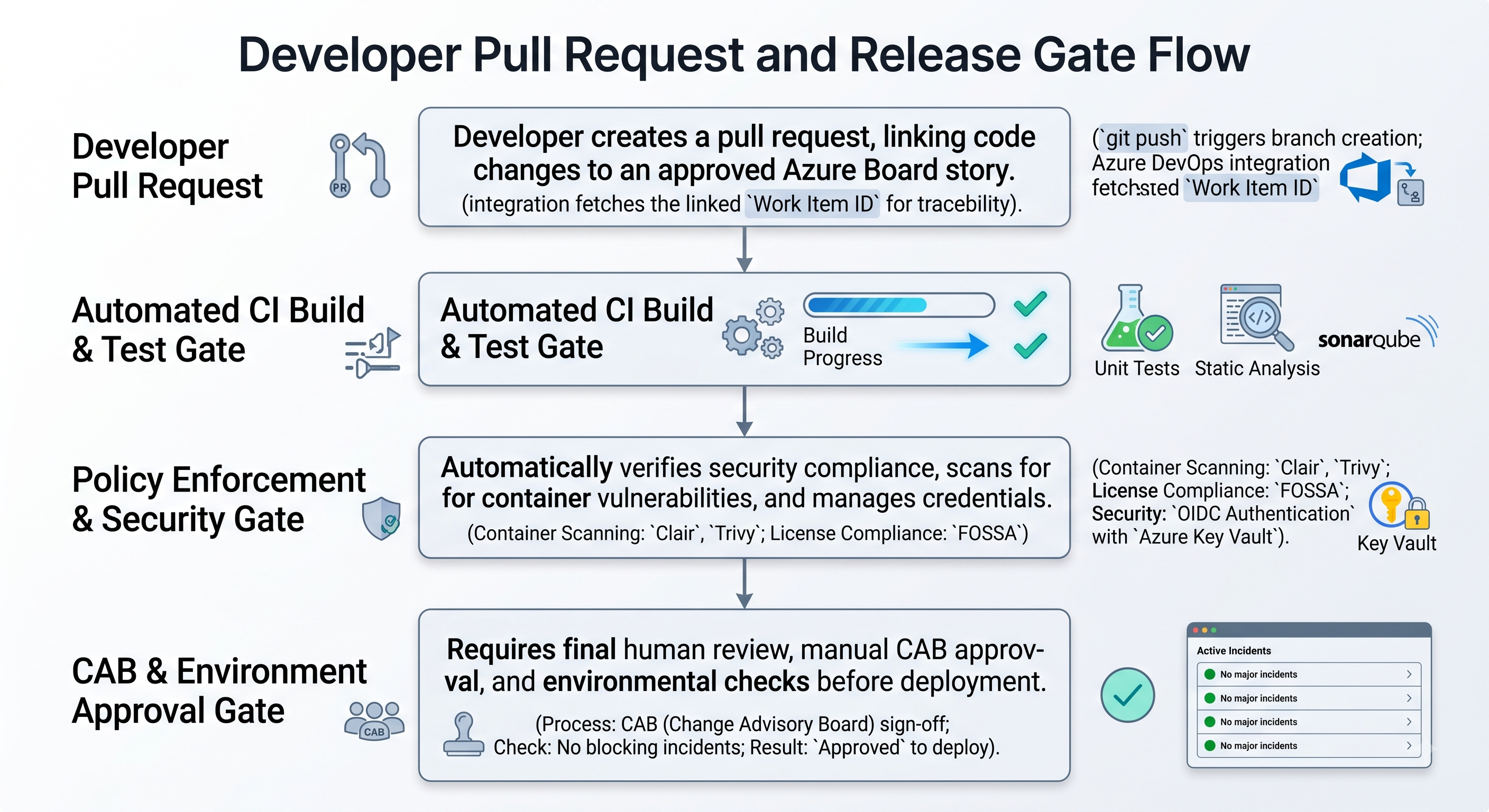
Service Connection & Key Vault: CI/CD pipelines should never keep passwords in plain text, API keys, or certificates. Access to cloud infrastructure (Microsoft Azure, AWS, GCP) must go via Federated Identity Credentials (OIDC) or Service Principals with RBAC. Secrets that have to be exposed during runtime must be kept securely via integration with Azure Key Vault.
Environment Approval and Check: Environment approval must happen on a per-environment level. The checks will include a manual approval gate by change advisory board, an automated check on branching (deployments to production are not allowed from other branches), and an automated REST API check ensuring that there is no open incident ticket.
Governance of the Pipeline Templates: Corporate security team must publish the central pipeline templates (in YAML form) stored in a secured repository. The templates will include all the security tools of the enterprise (static code analysis, container vulnerability scanning, open source license compliance). They must be mandatory and cannot be bypassed.
Repository Policies and Branch Governance
The quality of code and regulatory compliance depend greatly on the branch policies implemented in Azure Repos. The release or main branches have to be locked from direct push actions.
The procedures of the corporate branch policy state that:
Minimum Number of Reviews: Two reviewers are required to approve each Pull Request (PR).
Linking of Work Items: Each PR should link itself back to an approved Feature or User Story work item to ensure that traceability of the requirements are in place before deployment of the code.
Successful Build: PRs must pass all unit tests and static analysis in the CI pipeline before they are merged.
Reset of Approvals: When a push is done to the source code branch of the PR, all approvals on previously approved PRs will be reset .
CODEOWNERS Sign-off CODEOWNERS will ensure that the correct security/architecture specialist owners have signed off on the PRs that touch code that is related to critical systems from a security/architecture perspective.
Audit logs and compliance monitoring play a key role in enterprise compliance management as a means of providing insight into what administrative actions were performed. Various audit logging capabilities are available in Azure DevOps to log actions, from permission changes to usage of process templates to repository deletions.
For audit logging to take effect, enabling continuous streaming through Azure Monitor diagnostic logging into SIEM tools like Microsoft Sentinel and Splunk is imperative. This allows building an alert mechanism for any unusual administrative activity by the SOC team.
Cross-Project Visibility, Portfolio Management, and Analytics
One of the key goals of scaling Azure DevOps is providing stakeholders across all organizational levels— from scrum masters and engineering managers to business leaders and chief technology officers— with valuable insights.
Portfolio Backlogs and Delivery Plans
As feature teams handle day-to-day operations on Kanban boards and sprint backlogs, the senior management needs high-level visualization capabilities.
Portfolio Backlogs: Give leaders the ability to browse work hierarchy structures through different projects. By choosing Initiative or Capability backlogs, one will be able to track the percentage of completion, costs, and delivery forecasts for different engineering groups.
Delivery Plans: Visualize delivery roadmap across different teams and projects. Delivery Plans map work items on a calendar-based timeline according to the forecast completion date and iteration plan. It is important because it enables program managers to see schedule dependencies between teams, scheduling issues, and delivery milestone tracking for dozens of different concurrent feature development streams.
Advanced Analytics with OData and Power BI
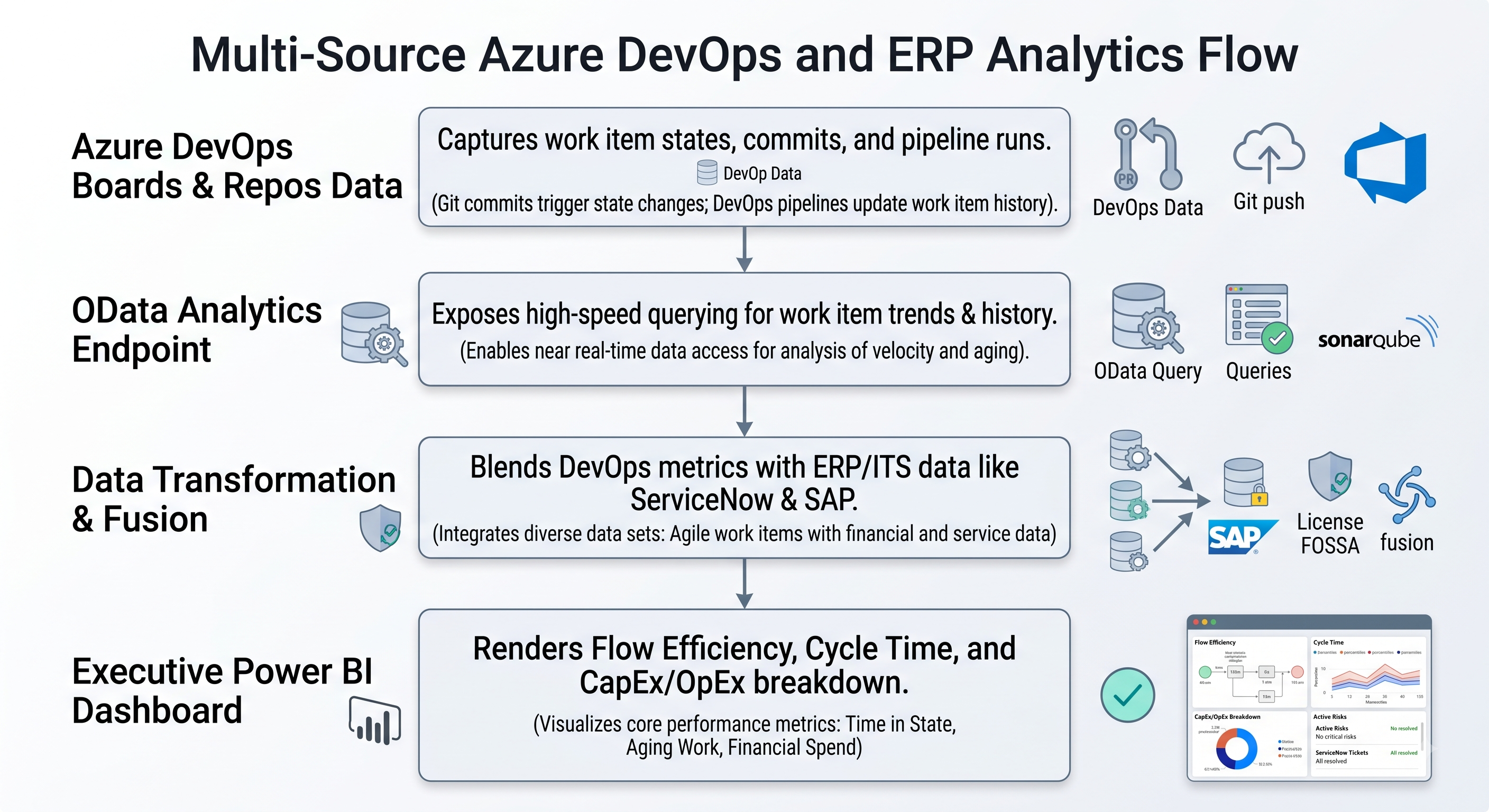
Although there are out-of-the-box real-time widgets in Azure DevOps, integration of DevOps metrics into other enterprise software like SAP, ServiceNow, and Workday needs data pipelines. Azure DevOps Analytics comes with an OData service that allows business intelligence teams to create executive dashboards. Business analysts who want to understand the complexities of OData schema and learn custom reporting usually enroll in a relevant azure devops online course.
Azure DevOps Analytics offers an OData endpoint that enables business users to perform advanced queries to the Azure DevOps database. As a result, business intelligence teams will be able to develop sophisticated executive dashboards to evaluate:
Metrics of Flow: Cycle time, lead time, throughput, and flow efficiency throughout all business areas.
Developer Productivity and Quality: Speed of bug convergence, density of escaped defects, and frequency of deployments.
Financial and Capitalization Metrics: Time spent on development of new features and time spent on maintenance of technical debt, allowing finance departments to determine software capitalization (CapEx or OpEx) by means of work item completion metrics.
Enterprise Operations Playbook: Implementation Strategy
In order to transform your enterprise Azure DevOps environment from chaos into a scalable and governed platform, it is necessary to apply an implementation playbook with several phases.
Phase 1: Creating a DevOps Center of Excellence (CoE)
A proactive approach is needed for governance to be enforced; it cannot be done in a top-down manner. Establish an enterprise CoE of lead architects, security experts, agile coaches, and platform engineers. For successful enterprise-wide adoption, most CoEs collaborate with a platform such as OnlineITGuru and offer azure devops course through their platform for engineering teams that will work in standardized procedures.
DevOps CoE will take responsibilities for all global administrative tasks:
Maintenance of the central Enterprise Inherited Process templates.
Approval of requests to create custom fields and custom work item types.
Maintenance of shared pipeline templates and custom security extensions.
Training and documentation to engineering organizations.
Phase 2: Standardize Taxonomy and Perform Field Audits
In preparation for designing custom processes, perform a complete audit of existing team projects and processes. Check for field duplication, picklist value inconsistency, and old work items.
The following components need the development of a framework of corporate taxonomy, such as:
Corporate taxonomy of project types, specificities of all the fields and states of workflows.
Scheduled reviews of usage in order to assure the quality of the audits.
Phase 3: Pilot Implementation and Migration in Stages
Do not try to perform a one-shot migration of the entire company at once. Choose a suitable business unit which is ready to become a pilot project for the new enterprise architecture.
Design a standardized enterprise inherited process according to taxonomy audit requirements.
Migrate the pilot project from its legacy process to the newly designed inherited process.
Validate the configurations of the boards, work items forms, rules, and delivery plans with pilot participants.
Based on the feedback, improve the process definitions, document experience and create migration scripts.
Systematically migrate other business units by cohorts.
Phase 4: Continuous Auditing and Transformation
The process of enterprise governance is not a one-time project but rather a capability that needs to be maintained constantly. It is advisable to carry out the audits on a quarterly basis, which involves monitoring the usage of the fields and elimination of the fields that are not used or obsolete.
Quarterly Process Reviews: Conduct field usage audits. Eliminate unused and deprecated custom fields that are not currently being populated or used.
Security Audit: Conduct access level audit, guest access expiration, service principle secrets, and admin group membership.
Optimization of Templates: Add in the new features released by Microsoft quarterly on Azure DevOps platform.
Conclusion
The ability to scale up Azure DevOps for enterprise-level operational needs requires striking the right balance between structure and autonomy in architecture. By creating an organizational topology, grouping team projects into value streams, and relying on inherited process models, organizations create a solid foundation for growth.
Work Item Types and custom portfolio hierarchies make visibility possible all the way down from executives' strategic planning efforts to the actual coding process, providing perfect alignment at any level of complexity of the product portfolio. Together with role-based security, automatic pipeline guardrails, branch protection, and centralized analytics, Azure DevOps is transformed from just a simple task tracker into a full-fledged enterprise solution for high-speed, compliant, and quality software delivery.
Companies that are ready to put money into the development of a DevOps Center of Excellence will make sure that their teams will grow faster, more efficient and agile with each passing day. In case companies want to boost this process, they will be able to turn to OnlineITGuru for specific microsoft azure devops training courses.