
Git Branching Strategies for Azure DevOps Teams
Last updated on Oct 20, 2026

In the present context of software development, organizations have to make sure that the speed of the release is competitive and that the operation of the software remains stable. The Git repository in Azure DevOps serves as the central repository of the application logic, its infrastructure, and automation scripts. Without the proper branch organization scheme, the process of software development will be ambiguous and inconsistent, which will lead to problems with merging different branches, building and testing, and releasing the software. Choosing the strategy in branching is not just a technical issue, as it determines communication within the team, frequency of releases, and frequency of code review.
Azure DevOps provides different means for keeping the repo in order, e.g., Branch Policies, Branch Security, Pull Request build validations, linking Work Items, automatic assigning of reviewers and use of multi-level YAML pipelines. To be able to harness their potential and choose the best workflow for their tasks, most engineers opt to participate in microsoft azure devops training courses at OnlineITGuru, where developers learn when they will release the software and how they will structure the teams and organize application repositories."
Important points to bear in mind when picking a strategy
Before arriving at a final tracking taxonomy, it is crucial for the engineering organizations to consider the technical and technology constraints.
The implementation process is the first factor to deal with. Thus, those teams working on implementing continuous delivery for software as a service platforms require an uncomplicated and short branch strategy, where the merging with trunk code may be carried out several times every single day. On the contrary, the businesses working with packaged software, embedded devices, and the like requires the implementation of branch and other types of branch continuity systems even on a quarterly basis.
Repository architecture is one more factor. Having a monolithic application supporting a large number of cross-functional teams is much different from separating microservice architecture with a number of separate repositories that allows applying much simpler branching for smaller repositories.
The third component of the model is readiness for implementing test automation in the organization. There are certain straightforward and effective solutions like Trunk Based Development, which require an extensive amount of automated tests, sophisticated integrations, and a great level of continuous delivery maturity. Companies that mainly undertake manual testing, with several lengthy approvals, should be ready to allocate the required amount of resources in case of the branching.
In relation to the fourth element, fixing defects and implementing hotfixes need to be pointed out. Teams should understand how to deal with production issues. In what way can the defects be corrected when something goes wrong? Should the solution rely on the master branch or revert to the production tag and start the production again?
Fifth principle emphasizes on the framework for team distribution and operations. Companies using distributed teams or outsourcing services are supposed to ensure the presence of Azure DevOps policies securing segregation of duties, minimum number of required approvers, implementation of break checks and the recording of work items at each stage of execution. An appropriate policy should function together with the pull request approval mechanism.
Azure DevOps Native Integration Architecture
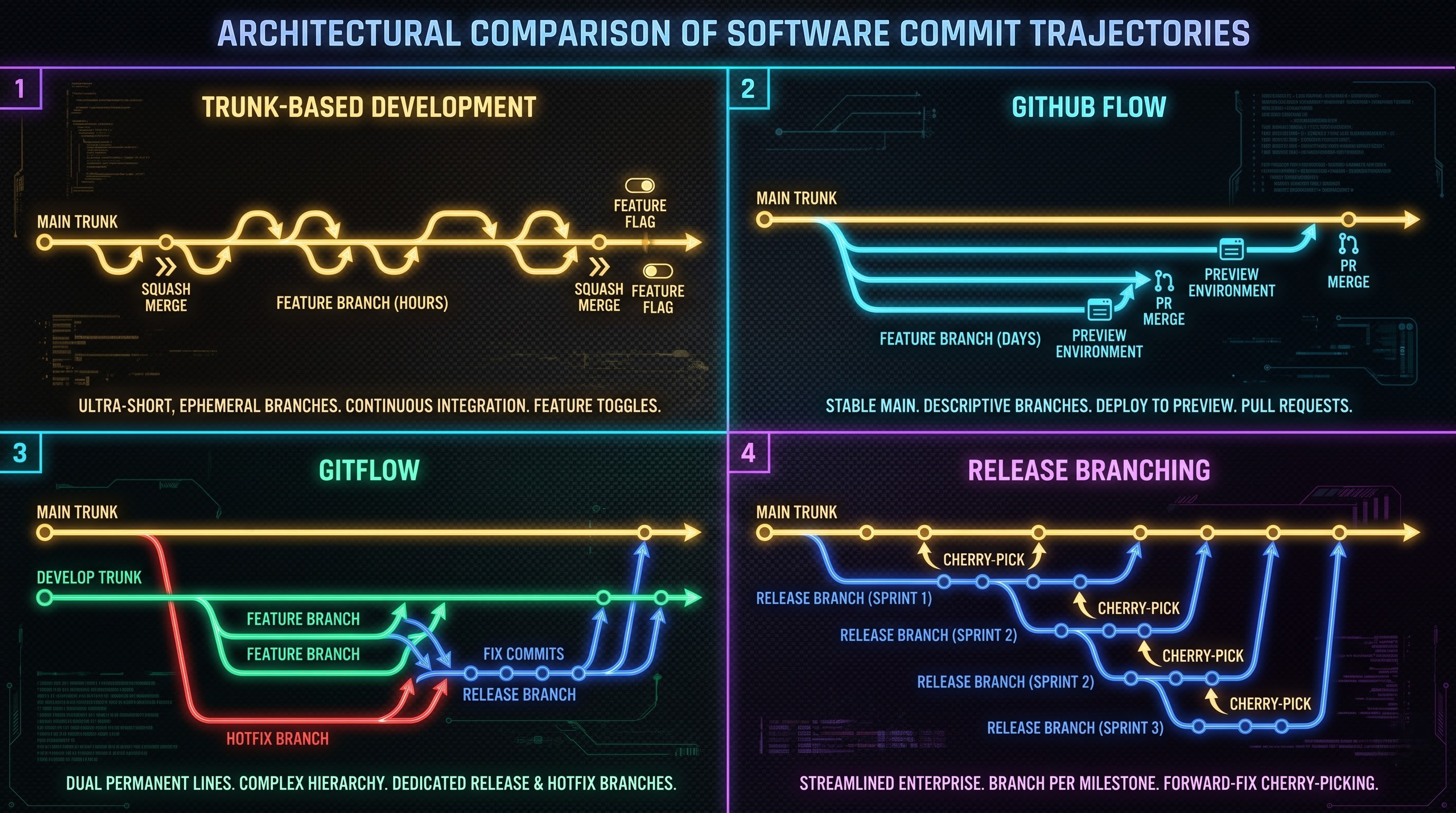
Azure DevOps serves a higher processing system that oversees raw Git repos. Understanding the way the core features of Azure DevOps function when paired with connected repositories and CI/CD pipelines is important for compliance in the enterprise—one of the most important modules offered in the best azure devops course by OnlineITGuru.
Branching Policies of Azure DevOps protect key branches from unauthorized pushes, forced pushes or deletion attempts. Implementation of policies on the major branches ensures that all changes are made via Pull Request. Rules about mandatory requirements can be set by organizations: for instance, a mandatory number of reviewers, prohibition for developers to authorize their own changes, automatic retraction of approval in case of any new commit, and a requirement for all requests to be dealt with before the finish of the operation.
Validation policies of the build associate the pull requests with Azure Pipelines. Before bringing together a pull request into some protected branch, Azure Pipelines uses validation for this purpose. Validation may involve both the process of compilation of the source code, passing of unit tests, static code analysis of the source code, and security checks on the libraries in use. In a case of the build process failure, as well as when something goes wrong with the test validation process, Azure DevOps blocks the merge process.
Policies for linking the work items provide a connection between the version control and project tracking. In the case of the need of linking a work item to a pull request, the technical management team needs to provide that the request is justified by an approved user story, requirement, or defect in the Azure Boards.
Branch Security is responsible for the access level distribution among the users depending on their functional responsibilities and their membership in security groups. The permissions allowing to Bypass Policies, Create Branch and Manage Permissions can be assigned in the repository management, as well as at the level of the branch subfolders.
The types of pull requests influence the degree of clarity of the project's version history. Azure DevOps has several types of merges allowing different combinations of Basic Merge (also called a merge commit), Squash Merge, Fast-Forward, and Rebase. Squash Merge is used in trunk-based projects as it keeps the trunk clean by merging specific feature commits into one information-heavy commit. The Basic Merge type keeps the history of commits constant in the primary branch used in release branches.
Method 1: Trunk-based Development
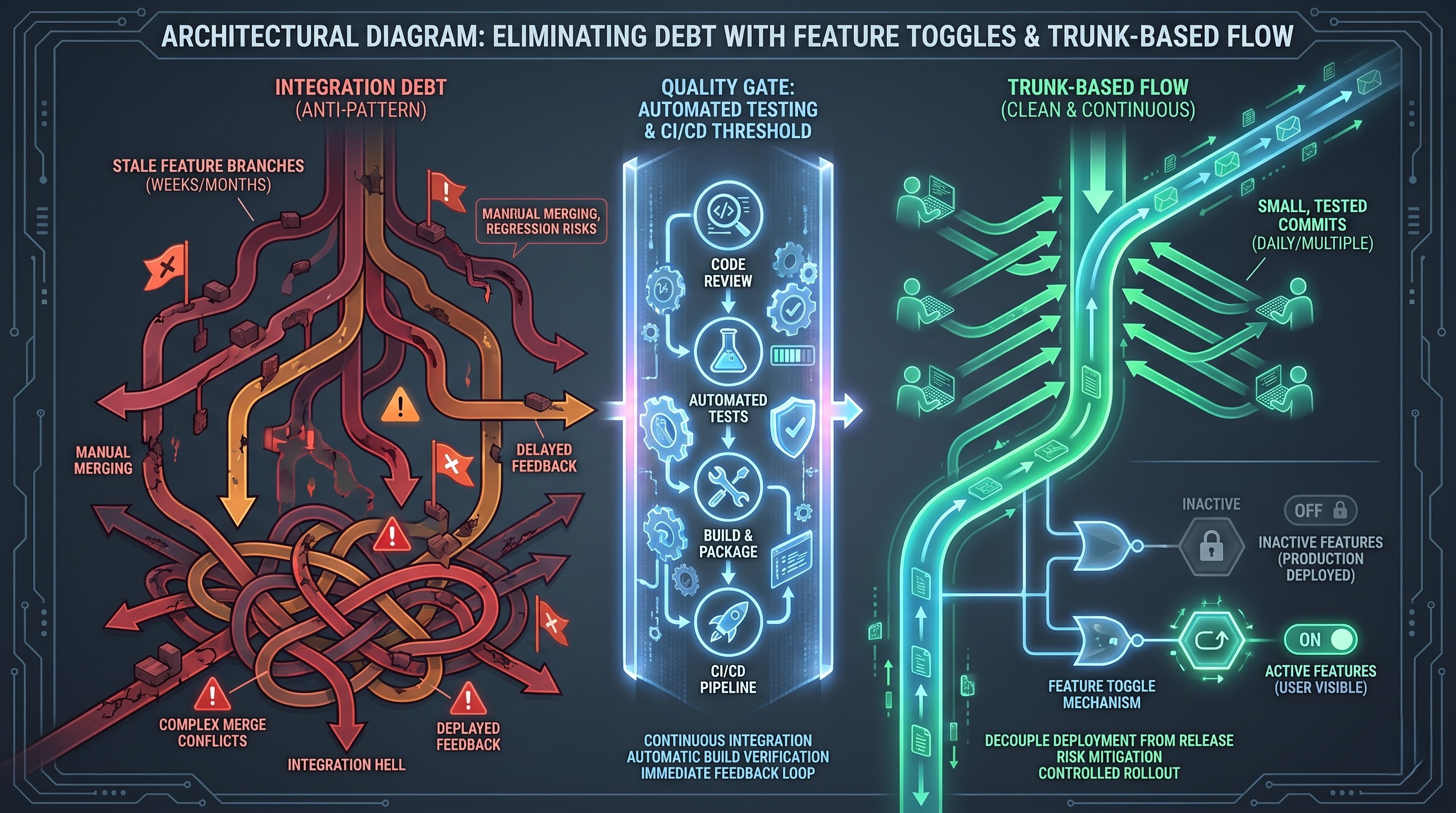
Trunk-based development is the most popular technique of working for successful development teams as there is a tendency to use this method in continuous integration and continuous delivery. According to this method, all developers are involved in work on the same trunk, which was previously called master and now calls main. Instead of existing branches for weeks, developers have temporary branches that can exist for several hours or a few days.
Developers check out the updated version of the trunk, make changes to it and send for the pull-request. The pull-request undergoes an automatic build process and code analysis before it is merged with the trunk.
The implementation of Trunk-Based Development for functionalities that require weeks to implement is possible as teams separate code release from feature release through the use of Feature Flags. This means that the project code of incomplete features is incorporated into the main repository continuously, but behind configuration toggles that have been disabled. Construction code gets compiled, tested and released to production, but untried services are not available to users during their development stage.
Among many benefits of Trunk-Based Development, one can mention its speed, simplicity, and the absence of merge conflicts. Due to short existence of branches, there are very few differences between code produced by a developer and the main code line. This means that any conflicts are extremely tiny and solved in no time. In addition, this methodology makes it possible for the team to do continuous integration.
However, the use of this approach assumes high discipline of developers. If the team is not disciplined enough to test its code in an automated way, there is a high probability that malfunctioning code will make its way into the main code line. The way to prevent the code merge from being unsuccessful is to manage the feature tool.
Azure DevOps characterizes Trunk-Based Development as default and protected on the main branch. The feature of using branch policies is a very important aspect of Trunk-Based Development since it enables PRs review and launch of fast build validation pipelines.
Developers’ branches have temporary prefixes in their names. While pulling requests, Squash Merge option is used on the main branch to have a clean and linear main commit history. Finally, a continuous delivery pipeline is used to build and deploy the merged artifact.
Method 2: GitHub Flow
Keeping the same style of operation as it does in its enterprise past, GitHub Flow makes the process easier and branch-oriented solutions.
In GitHub Flow, the main branch of the repository is always stable and can be deployed. To complete any task, the first step is to create a branch that has a descriptive name and is based upon the main one. The opposite to Trunk-Based Development is that branches stay for several days instead of a few hours.
Once the process starts, the developer sends the branch to Azure Repos first. After that, the next step of creating a pull request is carried out to discuss the necessity of merging branches and validating the branch. Thus, more and more commits are added to the branch based on the feedback of reviewers.
The unique trait of GitHub Flow is that the deployment happens before or at the same time as merging. Some sophisticated tools even allow to deploy the feature branch, either in review stage, preview stage, or in a temporary staging environment. After that is completed and testing is done, the pull request is merged with the main branch.
The main advantage of GitHub Flow is its simplicity. Developers do not have to deal with complicated concepts of branches- they work only with the main branch as well as the feature branch.
One of the major problems related to GitHub Flow is that it cannot make production releases. In case of the implementation of one version and another one in the GitHub Flow framework, the two processes cannot be differentiated. The GitHub Flow assumes that there is a single version of the production, which is the latest commit in the master branch.
In the case of Azure DevOps, GitHub Flow is utilized in the strictness of rules for all main branches. The automated build check occurs as part of the pull request, and all the environments are integrated into the deployment stages.
Method 3: GitFlow
GitFlow is an old-time technology in terms of branching and provides the solution for software projects working with the traditional release cycles. It introduces the hierarchy of roles in GitFlow so that several processes could be conducted separately.
GitFlow is a method that operates based on two core branches, namely main and develop. The main branch contains the true history of the production releases, where each commit represents an approved and implemented state of the production that received its own release number, while the develop branch mixes all of the finished functionalities for the next release.
There are 3 varieties of branches in the GitFlow system:
Feature branches that go out of the develop branch and come back only to it. Such branches make it possible to separate the process of working on the certain functionality.
When an appropriate quantity of functionalities has been collected for the release milestone, the release branches have to be generated from the develop branch. The release branch transforms into a stable environment for the detection of bugs and other problems. The release branch can contain only bug fixes and improvements to documentation, and it does not allow for making any new functions. Thanks to that, the programmers can continue creating new versions and do not spoil the future release. After getting rid of all bugs, the release branch can be combined with the master branch and be marked as a particular version. Besides, it can make a merge with the develop branch as well.
The hotfix branch is created from a master branch with the purpose of solving serious problems that can’t be postponed until the next release. After the fix has been confirmed, the hotfix branch will be merged with the master branch and will also merge with the develop branch for performing rigorous testing.
The main advantage of GitFlow is predictability.
However, GitFlow comes with some issues. The number of branches leads to great overhead. Merge conflicts arise from integrating the release and hotfix branch into the main and develop branches when the develop has progressed far ahead. Also, keeping feature branches for a long period of time will not be able to integrate and go against the principle of continuous integration. This results in complex merge collisions known as integration debt.
There are also policies in Azure DevOps that need to be defined both for the main and develop branches. The feature branches come with naming rules in accordance with the feature folder format. For the release branch, it is created in the release folder, while the hotfix branch is created in the hotfix folder. There are different configurations for the service connections and release pipelines wherein the automated builds are built for the develop, release, and main branches.
Method 4: Release Branching (Environment and Release Branches)
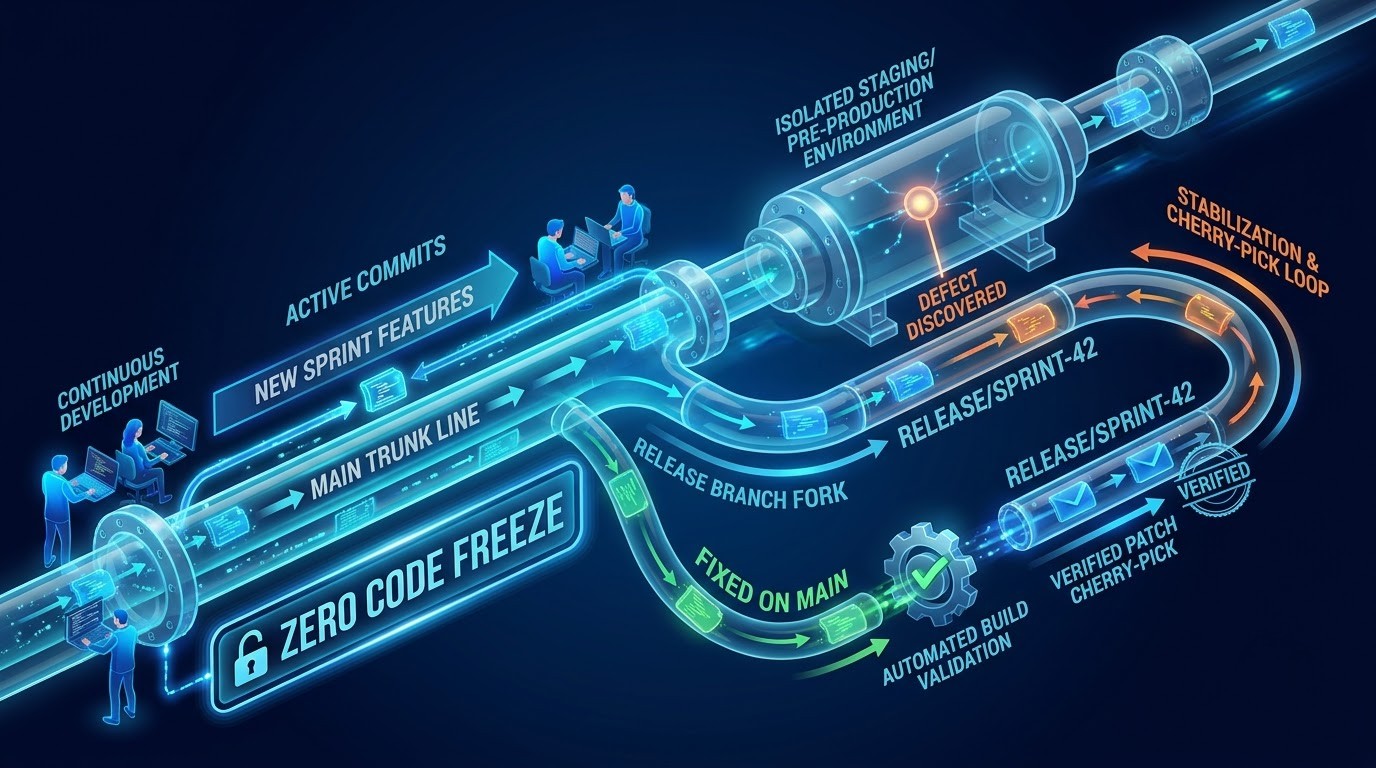
Another approach which combines the benefits of TDD and GitFlow strategies is referred to as Release Branching, and it can be used by the teams developing enterprise solutions like SaaS software or multi-tenant applications.
In Release Branching strategy, only one development branch should be kept – main. Modifications are performed in feature branches during a limited period of time and merged back to main via pull requests and CI. The main branch reflects the continuous evolution of the product in terms of its features, bug fixing, and improvement of the performance.
Once one release is completed, for instance, after a two-week sprint, a new release branch is created from the main branch. This release branch is named after this particular release/sprint, for example, release-sprint-forty-two.
The stabilization phase is reached when the release branch is ready to be deployed into the pre-production environment to perform automated regression sweeps, security checks, and operational verification. In the event that a bug is discovered during the stabilization phase, the handling of the bug must be done in a very controlled manner. Ideally, the bug should be fixed in the main branch, validated via the validation pipeline, and finally cherry-picked to the release branch. This means that the bug fix on the release candidate will be incorporated in the development trunk permanently to prevent future regressions.
The release branch is now ready for deployment into the production environment after the stabilization phase. Unlike the GitFlow workflow, the release branch will not need to merge back to the main branch as all changes have been incorporated in the main branch via the forward development workflow and cherry-picking approach.
There are a number of benefits that Release Branching strategy has related to engineering practices of companies. The work of the developers in main continues every day and is not hindered by the release freezes. In addition, the release engineers are going to concentrate exclusively on the testing of the release branch that is currently being reviewed. It allows looking at the deployed code in production without the need for GitFlow’s multi-branches merge.
In Azure DevOps, the release branches are created in a particular folder hierarchy. The branch permissions are going to exclude the creation of the branch in the release folder by people who are not build administrators or engineers. Azure Pipelines utilize the branch filters in order to establish an automatic connection between deployment pipelines and release branches delivering the artifacts through all deployment gates.
Comparison of Architectural Trade-offs
When choosing one of the four strategies, the trade-offs of speed, complexity, testing dependency, and flexibility should be considered.
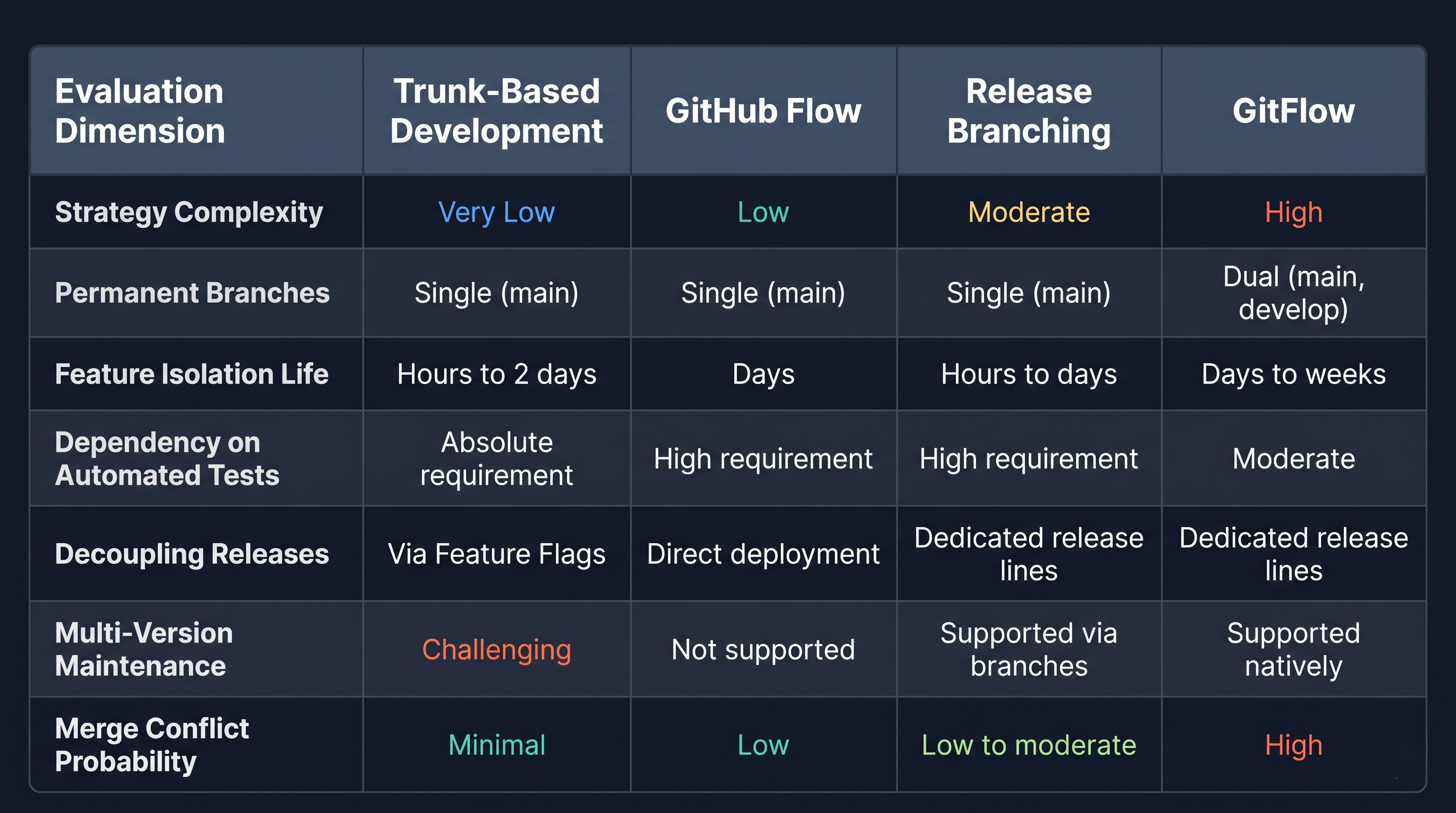
The advantage of Trunk-Based Development is maximum velocity with minimum operational complexity, however, it requires full dedication to testing automation and feature toggling. GitHub Flow ensures simple workflow management for web application development on a continuous basis but does not offer support where legacy versions of the application should be maintained together with new versions. Release Branching guarantees high velocity of development with real releases which are necessary for organizations following strict regulations. GitFlow enables isolation in terms of release planning but suffers from a high integration cost burdening modern software development.
Implementation of the Policy in Azure Repos
In order to provide effective functioning of the selected branching model, it is necessary for engineering leadership to introduce certain policies within the selected branching approach in Azure DevOps.
The repository folder structure will depend on folder naming conventions. Azure Repos apply hierarchical branching using forward slashes. Using standard prefixes will enable building up a clean structure as well as applying wildcards to inheritance of security policies:
The features folder has branches depending on the developer's tasks and requirements like feature/user-authentication.
The bugfix/hotfix folder is used to identify the issue which needs to be resolved; for example, bugfix/timeout-resolution or hotfix/payment-gateway-failure.
The release folder has candidate trackings like release/version-three-point-one.
The user folder has sandboxing capability where developers have the freedom of experimenting by themselves without messing up the shared environment; for example, user/developer-name/spike-caching.
Branch protection using wildcards protects all the dynamically created branches. In Azure Repos, policies could be set based on patterns, like release/*. Once the release engineer creates the new branch in the release folder, some protection policies will be applied: protection against deleting, Pull Requests requirements, and triggers for the Release Pipeline.
Pull Request Templates are helpful in making sure that there is an easier process of review. By default, pull request templates in Azure DevOps are found in the repository under markdown files. Developers are asked to give the context, requirements, test and deploy information before creating the pull request.
Work Item Resolution policies close the circle between engineering and project management. With Azure DevOps, the repositories could automatically change the status of linked work items from Active to Resolved/Closed upon merging of pull requests into the main branch.
The process of automating the reviewer assignment makes sure of the intelligent distribution of pull requests. With the configuration of the Branch Policies with the help of Azure Repos, changes to some particular file paths can automatically prompt approval from the respective subject matter expert. For example, pull requests involving changes to database migration scripts can automatically request approval from the Data Architecture team while pull requests involving changes to pipeline definition files can automatically prompt Platform Engineering approvals.
Conclusion and Implementation Roadmap
In order to evaluate the efficiency of a Git branching model, the environment has to be known. An organization that deploys its code to production several times per day requires an efficient branching strategy like Trunk-Based Development with feature toggling and automated testing. On the contrary, an organization that runs complex enterprise platforms with multiple environments within predetermined release cycles will benefit most from Release Branching without the added complexity of GitFlow.
For the introduction of the overall branching strategy in Azure DevOps:
At first, assess the speed of team releases, automation testing and architecture coupling. Decide which of them is more important – the speed of deployments or proper stabilization of releases.
Then, make effective repository practices. Create standards for branch naming, define the appropriate strategy of pull request merging, create templates of pull requests.
Also, take into account Branch Policies in Azure Repos. Make sure that it is impossible to perform changes in main and release branches due to peer review necessity, don't allow self-approvals, connect work items and merge the code into automated builds in Azure Pipelines.
In addition, automate pipelines according to branch filters. Implement fast integration of development branches, convenient deployment of release branches and traceable production deployments of tags.
Engineers and DevOps architects may develop their skills by taking a special microsoft devops course offered by OnlineITGuru, which will help them to eliminate integration problems and release cycles of their team members.