
GitHub Copilot & Azure DevOps: Boosting Productivity
Last updated on Nov 16, 2026
History and Background of Modern Software Engineering
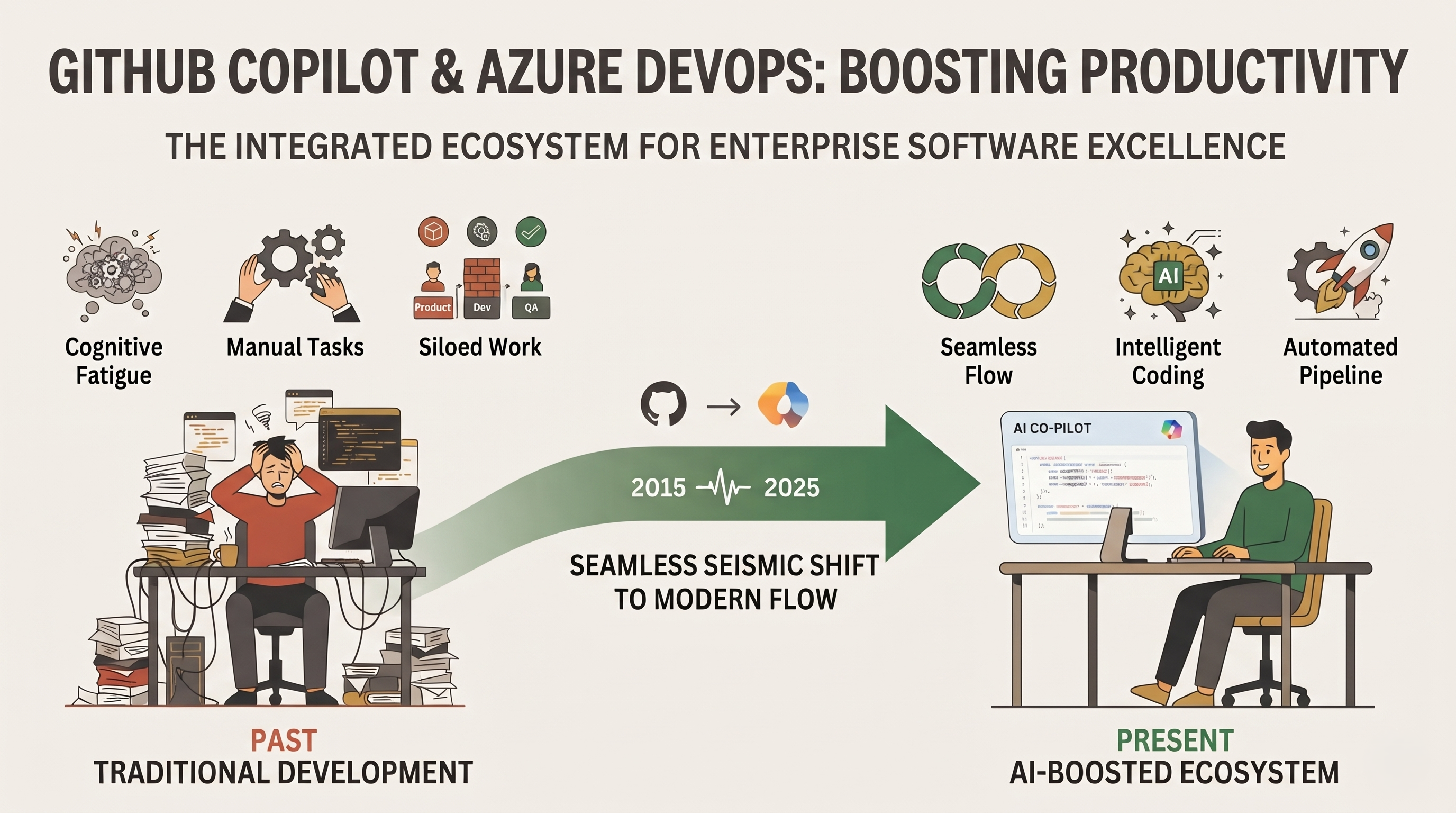
The last decade has seen a seismic shift in the software development landscape, fuelled by an insatiable demand for rapid delivery of features, uncompromising security and absolute reliability. Modern engineering organisations face huge pressure to reduce delivery cycles without compromising the quality of code, or burning out their engineering teams with cognitive fatigue. In this high stakes environment, developer productivity is no longer measured in lines of code written per day, but in seamless flow from conceptualisation to deployment, minimised context switching and elimination of repetitive, mundane tasks.
To solve these challenges, artificial intelligence and deep integration of tooling platforms have become more and more common in enterprise development ecosystems. The combination of GitHub Copilot and Azure DevOps is a transforming force among these. Azure DevOps is an enterprise level platform for agile planning, version control, and CI/CD. With GitHub Copilot you get powerful artificial intelligence right in your developer workflow. Together they form a complete ecosystem that will revolutionise how teams build, test and ship software.
You have to look under the features to see how these tools overlap and reinforce each other. This is about looking at the entire software development lifecycle, the psychology around the focus of the developer and the structural efficiencies that come when artificial intelligence meets strict enterprise project management. By bridging the gap between backlog management and intelligent code creation, organisations can reach new levels of engineering velocity and job satisfaction.
Main Pillars of Azure DevOps in Enterprise
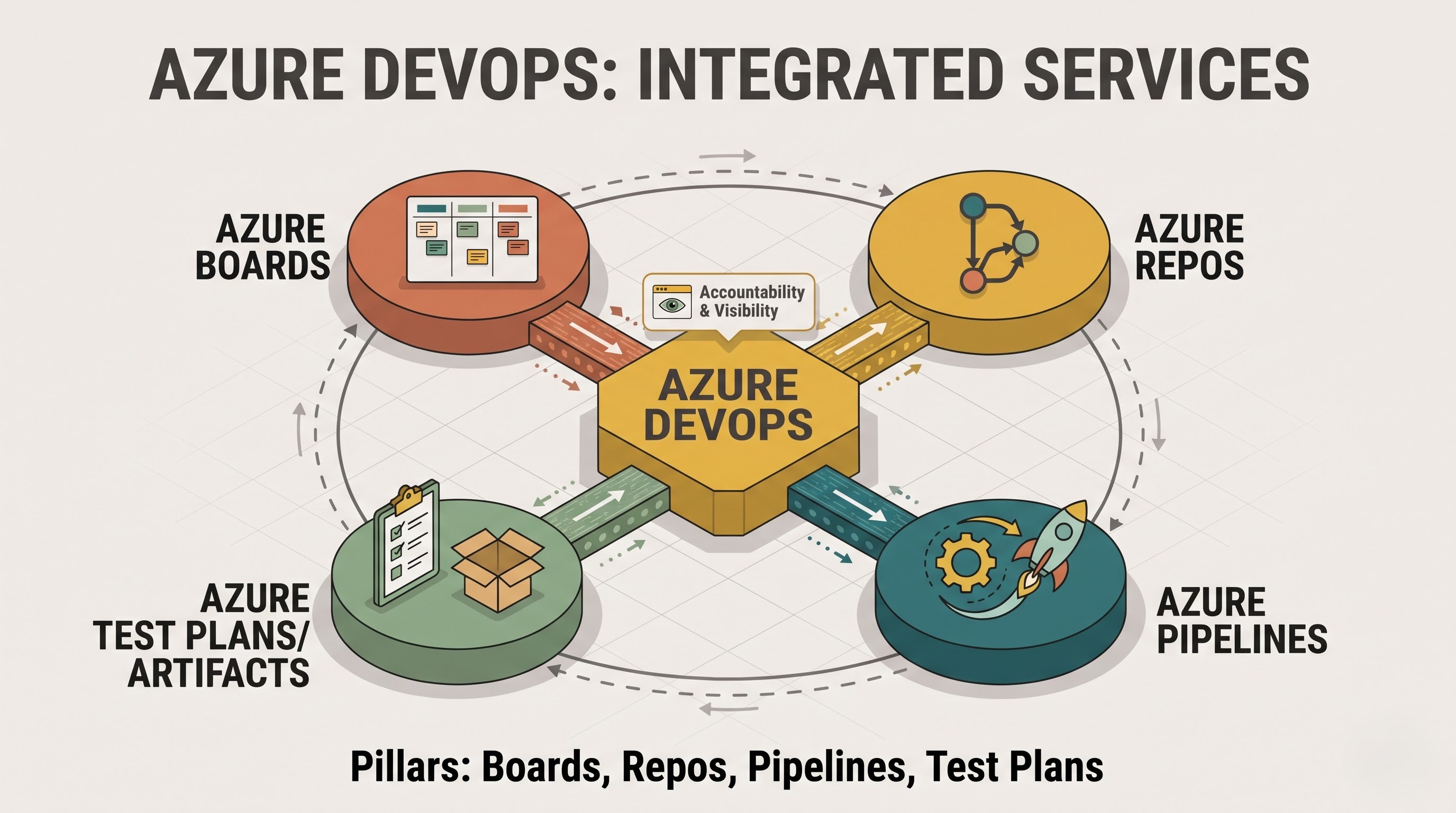
To understand how AI supercharges developer productivity, we have to look at the backbone on which many enterprise workflows depend. Azure DevOps has always been a full suite of collaborative services to support teams across the entire lifecycle of an application. It involves project management, version control, automated testing and deployment pipelines to build an organised environment with accountability and visibility.
Azure Boards is the heart of project-tracking and enables teams to manage their work with Scrum and Kanban. They break epics, user stories, tasks and bugs into manageable sprints, and offer clear visibility into project health and individual workloads. Azure Repos offers scalable, Git-based version control, helping to keep codebases secure, properly branched, and ready for collaborative development.
Azure Pipelines: Build, test, and deploy to any cloud or on-premises environment using continuous integration and continuous delivery. Automate your Whole Delivery Pipeline. The capabilities are complemented with Azure Test Plans for structured manual and exploratory testing and Azure Artefacts for integrated package management.
The traditional approach of developing an enterprise is thorough but can be complicated in a structured environment. Software developers have a habit of jumping around from one tool to another, such as sprint boards, using code editors, writing lots of documentation, managing requirements manually, and debugging build integration problems. Balancing planning, programming, and verification consumes all the energy of the software developer and disrupts their state of concentration. The professional who desires to become an expert in the important pipelines and project management framework should definitely take the azure devops course.
GitHub Copilot: Welcome the Age of AI-Enhanced Coding
GitHub Copilot transforms the traditional coding experience by providing an intelligent peer programr that is living inside the integrated development environment. Copilot is powered by sophisticated large language models that understand the immediate context of a developer’s workspace — open files, existing code patterns, comments and project architecture — to deliver real-time code completions, full function scaffolding and automated documentation.
The productivity gains from a tool such as this are far more than just savings on keystrokes. Much of a developer's day is spent on repetitive programming tasks: writing repetitive data models, boilerplate API endpoints, standard configuration files, and comprehensive unit tests.
Having Copilot take care of those boring mechanics allows engineers to spend their time on the complex business logic, on designing innovative features, and solving architectural problems.
Also, GitHub Copilot is an amazing knowledge accelerator. Onboarding new team members can take months, due to the complex frameworks and specific internal patterns that govern large enterprise codebases. It allows developers to understand new code they come across, translate natural language requirements into working code syntax, and propose idiomatic patterns that fit the rest of the repository. This democratisation of knowledge reduces reliance on senior engineers and accelerates time-to-productivity for junior and mid-level staff.
Closing the loop between planning and execution with Copilot and Azure DevOps
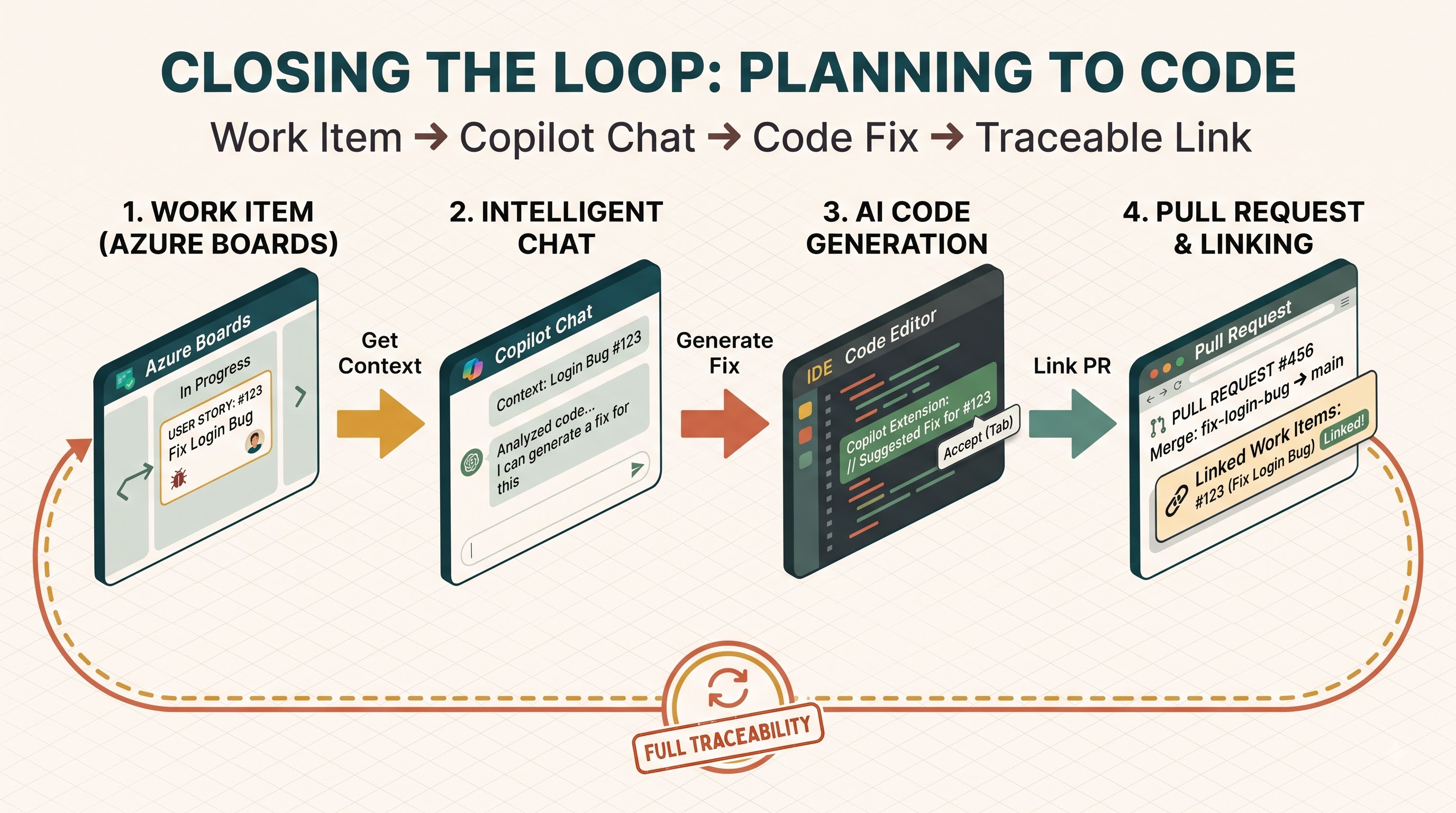
The real power of modern productivity tools can be found in the meeting of intelligent coding and effective project management. As much as the developer works within the world of the code editor, they still work under requirements established in planning tools such as Azure Boards.
In the past, the process of going from a high-level user story or bug description to actual code meant manually interpreting, gathering context, and doing lots of linking, time and time again.
The integration of GitHub Copilot and Azure DevOps ecosystems bridges the gap. Intelligent chat and editor extensions provide developers the ability to interact with their work items and pull requests directly, without needing to leave their coding environment all the time. When you’re working on a particular task or bug fix that’s tracked in Azure Boards, Copilot can take advantage of the context of the work item description, acceptance criteria, and historical comments to inform its code generation.
For example, a developer can ask Copilot to reply to a bug logged in Azure Boards with the specific error context or work item reference. Artificial intelligence can help to find root causes, propose targeted fixes and write rigorous unit tests specifically to avoid regression. That tight coupling ensures the code under development is exactly in line with acceptance criteria and architectural constraints set by product owners and tech leads.
The above-mentioned method will also provide better traceability through the software development process because all changes in the code, commits, and pull requests are automatically linked to the corresponding work items that were created in Azure DevOps. That is why the project managers and quality assurance specialists always know where they are on their way of implementation, without the need to change any information manually.
Enhancing Collaborative Processes and Team-to-Team Coordination
But it’s not only about doing tasks. GitHub Copilot and Azure DevOps dramatically alter how cross-functional teams collaborate. In traditional scenarios, there are often silos between product managers who define requirements in Azure Boards, developers who write code in local IDEs and quality assurance engineers who validate outputs via Azure Test Plans. These departmental silos often result in miscommunications, delayed feedback loops and misaligned deliverables.
AI assistants are the glue in the enterprise workspace. For example, in Azure Boards, product managers can write acceptance criteria in natural language, and modern extensions allow the development teams to immediately translate those functional descriptions into architectural outlines, test skeletons, and draft code implementations. This keeps all the stakeholders in sync, and translates business intent to technical execution with minimum ambiguity.”
Processes of code review, which have historically been a major bottleneck in enterprise software delivery, are greatly streamlined. Reviewers can instantly understand the core intent, architectural impact, and potential edge cases of large pull requests using AI-powered summary tools, rather than manually tracing hundreds of lines of code. This speeds up code reviews, reduces friction between junior and senior engineers, and ensures that code quality standards are uniformly applied across all repositories managed within Azure Repos.
Easing the Continuous Integration and Deployment Pipeline
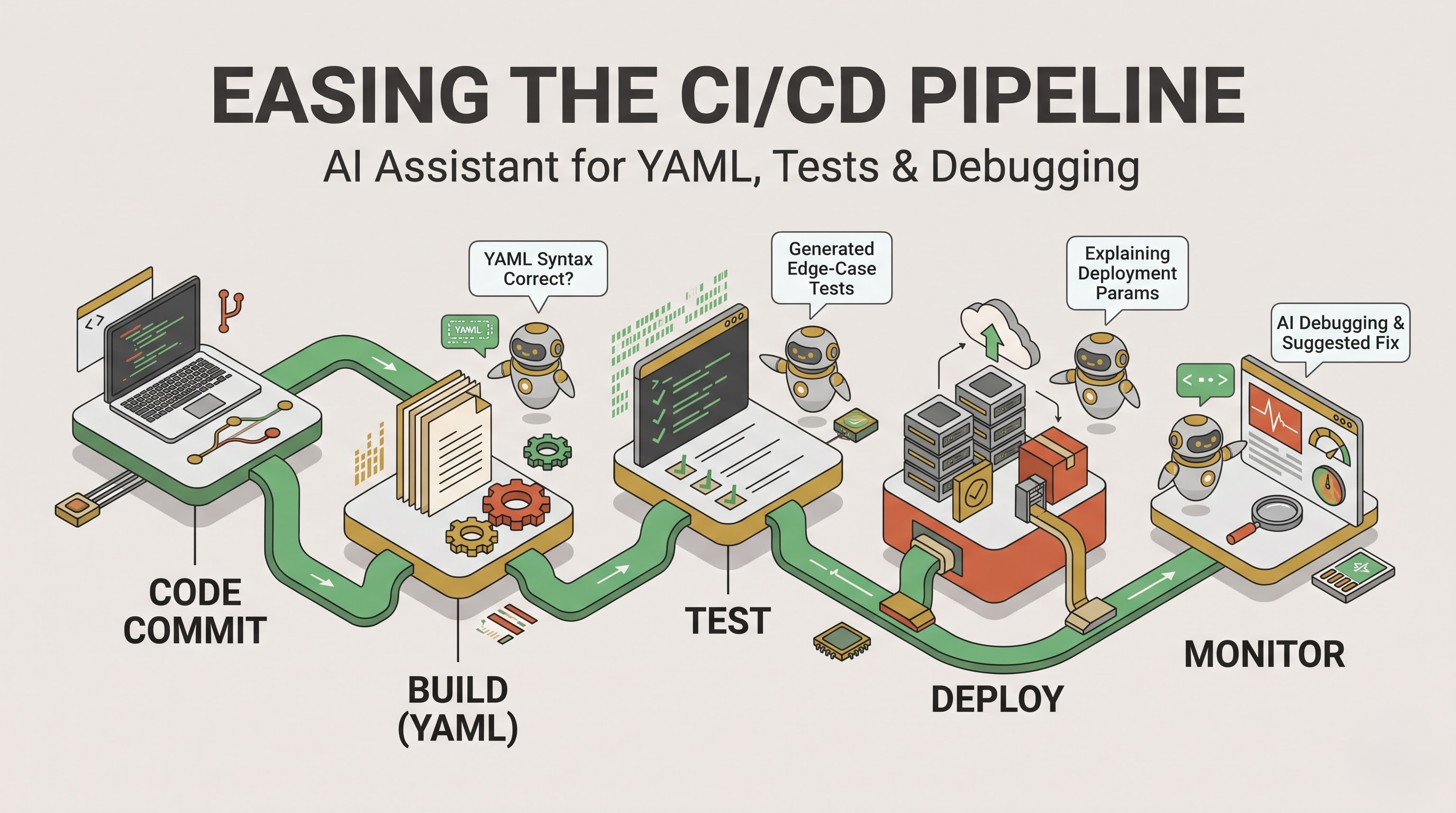
Writing code is just the beginning. Productivity continues throughout the entire deployment lifecycle managed by continuous integration and continuous deployment platforms. Writing configuration files for deployment pipelines, writing infrastructure-as-code scripts, diagnosing build failures can be tedious and prone to human errors in enterprise environments.
Developers are able to use GitHub Copilot in environments that leverage Azure Pipelines and use GitHub Copilot as an intelligent assistant to help navigate complex pipeline configurations. Whether you’re writing YAML build definitions, setting up deployment stages, or configuring security and compliance gates, Copilot can generate compliant syntax and explain deployment parameters in natural language.
If a pipeline build fails due to compilation errors, misconfigured dependencies or failing tests, developers are able to use the AI-powered debugging capabilities in their IDE or chat interfaces to analyse error logs. Engineers get contextualised explanations and suggested fixes that are directly relevant to their pipeline setup, rather than having to dig through long build outputs or hunt down external documentation forums. This fast feedback loop reduces lead time for changes and friction in deployment.
Such a comprehensive approach will turn out to be very helpful in ensuring security compliance and automation of quality assurance as well. Security code review and automation of test case generation will be carried out as part of the development process in order to discover any security risks that may exist even before the code enters production. Copilot will recommend on security coding best practices, upgrading dependencies, and even edge cases tests that are not possible to perform manually while carrying out quality assurance. Such engineering teams that desire to adopt such deployment strategies in order to build their careers should consider enrolling in the microsoft azure devops training courses.
Fighting Cognitive Fatigue and Cutting Down on Context Switching
Context switching is one of the most pernicious enemies of developer productivity and one of the biggest drivers of cognitive fatigue. Psychology research in software engineering has shown again and again that every time a developer is distracted by the need to switch tasks (from writing code to looking up an API syntax they forgot, updating a work item status, or looking up a deployment command) it costs them a lot of time to get back into deep focus.
GitHub Copilot and Azure DevOps integration reduces that friction by bringing important interactions into the developer’s primary workspace. Engineers can see, update and manage their assigned work items and pull requests directly from their development environment or chat extension, dramatically reducing the number of disruptive context switches.
Features for documentation and code summarisation also reduce the cognitive overhead of tracking changes in large teams. Copilot can help generate detailed descriptions and commit messages when you’re preparing pull requests that accurately summarise complex code changes. This saves time for admins and enables reviewers to quickly understand the intent behind a change, leading to faster code reviews, fewer rounds of iteration and a smoother path to merge.
Governance, Security and Trust in the Enterprise
In implementing AI tools in an enterprise setting where Azure DevOps tooling is applied for the management of the organization, it is necessary to consider the problems of data privacy and security governance, especially in relation to IP protection. It is important to ensure that the proprietary source codes are protected from being leaked, trained, and publicly disclosed.
With appropriate security and privacy guarantees, GitHub Copilot addresses the aforementioned issues in enterprises. Code created and used in the enterprise tiers is governed by strong data governance policies so that user input and AI suggestions are not retained or used to train a public model. Enterprise admins also get centralised management controls to manage seat allocations, audit usage patterns, and enforce organisational policies on AI assistance.
With Azure DevOps’ strict controls over access, compliance certifications, and auditing features, organisations can confidently embrace AI-assisted development. It respects existing permission boundaries, so developers will only see work items, repositories and deployment pipelines that they have been authorised to see for their organisational roles.
Developing a Culture of Continuous Learning and Engineering Excellence
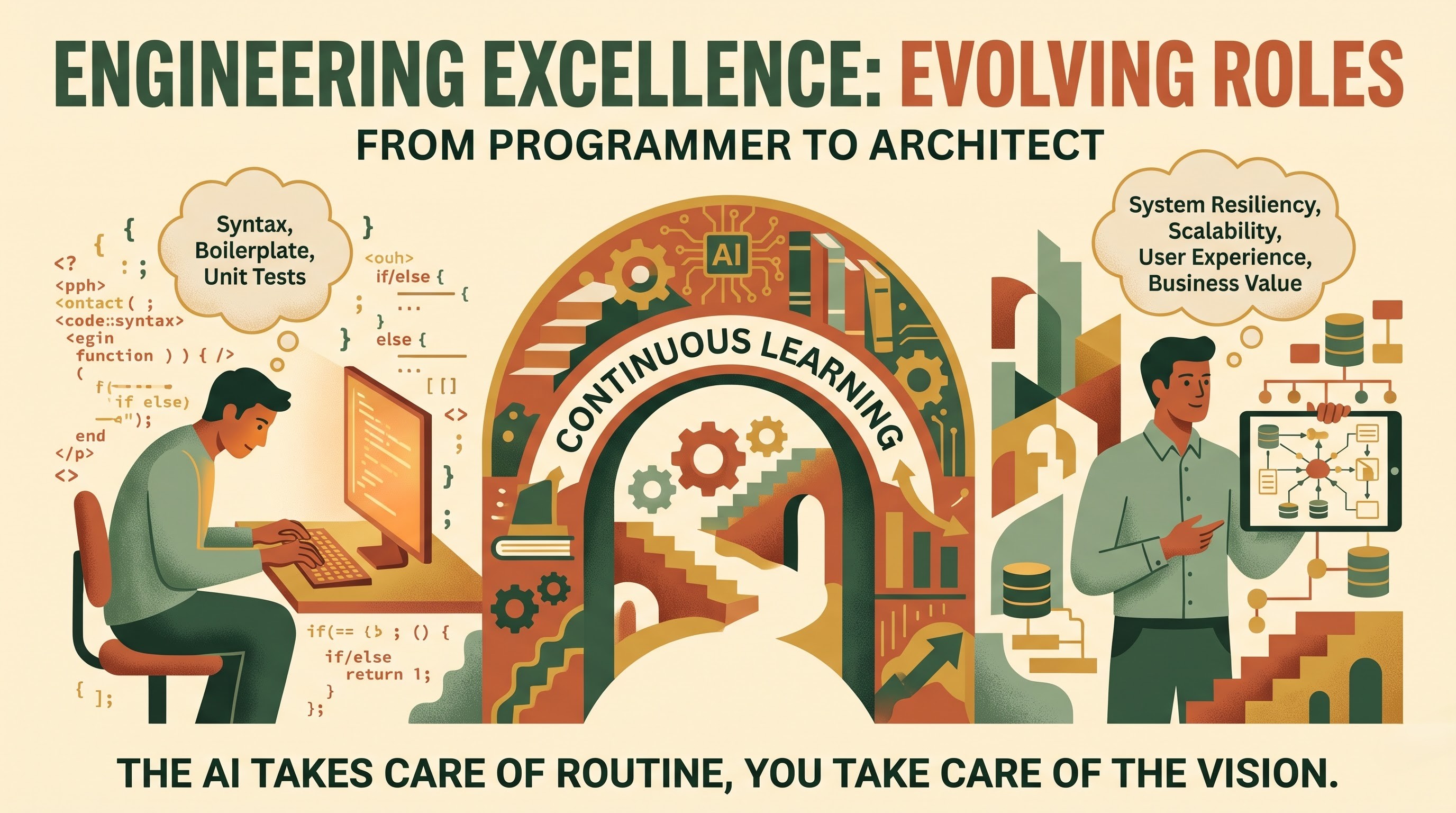
Being able to utilize the potential of GitHub Copilot and Azure DevOps does not mean only acquiring the necessary licenses and installing the plug-ins, but also making a transition to continuous learning and adaptive engineering. It is crucial for the engineering manager to inspire their team members to test AI-based development approaches while preserving the quality of code crafting and peer reviews.
As the monotonous task of coding will be taken care of by artificial intelligence, a software engineer should become more of an architect than a mere programmer. Developers spend less time worrying about syntax and boilerplate structure and more time on system resiliency, scalability, user experience, and business value. This change accelerates delivery velocity and dramatically increases developer satisfaction and retention.
The organisations pushing the edge of modern software engineering are the ones that bring their agile planning together in Azure Boards, version control and pipelines in Azure Repos and Pipelines, and intelligent coding workflows with GitHub Copilot. “They create an environment where technology empowers people, creativity blooms, and customers get high quality software faster and more reliably than ever before.”
Conclusion
GitHub Copilot’s integration with Azure DevOps is a watershed moment in the continuing evolution of enterprise software development. For decades, organisations have grappled with the friction of scaling engineering operations – balancing the relentless pressure to ship features fast against the steep cost of technical debt, admin overhead and cognitive fatigue. Traditional barriers to productivity have been fundamentally disassembled by modern tooling, seamlessly combining intelligent, artificial intelligence driven code generation with structured agile planning, scalable version control and automated continuous integration and continuous deployment pipelines. The outcome is a daily engineering experience that transforms from a string of manual hurdles into a streamlined, creative flow by removing mundane boilerplate tasks, reducing disruptive context switching, and dramatically improving cross-team traceability.
Looking forward, the convergence of generative artificial intelligence and enterprise-grade project governance is not a passing technology fad. It is a permanent structural change in the way digital solutions are designed, developed and supported. As software systems become more complex, distributed and deeply embedded into the fabric of modern business operations, engineering leaders are increasingly feeling the pressure to optimise every phase of the development lifecycle. This integrated ecosystem is no longer an experimental advantage or a peripheral luxury. Now, however, it’s a basic requirement for forward-thinking organisations that want to stay competitive in a fast-moving market.
This evolution is driven by the changing role of the software engineer. The AI takes care of the routine syntax, setting up standard project templates and generating simple unit tests, so that human developers are able to work at a higher level of abstraction. Engineers become architects, system designers and quality validators, rather than authors of code. This allows them to focus their creativity on solving tough business problems, building more resilient systems, optimising cloud scalability and delivering a better user experience. The change accelerates delivery velocity and time-to-market, but it also has a huge impact on developer happiness, engagement, and long-term retention.
This technology synergy also meets the key enterprise imperatives of security, compliance and trust. Organisations can take advantage of artificial intelligence without sacrificing intellectual property or regulatory compliance, thanks to robust data governance, tight privacy controls and automated security reviews embedded into the workflow. Coupled with the strong access management and auditing features of Azure DevOps, teams can innovate with confidence, knowing that their codebases are secure and compliant at every step of the pipeline.
The real power of the combination of GitHub Copilot and Azure DevOps is the combination of human creativity and machine efficiency. Companies can achieve unprecedented levels of engineering velocity by creating a collaborative environment where artificial intelligence fully empowers developers and is supported by transparent enterprise governance. They deliver software quality without compromise and therefore provide a resilient foundation for sustainable innovation and are ready to thrive in a more and more digital and automated future.