
Guide to Mastering Workday Integration Architecture
Last updated on Nov 5, 2026
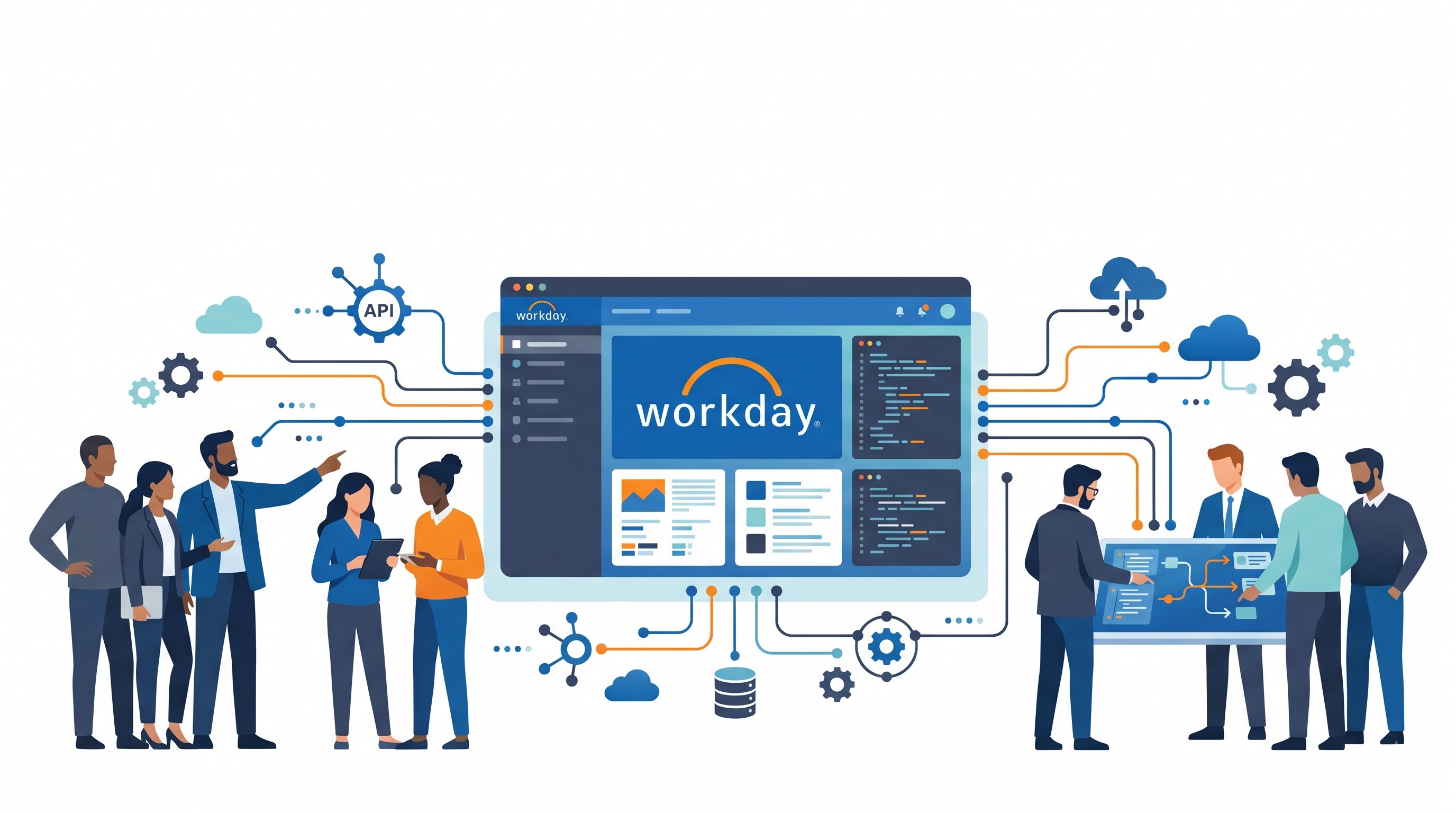
The present-day business environment does not have the privilege of existing within a standalone ecosystem as far as human capital management and finance management are concerned. Various business organizations make use of numerous external parties’ solutions for handling various functions such as payroll management, benefits administration, cost management, tax management, and archiving the historical records. In case business organizations rely on Workday as their record keeping solution, designing an efficient flow of data exchange becomes essential. As it becomes necessary not only to consume the data from the other sources but to export the required data for external vendors too, the architecture behind the process becomes the very essence of enterprise operations.
Workday follows a special approach towards the integration of the solution with the outside world due to the fact that integration itself forms one of the major building blocks of its cloud-based architecture. The Workday Integration Cloud provides various deployment options based on the complexity, overheads, and needs of the business organization. The understanding of the ecosystem of Workday Integrations becomes possible by having an insight into the three major pillars of the latter: Enterprise Interface Builder (EIB), Core Connectors, and Workday Studio.
The Importance of Workday Integrations in Terms of Strategy
To delve deeper into the analysis of the specific tools, one needs to consider the basis on which the creation of Workday integrations has been made. For many years, a typical enterprise resource planning system has required a middleware layer, which included expensive servers and software packages, which were responsible for such operations as data translation, transport, and protection.
Native integrations have some distinctive features. Firstly, all the security features implemented in the system are automatically used in the process of integration; thus, such features as data masking, domain security policy, and access control work equally well whether the data is presented on a screen or moved via batch files. Moreover, the cost of maintenance is lower due to the fact that the tools operate within the same environment as the business objects.
Still, the wrong choice of integration tools for certain operations can be a source of additional problems.
Apart from the technical considerations, the use of enterprise integration also involves change management. Should there be any need to change the data model or requirements from the vendor side, the platform for integration must be flexible enough to accommodate those changes without causing disruption to the normal business process flow. Therefore, when coming up with the strategy for the integration platform, the input of functional personnel (HR/finance) as well as the technical integration expert will be necessary to translate all business rules into the data model.
Pillar One: Enterprise Interface Builder (EIB)
Enterprise Interface Builder (also referred to as EIB) is a user-friendly tool used for integrating on Workday Platform. The main target audience for this tool are the business analysts, HR professionals, and functional consultants as it helps in ensuring that one is able to conduct simple integration without having programming skills at all. People who are willing to learn everything about integration basics in detail will find great value in spending a whole day on a workday integration tutorial.
Anatomy of EIB Integration
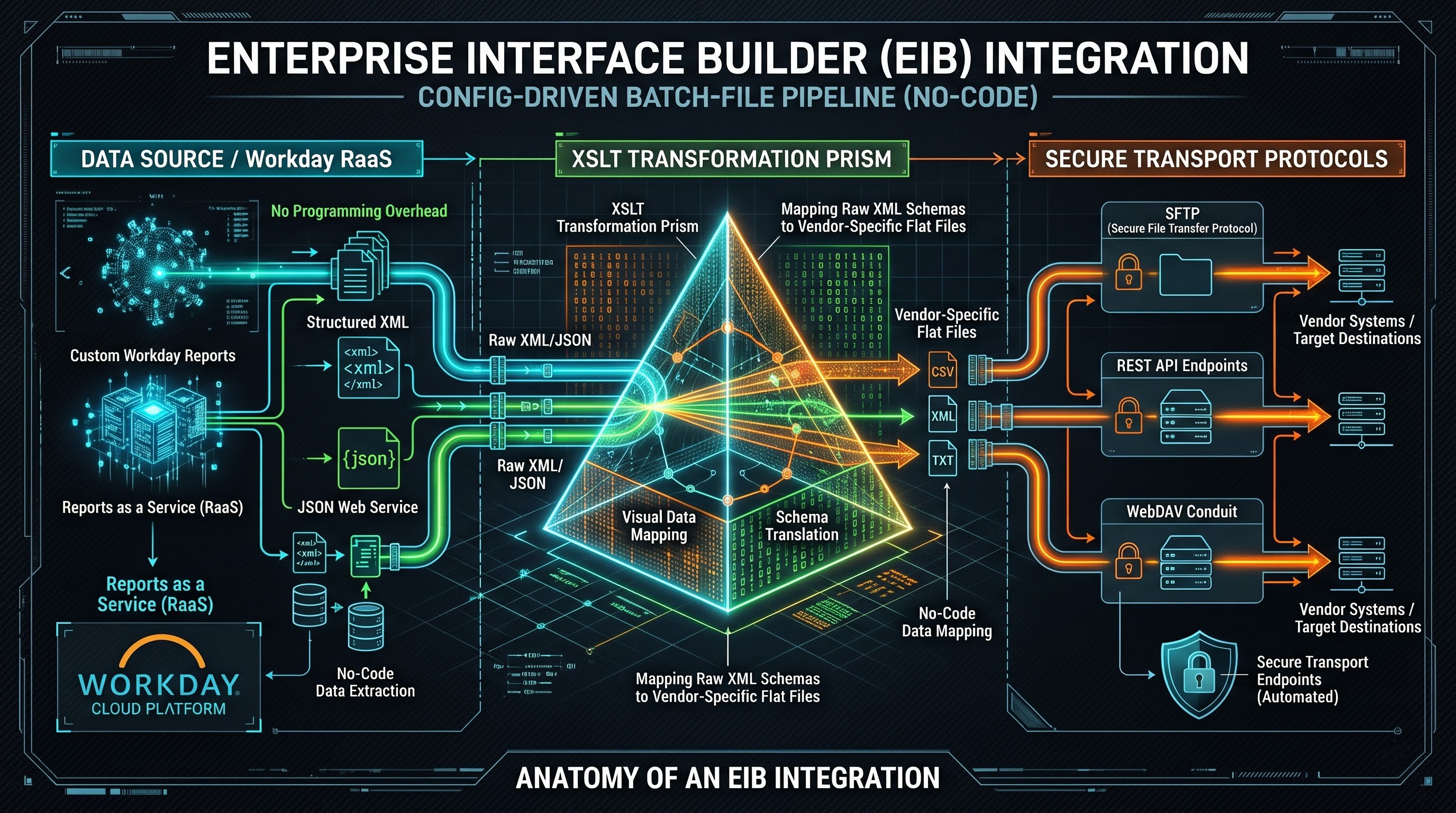
Integration of EIB is a three-layered pipeline consisting of the following components:
The process of Data Extraction and Transformation starts from the data source. In case EIB is the one responsible for outbound integration, then the Workday Reports as a Service (RaaS) will be the data source in question. At this step, a functional analyst generates a customized report in Workday that indicates exactly which business objects and fields are necessary for the recipient, including filter techniques. After the publication of the RaaS report, then EIB retrieves the XML/JSON web service URL. The data source for inbound integration will be an external file (CSV/JSON) in a secure location.
Afterwards, the data will undergo transformation process through EIB. Even though EIB does not provide features for performing complicated data transformation operations, it allows Extensible Stylesheet Language Transformations (XSLT). Therefore, the administrators are able to transform raw XML data structure to the form suitable for external vendors (flat file/XML schema).
Fourthly, the transport mechanism is the process that determines how the file is moved from one system to another. The outbound EIBs allow files to be delivered through various protocols, such as Secure File Transfer Protocol (SFTP), HTTP/REST endpoints, WebDAV, or email attachments. Inbound EIBs are able to pull files using the same protocols on a scheduled or ad hoc basis.
Use Cases and Limitations
EIBs are great tools in situations of heavy data loads and simple exports. Examples are the monthly upload of a spreadsheet of bonuses for employees, export of weekly active employees' list to another badge system, or import of old compensation data during a company's acquisition. The fact that the knowledge of programming is not needed allows EIBs to greatly decrease the time-to-value of the data exchanges.
Nonetheless, there are limitations to EIBs. First, they are inherently batch-file solutions. This means that the tools do not have capabilities for conditional routing, data aggregation, loops, and sophisticated error handling. If an integration requires checking of several external factors, dynamic file splitting according to department codes, or programmatic error handling, forcing the EIB to perform these tasks will lead to unworkable solution.
Pillar Two: Core Connectors
Even though EIBs can be used as an effective interface that allows the customer to customize file exchanges, in terms of integration, the needs of every company when it comes to payroll, sending benefit elections information to its insurance carriers, and integration of its organizational structure into the Identity Management System are very common and standard. Therefore, development of such integrations from scratch using EIBs or custom coding is highly inefficient. And this is where Workday has come up with Core Connectors.
Understanding the Concept of Core Connectors
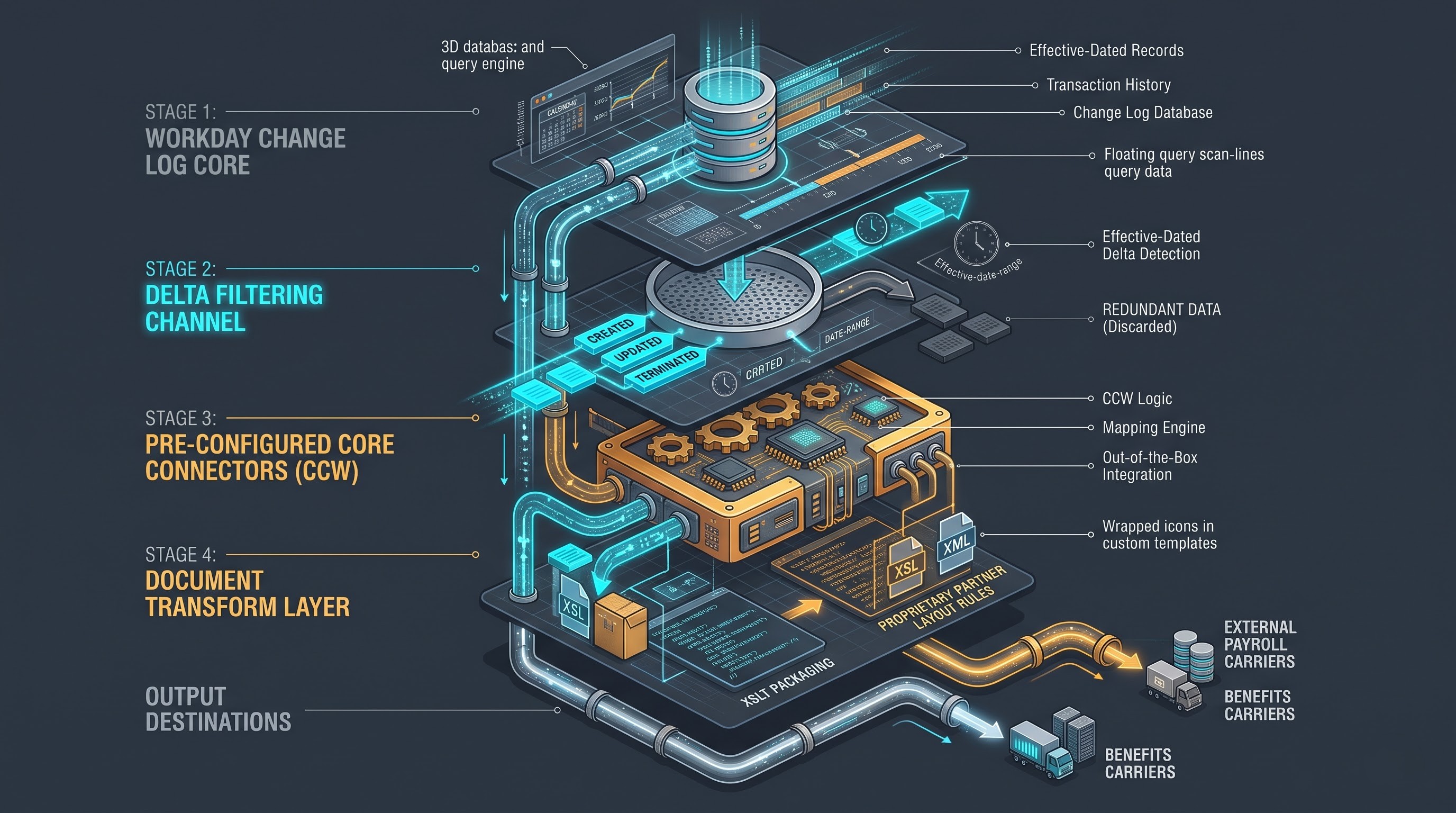
Core Connectors are pre-configured integration templates created by Workday. While EIBs involve creation of the data source interface from scratch, Core Connectors involve creating a configuration for particular business functions of Workday. For example, CCW template was created specifically to export demographic data of workers.
The key advantage of Core Connector Architecture is that it uses integration change log functionality provided by Workday. As opposed to traditional approaches to data exchanges, where processing of all the data during each interface run, regardless of changes was required, Core Connectors use delta-based approach.
During the execution of the Core Connector, the Workday Change Log is queried using the effective date and the previous transaction baseline. The records that have been created, updated, or terminated are pinpointed after the last successful execution of the Core Connector. Then, the delta records alone are extracted, formatted, and delivered securely based on the target system's requirements.
Extensibility and Document Transform Integration
Since third party vendors do not normally accept raw output formats from Workday, Core Connectors are usually bundled with other software for transformation purposes called Document Transforms or partner integrated solutions (Payroll Interface Connector Solutions).
The Document Transform uses the XSLT technology to transform the standard output XML file produced by the Core Connector into the proprietary layout format accepted by the external vendor. This is an example of a very effective architectural design in that Workday does the work of figuring out what data was changed and the transform layer handles the formatting details.
Strategic Strengths and Weaknesses
The key strength of Core Connectors is the high efficiency combined with low maintenance needs. Since Workday carries out all the logic of data retrieval, every time Workday launches its two semiannual platform updates, Core Connectors are automatically updated with respect to all schema changes. Thus, enterprises avoid going through the process of break and fix loop in custom coding.
Still, Core Connectors have certain limitations due to their inflexible data models. As it is clear from its name, Core Connectors are supposed to retrieve pre-defined Workday objects. If an enterprise is required to operate with some custom field or data relationships which are well beyond pre-defined Workday object templates, it could be difficult if not impossible to customize Core Connectors. In such situation, enterprises may need to choose a different solution.
Pillar Three: Workday Studio
In case the needs of the business exceed the possibilities of guided no-code tools and pre-packed templates, enterprises resort to Workday Studio. It is a code-based environment for integration of the enterprise developed by Workday. Based on Eclipse, Studio provides all the necessary flexibility and powerful orchestration possibilities.
The Architecture of Workday Studio
Workday Studio integrations, or also known as Studio integrations or assemblies, are complicated data flows that are built using a visual composition palette, XML configuration files (assembly.xml), and code scripts. The integration works inside the Workday Cloud environment as part of the runtime environment of the enterprise service bus (ESB).
In contrast with EIBs where data processing happens in a linear fashion following only one route, Studio provides orchestration capabilities for multi-step processes. The developers are able to build integration flows which include the following capabilities:
Conditional Routing: Routing the data through various routes based on a certain criteria, such as splitting an outgoing file based on geographical regions and/or legal entities.
Iterative Processing: Iterating through huge amounts of data, splitting them into smaller pieces to optimize memory usage and processing of asynchronous data.
Multi-Source Aggregation: Combining data from different sources into one package of data, such as a Workday custom report, an external web service, and an external SFTP reference file.
Complex Error Handling: Building a special mechanism of catch-blocks, retry loops, and logging that can capture errors, recover from them and notify the administrative teams about them.
Technical Skills & Stack
In order to design and develop integrations based on Workday Studio, there is some set of required technical skills. To name a few, developers should have good knowledge of XML and XSLT as a language for manipulating data, as well as of expression languages/scripts of Workday Studio. Moreover, there is a need to know about integration patterns, asynchronous messaging and memory management. Just like any other custom code, Workday Studio applications need SDLC, including Versioning systems such as Git and testing in preview/sandbox mode. Candidates who aim at showcasing their technical skills often turn to workday integration interview questions for learning about asynchronous messaging, XSLT, and enterprise integration patterns.
Workday Studio: When to Use?
There are some specific situations when usage of Workday Studio makes sense. They can be described as follows:
Processing large amount of data (in gigabytes) with high performance and stream processing requirements.
Integration which involves complex process orchestration, for example, receiving file from an external system, comparing data of this file with an external database and updating several Workday business objects according to certain conditions and sending some messages.
The employment of Studio where EIB would be enough is an unnecessary complication of technical procedures as well as potential trouble for future maintenance. Enterprises must recognize the power of Studio but at the same time realize that any code created by developers must be updated constantly during Workday releases.
Comparision: Choosing the Proper Tool
The success of integration processes within the Workday Integration Cloud depends on the ability of a company to match the integration need with the proper tool. In order to achieve that, there are some key aspects that must be considered: data volumes, transformation process complexity, maintainability and functionality.
Data Volumes and Performance
As far as low to middle data volumes go – uploading changes to department hierarchies and exporting several thousand records – EIB and Core Connectors offer excellent performance. However, when it comes to large-scale synchronization project involving tens of thousands of records – Studio will certainly be required.
Complexity of Transformation
If the transformation is of such a type where there are simple data mappings in which certain fields need to be mapped according to a certain format, the EIB or Core Connector may be used in combination with Simple Document Transformation. But for integration where there is a need for conditional logic, data enrichment from different external APIs, manipulation and splitting of data, it will be necessary to use Studio.
Ownership and Maintenance of Integration
Also, another important issue that needs to be kept in mind by many architects who make integrations is the operational ownership of integration in the long term. Business functional analysts and HR administrators can do all kinds of operations related to the maintenance, scheduling, and update of integration without having any programming skills at all. On the other hand, Studio integrations are restricted to the domain of integration specialists. Companies need to consider their own capabilities here.
Best Practices in Workday Integration Governance
In order to maintain tenant healthy and secure, companies need to follow some integration governance best practices:
Default to Easy: Default to using the easiest method which will meet the requirements of your business. If your business needs can be met by the EIBs, do not move ahead to build the Studio integration. This will be a case of technical debt.
Use Existing Content: When you build a custom EIB or a Studio Integration, make sure that you conduct a search to find any Workday Core Connectors which may meet your needs in Payroll and Benefits and other places.
Adhere to Security Standards: All the integrations have to be associated with an ISU in its own scope of ISGs. Administration permissions can under no circumstances be given to integration accounts.
Be Informed: Set alerts in advance so that if something goes wrong with your integration, you are aware of it. It is very important for you to monitor the run history of the integration so that you are aware of any performance problems like timeout or errors.
Test Your Integrations: Due to two yearly releases in the Workday platform, testing of all the integrations, especially the custom XSLT stylesheets in the EIBs and Studio integration assemblies becomes very important.
Conclusion
In addition to being able to offer a variety of capabilities concerning financial management and human capital management, another positive characteristic of the product under consideration is the flexibility of its architecture. Offering a comprehensive integration solution, which can range from the simple to the sophisticated (from the easy-to-use and guided configuration of integrations via Enterprise Interface Builder to the efficient Core Connectors and endless capabilities for programmatic integration via Workday Studio), Workday allows its customers to connect their systems.
In case you need to design an efficient integration architecture, it is essential not to be trapped in using the same old integration solution whenever you solve a problem in any company. Taking into account the amount of data to be processed, the required security measures, and sustainable ownership of the integration technology, The integration architect is now well positioned to ensure that an appropriate integration environment is built. Persons who are interested in validating their experience and deploying applications on an enterprise-wide basis should look into obtaining the Workday Integration Certification.