
How Azure DevOps Turns Everyday Code Changes Into Reliable Releases
Last updated on Aug 26, 2026
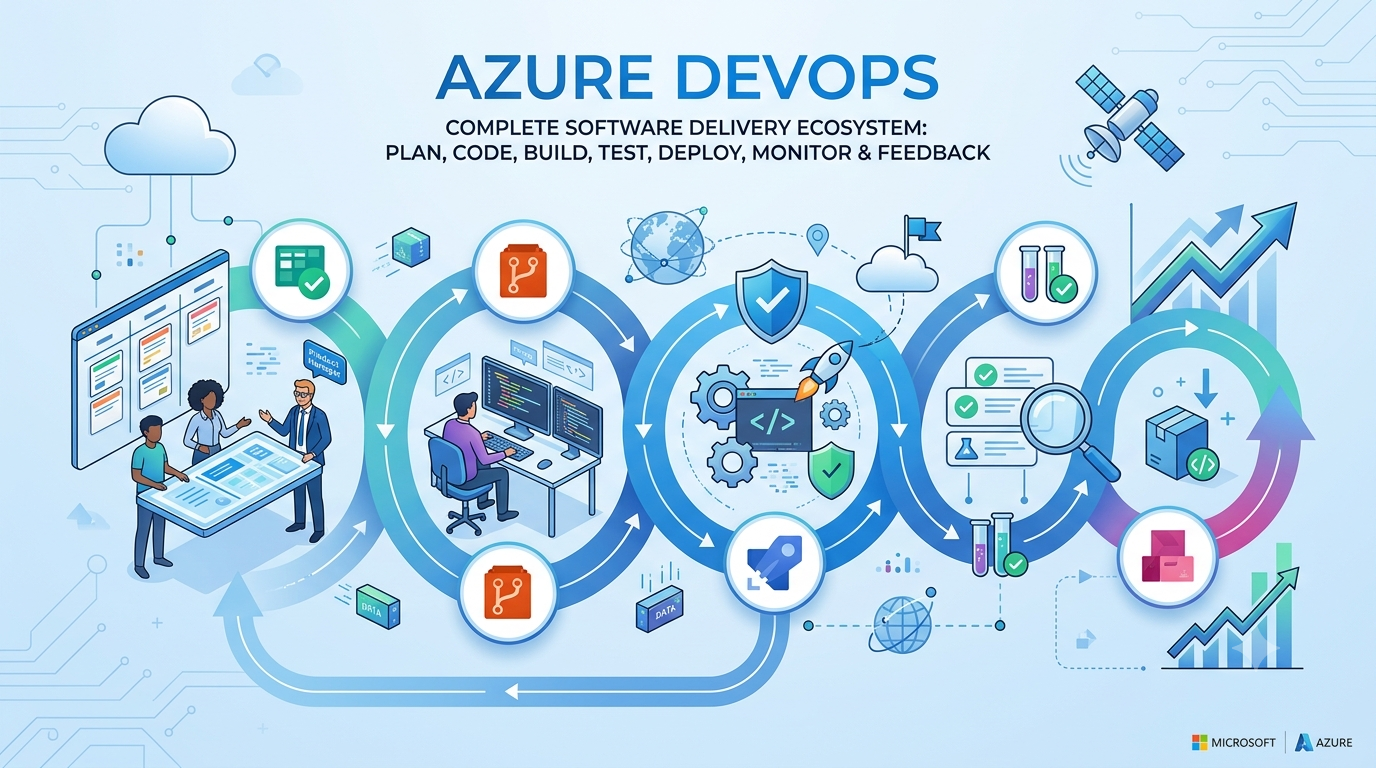
What If Shipping Software Wasn’t the Hard Part?
A developer writes a few lines of code. A tester discovers a problem. A product manager changes a requirement halfway through development. Someone waits for approval, another person prepares a deployment, and eventually the team starts asking a surprisingly simple question: Which version of the application is actually running? This kind of confusion is common when development, testing, operations, and business planning operate as separate activities.
Modern software development is no longer only about writing good code. The bigger challenge is creating a dependable path from an idea to working software while keeping that journey visible, repeatable, secure, and fast. DevOps addresses this challenge by bringing people, processes, and technology together across planning, development, delivery, and operations.
This is where Azure DevOps becomes interesting. Rather than viewing it as another collection of developer tools, it is more useful to think of Azure DevOps as a control room for software delivery. Requirements enter through planning, developers manage code through version control, automated pipelines build and test changes, packages are managed, releases move through environments, and feedback comes back into the development cycle.
So the more interesting question is not simply, “What is Azure DevOps?” It is this: How can one connected platform help a team move from a business requirement to a reliable software release without losing visibility along the way? Once that question becomes the starting point, the different Azure DevOps services begin to make much more sense.
Why Azure DevOps Is More Than a Collection of Tools
At first glance, Azure DevOps can look like a group of unrelated services: Azure Boards, Azure Repos, Azure Pipelines, Azure Test Plans, and Azure Artifacts. Someone learning the platform for the first time might naturally study each service separately and memorize what each one does. However, that approach can make the platform appear more complicated than it really is. The real strength of Azure DevOps comes from the relationships between these services. A requirement can become a work item, that work can lead to a code change, the code can trigger a build, the build can be tested, and the resulting application can move through controlled deployment stages. Instead of maintaining disconnected records across different systems, teams can build a continuous delivery workflow around the same piece of work.
Consider a team developing an online banking feature. The product owner creates a requirement for customers to temporarily lock a debit card through a mobile application. The requirement becomes work in Azure Boards, a developer creates a branch in Azure Repos, and the completed change is submitted through a pull request. Azure Pipelines can then validate the code automatically before it moves toward testing and deployment.
This connected approach is what makes Azure DevOps valuable. The platform is not simply helping different departments complete individual tasks; it is helping them understand how those tasks fit together. When a development activity can be connected to a requirement, test, build, and deployment, software delivery becomes easier to track and reason about.
The Hidden Advantage: Building a Digital Trail for Every Change
One of the most valuable ideas in DevOps is also one of the least visually impressive: traceability. It becomes important when something goes wrong and a team needs to reconstruct what happened. A production issue may require answers about the original requirement, the code change, the reviewer, the build, the tests that ran, and the deployment that introduced the change. Without an integrated workflow, finding those answers can involve searching through emails, spreadsheets, chat conversations, source-control histories, deployment records, and separate testing systems. That process becomes increasingly difficult as organizations grow and multiple teams contribute to the same application.
Azure DevOps can connect work items with development artifacts such as branches, commits, pull requests, builds, and releases. This means a requirement does not have to disappear into a project-management board once development begins. Its relationship with the technical work can remain visible throughout the delivery process.
For large enterprises, regulated industries, and teams responsible for critical applications, this visibility can be extremely valuable. Fast delivery is useful, but being able to explain what changed, why it changed, how it was tested, and where it was deployed can be just as important.
Azure Boards: Where Business Ideas Become Engineering Work
Every software project starts with something that is not code. It could be a customer complaint, a product idea, a regulatory requirement, a security improvement, or a request from business leadership. The challenge is turning that idea into work that a technical team can understand, prioritize, assign, and eventually deliver.
Azure Boards provides a structured environment for doing exactly that. Teams can organize work through epics, features, user stories, tasks, and bugs while using backlogs, sprint planning, Kanban boards, queries, dashboards, and reporting to understand progress. For someone taking an azure devops course, understanding how these planning elements connect to development work is an important part of building a practical foundation. These capabilities help connect the business side of a project with the engineering work that follows.
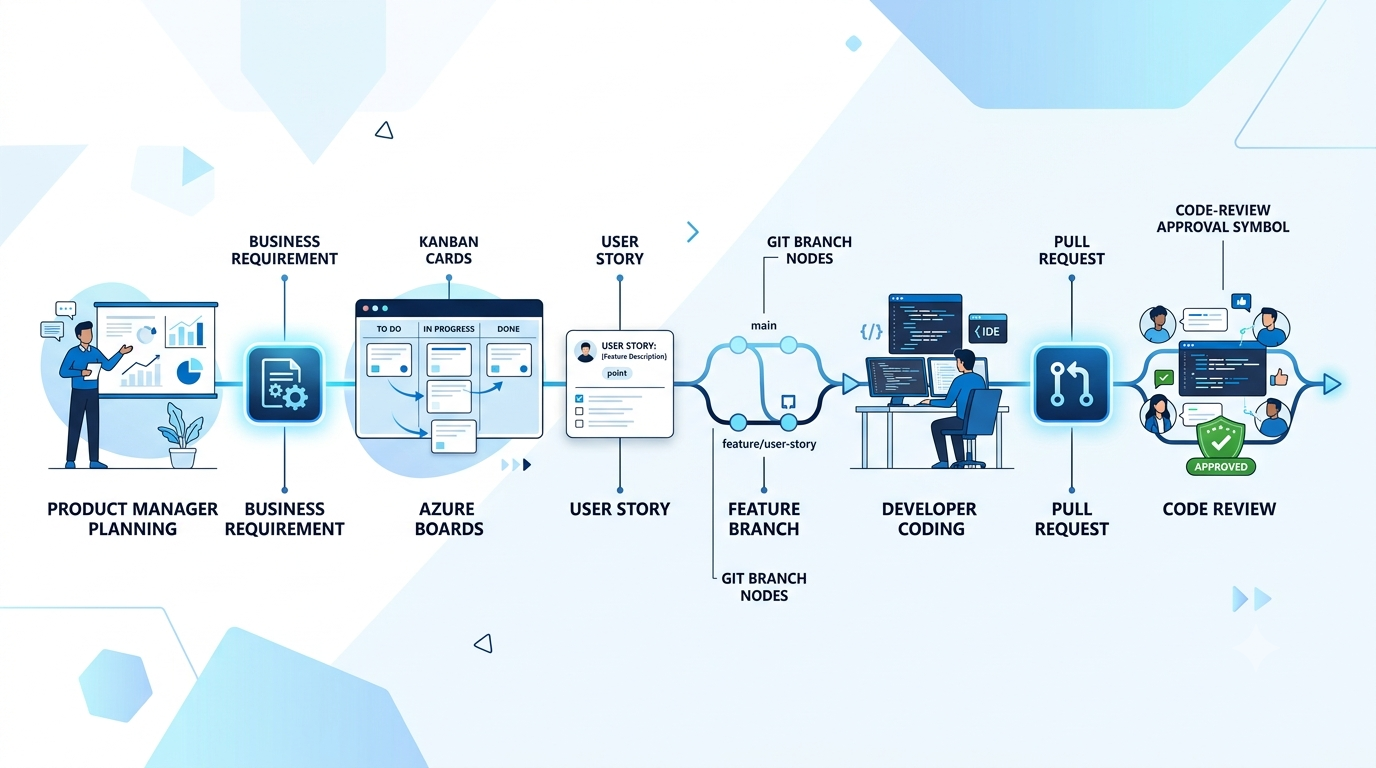
However, a board should not simply become a digital version of a spreadsheet where people move cards from “To Do” to “Done.” Its real value appears when work items remain connected to what happens after planning. A user story describing a new password-reset experience, for example, can eventually be connected with development work, pull requests, builds, tests, and deployment activity.
That changes the question the board can answer. Instead of only asking, “What are we working on?”, the team can begin asking, “What happened to this requirement from the moment it was created until it reached users?” That shift is particularly useful when projects involve multiple teams, environments, and release cycles.
Azure Repos: Turning Individual Code Into Collaborative Engineering
Writing code individually is relatively straightforward. Managing code written by dozens or hundreds of developers is a completely different challenge. Developers may work on the same components, fix production issues while new features are being developed, or modify shared dependencies at the same time. Without a disciplined source-control process, even technically strong teams can create unnecessary conflicts.
Azure Repos provides Git repositories and also supports Team Foundation Version Control. With Git-based workflows, teams can use branches, commits, pull requests, reviews, and branch policies to create a more controlled development process. These capabilities make source control part of the team's engineering workflow rather than simply a place where code happens to be stored.
A typical workflow might begin with a work item, followed by a feature branch and several commits. The developer then creates a pull request, reviewers examine the change, automated checks run, and the branch can be merged when the required conditions are satisfied. The process creates a clear checkpoint between writing code and allowing that code to become part of the shared application. The objective is not to create unnecessary bureaucracy around development. It is to identify problems when they are still inexpensive to fix. A review caught before merging is usually easier to address than a defect discovered after deployment, and automated validation before integration can prevent an unstable change from affecting the wider codebase.
Azure Pipelines: Where Automation Becomes Part of the Delivery Process
If Azure Boards represents the planning side of the lifecycle and Azure Repos represents the codebase, Azure Pipelines is where much of the delivery automation happens. Instead of relying on someone to manually compile an application, execute tests, package the output, and prepare a deployment every time code changes, these activities can be incorporated into an automated workflow.
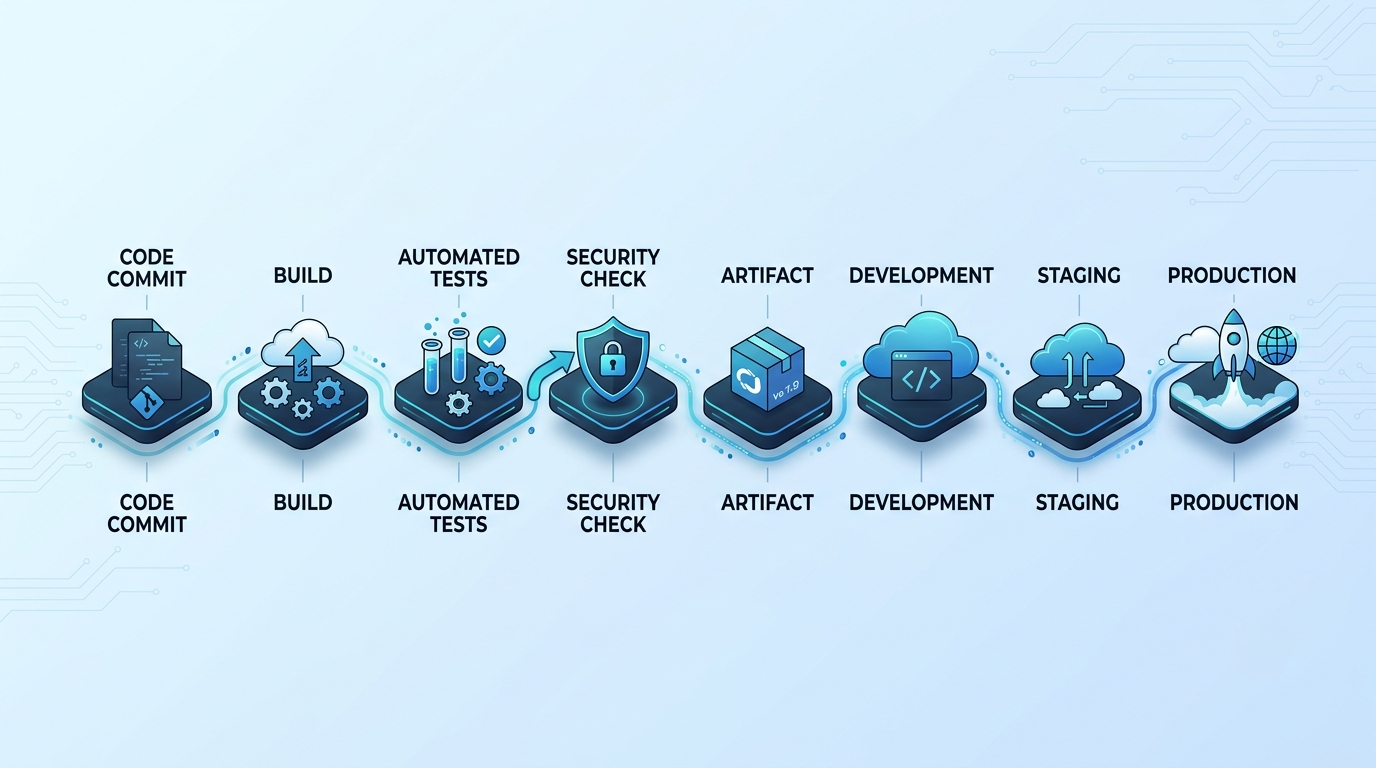
A pipeline can retrieve source code, install dependencies, build the application, execute automated tests, generate artifacts, and prepare those artifacts for deployment. Good azure devops training should cover how these automated stages work together rather than treating each pipeline step as an isolated feature. Depending on the architecture, the same workflow can continue by moving the application through development, testing, staging, and production environments.
This becomes especially useful in organizations where the technology landscape is not simple. One company may have .NET applications running on Azure, Java services inside containers, legacy applications hosted on-premises, third-party APIs, and infrastructure managed through code. A modern delivery platform therefore needs to support different technologies without forcing the organization into one development pattern.
The important point is that automation is not valuable merely because it is faster. It is valuable because it makes the delivery process repeatable. If the same validated steps are performed every time a release is created, the organization becomes less dependent on individual memory and manual intervention.
What If the Pipeline Were a Quality Gate, Not Just a Deployment Button?
A common beginner mistake is to think of a pipeline as a faster way to deploy software. That view misses one of its most important purposes. A well-designed pipeline can act as a sequence of quality gates that continuously ask whether the software is ready to move to the next stage. A typical workflow might involve building the code, running unit tests, performing security checks, creating an artifact, deploying it to a test environment, validating the application, and then requiring an approval before production. Each stage provides additional evidence about whether the release should continue.
This changes the central question from “Can we deploy this?” to “What evidence do we have that this change is ready to be deployed?” The difference may sound small, but it represents a major shift in engineering thinking.
A deployment pipeline therefore becomes part of the organization's quality strategy. It can prevent known problems from progressing, enforce required checks, standardize deployment procedures, and create records of what happened during a release. The best pipelines are not necessarily the longest ones; they are the ones that provide the right safeguards without creating unnecessary friction.
Azure Test Plans: Bringing Testing Into the Delivery Conversation
Testing becomes much more useful when it is connected to development rather than treated as a final activity that happens immediately before release. Azure Test Plans supports capabilities around manual testing, exploratory testing, test cases, test suites, and test results, allowing testing activities to become part of the broader delivery lifecycle.
Imagine an e-commerce company changing its checkout process. A tester may need to validate successful payments, failed payments, expired cards, invalid coupons, multiple-item purchases, mobile behavior, browser compatibility, and recovery after a payment failure. These scenarios are not simply a checklist; together, they provide evidence about whether the feature behaves correctly in realistic situations.
When test results and defects remain connected to the relevant requirements and development work, the team gains more context when something fails. A failed checkout scenario can lead to a defect, which can be associated with a code change, retested after a fix, and eventually included in a later build. The objective is not to create as many test cases as possible. It is to create confidence in the behavior of the software. Testing becomes more powerful when it helps the team understand not only whether something failed, but also what requirement it relates to and what needs to happen before the change can safely move forward.
Azure Artifacts: Managing the Software Behind the Software
Source code receives most of the attention when people talk about application development, but modern applications depend on much more than source files. They use frameworks, libraries, internal components, external packages, and other dependencies that need to be versioned and managed consistently. Azure Artifacts provides package management for technologies and formats such as NuGet, npm, Maven, Python, and Universal Packages. This can become particularly valuable in large organizations where multiple applications depend on internally developed components.
Imagine an enterprise with twenty applications using the same internal authentication library. Instead of copying the library into every project, the team can publish a controlled package and allow applications to consume approved versions. This creates a more manageable way to distribute shared software components. It also introduces an additional layer of governance. Teams can understand which package versions are being used, control who can publish packages, determine when dependencies should be updated, and manage how internal components are distributed. In this sense, DevOps is not only about moving application code; it is also about managing the ecosystem of software that the application depends on.
What Happens When the Azure DevOps Services Work Together?
Now consider a company introducing biometric authentication into its customer application. The product team creates the requirement in Azure Boards, and developers create a branch in Azure Repos to begin implementing the feature. Once the code is ready, a pull request triggers review and automated validation.
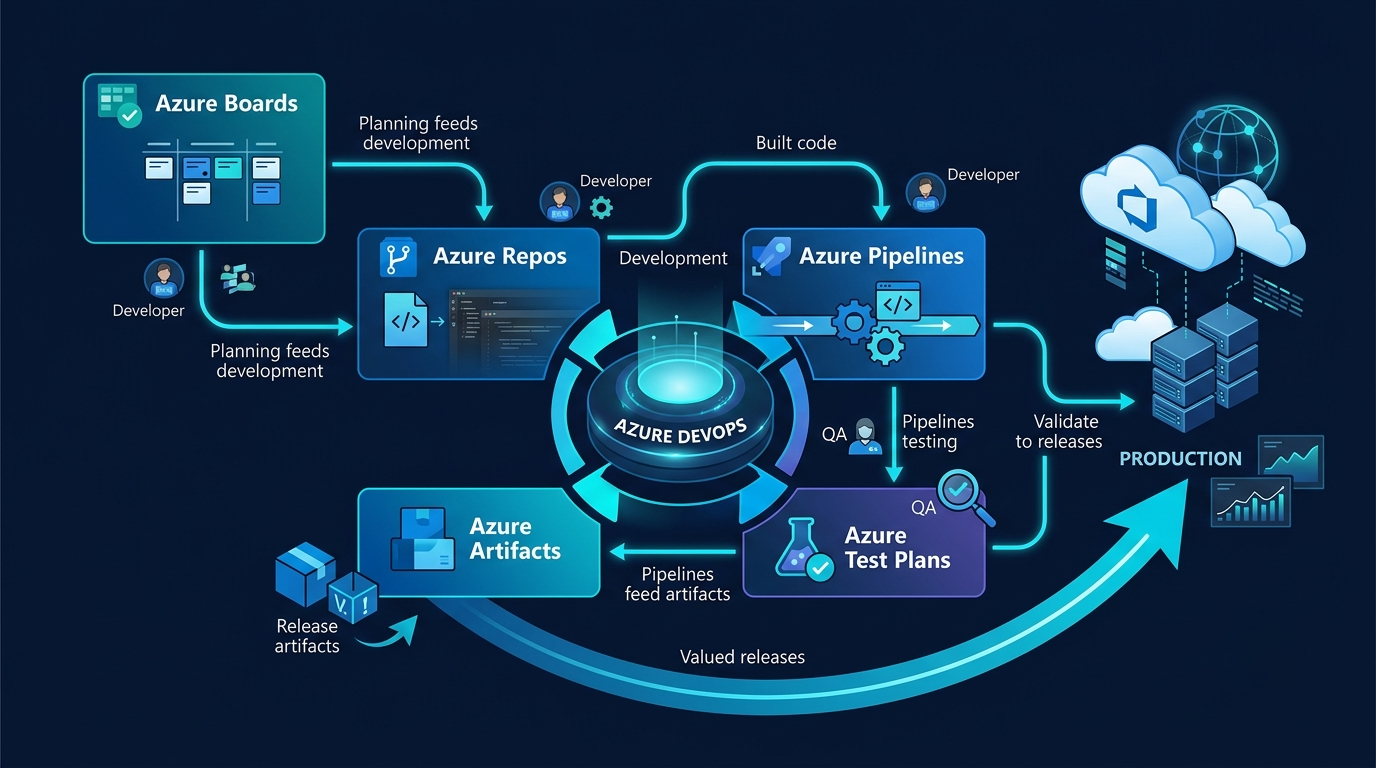
Azure Pipelines builds the application and runs the required automated tests. The resulting application is moved into a test environment, where QA engineers validate realistic user scenarios. If the application depends on a shared internal component, that dependency can be retrieved through Azure Artifacts. Once the required quality and security conditions are satisfied, the release can progress toward production according to the organization's deployment strategy. After deployment, the team can evaluate application behavior and delivery results, identify improvements, and create new work based on what they learn.
This creates a continuous cycle rather than a collection of disconnected activities: plan, develop, review, build, test, deploy, observe, and improve. That is why Azure DevOps is better understood as a software-delivery system than simply as a group of tools.
A Realistic Azure DevOps Workflow From Requirement to Release
A useful way to visualize the complete process is to imagine the lifecycle as a continuous flow. It starts when a business requirement becomes a prioritized work item and continues as developers create branches, write code, and submit pull requests. Reviews and automated validation provide checkpoints before the change becomes part of the shared codebase.
The pipeline then builds the application and produces a deployable artifact. Automated tests and other quality checks provide evidence about the change, while manual or exploratory testing can validate behavior that automated tests may not fully cover. Once the required conditions are met, the release moves through the appropriate environments. Deployment is not necessarily the end of the process. Teams need to understand what happened after the release, whether the application behaved as expected, and whether customers experienced problems. That feedback can become new work in the backlog, creating another development cycle.
The result is a feedback loop rather than a straight line: requirement → development → validation → release → feedback → improvement. This continuous flow is one of the fundamental ideas behind modern DevOps.
Why Automation Alone Does Not Create DevOps
There is a common temptation to equate DevOps with automation. Install Azure Pipelines, create a YAML configuration, automate deployment, and the organization may feel as though it has suddenly adopted DevOps. In reality, automation can accelerate a poor process just as easily as a good one. If requirements are unclear, automation does not make them clearer. If developers and operations teams do not communicate, a faster pipeline will not solve that organizational problem. If security is considered only after deployment, an automated release process does not automatically make the software secure.
DevOps is better understood as a combination of culture, process, and technology. Technology provides the capabilities, but teams still need sensible engineering practices, communication, ownership, and feedback mechanisms around those capabilities. This is why successful DevOps transformations are often less about installing a tool and more about changing how work moves through the organization. The platform matters, but the operating model surrounding it matters just as much.
The Shift From “Deploying Code” to “Managing Flow”
One of the most useful ways to understand DevOps is through the concept of flow. A software change moves through a sequence that may include an idea, requirement, code change, review, build, test, release, production environment, and customer feedback. Every handoff can introduce delay. Developers may finish code but wait for a manual build. Testing may begin only at the end of a sprint. A production deployment may depend on several people coordinating scripts manually. Teams may even struggle to determine which version of the application is currently deployed.
These are not simply technical problems. They are flow problems. The organization is spending time moving work between stages rather than creating value for customers.
Azure DevOps can help make these stages more visible and automate appropriate parts of the journey. The objective is not merely to make individual employees work faster. It is to improve the entire system through which software moves from an idea to something customers can actually use.
Security Cannot Be an Afterthought
Modern software delivery also requires security to become part of the development lifecycle. Identity, permissions, secrets, dependencies, code quality, infrastructure, and deployment policies all influence the security of the final system. Consider something as basic as application credentials. Storing secrets directly inside source code can create unnecessary risk. A mature delivery process should instead use appropriate secret-management mechanisms, restrict access according to least-privilege principles, and ensure sensitive information is not casually exposed through repositories or pipeline logs.
Security checks can also be incorporated earlier into the delivery process. Dependency scanning, code analysis, compliance checks, and policy enforcement can help identify problems before software reaches production. The earlier a vulnerability is discovered, the more opportunities the team has to address it without creating an emergency release.
This demonstrates an important evolution in DevOps thinking: delivery speed without security is not mature delivery. The objective is to create a process where security and compliance are considered alongside quality and reliability rather than being treated as a final approval step.
Azure DevOps and GitHub: Competitors or Partners?
Modern Microsoft development environments also make the relationship between Azure DevOps and GitHub worth understanding. Organizations do not necessarily have to choose one platform for every part of their software lifecycle. Depending on their requirements, they may combine GitHub repositories and workflows with Azure DevOps capabilities.
This matters for people learning DevOps because the goal should not be to memorize the location of every feature in one platform. Instead, learners should understand the underlying engineering concepts: source control, continuous integration, continuous delivery, security, infrastructure automation, testing, monitoring, and release management.
A strong DevOps engineer can look at a delivery problem and ask, “What architecture will solve this problem effectively?” rather than immediately asking, “Which button or feature should I use?” That difference separates basic tool familiarity from engineering capability. The tools will continue to evolve, and organizations will continue to use different combinations of them. Understanding the principles behind those tools creates a much stronger foundation for adapting to new technologies.
Azure DevOps Services vs Azure DevOps Server: Which Model Fits the Organization?
Azure DevOps is available through Azure DevOps Services as a Microsoft-hosted cloud offering, while Azure DevOps Server provides organizations with an on-premises deployment model. The distinction matters because organizations do not all have the same infrastructure, compliance, security, or data-management requirements. A cloud-first company may prefer Azure DevOps Services because the platform is managed as a hosted service, reducing the operational responsibility associated with maintaining the underlying DevOps infrastructure. An organization with specific on-premises requirements may instead evaluate Azure DevOps Server.
The choice should not be based simply on which option sounds more modern. Architecture should follow the organization's technical constraints, governance requirements, security model, existing infrastructure, and long-term operating strategy. The broader lesson is important: DevOps architecture should support business requirements rather than forcing business requirements to fit a particular technical configuration.
What Should You Actually Learn to Become Good at Azure DevOps?
Learning Azure DevOps effectively requires more than memorizing menus and features. The platform sits across several areas of modern software engineering, so a strong foundation should include Git, CI/CD, YAML pipelines, Azure fundamentals, infrastructure as code, containers, security, testing, and monitoring. A well-structured learn azure devops can provide a useful starting point, but the real value comes from connecting these concepts through practical projects. This broader foundation helps learners understand not just how the platform works, but why each part of the delivery process matters.
Git knowledge should cover branches, commits, merges, pull requests, conflicts, tags, and branching strategies. CI/CD learning should include triggers, artifacts, environments, approvals, deployment strategies, and automated validation. YAML becomes particularly important when pipelines are maintained as configuration rather than created entirely through graphical interfaces.
Cloud and infrastructure knowledge also matters. Engineers working with Azure DevOps benefit from understanding compute, networking, identity, storage, containers, and infrastructure-as-code technologies such as Bicep or Terraform. These concepts help explain what the pipeline is actually deploying rather than treating deployment as a black box. Security and observability complete the picture. Developers and DevOps engineers need to understand secrets, permissions, service connections, dependency risks, security scanning, logging, monitoring, and operational feedback. The more connected these skills become, the easier it is to understand Azure DevOps as an engineering system rather than a standalone product.