
How Salesforce Helps Sales Teams Spend Less Time on Admin and More to Time Selling
Last updated on Sep 23, 2026

Sales teams are expected to move quickly. They need to respond to leads, understand customer needs, follow up on opportunities, update records, attend meetings, prepare reports, and still find enough time to actually sell. The challenge is that selling is only one part of a salesperson’s working day.
A large amount of time can disappear into activities that support the sales process but do not directly generate conversations or revenue. Updating customer records, entering information, checking opportunity stages, assigning leads, creating follow-up tasks, and preparing reports can gradually turn into a second job. This is where a CRM such as Salesforce can become more than a place to store customer information. When configured properly, Salesforce can help organize sales processes, automate repetitive activities, and give sales representatives access to the information they need without constantly switching between different tools.
The goal is not to automate the salesperson out of the process. The goal is to automate the work around selling so salespeople have more time for the work that requires a human connection.
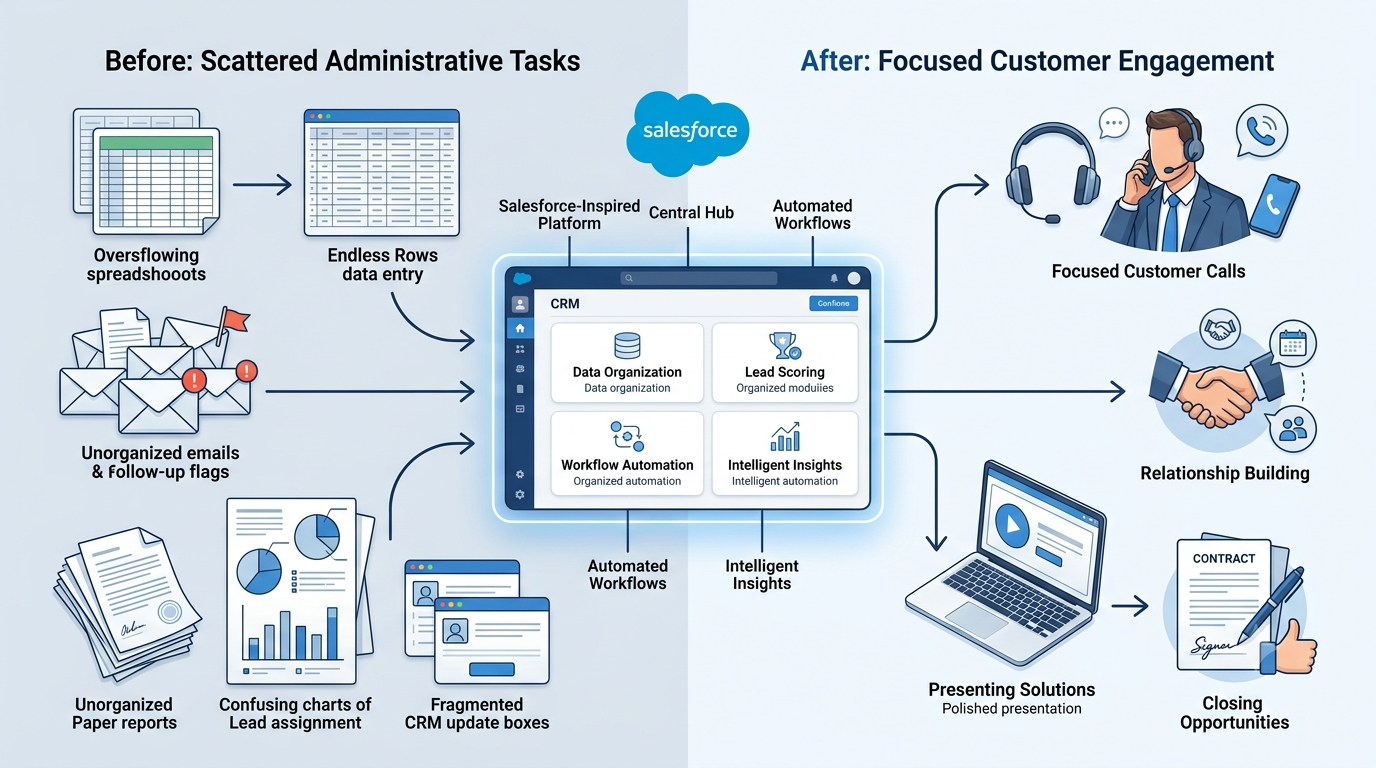
The Productivity Problem Behind Modern Sales
Sales productivity is often associated with doing more activities in less time. But simply increasing the number of calls, emails, or meetings does not necessarily make a sales team more productive. A salesperson might spend an entire morning contacting prospects and then several hours updating spreadsheets, searching through emails, checking customer histories, and preparing internal reports. By the end of the day, they may have been extremely busy without spending enough time on meaningful customer conversations.
This creates an important distinction between sales activity and sales productivity. Activity measures what a salesperson does. Productivity looks at how effectively their time and resources contribute to meaningful sales outcomes. For example, manually entering the same customer information into multiple systems is an activity. It may be necessary, but it does not necessarily move an opportunity forward. A well-designed CRM process can reduce some of that administrative effort by automatically updating records or triggering the next step in a workflow. That is why sales productivity is not simply about making salespeople work faster. It is also about removing unnecessary friction from the sales process.
Where Salespeople Lose Valuable Time
Administrative work rarely arrives as one large task. Instead, it appears as dozens of small activities throughout the day. A representative receives a new lead and has to determine who should handle it. After a customer conversation, the representative needs to update the opportunity. A follow-up needs to be scheduled. A manager wants an updated pipeline report. Another team needs information about the customer.
Each task may take only a few minutes. But when those minutes are repeated across dozens of leads and opportunities, the accumulated time becomes significant.
Common sources of administrative workload include:
Manually entering customer information
Updating lead and opportunity records
Assigning leads to representatives
Creating follow-up tasks
Searching for customer history
Preparing sales reports
Tracking opportunity stages
Sending routine notifications
Updating spreadsheets
Moving information between disconnected applications
The problem becomes even more noticeable as a sales organization grows. A process that seems manageable for five representatives can become difficult to maintain across fifty or five hundred. Salesforce can help by providing a structured environment where customer information, sales activities, opportunities, and workflows can be managed within connected processes.
Salesforce Turns Sales Processes Into Workflows
One of the biggest productivity opportunities in Salesforce comes from workflow automation. Many sales activities follow a predictable sequence, but when each step is handled manually, representatives can spend valuable time coordinating routine tasks instead of focusing on customers. A new lead may need to be reviewed, categorized, assigned to the right salesperson, followed up, and tracked until someone takes action. When these activities are connected through a structured process, much of the routine coordination can be reduced.
Without an automated process, someone may need to check an incoming lead, determine its category, assign it to a salesperson, notify that person, create a follow-up task, and monitor whether the lead was contacted. With an appropriately configured Salesforce environment, some of these steps can happen automatically according to predefined business rules. The system can route information, create tasks, send notifications, and move records through established stages, helping sales teams maintain a more consistent process.
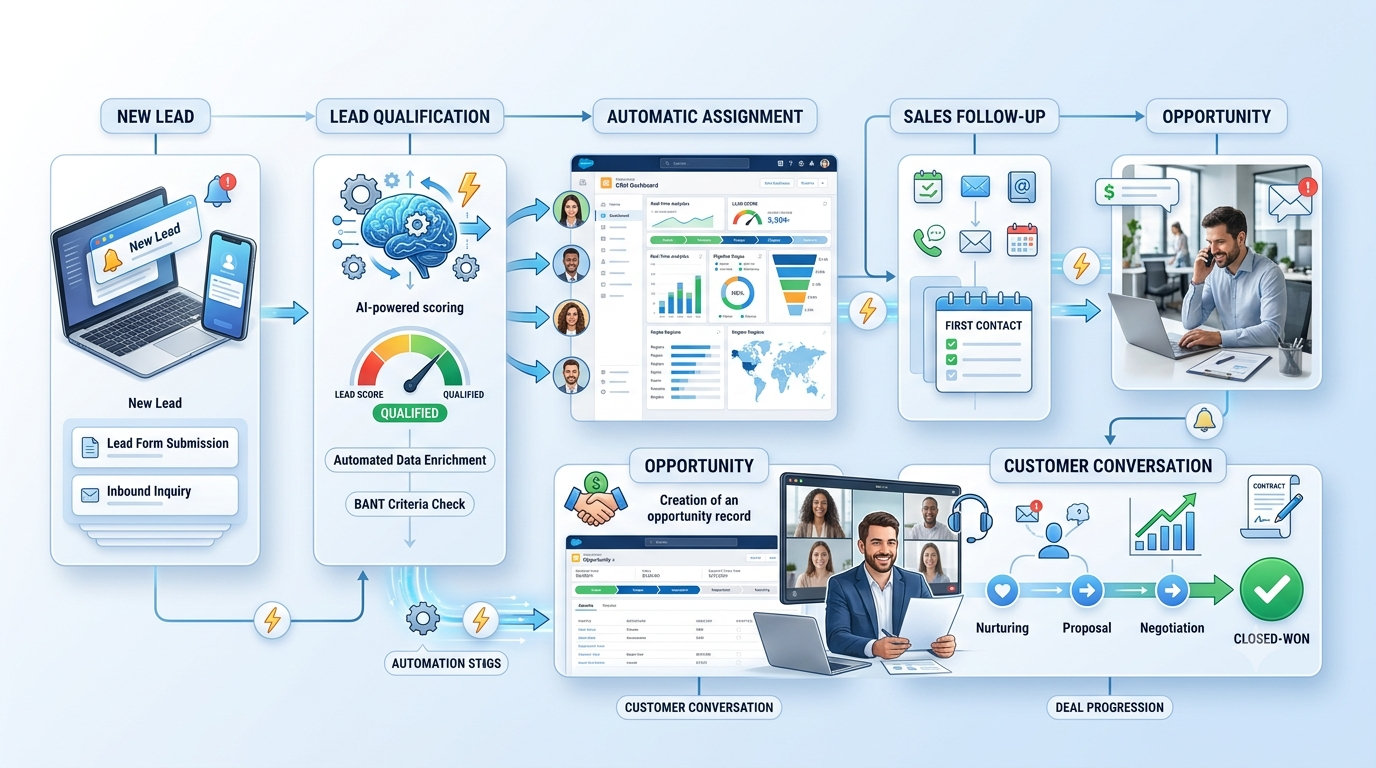
Understanding how these workflows are configured is also an important part of Salesforce administration. A salesforce admin course can help professionals develop knowledge of CRM configuration, workflow processes, automation, records, and other administrative capabilities that support business operations. For sales teams, effective configuration matters because the automation should reflect how representatives actually manage leads and opportunities rather than adding unnecessary complexity.
Automation does not eliminate the salesperson’s responsibility. Instead, it removes some of the repetitive coordination surrounding that responsibility. Once routine actions are handled more efficiently, the salesperson can focus on the more valuable part of the process: understanding the prospect, asking relevant questions, identifying needs, addressing concerns, and developing the relationship. Good automation does not replace selling. It removes the unnecessary steps surrounding selling.
Faster Lead Management Can Improve Sales Response
Speed matters when a potential customer shows interest. A lead that sits untouched in a queue for hours or days may receive attention too late. But responding quickly is not simply about telling salespeople to work faster. The underlying process also needs to support timely action.
Salesforce can help organizations create structured lead-management processes.
For example, when a lead is captured, rules can determine how it should be categorized or assigned. The appropriate sales representative can receive the information, and follow-up activities can be created according to the organization's process. This reduces the amount of manual coordination required between marketing, sales operations, and individual representatives. It also gives sales managers greater visibility into what is happening with incoming leads. Instead of asking, “Who is handling this lead?” or “Has anyone followed up?”, managers can work from the information available in the CRM. That visibility can make the sales process more predictable while reducing unnecessary internal communication.
Less Searching, More Selling
Another productivity problem is surprisingly simple: finding information. A salesperson preparing for a customer conversation may need to know when the customer was last contacted, what products they previously discussed, whether there are open opportunities, which team members interacted with them, and what happened during earlier conversations. If this information is spread across emails, spreadsheets, documents, and different applications, preparing for the conversation takes additional time.
A CRM provides a centralized environment for customer and opportunity information. Salesforce can bring relevant records and activities together so representatives can spend less time searching and more time preparing for the conversation itself. This becomes particularly valuable when customers interact with multiple people inside an organization. Instead of relying entirely on one salesperson's memory or personal records, the organization can maintain a shared view of customer interactions. That creates continuity when accounts change hands, team members collaborate, or managers need to step into an opportunity.
Making Follow-Ups Easier to Manage
Follow-up is one of the most important parts of sales, but it is also an area where manual processes can create problems. A salesperson may finish a call and think, “I need to contact this prospect again next Tuesday.” If that reminder lives only in their memory, there is a risk that it gets missed among other meetings and priorities.
Salesforce can help turn follow-up intentions into structured activities.
Tasks, reminders, opportunity stages, and workflow-driven actions can help representatives maintain a more consistent process. This does not mean every follow-up should become robotic. The content and timing of a customer interaction still require judgment. The benefit is that the system can help make sure the administrative part of remembering and organizing the next action does not depend entirely on memory.
For sales teams managing a large pipeline, that difference can be important. Better Visibility Into the Sales Pipeline
Sales productivity is not only about individual representatives. Managers also need to understand where time and opportunities are being lost.A sales pipeline contains many moving parts. Some opportunities are progressing, some are stalled, and others may need immediate attention. Without a centralized CRM, managers may rely on spreadsheets, individual updates, or meetings to understand the current state of the pipeline. Salesforce provides dashboards, reports, and opportunity information that can help teams see pipeline activity in a more structured way.
A manager can use this information to identify questions such as:
Which opportunities have not progressed recently?
Where are leads accumulating?
Which stages contain the most opportunities?
Are representatives following the expected sales process?
Where are deals spending too much time?
Which activities require management attention?
This changes the manager's role from simply collecting updates to using available information to guide the sales process.
Salesforce Administration Also Matters to Sales Productivity
There is another side of Salesforce productivity that is easy to overlook: the way the CRM itself is managed. A sales team can have a powerful CRM and still experience unnecessary friction if its processes are poorly configured.
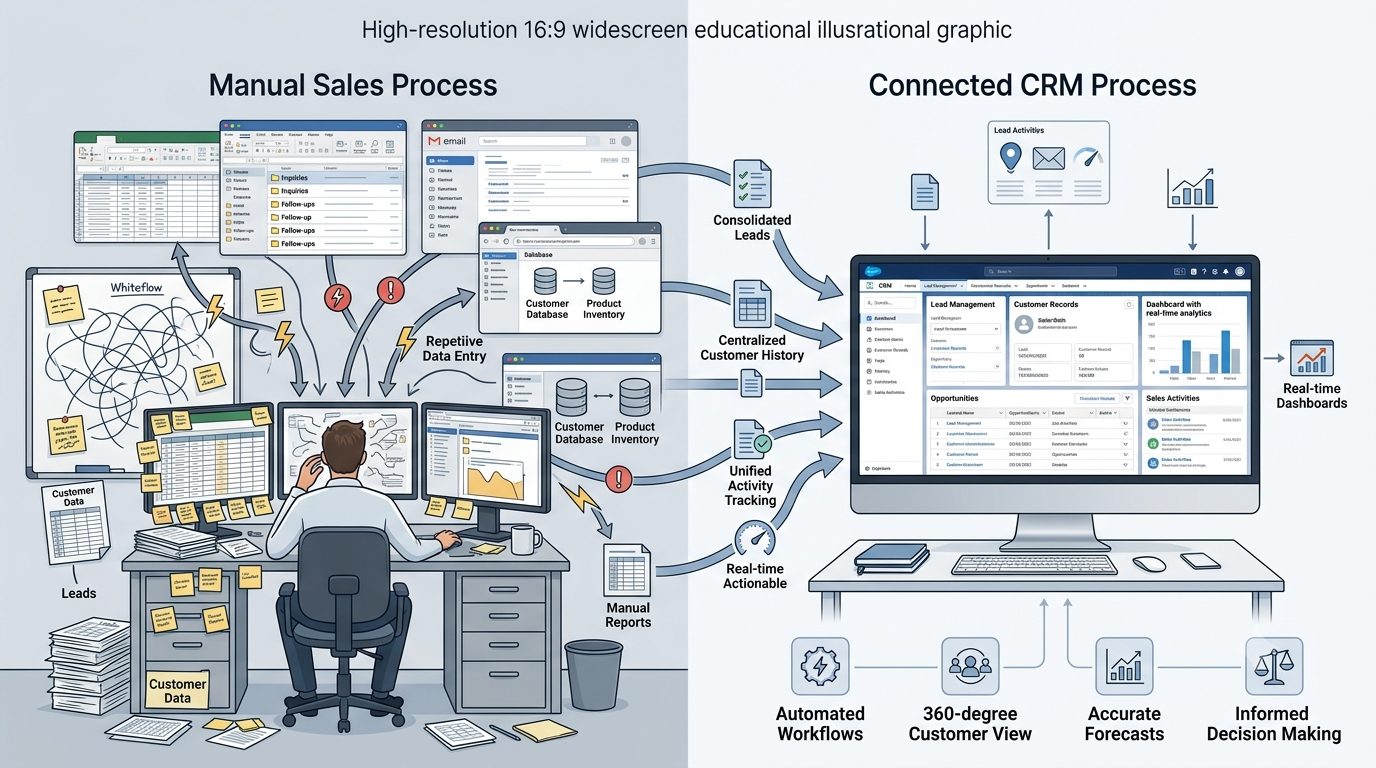
Fields that are not useful, confusing workflows, duplicate records, excessive manual entry, or poorly designed processes can make a CRM feel like additional administrative work rather than a productivity tool. This is why Salesforce administration plays an important role in the overall user experience. Professionals building their skills through a salesforce administrator course may learn how CRM objects, workflows, permissions, reports, automation, and data structures can be configured to support business requirements. For sales organizations, this matters because the CRM should reflect the actual sales process rather than forcing salespeople to work around the system. A well-maintained Salesforce environment can make it easier for representatives to find information, complete routine tasks, and follow consistent processes. Automation Should Support People, Not Overcomplicate Their Work.
Automation sounds attractive, but more automation is not automatically better.
A sales process can become complicated if every possible activity triggers another workflow, notification, task, or approval. Salespeople may then receive too many alerts and spend their time managing the automation itself. The objective should therefore be useful automation rather than maximum automation. A good automation strategy starts by identifying repetitive activities that follow clear business rules. For example, assigning a lead based on territory may be suitable for automation because the rule can be clearly defined. On the other hand, deciding how to approach a high-value customer may require human judgment. The distinction is important.
Salesforce should handle predictable processes where automation can improve consistency, while salespeople should retain control over activities that depend on context, communication, negotiation, and relationships.
Measuring the Right Kind of Sales Productivity
One of the biggest advantages of having structured sales data is the ability to examine productivity more intelligently. Traditional sales reporting may focus heavily on activity numbers: calls made, emails sent, meetings completed, and leads contacted.
These numbers can be useful, but they do not tell the entire story. A salesperson making 100 calls is not necessarily more productive than someone making 50 calls if the second salesperson is working with better-qualified opportunities and progressing them more effectively.
Salesforce data can help organizations examine broader indicators, such as:
Lead response time: How quickly does the sales team act after receiving a lead?
Conversion rate: How many leads move toward meaningful sales opportunities?
Opportunity progression: Are opportunities moving through the pipeline or remaining inactive?
Sales cycle: How long does it take opportunities to progress toward completion?
Administrative workload: How much time is being spent on repetitive processes?
Looking at these measures together provides a more useful picture of productivity than simply counting activities. Connecting Sales and Other Business Teams Sales does not operate independently. Marketing generates and nurtures leads. Customer service interacts with existing customers. Finance may become involved when deals progress. Management needs visibility into revenue and pipeline performance. When these teams operate with disconnected information, sales representatives may become the middle point responsible for moving information between departments.
A connected CRM environment can reduce some of this friction.
For example, marketing information can support sales conversations, while customer information can help teams understand the broader relationship with an account. The result is not simply better technology. It can create a more connected operating process in which salespeople do not have to repeatedly gather information that already exists elsewhere in the organization.
The Human Side of Salesforce Productivity
It is easy to describe CRM automation entirely in terms of efficiency. But sales is ultimately a human activity. Customers do not buy simply because a workflow was triggered or a dashboard was updated. They buy because a business understands their problem, communicates clearly, builds trust, and provides a solution that makes sense for them. Salesforce can support those activities by taking care of some of the operational work around them. A salesperson can use the information available in the CRM to prepare for a conversation. They can understand previous interactions, identify the current opportunity stage, and organize their next steps. But the actual conversation still belongs to the salesperson.
This is why the most useful way to think about Salesforce productivity is not human versus automation. It is human expertise supported by better processes and technology. What a Productive Salesforce Sales Process Looks Like Imagine a sales representative beginning the day with a clear view of their priorities. Instead of checking multiple spreadsheets, email threads, and personal notes, they can review their assigned leads, opportunities requiring attention, upcoming activities, and relevant customer information within their CRM environment.

New leads can be routed according to defined rules. Follow-up tasks can be created as part of the sales process. Customer information can be updated within the system, and managers can access pipeline information without repeatedly requesting manual reports. The representative still has plenty of work to do. They need to make calls, understand customer requirements, conduct meetings, handle objections, prepare proposals, negotiate, and close opportunities. But fewer hours are consumed by administrative coordination. That is the real productivity opportunity.
The Future of Sales Productivity With Salesforce
As CRM platforms continue to evolve, sales productivity is likely to become increasingly connected with automation, analytics, and AI. But technology alone will not create a productive sales organization. Businesses still need clearly defined processes, accurate data, appropriate automation, effective training, and employees who understand how to use the tools available to them. Salesforce can provide the infrastructure for that environment, but the quality of the implementation matters.
A poorly designed process can simply automate inefficiency.
A thoughtful process can remove unnecessary work and make important information easier to access.
That distinction will become even more important as sales teams adopt more intelligent CRM capabilities.
Conclusion
Salespeople should spend their time where their expertise creates the most value: understanding customers, building relationships, solving problems, and moving opportunities forward. Administrative work will always be part of sales, but not every administrative task needs to consume a salesperson’s attention. Salesforce can help organizations automate repetitive processes, organize customer information, manage leads, structure follow-ups, improve pipeline visibility, and connect different parts of the sales operation.
For professionals looking to understand how these systems are configured and maintained, salesforce administrator training can provide knowledge of CRM processes, automation, data management, and system administration that supports effective Salesforce environments. This understanding can also help organizations build CRM processes that are aligned with the actual needs of sales teams.
The result is not simply a faster CRM. The real opportunity is to create a sales environment where technology handles more of the routine work, while people spend more of their working day doing what technology cannot replace: having meaningful conversations with customers and making better sales decisions.