
If AI Builds the Dashboard, What Should Tableau Experts Do?
Last updated on Aug 11, 2026
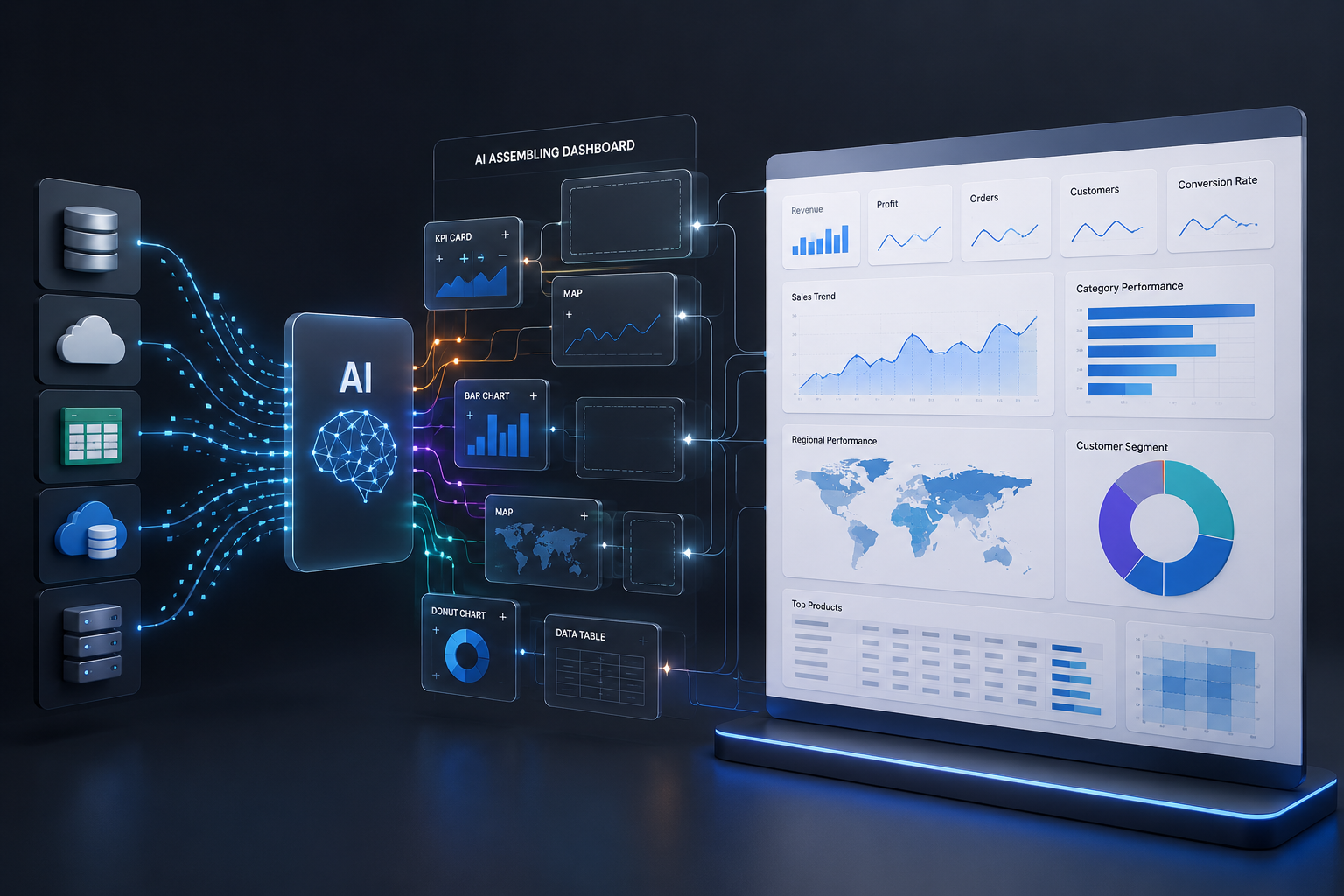
Knowing Tableau Isn’t Enough Anymore. Here’s What’s Next.
For years, Tableau professionals were valued for their ability to take complicated business data and turn it into something people could understand. A well-designed dashboard could bring sales, customer behavior, financial performance, or operational data into one place and help a manager see what was happening without going through spreadsheets or asking an analyst to prepare a
new report every time.
That role is changing.
AI is starting to take over some of the routine work involved in analysis. Users can ask questions in plain language, work through calculations, spot patterns, and get a quicker view of what may be happening in their data. Tableau is taking this a step further with Tableau Next and Tableau Agent, bringing more conversational and action-focused capabilities into the analytics process. This raises an uncomfortable but important question for anyone building a career around Tableau:
If AI can help build the dashboard, what becomes the real value of a Tableau professional?
The answer is not to compete with AI by creating dashboards faster. The more valuable direction is to understand the data behind the dashboard, the business problem it represents, and the decisions that need to follow from the analysis. That is why the modern Tableau skill set is becoming broader. Tableau remains important, but it increasingly sits alongside SQL, data modeling, AI, business understanding, and governance.
The Dashboard Is Still Useful, But It Is No Longer the Whole Story
A dashboard has always been a way of answering business questions visually. A sales manager may want to know which products are performing well, a finance team may want to track profitability, or an operations team may need to monitor delivery performance.
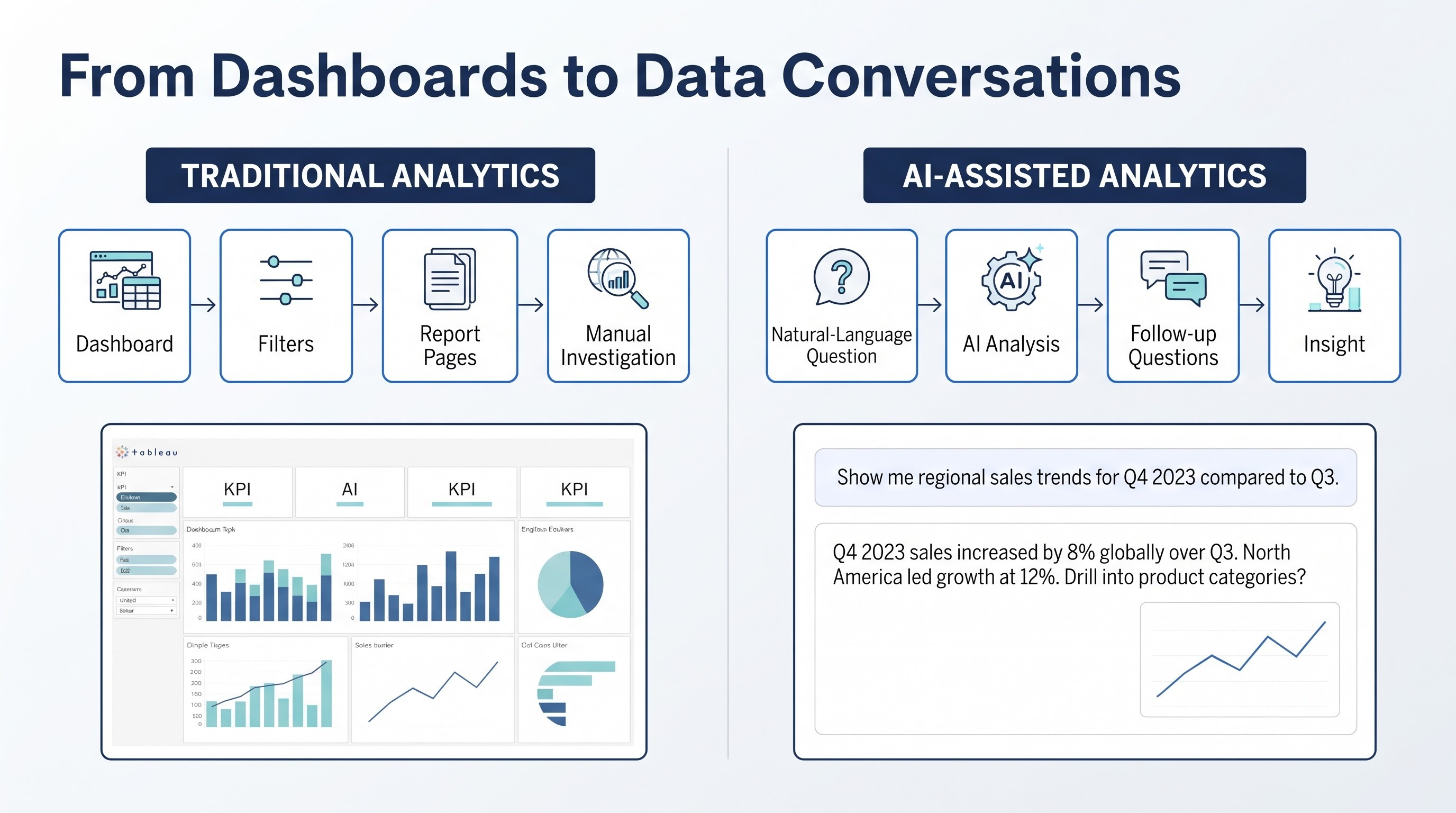
Tableau makes these questions easier to explore by bringing different dimensions of information into an interactive visual environment.
The limitation is that a dashboard generally shows the information that someone has already decided to measure.
Imagine a company discovers that revenue has declined over the last quarter. The dashboard may clearly show the decline and perhaps identify the region or product category responsible. But the manager still needs to investigate whether the change came from lower sales volume, pricing, customer churn, a seasonal effect, or something else.
That difference between seeing a result and understanding the reason behind it is where AI-assisted analytics becomes interesting.
Instead of navigating through several report pages, a user can increasingly ask questions about the data and continue the investigation based on the answers. Tableau's current direction toward conversational and agentic analytics reflects this broader shift in how people interact with business intelligence.
The dashboard has not become irrelevant. Its role is expanding.
Tableau’s Next Challenge Is Not Better Charts
Visualization will continue to matter because people still need a clear way to understand trends, comparisons, relationships, and exceptions. A good visual can communicate something in seconds that might take several paragraphs to explain.
The bigger question is what happens before and after that visual.
Before the dashboard exists, someone needs to understand the source data, establish relationships, define metrics, and decide which information is actually relevant to the business problem. After the dashboard reveals a pattern, someone still needs to determine whether that pattern is meaningful and what action should follow.
AI can make parts of this work faster, but someone still has to look at the result and decide whether it actually makes sense.
For example, an AI system might identify that a company's highest-value customers have experienced a decline in engagement. That is useful information, but a business professional still needs to determine whether the pattern is significant, whether the underlying data is reliable, and what the company should investigate next.
This is why the future Tableau professional is likely to spend less time thinking only about how to display information and more time thinking about how to make information useful.
Where Tableau Meets the New AI Workflow
Tableau's current product development provides a useful indication of where analytics is heading. Tableau Next is being positioned around agentic analytics, combining trusted semantics, data, visualization, AI, and actionability into a broader analytics experience. Tableau Agent is also designed to help users interact with data through natural-language analysis and AI-assisted workflows.
The significance of this change is easy to miss if AI is viewed simply as another feature.
Traditional analytics often follows a sequence such as:
Connect data → Build analysis → Create dashboard → User interprets results
An AI-assisted environment can make that interaction more conversational:
Ask a question → Explore the data → Investigate the result → Refine the question → Identify an insight → Consider an action
The second approach does not eliminate visualization. Instead, it gives visualization a place within a larger analytical conversation.
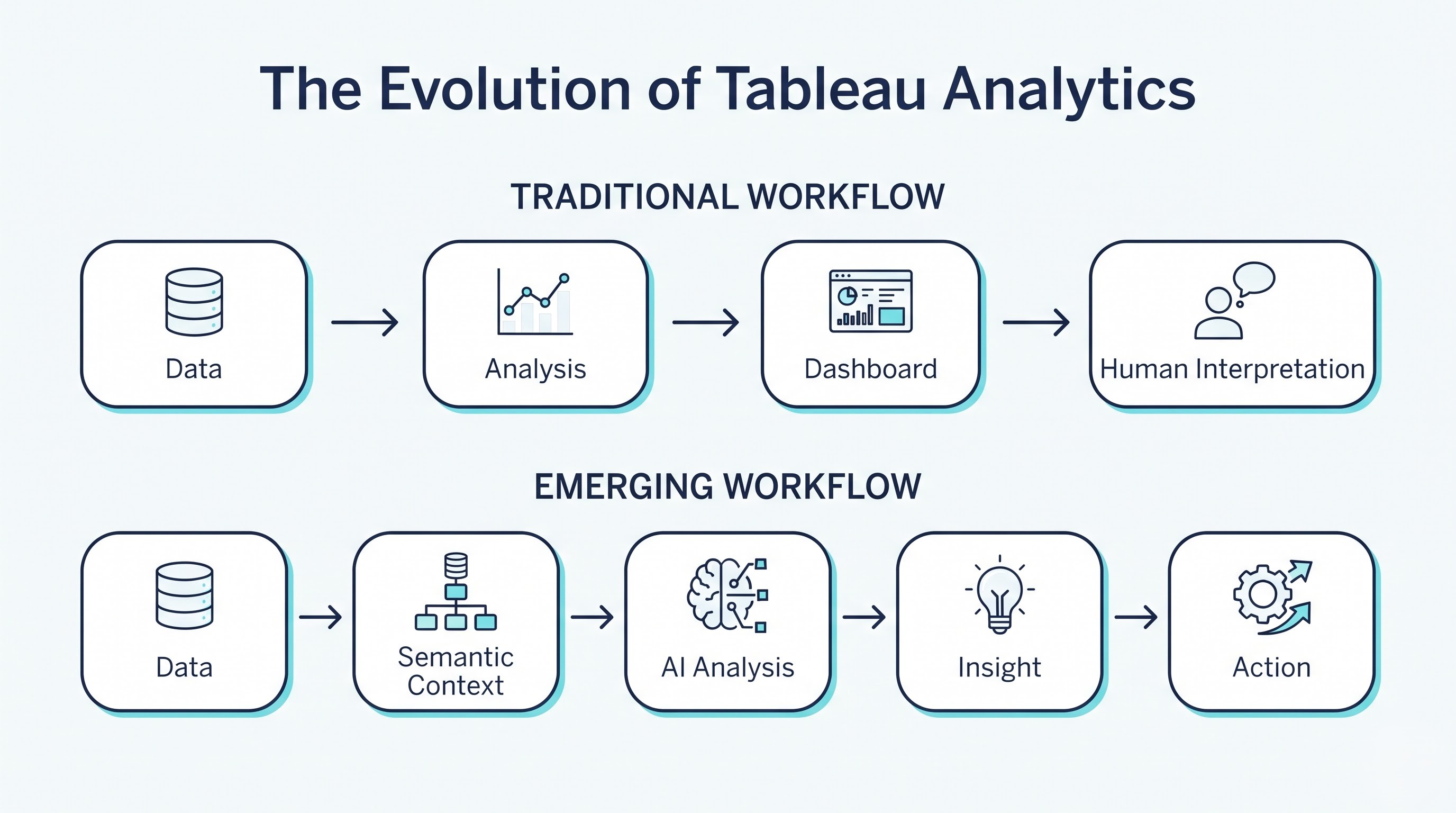
That is an important distinction for professionals deciding which Tableau skills to develop.
Why the Data Model Behind the Dashboard Matters More Than Ever
One of the less visible changes in modern analytics is the growing importance of the semantic layer.
A business question often sounds simpler than the data problem behind it. Consider the question, “What was our profit last year?” Before an analyst can provide a trustworthy answer, the organization needs to agree on what profit means, which costs should be included, which transactions belong in the calculation, and which time period should be used.
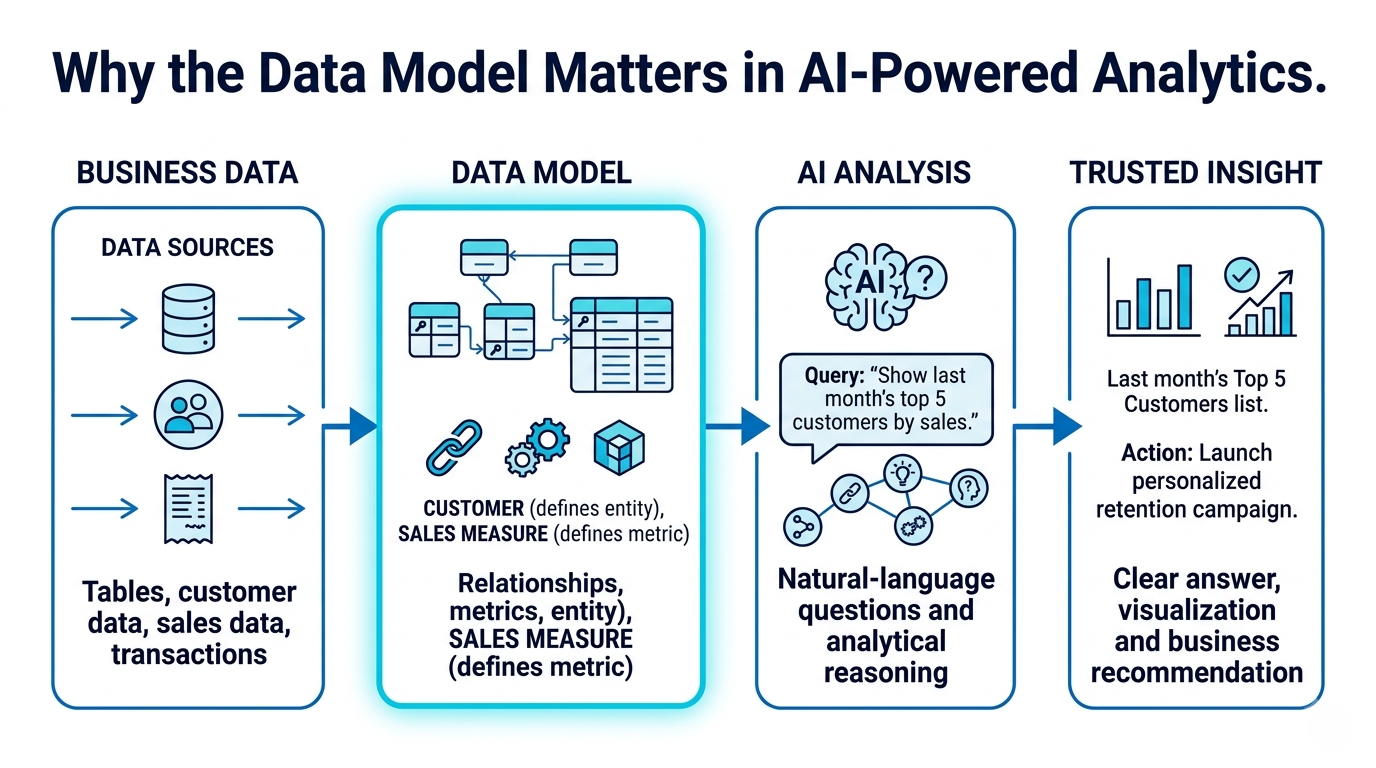
If those definitions are inconsistent, an AI system can make the problem easier to access without actually solving it.
This is why data modeling and semantic understanding are becoming increasingly important as AI becomes part of analytics. Tableau's current direction emphasizes trusted semantics and business context so that analytical experiences can work with defined metrics, relationships, and business meaning rather than treating every field as an isolated piece of data.
For Tableau professionals, this creates a valuable shift in perspective. Knowing how to design a dashboard remains useful, but understanding why the underlying data produces that dashboard becomes equally important.
SQL Gives Tableau Professionals a View Beyond the Dashboard
Tableau makes data accessible visually, but professionals often need to investigate what is happening beneath the visualization.
Suppose a dashboard suddenly shows an unusual increase in customer cancellations. The first question should not necessarily be how to change the chart. It may be whether the underlying data contains duplicate records, a changed definition, a new source, or a genuine shift in customer behavior.
SQL provides a practical way to investigate those questions.
It helps professionals query source data, examine relationships, validate results, identify inconsistencies, and understand how information is being prepared before it reaches the visualization layer. AI can help accelerate some of this work, but SQL knowledge allows a professional to verify what the system is actually working with.
That makes SQL less of a separate technical skill and more of a supporting capability for serious Tableau work.
The New Tableau Skill Stack
The modern Tableau skill set is no longer about mastering visualization alone. Tableau skills now sit alongside several other areas of data work. A professional may need SQL to look deeper into the data, data modeling to keep it organized, and business knowledge to understand what the numbers actually mean. AI and governance add another layer to that process. Knowing these areas individually is useful, but the bigger advantage comes from knowing when and how to use them together.
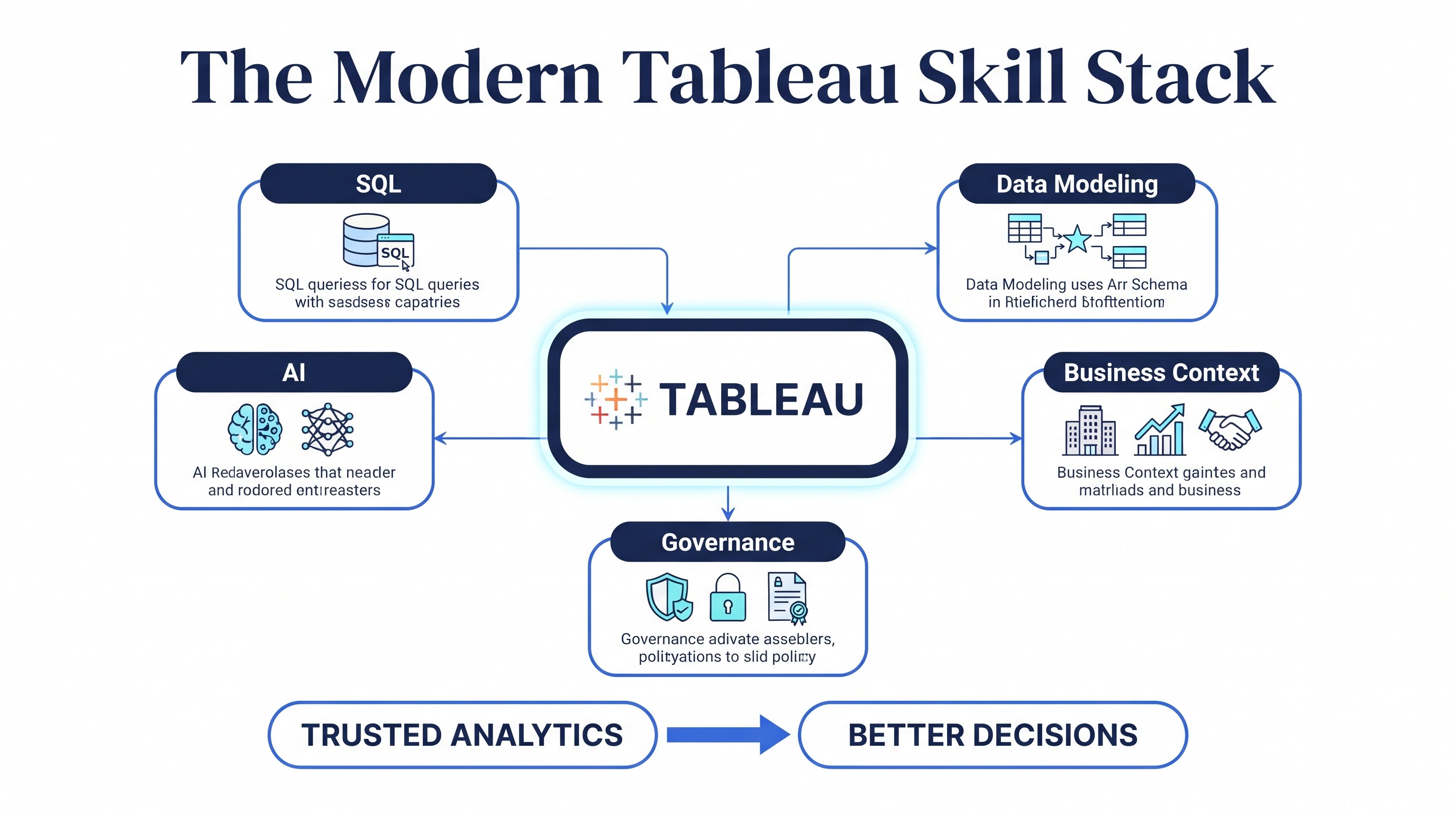
The value of this skill stack comes from the connection between these areas rather than from any one technology.
Business Understanding Could Become the Differentiator
Technical skills are often easier to measure. A person can demonstrate that they know SQL, create a Tableau dashboard, or build a calculated field.
Business understanding is harder to demonstrate, but it can have a much greater effect on the quality of the final analysis.
Consider two people given the same customer dataset.
One person immediately starts building charts showing customer counts, revenue, and churn.
The other first asks what decision the business is trying to make. Are customers leaving because of pricing? Is the company trying to identify high-value customers at risk? Is the objective to improve retention in a specific region?
Those questions determine what data should be examined and what the final dashboard should actually contain.
AI may make it easier to produce the first dashboard. The second approach still requires human reasoning. This is why the future Tableau professional may be judged less by how many dashboards they can build and more by whether their analysis helps a business make a better decision.
AI Will Automate Tasks, Not the Entire Analytical Responsibility
There is a natural concern that AI will reduce the demand for Tableau developers and analysts. Some repetitive tasks will almost certainly require less manual effort as AI capabilities become more capable.
That does not mean the entire role disappears.
Tableau's AI capabilities are increasingly aimed at accelerating tasks such as creating calculations, exploring data, preparing semantic models, and answering analytical questions. The important distinction is between doing a task and being responsible for the result.
A system can generate a calculation, but someone still needs to check whether the calculation reflects the correct business definition. It can identify a trend, but someone needs to decide whether that trend is meaningful. It can summarize information, but someone needs to determine whether the summary leaves out an important context.
As routine production becomes easier, the human contribution can move toward validation, interpretation,
communication, and decision support. That is not a smaller role. It is a different one.
Analytics Is Moving Closer to Where Decisions Happen
Another important development is that analytics is becoming less dependent on a separate reporting destination.
In many organizations, people already spend their working day inside collaboration, customer management, operational, or productivity applications. Requiring them to leave those environments every time they need an analytical answer can create friction.
Tableau is moving toward bringing analytics into those workflows. Tableau Next, for example, supports analytics experiences in Slack, including conversational interactions with Tableau Agent and the ability to work with insights within the collaboration environment.
The practical idea is simple: analytics becomes more useful when it appears where the decision is being made.
For Tableau professionals, this means understanding the consumption of analytics becomes just as important as creating it. The question is no longer only how to build the dashboard, but how people will discover the insight, discuss it, and potentially act on it.
What This Means for Someone Learning Tableau
The changing technology landscape does not make learning Tableau less useful. It changes how Tableau should be approached.
Someone beginning today should understand the fundamentals of visualization and dashboard development, but should avoid treating them as the final stage of learning. Building a strong foundation in Tableau alongside SQL and data modeling creates a better starting point for understanding modern analytics.
For someone who prefers learning step by step, a Tableau course online can be a practical way to get started with the basics. But learning should not stop at knowing which button or feature to use. A useful course should also show how Tableau fits into real data and business situations, so learners can gradually build skills in areas such as SQL, AI, and analytics.
That distinction becomes increasingly important as AI handles more routine technical tasks.
Why Practical Learning Matters More in an AI-Assisted Environment
Learning a BI platform entirely through isolated features can create a misleading sense of progress. Someone may know how to create charts, add filters, and construct dashboards without knowing how to decide which analysis a business actually needs.
Practical situations solve that problem.
A learner could work with sales data and investigate declining revenue, use customer data to examine retention patterns, or analyze operational data to identify recurring delays. Each project forces them to think about the question, select appropriate data, validate the result, and communicate what they found.
This is the type of practice that helps turn software knowledge into analytical ability. This is where Tableau classes online can be helpful, especially when they include guided practice, realistic datasets, and projects based on actual business situations. Instead of simply following a demonstration, learners get a chance to make decisions, test their analysis, and explain the result. Over time, that kind of practice builds the habit of asking why a particular analysis is needed, rather than only learning how to create it.
Which Tableau Skills Will Still Matter as the Platform Changes?
It is hard to say exactly what Tableau will look like a few years from now. AI features will keep developing, the interface will change, and some of the tasks that currently need specialist knowledge may eventually become easier to automate.
What is less likely to change is the basic thinking behind good analytics.
Professionals will still need to understand the data, challenge assumptions, explain what they find, and connect those findings to an actual business outcome. They will also need enough technical knowledge to validate what automated systems produce.
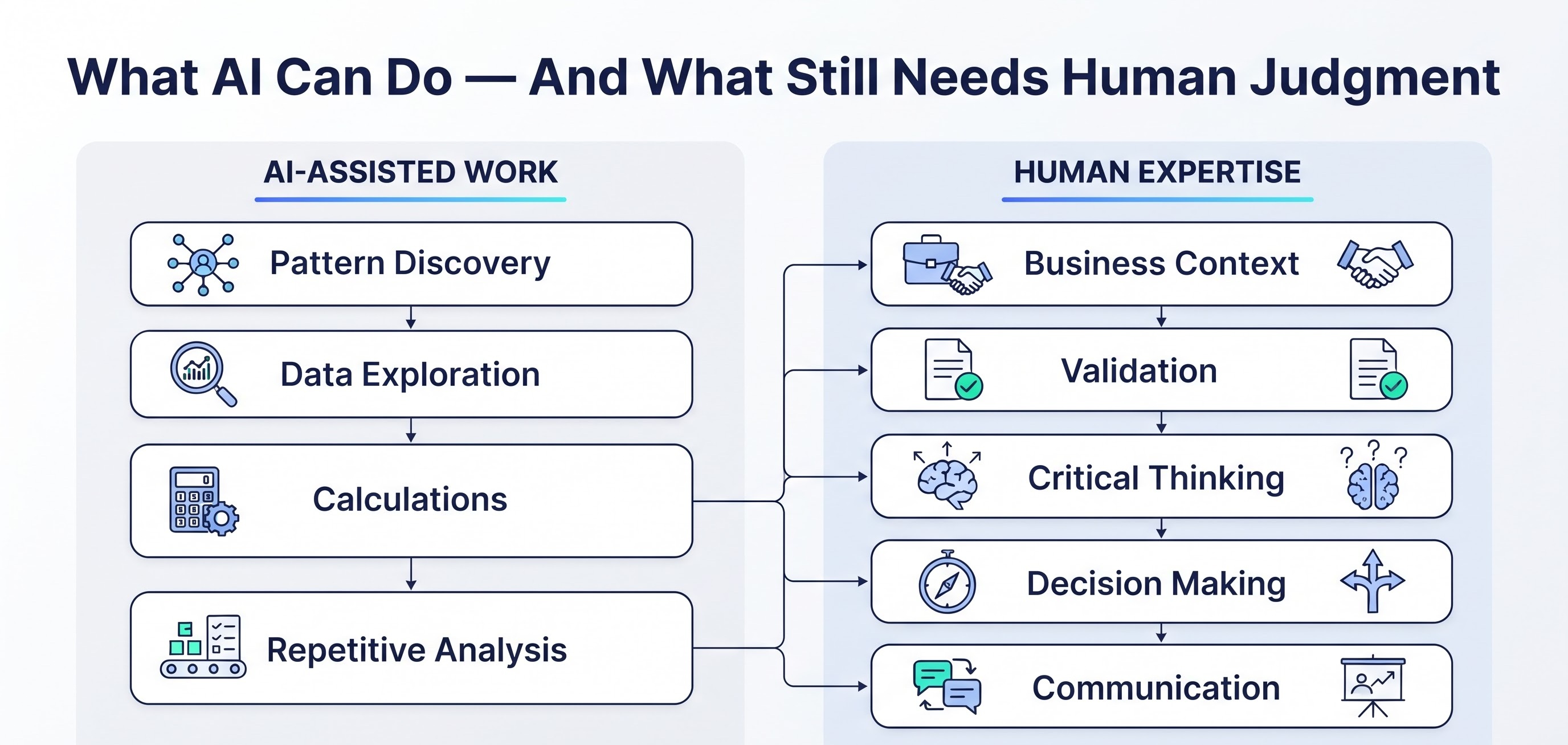
This is why a broader skill set is more resilient than a narrow focus on one interface or feature.
Someone who knows only how to build a particular type of dashboard may find that capability increasingly automated.
Someone who understands data, business logic, analytical reasoning, and AI-assisted workflows can adapt as the tools change.
How to Build the Skill Stack Without Trying to Learn Everything at Once
The expansion of Tableau can make the learning path appear overwhelming. There is SQL, data modeling, AI, cloud platforms, governance, visualization, and an increasing number of new analytics capabilities.
The answer is not to learn everything simultaneously.
A practical progression can begin with Tableau fundamentals, followed by SQL and data modeling. Once those foundations are comfortable, AI-assisted analytics becomes easier to understand because there is already a framework for judging the quality of the data and the results.From there, professionals can add business-domain knowledge and governance concepts based on the type of work they want to pursue.
For learners looking for a more structured path, Tableau online training can be one part of that progression, particularly when it combines visualization fundamentals with practical projects and prepares learners to build skills beyond the reporting layer. The goal is not to collect certificates or memorize features. It is to become capable of moving from a business question to a reliable, understandable answer.
The Tableau Professional of the Future Will Ask Better Questions
The most important change may not be a new Tableau feature at all.
It may be the way professionals think about their work.
A traditional approach might begin with:
“What dashboard should I build?”
A stronger analytical approach begins with:
“What decision does the business need to make?”
From there, the professional can determine what data is required, how it should be modeled, which metrics matter, how Tableau can communicate the result, and where AI can accelerate the analysis. This way of working also creates a better relationship between humans and AI.
The professional does not need to compete with the system on every repetitive task. Instead, they can use automation where it helps and focus human attention on the areas where context and judgment matter most. That is likely to be one of the defining characteristics of modern BI work.
Tableau's Future Is Bigger Than the Dashboard
Tableau's future is not about moving away from visualization; it is about expanding what happens around it. With Tableau Next bringing together data, trusted semantics, AI, visualization, and actionability, and Tableau Agent enabling more conversational ways to work with analytics, the platform is moving toward a broader decision-support experience. Integrations such as Slack also bring analytical questions and insights closer to the environments where teams already work.
This changes what a modern Tableau professional needs to understand. Building a dashboard is still an important skill, but the quality of that dashboard depends on the data behind it, the logic used to model it, and the business problem it is intended to solve. AI can speed up some parts of the analysis, but governance is still needed to make sure the information being used and the insights produced can be trusted and managed properly.
Final Thoughts: Tableau Skills Are Only the Starting Point
The way people use business intelligence is changing as AI becomes part of everyday analytics. People want faster answers, more natural interaction with data, and insights that can fit into the workflows where decisions are already being made. That does not make Tableau less relevant. It makes the definition of Tableau expertise broader.
The professionals who stand out will not necessarily be the ones who can produce the most dashboards. They will be the ones who can understand a business problem, work confidently with its data, use AI where it adds value, recognize when an answer needs to be questioned, and communicate an insight clearly enough for someone to act on it.
That is why the new Tableau skill stack is not simply about adding more technologies to a resume.
It is about developing a stronger connection between data, technology, business decisions, and human judgment.
If AI can help build the dashboard, the real advantage is knowing what should happen after the dashboard is built.