
Integrating Workday with External Payroll Providers Using Workday Studio
Last updated on Oct 13, 2026
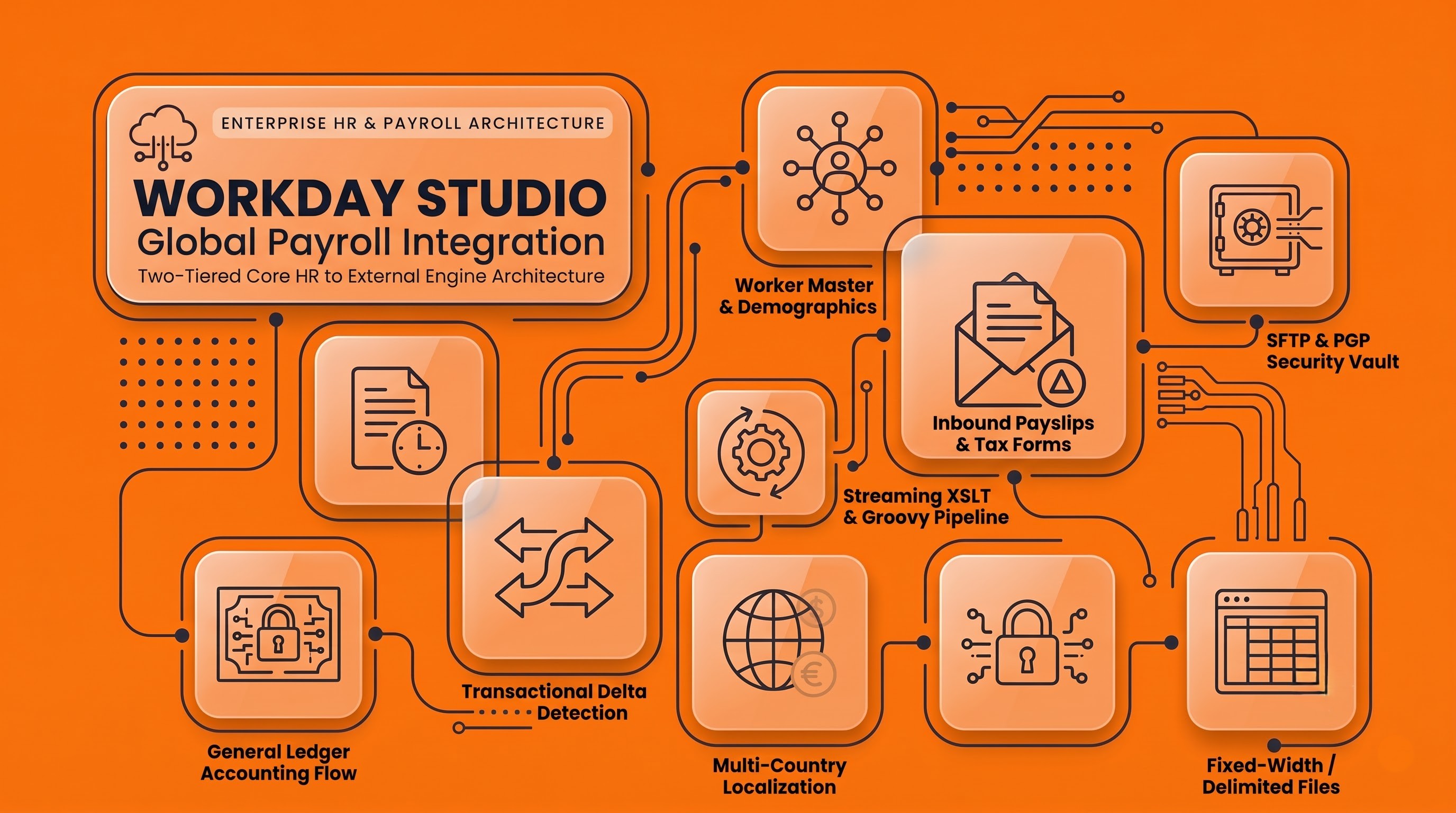
Today’s international corporations are operating in an environment where human resource managers must balance central control over operations with decentralised implementation of regulations. Human resources departments prefer to use integrated tools like Workday to process the entire lifecycle of employees globally, yet payroll execution is inherently local. This is due to competing requirements, including mandatory deductions, tax schedules, pensions, court-ordered garnishments, and local matters pertaining to banking.

As a result, many companies choose a two-tiered architecture: Workday being the unified global record for the core field of human resources, while some independent payroll processor handles payroll calculations, regulations and money payments for every country where the company operates. To connect both worlds of Workday and local payroll processing requirements, the platform needs integration capabilities that help process high volumes of complicated salary records while converting their hierarchical structures into legacy formats.
Despite that Workday already provides such integration-related tools as Core Connectors and Enterprise Interface Builder, in some cases employers dealing with payroll prefer using something more sophisticated. In particular, the company might need a special solution when the integration process involves complicated stages of delta detection, gathering data from different sources, applying various business rules, or implementing specific result formats. In such cases, Workday Studio proves to be the best solution because this tool is easy to use but at the same time very efficient. While learn Workday Studio, developers and architects, who want to deal with complex integration processes related to global payroll solutions and make sure they can implement them properly, can receive the necessary knowledge and expertise from OnlineITGuru.
Architectural Paradigms and Integration Patterns
In order to build an integrated platform between Workday and an external payroll vendor, one must proceed with the decision-making concerning the best way of communication to use based on the situation. As far as the information is moving either from HR to payroll or returning after calculations are done, one should grasp what inbound and outbound flows are used throughout the whole process.
Understanding the Outbound Employee Master and Payroll Inputs Flow
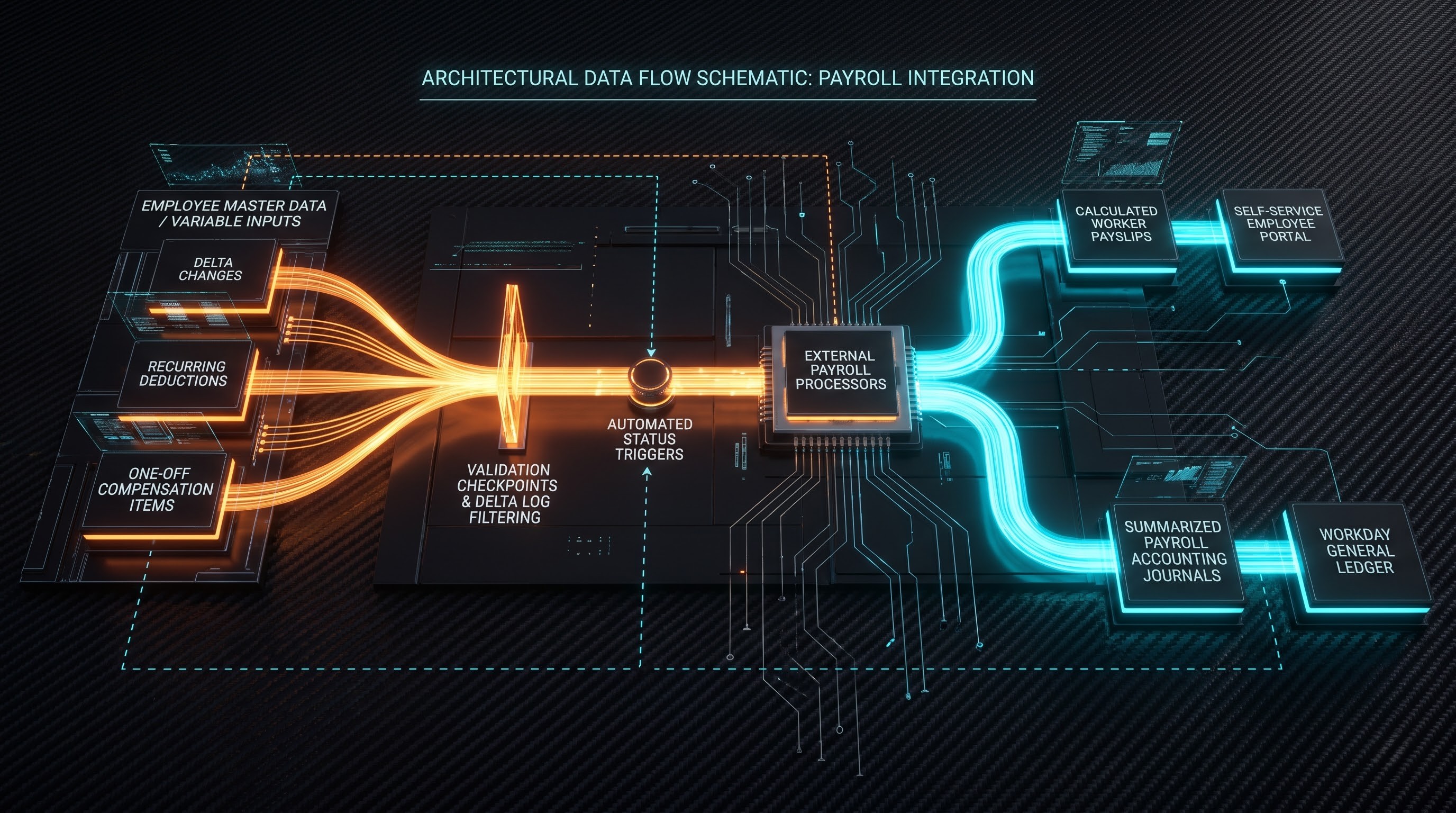
The key function of any payroll interface involves the outbound processing of the demographic, job, payroll, and deduction information. This involved both static fixed employee data and variable pay information applicable to the given processing period.
When it comes to making such choices, architects have two options from which to make a choice: full-population extracts and transactional delta extracts. A full-population extract sends the entire group of active employees alongside their ongoing payroll structure and then measures integration since that full extraction process is relatively simple. However, this can be difficult from the technical point of view, as full extracts consume much computing power and network bandwidth and increase the risks of possible race conditions or data overwriting in old vendor platforms.
The delta model is the architectural approach used in Workday Studio integrations. The idea is simple: the model extracts only the employees whose processes took place since the last successful execution of the integration, or within the chosen payroll frequency. This way, the company can make the files smaller, thus saving time on processing them by the vendor.
The outbound dataset consists of both recurring and non-recurring aspects. The recurring components include the basic annual salary, hourly pay, regular working hours, the normal benefits accrued, direct payment distribution, and recurring pre-tax or post-tax deductions. The non-recurring components correspond to the temporary events that happen only in the current pay period: bonuses, payments of commissions, compensation packages, retrospective adjustments, refunds, and differentials. Workday Studio incorporates various data sources into a single package for the external processing system to use.
Pay Statements in Practice Flow
Payroll processing is never a closed procedure. Once the data has been gathered, and gross-to-net calculations are done, statutory tax tables are used to prepare bank payment files, and the results must move again to the enterprise architecture. Workday functions as both the employee interface and the accounting interface, which creates a need for two different paths of carrying input data.
The first inbound flow has to do with documents for employees. Workers expect to find past payslips, required year-end tax documents, and benefit total reports in the Workday self-service portal, irrespective of the provider which did the calculations. The Workday Studio tool automates the process of retrieving documents. It uses encrypted archives from the provider, extracts employee identifiers from the archives, and calls web services to connect payslips to employees.
The second inbound flow refers to actual numbers in general ledger and payroll costs. Financial management involves the need for information about what taxes the employer has paid, total payroll expenditure, benefits reserves, and legal liabilities. The external provider sends summary files sorted according to the cost centers, company codes, subdivisions, and account types. An inbound integration of Workday Studio processes this data, converts providers’ account numbers into Workday internal data, checks whether debiting matches credit terms, and prepares required journal entries.
Technical Fundamentals and Runtime Engine of Workday Studio
Workday Studio is more than just an extraction script; it is a distinctive, component-centric integration pipeline that works in a managed runtime environment in the Workday cloud. Development of successful integrations requires profound knowledge of the execution engine and the technical primitives.
The Model of Message Exchange and Mechanics of Pipeline
The foundation of Workday Studio is the Message Exchange concept. The execution pipeline is executing a Workday Message. A Workday Message consists of headers, execution context and payload with different parts that are arranged accordingly.
The root part of messages is responsible for delivering the multimedia content that is processed like XML payloads, delimited text files, etc. The execution context represents the set of properties that are kept throughout the integration flow and include important parameters like target filenames, runtime parameters, extraction window limits, and security tokens.
In order to process this information, developers link various mediation modules to perform functions such as message delivery, transforming, filtering, and sending of the information. The process starts with receiving the message through an incoming transport or initialization event, passing it through the process of transformation and filtering, applying appropriate catch mechanisms for error handling, and completing with outgoing transport systems.
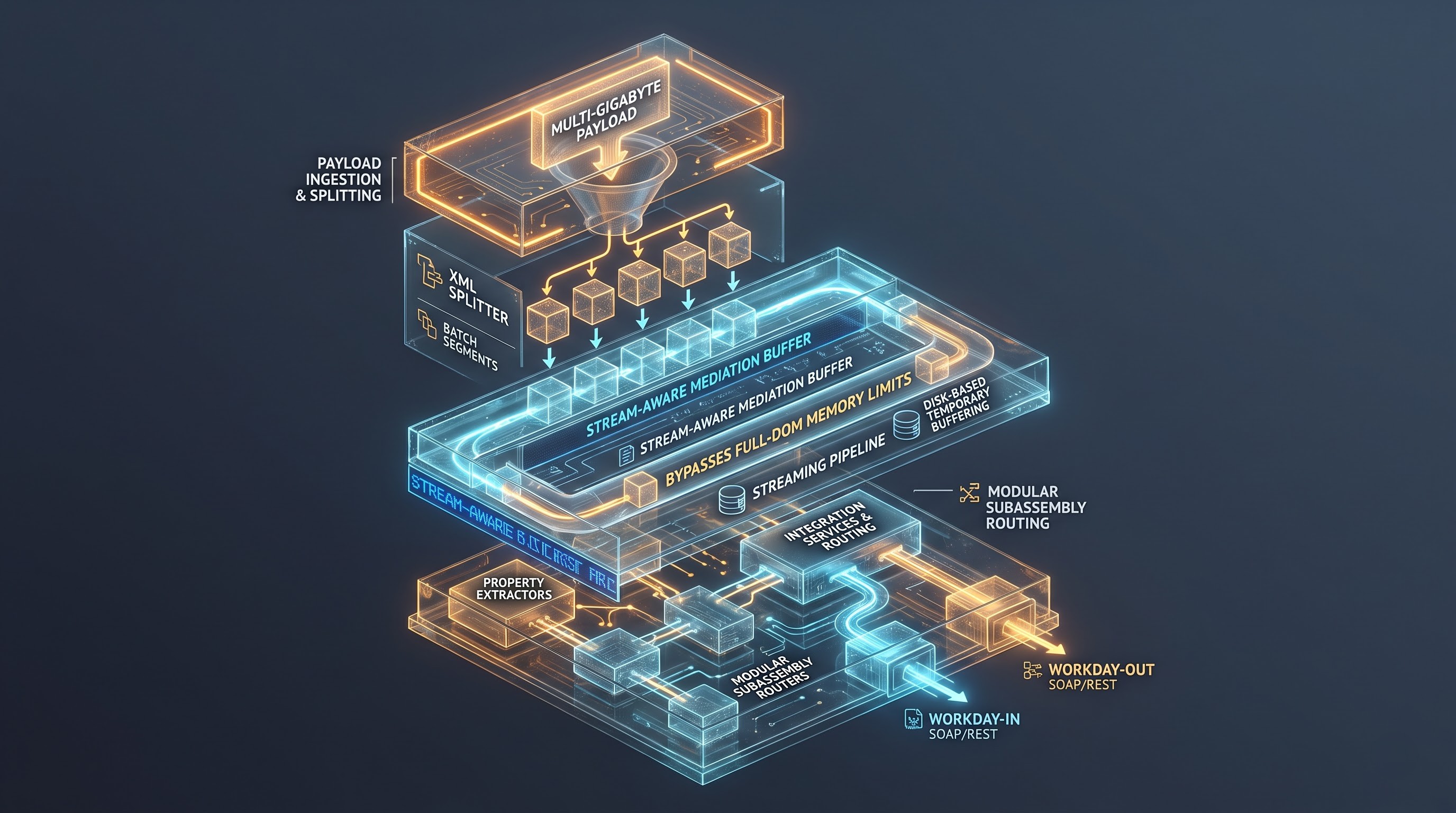
The other important aspect is memory usage in Workday Studio. In the enterprise environments, payroll files very often include processing tens thousands of employees across international units. If the size of the XML tree exceeds several gigabytes, then bringing it into the working memory would lead to problems with breach limits and subsequent failure of processes.
Workday Studio addresses this issue by the implementation of streaming architecture. The function of each component is either reading from the input or writing to the output without utilizing the entire document object model in the memory. In case of any processing that implies the use of huge data files, Workday Studio utilizes disk-based temporary memory.
It is very important to know how stream-aware components differ from DOM-oriented components. Stream-aware components allow the system to maintain documents in memory, whereas stream-based components process data in a linear way. When building a sophisticated payroll system, developers will typically utilize the principle of streaming to get their work done fast and ensure uninterrupted business processes of clients. Since implementation of streaming components, XML splitters, and custom subassemblies requires understanding of complicated architecture, professionals often take specialized Workday Studio courses at OnlineITGuru to get hands-on experience in payload handling, troubleshooting and memory optimization before delivering the code to the user’s organization.
Key Processing Components
Studio contains a comprehensive range of components designed for enterprise data processing:
Splitter and Aggregator sets: When handling huge staff numbers, one-piece processing techniques do not work. The Splitter unit splits the whole payload into defined data sheets. The unit divides the huge document into parts corresponding to workers and processes them sequentially or in batches. Upon completing the batch processing, the Aggregator gathers the separate records and creates the primary document with the relevant header and footer information.
Invocation of Web Services: Studio connects directly to Workday via Workday-In and Workday-Out components. Through these components, integrations access internal public web services through either Simple Object Access Protocol or Representational State Transfer methodology. This enables the integrations to invoke activities such as worker record retrieval, fetch document attachments, request custom business objects and post operational journals.
Property Manipulation: Such dynamic execution requires setting, accessing and converting metadata. Property extractors examine an expression against a message payload which allows making routing decisions based on the collected message.
Call and Route Steps: The complexity of the integration process demands modularity of the system. Call steps are meant to invoke reusable flows of subassemblies to modularize the complex systems of basing operations on the set of rules such as currency transformation, date format unification, etc.
Data Extraction Mechanisms and Strategy
The reliability of payroll integration depends on the accuracy of data extraction. Incomplete extraction produces wrong paycheck calculations. Excessive extraction of non-payroll information leads to operational disruption.
Invocation of Workday Web Services
Workday’s most accurate way to extract data into the Studio is through the invocation of Workday Web Services. The services cover operations such as Human Resources, Payroll Interface, and Staffing, offering extensive operations, which include the Get_Workers function.
Get_Workers function has specific requirements in the request. Programmers make adjustments in order to receive required transaction logs, demographic information, salary plans, and benefit enrollment requests represented in certain time intervals. It returns a highly-complex XML document complying with the established schema and reflecting employee facts available at that moment.
Although Get_Workers provides a wide range of information, excessive extraction of the data increases processing expenses significantly. Recommended method for Studio implementation is to set only determined data in the requests based on information extracted by specific payroll processing engine.
Custom Reports-as-a-Service (RaaS)
One of the solutions often used is to combine the Workday reporting system with Workday Studio. In the configuration process, an analyst creates a report in the Workday UI and sets all fields, complex business objects, calculated fields, and other working logic there. The completed report can be connected to the web and accessed through a special endpoint.
It is worth mentioning that RaaS makes everything easy with the Studio operations. Functional consultants can easily change the report logic, modify the name of the output data, and define information filtering without making any changes to the Studio pipeline or redeploying the code.
At the same time, RaaS has some restrictions related to processing historical transactional data and working information. Report performance is greatly affected by several factors related to pagination and restrictions set on the response size. Therefore, enterprise architects usually use RaaS only for static reference data and simple lookup operations.
Integration of Core Connector Extraction and Studio Transformations
In order to leverage both the advantages of pre-configured integration engines and allow for the programming flexibility offered by Workday Studio, system architects often utilize hybrid architecture which combines a Core Connector and Workday Studio.
In particular, Workday offers Core Connectors acting as worker and payroll interface extractors. Such connectors are equipped with tenant-specific delta-detection systems. These systems can analyze audit transaction logs very effectively. They allow workers to get details on what attributes changed, retroactive events and receive information as a standardized XML file named Integration Document.
Nevertheless, the issues with ready-made Core Connectors are related to limitations of their export formats and delivery options, as they cannot export proprietary flat files or connect to custom vendor APIs easily. However, if a Core connector is configured to activate Workday Studio after its own completion there is no risk of losing advantages provided by both technologies.
Transformation, Translation of Data and Business Logic
When data is drawn from enterprise systems, it does not fit into strict requirements of third-party payroll systems. Therefore, the process of converting flexible, interconnected HR records into universal payroll inputs is the most complicated task when launching the system integration.

Extensible Stylesheet Language Transformations (XSLT)
XSLT is the main instrument for transformation data in Workday Studio. It utilizes modern transformation technologies, which means that it enables IT specialists to apply principled mappings when working with sophisticated structures of documents.
Using XSLT scripts, data can be converted from complex data about employees into easy-to-understand formats that payroll providers require. For instance, the information that refers to employees, their compensations, addresses, and work history before the system integration is converted into many distinct pieces of information comprising general information about employees, job information, and repeated data such as information about earnings and deductions.
XSLT is also used for structural filtering. Templates need to match specific conditions (like checking if an employee's pay is in local currency, and connected to an active country’s tax entity) to develop output nodes. In large datasets, developers use XSLT streaming patterns to prevent complete document scanning.
Custom scripting using Groovy
Although XSLT is very effective in terms of access structure conversion and workflows, it is not necessarily good with complex calculations or complicated arithmetic operations. Workday Studio solves this issue with a built-in Groovy interpreter.
Groovy scripts run in the mediation channel giving it access to messages and parameters. When used in payroll processing, Groovy performs some specific functions such as:
Transforming complete names of workers into legacy vendor formats which presuppose strict character limitations, removing non-ASCII characters and normalizing diacritical marks.
Analyzing conditional split rate salary calculations in case an employee goes through intra-period salary modification.
Creating fixed width record lines where each field must be filled with appropriate trailing spaces and leading zeros.
Making custom mathematical control sums, file hash sums, and counting lines to be included into mandatory file trailer parts.
Cross-Reference Configuration and Data Translation
Business enterprise systems and outside payroll vendors have completely different codification systems. For example, Workday uses an internal reference number to recognize job profiles whereas local payroll vendors use two-digit occupational code to identify the same position. Likewise, Workday must turn its compensation systems, company structures, costing centers, and reasons for termination into the income codes used by vendors, department numbers, and types of legal separation.
When the mappings are rendered into hard-coded form directly in XSLT or Groovy, it leads to significant maintenance issues. Any small modification in vendor codes leads to the requirement of code modification, peer review and complete redeployment of the Studio project.
In order to resolve this issue, the Studio integrations utilize the Integration Maps and Alternate ID systems set up within the Workday tenant. This allows developers to set up the integration services within the Workday UI and map the Reference IDs to the vendor IDs. During the execution of the Studio pipeline, these mapping tables are queried at runtime.
A functional payroll team can update the mapping whenever a new Workday allowance plan is tied to the tested taxable benefit code, which will lead to the corresponding update in the mapping table inside the tenant. The Studio integration will pick the updated mapping during the next execution.
Technical Aspects Through the Entire Integration Process
The integration of core enterprise systems with third-party payroll service providers comes with some unique cases that may require detailed architectural planning.
The Issue of Retroactive Adjustments
The payroll does not function strictly on a forward-moving time frame. For instance, a manager could approve a raise for an employee in October, but apply the adjustment from August. An employee could also bring up the issue of unpaid vacation days weeks after the pay period has closed.
Retroactive adjustments are one of the complicating factors in the design of a payroll system. It cannot just send information about the updated hourly rate to the payroll processor. The external payroll system should identify and calculate the amounts of unpaid wages from different periods and be able to use the required tax rates for the particular periods.
To address this, it is important to design the Workday Studio pipeline in such a way that it is capable of transaction logging. The integration employs Workday's retro-event logging queues.
The transformation layer subsequently separates out the delta and creates necessary retroactive adjustment files for the payroll service provider. These files indicate crucial data such as date range, previous value, and new value to allow proper retroactive gross-to-net calculations to happen without any administration activities.
Multi-Country, Currency, and Localization Complications
Multinational corporations rarely deal with only one global payroll service provider; most often, several regional vendors are engaged. Usually, even if a global aggregator is used, every country implementation has its localization requirements.
There must be an integration framework capable of dynamic operation depending on geographical location. For instance:
Proration of the working days: Different countries have different laws for prorating the salaries of hired employees mid-month. Some countries make prorating according to the calendar days, some apply actual working days, and some use fixed monthly salaries (in other words, assume that every month has 30 days). The correct information about statutory full-time equivalency, actual working hours and the proper working calendar should be extracted for the integration to serve the external vendor correctly.
Currency and Accuracy: Although employers may be able to compute salary bands using a centralized base currency, actual payroll processing should always be conducted in the legal tender of the location where the worker resides. All studio connections should either find the local currency component directly in the queries or utilize exchange rates for converting the base currency into the local equivalent while respecting local currency rounding regulations.
Local Data Privacy: Statutory mandates typically require that certain data elements such as Social Security numbers and National Insurance numbers be provided for every country. Consequently, the studio must be able to identify and verify the required specific pieces of information while ensuring compliance with the relevant taxation laws and data protection regulations.
Creating Output File Across Legacy and Modern Standards
External payroll services include services with numerous technical expertise. Some of the current providers have RESTful APIs that accept JSON documents. The century-old service providers still require flat text files or a text file with fixed byte positions.
Workday Studio is useful for developing formats that can bridge this gap. By using XSLT, Groovy, and other software for output, the program can create many different types of formats:
Fixed-width ASCII/EBCDIC formats. Very well known in the world of banking and traditional payroll providers. Each column of data must use a fixed width. Because of this rule, if a person's last name is longer than twenty characters, the name will be cut. If it is shorter, it will be filled with spaces. Byte-level alignment must be strictly followed to prevent column misalignments in the entire file.
Delimited text (CSV, pipe, tab) is quite popular for importing tables of information. The program needs to perform text encapsulation, escape reserved characters, and standardize the ending of lines in its operating systems.
Hierarchical Vendor XML/JSON: It is really common with global enterprise aggregators. The Studio produces a document that has a multimodal structure complying with a schema and incorporating the organizational headers, demographic classification, compensation lists, and digital metadata.
Achieving proficiency in the complete integration process between Workday and outside payroll service providers demands a combination of HR sector expertise, knowledge of the local tax regulations, and great proficiency in pipeline creation skills. Skills in development are very critical, whether it involves the executing of delta extracts, applying the retroactive salary logic, or arranging secure file transfers using PGP and SFTP. Taking a full course in Workday Studio course at OnlineITGuru allows you to practice with real integration solutions and gain the needed skills for the implementation and upkeep of crucial integrations.