
Is QlikView Still Relevant? Understanding Its Place in Modern Qlik Analytics
Last updated on Oct 7, 2026
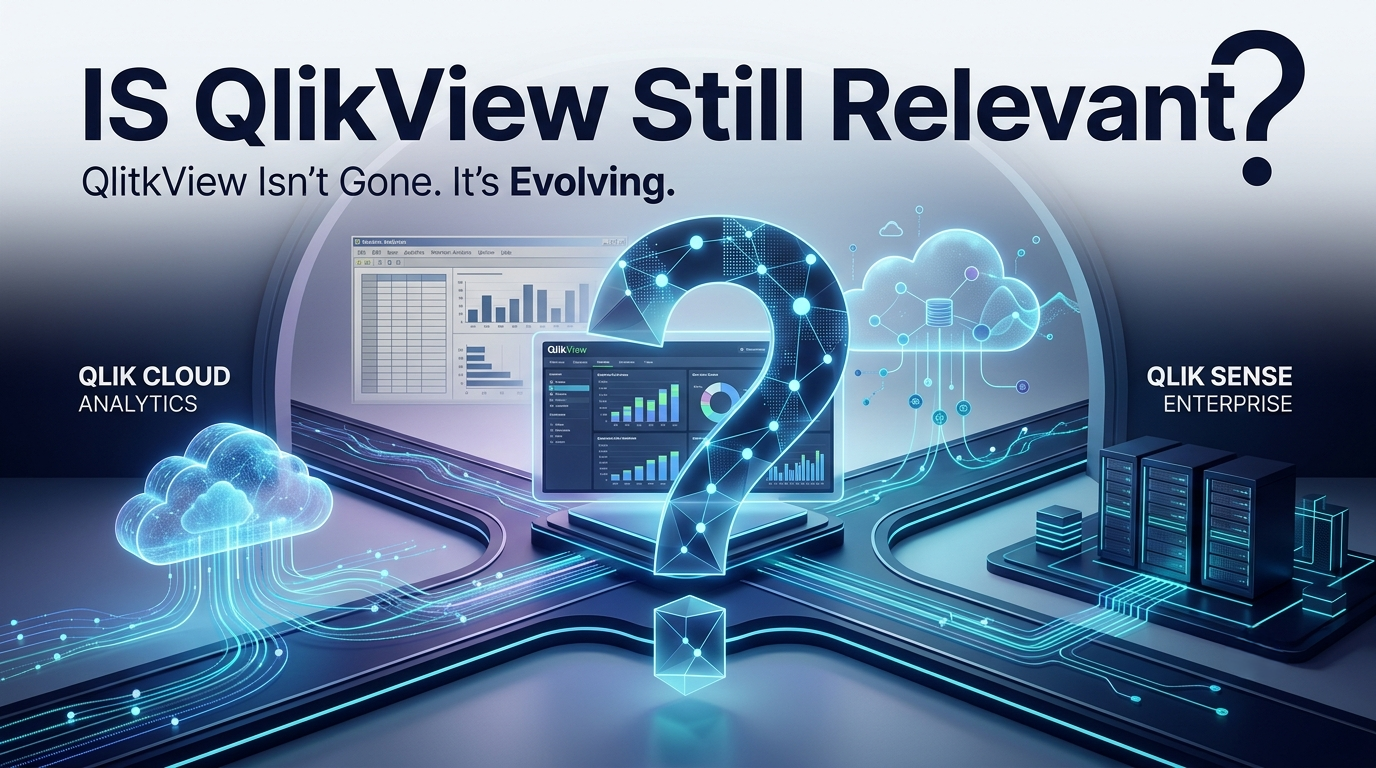
QlikView’s Story Has Not Ended
Business intelligence has changed a lot over the past ten years. Organizations that once relied on desktop reporting and older business intelligence tools are now shifting toward cloud platforms self-service analytics, automated data workflows and real-time decision-making. In this shift one name keeps coming up: QlikView. For companies QlikView was more than just a tool. It became part of how data was connected, dashboards were built, information was explored and daily decisions were supported. Even though newer products from Qlik have changed the direction of the company’s analytics offerings, many organizations still run
QlikView applications in production. These apps often hold years of business logic and designed dashboards. This leads to a question: Is QlikView still relevant? Has modern analytics made it obsolete?
The answer is not simple. QlikView is older compared to Qlik’s cloud-based solutions. That doesn’t mean existing QlikView setups are useless. Businesses must look at the value of their systems, the complexity of their data setup, migration needs and what they want from their analytics moving forward. At the time companies starting projects today may have very different goals than those that adopted QlikView long ago.
Understanding where QlikView stands today means looking beyond replacement. Instead, think of the situation as evolution. Qlik Cloud Analytics offers a SaaS-based model. Qlik Sense Enterprise supports client-managed environments like on-premises or private cloud. For those already using QlikView these newer platforms can be part of a modernization journey rather than a sudden end to the old technology.
QlikView’s Position in the Qlik Ecosystem
QlikView played a role in changing how businesses used business intelligence. Traditional reporting systems usually required users to rely on fixed reports and rigid queries. QlikView introduced something through its associative engine. This allowed users to interact with data and explore relationships between pieces of information. Of just viewing a report users could investigate data from multiple angles and uncover connections that weren’t obvious at first.
This way of working made QlikView especially useful for companies dealing with amounts of data from many sources. Businesses could bring together information from sales, finance, inventory, customer management, operations and supply chains into apps. Once the data model was set up correctly users could interact with dashboards. They could explore business questions without asking for a report every time. That flexibility was one of the reasons QlikView became such a business intelligence platform.
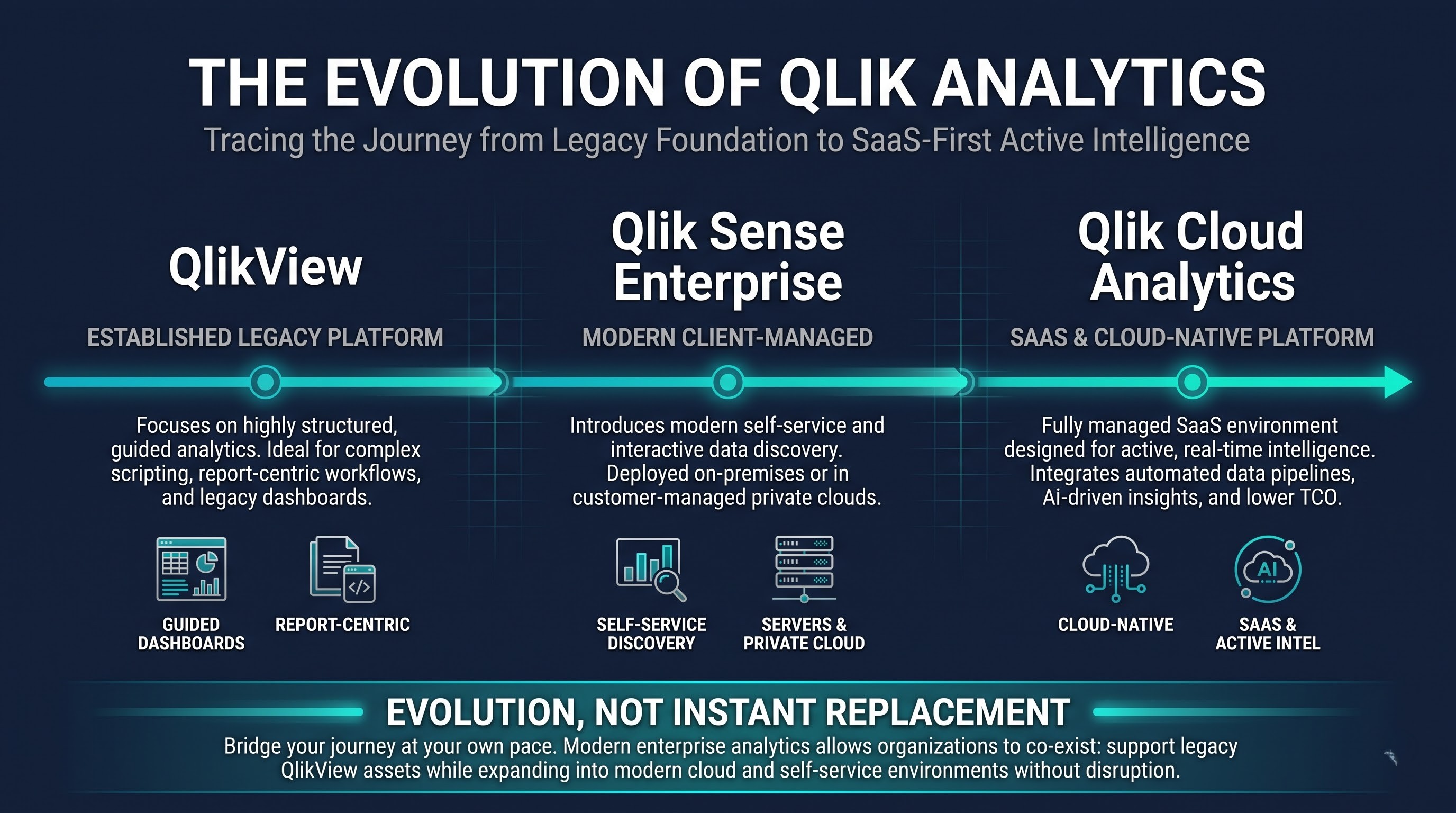
Another key point in QlikView’s history is how it shaped the Qlik product family. Many ideas that users learned through QlikView continued to influence Qlik products. Concepts like the data model, interactive data discovery, dashboard-based analysis and focus on business-user exploration helped lay the groundwork for analytics tools.
For professionals who are maintaining existing QlikView environments, understanding the platform is still important. Existing apps don’t disappear when a new product comes out. Companies may have spent years building dashboards, writing scripts, creating data models and setting up business rules. Rebuilding everything from scratch could be costly and disruptive. So knowledge of QlikView remains valuable for people who keep these systems running and fix issues documenting them. Help migrate them.
That’s also why learning QlikView can still be practical. The goal isn’t always to build a brand- QlikView system. Understanding how existing QlikView apps work helps professionals maintain them, troubleshoot problems, and understand data models. Take part in modernization projects where legacy apps need to be reviewed before moving. The key difference here is that relevance and future direction are not the thing. QlikView can stay relevant because it still solves a business problem even if the organization is slowly considering technologies for growth. Technology choices aren’t based on whether a product's old or new. Stability, business value, migration costs, technical dependencies and user needs all matter.
Why Organizations Are Moving Beyond QlikView
The main reason companies look at alternatives to QlikView deployments isn’t that QlikView suddenly stopped working. The bigger change is in what businesses expect from analytics tools today. Modern organizations increasingly want analytics that can be accessed anywhere scaled, easily integrated with cloud data sources and managed without handling infrastructure.
Cloud computing has completely shifted those expectations. In the past companies had to manage servers, operating systems, software installations, upgrades, security settings, backups and other technical tasks. A SaaS analytics platform changes that by handing most of the infrastructure management to the provider. This lets internal teams focus more on analytics, data and business results of managing the platform itself. Collaboration has also become more important. Today’s teams are often spread across offices, cities or countries. Business users expect dashboards and insights to be available through environments. A cloud-based platform makes it easier to share resources among teams while supporting control.
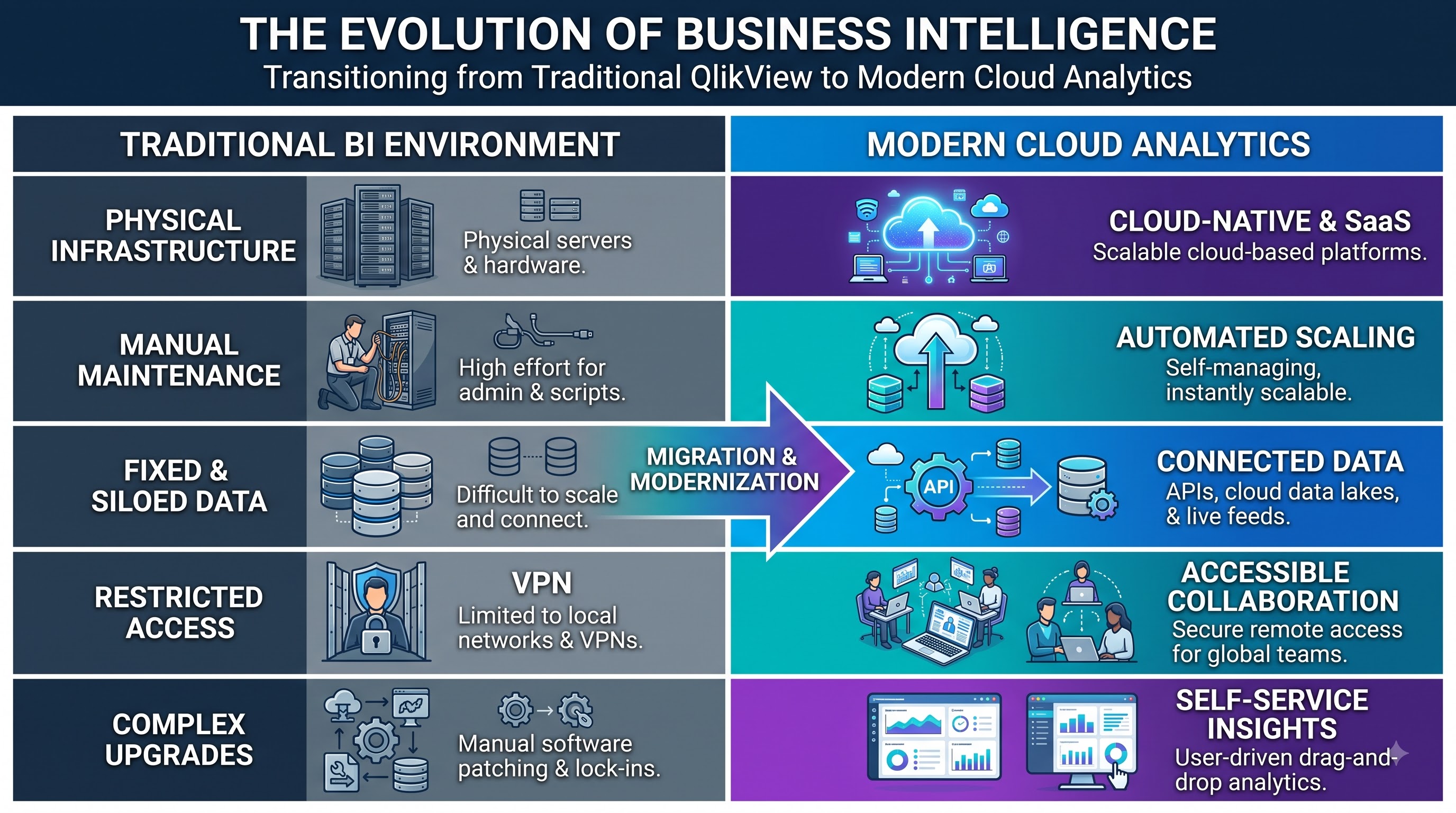
Another major factor is the rise of cloud data infrastructure. More companies store data in data warehouses, cloud databases, enterprise applications and modern data platforms. Analytics environments therefore need to work with a changing data landscape. Organizations reviewing their BI strategy may prefer platforms built for cloud workflows or extending old infrastructure forever. There's also a shift in what users expect. Business users now want self-service analytics—no more waiting for IT teams to create every report. They want to filter data, track trends, compare business areas and answer questions quickly. Modern analytics platforms are expected to support this kind of interaction while also offering governance and security in enterprise settings.
That doesn’t mean all QlikView apps need to be replaced. Often the smarter move is to evaluate the existing setup. Some apps may still serve a purpose with no need for change. Others may find it hard to keep running. They could stop an organization from getting cloud capabilities. So the real question shouldn’t be "Is QlikView old?" It should be: Does the current QlikView environment still meet the organization’s business needs? This distinction matters because modernization should fix a business issue not just be a tech upgrade for the sake of using something
QlikView vs. Qlik Cloud Analytics
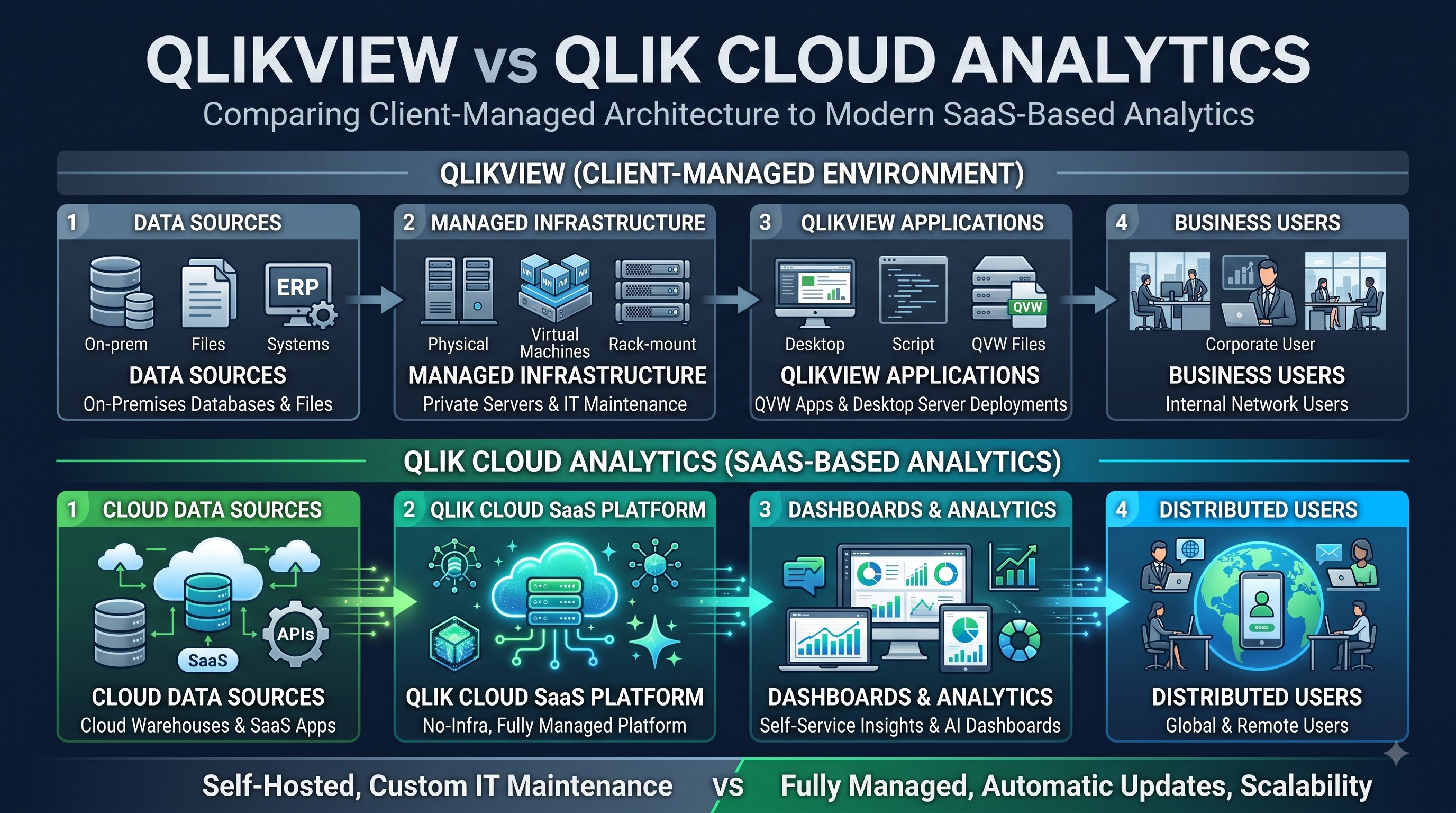
One of the things to know in today’s Qlik ecosystem is the difference between QlikView and Qlik Cloud Analytics. These are not two names for the product. They represent ways of delivering analytics. QlikView belongs to a generation of business intelligence tools. Then most organizations managed their own environments and deployed analytics through controlled infrastructure. They could build dashboards and data models. Doing so required careful administration, maintenance and technical support.
Qlik Cloud Analytics takes an approach. It is Qlik’s SaaS-based solution. This means the platform runs in the cloud and doesn’t require customers to manage the underlying infrastructure themselves. This model makes analytics easier to access and reduces some of the burden of running an analytics setup. The difference gets clearer when organizations think about scalability. As a company grows it may need users, data sources, dashboards and analytical workloads. A cloud-based platform offers a flexible foundation for organizations wanting their analytics to grow along with their overall cloud strategy. Accessibility is another point. Cloud analytics can support users who need to access dashboards and reports from locations without relying on the internally managed systems used in older setups. For companies with teams spread around the world this can be an advantage.
Migration shouldn’t be seen as a technical swap. A QlikView app might include scripts, data transformations, business rules, visuals and dependencies. Moving it to an environment requires knowing exactly what the app does, which parts are still needed and how those requirements fit into the new platform. This is where people with hands-on experience in QlikView become especially helpful. Someone familiar with the application can help identify business logic before modernization begins.
Without that knowledge, an organization might technically move an app. Accidentally change key calculations or processes. For individuals building their skills in this area a qlikview course can provide a foundation in topics like data loading, scripting, app development, data modeling and dashboard creation. However in an analytics career that knowledge becomes more useful when combined with understanding Qlik platforms and cloud-based data architectures.
Where Qlik Sense Enterprise Fits
A misunderstanding is that Qlik Cloud Analytics is the cloud option and Qlik Sense is only for on-premises use. That view is too simple. Qlik Sense Enterprise is built for client-managed deployments. It supports environments like on-premises and private cloud giving organizations control over their infrastructure and deployment method. This difference matters because not every business can switch fully to SaaS. Some companies follow regulations, internal security policies, data residency laws or infrastructure plans that require control over their technology. For these cases a client-managed analytics platform may still make sense.
Qlik Sense Enterprise also gives organizations the chance to improve their analytics experience while keeping control over their environment. This can be especially important for enterprises with infrastructure or integration needs that can’t immediately transition all workloads to a public SaaS environment. The choice between Qlik Cloud Analytics and Qlik Sense Enterprise therefore depends on requirements rather than a simple cloud-versus-on-premises rule. A company might prioritize managed cloud infrastructure while another might prioritize control, customization or integration with existing enterprise systems.
For organizations coming from QlikView Qlik Sense can also represent a part of the modernization discussion. The transition requires evaluation because the goal should not simply be to reproduce a dashboard in a new interface. Modernization provides an opportunity to reconsider how applications are structured, how users consume information and how analytics connect with the organization's data strategy.
The strongest modernization strategy is one that starts with business requirements. Then choose the Qlik deployment model. This is also why professionals involved in Qlik environments benefit from understanding more than a product. A person who knows the mechanics of an older platform may struggle to participate in modernization discussions. By contrast, someone who understands QlikView, modern Qlik analytics, data integration, deployment models and business requirements can contribute effectively to transformation projects.
Should Existing QlikView Applications Be Migrated?
The decision to migrate an existing QlikView application should not be made simply because the application is old. Businesses should first determine whether the application continues to deliver value and whether its current architecture creates limitations that affect users or IT teams. A stable QlikView application that supports a business process may not need to be migrated away. If users continue to rely on it the data stays accurate, performance remains acceptable. The organization does not have any need for new features then a carefully planned modernization timeline might make more sense than an immediate replacement.
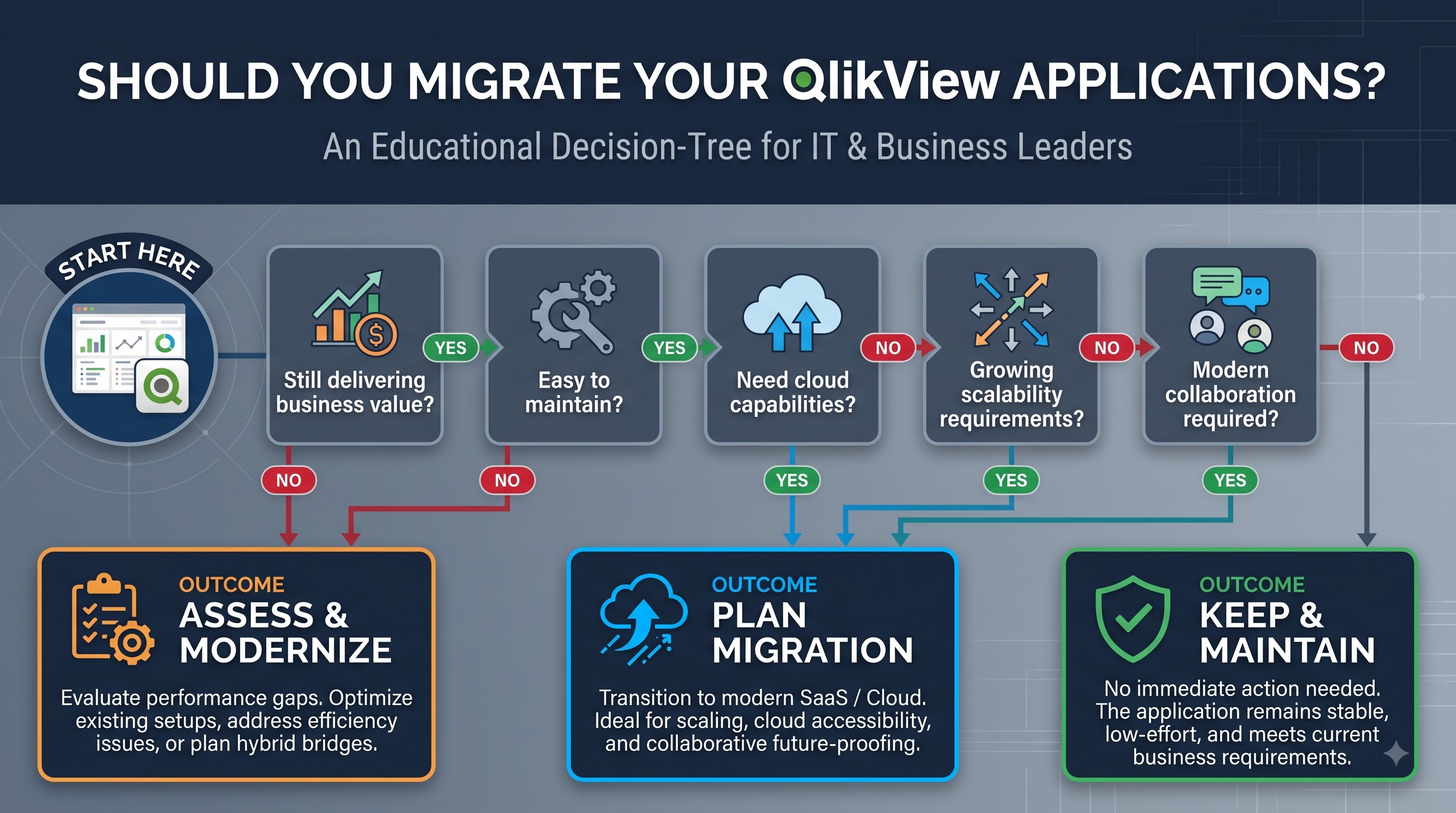
On the other hand migration becomes more appealing when an organization seeks stronger cloud capabilities, better collaboration tools, easier scaling new ways to explore data or a closer fit with a cloud-first technology strategy. Applications that are hard to maintain over time can also become candidates for modernization. Before starting a migration organizations should take stock of their QlikView environment. This means listing all applications identifying each data source, reviewing scripts noting who uses the dashboards, who owns them, what security rules apply, what integrations exist and how everything connects. It’s also important to figure out which applications are still in use and which ones may no longer serve a purpose.
This step is often skipped. Many businesses believe every existing application must be moved.. Some dashboards have outlived their usefulness. Migrating unused apps just carries forward technical debt without adding value.
Data models deserve attention. QlikView applications often embed transformation logic inside scripts. These scripts may depend on business definitions and reporting needs. So the migration team must understand not how the application looks but also how the numbers come to be.
Testing is another phase. After migration users should check calculations, filters, data relationships, security settings and dashboard outputs. Business stakeholders should be involved because even if the technical results match the business meaning might not. A phased approach can help reduce risk. By moving everything at once organizations can pick a few representative applications, run the migration process, find issues, learn from them, and improve before tackling more complex workloads. Migration should not be treated as a software update. It should be seen as a controlled modernization effort. That way, organizations can keep business logic while slowly shifting to a more modern analytics setup.
The Future of QlikView
So is QlikView still relevant?
The honest answer is yes. Its role is changing. QlikView continues to be relevant wherever businesses still depend on established applications and processes built around the platform. Years of development data modeling, reporting logic and institutional knowledge do not disappear just because newer tools are available. For companies QlikView applications still deliver useful insights and support key operational decisions.
At the time, organizations planning new analytics projects are likely to look at modern Qlik solutions based on their current needs rather than defaulting to QlikView. Cloud adoption, SaaS delivery, collaboration features, scalability and evolving data architectures have shifted expectations for what analytics platforms should offer. This creates a transition period. QlikView may remain part of an organization’s existing analytics environment while new applications are built or moved using Qlik technologies. During this time, professionals may need to work with both legacy systems and modern platforms.
That makes QlikView expertise especially valuable for people working in organizations that are modernizing their analytics. qlikview training can help professionals understand applications and the underlying technology concepts. At the time, broader knowledge of Qlik analytics allowed them to take part in migration and transformation efforts. The future is not about saying QlikView is outdated. It’s about knowing where it fits. One organization might decide to keep using QlikView while building a long-term plan to modernize. Another might choose to move selected workloads to Qlik Cloud Analytics. A regulated company might prefer a client-managed Qlik Sense Enterprise environment. Different choices make sense for businesses because their needs vary.
Final Thoughts
The story of QlikView is not simply one BI tool being replaced by a newer version. It is about how business analytics has evolved. qlikview learning helped organizations move beyond reports toward interactive data discovery. Many of those ideas still matter today. What has changed is the surrounding environment. Businesses now expect cloud access, flexible deployment options, scalable infrastructure, better collaboration and deeper integration with data ecosystems. Qlik’s current portfolio shows that shift through products like Qlik Cloud Analytics and Qlik Sense Enterprise.
For organizations already using QlikView the smartest path is neither to ignore modernization nor to rush into it. The best strategy is to assess the value of existing applications, understand requirements and build a migration roadmap that brings real business benefits. For professionals this also means QlikView skills should not be seen as outdated. Understanding legacy systems can be helpful during migration, maintenance, troubleshooting and modernization. When paired with knowledge of Qlik platforms and cloud analytics that experience becomes part of a broader more valuable business intelligence skill set.
In the end QlikView may no longer lead the way, for every organization’s analytics journey.. Its influence and existing presence mean it still plays a role in today’s Qlik conversation. The key question is not whether QlikView is old. The key question is: What role should it play in your organization’s stage of analytics?