
Master Guide: Advanced Workday Studio
Last updated on Jul 22, 2026

Data connectivity across core systems is not a choice in the cloud-first era for businesses, it is a requirement. As companies scale, their digital footprint evolves into intricate ecosystems comprising human capital management systems, ERP engines, accounting systems, third-party payroll solutions, and proprietary software. Workday sits at the center of this intricate web, a system of record for workforce and financial data serving thousands of companies globally.
Workday has a rich model of data connectivity to integrate with external systems. Enterprise integration can be as simple as periodic exports of employee directories or as complex as real-time, bidirectional syncs of payroll, benefits and banking. To solve all these different types of integrations, Workday provides its clients a multi-tiered architecture of integrations which include:
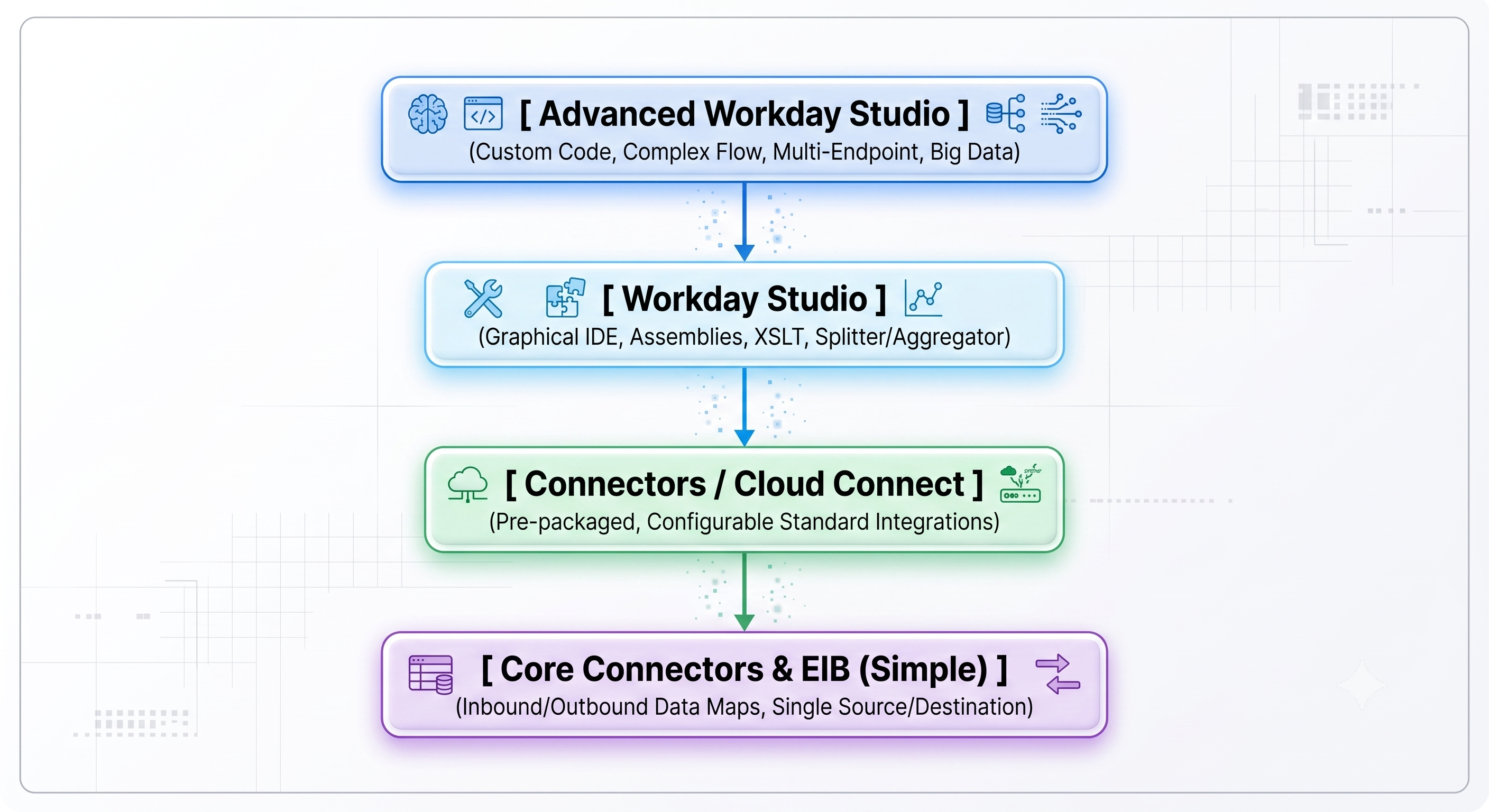
Enterprise Interface Builder (EIB): A straightforward tool exclusively used to facilitate transferring files from one source to one destination. EIB is designed for data dumping and importing from flat files and simple XML templates. It requires no programming.
Workday Cloud Connect: Integration products built by Workday and provided through vendor channels. The connectors enable standardized access to commonly used third-party software, such as global payroll software solutions, benefit administrators, and tax authorities.
Workday Studio (Standard to Advanced): An IDE based on Eclipse that is used for developing, testing, and administering workday studio online applications that execute inside the Workday Cloud environment.
There are plenty of data exchanges taking place in terms of EIBs and standard connectors. However, as far as processes became better structured, the requirements for integrations became quite different. Processes involving multiple destinations, payload streaming, error recovery, cryptography became too complicated to be realized using simple means of transfer. And here is where the role of Advanced Workday Studio comes in.
Moving from data mapping and transferring to full-scale integration software engineering, Studio provides teams with an entire execution pipeline. They are allowed to execute custom Java beans, perform complex XSLT transformations, evaluate dynamic MVEL expressions, and orchestrate low-latency multi-endpoint workflows—all safely and fault-tolerant under cloud governance constraints.
Core Principles of Architecture & Component Design
The Assembly Design
In the core of the Workday Studio application development process lies the Assembly which is defined as the highest level deployment container. The life cycle and execution design for each integration is specified within the Assembly design and Assembly can consist of subassemblies, transports, components, and steps.
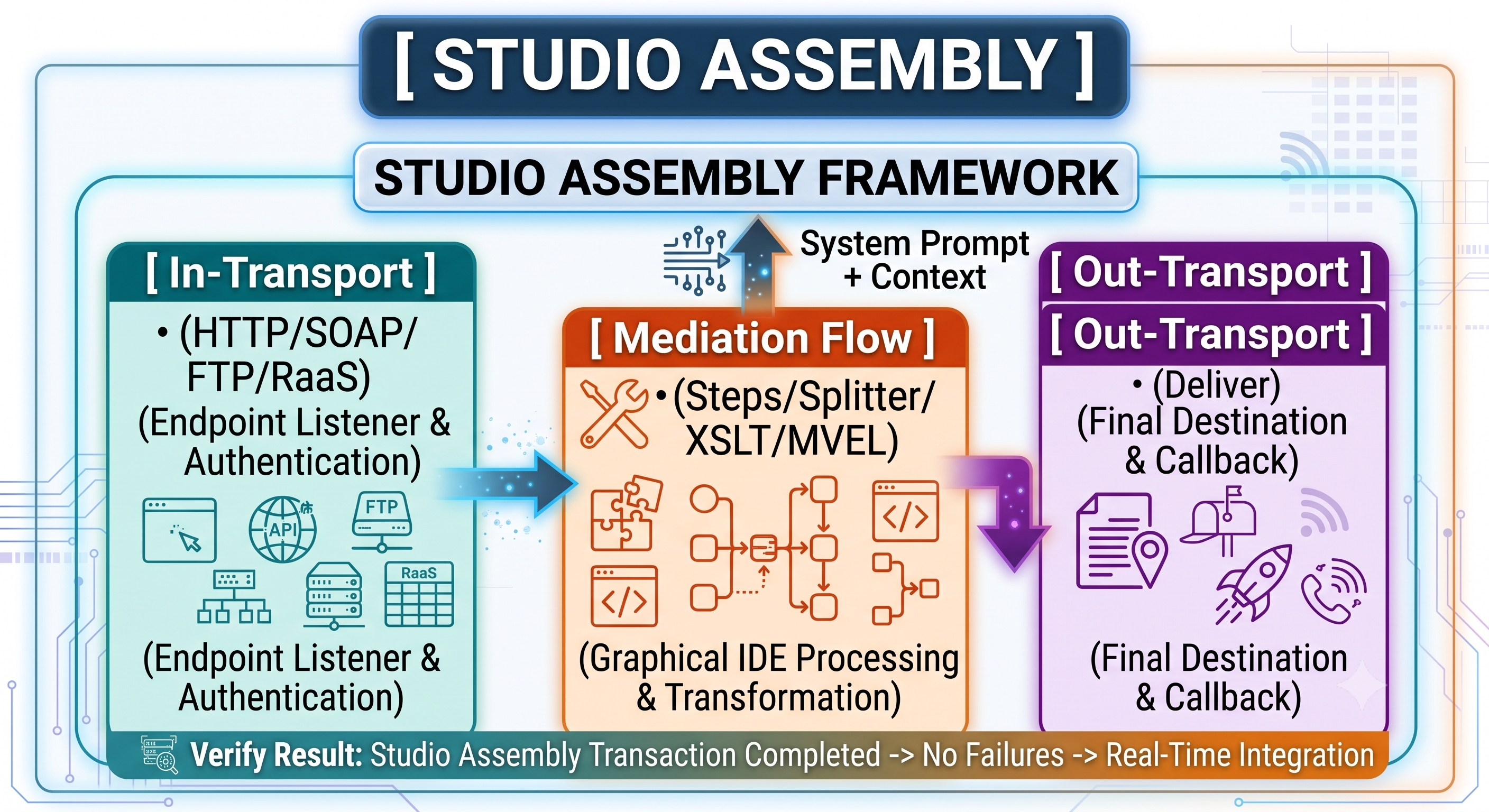
An Assembly consists of three separate areas:
In-Transports (Inbound Endpoints): Gets the payload from the outside world through HTTP/REST, SOAP, SFTP, AS2, or internal Workday launch events.
Mediation Flows (Processing Engine): The main pipeline area where the data is filtered, modified, divided, aggregated, routed, and validated.
Out-Transports (Outbound Endpoints): Sends the processed payload to the external target system, internal Workday web services, or any dynamic notification system.
Message Context & Pipeline Dynamics
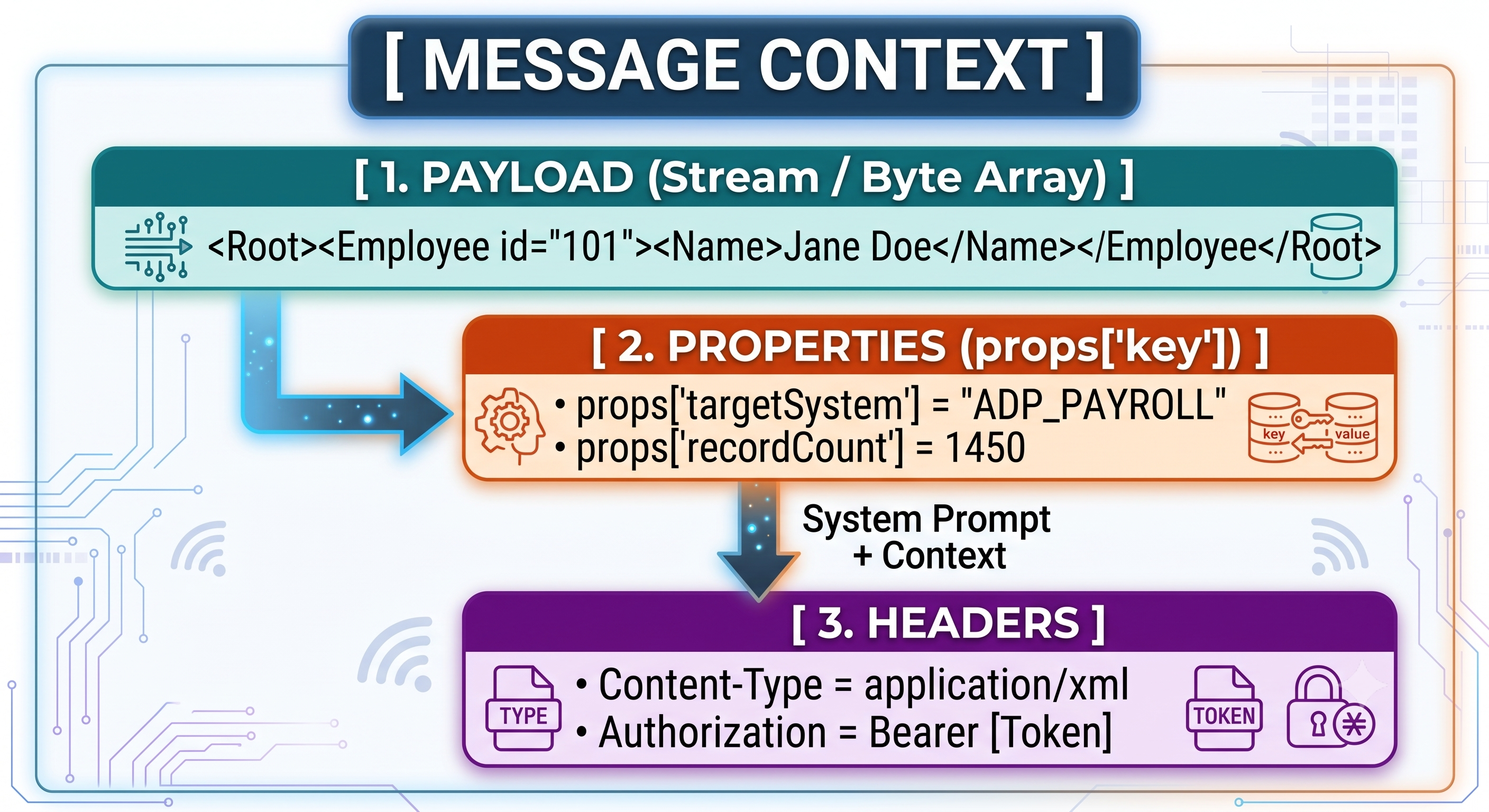
As part of the execution of an assembly, the data flows within the pipeline which resides inside the immutable execution container known as the Message Context. There are three important places where the data exists inside the Message Context:
Message Payload (Body): The actual stream or byte array which gets processed on a specific stage (for example XML document, JSON payload or CSV file).
Message Properties (props): Variable key-value pairs in memory which survive all component boundaries during the lifecycle of the integration thread. Accessed using expressions props['myProperty'].
Integration Headers: Metadata about the message transport (HTTP headers, authentication tokens or content types).
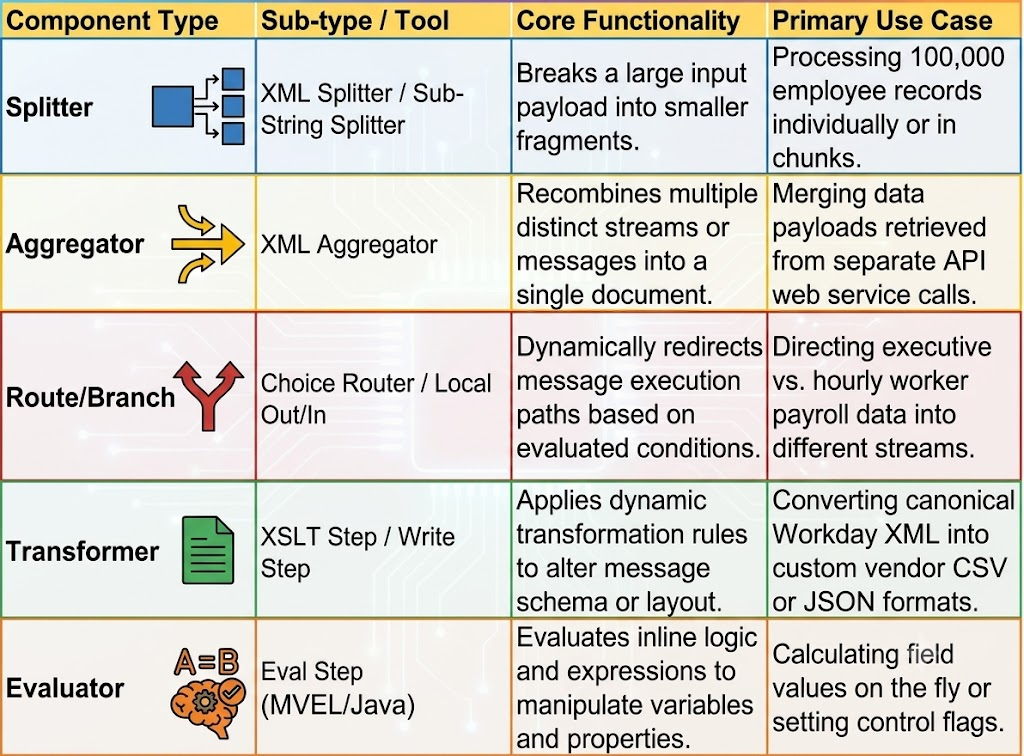
Basic Assembly Components
For advanced workflows, you need to have a solid understanding of the following core Studio components:
Scalability and Processing at Scale Architecture
The reality of memory limits and garbage collection
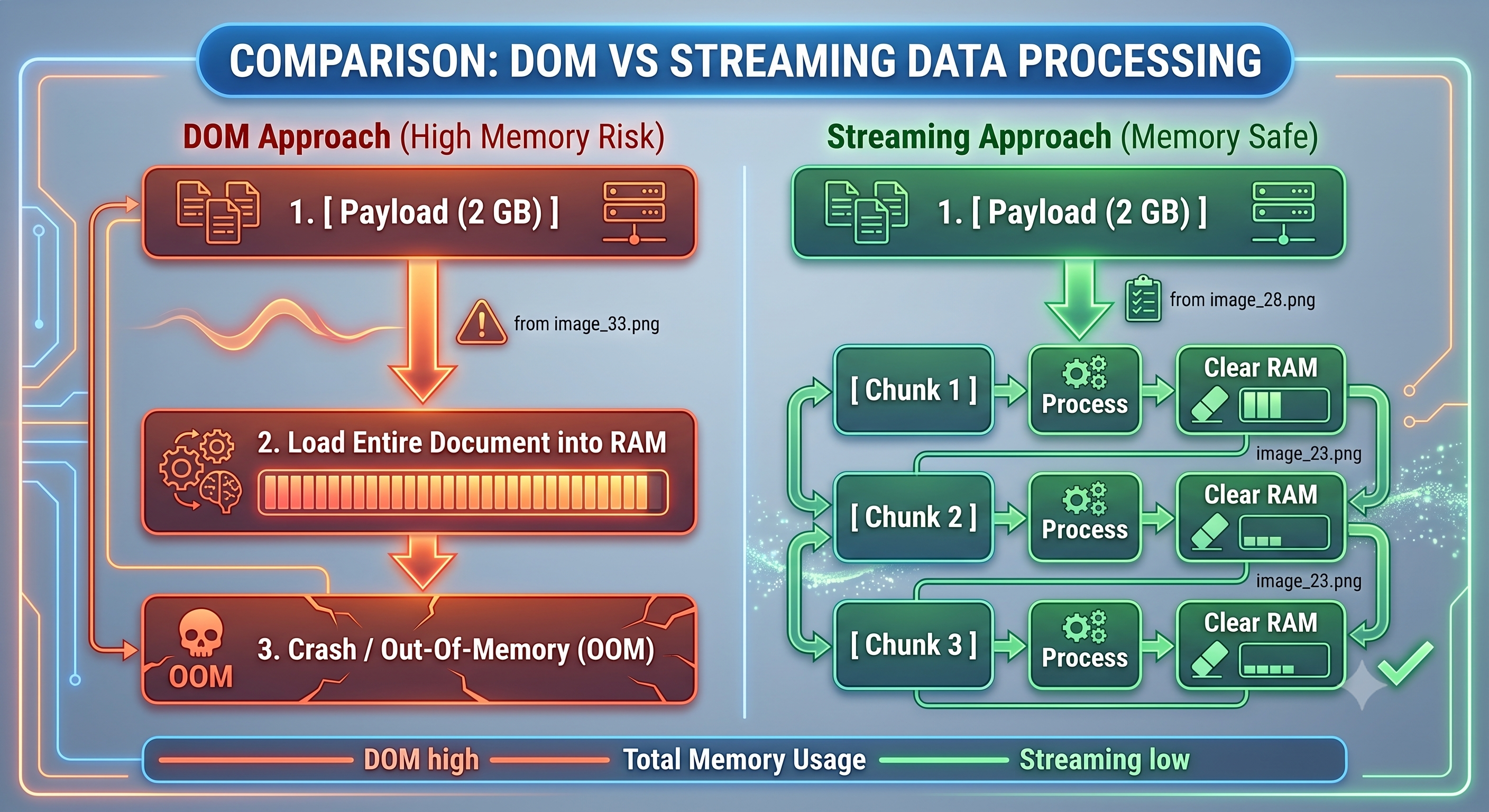
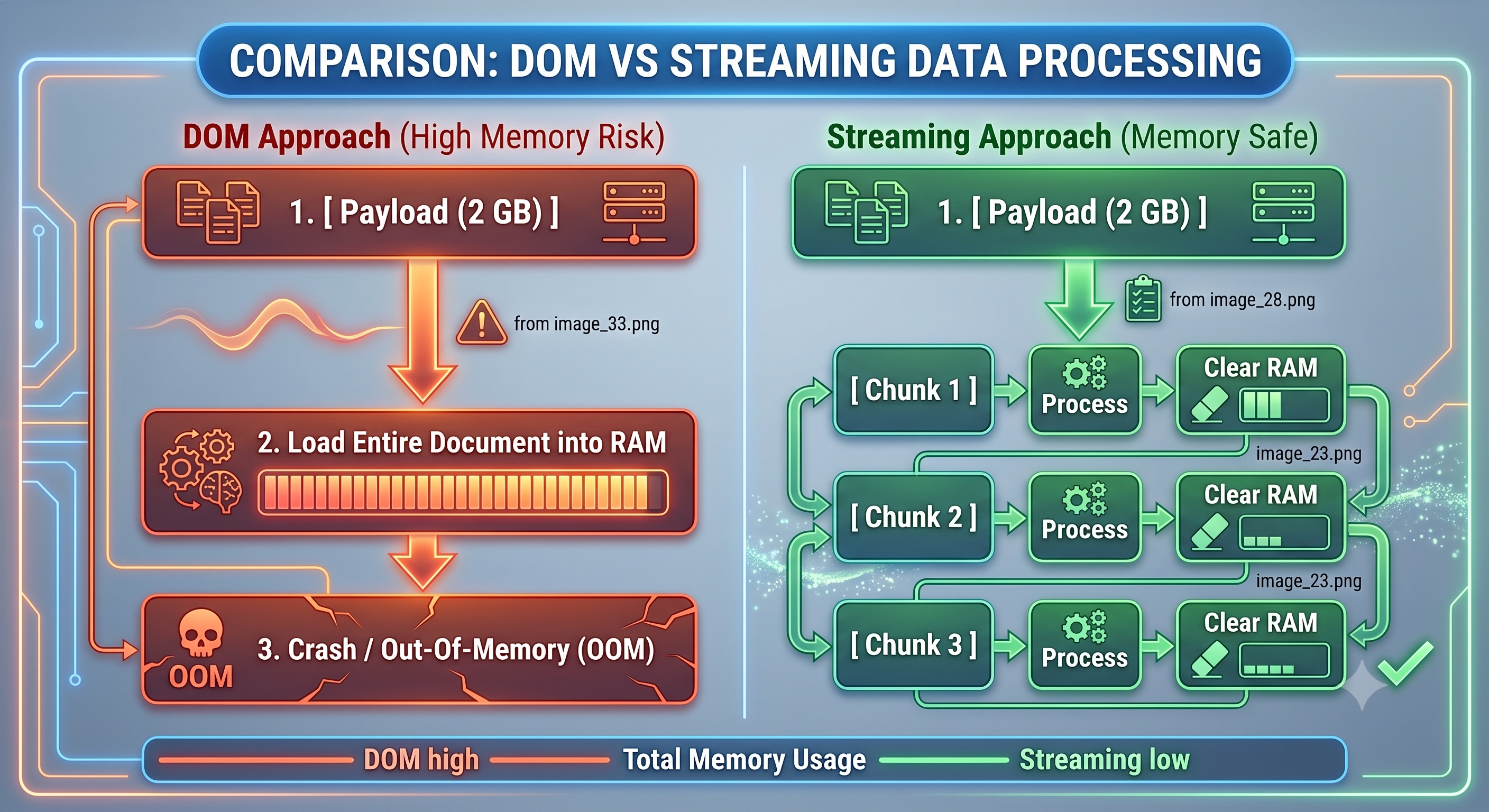
In implementing pipeline processes, the workday studio course runs in multi-tenant worker nodes in the Workday Cloud and thus requires proper memory management. This implies that memory usage is constrained by hard tenant governance bounds. Loading huge multi-gigabyte XML payloads completely into memory (DOM model) will cause an OutOfMemoryError or the process will be terminated prematurely by the execution engine.
For scalable integrations, developers should steer clear of DOM based processing and embrace streaming execution patterns.
Advanced Splitter Aggregator Patterns Techniques
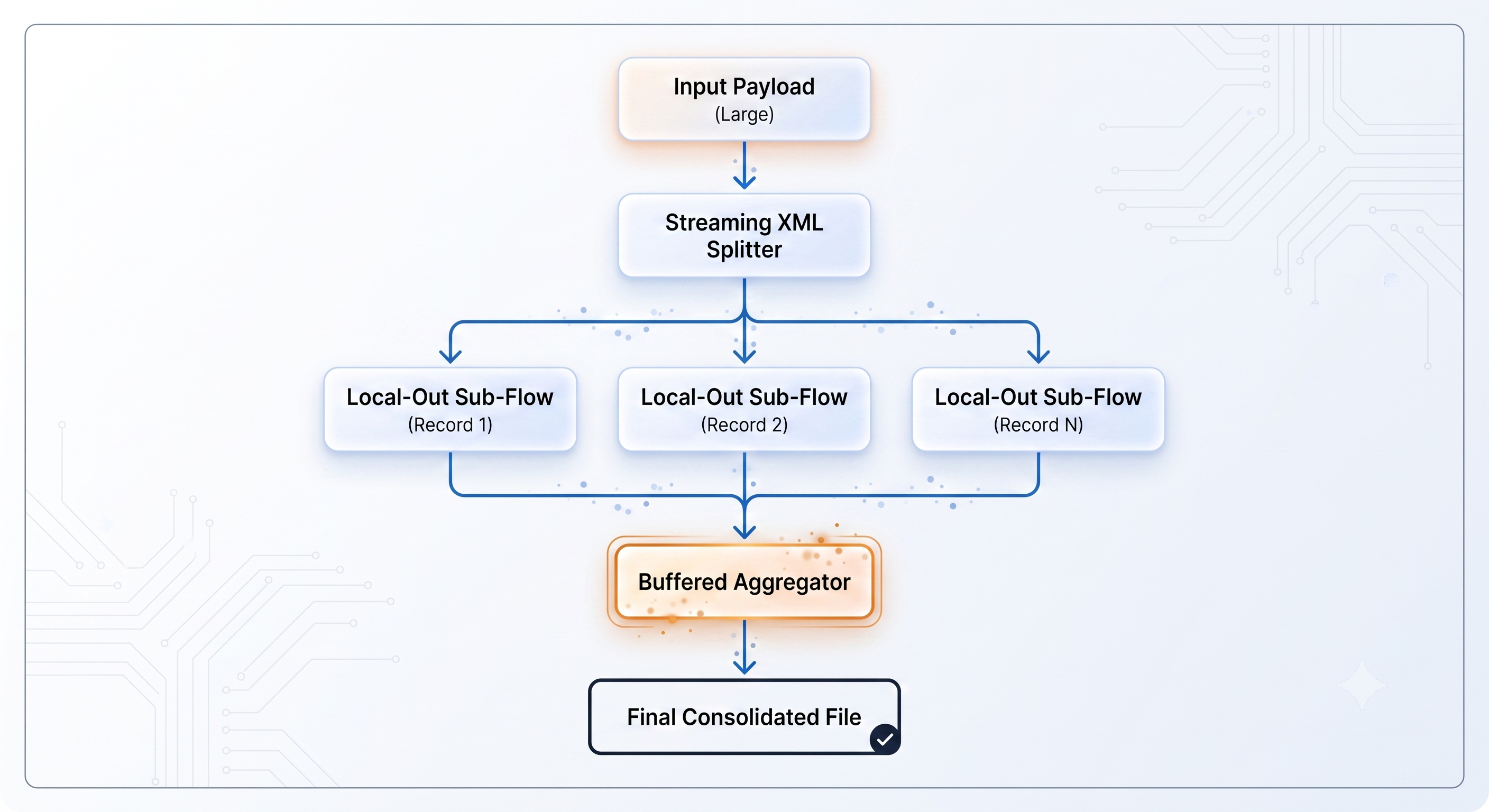
Splitter Aggregator Pattern is used for efficient processing of large sets of employees (like payroll or tax form updates globally) :
Source Splitting: Use the XML splitter component by setting the streaming mode (streaming=true). This enables the system to deal with elements by streaming, without having to load the complete file to memory.
Local Subassembly Processing Individual chunks in Local Out subassemblies are processed.
Aggregation in Increments: Merge processed fragments using XML aggregator component with disk buffered mode so that memory usage remains constant irrespective of the overall file size.
Paged Web Services
When calling the RaaS or WWS endpoints that return a large amount of data, do not request all the records at once. Make a Paged Loop Pattern:
Make a call to the API with the pagination flag parameters (Response_Filter/Page=1, Response_Filter/Count=999).
Calculate the total number of pages from the response header metadata using an MVEL expression.
Looping logic operation (with the help of Loop component or Route assembly) incrementing page index dynamically.
Custom Code: MVEL, Java, and XSLT 2.0/3.0
Although components are what create the body of an assembly, the creation of custom code requires programming.
MVEL (MVFLEX Expression Language) Integration
MVEL is a light-weight Java-based expression language applied for evaluating expressions within Eval steps, choice routers, and component parameters.
Use cases:
Message Context variable and property manipulation.
Standard Java collection utility classes' use such as HashMaps and ArrayLists.
Value extraction from headers and payloads.

Advanced XSLT (Extensible Stylesheet Language Transformations)
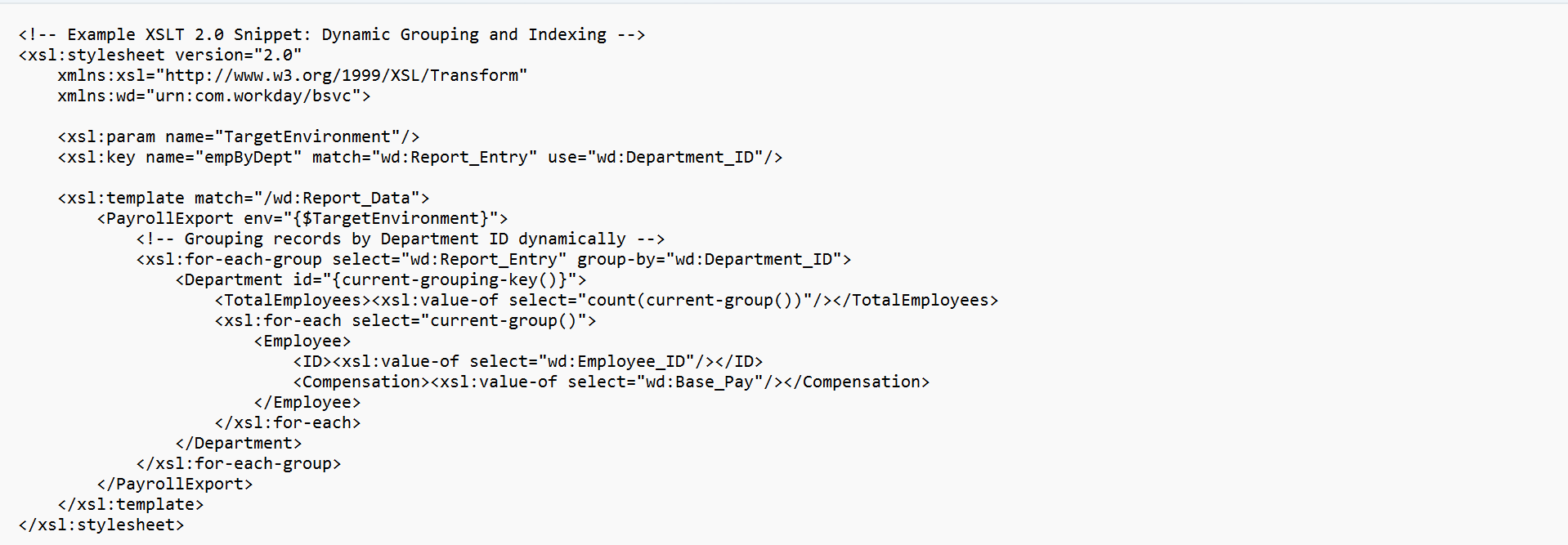
XSLT is the main engine of transformation within Workday Studio. In case of basic integration, the process involves just mapping, but advanced integration implies usage of XSLT 2.0/3.0 capabilities:
Grouping (xsl:for-each-group): Very important when grouping employees in terms of cost center, department or location before output.
Key lookups (xsl:key): Speeds up searches within large XML datasets reducing complexity from $O(n^2)$ to $O(1)$.
XSLT Parameters: Passing of runtime props to the stylesheet via <xsl:param>.
Going Beyond with Custom Java Classes
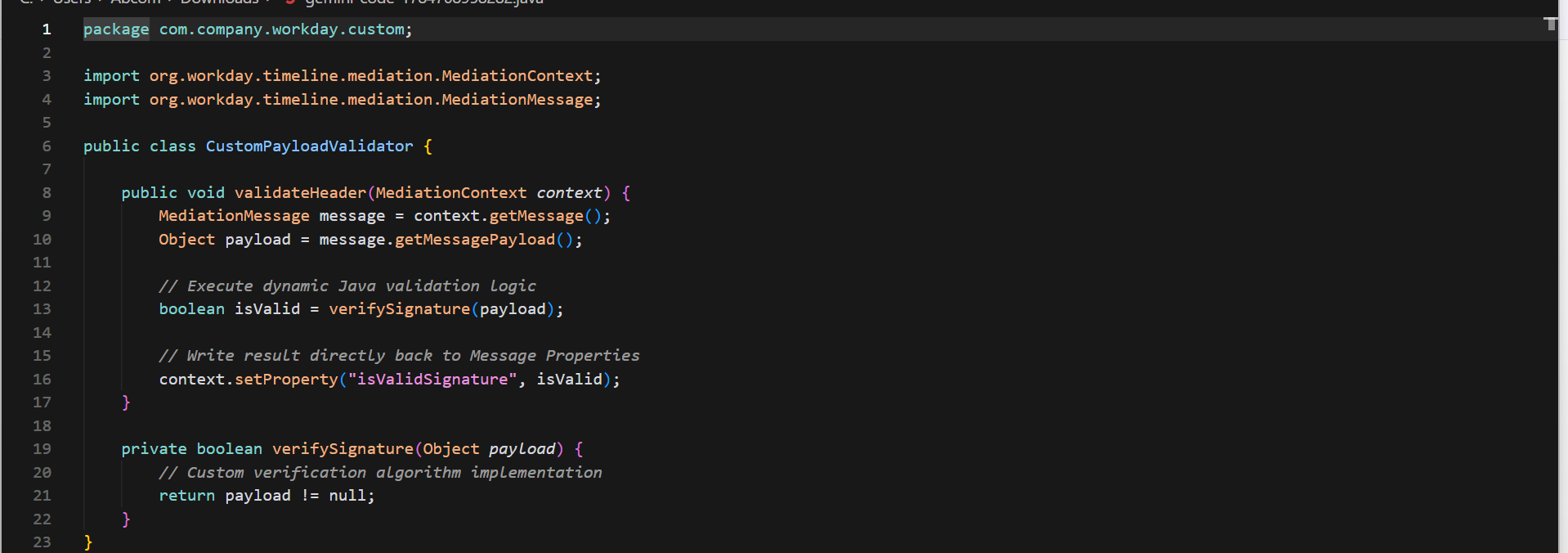
Beyond the capabilities of native controls, MVEL expressions, and XSLT processing, Workday Studio enables programmers to use their own Java classes within the integration platform:
Complicated Business Rules: Implementing algorithms (for example, custom encryption, proprietary hashing, or string manipulation) which cannot be effectively implemented using XSLT.
Memory-Based Data Structure Manipulation: Employing java.util.HashMap or other data structures for data set cross-referencing within memory.
Errors Handling, Log, and Resilience in Production Environment
Vendor endpoints and network connections can go down in production environments while input data can be malformed. For complex Workday Studio integrations to work, error handling should not corrupt the enterprise data and be done gracefully.
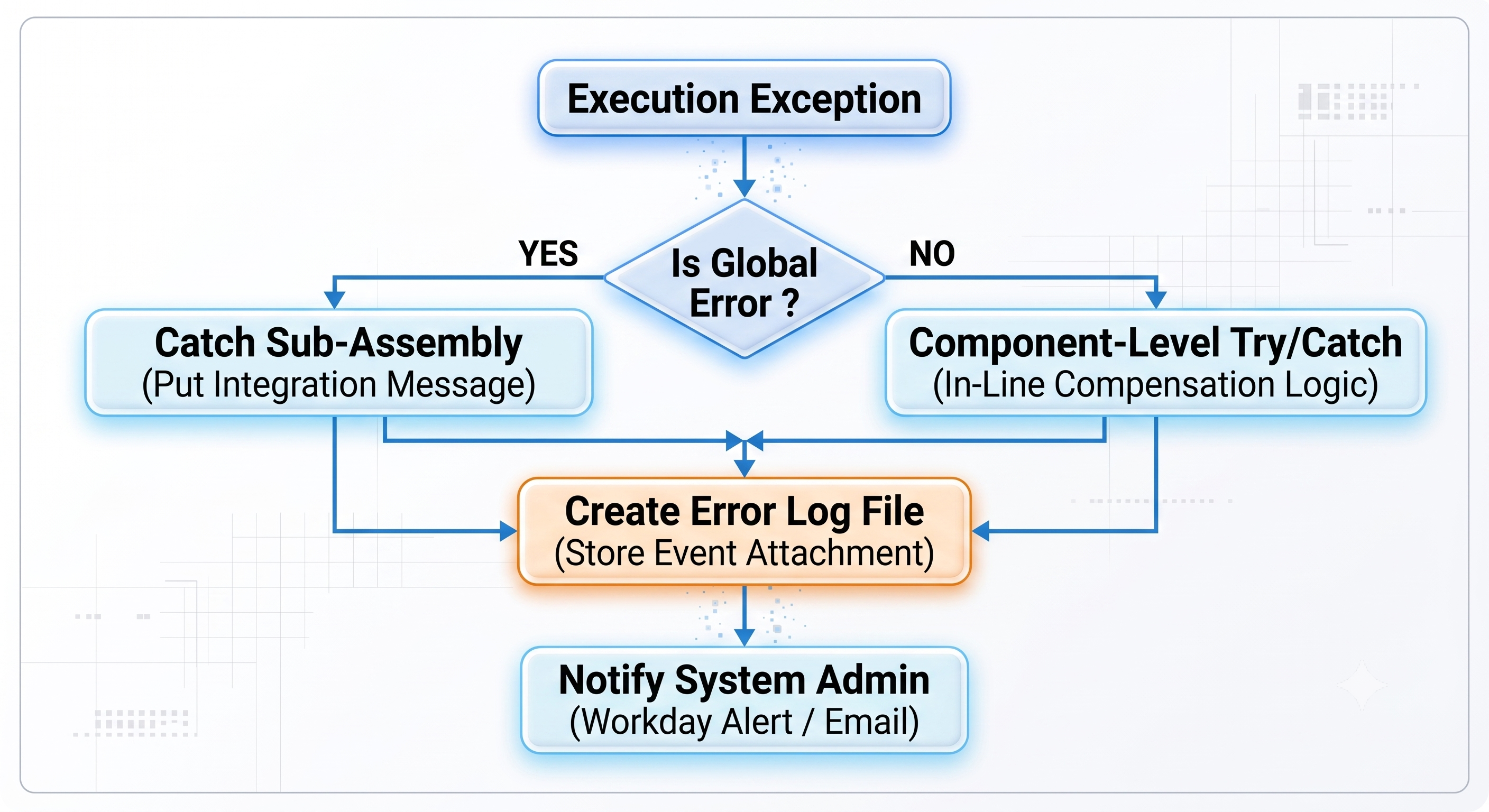
Exception Handling that Is Fault-Tolerant
Studio offers structured ways to handle exceptions using Catch Sub-Assemblies:
Try-Catch Pattern: Surround volatile sub-assemblies (such as an HTTP outbound connection or a transactional database action) by calling out to a local sub-assembly. In case of an exception, execution is passed to a Catch handler instead of terminating the integration.
In-Line Error Handling for Non-Fatal Errors within Components: Handle non-fatal errors at the component level so that only the valid records from the batch can be processed and invalid records go to the error queue.
Standard Logging vs. Attachments of Events for Logging Frameworks
Right logging prevents performance issues and maintains readability of the integration runs:
Put Integration Message (PIM): A built-in component that displays status message, warnings and system errors on the Workday Integration Event UI.
Practice: Do not use PIM within the processing loop. It could consume too much memory to write 50,000 PIMs for one batch run.
Disk-Buffered File Logging (Store Component): For logging detailed audit trail of a record level, catch validation errors in a buffer or temp file, clean up the output in a desired logging format (like CSV or JSON) and attach it to the Integration Event using the Store Component.
Re-Drive and Re-Try Patterns
Network callouts to external APIs may fail due to transient timeouts. Using re-drive and re-try patterns assures data delivery:
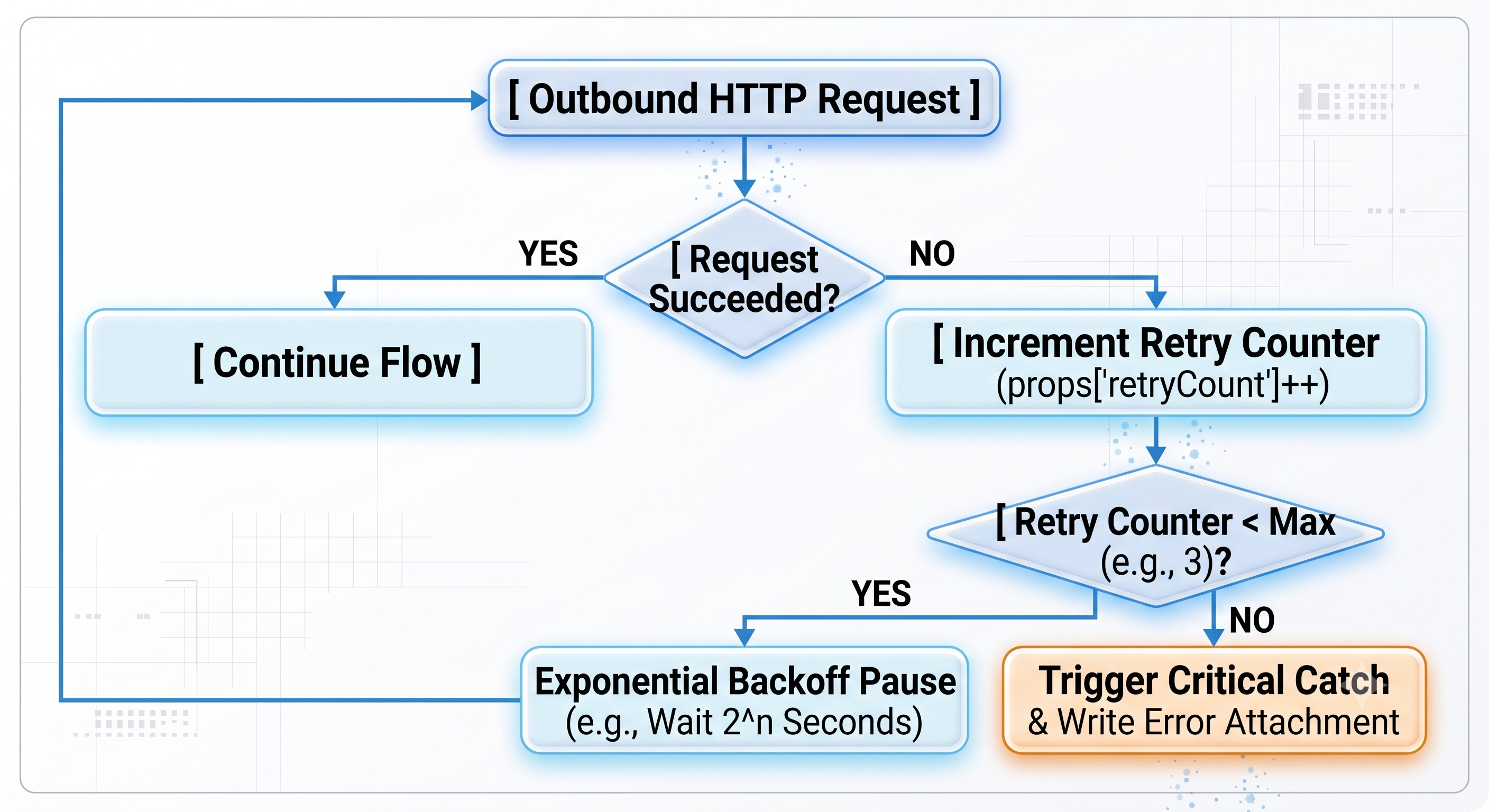
Exponential Backoff Retry Loop: HTTP status codes like 502, 503, 429 Rate Exceeded should be captured by means of MVEL expressions.
Dynamic attempt counters should use message properties (props['retryCount']) to store values.
Progressively introduce delays in attempts (for example 2, 4, 8 seconds) until maximum attempts threshold is reached.
Enterprise Application Integration Use Cases
Global Payroll & Financial Settlements Integration - Architecture Design
Use Case Description:
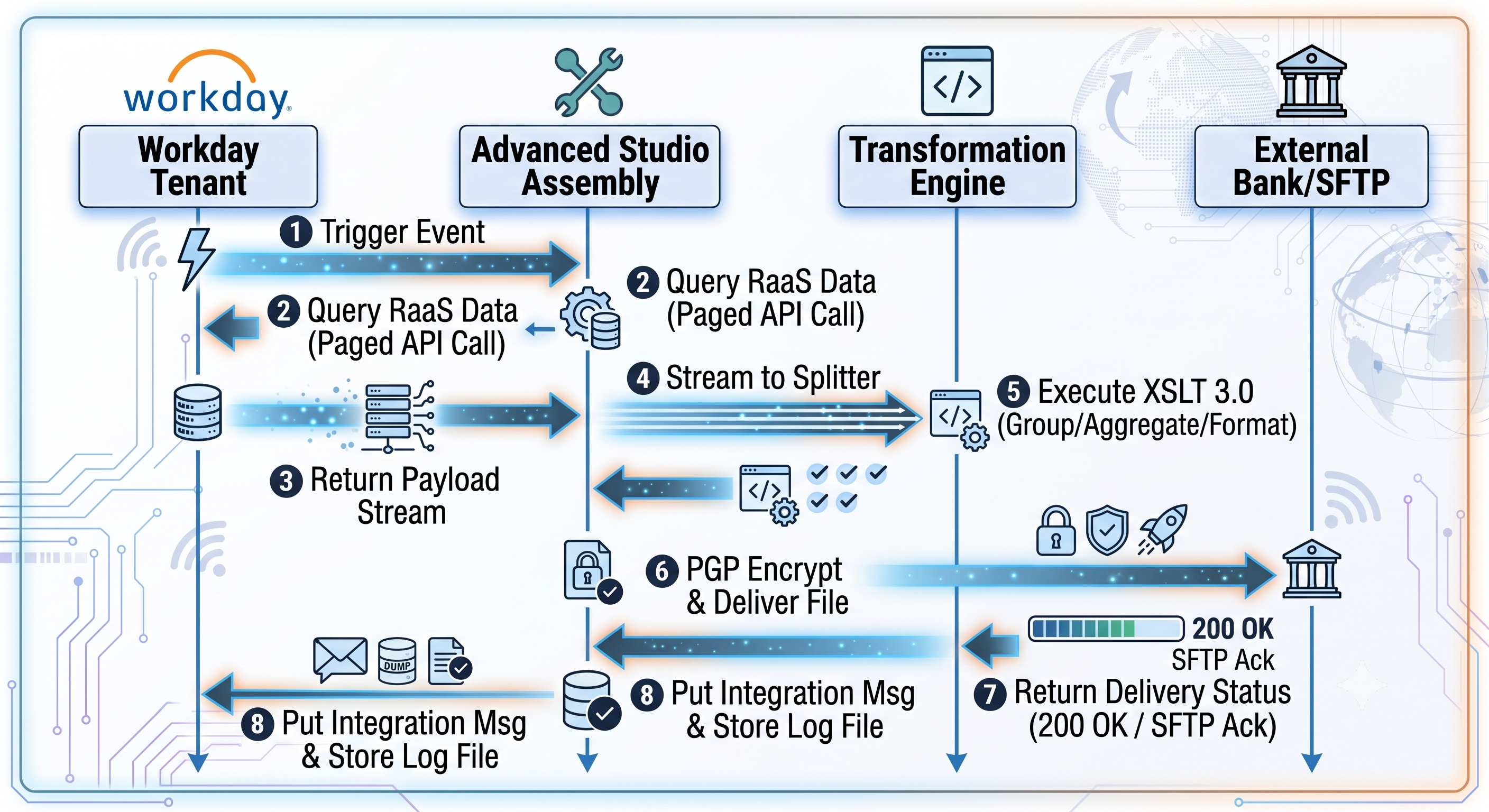
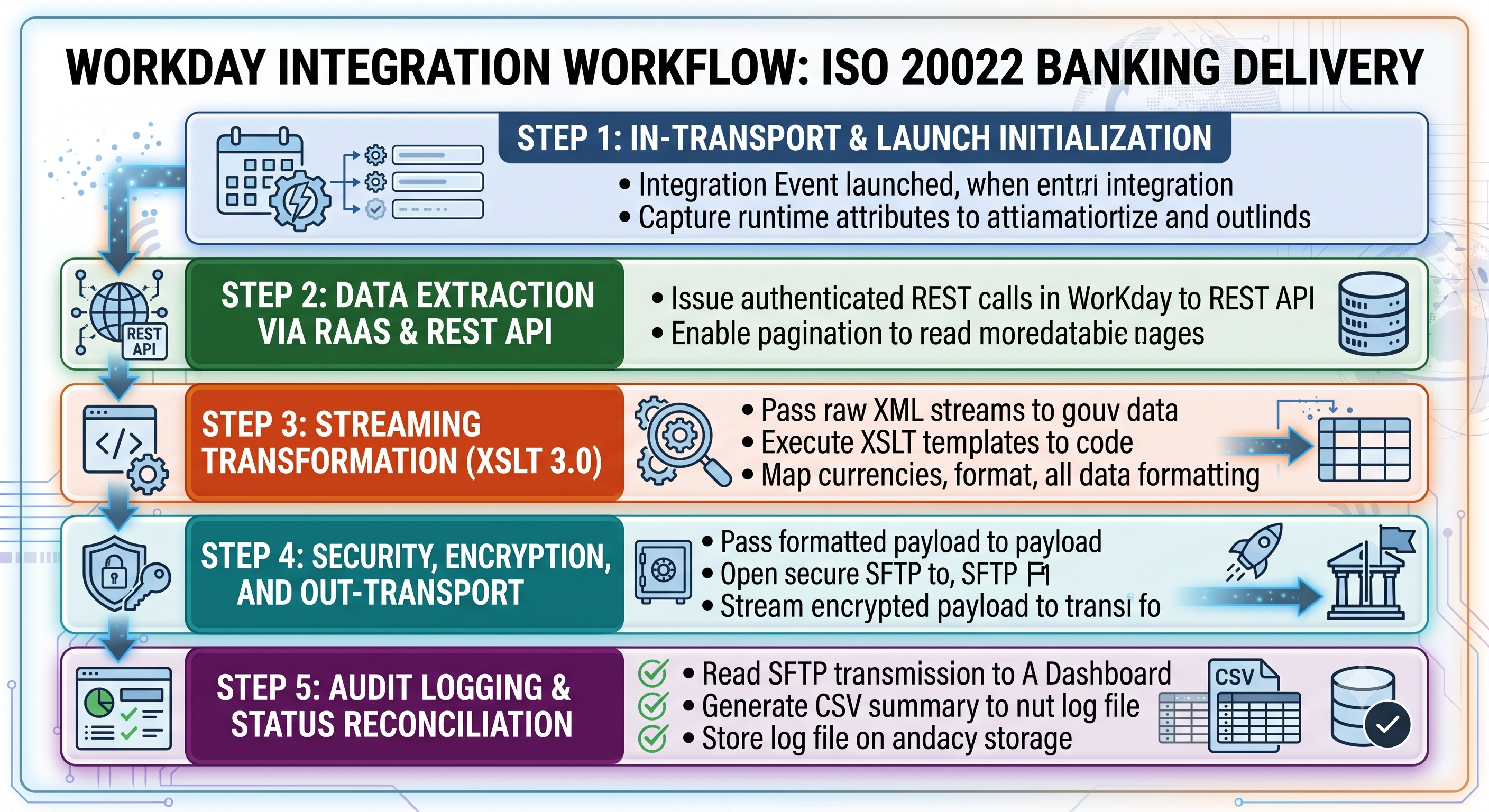
An international company needed an automated workday studio integration online which would help in fetching monthly payroll adjustment, transform financial information, and transfer payment files on monthly financial allocations, payroll changes and tax withholding information from Workday Financials and HCM application. Retrieved data has to be transformed into banking format, encrypted and sent through SFTP connection to the banking partner. Moreover, processing results have to be posted to Workday by means of Web Services updates.
Sequence Diagram and Architecture:
Step-by-Step Technical Implementation Workflow:
Optimization, Limitations, and Governance
To guarantee multi-tenancy stability, Workday has execution limitations for integration applications. If these limits are exceeded, it will lead to execution errors.
Governance Limits & Operational Safeguards
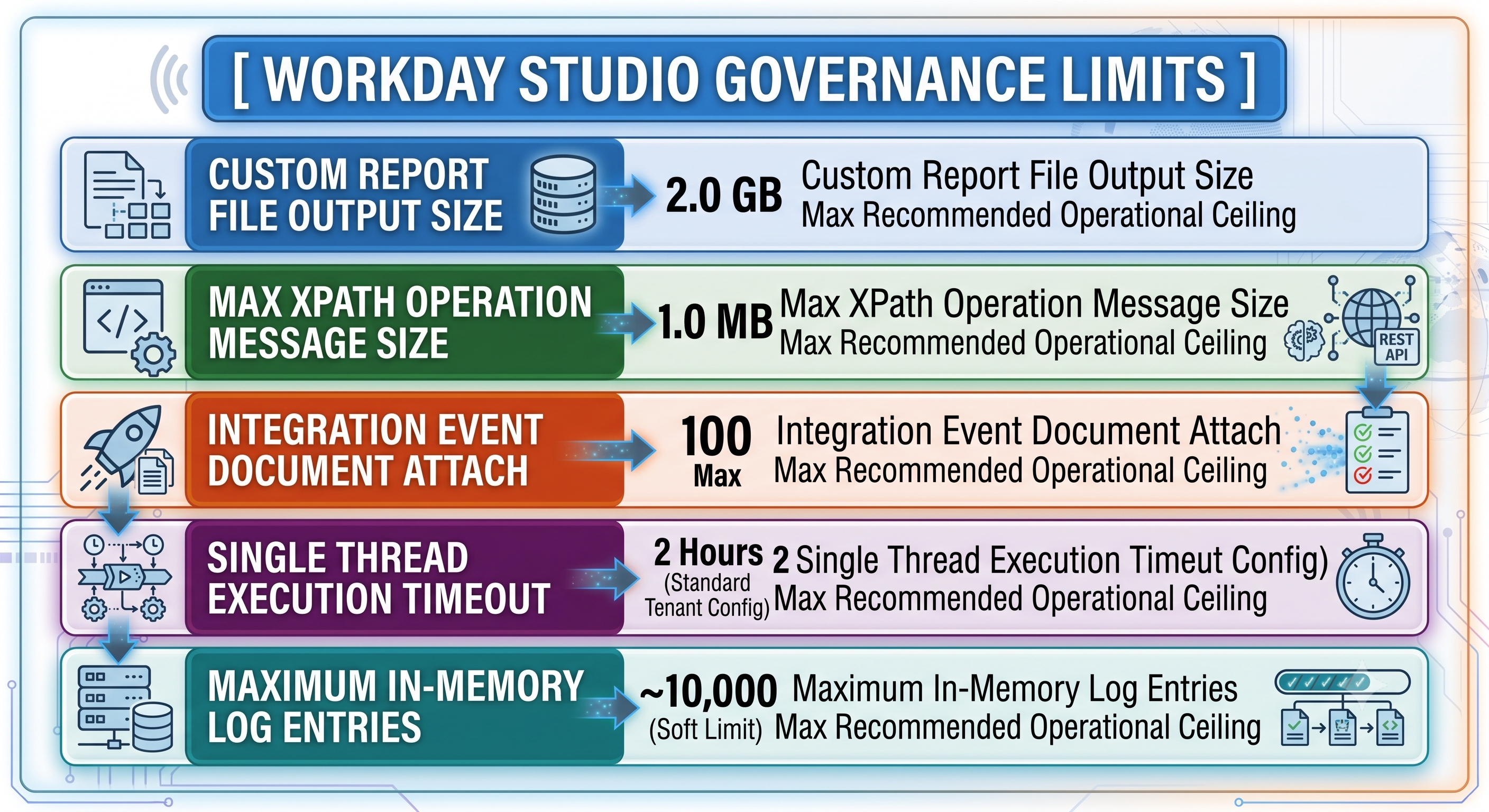
Custom Reports File Sizes: Custom reports invoked through RaaS must not go beyond 2GB in raw text format.
In-Memory Limitation for XPath Evaluation: XPath evaluation based on DOM for messages with size more than 1MB results in performance degradation. Programmers need to split the XML message using XML Splitter or stream parsers before applying any XPath evaluations.
Attachments per Integration Event: Single execution of an integration process can have no more than 100 output documents attached to one integration event.
Checklist for Optimizations
1. Make sure streaming is enabled between nodes in an assembly
If you are optimizing a high volume workday studio integration online, ensure that streaming is enabled through all the Splitters, Transformers, and Transport components. Programmers must program Streaming between Splitters, Transformers and Transport components.

2. Optimize Design of XPath Query
Do not use deep scanning XPath queries like //wd:Employee_ID. The engine will scan the entire XML document tree. For example , use /wd:Report_Data/wd:Report_Entry/wd:Employee_ID . This will reduce the number of search cycles on the CPU .
3. Move Static Lookups to Local In-Memory Maps
While performing the lookup of thousands of static codes (e.g., mapping internal job profile IDs to vendor job codes), try to refrain from repeatedly calling Web Services or performing time-consuming XSLT lookups. Load all of the key-value pairs in advance to one java.util.HashMap inside one initial Eval operation.
Deployment Life Cycle, CI/CD, and DevOps Best Practices
Enterprise integrations need strict SDLC discipline.
Best Practices for Version Control
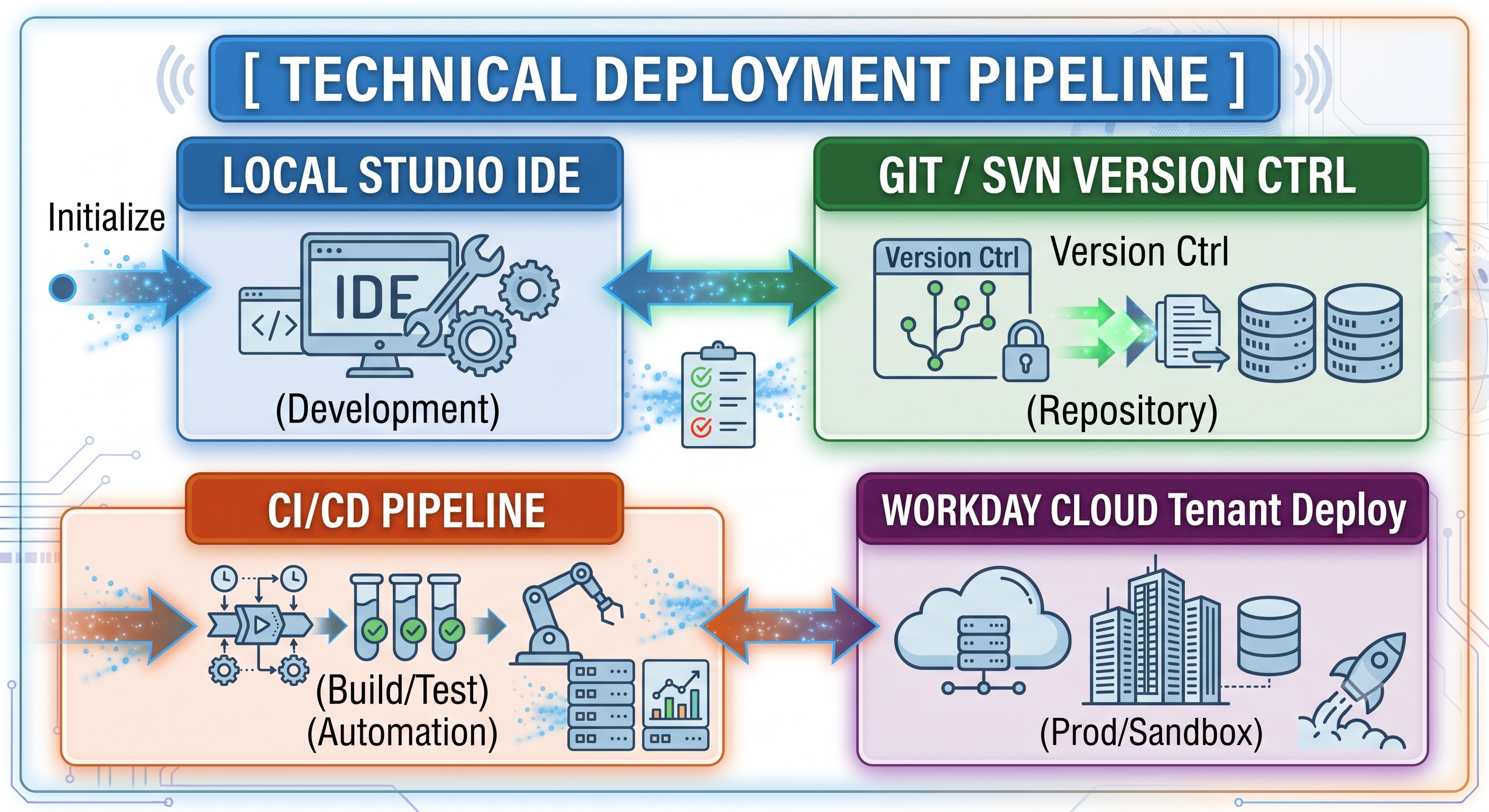
Repository Structure: Ensure that Workday Studio workspace project directories are organized within standard Git or Subversion repositories.
Modularity of Components: It is not recommended to build huge monolith assembly files that contain many thousand visual components. Try to build reusable sub-assembly files (.clover visual layouts and sub-flows).
Decoupling of Environment Variables Configuration: Do not use hardcoded system URLs, credentials, hostnames, and API end-points in the assembly file itself. All configurations should be stored as Workday Integration Maps or Integration Attributes, which can be changed dynamically by Workday UI per tenant (Sandbox, Production etc.) without recompiling any code.
Automated Unit Test & Validation
Local Unit Tests: Validate dynamic message structure and context payload values using local Workday Studio Debugger to debug mediation components before uploading code into cloud tenant.
Mock Input Payloads Validation Place mock XML files of input messages in the test directory of the project. Validate message structures through XSLT processing locally without internet connection.
Secure Deployment Pipeline
Source Code Compiling: Compile source code into valid integration assemblies (.zip file which contains .clover code, java files, transformation stylesheets etc.) using Workday Studio IDE.
Tenant Cloud Deployment: Use Cloud Explorer and deploy the assemblies on cloud tenant directly or via Workday Deployment APIs.
Deployment Log & Audit Trail Tracking: Store the deployment logs and associate the release candidate artifact with the particular git release commit.
Trends in Future Workday Integration Solutions
Workday integration solutions are facing a paradigm shift that includes the need for responsiveness, modularity, and event-based integrations. Simple data exchanges are possible through EIBs and predefined Workday Cloud Connectors, but Advanced Workday Studio stands as the number one solution in case of heavy processing, multi-point orchestrations, and large high-volume datasets.
Considering the increasing hybrid nature of enterprise landscapes, the future of Workday integrations will involve the following three major pillars for integration architects:
1. Architectural Discipline: Design for Streaming & Fault Tolerance
Large volume processing implies architectural efficiency. Future-ready integrations focus on the usage of streaming patterns in order to address memory governance and avoid memory problems.
By also moving the volatile configuration values like target URLs, credentials, and business logic key values to dynamic Integration Attributes, programmers make the solution portable to Sandbox, Implementation and Production environments without having to modify the source code. Finally enterprise fault tolerance is reached by proper error handling, including Catch Sub-Assemblies, exponential retry on HTTP exceptions and log file attachments to disk buffers.
2. Selecting the appropriate integration framework is influenced by the architectural complexity, execution performance, and the maintainability of your solution.
Workday Enterprise Interface Builder (EIB) will be the tool of choice in cases where you need to move data in a basic form using batch files (either from one system only or to one system only). EIB is a highly performant and easily maintainable option that does not require any custom development.
If your integration involves third-party applications that are very popular and have been around for a while (ADP Payroll, health benefits administration systems, tax calculation services), the best solution would be the Workday Cloud Connect connector. Being prepackaged and managed by Workday itself, Cloud Connect connectors guarantee continuous compliance and schema updates.
However, if there is a need to integrate with several systems at once, process messages dynamically, split and aggregate payload in a memory safe way or process payloads using complex XSLT 3.0, MVEL or Java logic, Workday Studio comes into play. Studio makes simple data transfers into integration software engineering with high performance and fault-tolerance of mission critical processes of enterprise scale that work in a strict cloud governance environment.
Key Takeaway: In general cases, stick to EIB for fast 1-to-1 data transfers, use Cloud Connect for standard third-party vendor platforms and choose Advanced Workday Studio if you have complex logic or need to use APIs and streaming for large datasets.
3. The Modern Integration Stack: Real-Time and Event-Driven Enterprise
The classic model of overnight batch processes is making way for real-time, event-driven process orchestration. The Modern Workday Studio solutions combine classic XML parsing with modern API design, including RESTful interfaces, JSON data payloads, and GraphQL queries.
Now, with Workday Webhooks, Orchestration, and Kafka-based messaging buses, integrations are reacting to events in the business life-cycle (such as hiring new workers or restructuring organizations), in real-time, rather than waiting for scheduled polling operations.
Conclusion
With enterprise ecosystems becoming more integrated, Advanced Workday Studio provides the computation power and security controls to build robust, secure, enterprise-class integration pipelines. With Studio's processing power and the latest API designs, we will have high-performance, scalable integration stacks.