
Mastering Advanced Workday Calculated Field Examples
Last updated on Oct 17, 2026
Workday Calculated Fields are the analytics engine of the Workday platform. This allows functional report writers, integration specialists and system administrators to do on-the-fly extraction, transformation, manipulation and enrichment of tenant data without altering the underlying database schema. Basic calculated fields can do simple things like concatenate names or calculate a worker’s age from a date of birth. Enterprise environments require a much deeper command of advanced calculated functions.
Advanced calculated fields are not simple linear formulas, but multi-tiered, object orientated data structures. In complex global organisations you will rarely find HR, payroll, benefits and financial data on a single business object. Architectural discipline is required for parent and child entity nested data relationships, complex boolean logic, effective dating traversal and high performance on reports running over hundreds of thousands of records.
Whereas basic calculated fields enable basic calculations like concatenation of names and computation of an individual’s age based on their date of birth, enterprise settings require more than that; knowledge of advanced functions becomes mandatory, skills gained via professional workday hcm training online at OnlineITGuru.
Calculated Fields Architecture
Understanding complex calculations involves the comprehension of the object-oriented technology upon which Workday is built, an area of expertise emphasized in specialized workday courses. Workday is different from traditional relational database systems in that it organises data around business objects, instances, and object relationships rather than relational keys and flat database tables.
Business objects related business objects and one-to-many relationship
The business object is an entity in the enterprise ecosystem, e.g. Worker, Position, Supervisory Organization, Job Profile or Supplier Invoice. Each report record is compared to a Primary Business Object.
Enterprise reporting complexity is that business objects are not in isolation, but are related to each other through object relationships. Generally these relationships can be categorised into two:
Single-instance relationships: A one-to-one relationship such as a Worker’s Primary Position or a Position’s Supervisory Organization.
Multi-instance relationships: For example, a one-to-many relationship such as Worker’s Compensation Changes, Dependent profiles, Historic Job Profiles or Benefit Elections.
If you’re a report designer needing to get at data stored in a multi-instance related object, you can’t simply drag the field onto the canvas. If you try to report on a worker’s historic compensation amounts without filtering, you will get reporting errors or a non-structured array of historic records. Advanced Calculated Fields are the navigational bridges across these one to many relational divides filtering, sorting, extracting and aggregating just the single instance or collection of instances needed for business execution.
Calculation Field Life Cycle & Execution Mechanics
Calculated fields are calculated at run-time in memory. When a custom report or integration is executed, the Workday runtime engine builds the business object hierarchy, loads the data into memory, and evaluates the calculated fields in the order in which they appear, for each instance evaluated.
Calculated fields are calculated on the fly, at run time . Poorly designed calculated field chains can cause the report to perform poorly in an exponential way. More advanced practitioners will build calculated fields with execution order in mind, such as filtering collections of records before any computationally intensive transformations, reusing existing fields rather than creating duplicate calculations, and finding the shortest relational path possible to reduce memory footprint.
Calculated Fields – Complex Functions
Workday has dozens of calculated field functions, but five advanced functions are the backbone of enterprise implementations. These are Evaluate Expression, Extract Single Instance, Extract Multi-Instance, Lookup Related Value and Arithmetic/Date Calculations with True/False conditions.
Expression Evaluation (EE)
Evaluate Expression is Workday’s dynamic decision engine. It is a better if-then-else operator which checks the conditions one by one from top to bottom and returns the respective value as soon as one condition in the chain is true.
Evaluate Expression requires two structural elements:
If none of the explicit conditions evaluates to true, a default return value is populated.
A set of condition lines, each line has a boolean condition (True/False field) and the return value in case that condition is satisfied.
Evaluate Expression is an advanced function as it can return any type of data be it text, numbers, dates or even full business objects. Condition lines can also refer to related objects and nested boolean expressions. Evaluate Expression fields can also return other calculated fields in complex configurations, enabling architects to build modular and highly dynamic business logic trees.
ESI (Extract Single Instance)
The Extract Single Instance function converts a multi-instance relationship to a single instance relationship. If a business object is linked to multiple instances of a child object, you have an Extract Single Instance field to specify a particular instance of the child object based on specific filter and sort criteria.
To create an Extract Single Instance you need three basic inputs:
The multi-instance field on the business object that holds the array of instances (for example, All Compensation Changes on the Worker object).
Condition: A True / False field that filters the source instances and removes any records that do not meet the criteria (e.g. filter only for changes with a base salary increase).
Sort Direction & Criterion: The field to sort surviving records by and direction (First or Last). The most common sorting fields are effective dates, completion dates or sequence numbers.
Extract Single Instance gives you deterministic selection by allowing you to specify the condition and then take the first or last record, so downstream reports and integrations always get one predictable, valid object instance.
Multi-Instance Extraction (EMI)
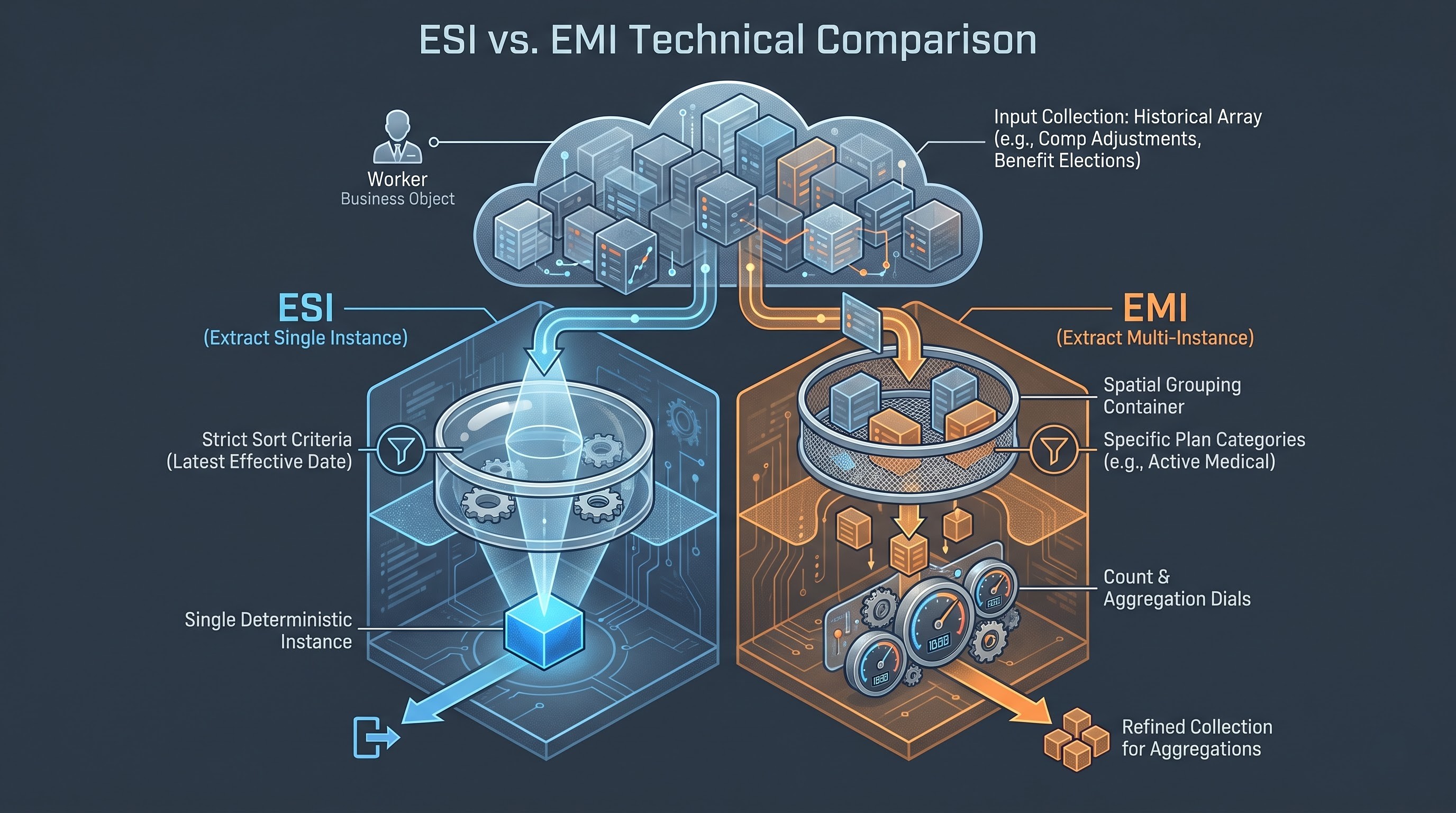
Extract Single Instance reduces a collection to one record, whereas Extract Multi-Instance generates a filtered subset of records that are refined from the original collection. This is an in-memory filter on a multi-instance field that keeps only the instances that satisfy a given boolean condition.
For example, a worker may have 12 benefit elections on record across medical, dental, vision, life insurance and retirement plans, across several plan years. For example, an Extract Multi-Instance field reduces the worker’s entire benefits collection to the two or three relevant health plans for a downstream integration to an insurance carrier that only needs the active health plans for the current plan year.
Extract Multi-Instance (MI) fields are often used as intermediate phases. A report designer will first create an Extract Multi-Instance to create a clean, focused subset of records, and then create an Extract Single Instance, Aggregate Related Instances or Count Related Instances field on top of this refined subset.
Looking Up Related Value (LRV)
The Lookup Related Value function is the north star of reporting in Workday. It allows a calculation based on a source business object to traverse an object relationship and get a field from a related business object.
An LRV has two specifications:
Lookup Field: A single instance field that defines the path from the current business object to the target business object (e.g. Primary Position, Business Unit or a previously built Extract Single Instance field).
Field to Return The specific data attribute on that related target object that you want to return to the source object (e.g., Management Level, Cost Center Code, or Full-Time Equivalent percentage).
LRV operations are cascadable. If Object A is related to Object B and Object B is related to Object C, then a chain of Lookup Related Values can allow a report writer on Object A to reach all the way to Object C. However, each hop over business objects adds computational overhead and must be carefully designed.
Advanced TF and Boolean Conditions (True/False)
The True/False calculated field is the most basic building block for nearly all dynamic filtering and expression evaluation in Workday. A straightforward True/False field indicates whether a worker is in London. Advanced True/False fields have sophisticated boolean logic with AND, OR and NOT arguments, multiple comparison conditions and nested relational operators.
The advanced use cases use True/False fields to evaluate conditions on related business objects. For example, a True/False field on the Worker object could be used to determine if any active position held by the worker has an annualised compensation value above a certain threshold or a dependent child is over twenty-six years of age. These fields are the conditional triggers for the Extract Single Instance, Extract Multi-Instance and Evaluate Expression fields.
Architecture: Cascaded calculation chains
Through breaking down complicated problems using this step-by-step process, which is a proven design technique taught in workday courses online, architects can build modular calculated fields that are simple to test, debug, and reuse in various reports.
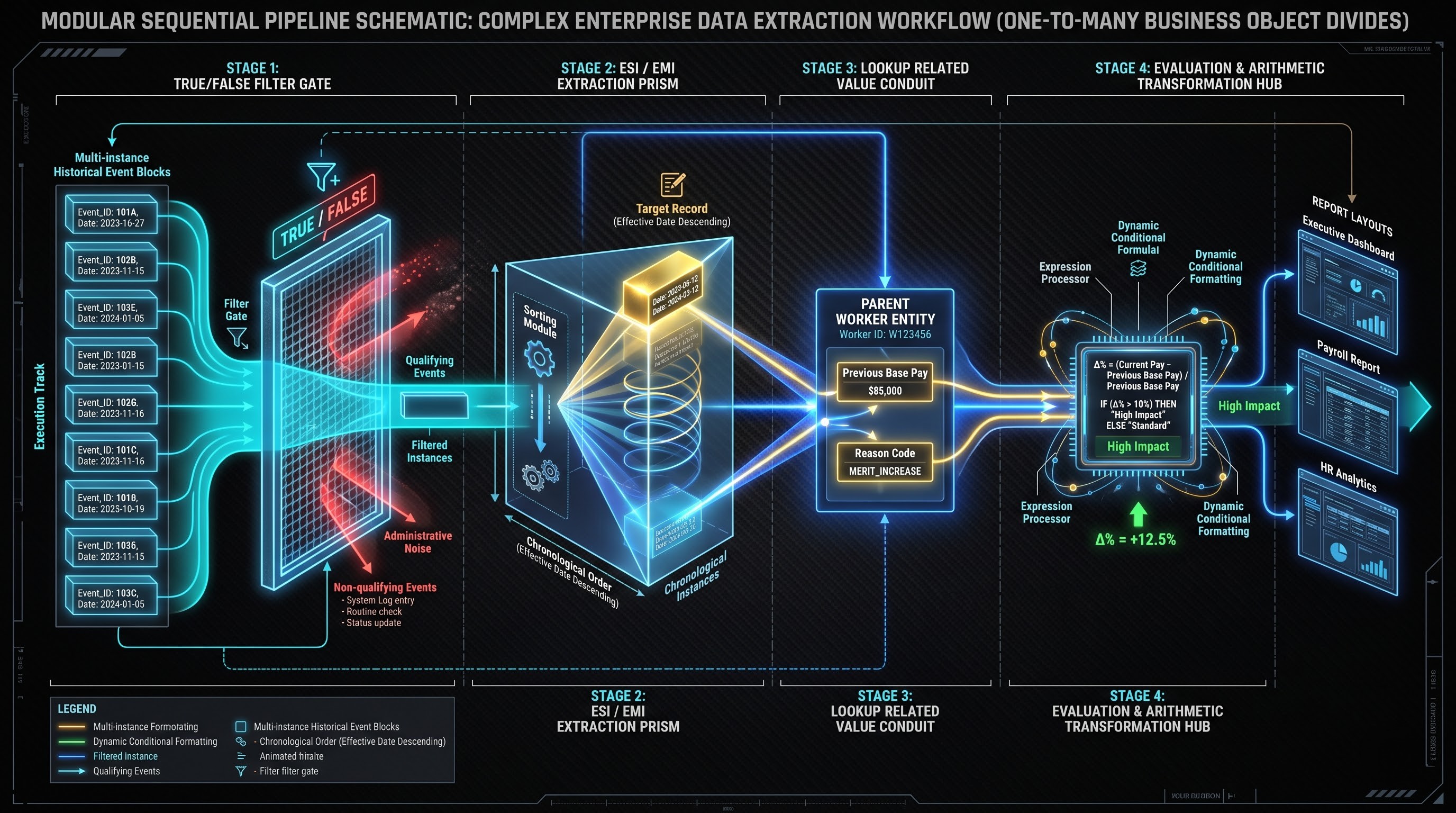
The real power of Workday calculated fields is realised when you chain them together in a logical series of multi-step calculations. In the real world of enterprise reporting, a calculated field alone rarely meets a complex business requirement. Instead, report architects build multi-tiered workflows, where each calculation depends on the output of the previous step.
A typical pattern for the structure of cross-object data extraction is a disciplined 4-stage pipeline:
Filtering (True/False): Locate and filter the qualifying criteria on the child business object.
Extraction (Extract Single Instance or Extract Multi-Instance) Filter the multi-instance relationship of parent object, using True/ False to get the exact target instance or subset.
Traversal (Lookup Related Value) Traverse the bridge from the parent object to the extracted child instance to pull the required raw attributes up to the parent level.
Transform (Evaluate Expression, Text Formatting or Arithmetic) Format, calculate, merge or group the fetched data into its final usable form.
This stepwise approach to complex problems allows architects to design modular calculated fields that are easy to audit, test and reuse in multiple reports and integrations.
CISCO® Real World Business Scenarios
We demonstrate the operation of these advanced features and calculation chains in production tenants with four enterprise use cases: Global Compensation Analytics, Automated Compliance Reporting, Executive Headhunting Metrics and Cross-Module Financial Allocations.
Scenario 1. Global Track of Salary Changes
Merit increase trends are a common thing for enterprise HR leadership to review. Managers want to see the old salary, new salary, the specific percentage difference and the business reason for the last change when an employee’s last pay change is made.
The compensation history is stored as a continuous series of historical events on the Employee Compensation Event business object.Retrieving the last compensation event requires a multi-step calculated field pipeline on the Worker object.
The first step is to create an Advanced True/False calculation on the business object, Employee Compensation Event. This field confirms that the status of the compensation event is Completed, that the compensation event is effective prior to the most completed event date and that the event was a change to base pay.
Second, the Worker business object has an Extract Single Instance set field. The source field is the collection of all compensation events on the worker. The condition is the True/False field you created in step 1 above. The sort criteria uses the first instance to sort events by effective date descending. This is the exact record of the workers’ compensation just before the present rate of pay.
Third, the Worker object is enhanced with a set of Lookup Related Value fields. These LRVs use the Extract Single Instance field as the lookup path to bring through the Previous Base Salary Amount, Currency Code, Effective Date and Reason Category from that historical event.
Finally, an arithmetic calculation on the Worker object calculates the percentage increase between the prior base salary amount and the current base salary amount. If the organization is in multiple currencies, you add a Currency Conversion calculated field to convert both figures to corporate standard currency before the arithmetic delta is calculated. So you can get a clean, automated comp-ratio and salary trajectory report without having to reconcile spreadsheets by hand.
Scenario 2: ACA Dependent Eligibility Audit Automation
U.S. health care compliance rules require organisations to track the ongoing eligibility of employee dependents for employer-sponsored health coverage. A major eligibility criterion is that dependent children are only covered until the end of the month or year they turn twenty-six, unless they are deemed disabled.
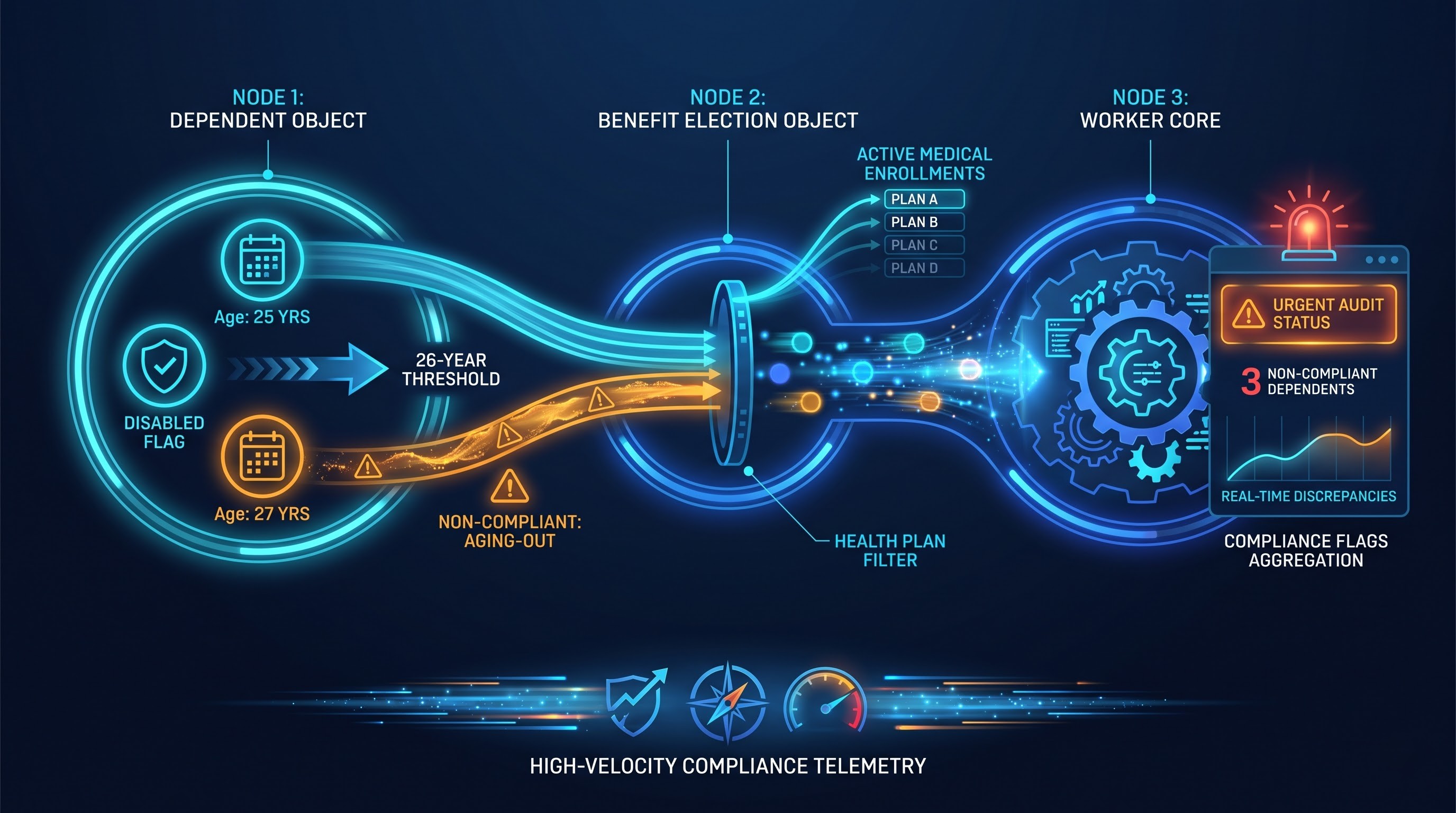
To create an audit report that detects active enrolments for aging-out dependents, you join the Worker, Dependent, and Benefit Election business objects together.
The process begins on the Dependent business object. A calculated field Date Difference that calculates the number of years between the dependent’s Date of Birth and the current system date or open enrollment target date. The second True/False field tests if the age of the dependent is greater than or equal to twenty-six and the Disabled flag is False.
Then a True/False field on the Benefit Election business object determines if the coverage type is in the Medical health plan category, if the election status is Active, and if the enrolled covered individual is the aging-out dependent as defined in the previous step.
A Extract Multi-Instance field on the Worker business object filters the worker's overall benefit election history to return only active medical elections that cover an ineligible dependent.
Finally, the risk of non-compliance is determined by an Evaluate Expression on the Worker object. If the multi-instance collection of non-compliant enrolments is not empty, it populates the specific dependent’s name and birth date through Lookup Related Values and returns an urgent alert label of Ineligible Dependent Covered. This enables the Global Benefits team to run weekly exception dashboards and to automate alerts to employees ahead of compliance penalties.
Scenario 3: Internal Mobility Velocity, Executive Tenure, and Job Hopping Metrics
Organisations measure internal mobility velocity for executive talent management to identify high potential leaders and track risks of retention. Sophisticated date and multi-instance aggregation calculations are needed to determine the mean time in each job profile for the entire tenure of an employee for the entire enterprise.
The problem is Worker’s Position History keeps track of job changes. Some of the move types are promotions, others are lateral moves, organization restructures or data corrections.
First, in an effort to create an accurate mobility velocity metric, we will create a True/False field on the Worker History business object. This field is used to filter out administrative corrections and supervisory reorganisation events, to isolate only substantive changes to the job profile, promotions and lateral moves.
This clean history of real career progressions is aggregated into an Extract Multi-Instance field on the Worker object. Then there is an Aggregate Related Instances field which aggregates the total number of these different promotional events.
Simultaneously, there’s a calculated field of Date Difference on the Worker object that calculates the worker’s Total Enterprise Service in months, from their original Hire Date to today.
Finally, an Arithmetic Calculation on the Worker object divides the total months of service by the number of validated promotion events. Then an Evaluate Expression turns this mathematical quotient into strategic talent bands: Workers who move up every twelve to eighteen months are tagged as Fast-Track Leadership Candidates and workers who remain in the same executive tier for more than sixty months without movement are flagged for Executive Retention Review.
Scenario 4. Dynamic Cost Distribution in Matrixed Global Organisations
As a rule, knowledge workers do not work only for their home supervisory organization within the multinational enterprise of today. A software architect might be formally employed by an engineering firm in Germany, but spend forty percent of his working time on a product launch in the United States, and twenty percent on an infrastructure overhaul in Singapore.
Finance teams need to be able to dynamically allocate employee salary and benefit expenses to matrixed business dimensions for cross-border operational cost reporting without the need to hard-code allocation percentages in external spreadsheets.
This calculation architecture is based on the business objects Worker’s Position Restrictions and Costing Allocation. Costing allocations may be assigned at the worker, position, or earnings level and are valid for effective date intervals. The Worker object has a field Extract Single Instance that identifies the Currently Effective Costing Allocation Schedule.
This costing allocation instance Lookup Related Values has the individual cost lines extracted. The Evaluate Expression looks at the project codes to find foreign entities. Each costing line has a Worktag combination (Company, Cost Center, Program, Project) and an Allocation Percentage.
For each foreign entity found, the Arithmetic Calculation takes the Total Annual Base Cost for the worker (which is a sum of the salary, employer retirement contributions and health plan subsidies) and multiplies it by the Allocation Percentage for that international project Worktag.
Another Currency Conversion calculation converts each allocated amount to the functional currency of the receiving business unit at corporate daily exchange rates. Thus, the multi-entity allocation line items of the balanced month-end corporate recharge report are directly sourced from the Workday Core HR and Payroll data, obviating the need for manual general ledger adjustments in external accounting systems.