
Mastering Azure DevOps: The Definitive Enterprise Architecture, Engineering, and Governance Guide
Last updated on Jul 23, 2026
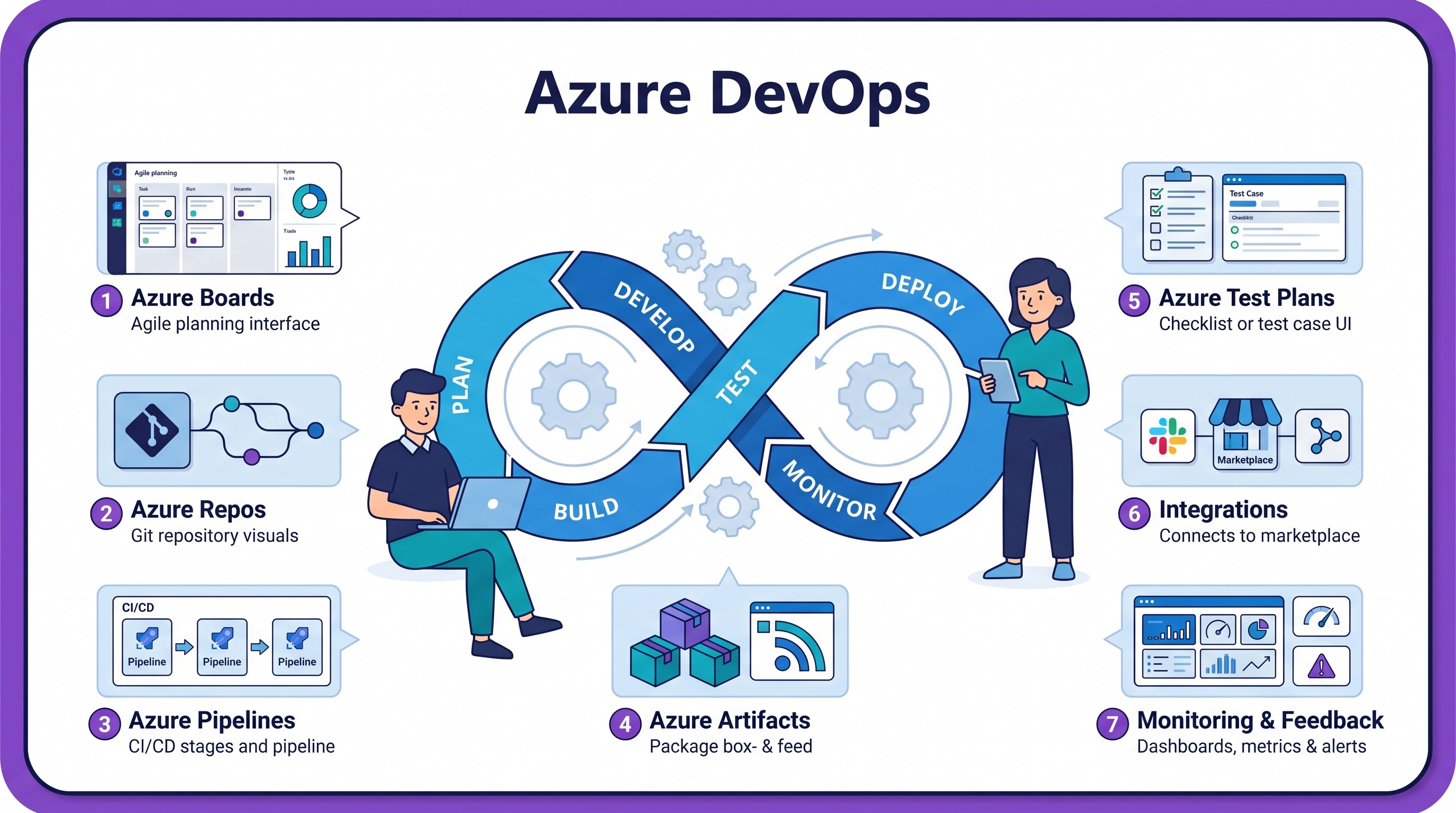
The modern enterprise software environment entails a careful blend of fast delivery and stringent compliance requirements. The intersection of old technologies, microservices architecture, compliance requirements, and global engineering team makes Azure DevOps a suitable solution for Application Lifecycle Management (ALM), CI/CD pipelines management.
Available both as a cloud-managed option of Azure DevOps Services and as a self-hosted option of Azure DevOps Server through the Modern Lifecycle Servicing release by Microsoft, Azure DevOps delivers a comprehensive solution capable of serving thousands of developers simultaneously in hybrid/multi-cloud setups. For all teams wanting to excel in these kinds of enterprise deployments, taking the best azure devops course online is a must for laying down the groundwork.
This guide is an overview of Azure DevOps operation and architecture. Through six sections of in-depth coverage, we look at the architecture of Azure DevOps, YAML pipeline engineering, zero-trust security approach, REST API automation, migration approaches, and organizational strategy.
Core Architectural Pillars and Subsystem Design
The Azure DevOps suite consists of five distinct modules. Although each module has the capability to run on its own and substitute for third-party tools, their intrinsic integration enables full traceability from requirements to deployment logs.
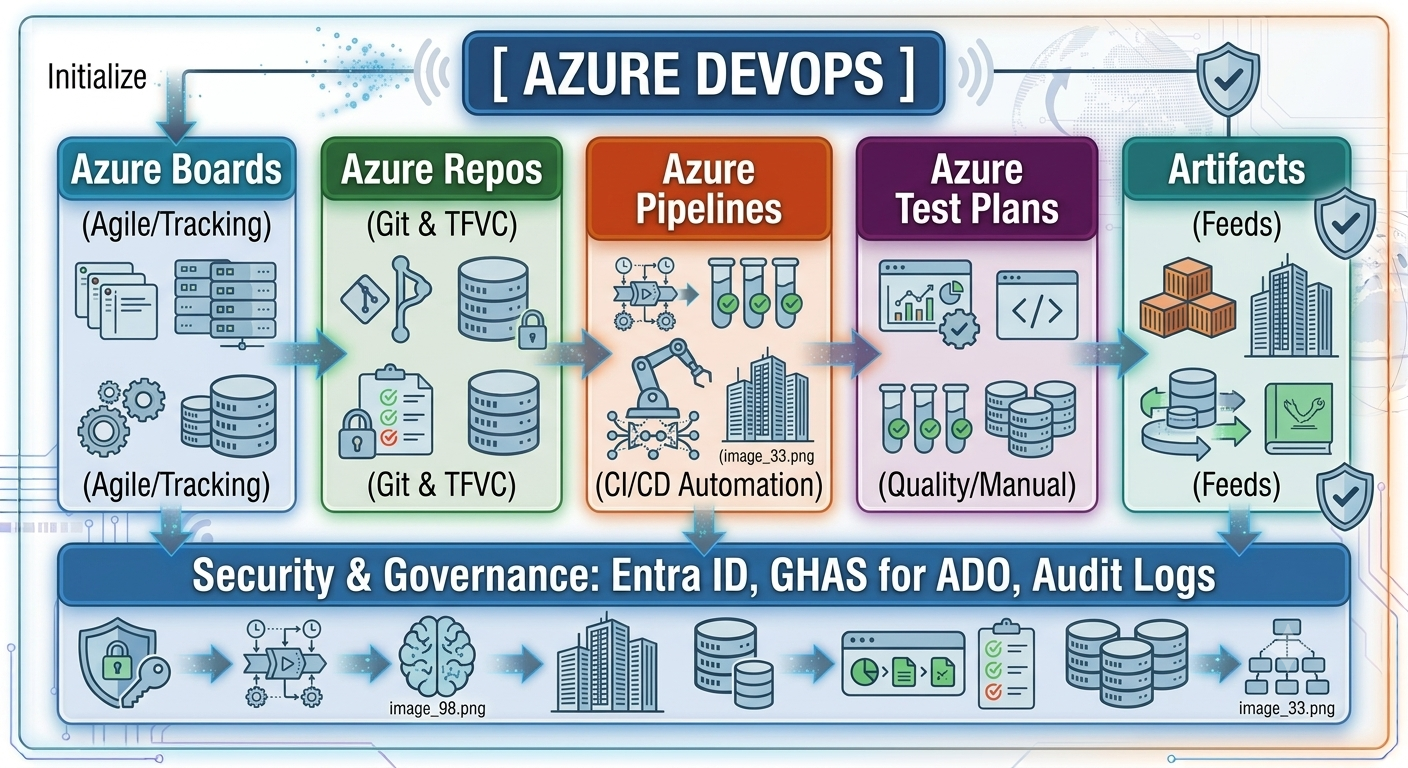
1. Azure Boards: Portfolio Management and Planning
Azure Boards offers work tracking capabilities for enterprise-level portfolios. Using a relational data model, Azure Boards enables hierarchical structuring of work items in the following way:
$$\text{Epic} \longrightarrow \text{Feature} \longrightarrow \text{User Story / Work Item} \longrightarrow \text{Task / Bug}$$
Custom Process Definition: The platform allows users to select from built-in process templates (Agile, Scrum, Basic, or CMMI), or define their own custom processes using Inherited Processes. Customizable elements include types of work items, addition of typed attributes, state machines and transition rules definitions, condition validation fields (for example, root cause analysis prior to resolving a bug), and state machine automation.
Cross-project Rollups and Delivery Plans: Program Management Offices (PMOs) can get cross-project rollups (velocity, burndowns, dependency timelines) from dozens of projects. Delivery Plans provide an interactive capability for cross-team dependency mapping, schedule conflict detection and critical path determination.
Analytics Service and WIQL: Besides built-in dashboards, Azure Boards provides access to the Analytics OData endpoint and Work Item Query Language (WIQL) allowing users to implement their own powerful queries or export operational metrics to Power BI.
2. Azure Repos: Source Code Management for Enterprise
Azure Repos allows for distributed Git and also legacy TFVC (Team Foundation Version Control) for centralized repositories. Main capabilities include:
Branch Policies Enforcement: Branch policies ensure code quality enforcement on important branches (such as main or release/*). This means that certain minimum requirements regarding number of code reviews, successful builds, security scanning and thread resolution have to be met prior to merge.
Forking and Upstream Sync: For large enterprises with separate business units working in silos, the forking approach allows contributing to common libraries while not providing write permissions to central repositories.
Commit-Requirement Traceability: With pull request based work item tracking it is possible to trace any change made to code in production back to the requirement document.
3. Azure Pipelines: Cross Platform Execution Engine.
Build, test and deploy to any OS (Linux, Windows, macOS) and any cloud service provider (Azure, AWS, GCP, on-premises) with Azure Pipelines. Concepts include:
Declarative multi-stage pipelines: Pipelines defined as YAML files under version control that define processes such as build, security scan, and release with stage-level gates, variable groups, and environment matrix.
Managed vs. Self-Hosted Pools: An organization can choose a combination of Microsoft-managed temporary agents with self-hosted agents (Virtual Machine Scale Sets, or Kubernetes-based KEDA auto-scale agents), working in separate networks.
Environments and Deployment Groups Target environments for the deployment process (Kubernetes namespaces, VM groups, Web Apps), secret keys retrieval, canary/blue-green deployments, approval process.
4. Azure Test Plans: Compliance-Driven Quality Assurance
Azure Test Plans helps in structured manual testing, exploratory testing, and automated testing to ensure that all requirements for compliance are met:
End-to-End Test Traceability: Creation of step-by-step test plans authored by testers and traced to User Stories and Acceptance Criteria.
Web & Desktop Exploratory Testing: The Azure Test & Feedback browser extension tracks user interaction, console logs, diagnostics and video recording, formatting issues into bug reports once an issue is detected.
Automated Framework Compatibility: Integrates native test adapters for Playwright, Selenium, JUnit, and PyTest frameworks to gather history, identify flaky tests and generate metrics for execution.
5. Azure Artifacts: Private Package Repository
Azure Artifacts works as the secure private package feed, blocking supply chain attacks on dependencies to keep software availability:
Compatibility: Hosts private package feeds for npm, NuGet, Maven, Gradle, PyPI and Universal Packages.
External Registry Proxying & Caching: Acts as a proxy server for external registries (npmjs.com, PyPI, etc.), caching any packages downloaded. Thus securing pipeline builds from failures due to external registry unavailability and package deletion.
Package Release Channels: Supports package release views with different channels for local (@local), prerelease (@prerelease), and release (@release).
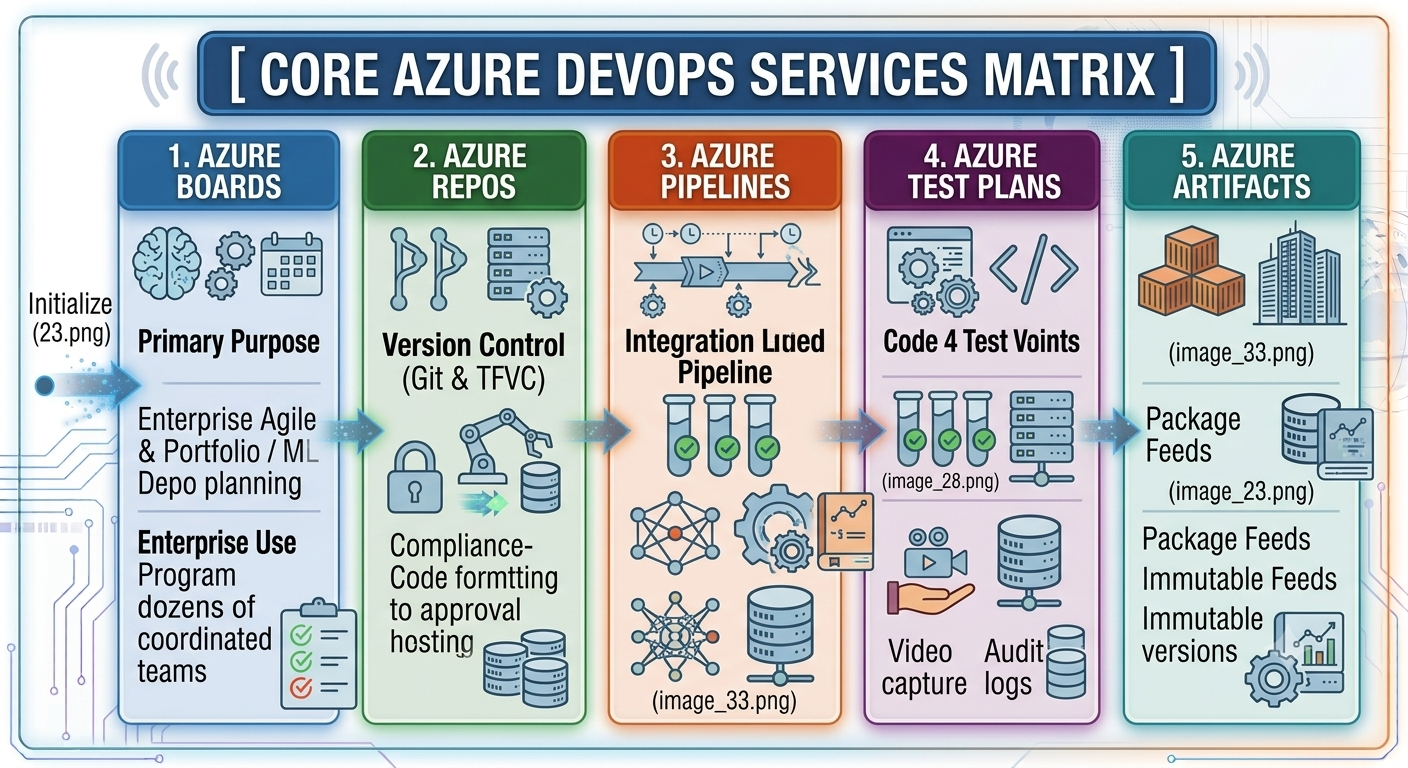
Declarative YAML Pipeline Engineering, IaC, and Deployment Strategy
Current continuous delivery processes depend upon the use of declarative, version-controlled YAML pipelines. The pipeline architecture splits the workflow process into three distinct layers of execution:
Stages: Main stages in the operation (Build, Security_Scan, Deploy_Staging, Deploy_Production). Stages operate either sequentially or in parallel depending on dependency tags.
Jobs: Jobs to be done by individual build agents. Jobs include sequential execution steps and can operate in parallel based on matrix approaches on different operating systems.
Steps: The actual commands that operate sequentially in jobs, using task-based definitions or shell scripts (bash, pwsh).
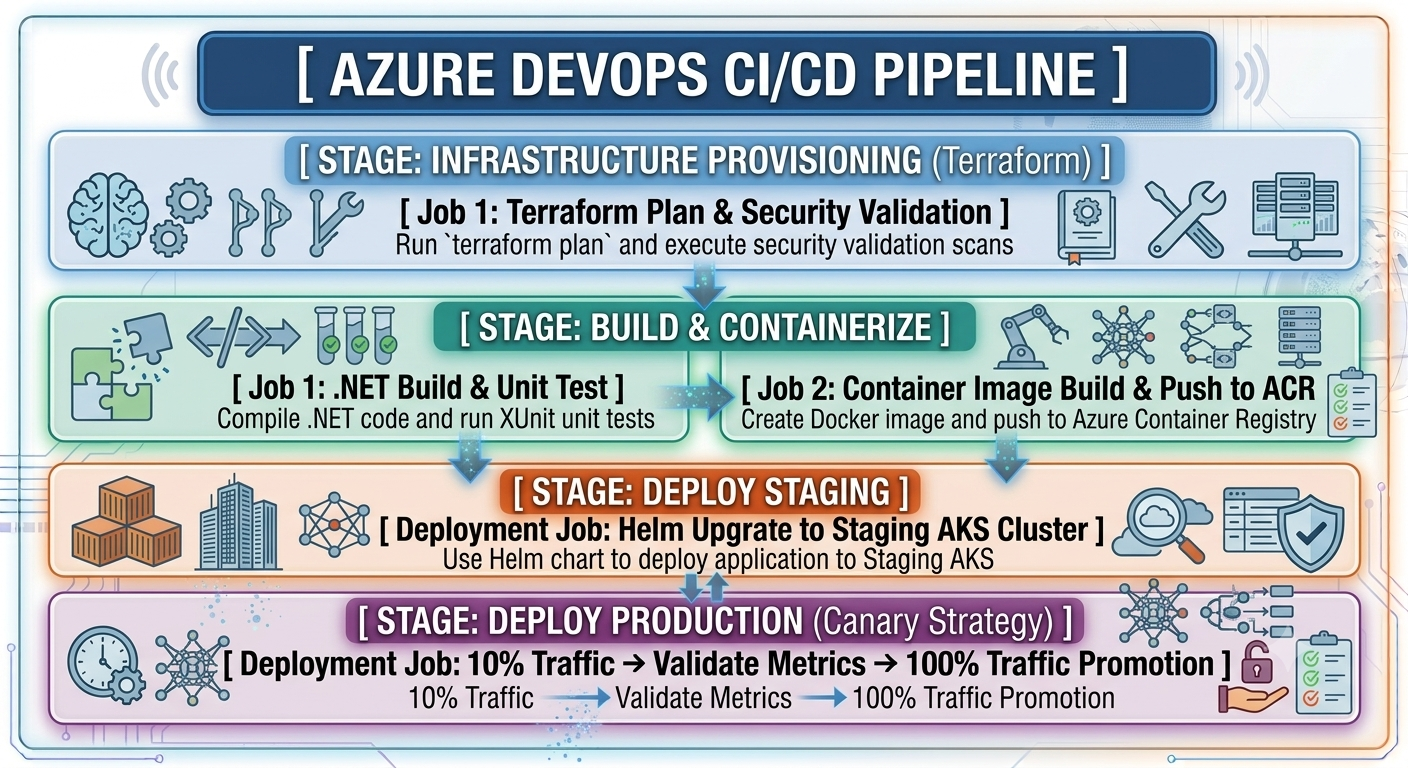
End-to-End Continuous Delivery YAML Pipeline
This pipeline is an example of an architecture of end-to-end continuous delivery. It involves the provisioning of infrastructure via Terraform, compilation of a .NET application, execution of unit tests, construction of a containerized image through OIDC, and a progressive deployment canary to AKS.
Azure DevOps Services vs. Azure DevOps Server
Decisions made between using cloud-based Azure DevOps Services or on-premise Azure DevOps Server affect operational costs, network considerations, and updates.
Microsoft uses a Modern Lifecycle Policy for Azure DevOps Server by which it replaces annual releases with servicing releases.
Zero-Trust Security, Identity Federation, and Governance
Securing DevOps pipelines needs a shift from static, long-lasting credentials to dynamic, zero-trust patterns.
1. Getting Rid of Static Secrets by Means of Workload Identity Federation (OIDC)
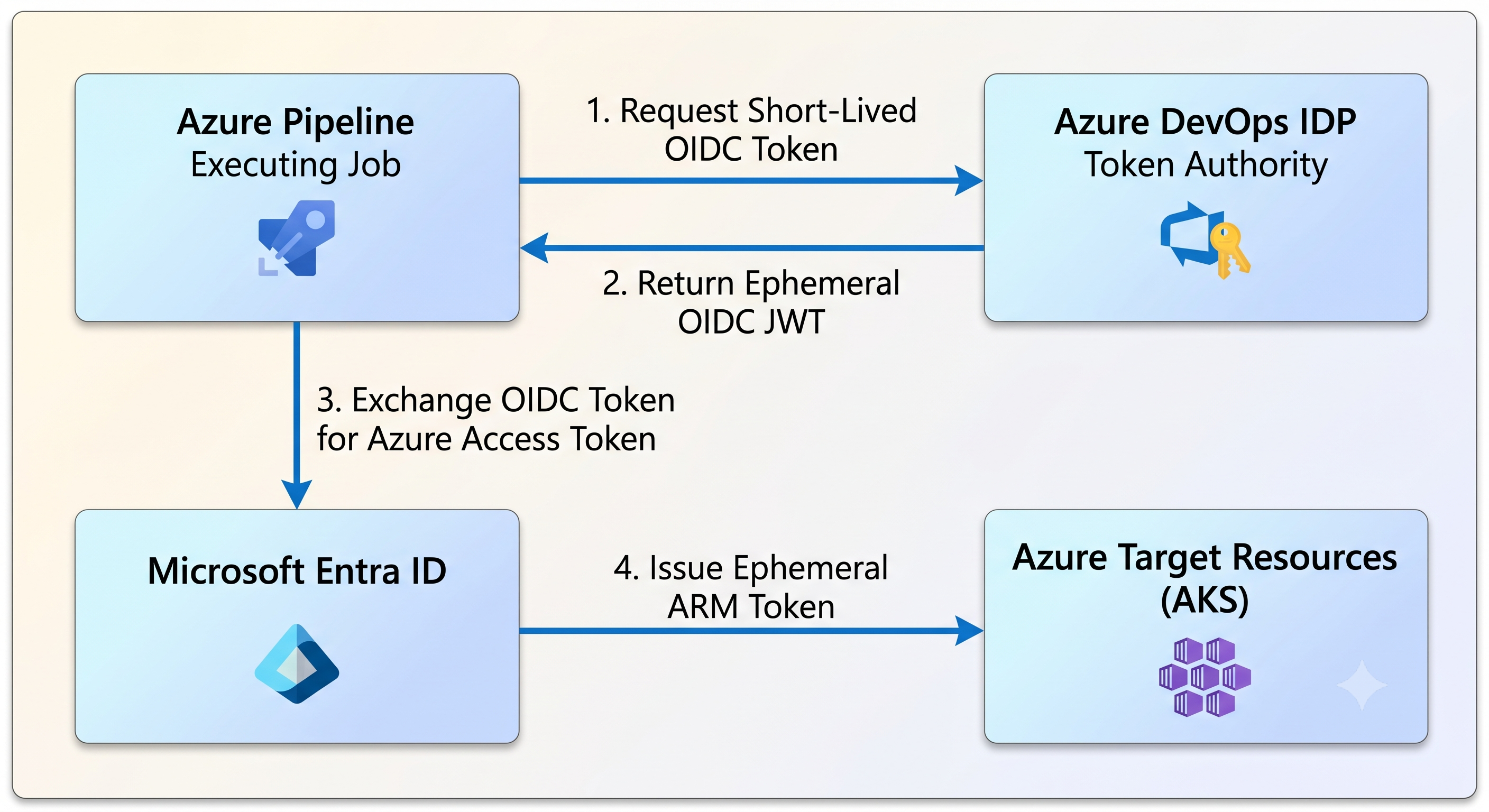
The practice of storing static Service Principal secrets or PATs within pipeline variable groups poses potential threats to security. The use of Workload Identity Federation via OpenID Connect (OIDC) allows issuing temporary credentials for pipelines to run:
When a pipeline job gets triggered, Azure DevOps generates a temporary OIDC JSON Web Token (JWT) that contains information on build execution.
Pipeline then forwards the JWT to Microsoft Entra ID.
Entra ID authenticates the issuer of the token as well as its claims using predefined Federated Credential mapping.
After validation, Entra ID issues a short-lived Azure Resource Manager access token for the specific pipeline task.
2. GitHub Advanced Security for Azure DevOps (GHAS for ADO)
GitHub Advanced Security is a native application security tool that works with Azure Repos and Azure Pipelines:
Push Protection and Secret Scanning: Prevents pushes to repositories with commits containing known credential patterns, API keys or certificates.
CodeQL Static Analysis (SAST): Analyzing source code at compile time to identify untrusted user input vulnerabilities, such as SQL injections, cross site scripting (XSS) and buffer overflows.
Dependency Scanning: Identifies and tracks third party library dependencies with known vulnerabilities (CVE) and provides guidance on remediation steps.
3. Auditing through Log Analytics (KQL)
Audit events in Azure DevOps are sent in real time to the Azure Log Analytics workspace. Engineers are able to track critical events such as changes in pipeline authorization policies, override of project policies or creation of Personal Access Tokens (PATs) using Kusto Query Language (KQL):

Security Controls of Azure DevOps Security Control Framework
Authentication In the first layer of security perimeter, Authentication control is managed using Microsoft Entra ID with Conditional Access policies that secure access to the platform through multi-factor authentication (MFA), device health/compliance checks, and stringent geographic/IP locations before users can be allowed into the system.
Authorization Identity and access management in the pipeline are managed through Workload Identity Federation using OpenID Connect (OIDC). This is done through token exchanges between Azure DevOps and targeted environments, thus completely getting rid of storing static secrets or credentials in pipeline variable groups.
Code Inspection For inspection of the codebase before being pushed into production, Code Inspection is provided by GHAS for ADO that uses Secret Scanning and CodeQL Static Application Security Testing (SAST) to actively scan repositories in order to prevent secret exposure in commits and vulnerabilities in the code before pull requests are merged.
Security for Supply Chain Guard Software Supply chain security is guaranteed through Azure Artifacts Upstream Sources and Immutable Views combination. In this case, external package dependencies are proxied and cached locally, securing the supply chain from any dependency confusion attacks, build resilience to upstream registry outages, and package integrity.
Runtime Audit Runtime and continuous monitoring and operations are handled through Diagnostic Audit Streaming into Azure Sentinel. This solution ensures the continuous flow of administrative and pipeline logs in real time into an enterprise SIEM for monitoring and threat detection for all Azure DevOps activities.
REST API Automation Engine & Enterprise Programmatic Management
All the administration capabilities that exist in the Azure DevOps portal UI can be executed programmatically using the REST APIs. In such a way, platform teams can automate organizational management, pipelines configurations, policies, and reporting.
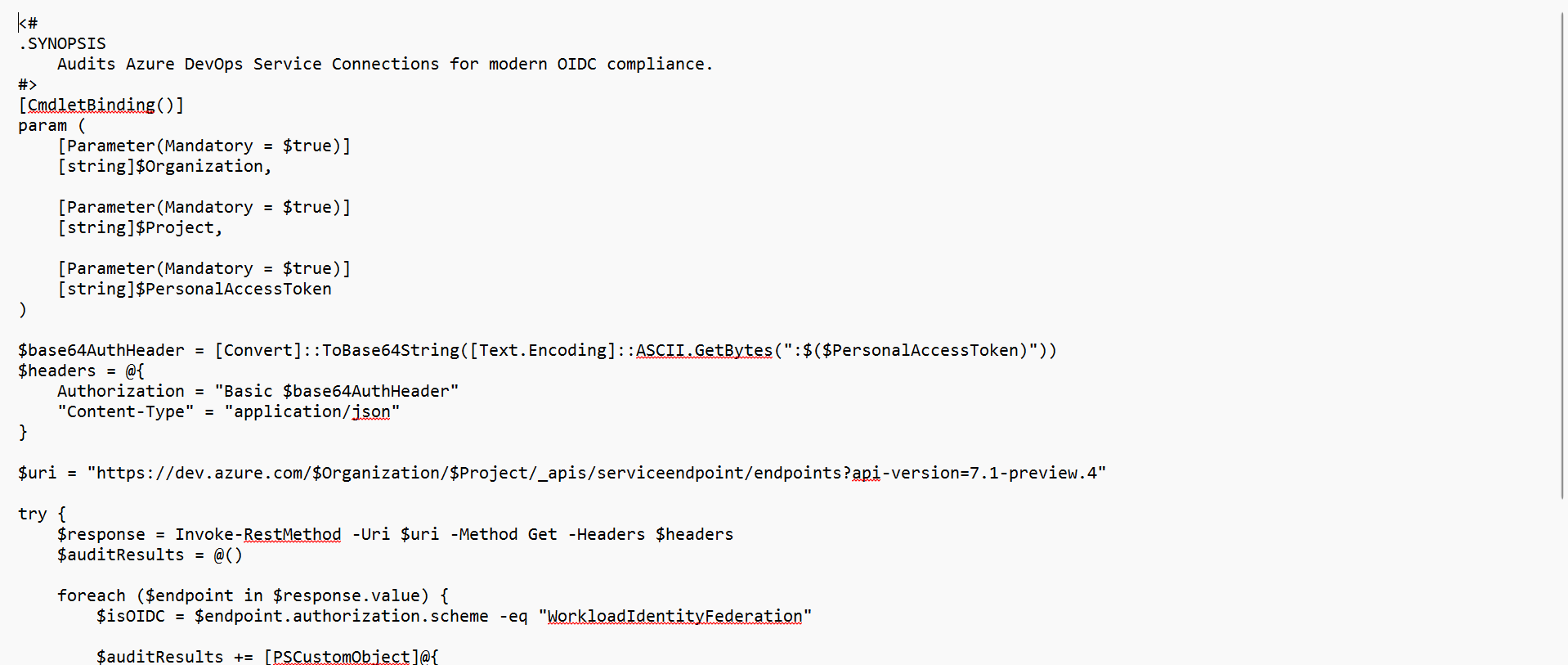
1. PowerShell: Service Connection Audit Automation
The following PowerShell script queries all defined Service Connections in the enterprise project and shows which of them are not secured by using static credentials and not using Workload Identity OIDC based connections:
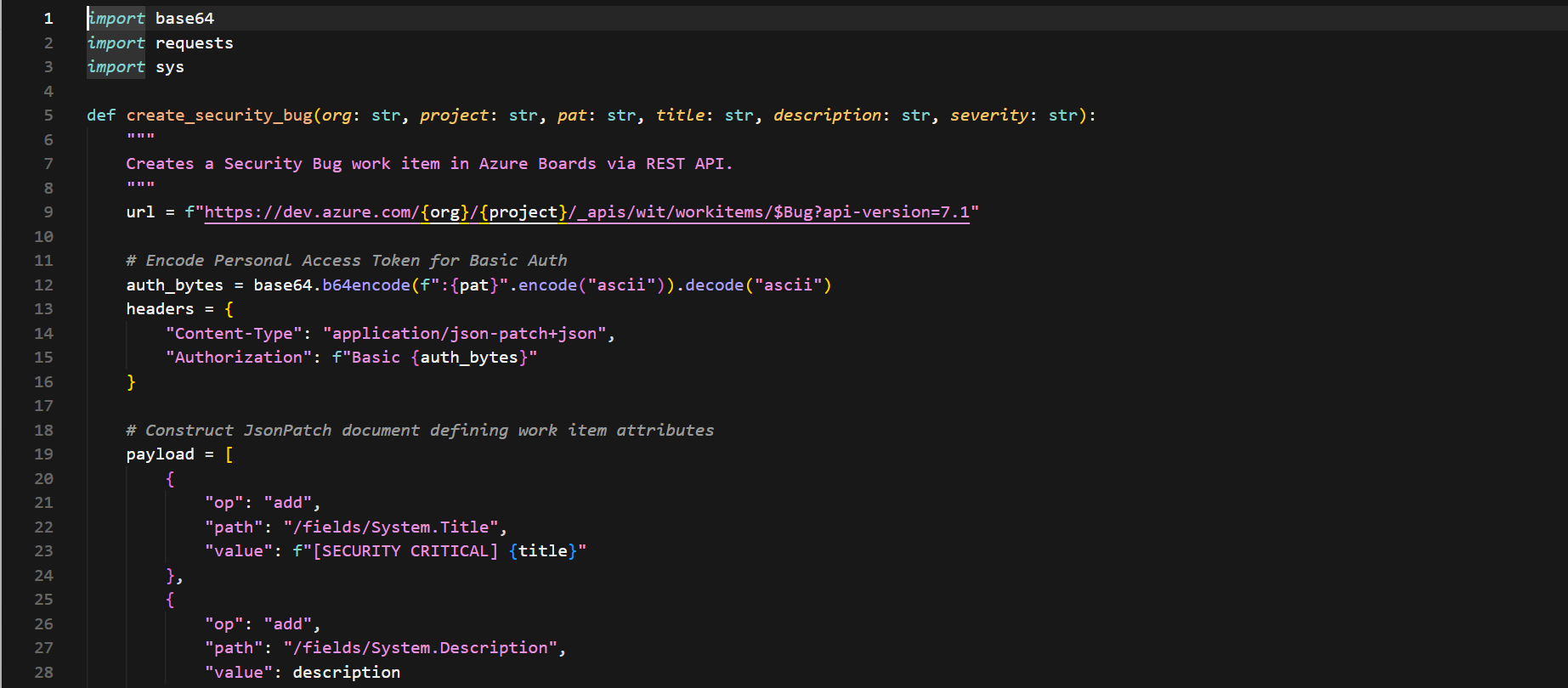
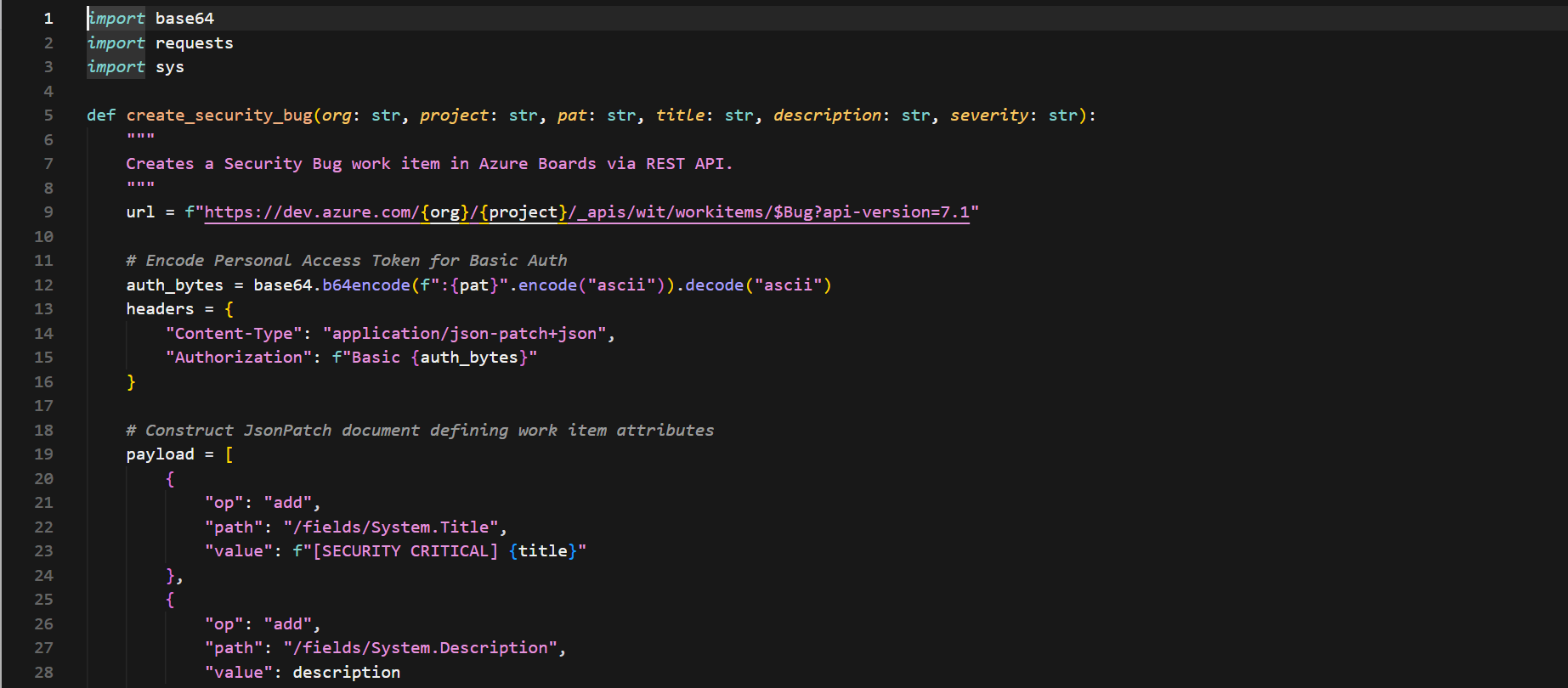
2. Python: Automating Creation of Work Items for Security Bugs
The following python program utilizes the REST API to automate the creation of linked bugs in Azure Boards when security scanning tools find any compliance problems:
Migration Mechanism, GitHub Hybrid Integration, and Organizational Strategies
Many large engineering organizations may require migrating from existing workloads within Azure DevOps to new platforms such as GitHub Enterprise.
1. Enterprise Organization Migration Methodology: Cloud from On-Premises
For migration from on-premises Azure DevOps Server to Azure DevOps Services, there are some mechanisms to follow:
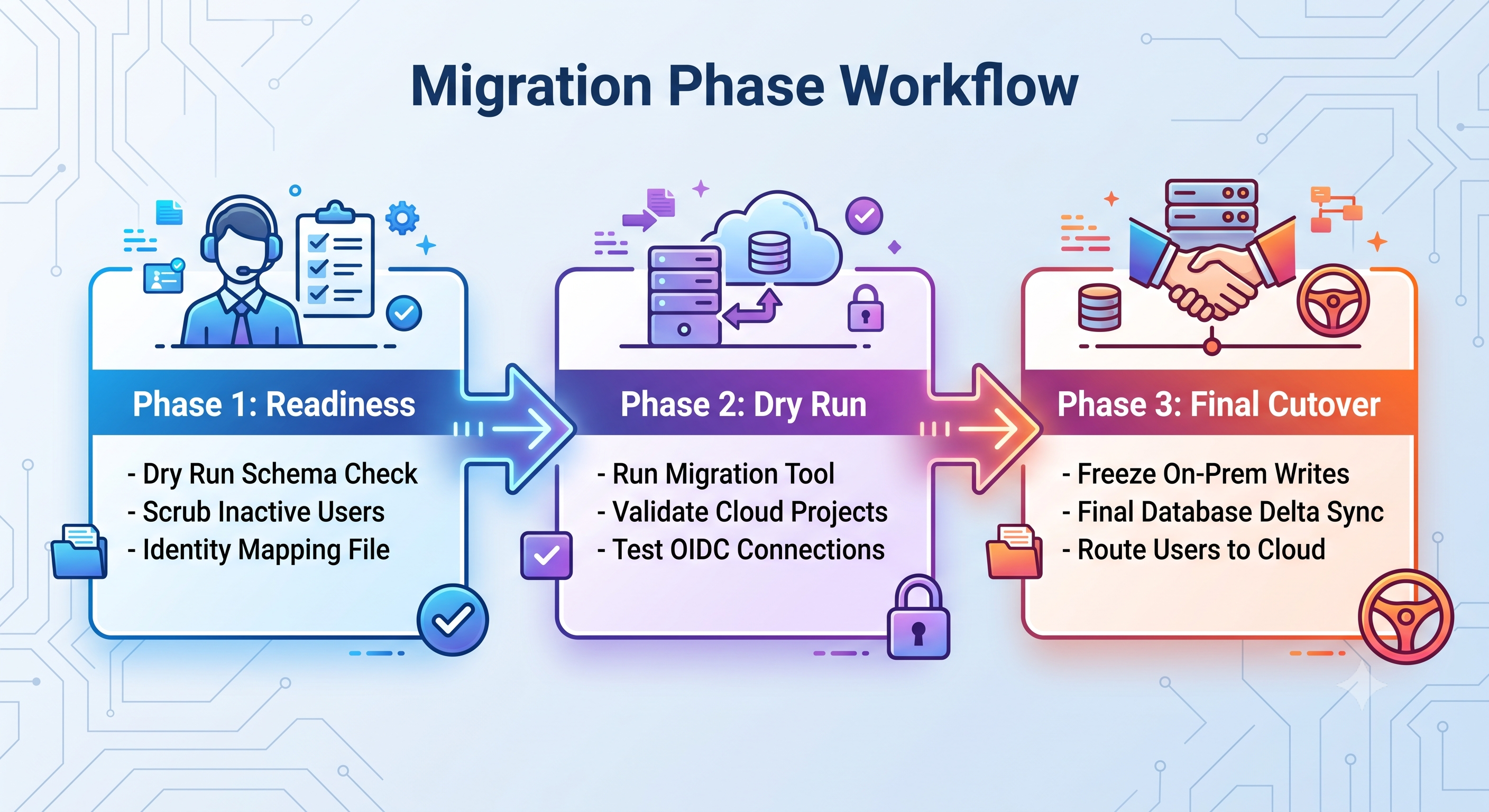
Step There are some mechanisms to follow for migration from on-premises Azure DevOps Server to Azure DevOps Services:
Step 1: Schema Cleaning & Schema Compatibility Run the Azure DevOps migration tool validation engine against the on-prem SQL database to surface any process template customization or unsupported extension schema issues.
Step 2: Identity Matching: Use custom Active Directory identity mapping to map local Active Directory domain users (DOMAIN\jdoe) to Microsoft Entra User Principal Names (jdoe@company.
Step 3: Dry Run Migration: Import database snapshots to individual cloud sandbox environments. This ensures the integrity of the data in the work items history, repositories branch, attachments, and assignments prior to migration.
Step 4: Cutover Process: Make the on-premise collection read-only, take the last database snapshot, run the cloud import process, and move developers to new cloud organization URLs.
2. Dual platform strategy: Azure DevOps and GitHub Enterprise
Microsoft isn’t dropping support for either Azure DevOps or GitHub Enterprise. Rather than making the move immediately, most companies take a dual platform approach to gain the benefits of both.
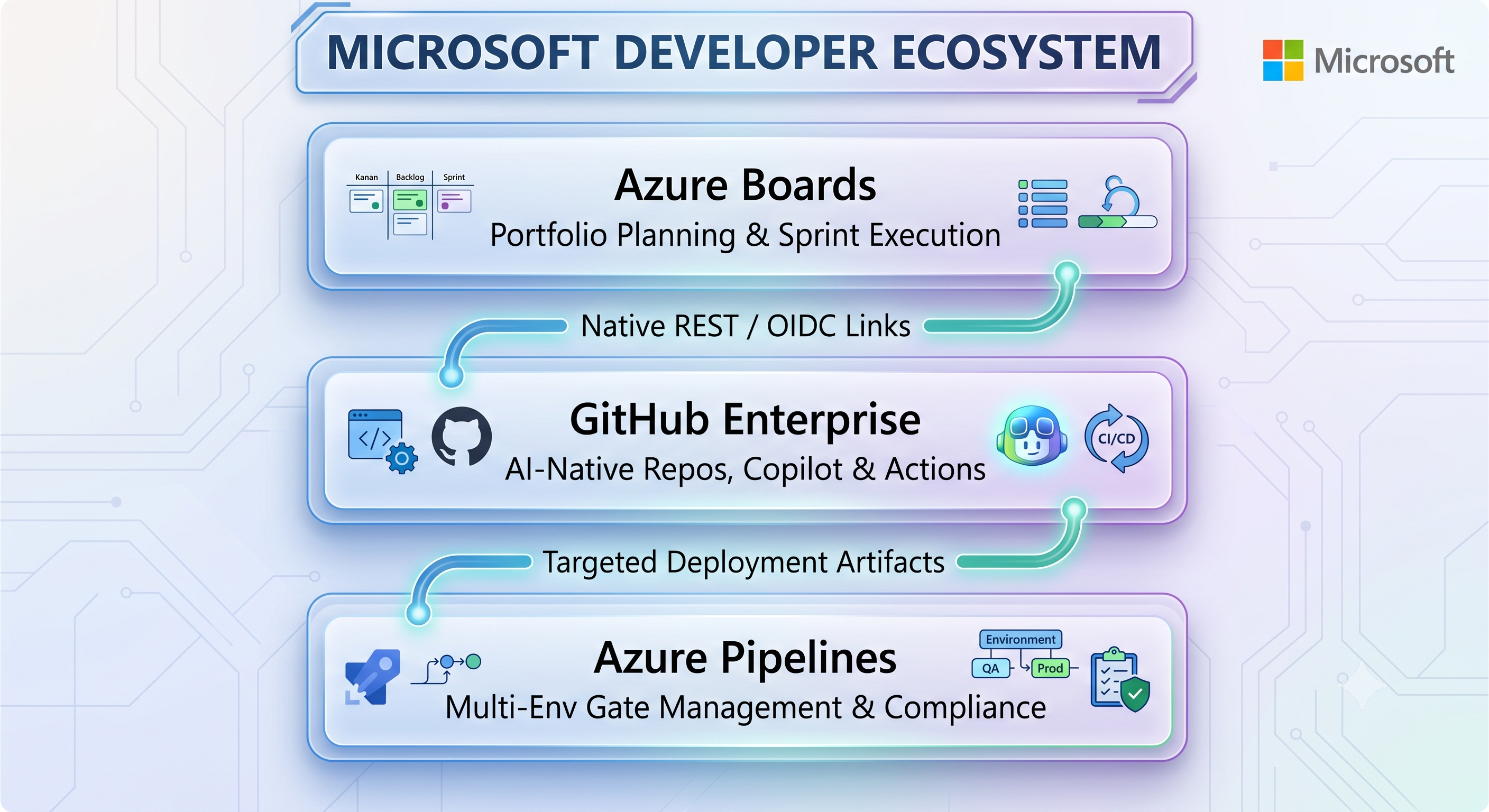
Azure Boards for Portfolio Management: PMOs and product owners are using Azure Boards for backlog management, process templates, delivery and customized roll-ups at an organization level.
GitHub for Development & AI: Coders write their code in GitHub repositories to leverage AI-enabled services like GitHub Copilot, GitHub Actions, and GitHub Community integrations.
Azure Pipelines for Complicated Deployments: The build artifact will kick off multi-stage Azure Pipelines where the pipeline is set up with approval gates, release management, and hybrid network connections.
Capability & Alignment Model: Azure DevOps vs. GitHub Enterprise
Work Tracking
When looking at the ability to manage projects, Azure DevOps provides an advanced portfolio roll-up and process configuration capabilities by CMMI, Scrum, and Agile workflow methodologies while GitHub Enterprise has a strong focus on issue-based work tracking within GitHub Projects. Hybrid approach would be based on usage of Azure Boards for enterprise portfolio planning and cross-team program planning while keeping the developer workflows aligned.
Developer Experience & AI
When it comes to developer productivity and AI capabilities, Azure DevOps provides advanced capabilities for traditional IDE such as Visual Studio and VS Code while GitHub Enterprise is a leader when it comes to AI-native development where native Copilot agents and Copilot Workspace are available. Operational approach would consist of usage of GitHub for developer repositories and AI toolchains.
Automation for CI/CD
For CI/CD practices, Azure DevOps is good at YAML-based release pipelines with sophisticated environment management, whereas GitHub Enterprise offers event-driven automation with GitHub Actions and reusable workflows. The proposed solution is to use GitHub Actions for application CI and Azure Pipelines for complex release CD. Actions can be used for fast developer feedback whereas Pipelines will work great for multi-cloud deployments with strict environment gates.
Step Quality & Compliance
Azure Test Plans in Azure DevOps offers explicit and sequential tracking of manual and automated tests for compliance when it comes to quality assurance and compliance. On the other hand, GitHub Enterprise uses Actions-based execution along with third-party extensions. For compliance purposes, it would be best to go with Azure Test Plans for compliance sign-offs, making sure that every test run will trace back to the business requirement.
Modernization Roadmap
To increase operational efficiency, security, and speed up deliveries, enterprise platform teams need to adhere to the following phases of the modernization roadmap:
Phase 1: Identity and Access Standardization
Move to Microsoft Entra ID and introduce the Conditional Access Policies (CAP) with Continuous Access Evaluation (CAE).
Replace static secrets and Personal Access Tokens (PATs) in your pipelines with Workload Identity Federation (OIDC) service connections.
Upskill the platform engineers with the best azure devops online training so that they can maintain standards of compliance, identify management, and pipeline security at all levels.
Phase 2: Pipeline Standardization and Infrastructure Control
Migrate all legacy Classic UI pipelines to version-controlled multi-stage pipelines with YAML configuration.
Establish centralized YAML template repositories for all teams to provision the infrastructure (Terraform/Bicep), do security scans, and deploy containers.
Establish self-scaling build infrastructure (Managed DevOps Pools, AKS KEDA container agents) to reduce the build time and make platform usage cost-efficient.
Phase 3: Guardrails & Compliance Automation
For migration from on-premises Azure DevOps Server to Azure DevOps Services, there are some mechanisms to follow:
Step Enable GHAS for Azure DevOps for all critical codebases to enable Push Protection, Secret Scanning and CodeQL SAST analysis.
REST API scripts to send to Azure Boards and log to Azure Log Analytics for automating vulnerability creation.
Conclusion: Future-proofing and strategic architectural synthesis
In enterprise software delivery, it’s a balancing act between speed, developer freedom, and governance. All of the above makes Azure DevOps a proven, highly flexible platform, and it can help deliver enterprise software at scale. Sustainable delivery frameworks will be achieved by adopting modern practices such as not using legacy practices like hard-coded pipeline credentials, compliance sign-off processes and hard projects.
In order to ensure future resilience and realize maximum value of engineering investment, enterprise executives should consider four major strategic areas:
Zero-Trust Identity Integration: The abandonment of PATs and Service Principal secrets in favor of OIDC and Microsoft Entra ID Conditional Access Workload Identity Federation is absolute. The result is a much smaller attack surface and a streamlined process of credential management in hybrid clouds.
Infrastructure and Pipeline Modernization: Migration to modular versioned multi-stage YAML pipelines and auto-scalable build infrastructure such as KEDA-based container agents or Managed DevOps Pools guarantees consistent security validation and cost-effective compute infrastructure.
Shift Left Compliance: Adoption of GHAS for ADO and automating audit logs into Azure Sentinel ensures that developers are alerted about vulnerabilities, leakage, and compliance gaps present in their code before the code goes to production.
Step Better Together in the Same Ecosystem: A hybrid structure that integrates Azure DevOps and provides superior portfolio management with Azure Boards, complex release processes, and compliance with Azure Test Plans, accompanied with GitHub Enterprise for AI driven workflows and GitHub Copilot helps in modernizing the developer experience.
Ultimately, Azure DevOps is not just a set of disjointed tools but the very foundation of continuous delivery. By adopting the architectural designs, security approaches, and automation strategies covered in this article, you will be able to build software that is not only secure and compliant but also capable of adapting to emerging cloud-native technology. In order to boost your team’s learning process and learn everything hands on, check out our best Azure DevOps online training.