
Mastering Enterprise Control: Complete ServiceNow Admin Course Roadmap
Last updated on Aug 26, 2026
Enterprise IT architecture rarely breaks down from a lack of software capability. Instead, it fails from weak governance, uncontrolled data models, and unmanaged customization. When thousands of employees log support requests, provision infrastructure, and escalate critical outages simultaneously, the platform must process those actions cleanly while maintaining strict data isolation and rapid query performance.
System administration is a structural governance role, not a simple help-desk function. True platform mastery requires far more than navigating a web-based user interface. It demands a deep understanding of relational database inheritance, multi-layered security models, asynchronous process execution, and strict cross-instance deployment lifecycles.
Understanding Core Data Schema & Table Inheritance
At its foundational layer, the platform functions as a relational database wrapped in an abstracted web layer. Every ticket, configuration item, user profile, and workflow log lives inside a discrete table. System efficiency depends directly on how cleanly these tables relate to one another and how effectively they leverage database inheritance.
Base Tables vs. Extended Tables
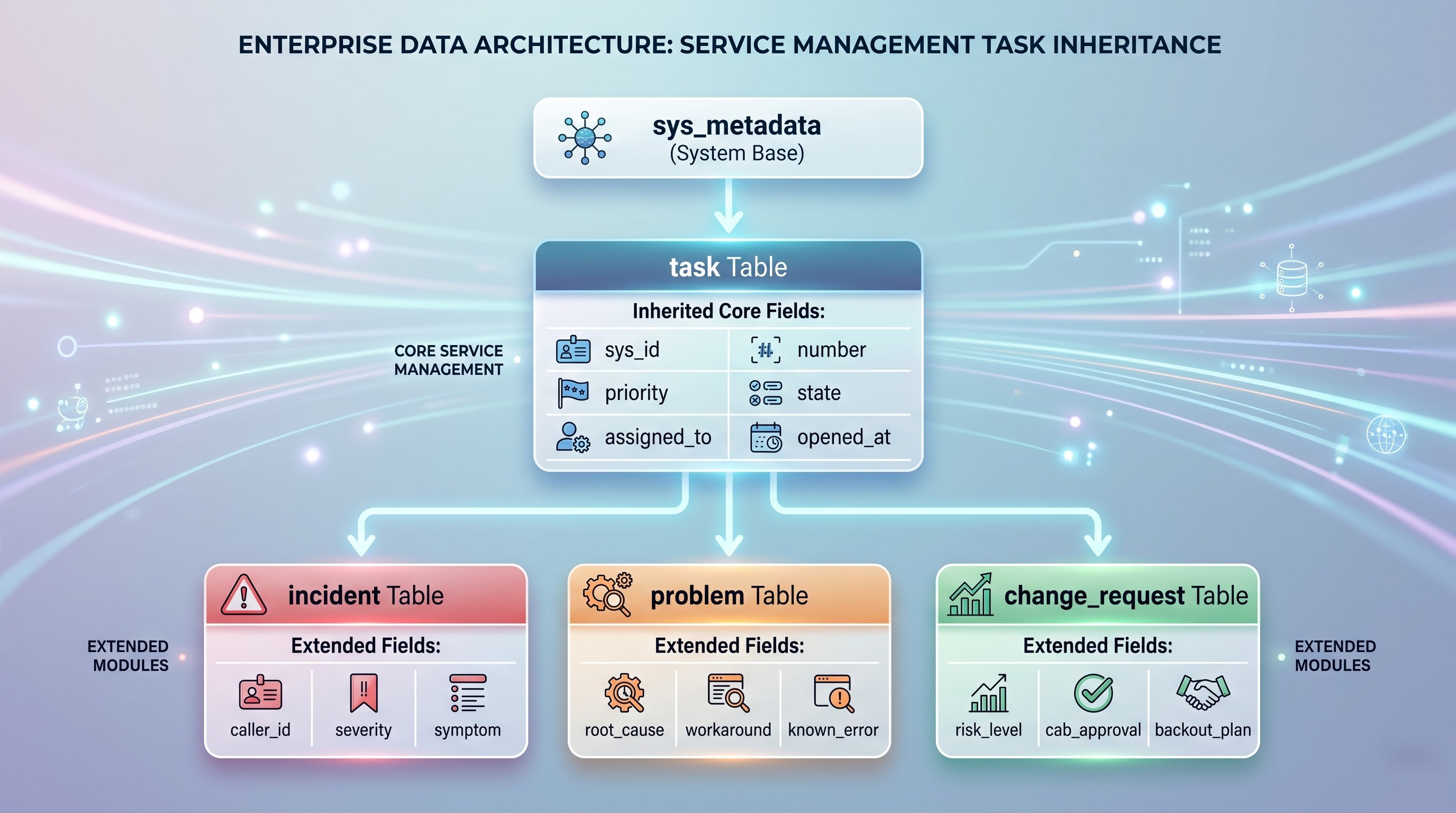
The platform uses a parent-child schema model. The Task (task) table acts as the primary parent table for operational record processing. Base fields defined at the Task level automatically propagate down to extended child tables like Incident (incident), Problem (problem), and Change Request (change_request). When extending a table, the child inherits all structural attributes, indexes, and existing fields from its parent. Administrators can then add specialized fields unique to that business process without re-creating universal tracking attributes like assignment groups or SLA states.
Schema Relationships and Field Mechanics
Data integrity across tables relies on three core field types:
Reference Fields: Store the 32-character global unique identifier (sys_id) of a record on a target table, creating direct foreign-key relationships (e.g., linking an Incident to a record on the sys_user table).
Document ID Fields: Allow a single field to reference records on any table dynamically, decoupling the schema from a single fixed relationship.
Choice Fields: Map readable strings to numeric database values, holding consistent options (e.g., States: 1=New, 2=In Progress, 3=On Hold) while keeping database footprints minimal.
Enrolling in a structured servicenow admin course gives you hands-on experience designing normalized schemas, ensuring tables scale smoothly even when processing millions of transactional records.
Enterprise Access Control & Multi-Layered Security Logic
Securing enterprise data requires isolating access based on identity, job function, and dynamic record context. The security layer evaluates access sequentially, stopping unauthorized requests long before they hit the database layer.
Identity Architecture: Users, Groups, and Roles
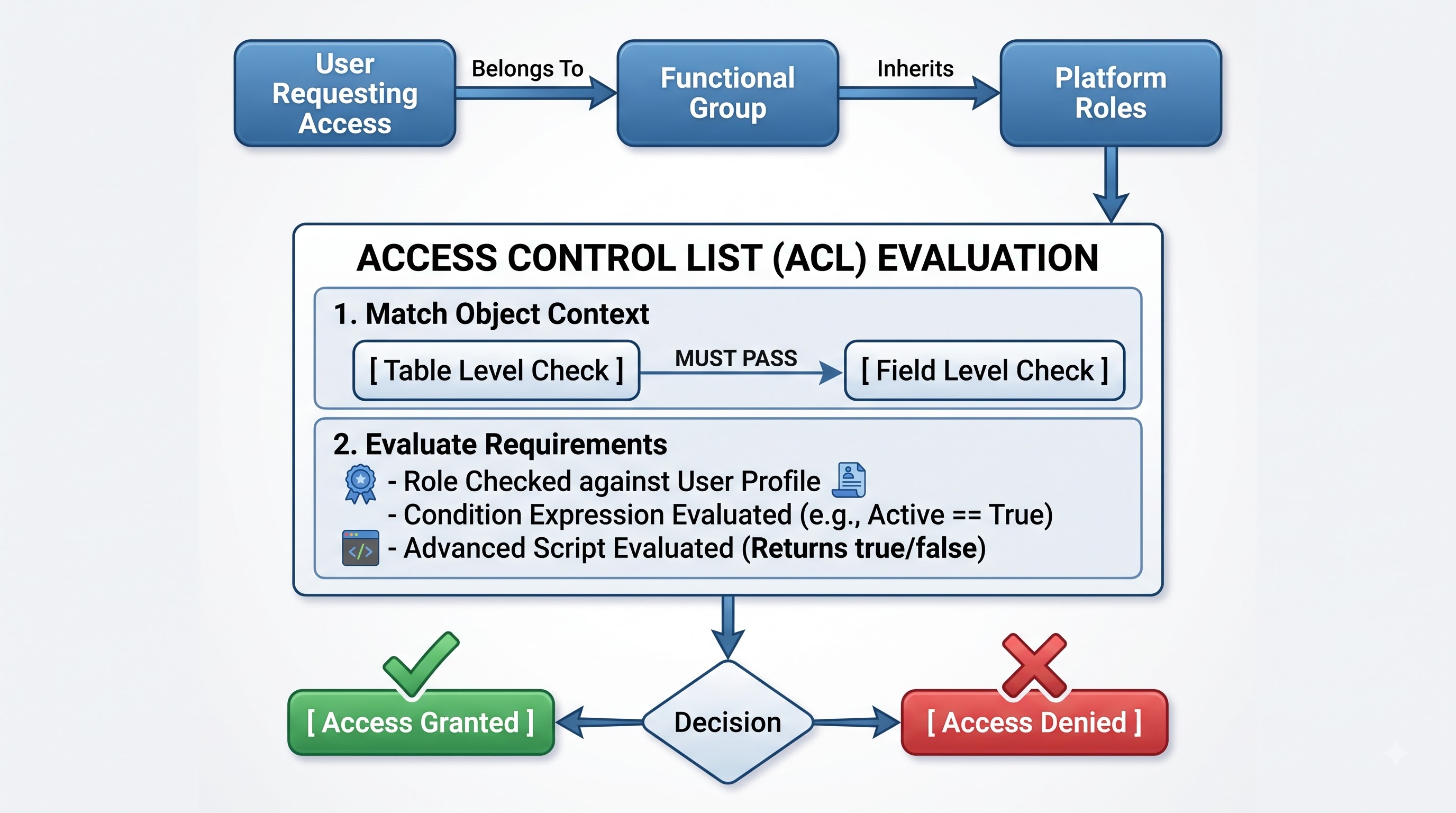
Best practices strictly prohibit assigning permissions directly to individual user accounts. Instead, access control uses a clear structural pattern:
Users (sys_user) are assigned as members of one or more Groups (sys_user_group).
Roles (sys_user_role) are granted directly to those Groups.
ACLs evaluate whether the executing session holds the necessary Role inherited from group membership.
This setup prevents operational drag during employee onboarding, role changes, or offboarding. Updating group membership automatically updates all underlying permissions.
Access Control List (ACL) Execution Rules
ACLs act as the platform's security boundary. Every ACL rule defines an Operation (read, write, create, delete), an Object (the target table or field), and the Execution Criteria. When a user tries to view or update a record, the engine evaluates access in a mandatory order:
Table-Level ACL: Evaluates if the user has access to the container table. If this fails, the entire record request is rejected instantly.
Field-Level ACL: If the table check passes, field-specific rules evaluate. If a field check fails, that specific field is hidden or locked while the rest of the form remains accessible.
If any single evaluation returns false, access is blocked, shielding sensitive data right at the API and database boundary. Completing the servicenow administrator certification validates your ability to design robust access models, protecting enterprise data without impeding daily user workflows.
Automation Engines: Browser Execution vs. Database Processing
Automating business logic requires knowing where and when to run your code. Running heavy scripts inside the user's browser slows down the user interface, while firing unoptimized server scripts can stall background database queues.
Client-Side Logic: UI Policies and Client Scripts
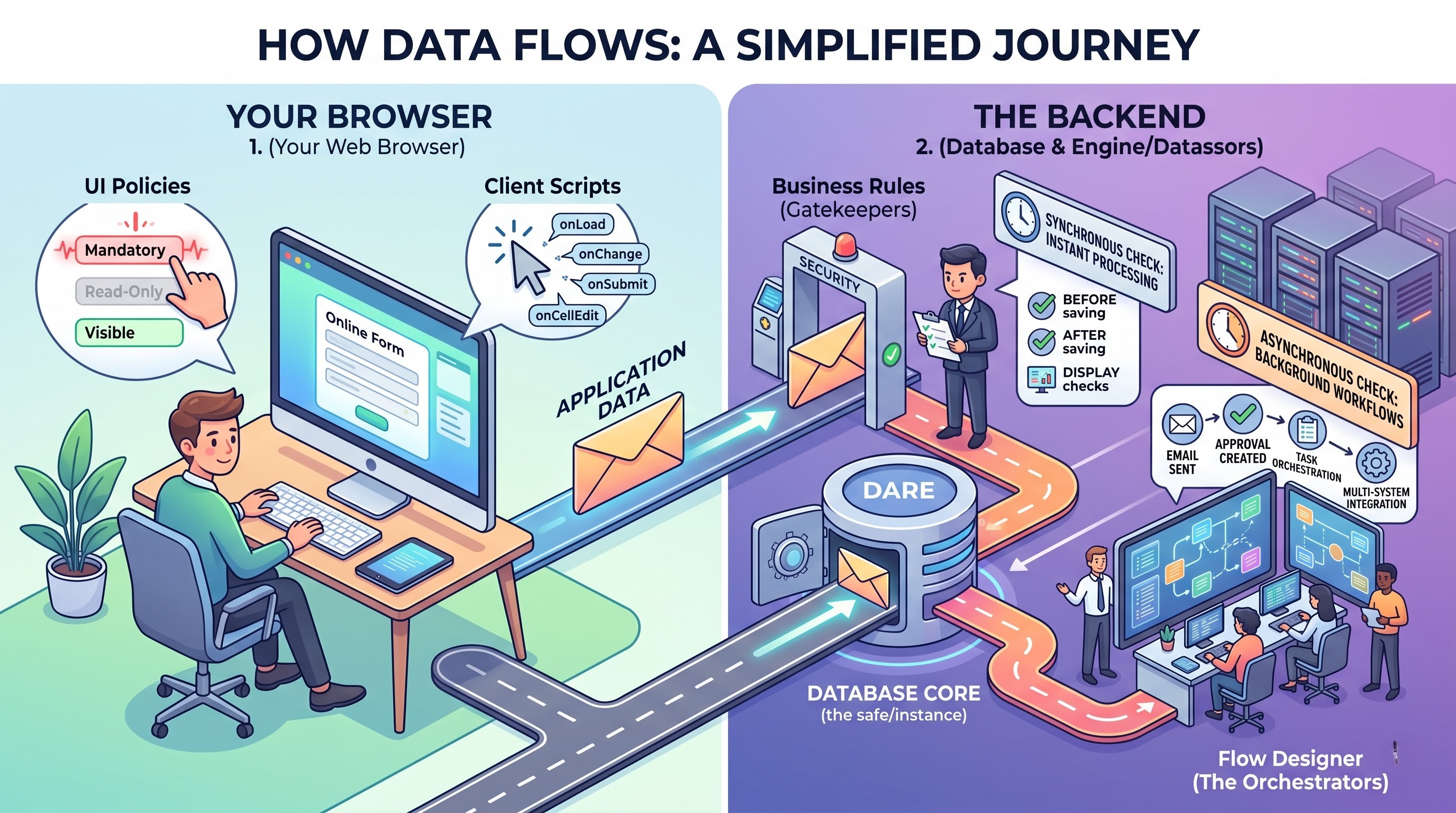
Client-side scripts run directly within the end-user's web browser. Their main job is improving the user experience by giving immediate feedback without waiting on server responses.
UI Policies: Declarative, low-code rules that dynamically change field properties. They enforce three basic attributes based on form conditions:
Mandatory: Requires data entry before submission.
Read-Only: Prevents users from modifying existing data.
Visible: Hides or reveals fields dynamically based on user inputs.
Client Scripts: JavaScript handlers that run during explicit browser events: onLoad() (when the form opens), onChange() (when a specific field updates), onSubmit() (when the user saves), and onCellEdit() (when editing directly from a list view).Server-Side Logic: Business Rules
Business Rules execute on the server before or after database writes. Unlike client scripts, they run regardless of how data enters the system—whether through form submissions, REST API integrations, or background imports.Process Orchestration: Flow Designer
For end-to-end process automation across multiple systems, administrators use Flow Designer. This visual, asynchronous engine decouples business logic from low-level background scripts.
Triggers: Events that start the process (e.g., record updates, scheduled timers, REST webhooks).
Actions: Reusable operational units (e.g., requesting approval, sending outbound REST calls, creating catalog tasks).
Data Pills: Dynamic variables passed sequentially between flow steps, maintaining state throughout complex multi-day approval paths.
Application Governance, Update Sets, and Migration Pipelines
System stability requires strict development controls. Administrators never build, edit, or test configurations in a live Production environment. All platform changes follow a controlled multi-instance migration lifecycle.
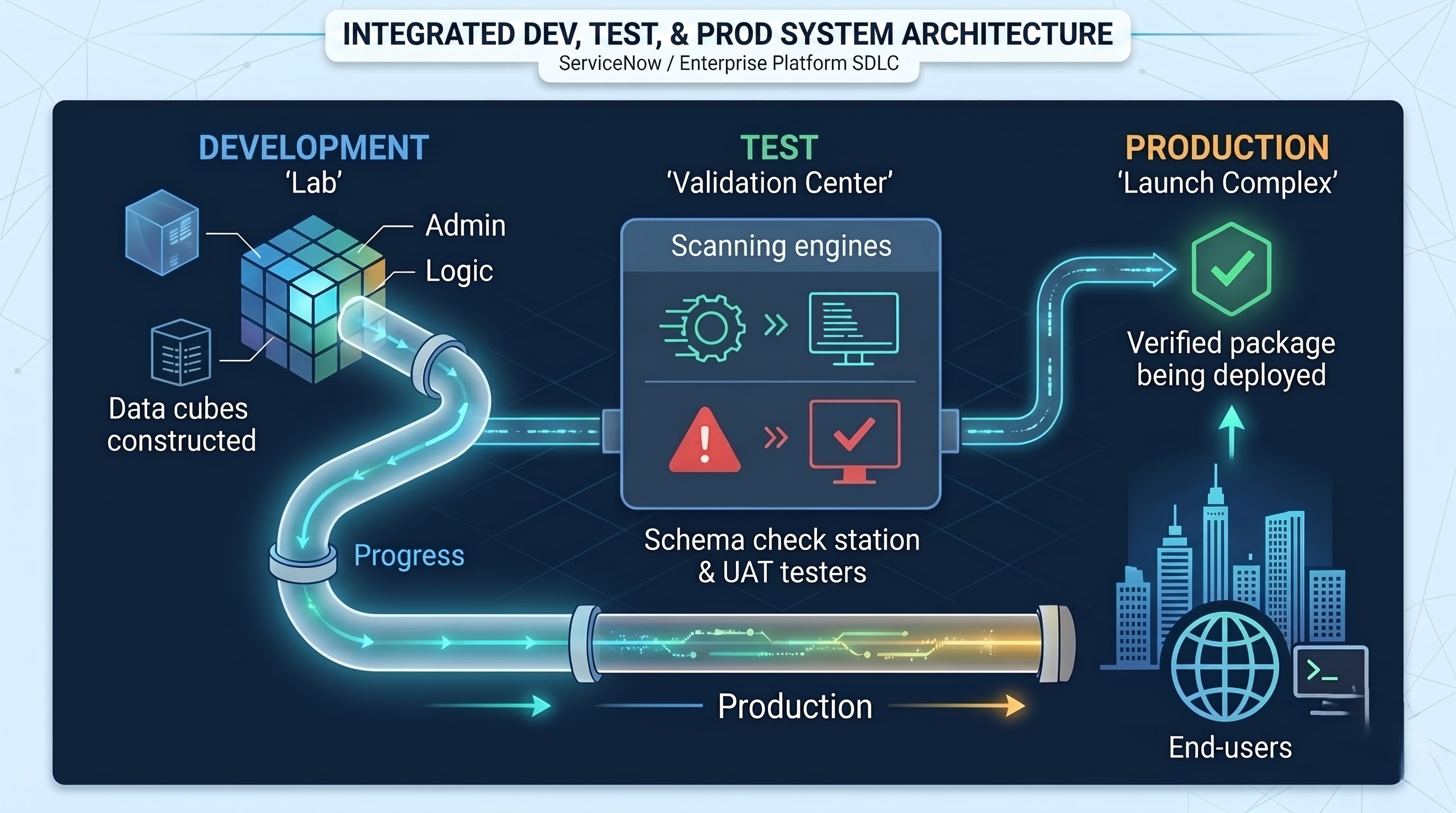
Scope: What Update Sets Track (and What They Ignore)
An Update Set is a container record (sys_update_set) that tracks platform configuration changes so administrators can safely move customizations between instances. Understanding what the engine tracks automatically—versus what it skips—is critical for avoiding broken deployments across development, testing, and production environments.
The platform automatically captures configuration data that defines system behavior and structure. This includes server and client-side logic like Business Rules, UI Policies, and Client Scripts, alongside structural database modifications such as Form Layouts, Field Additions, and Schema Edits. Process automation components—including Flow Designer Flows and Action Definitions—are also tracked automatically, as are visual and system configurations like Report Definitions and System Properties.
Conversely, the engine intentionally ignores operational and transactional data, which must be moved via XML exports or data migration tools if needed in target instances. The engine does not capture individual transactional records such as Incidents, Problems, or Change Requests. Platform foundation data—including User Accounts (sys_user), Group Assignments, and Configuration Items (CMDB Records)—is similarly excluded. Finally, runtime system state information, such as Scheduled Job Execution Logs and platform Audit Data, is never captured in an Update Set, ensuring production analytics and histories remain untainted during deployment.
Conflict Resolution and Preview Processing
When an Update Set is moved into a target environment, the system runs a mandatory Preview Action before committing changes to the database. The preview engine checks the incoming update payload against the target instance's local change history (sys_update_xml). If it finds that a target script or layout was modified locally, it flags an Update Collision.
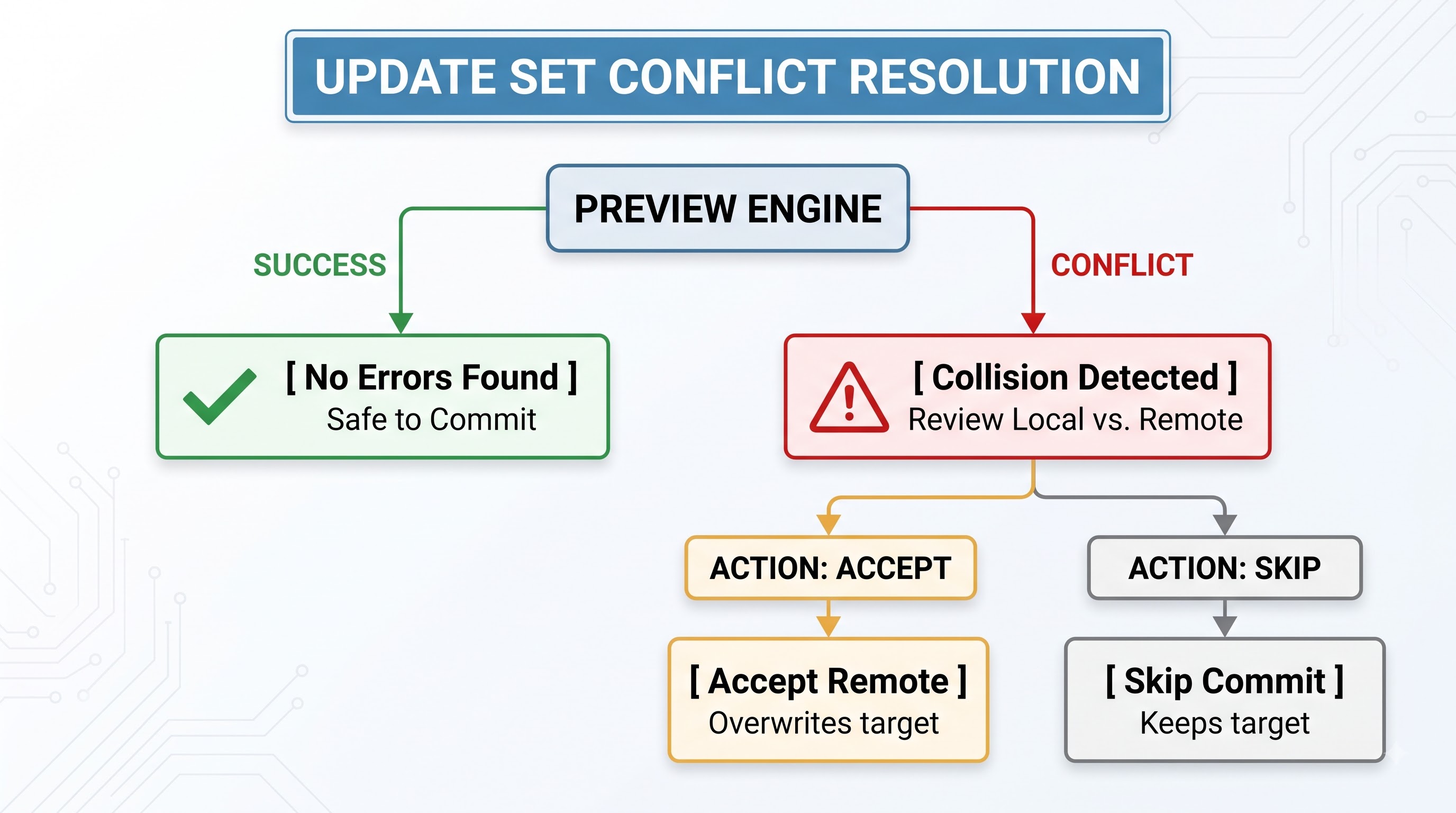
When collisions occur, administrators must compare the local and incoming code diffs side by side, choosing whether to accept the remote incoming payload or keep the target instance's local customization.
Hands-on deployment exercises in an immersive servicenow administrator course help you master these migration pipelines, preparing you to roll out complex platform configurations without unexpected downtime or configuration losses.