
Mastering Enterprise Integration: The Complete Guide to Workday Advanced Studio
Last updated on Jul 27, 2026
The modern cloud computing and ERP environment requires the movement of data to continue operating. Businesses rely on real-time data synchronization, automated cross-platform processes, and orchestration in financial, payroll, and human resource sectors. Workday has been serving as one of the main centers of the cloud ecosystem in operation.
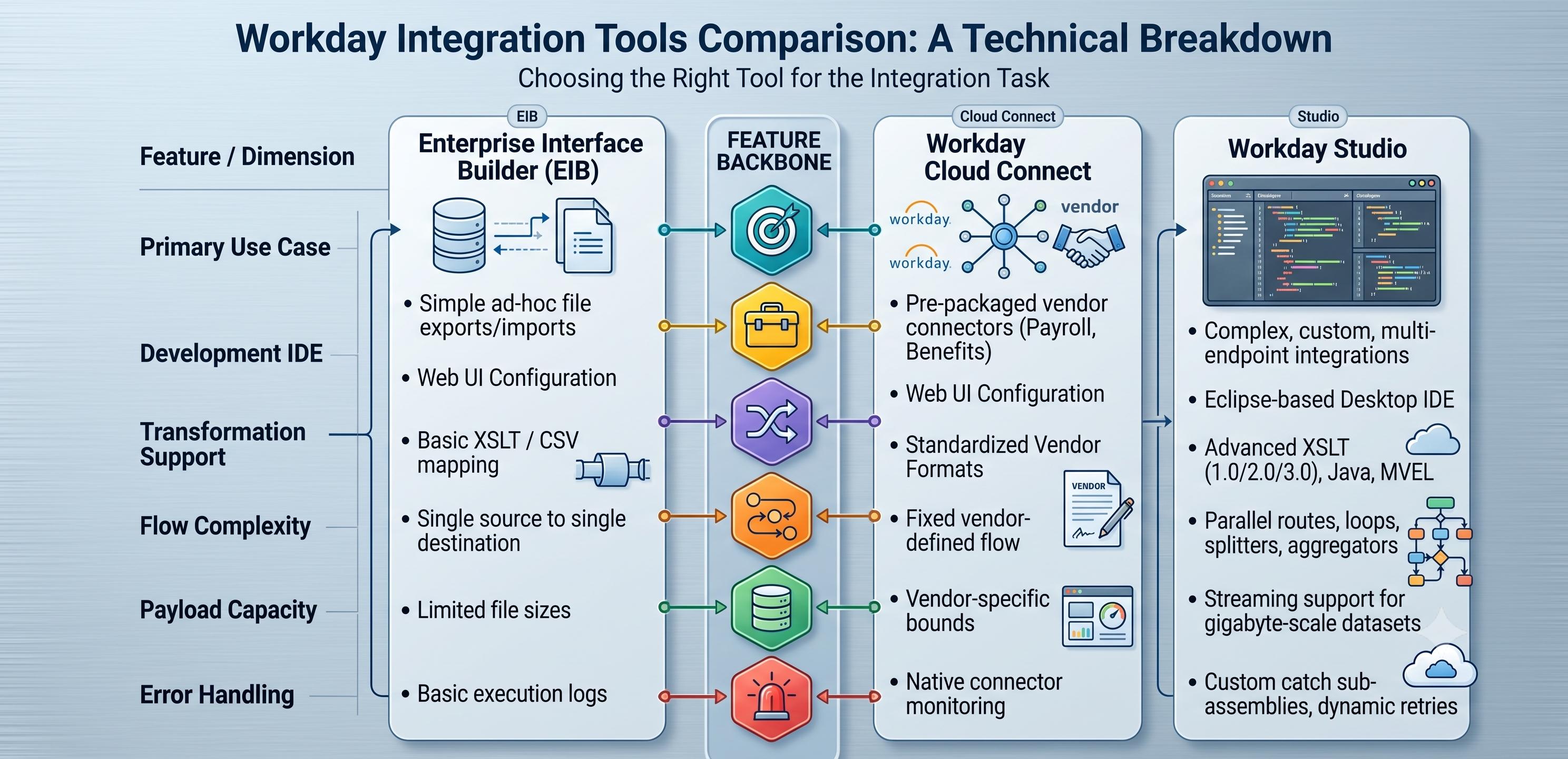
While native solutions such as EIB and Workday Cloud Connect work well with standard incoming and outgoing flat files, the modern enterprise architecture requires more flexibility. Complex environments need multi-step processing logic, gigabytes of data transfer, REST and SOAP custom API integration, record transformation, and error management that regular point-to-point means cannot provide.
This is the moment Workday Advanced Studio proves to be crucial. Advanced Studio is a robust development environment based on the Eclipse IDE platform and it helps channel developers from basic tenant configuration to real enterprise software engineering. It gives integration developers the unique tools necessary for designing, implementing, and managing complicated, highly efficient cloud solutions in the Workday Cloud ecosystem.
What is Workday Studio?
Workday Studio is an integrated visual development environment that allows the creation of data pipelines through Workday Cloud. Unlike traditional file transfer methods, Workday Studio allows the developer to create graphic orchestration flows but still access the programming code independently.
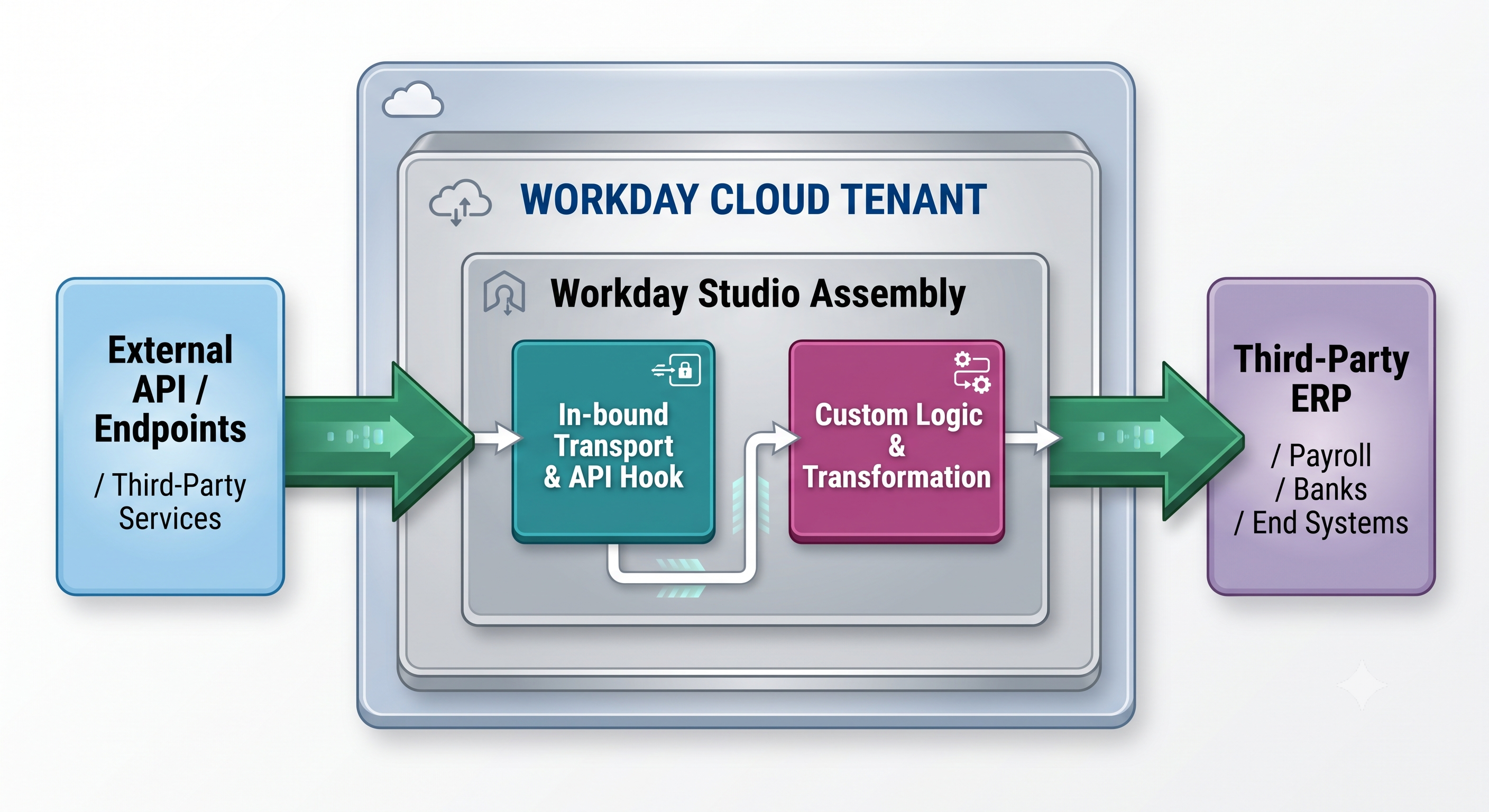
Key Features of Core Architecture
Unified Eclipse IDE: Based on the Eclipse platform, it allows for the use of visual drag-and-drop features, as well as XML, XSLT, and MVEL programming languages.
Multi-Transport Capability: Direct operations can be performed through SFTP, HTTP/HTTPS, REST, SOAP, AS2, and Workday Web Service (WWS).
Sophisticated Data Processing: It has the built-in ability to analyze, convert, slice, combine, and pass the information in several formats such as JSON, XML, CSV, EDI, and binary.
Scalable Runtime Oversight: The system works on multi-tenant workers in the Workday environment.
Comparing the Workday Integration Ecosystem
In order to understand when it is necessary to utilize Workday Studio, one should compare it with the other integration tools of Workday.
Comprehensive Course Syllabus Overview
Taking part in workday studio online training is one way to develop proficiency in integrative skills that require a hands-on approach and real-world application in regard to enterprise integration scenarios, such as monitoring different assembly flows, memory streaming, and custom error handling.
Module 1: IDE Setup, Workspace and Cloud Architecture
Understanding the Eclipse IDE: Project Explorer, Cloud Explorer, Canvas and Palette.
Connecting to Workday Cloud with API Keys, OAuth, and Tenant URLs.
Learning about .clover, assembly.xml and deployment descriptors.
deep understanding of deployment life cycle from local IDE build to execution in BirtTenant.
Module 2: Assembly Flow Introduction
In-Transports & Out-Transports: Configuration of inbound events (HTTP Listener, Scheduled Studio Run) and outbound events (SFTP, REST APIs).
Discussions on Mediation: Synchronous Mediation, Asynchronous Mediation.
Variables & Properties: message properties, context variables.
Integration Message Storing Evaluating Writing Logging Putting Main points.
Module 3: Advanced Scripting & Data Manipulation
XSLT Processing: Developing XSLT 2.0/3.0 Stylesheets for Large XML Payloads
CSV To XML Conversion: Set default flat file parsers.
MVEL Language: implementation of lightweight scripting for using conditions, inline values and headers.
Java Integration: making use of Java Beans in cryptography or advanced business scenarios.
Module 4: Web Services, REST, and RaaS
Working with Workday Public Web Services, including using the WWS SOAP API.
Implementing REST API calls in the mediation phases by means of JSON handlers.
Implementing RaaS technology including designing reports in Workday and making them RaaS-compatible.
Dynamic parameters: the ability to provide parameters automatically during the RaaS calls.
Module 5: Processing Large Data
The Memory Issue: How to deal with the limits and the heap memory size of Workday.
Splitters: XML Splitter, Line Splitter, Substring Splitter to process the data in chunks.
Aggregators: Collecting and combining the results of processing in multiple threads
Streaming configurations : No DOM parsing, SAX streaming to process big files.
Module 6: Reliable Error Handling & Logging
Designing Catch Sub-Assemblies for Synchronous and Asynchronous Exception Handling
Added retrying of the calls in case of API timeouts with exponential backoff. Keep the transformations tidy.
Generating custom and structured error logs and sending alerts to managers using emails/messages in Workday.
Debugging tools Local unit tests Cloud logs Runtime traces.
Key Preconditions
As Workday Studio is a programming tool, students will need to have some technical skills to take the advanced course on Workday Studio.
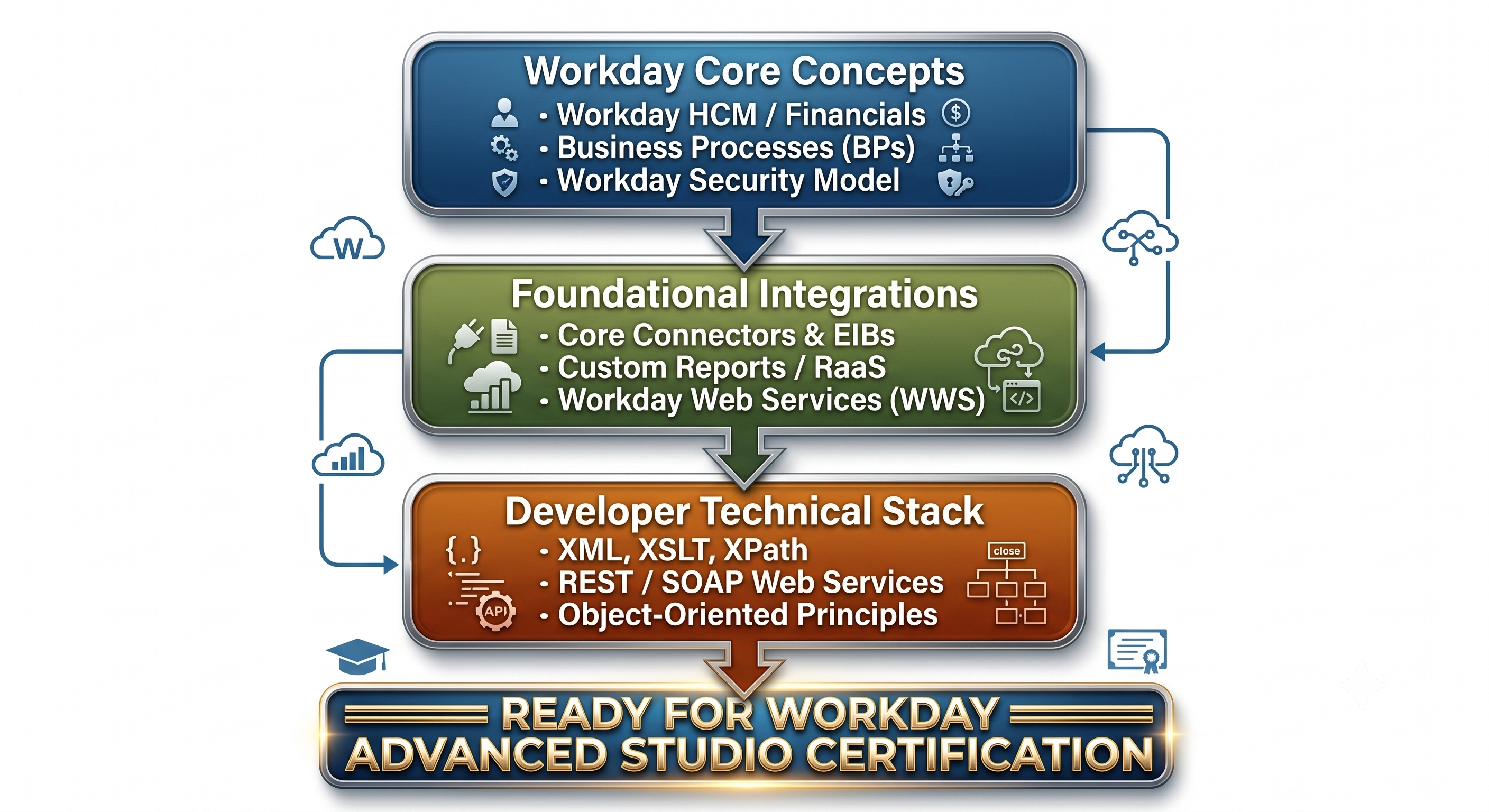
Workday Functional Knowledge: Deep knowledge of Workday HCM, Financials, Org Structures, and Security Groups.
Standard Integration Skills: Experience in EIB, Core Connectors, Custom Report (RaaS) configuration
XML Technologies established: Good knowledge of XML, XPath, XSLT.
Knowledge of Web Services: Experienced in HTTP, REST API, JSON, SOAP, WSDL parts.
Taking an introduction course to learn workday studio is essential in helping you acquire the necessary skills to perform effectively in your enterprise functions after your training.
Architectural Insight: Constructing the Studio Integration
For the purpose of explaining how Workday Studio works in real life, let’s take a commonly used practical example: export of global payroll updates to an external third party vendor with the help of seamless splitting of files as well as detailed reporting.
Phased-out Work Process
Step 1: Triggering Process in Terms of Parameters
The Studio integration is initiated using an external web request or via a back office process. The flow sets the context by getting properties that are required for execution such as Target_System_URL and Effective_Date.
Step 2: Data Extraction with the Use of RaaS
The assembly begins by executing an HTTP call to a previously configured Workday RaaS report.

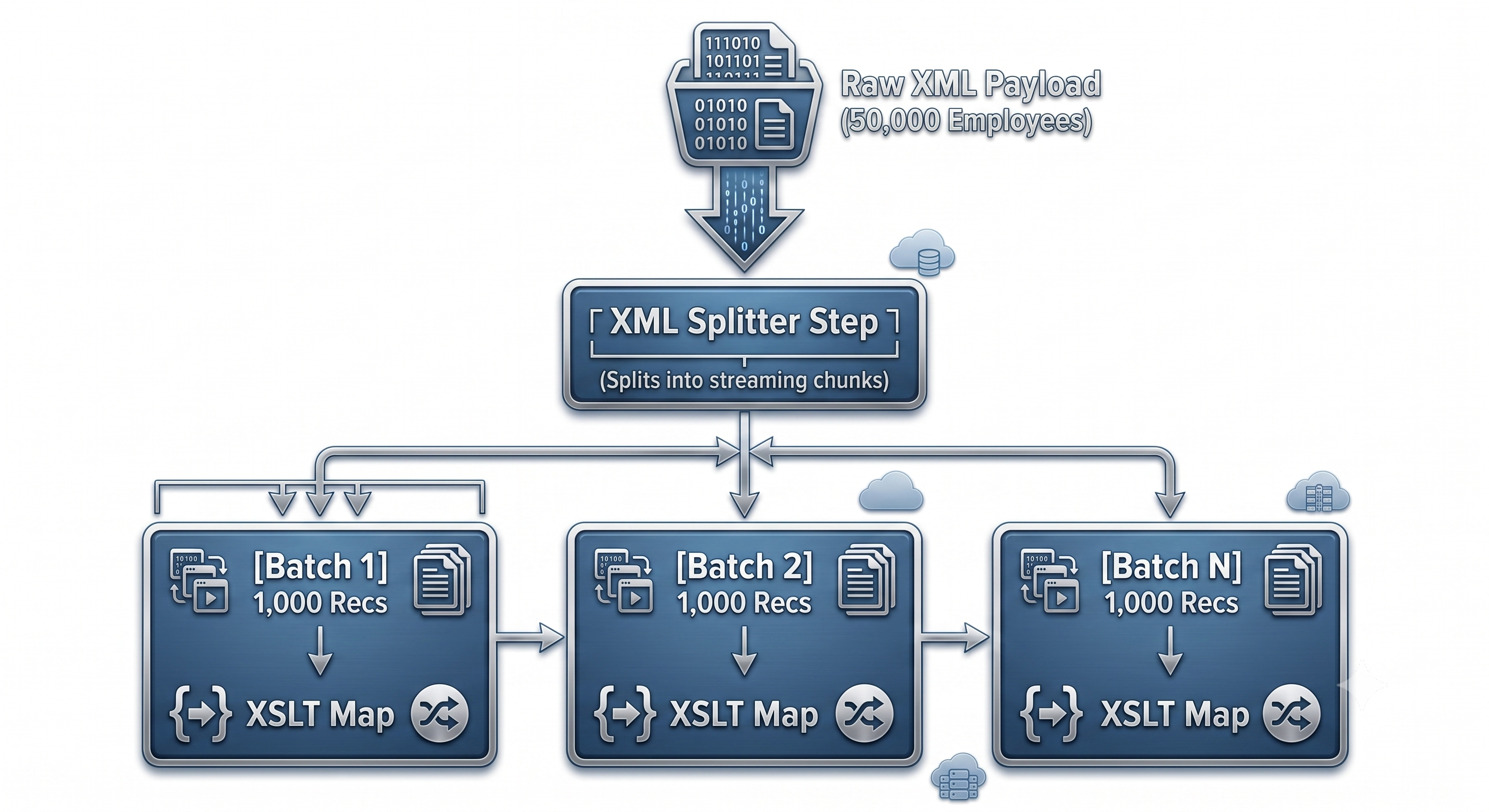
Step 3: Split and Transform
When reports return too many records, having a full XML tree loaded in tenant memory can lead to out-of-memory problems. The integration uses XML Splitter which splits the data into small batches.
Step 4: Aggregating and Exporting Transport
After the transformation is complete, the batches proceed to the Aggregator stage where the outputs are assembled into an appropriate output type (e.g., a final CSV or JSON). This data is then securely transferred via outbound transport, last step.
Real-life Case Study: Global Payroll Synchronization by a Large Corporation
Problem Statement
A multinational corporation operating in 24 countries had to synchronize payroll in both directions between Workday HCM and an external provider.
The Problem
Regular EIB integrations did not work because of complicated delta-calculation schemes in different regions.
Validation of payroll information by the payroll system had to be done instantly; in case errors were found, it should be possible to separate this particular employee and make a note of the error while processing the rest of the batch, without stopping the operation.
Daily transaction data of more than 500 MB was being processed.
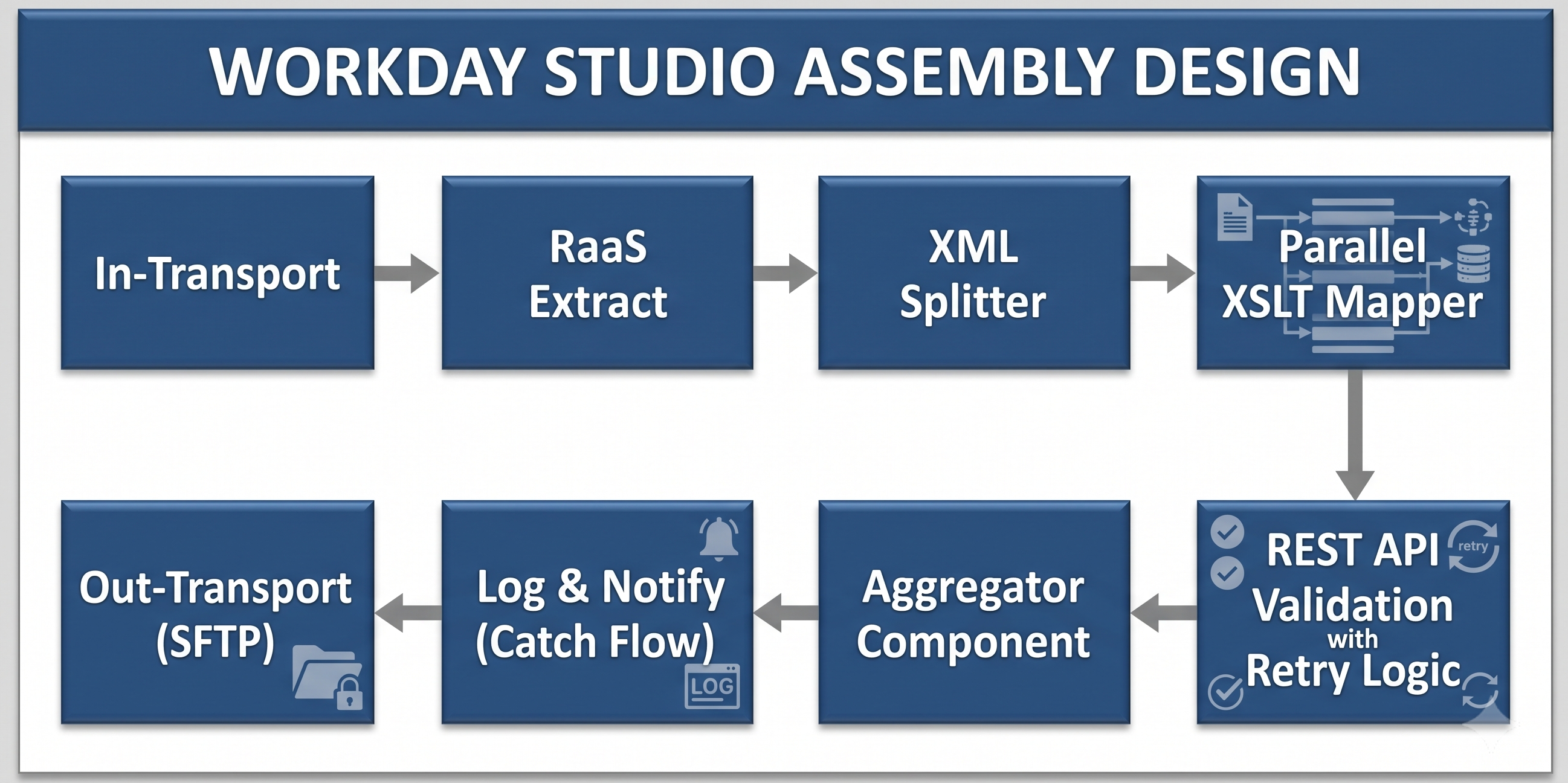
Stream Processing: Incoming tasks from workers were split into different record segments using an XML Splitter, eliminating the possibility of running out of memory on the tenant.
Asynchronous REST Validation: Each segment is processed independently using parallel processing to validate it against the vendor API.
Fault-Tolerant Catch Sub-Assembly: Bad records were sent to the Catch Sub-Assembly to generate an automated ticket in our HR service portal, while the good records were combined and delivered in time.
Results: The processing time decreased by 65%, the manual auditing process equaled zero and the system reached 99.99% operational uptime.
Career Paths, Demand and Certification
Working with Workday Advanced Studio leads an experienced specialist to senior technical positions in the Workday enterprise.
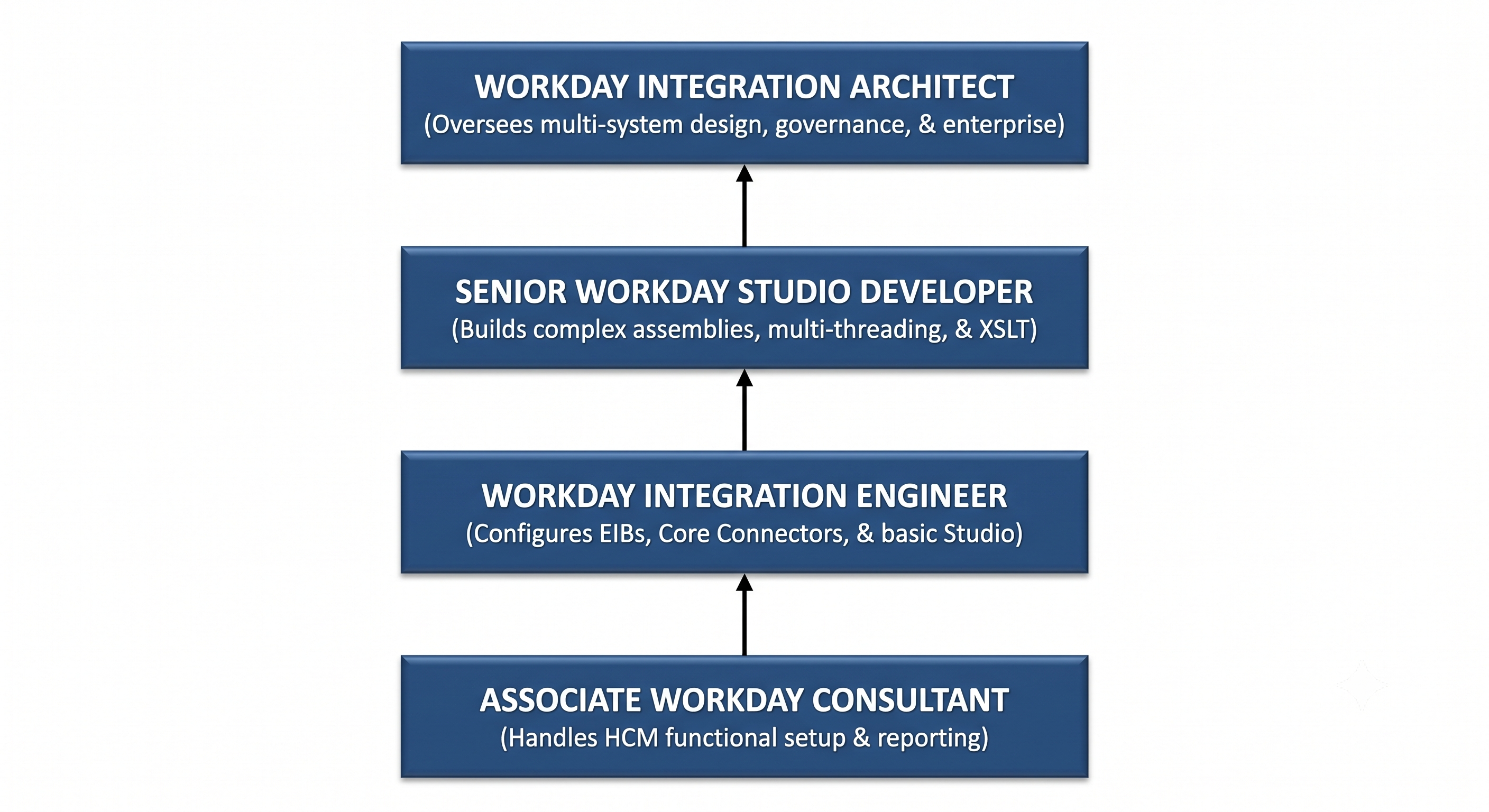
Positions Available for Graduates.
Workday Studio Integration Developer: Concentrates on assembling, deploying and servicing customized fixtures.
Workday Technical Architect: Plans complete cloud infrastructure linking, protection schemes, and enterprise data models creation.
Workday Integration Consultant: Advisory job which assists enterprises in choosing appropriate ways to integrate (EIB vs. Studio vs. Extend).
Workday Certification Policy
It is necessary to understand Workday’s official policy regarding certificates:
Official Workday certificates (Workday Integration and Workday Studio certificates included) are supervised by Workday.
In order to be eligible to take the official exam, an individual has to work in a Workday partner company or an organization of the Workday customer.
Partner companies and third-party educational institutions provide training programs that consist of various vital skills that are required to pass the certification tests.
Companies specializing in the provision of high-quality workday studio online training programs, such as OnlineITGuru, have developed systems allowing you to enhance your skills as a programmer by becoming acquainted with new integration platforms and technologies used in modern integration tasks and processes.
Important Best Practices for Developers
In order to create reliable integrations in Workday Studio, consider the following fundamental principles:
1. Design for Streaming & Memory Management
Assume that the amount of input data will increase by 10 fold over time. Avoid loading entire XML messages into memory using standard DOM models. Use XML Splitters and SAX streaming as much as possible.
2. Extract Environment Properties
Do not hard code SFTP endpoints, URLs or API keys directly into the application code. Use Integration Attributes and Integration Maps in the Workday Tenant so that the properties can be modified dynamically between the Sandbox, Implementation, and Production environment without having to redeploy the code.
3. Create Centralized Logging and Alerts
Every integration should have a structured exception handling. Associate execution logs with Workday Event Process so that the administrators can diagnose failure quickly without having to launch the IDE.
4. Keep Transformations Clean
If you can avoid it, don’t use complex nested XSLT templates. Break down complex transformations into a series of mediation processes, or use lightweight MVEL expressions for inline evaluation.
Learning About Advanced Memory Management & Governance
Integration of Workday Studio is done under the principles of multi-tenancy. The knowledge of tenant run-time limits and heap limits distinguishes novice programmers from professional architects.
Tenant Runtime Constraints
Workday applies the strict rules of limiting run-away integration from using excessive resources of the cloud:
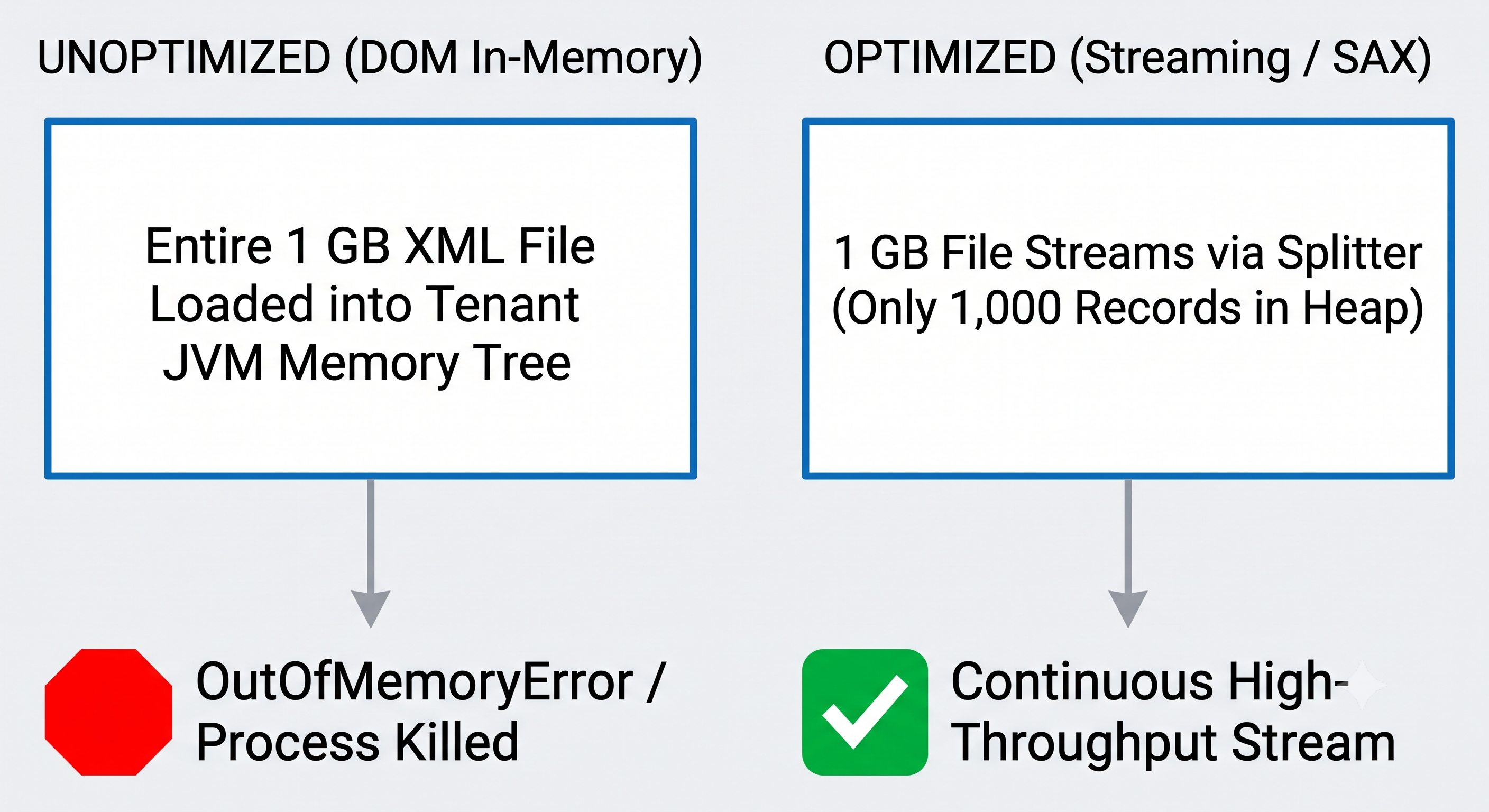
Memory Restrictions: The default worker processes provide the use of standard JVM heap space but if the processing of individual payloads exceeds the buffer limits it results in high Garbage Collection (GC) cost or a fatal java.lang.OutOfMemoryError.
Execution Time Limits: Synchronous requests complete in 60 to 120 seconds while asynchronous processes may take longer. Any long process should either yield on its own or be prepared for batching.
In-Memory Parsing vs. Streaming Techniques
XML Document Object Model (DOM) parsing: By rules, XML conversion involves the full document tree residing in memory. It works great for small files of less than 10 MB but fails badly on larger scales.
Streaming with SAX or StAX: Using the XML Splitter component, the Studio engine is set up to process the XML file node-by-node, thanks to streaming readers. All throughout the process, there is no change in the memory size, be it processing 1,000 or 500,000 records.
Security, Authentication, and Cryptography
Security for Workday Studio goes beyond a simple username and password combination. Enterprise systems require strict data protection throughout the use of data, strict role-based access, and use of encrypted inputs only.
Integration System Users (ISU) and Security Groups
The studio application runs as ISUs, not using personal accounts, thus making it more secure.
Least Possible Access: An ISU should be assigned to the Integration Security Group (ISSG) that only grants access to the only set of access permissions required for the execution of a Web Service task.
Contextual Security Constraints: Security-related specifications can restrict the ISU to only access a specific set of information, thus avoiding potential data leaks.
Transport and Payload Protection
Compliance rules for different policies including GDPR, HIPAA and SOC 2 highlight the fact that the information must be safe in transit and at rest.
WS-Security and OAuth 2.0: Enterprise Studio connects with third-party endpoints and supports OAuth bearer tokens and WS-Security headers for SOAP.
PGP Encryption Process: Enterprise studio uses built-in connectors to be able to encrypt and decrypt files according to PGP. Sensitive outbound files including information like payroll and bank routing are encrypted in memory and sent via SFTP.
Testing, Version Control and DevOps Lifecycle
The company strives hard to manage the Enterprise Studio development, controlling each step in the life cycle of code from local work to Sandbox and into Production.
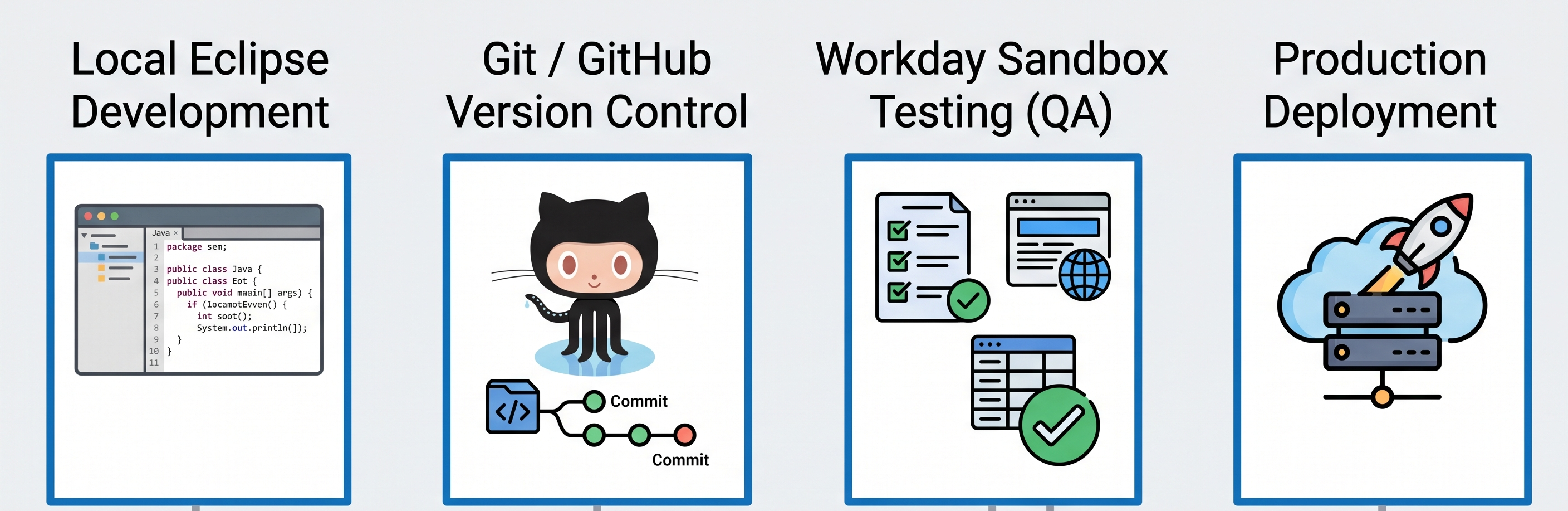
Integrating version control
Because a Workday Studio project consists of different configurations that use XML, stylesheets, and Java/MVEL scripts, it can be directly managed in Git:
Commit different files for assembly.xml, XSLT maps, and unit testing in the feature branch.
Conduct code reviews to spot performance antipatterns before deploying the program.
Unit Testing and Local execution
Before deploying the code on the cloud tenant, developers can develop the unit component before the deployment:
Mock In-Memory Unit Test: Prepare the HTTP requests and execute XSLT stylesheets within Eclipse by using test XML inputs.
Tenant Unit Test: Deploy the assembly on a sandbox implementation tenant and carry out tests based on input parameters.
Conclusion
The paragraph illustrates the importance of modern business architecture: the switch from static cloud configuration to active software development.
In the era of modernization of the enterprise resource planning (ERP) systems, moving away from traditional on-premise servers to cloud platforms like Workday, business requirements become increasingly complex and intertwined. The usual out-of-the-box solutions and simple templates such as Enterprise Interface Builders (EIBs) allow merely simple point-to-point data transfers. However, multinational corporations work in complicated multidimensional environments and need data to be processed in real-time across various platforms, including various custom web applications, payroll companies, financial clearinghouses, and identity vendors.
In such difficult environments, traditional configurations have reached their limit. To bridge this gap, Workday Advanced Studio can provide the appropriate tools for developers to perform their work as integration architects.
The expertise of Mastering Studio coordinates everything relating to the processing of its data. The processes can include:
Custom Assembly Flows: This involves the ability to generate multiple routes with paths that can run simultaneous processing in order to follow complicated conditional processing.
Streaming Transformations: This means being able to use advanced versions of XSLT 3.0 as well as SAX relevant streaming parsers in the process of handling large amounts of data (usually many gigabytes) without crossing strict memory limitations required for all processes.
Dynamic Error Handling: It is possible to come up with reliable solutions that provide automatic retries and include mistakes eliminating.
API & Security Protocol Orchestration: Being capable of applying complex OAuth 2.0 schemes as well as PGP encryption with the purpose of providing compliance with such standards as GDPR as well as SOC 2.
Due to the fact that these tasks resemble those of traditional software development, such developers are hence empowered with skills in XML schemas, object-oriented programming, memory management, and continuous integration/continuous deployment.
The velocity of digital transformation is leading to an increased need for people who can create, construct, and repair these vital data pipelines. For various organizations, it is crucial that these integrations are put in place to ensure proper payroll distribution of compensations along with a proper medication of finances and other work data around the world.