
Mastering the Cloud: The Ultimate Guide to Salesforce Training and Career Success
Last updated on Jun 30, 2026
Data fragmentation defines the current corporate environment. On any single day at work, a midsize or large company uses tens of different channels: digital storefronts, outbound sales dialers, omnichannel customer support pipelines, social media outlets, and enterprise resource planning (ERP) systems.
Traditionally, it used to mean working in the darkness. The salespeople didn’t know what kind of problems there were in the customer support; the marketing department was spending millions of dollars trying to win back customers who already left the sales process; and strategic forecasts relied on outdated data gathered manually in spreadsheets.
In the heart of the solution to this problem is Salesforce, the unquestioned king of CRM software.
As companies across the globe move away from traditional on-premise hardware towards cloud-based models that are agile and multi-tenant, the need for experts in Salesforce has become an imperative need rather than just an occasional demand.
If you are a potential candidate interested in making a career in the world of Information Technology, be it an aspiring IT professional wanting to join the IT world, a business analyst who wants to switch, or a software engineer wanting to benefit from lucrative positions in cloud computing, then it is essential to learn about Salesforce.
Part 1: Background of Salesforce and the Cloud Revolution
Before going deeper into the reasons why Salesforce training can be considered important, we have to look into the fundamental problem that makes it necessary.
What is CRM?
Customer Relationship Management (CRM) is a method of organizing an enterprise's communication with its existing and potential clients. It integrates information about the client received from such areas as sales, marketing, customer support, and e-commerce into one interface.
Until now, customer data used to be scattered between different parts of the organization. There were spreadsheets for sales, ticketing systems for customer support, and separate mailing lists for marketing. Salesforce breaks down the walls between them all by offering a "360-degree view" of the client.
The Transition to Cloud Computing
Traditional implementations of software involved significant initial expenses in terms of purchasing server hardware, managing the infrastructure, setting up the data centers, and installing software locally. It was Salesforce that helped bring about a change in this scenario by implementing everything through the cloud. This revolutionary change clearly explains the reason why salesforce course online in OnlineITGuru is now an absolute necessity.
The types of cloud computing include the following three basic models of operations:
Infrastructure as a Service (IaaS): Offers bare-metal computational facilities like virtual servers and storage.
Platform as a Service (PaaS): Offers a platform for developing, testing, and deploying software (for example, Force.com).
Software as a Service (SaaS): Offers ready-to-use software applications via the web as subscription-based solutions (such as Salesforce Sales Cloud).
With the adoption of the multi-tenant cloud computing model, whereby different organizations share common infrastructure but keep their data completely separate and safe, Salesforce achieves tremendous cost savings. The organization releases updates on a regular basis (several times a year) without interrupting any custom configuration and thus enables rapid scaling of businesses.
Part 2: Understanding Salesforce Architecture
Salesforce training starts with introducing learners to the configurations that control the functioning of the instance called an Org in Salesforce architecture.
Core Admin Configurations
Even before a line of code is written or any custom object is defined, the environment should be configured based on the realities of the business organization. Training focuses on configuring the Company Profile that determines the following:
Fiscal Year: customized fiscal calendar for tracking revenues.
Business Hours and Holidays: ensuring customer escalation takes into consideration the days that are not business days.
Language and Currency: critical when dealing with global multi-currency environments.
Environment: Declarative Versus Programmatic Modification
Salesforce’s biggest advantage lies in its ability to combine both forms of modification.
Declarative Modification (Point and Click): Creation of features through the visual interface. This involves creation of custom fields, validation rules, page layout, and security matrix.
Programmatic Modification (Code): Expansion of platform features beyond the existing limitation through apex coding, Visualforce, and Lightning Web Component.
The Sandbox Approach
In professional environments, it is important not to work on features in the location where employees operate (the Production Environment). Instead, developers will work on the Sandbox—replica of the production environment without affecting anything in the actual production environment. Through training modules, you learn how to create various types of sandboxes (Developer, Developer Pro, Partial Copy, and Full Sandboxes).
Part 3: Data Architecture, Modeling and Security
In essence, Salesforce is a highly relational database covered by an intuitive interface. It is important to understand how data interacts in order to be a good platform engineer.
Objects and Fields
Standard Objects: Tables built in by default. Examples include Account (organization), Contact (person), Lead (lead), Opportunity (opportunity). Learning how these fundamental architectures work together is one of the main goals of any salesforce course online.
Custom Objects: Custom tables that can be created by an administrator to hold particular business data (e.g. 'Property' object in a real estate company).
Relationships Mastery
Not everything is independent in Salesforce. During your training, you will learn how to create data schemas and relationships using certain types of relationships:
Lookup Relationship: Loosely connected "parent-child" relationship. The child record will exist even when the parent record gets deleted.
Master-Detail Relationship: Very strict, highly dependent relationship. All security and visibility of the child record will depend on the parent record. The child record will get deleted along with the parent record.
Roll-up Summary Fields: They have been developed using Master-Detail Relationships. They automatically perform calculations like sum, count or average on child record fields and display those calculations on parent records instantly.
Many to Many Relationships: Created using a "junction object" connecting two objects using master-detail relationships.
The Ironclad Salesforce Security Model
Enterprise data security is incredibly granular. A professional training curriculum ensures you understand the levels of access control:
System Access: Users & Profiles
Object-Level Security: OWDs (Organization-Wide Defaults)
Record-Level Security: Role Hierarchies & Sharing Rules
Field-Level Security: Profile/Permission Set Visibility
Object Level Permissions: Determine whether a user will be able to perform an action (Read, Create, Edit, Delete) on an object.
Organization-Wide Defaults (OWDs): Determine the basic level of visibility of records (Private, Public Read-Only, Public Read/Write).
Role Hierarchy: Enable managers to see records of their subordinates through inheritance.
Field Level Security (FLS): Block certain users from accessing sensitive fields on a record which would otherwise be visible to all.
Part 4: Enterprise Security Architecture
With global technology companies managing more sensitive consumer information, having a comprehensive knowledge of Salesforce's multilayered security architecture is one of the major weightages for professional certifications.
Security Architecture works in much the same way that an old castle did with layers of defense surrounding it. In order to get into just one of the data fields, you have to get through all of the layers.
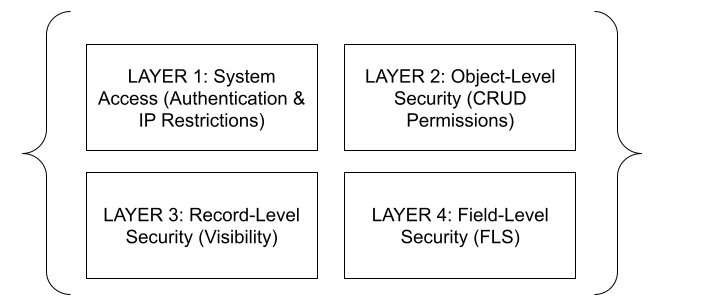
Layer 1: System Access (Authentication and Perimeter Controls)
The first layer involves verifying whether the user has the right to be inside the system before determining whether the user is entitled to any data.
Login Hours: In a call center company, customer service representatives will not be able to log in to Salesforce except during their working hours, for example, 9:00 AM to 5:00 PM.
Login IP Ranges: Companies can restrict access in a manner where the user is only allowed to login when the user’s computer is on the corporate office network or corporate-approved VPN.
Layer 2: Object-Level Security (Creds and Capabilities)
Object level security manages basic database privileges that can be referred to as CRUD (Create, Read, Edit, and Delete). This layer is managed through Profiles and Permission Sets:
Profile: Each and every user within Salesforce needs to be associated with a profile. It sets their basic roles (for example: “Standard Sales User”, “System Administrator”, or “Support Engineer”).
Permission Set: For designing efficient architectures, the latest best practice for this layer is to create minimal profiles. In case two sales persons have the same "Sales User" profile, but one salesperson requires permission to delete accounts then the administrator creates "Delete Account Permission set" which is granted uniquely to the particular salesperson. Permission sets can add permissions to profiles; however, they can never take away any permissions from a profile.
Layer 3: Record-Level Security (Data Visibility Models)
After having permissions to read an object, the record level security defines what particular rows of data a user is allowed to view. It is implemented by means of a 4-stage process:
Organization Wide Default Permissions (OWDs): OWDs provide the strictest and most basic data visibility restriction across the whole organization. In case you need a secure system, you will have to define OWDs of your system to be Private. That is to say that after creating a record, only its owner would have permissions to view it.
Role Hierarchy: Having defined the strict baseline through OWDs, Role Hierarchy allows vertical opening of access up the corporate management structure. In case a sales rep creates his private opportunity record, then his manager, the VP of Sales, and even the CEO automatically get full permissions to view and edit this record.
3. Sharing Rules
Sharing rules provide access horizontally within the hierarchy. In this case, if the Western Region Sales Team must share information with the Western Region Marketing Team, then the administrator sets up a criteria-driven sharing rule as follows: "When the state of the opportunity is 'California,' share read/write access with Public Group: Western Marketing."
4. Manual Sharing and Apex Managed Sharing
In one-off situations, a manual sharing method may be used to enable a person to click on a button on the record for temporary access to another individual. The developer may create Apex Managed Sharing rules for sharing records using enterprise-specific code.
Layer 4: Field-Level Security (FLS)
This is the last layer in the inner rings of security. Through Field-Level Security, the administrator will be able to mask some specific fields from appearing in the record. For instance, let us consider that both Human Resources Manager and Line Manager can access the same employee record. But, through FLS, we set the fields "Social Security Number" and "Base Salary" as Visible for HR profile while these fields would be Hidden for the Line Manager Profile.
Part 5: Enterprise Process Automation with Salesforce Flow
The overall objective of any contemporary cloud deployment is to avoid repetitive tasks. This is made possible by Salesforce’s highly sophisticated visual programming platform called Flow Builder, which can be used by non-developers for complex transactional logic.
It is vital to comprehend the different execution modes of Salesforce Flows:
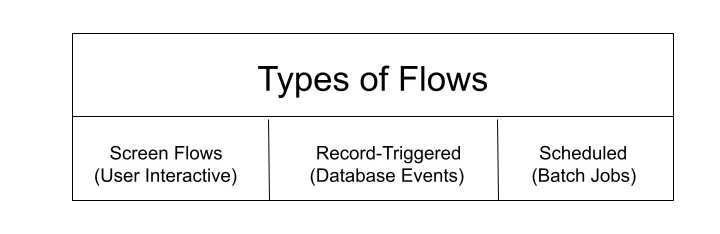
1. Screen Flows
Screen Flows are the sole type of flows that provide a visual user interface for the end-user. Screen Flows work as dynamic wizards, guided scripts, or a set of forms.
Use Case Example: There is a need for a call center to have an automated tool for gathering uniform information about a defect product from their clients when receiving calls. The administrator creates a Screen Flow that navigates the agent through certain diagnostic questions by showing dynamic questions based on the answers given by the agent before and creating a case when done.
2. Record-Triggered Flows
Record-Triggered Flows are the flows that are totally working in the background. They listen directly to the database and trigger right away when the record is created, updated, or deleted.
Technical Difference: Record-Triggered Flows can be set to run in two different ways:
Field Update Before Saving (Before-Save Flows): The flows that run before saving the record to the database disk are very optimized and should only be used when you want to update the field of the record that has initiated the flow itself. These are 10 times faster than workflows.
Actions With Related Records (After-Save Flows): The flows that run after saving the record to the database are used for the actions where you want to update some completely different record or send emails.
3. Triggered by Scheduled Time Intervals
These flows work according to specific times and time intervals (for example, daily at midnight, or every Monday morning) for all those batches that meet certain criteria.
Example Business Scenario: At every night, precisely at 11:00 PM, there is a time-interval-based flow that searches the database for all Opportunity objects which have the close date past but are not yet closed-won and sets their status to "Stale." This action sends notification to the regional sales director.
Part 6: Programmatic Engineering – Deep Dive Apex Architecture
For cases when business process requires complicated math calculations, intensive transactional processing, special API calls, or integration tasks, declarative approach is out of its capabilities. This is when Salesforce programming comes into play.
The Anatomy of Apex
Apex is a strongly typed, object-oriented programming language executed entirely within the multitenant runtime environment of the cloud. Structurally, developers with a background in Java or C# will find Apex syntax highly familiar.
To ensure security and stability across the shared platform, Apex compiles down into abstract syntax trees and executes on an isolated interpreter engine, completely protected from executing low-level system memory commands or direct OS interactions.
Advanced Apex Collections
To write optimized code, you must understand three basic collections that make up the foundation of Apex. Here is a brief overview of how they handle data profile in memory:
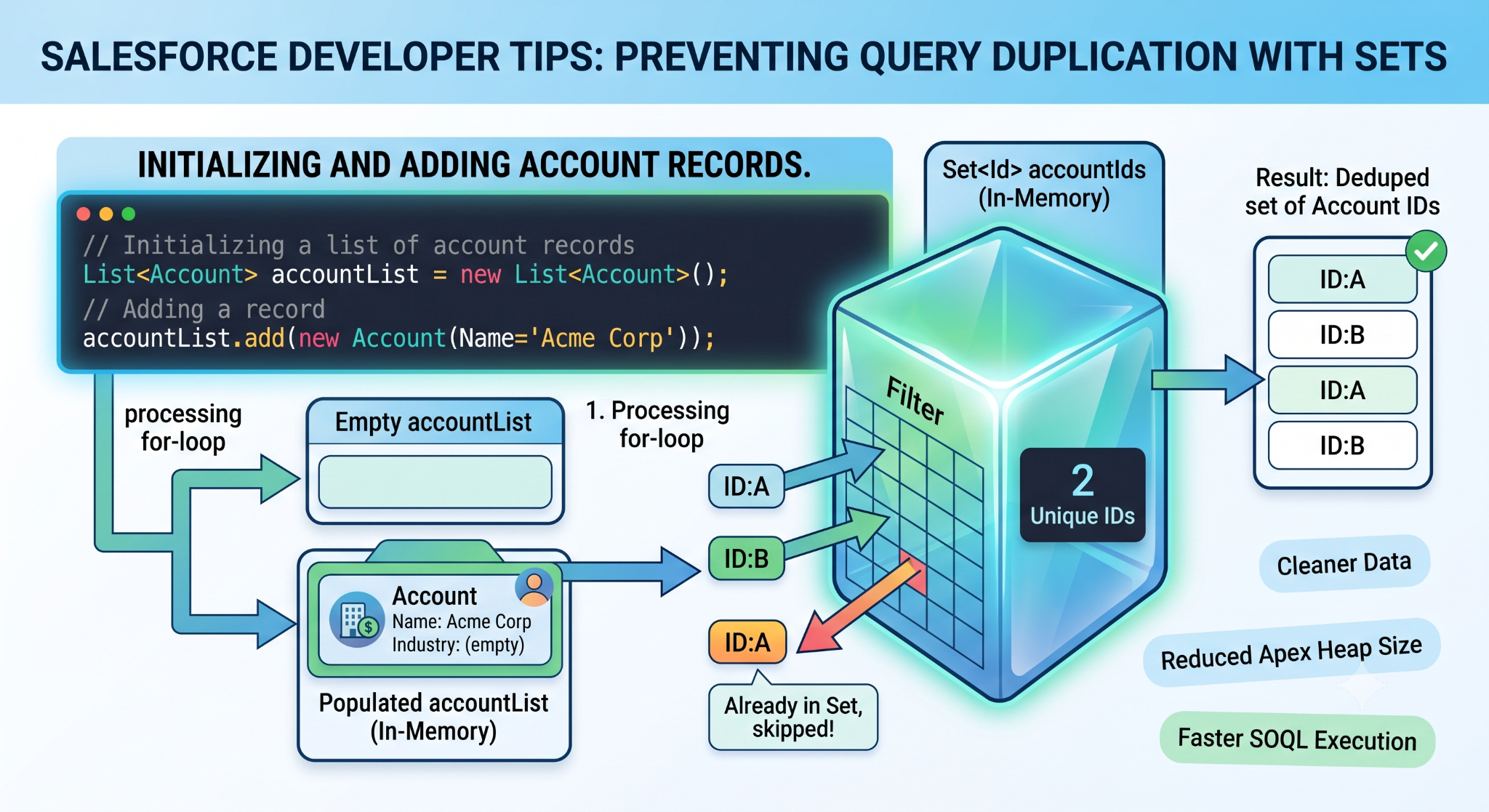
1. Lists
An ordered number of elements, where all element is mapped accurately to an index value (beginning at 0).
2. Sets
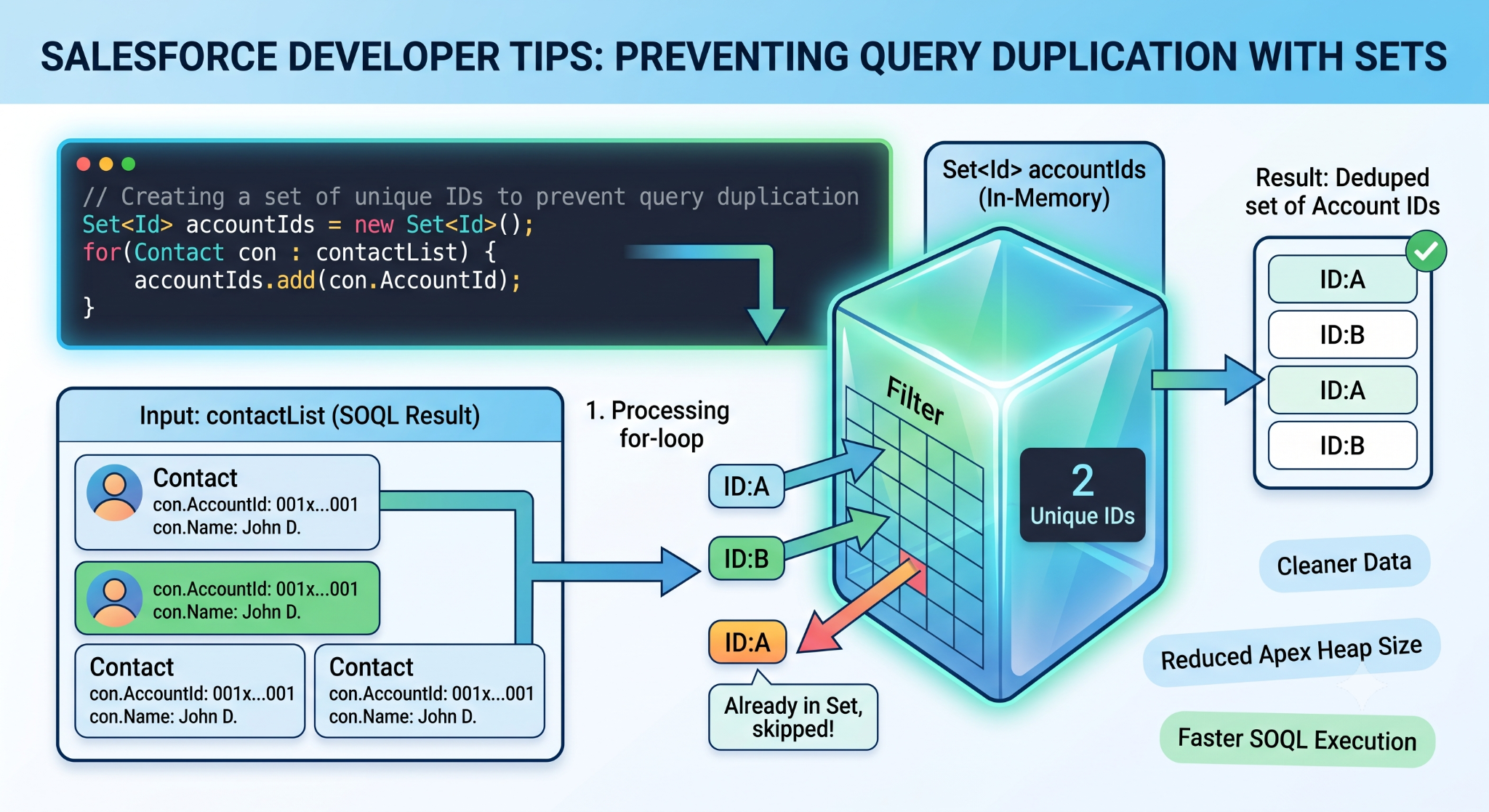
This is an unordered set of distinct objects. A set is very helpful when trying to collect a set of distinct Record IDs before querying relevant data tables.
3. Maps
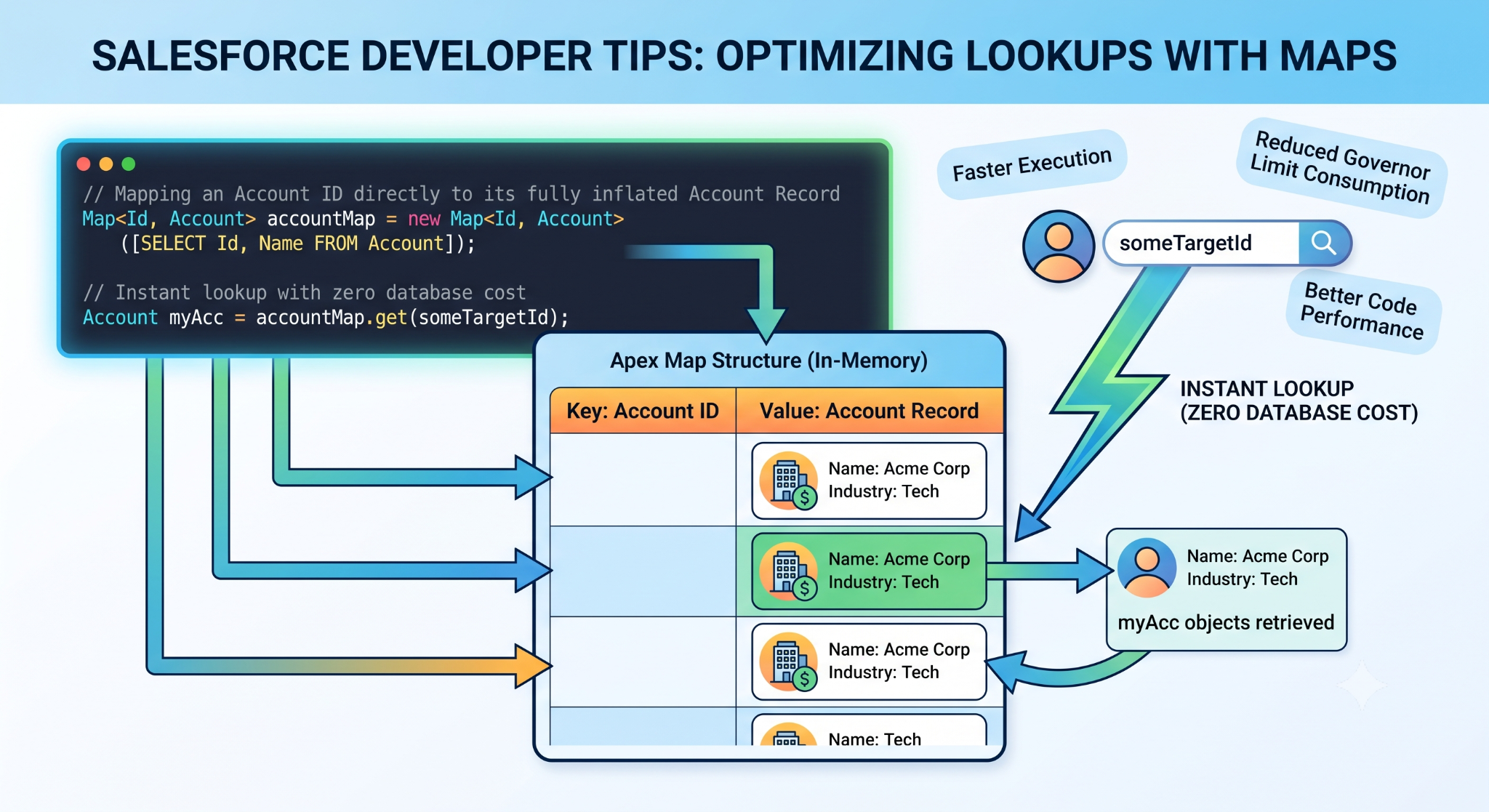
A very strong and multidimensional collection which consists of distinct keys mapped to specific values. The maps play an important role in bulkifying the code because they do not require any nested for loops and can access related records through their keys.
Database Communication: SOQL and SOSL
There are two ways in which Apex interacts with the relational database layer for querying.
Salesforce Object Query Language (SOQL)
SOQL is used when we need to retrieve records from one particular object table or go down vertically across the specified relationships. As opposed to normal SQL queries, JOINs are not supported by SOQL. Instead, SOQL makes use of the relationships that you create in your data model.
Parent to Child Query: Retrieve all the accounts and their respective child contacts.
List<Account> accountsWithContacts = [SELECT Name, (SELECT LastName FROM Contacts) FROM Account];
Question from Child to Parent: Get a contact record and go directly to the name of the parent account.
List<Contact> contactsWithAccount = [SELECT LastName, AccountName FROM Contact];
Salesforce Object Search Language (SOSL)
In case you don't know on which particular object table your text is stored, SOQL is very inefficient. SOSL helps you run the search for the text simultaneously from different unconnected tables.
// Searching for the word 'Acme' across multiple independent tables
List<List<SObject>> searchResults = [FIND 'Acme' IN ALL FIELDS RETURNING Account(Name), Contact(FirstName, LastName), Lead(Company)];
The Iron Law of Bulkification and Triggers
Due to the strict multi-tenant Governor Limits of Salesforce, any attempt at creating "unbulkified" code will cause immediate runtime exceptions and crash your business process.
This is a case of architectural failure:
// ANTI-PATTERN: THIS CODE WILL BREAK IN PRODUCTION
trigger AccountBadTrigger on Account (after update) {
for(Account acc : Trigger.new) {
// FATAL ERROR: Putting a SOQL query inside a loop.
// If 101 accounts are updated at once, this crashes the system!
Contact relatedCon = [SELECT Id FROM Contact WHERE AccountId = :acc.Id LIMIT 1];
}
}
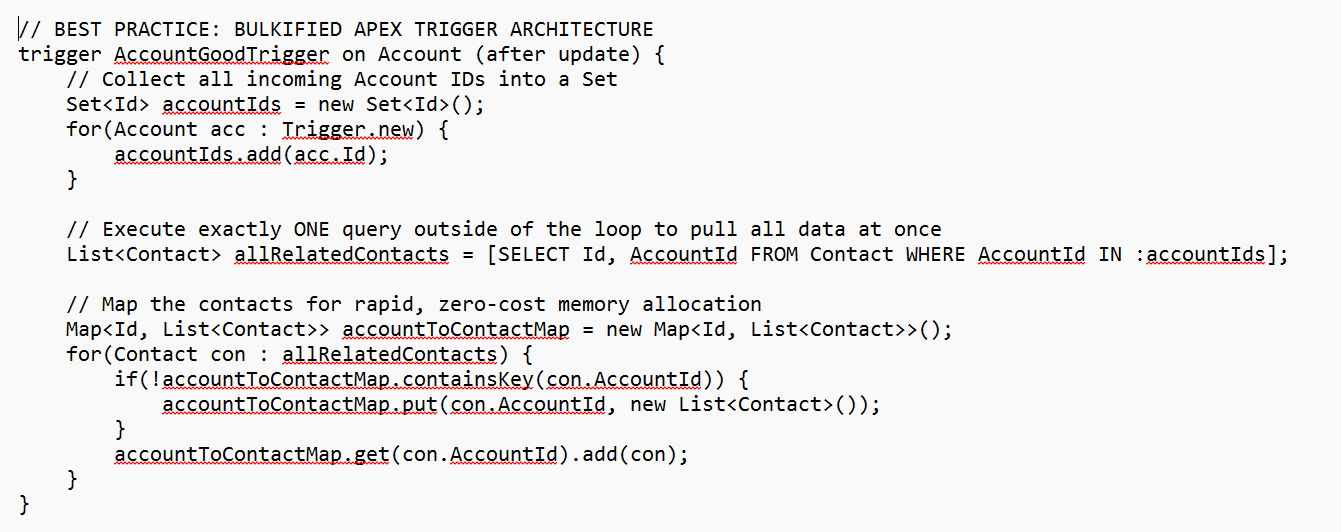
For this purpose, salesforce online training is carried out by having a Bulkification Mindset. It is necessary to design code in such a manner that it could easily handle hundreds of records in array form in one single attempt.
This is the way the same logic can be processed with bulk optimization in mind:
Part 7: Front-end Customization – Lightning Web Components (LWC)
The Presentation layer of Salesforce has completely matured into natively based web programming. The contemporary user experience is developed using Lightning Web Components (LWC).
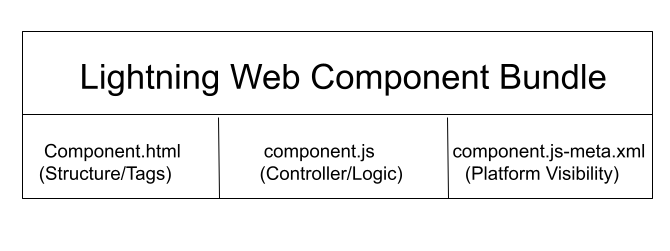
LWC is built on top of the modern and lightweight component-driven architecture which generates standard code that runs inside modern web browsers. Standard LWC pack consists of the following three main file resources:
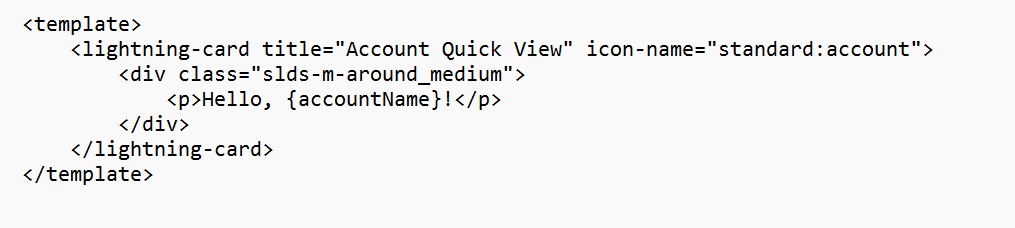
1. The Markup (HTML)
Includes standard HTML5 semantic tags with additional Salesforce Lighting tags.
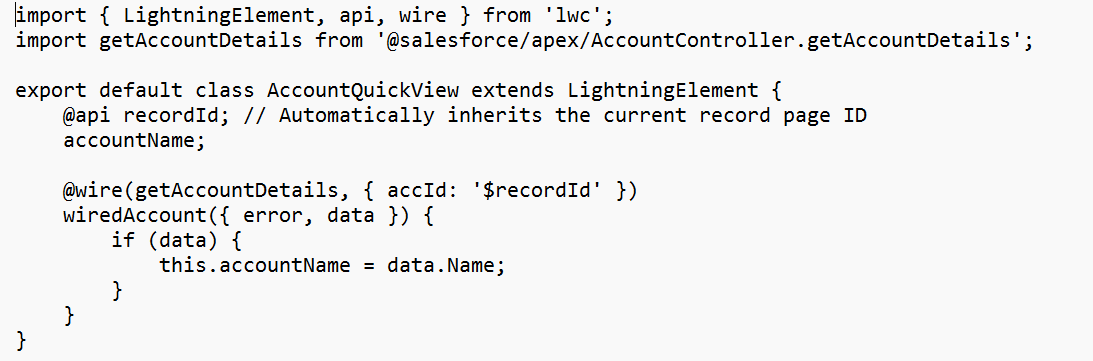
2. The Logic Controller (JavaScript)
Uses latest ECMAScript 6 (ES6+) classes. Deals with events, maintains tracking states, and binds data to the backend Apex data query services using the @wire decorator service.
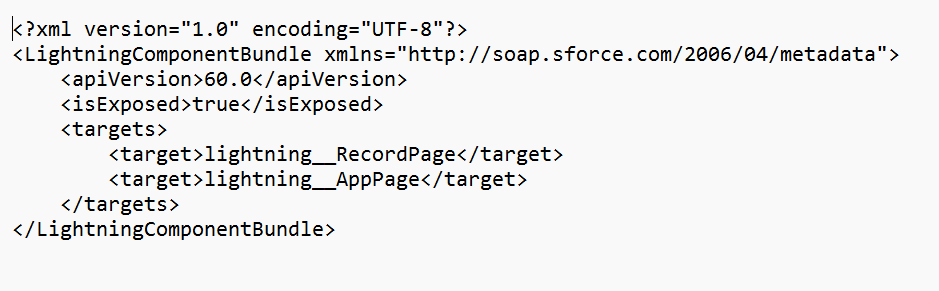
3. The Metadata Configuration (XML)
This identifies where the custom component can be inserted into the layout of Salesforce (for example, on the Lightning App Builder, on the Record Home Page, or available from the Utility Bar of an app on a mobile phone).
Part 8: Strategic System Integrations and Core Product Ecosystems
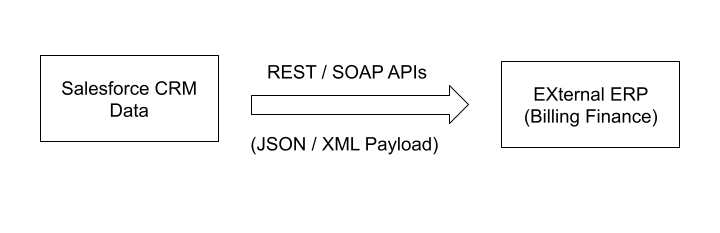
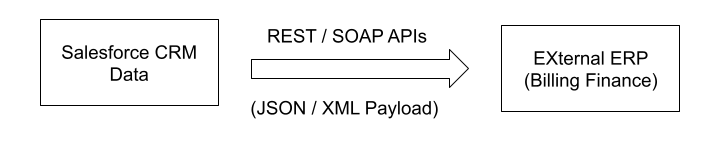
Enterprise level CRM solutions do not function alone. In order to leverage their full benefits, they need to interface with external software configurations, ERP systems, mainframe legacy systems, and billing systems.
1. Inbound and Outbound API Integrations
The Salesforce developers invest a large chunk of their time building integrations through standard industry endpoints:
REST APIs: Using lightweight JSON formatting payloads for web-based real-time applications. Writing custom Apex REST classes using annotation tags, such as @HttpGet and @HttpPost, allows developers to transform web-based requests into record manipulations.
SOAP APIs: Using strictly typed XML formatting payloads, which are mandatory in secure communications with legacy mainframe systems of corporate banks or manufacturing facilities.
2. Stacking Further: Domain-Specific Ecosystem Clouds
An integrated Salesforce professional should be fluent in the product clouds which are seamlessly embedded into Sales & Service platforms:
Marketing Cloud: The comprehensive solution for marketing automation. It monitors behavior of consumers through multiple channels, implements large-scale automated email sequences, provides digital advertising retargeting, and calculates consumer sentiment analytics using predictive models.
Commerce Cloud: Provides capabilities for developing digital storefronts. This cloud allows for implementing localized B2B and B2C digital checkout process, scale order fulfillment operations and integrate global product catalogues with unified pricing rules.
MuleSoft Integration Cloud: An enterprise-integration platform purchased by Salesforce. In case there are thousands of legacy applications within an enterprise, MuleSoft is the advanced middleware. It consolidates APIs into a cohesive data network providing seamless data synchronization across the whole environment.
Part 9: Navigating the Salesforce Certification Matrix & Career Blueprint
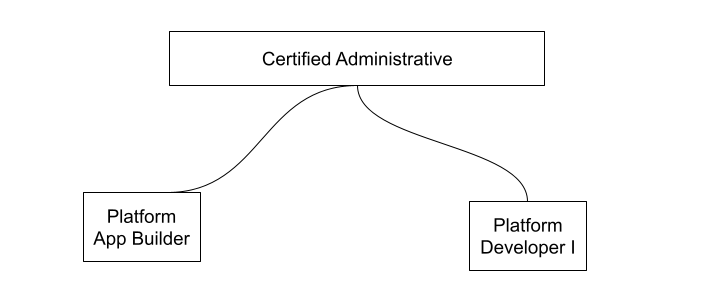
In the Salesforce ecosystem, there are unique certifications used to prove practical proficiency in the field. To get these certifications, a certain balance between theory and build is required.
1. Salesforce Certified Administrator (ADM-201)
The base entry point. This certification gauges the expertise of a professional in areas such as setup management, user administration, globalization settings, standard permission (profile and sharing), and basic reporting capabilities.
2. Salesforce Certified Platform App Builder
The perfect certificate that bridges between configuration and programming. It confirms your capability of constructing complicated custom data models, advanced relationships, and highly sophisticated automation systems using only declarative features such as Flow Builder.
3. Salesforce Certified Platform Developer I (PDI)
The bare necessity for software developers. The exam evaluates your programmatic skills in terms of basics of Apex, SOQL syntax, triggering best practices, and fundamental front-end deployment principles by means of lightning components.
What Makes Structured Salesforce Training So Important?
Making sense of this huge cloud system on your own can be quite challenging and confusing. The course curriculum provided by OnlineITGuru is formulated specifically for that purpose to make your learning process as efficient as possible.
Technical Curriculum Breakdown
45 Hours of Interactive Classes Led by Experts: Forget about recorded tutorials which may be out of date. Learn everything from certified consultants who manage global enterprises' projects.
32 Targeted Real-World Assignments: Hands-on practice-based assignments aimed at reinforcing theoretical concepts - ranging from security matrix creation to bulkifying triggers.
Capstone Projects on Multiple Clouds: Build a real-world Salesforce setup from the ground up. Learn to cater to the requirements of enterprises, design automation workflows and code integrations.
Job Assistance and Placement Opportunities: Leveraging a network of corporate partners globally, numbering more than 200 companies based out of the USA, India and Europe. These include customized resume writing sessions, technical panel interviews, etc.
The enterprise cloud revolution on a global scale is just getting started. Investing in formalized training for Salesforce helps you develop a technically proficient set of skills that is resilient and lucrative, globally. Learning how to manage the declarative versus programming aspect of Salesforce helps you take off in the digital economy.