
Mastering Workday Integration: Architecture, Real-World Use Cases, and Career Growth
Last updated on Aug 19, 2026
Transferring data seamlessly between different business systems represents one of the biggest challenges of corporate technology in the current times. When a corporation implements Workday for the purposes of managing its workforce, finances, and operational processes, that platform cannot be utilized in a standalone way. It must communicate information safely with external payroll providers, benefits systems, local financial institutions, time tracking platforms, and internal IT directories. When connections stop working or get delayed, payroll does not get processed on time, newly hired employees lose access to important software, and executives have trouble generating reports.
The ability to establish and maintain data connections has become one of the critical skills of modern cloud developers and HRIS specialists. Specialists need to do exact coding but to understand the logic of the systems, data mapping, and automated information transfer mechanisms. Getting specialized workday integration training provides professionals in the field of technology with the experience enabling them to get higher-level positions in the area of cloud architecture, workflow design, and enterprise application management.
Real-World Case: Fixing a Broken Payroll Pipeline
Consider a fast-growing retail business that operates across three regions. The company relies on Workday for core employee data, but it uses a third-party regional engine to run weekly payroll. Every Friday, the HR team used to export huge CSV files containing address updates, direct deposit adjustments, hourly pay changes, and new tax withholdings. Because this task was handled manually, errors were common. A misplaced comma in a text column would reject a batch of fifty workers, leaving staff without paychecks and forcing developers to spend their weekends fixing files line by line.
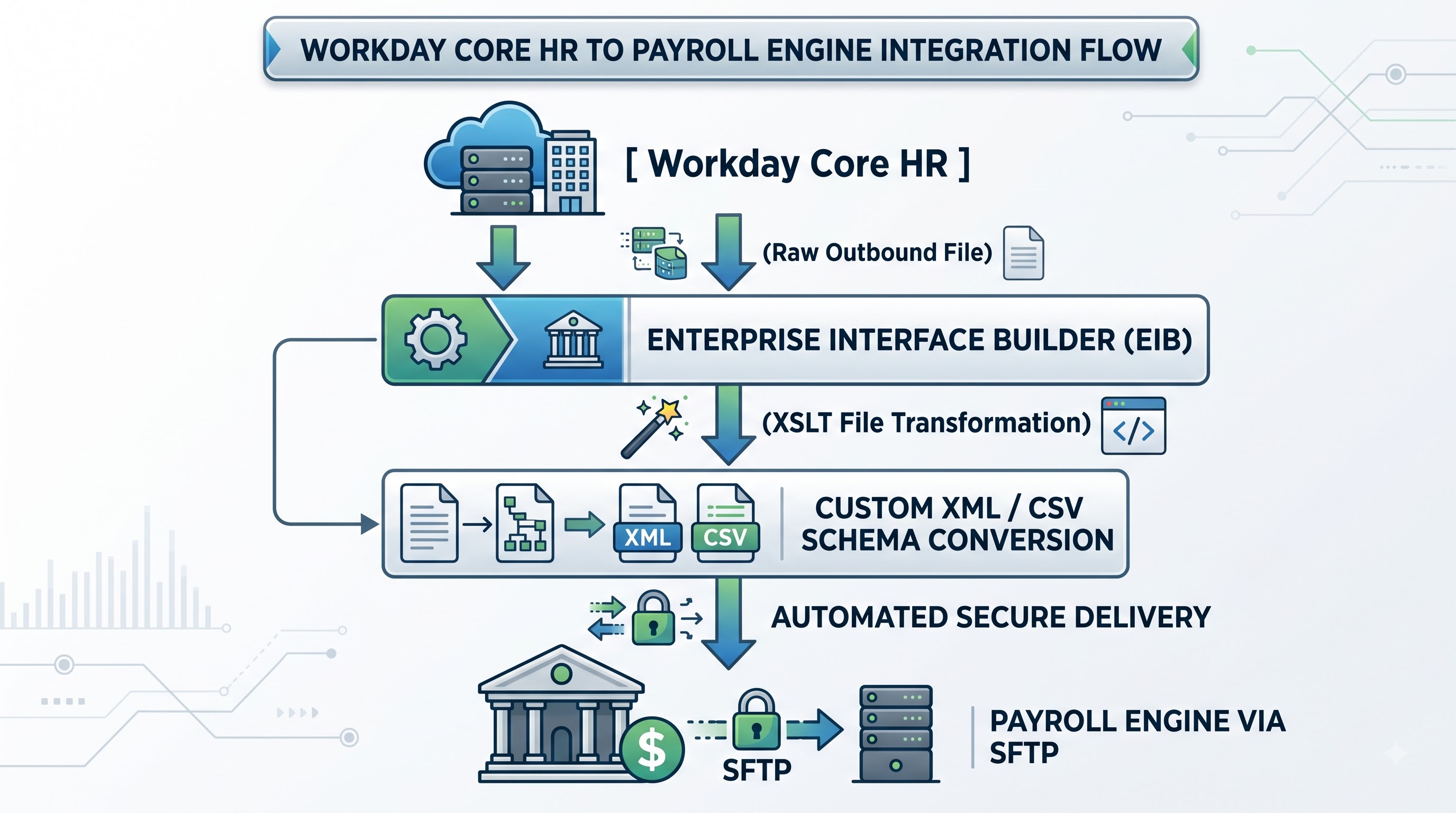
The technical team resolved this by configuring an automated inbound and outbound pipeline. Outbound data extractors pull changed records automatically, apply custom layout rules, and deliver clean files straight to the vendor's secure server. Meanwhile, inbound validation workflows handle incoming pay stub confirmations and pull updated figures back into the central HR dashboard without any human intervention. This change cut processing delays from days to minutes, stopped manual data leaks, and ensured every employee was paid accurately on time.
Real-World Application: Frictionless Global Onboarding
A global technology firm hires hundreds of software engineers, support staff, and sales reps every month across dozens of countries. The moments after a new hire signs their offer letter require a long chain of actions:
Generating corporate email addresses and login credentials in the main directory.
Ordering laptops and security keys via an external hardware vendor.
Enrolling the worker into health insurance, pension funds, and local perks.
Setting up default permissions in project boards and internal code repositories.
Doing this manually meant new employees spent their first week waiting for laptop deliveries and IT permissions. The HRIS team solved this by setting up event-driven web service triggers. Now, as soon as a manager marks a candidate as "Hired" inside Workday, background processes spring into action. The system pushes real-time messages to the IT directory, sends encrypted purchase requests to the hardware supplier, and pushes benefit enrollments to regional platforms. On their first day, every new employee logs in with a fully configured laptop and complete system access.
Understanding the Core Toolset
Building reliable data flows inside enterprise software relies on a specific set of tools and framework designs. Each component handles a distinct operational need, ranging from basic batch exports to complex multi-system transformations
Enterprise Interface Builder (EIB) Best used for bulk imports and single-source file exports. It features a simple UI-based setup with built-in SFTP and email routing, alongside support for custom XSLT transformations, making it a low to medium complexity option.
Core Connectors Designed for standard third-party vendor integrations such as payroll and benefits systems. It offers pre-built schema templates with automatic delta and change-log tracking at a medium level of technical complexity.
Document Transformation (DT) Ideal for reformatting complex data structures to match specific vendor requirements. Operating at a medium complexity level, it utilizes custom XSLT rules, string manipulation, and node filtering to reshape data payloads.
Workday Studio Built for heavy-duty, dynamic, and multi-endpoint processing tasks. This high-complexity tool provides an Eclipse-based Integrated Development Environment (IDE), enabling custom code execution and advanced message route management.
The Architecture of Modern Enterprise Data
Enterprise Interface Builder (EIB)
The Enterprise Interface Builder is the most widely used tool for handling batch data movements. It provides a straight-line setup that accepts a single input source, processes the payload, and sends it to a destination. Inbound EIBs let administrators upload spreadsheets to update worker profiles, salary structures, or organizational units in bulk. Outbound EIBs read data from custom reports and publish formatted documents like XML, JSON, or CSV to secure endpoints on a set schedule.
Document Transformation and Custom XSLT
Raw data extracted from a primary system rarely matches the format required by an external vendor. A health insurance company might require fixed-width text files with exact column positions, while a financial partner might demand encrypted XML payloads with custom header tags.
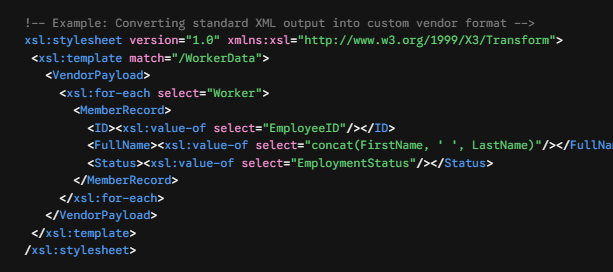
Developers use Extensible Stylesheet Language Transformations (XSLT) alongside Document Transformation modules to reformat these payloads. This layer strips out unnecessary data, changes date styles, converts values using clear rules, and ensures the output file meets the vendor's technical requirements before delivery.
Core Connectors and Change Detection
When managing worker records across massive enterprises, exporting the entire company database every single day wastes bandwidth and storage space. Core Connectors solve this using change detection mechanisms.
Instead of running full database dumps, these pre-built templates monitor system logs for specific changes—such as salary updates, job transfers, or address edits. When the integration executes, it extracts only the delta records modified since the last scheduled run. This approach reduces network load, speeds up system processing, and gives downstream systems real-time updates without heavy resource demands.
Web Services and Live API Execution
Modern business demands instant processing over nightly batch updates. Web services APIs allow corporate networks to query system records and submit transactions in real time. Using SOAP and REST standards, external applications can read job profiles, submit leave requests, or trigger business processes instantly. Security profiles govern these service operations, making sure external calls access only authorized data points while protecting sensitive personnel records.
Step-by-Step Implementation Guide
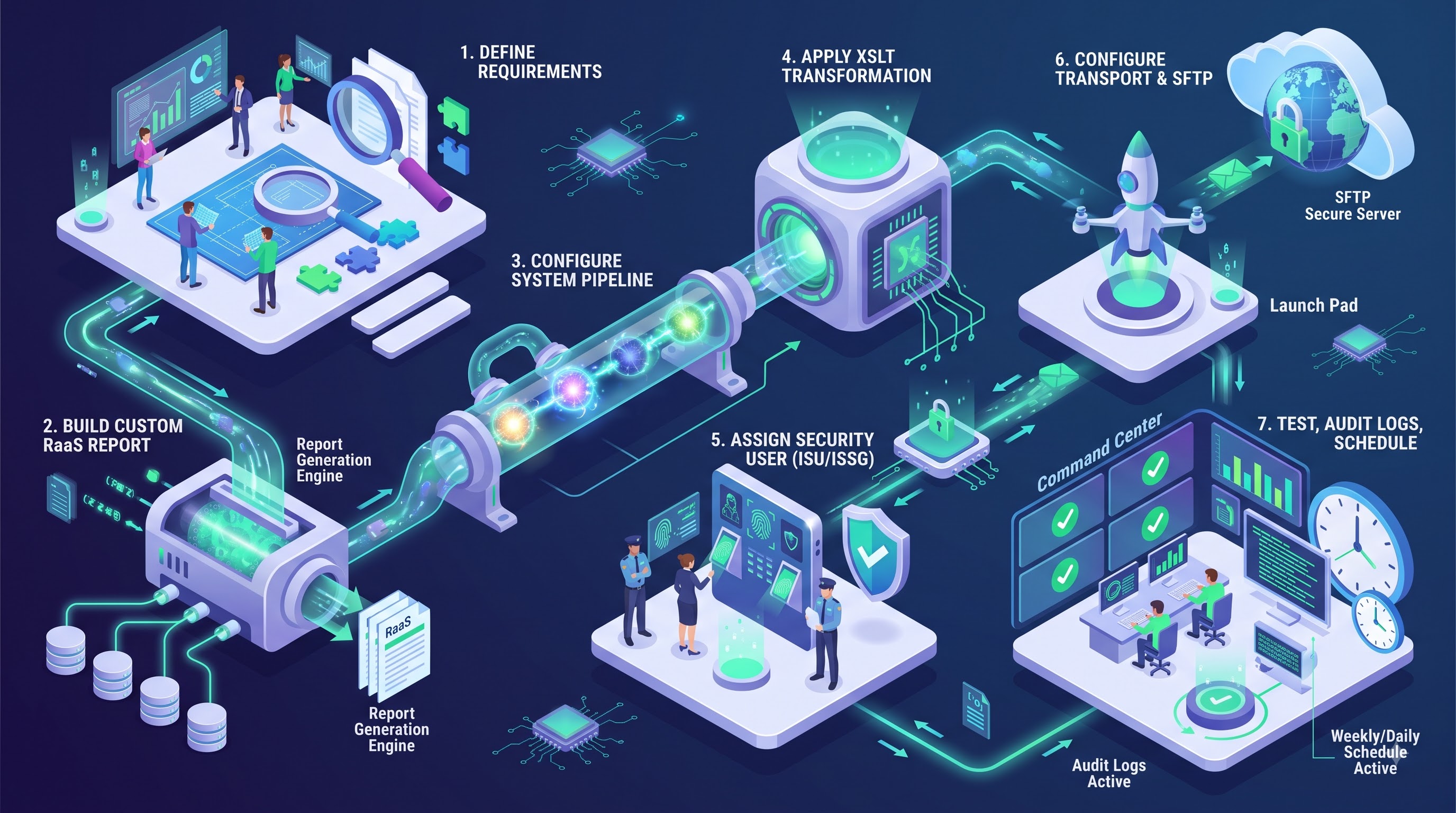
Setting up an outbound integration pipeline requires following structured deployment steps. Skipping validation checks or using incorrect security settings can lead to data leaks or delivery failures.
Define Business Needs and Schema Details
Map out every required field, data type, and transformation logic before touching the system configuration. Document the recipient’s server addresses, encryption specs, and delivery schedules.Build the Custom Data Source Report
Create an advanced report containing the necessary business objects and fields. Add calculated field logic to convert raw values—such as calculating ages from birth dates or combining first and last names into full-name strings. Expose this custom report as a Report-as-a-Service (RaaS) endpoint.Configure the Integration Pipeline
Set up the integration system using the appropriate template or builder tool. Connect the pipeline directly to the custom report data source.Apply Document Transformations
Attach custom XSLT style sheets to reformat the raw report output into the precise file format expected by the receiving vendor.Set Security and System User Accounts
Create a dedicated Integration System User (ISU) and assign it to an Integration System Security Group (ISSG). Grant minimum necessary permissions to the required domain security policies, keeping system credentials secure.Establish Secure Delivery Protocols
Set up transport settings using SFTP with SSH key authentication, HTTPS endpoints, or encrypted email channels. Configure PGP encryption keys if the payload contains sensitive personally identifiable information (PII).Run Tests, Audit Output, and Schedule Automations
Run manual test launches in non-production sandbox environments. Validate the output file against vendor specifications, check execution logs for warnings, and set the final automated delivery schedule.
Maintain and Optimize Data Pipelines
Once your automated pipeline goes live, continuous monitoring ensures long-term operational health and system performance. Gaining hands-on knowledge of workday learning integrations allows administrators to analyze error logs, fine-tune XSLT processing, and update custom reports whenever business requirements shift. Staying proactive with system maintenance prevents unexpected pipeline failures, protects sensitive corporate records, and keeps downstream platforms in total sync.
Career Impact and Enterprise Opportunities
As global organizations update their corporate software setups, demand for technical professionals who can link enterprise tools together continues to grow. Completing a structured workday integration course helps developers, HR analysts, and cloud administrators master these tools. Learning how to design automated, secure pipelines transforms team members from basic platform users into key architects capable of solving core technical challenges. Moving into system integration work changes your career trajectory. Instead of handling repetitive tasks or responding to daily support tickets, integration engineers design automated data flows that power entire organizations. Professionals with hands-on integration experience routinely take on high-visibility roles, leading complex software rollouts, managing vendor connectivity, and optimizing enterprise data pipelines.
As enterprise software systems become more interconnected, technical teams must move beyond simple manual uploads. Building skills in advanced system architecture allows specialists to handle complex data mapping, manage live APIs, and secure core corporate communications. Mastering these integration platforms helps technical professionals build efficient data pipelines that protect privacy, save operating costs, and accelerate organizational growth.
Conclusion: Unlocking Enterprise Potential Through Integration Mastery
Connecting cloud platforms with external software ecosystems is no longer just an IT operational requirement—it is a strategic business advantage. As organizations scale and diversify their technology stacks, the ability to build, secure, and maintain automated data pipelines determines how efficiently a business operates. Moving away from manual data entry and fragmented file transfers reduces error rates, protects sensitive personnel records, and keeps critical business operations like payroll and onboarding running without interruption.
For technical developers, HRIS specialists, and cloud architects, mastering these data flow mechanisms opens direct pathways to career advancement. By taking full ownership of enterprise data pipelines—from simple batch uploads to complex, real-time web service connections—you transition from maintaining software to actively shaping enterprise architecture. Investing in these technical skills ensures you remain an essential asset in an increasingly interconnected cloud environment.