
Mastering Workday Studio: The Complete Guide to Enterprise Integrations
Last updated on Aug 22, 2026
In contemporary enterprise resource planning environments, implementing quick and efficient data trading involved in human capital management, financial operations, payroll system, and third-party business models is necessary. In the realm of Workday, integration is the instrument that allows joining up transactional systems with third-party service providers or governmental organizations and in-house data lakes. Workday is equipped with a number of integration solutions varying in sophistication from the Enterprise Interface Builder and Core Connectors to Workday Studio.
The last mentioned has the distinctive feature of being the most developed and flexible integration development environment from the Workday family. Workday Studio is a client-based integrated development platform based on Eclipse that provides architects and developers with numerous opportunities to create, check, debug, and deploy difficult volume-producing integration models. In contrast to other integration tools that are restricted to uncomplicated exporting of data files or their imports, Workday Studio has been designed to cope with complex business logic, numerous data transformation processes, complicated branching means for error correction, as well as massive processing of data.
The Architectural Basics and Main Principles
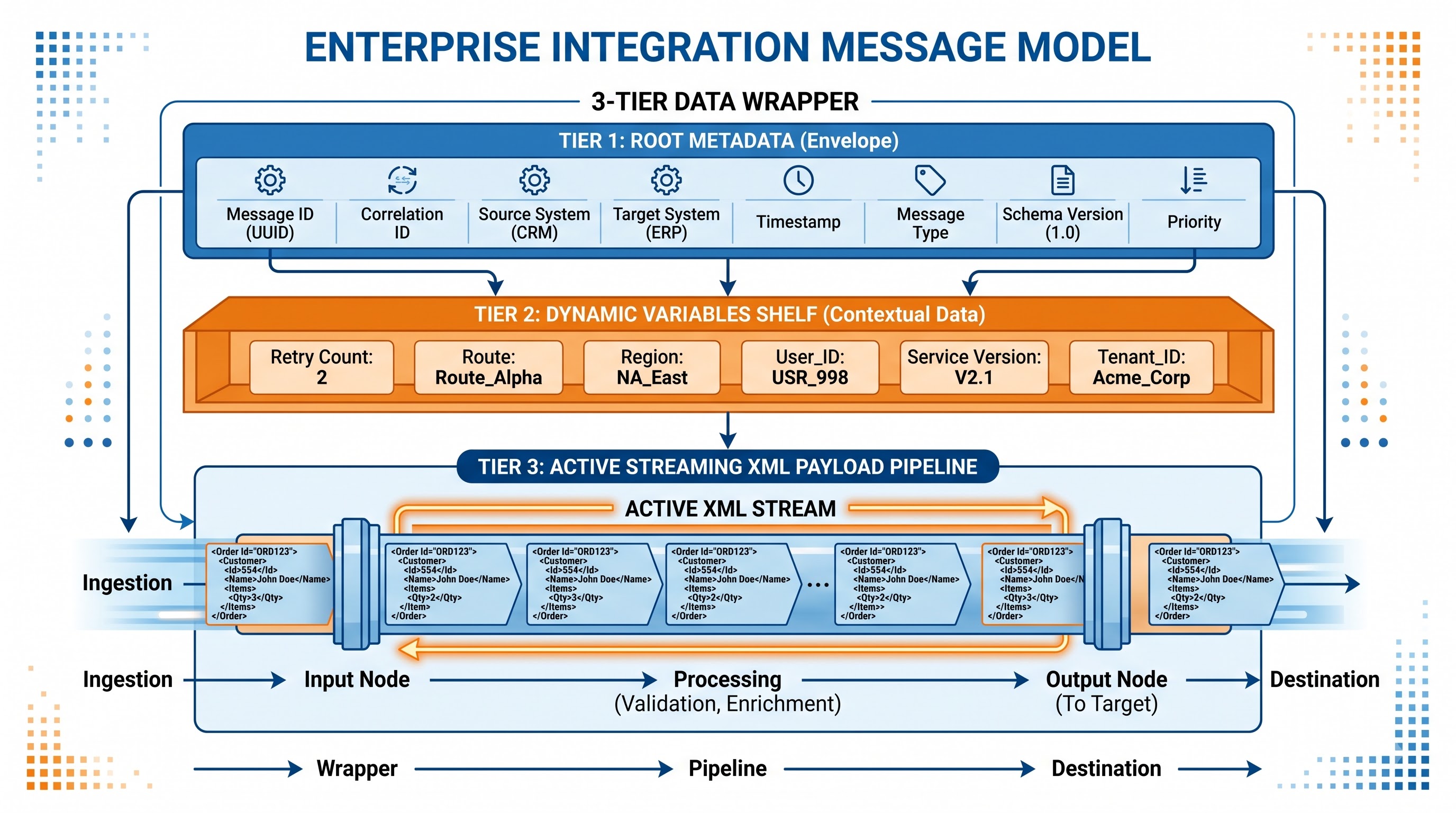
To comprehend how Workday Studio operates, we must familiarize ourselves with the underlying architectural principles of its messaging-getting engine and processing mechanism.
Framework Based on Messages
Fundamentally, what makes the Workday Studio work is the asynchronous message-driven method of processing the information. Each message starts from an ‘event’ or a ‘trigger’, makes the input be transformed into the message wrapper, and processes it while going through the so-called processing components or mediators.
An integration message consists of three distinct layers:
The Root Message: Encompasses the data about the integration execution instance and the results of the integration.
The Message Variables and Properties: Key-value pairs that hold various kinds of information relevant to execution of the message, token authentication etc.
The Message Content: The message payload passing through the message processing pipeline, whether it is an XML stream, JSON object, binary file, CSV string etc.
Component-Based Architecture
Workday Studio uses a visual assembly method based on standard enterprise integration patterns. The programmer has to organize tasks by linking different building components that provide distinct functions.
Inbound Endpoints: The tools that trigger the process, such as scheduled events, web service receivers, or signal sources.
Mediators: The operations that convert, filter, improve, validate, or split packages.
Outbound End Points: The layers that send information to outside endpoints through such means as SFTP, AS2, HTTP, and the rest.
Error Handlers: The units that catch mistakes, handle them, generate notifications and help make the process complete in a proper way.
Comparative Analysis of Workday Integration Tools
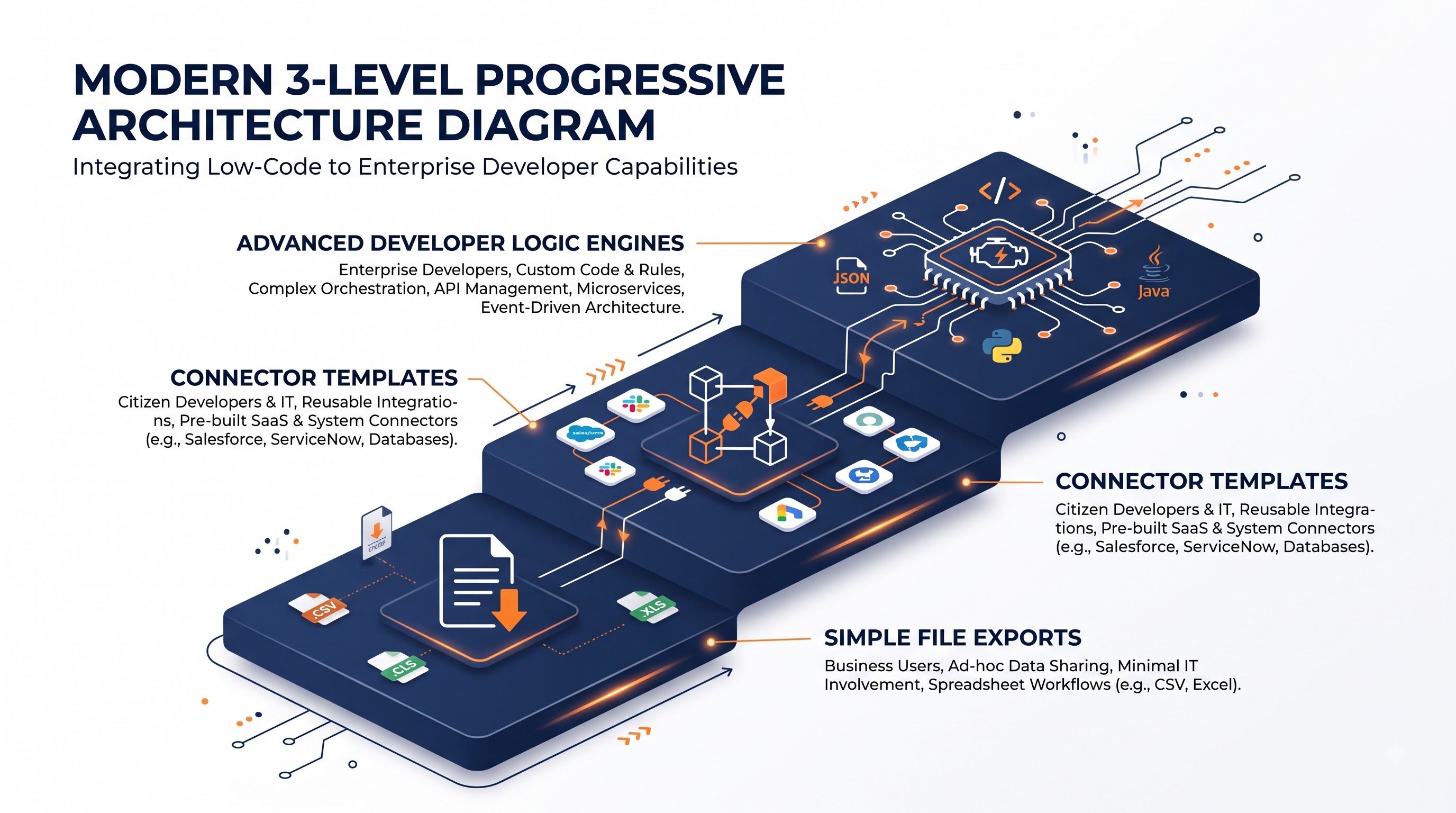
The understanding of Workday Studio as a part of the company architecture appears due to the comparison with other usual methods of Workday integration.
Enterprise Interface Builder
Enterprise Interface Builder is an online, no-code/low-code application offered within the Workday interface – helping users with simple data imports and exports. The application can produce both custom reports and data inputs from templates.
Pros: It is easy to configure, accessible from any device, and does not require long-time maintenance.
Cons: It can only pull data from one source, perform one transformation, and use one protocol. Core Connectors and Document Transformation
Core Connectors work as plug-and-play templates from Workday for working with popular vendors for payroll processing, benefits offering and contract document checking. Document Transformation works as an intermediate system for transferring XML to XML/text using XML stylesheets.
Pros: There are processes to track date changes and to apply pre-defined schemas and changes from vendors.
Cons: There is a need to use specific schemas.
Workday Studio
When an integration improves to the point of eclipsing the abilities of either Enterprise Interface Builder or Connectors, Workday Studio comes to the forefront.
Pros: Ability to deal with multiple sources of information in one workflow; use streaming technology for processing huge amounts of information; support complicated multi-path processes; call upon REST and SOAP web services flexibly; organize simultaneous execution; capable of good technical services.
Cons: Involves the need for skilled personnel and a greater cost of development and upkeep compared with other tools; needs technical solutions to be set up on client side, and several tests to be done.
Many professionals eager to showcase their skills in architecture through these tools often pursue a full-day workday studio certification course that can be obtained from various institutions, such as OnlineITGuru which proves the individual’s complete knowledge of enterprise integration development.
Important Cases Requiring Workday Studio
Workday Studio is usually utilized by businesses in some technical and commercial scenarios:
Merging Data From Multiple Sources: Cases involving integrations which need to obtain data obtained from a Workday-customized report, request data from an external REST API to get more information about the employees, and perform checks in the corporate database.
Endless Data Flow: Cases which consist of huge sets of data such as entries in the global payroll, files related to the annual enrollment of employees or reports of the workers’ history during the period when the whole data set can be uploaded into the memory of the server.
Sophisticated Custom Logic and Branching: Integrations that must undergo long conditional trees analysis, perform loops, count tax deductions, or use various methods of moving data depending on the geographical area where the company works.
Specific Cryptography and Forms of Transport: Integrations that use exclusive approaches of PGP key implementation, electronic signatures, AS2 protocols that support automatic notifications, or certificates for mutual TLS.
Bidirectional Coordination: Cases that imply receiving data, transferring it to another system, waiting for confirmation, analyzing the occurrences of failures in the past, and re-uploading it to Workday through the web.
The Studio Component Ecosystem
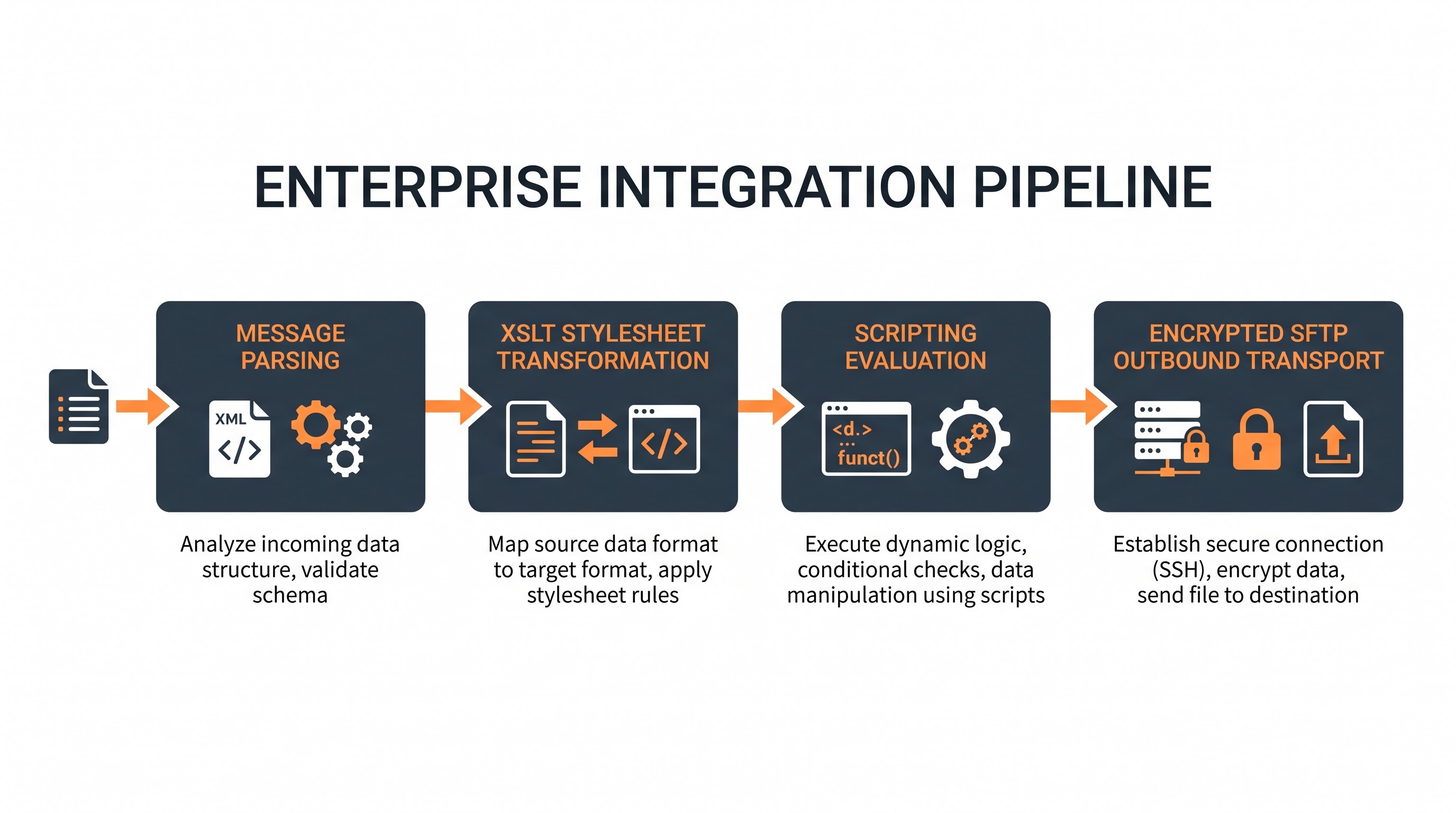
The Workday Studio has a rich selection of components that can be defined as the puzzle pieces of the integration architecture.
The role of the Transport components is to ensure how the data is transferred into and out of the Workday Studio pipeline.
The Workday Inbound and Outbound Mediators establish a direct communication channel with Workday services, providing both Report as a Service calls and standard HR and Finance operations.
The Outbound HTTP/REST transport sends GET, POST, PUT, DELETE, and PATCH requests to external cloud applications, performing request transformation and allowing for sending headers, query parameters, and multi-part attachments.
The core of the Async-FTP and SFTP transport is the connection to remote FTP servers to deliver files in batch, supporting customer SSH keys, directory navigation, and renaming.
The role of JMS and Event mediators is to enqueue and dequeue the messages to create the event-based architecture of the system.
Movements and Content Intermediaries
One of the main objectives of integration development is payload manipulation.
XSLT Mediator: Performs Extensible Stylesheet Language Transformations for conversion of XML payloads to many other forms of XML, flat text files, CSV file formats, fixed width files, or HTML.
JSON-to-XML and XML-to-JOSN Mediators: Automatically convert simple web payloads into structured XML trees, or vice versa.
Text-to-XML and XML-to-Text Mediators: Parse delimited, positional flat legacy files into structured XML nodes, or convert structured XML documents into legacy format.
Base64 and Compression Mediators: Encode, decode, compress (ZIP, GZIP), and decompress messages, documents, and payloads.
Flow Control and Routing Mediators
The components responsible for control carry out the execution paths as well as maintain the state of an assembly.
Mediators for Routing/Choosing: This describes a method that allows the user to route messages in accordance with business rules through the utilization of XPath or Boolean expressions.
Splitting and Aggregation Mediators: This refers to a process whereby a big XML document is broken into smaller records, which are processed simultaneously and merged into the new document.
Mediators for Iterating and Looping: Here, the mediators operate through all the objects, employing the sub-gateways for them and ensuring the execution properties remain unchanged.
Parallel Processing Mediators: This refers to the operation of independent tasks simultaneously in different threads.
Logic Mediators and Enrichment
Custom Scripting Mediators: These enable software developers to execute the small scripts written in Groovy and MVEL languages for math calculations, string manipulations, array processing, logic operation.
Storing and Retrieving Mediators: They work for keeping temporary variables in the disk and retrieve them later when necessary.
Properties and Parameters Mediators: They provide for the possibility and way of getting access to variables and their value at the moment of execution.
Memory Management and Streaming Structure
Memory management is one of the essential things about Workday Studio development in enterprises. Integrations can face the loss of their allocated heap memory due to the processing and dealing with lots of records.
DOM Processing vs. Streaming Processing
In the case of Document Object Model (DOM) processing, everything is loaded in memory as XML or JSON payload, forming a hierarchical tree. Anything processed by DOM is easy to access via any XPath query, and the expenses for memory usage in this case grow linearly with the increase of file sizes. Once the files are more than tens of mb, it is probable that out-of-memory Exceptions will be given.
To prevent this from happening, Workday Studio comes with a streaming architecture:
Streaming Mediators - Components that are responsible for byte by byte or node by node processing.
Streaming Splitter – Processes large XML streams, cutting pieces of them in the process.
Streaming XSLT – Allows the processing of certain repeating child nodes and clearing the memory after processing each of them.
Recommendations for Efficient Resource Management
Utilize streaming-compatible components when processing batch files that may have an unpredicted number of records.
Transfer large temporary files into disk storage instead of keeping them in message properties in memory.
Do not make complicated, deep XPath queries over big documents that do not use indexing.
Use the variables and properties holding large data immediately after their use in order to free their memory.
Performance Improvement and High Volume Architecture
High performance in the Workday system requires advanced architectural patterns that allow reducing delays, minimizing CPU usage, and improving input and output bottlenecks.
Optimizing Calls to the Web Service and Pagination
Repeated web service calls across the thousands of worker records generate significant network latency that can overwhelm system rate limits. Production integration uses technology solutions to solve this problem by means of bulk queries and automated pagination. Instead of sending point-to-point calls to web services for every employee record, architect specialists plan the flows in such a way as to allow batch retrieval via the indexing process. Furthermore, when transferring information back to Workday, using batch import web services simplifies the process of information handling in terms of session cost.
Asynchronous Execution and Parallel Processing
When the data needs to be sent to various targets (an inner data lake, archival compliance, and a vendor), its sequential delivery results in increased time consumption. Using parallel processing means that the outgoing stream can be split into several parallel threads, which will run the task in parallel. Every thread has its own path, individual transport settings, and a set of retry rules.
Security, Authentication, and Cryptography
Integrations carry out transactions that involve sensitive corporate data like personal identification information, payroll specifics, compensation structure, and credentials of the executives. Workday Studio has strict security protocols.
Authentication Mechanisms
Integration System Users and Security Groups: The integration system uses dedicated service accounts to authenticate against Workday while employing least-privilege security protocols that restrict access to only given data fields and web service operations.
OAuth 2.0 and OpenID Connect: The integrations that make use of modern REST APIs like Salesforce, ServiceNow, or Azure automatically perform token creation, token refresh life cycles, and bearer authentication headers.
Mutual TLS (mTLS): The studio incorporates client-side certificates setup and verification in order to create mutual security trust in the environment with high security levels.
Data Protection and Encryption
PGP / GPG Encryption: Studio integrates PGP encryption and decryption components, thus facilitating the secure encryption of files with third-party public keys prior to their transfer via SFTP or storage in intermediary repositories.
Digital Signatures: Payloads can be digitally signed, ensuring data integrity and non-repudiation among enterprise systems.
Data Masking in Logs: Developers are required to configure audit logs and integration run histories so that sensitive personal information, social security numbers, banking details, and passwords are sanitized.
Error Management, Logging and Monitoring
An integration can be termed as production-ready not only based on its efficiency during successful runs but also based on how well it deals with errors.
Hierarchy of Error Management
Workday Studio offers a type of error management system involving multiple levels:
Local Catch Handlers: Used for specific components to catch specific errors (e.g. errors for failure of HTTP connection) and try to apply fallback logic and retry as needed.
Sub-Assembly Error Handlers: Used to catch errors that occur in any part of a functional module.
Global error handler: The overarching system for the integration assembly, making sure that all errors are logged, notifying users, changing the status of the integration launch event to either an error or warning state.
Automated Reconciliation, Alerting, and Self-healing
Multipurpose enterprise workflows have automation processes to alert and escalate incidents. In a case of a temporary transport error, for instance, the Studio assemblies have automated intervals of interventions before raising an alarm for a fatal error. During a failure that results in significant business error, such as wrong national identifier or code of cost center, records with failed executions are switched to a unique reconciliation file that is sent to people responsible for HR and payroll activities.
The Workday Log and the Cloud Logging Framework
The Workday auditing and reporting subsystem is tightly coupled with the Workday Studio:
Workday Integration logs entail structured logging messages that integrations can place directly in the Workday database. Three logging levels are implemented - Info, Warning, Error, and Critical.
Delivery Files and Attachments come in handy for integration to create error reporting or reconciliation files and attach them to the Integration event for operations managers’ usage.
Integration Events are recorded every time the Studio is executed whereby data such as time of execution, duration, user kicks, and executed records are defined every time the Studio runs.
Enterprise Governance, Version Control, and CI/CD
Carrying out integration processes in Workday Studio in huge numbers and in many environments requires implementation of the principles from software engineering and source code management.
Source Control Integration
Since Workday Studio projects utilize basic XML assembly files, unique scripts, XSLT definitions, and schema mappings, they can be stored in business version control repositories like Git, GitHub, GitLab, or Bitbucket. Teams need to make regular feature branches, perform peer code reviews for integration updates, and supervise release tags that reflect production releases. The repository-based procedure grants total transparency of past changes, makes rollback much easier, and keeps the team from interfering with changes being done at the same time.
Automated Testing and Deployment Automation
Enterprise integration procedures usually include use of automated testing systems for checking Studio modules prior to tenant migration. Developers are able to create mock data injection points and testing systems in the local environment to check algorithms, transformation, and scripts implementation without utilizing real tenant endpoints. In addition, deployment automation methods and migration systems can facilitate proper assembling of developed Studio archives and ensure systematic deployment to Development, Implementation, Sandbox, and Production tenants, fulfilling all compliance and audit requirements.
Lifecycle of development and process of deployment based on the development of integration using Workday Studio
The software application development process used by the developers starts with workday studio download and setting up the Eclipse development environment with the right applications of Workday. The tools include:
Visual Assembly Canvas: Is known to be a graphical designer that is used to set up the flow of components and their configurations.
Workday Schema Explorer: Provides developers the ability to analyze web service definition language schemas, dictionaries of metadata, and definitions of custom reports from within the interface.
Local Test Environment: Gives developers the opportunity to conduct assembly tests on the corresponding sandbox client either using dummy payloads or directly calling web services.
Breakpoints and Variable Inspection: Allows developers to review the objects of the message, evaluate variables, and observe the efficiency of components.
Deployment and Packaging
The integration is bundled in a compressed archive (.cla file) after being constructed and tested in a local setup before being deposited into the Workday tenant.
Integration System Definition: This describes an administrative entity in Workday that associates the Studio package with tenant configuration attributes, users who have permissions to use the integration and schedule intervals.
Integration System Attributes and Maps: This feature enables the functional administrators to change configurations, like target URLs, SFTP paths and organization mapping codes, without changing the Studio package by directly accessing the Workday web interface.
Tenant Migration Pipeline: It uses the Workday standard migration techniques to migrate the integration definitions from Development to Sandbox and Production versions.
Importance and Future Direction
Workday Studio is the main integration technology that is used by companies with complex enterprise ecosystems. Attempting to fill the gap between Workday’s consolidated cloud architecture and traditional on premises system, custom-built data warehouses and specific third-party companies, Workday Studio offers enough flexibility for enterprise developers to meet any integration needs that they might have.
With cloud system designs leaning toward microservices-driven events, REST-based interaction, and API-based communications, Workday Studio can provide more ability to connect various components, playing the role of the core component for enterprise-wide data transfer.
In case developers wish to gain experience in the Workday ecosystem or prepare for any technical evaluations, getting familiar with the architecture-related questions in a real-life context and the workday studio interview questions from OnlineITGuru will help them understand integration knowledge on a theoretical level as well as imply its use in practice. To succeed in utilizing Workday Studio, it is necessary to learn about integration architecture design, basics of XML/web services, data streaming, security issues, and business objects.