
Modernizing Software Delivery: The Complete Guide to Azure DevOps
Last updated on Sep 3, 2026
Azure DevOps is an extensive, web-based suite of software development and collaboration tools created by Microsoft. Its goal is to enable the teams in charge of engineering, operations, quality control, and project management to collaborate during the whole application development process. The platform integrates the stages of modern digital production starting from the idea generation and needs identification, code writing, integration and delivery to testing and monitoring of functions. The goal of Azure DevOps is to eliminate the barriers existing between different departments, reduce the number of operations, automate tasks, and minimize the process of transforming ideas into something useful for customers.
History of Microsoft Developer Tools
To understand the main idea of Azure DevOps, it is necessary to find out more about the long history of Microsoft’s developer platform. During the early 2000s, software development was disorganized. Organizations used different file-sharing solutions, unique systems for tracking versions, independent management systems, and ordinary checklists for software release. Microsoft launched Visual Studio Team System in 2005 that developed into Team Foundation Server or TFS.
TFS used to be a colossal piece of software. It had to work on powerful servers, Windows Server systems, Microsoft SQL Server, and required scrupulous service. TFS allowed unprecedented traceability of work items in the source + code increment but was associated with a lot of operation costs and slow upgrades. Version control was implemented through a centralized system - Team Foundation Version Control, thus keeping a continuous network connection necessary for performing any action like branching or committing.
With the development of the IT industry, Microsoft changed its strategy and started offering the TFS service in the cloud, first as Team Foundation Service and later as Visual Studio Online and Visual Studio Team Services that were free from the need to manage hardware, update OS, or back up data.
Late in 2018, Microsoft revamped this platform and branded it as Azure DevOps. This rebranding was not only a logo change; it was a change in technology direction toward modularity. Microsoft did not make it a one-size-fits-all mechanism. Instead, Microsoft offered many separate pieces that could operate in tandem with each other and in combination with third-party applications. At the same time, Microsoft still provided its on-premise version of the product called Azure DevOps Server. Thus, organizations that operate in a heavily regulated environment can take advantage of the same set of features.
DevOps Philosophy and Cultural Context
Cutting-edge technology alone cannot guarantee agility. It is the cultural movement of DevOps that seeks to eliminate the friction that usually exists between the teams of developers and operations. Developers have an incentive to innovate as they need to introduce new features to meet ever-changing customer needs. However, the operations team is motivated to keep the system intact and dependable, making the operations team resistant to innovations.
Azure DevOps solves this problem by establishing shared responsibility, transparency, and automation. Quality gates, security regulations, and automated delivery pipelines are embedded into version control and issue tracking tools, making development and operations two different stages of the flow and not a few separate ones.
The key ideas expressed in the platform are continuous learning, breaking big batches of deliverables down into smaller ones, automation of feedback loops, and overall awareness. The idea of breaking a huge annual release into bi-weekly components minimizes possible risks associated with a release.
Architectural Foundations and Governance Models
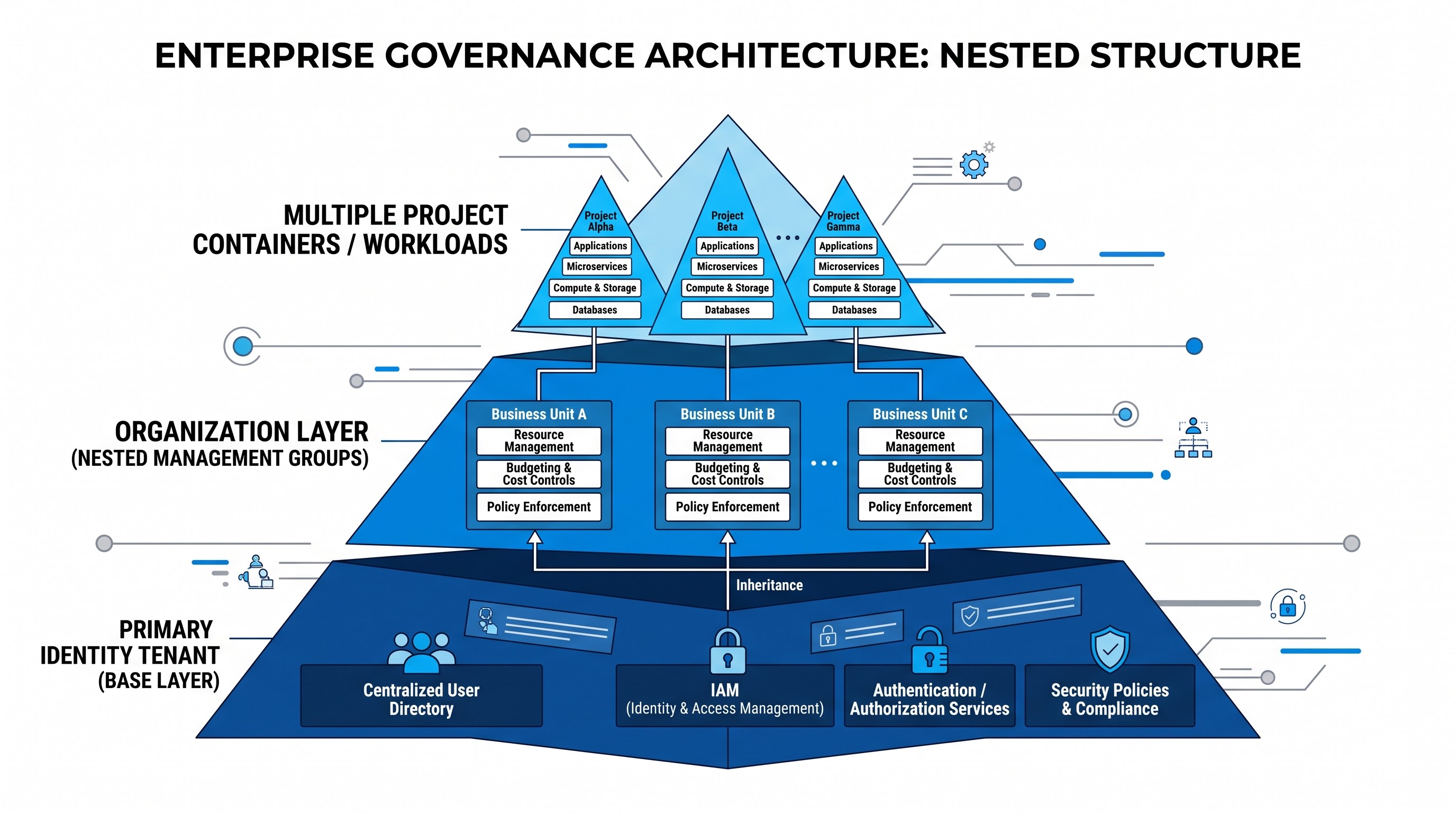
Azure DevOps is based on a well-defined hierarchical system that supports small companies to achieve the status of a large corporation where thousands of people are employed for different roles in an organization. It is therefore not surprising that specialists looking for azure devops training online devote a lot of energy to learning the architectural ideas and governance models that enable them to efficiently manage the responsibilities of a big enterprise.
The highest hierarchy level is the Organization, which acts as the core tenant limit for various customers. The organization is based on Microsoft Entra identity tenant and provides a single security limit, centralized invoicing, and an environment for shared extensions. Various Projects are created under each Organization by administrators. Each Project is an isolated working environment of all its repositories, backlogs, pipelines, boards, and building materials.
The authority is managed within enterprise level role-based schema, and various Identity providers are responsible for it. Various administrators can create security groups and map them to directory groups so that all rules of least privilege are followed throughout all parts of the system. Permissions may specify what person may access the information regarding work item definitions, who may commit in the certain branches, who is allowed to approve releases, and who can view the sensitive environment variables related to the building process.
Behind the user interface, there is a distributed, multi-tenant cloud infrastructure controlled by Microsoft. It provides features such as automatic scaling, global redundancy, data encryption while data is at rest and during transmission, and continuous upgrades of the platform that allow the introduction of new features without service interruptions.
Core components of the service
Azure DevOps comprises five main services and a large marketplace of extensions and administrative tools.
Azure Boards: Agile planning and tracking of the work
Azure Boards is the collaborative tracking system of the platform and provides insight into project progress, resource allocation, and backlog status to product owners, business analysts, developers, and scrum masters.
The service supports different agile methodologies like Basic, Agile, and Scrum. Organizations can also tailor their own processes with different types of tasks, transitions, custom parameters, and automated workflows.
The tracking of tasks is done following a classified hierarchy of various work item types, including Epic, Feature, User Story, Backlog Items of product, Task and Bug. The interactions with such data is done via various Kanban boards, sprint backlogs, task boards and query builders.
Kanban boards have multiple visual status columns portraying the development process. Teams may set the Work-in-work limits aiming to eliminate bottlenecks, emphasize clear policies regarding cards transition from one column to another or enable cumulative flow diagram tracing the cycle and lead times.
Azure Boards work concurrently with other elements of the system. The developer may connect a task to a Git branch, check particular code commits depending on a bug, trace the concrete pipeline build and somebody’s production pallet created for a bug fix. The tracking of the items from A to Z satisfies requirements for compliance and audit.
Azure Repos: A Tool for Version Management and Teamwork
Azure Repos has strong security and provides a platform for online version management. However, a number of its products still support the use of traditional Team Foundation Version Control technology.
The Git functionality of Azure Repos allows creating an unlimited quantity of public and private repositories in addition to ensuring capacity for current needs. The use of Git makes it possible to employ a variety of command-line tools as well as software applications for data analysis and Integrated Development Environment (IDE) such as Visual Studio.
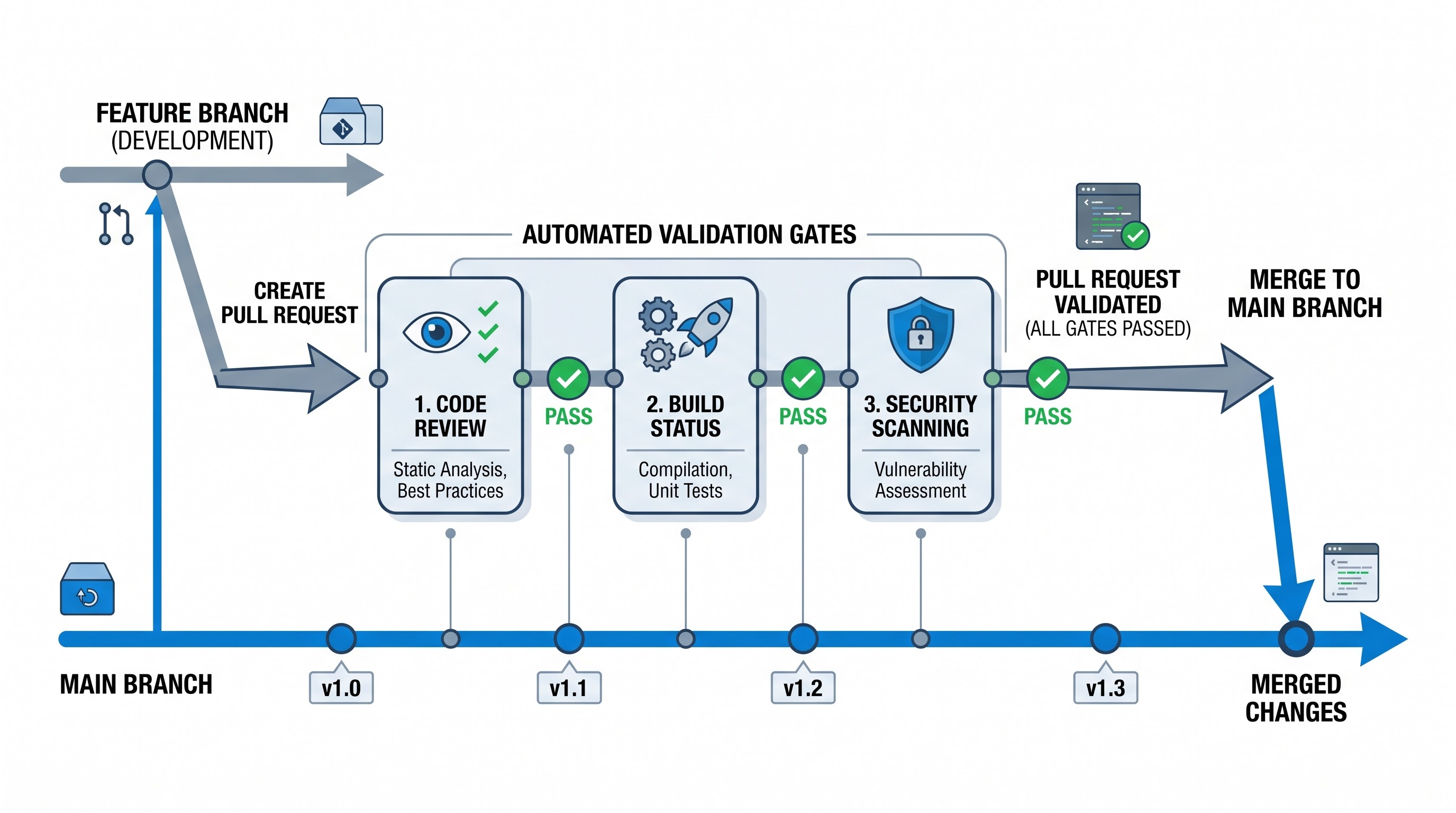
The tool enables team cooperation through the use of pull requests. The pull requests are special review stages in which the team members examine the code and offer corrections and improvements.
Imposing a required minimum threshold of approvals from peers before proceeding with merging.
Requiring a connection between work items that ensures that all amendments correlate with an approved requirement.
Preventing the merging process until the CI builds yield successful results.
Ensuring that the outcome of the analysis report from the automatic tool is efficient and free from any violations.
Issuing a reminder to resolve any comments in the code in order to prevent incorrect feedback being ignored.
In order to cope with the problem of storing many binary resources in enterprise repos, Azure Repos uses Git LFS which transfers big files to special storage but keeps simple references in the Git system.
Azure Pipelines: Integrated Continuous Delivery and Continuous Integration
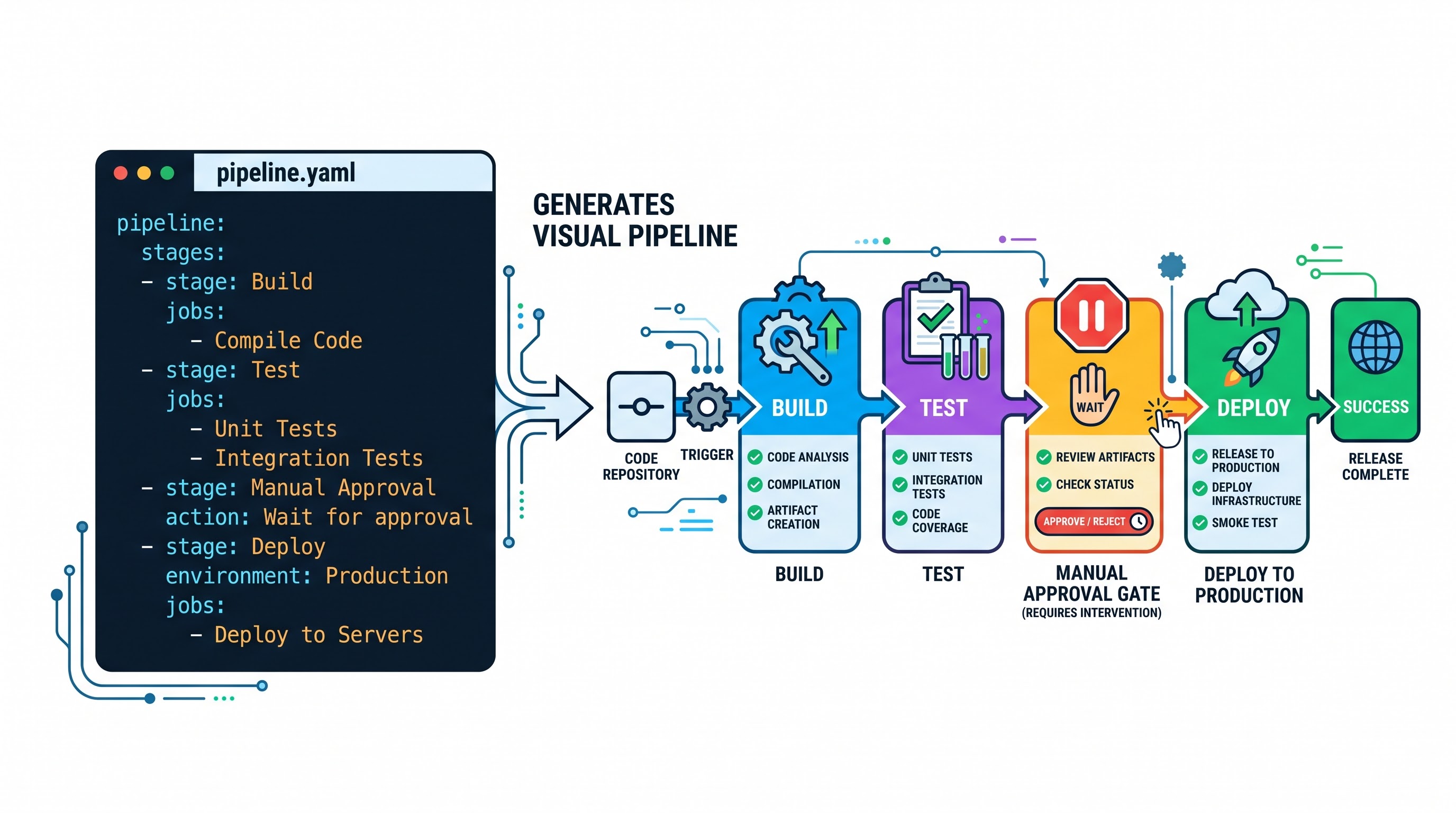
The Azure Pipelines feature is a tool that helps automate processes across many platforms and operating systems. It helps to automate the process of obtaining source code, building binaries, running test procedures, running static analysis, as well as packaging artifacts and deploying them to target environments.
Pipelines use two main paradigms of implementation. The first is a well-known definition of the so-called declarative pipeline in the form of some text documents and the second is an older pipeline defined visually and managed via web interface.
The key idea of the declarative configuration is that you can keep automation definitions as versioned software units along with source code.
The structure of pipelines consists of several logical blocks called stages, jobs, and steps:
What is a step? A step is the fundamental work unit, for instance, running an operating system script, running a test harness, or calling a task plugin.
What is a job? A job is an execution unit containing the ordered steps assigned to a specific agent machine. A job can run in sequence or in parallel on multiple agents.
What is a stage? A stage is a logical part of the software development process, for example, Build, Unit Test, Integration Test, Staging, and Production. A stage may include manual approval gates, health checks, or depend on trigger conditions.
Procurement of the resources for deployment is performed with the assistance of the build agents. The agent pools provided by Microsoft are hosted in the cloud and come with up-to-date operating systems, applications, and libraries ready to use in Linux and Windows. Hosted agents operate and are removed when the job they executed is finished, providing a clean execution environment. If a company needs to maintain an on-premises infrastructure with specific networking requirements, hardware accelerators, and proprietary software licenses, it can deploy self-hosted agents which would cover such needs.
Azure Pipelines works with all platforms and offers many services that meet the needs of Microsoft Azure as well as other cloud providers like Amazon AWS, Google Cloud Platform, bare-metal datacenters, virtual server centers, serverless platforms and container management platforms (Kubernetes). The configuration is quite complicated as automation in mixed environments requires a lot of practical knowledge, thus taking an azure devops course online with labs will help in configuring the pipelines quickly.
Azure Test Plans: Quality Assurance and Manual Testing
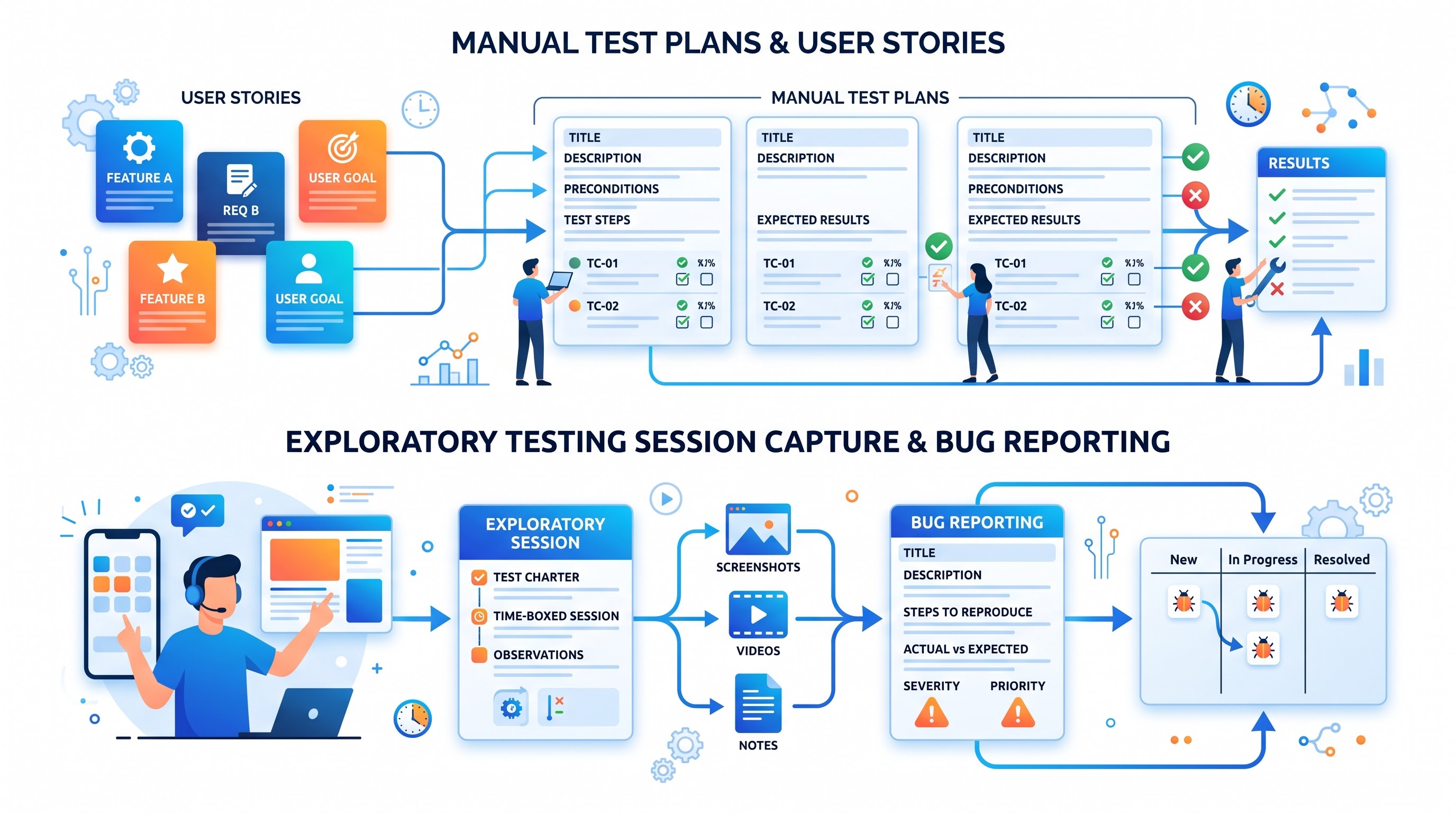
Automation has taken the top spot in the growth process, particularly regarding automated testing and CI pipelines. But in the case of complex business applications, another type of testing needs to be included, which is planned, exploratory, user acceptance testing, and ad-hoc or manual verification. To provide testing QA for many companies, Azure Test Plans gives users excellent management tools specifically for QA teams. A person taking an azure devops online course for QA and DevOps engineers learns how to add manual testing to automation.
Thus, the quality control process is organized through the following schemes:
Test Plans structure quality assurance in accordance with the specification of goals and location where testing will take place.
Test Suites group tests available either in a static way or through the predefined requirements set.
Test Cases describe necessary requirements and testing process steps in the correct order.
In manual testing, test engineers can utilize either the test runner or browser plugin to run tests and also record how the test was executed, create screenshots, pinpoint problems visually, and store videos. Whenever a defect is found, the runner automatically generates a bug report where all steps for reproducing the bug would be written and all technical details like system specifications and diagnostic information would be provided.
Azure Test Plans also enable exploratory testing sessions where testers can observe applications in an unstructured way without following a strict script but at the same time collecting telemetry data and logging events automatically.
Azure Artifacts: The universal package management
In modern software engineering, modularity is of great importance. Azure Artifacts is a package management solution that allows teams developing software to create their own internal package feed and share the packages with others.
The system natively accommodates the traditional package ecosystems: NuGet for .NET frameworks; npm for JavaScript and TypeScript; Maven and Gradle for Java ecosystem; pip and twine for Python; and universal packages for various file types, runtime executables, and assemblies.
Azure Artifacts operates like a security-verified internal package repository allowing teams to disseminate shared business logic, avoiding exposure of proprietary information through public registries. This is realized through an upstream sources mechanism that routes queries to public registries such as npmjs or NuGet Gallery. In case of any external dependency request, Azure Artifacts saves a replica on its territory which minimizes the impact of issues with public registries on build processes, protects from unpredicted changes from third-party libraries, and offers protection from hacking.
Package feeds can be made secure by means of role-based access control yielding a possibility to make them widely - yet not uncontrollably - consumed by the enterprise.
Extensibility, Marketplace, and Third-Party Integrations
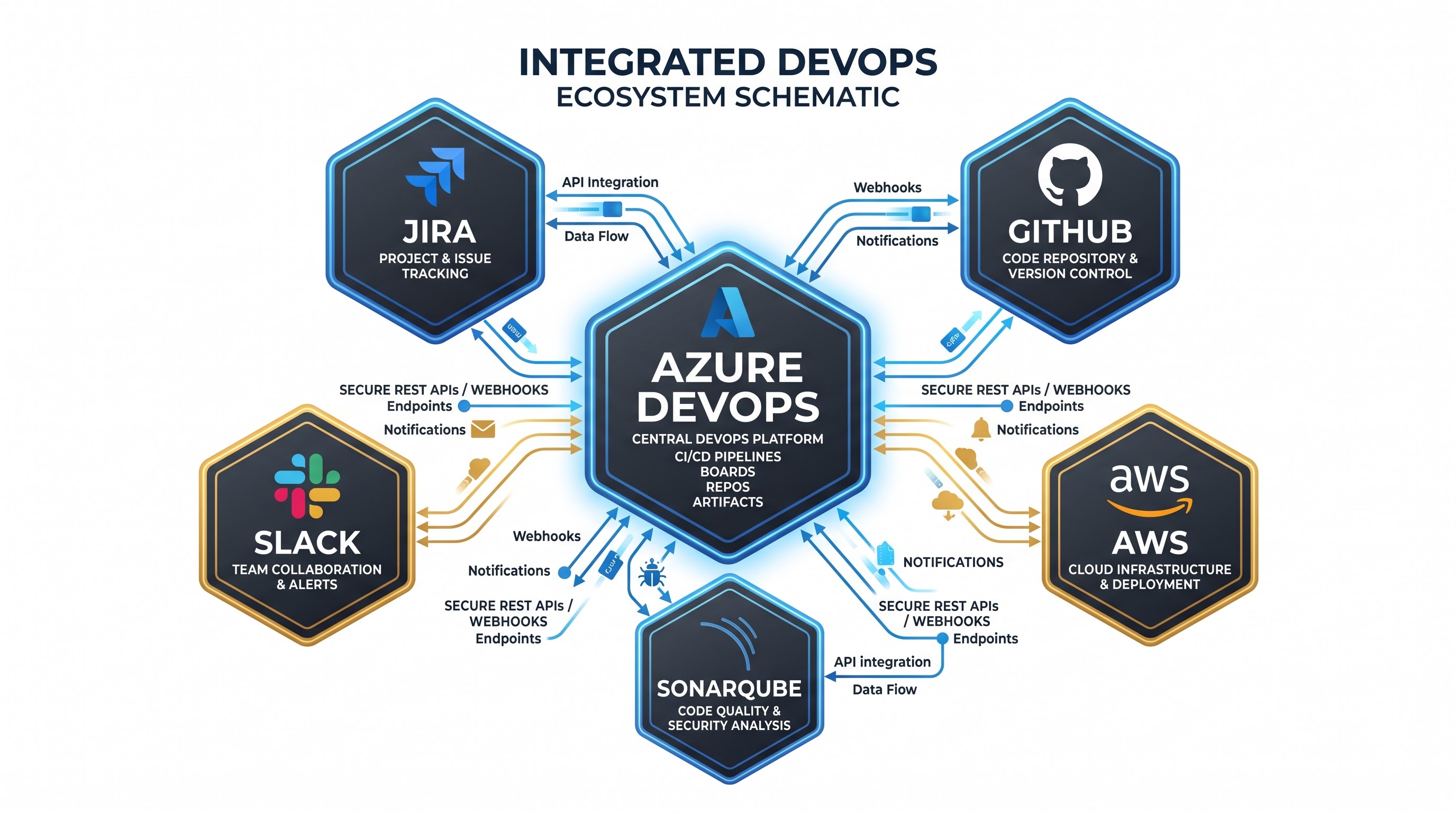
Azure DevOps may have a full range of native features, but it was specifically designed to be an open platform, free of the constraints that come with any kind of vendor lock-in.
The Azure DevOps Marketplace includes thousands of commercial, open-source, and community-created integrations that add different features within the core platform. These include custom pipeline tasks, customized boards, dashboards, compliance checks, and reports.
The easy-to-use REST APIs let you perform every action from the web interface via automated scripts. This means you can create your own scripts to provision projects, manage branch policies, get the performance metrics you need, sync external issue trackers with the platform, and deal with complex deployments. Azure DevOps can also send notifications about operational events such as pipeline completion and code push to different collaboration platforms like Microsoft Teams or Slack, as well as ITSM systems such as ServiceNow.
In addition, Azure DevOps does not necessitate the implementation of its platform. A company can keep its source codes on GitHub, handle tasks through Jira, and apply Azure Pipelines only as a means of deployment and setup. On the contrary, one can store the complete source code and perform tracking in Azure Repos and Azure Boards while making deployments from Jenkins or third-party platforms.
Security, Compliance, and Governance
The idea of security and governance cannot be ignored in today’s enterprise IT. In the context of Azure DevOps, security can be defined as the collection of numerous layers of protection of source codes and delivery systems, as well as operational infrastructure.
Authentication is carried out by means of the enterprise directory federation, more specifically Microsoft Entra ID. The implementation of multi-factor authentication and conditional access is possible as it allows monitoring user device status and determining their physical location.
In order to ensure protection of sensitive operational information such as cloud infrastructure access codes, database connection strings, and cryptographic certificates, Azure DevOps provides variable groups together with secure file storage. Sensitive variables can be marked as encrypted secrets thereby preventing their appearance in the build logs for pipeline builds and exposing them to unauthorized users. For large enterprise environments that have centralized key lifecycle management,the pipelines can work with outside secret management solutions like Azure Key Vault to retrieve secrets at runtime without storing them in any way on the storage devices.
Enjoying the robust branch security policies to forbid unauthorized modification of significant lines of code, with the requirement for cryptographic signatures to be confirmed for Git commits and strict rules of branch isolation, the solution integrates automated security scanning tools such as GitHub Advanced Security for Azure DevOps with secure scanning capability to automatically detect and erase secret credentials, dependency scanning for alerting about vulnerabilities in open-source software components, and static code analysis for uncovering security issues concerning architecture.
From the perspective of auditing, Azure DevOps captures audit logs that are unalterable with records of administrative activity, changes in permissions, access to repositories as well as approval of pipelines. This service also possesses a number of certifications for international compliance with the laws such as SOC, ISO 27001 and HIPAA and it is regarded as aimed at matching the laws on data sovereignty and privacy.
Comparative Analysis: Azure DevOps versus GitHub
After the acquisition of the GitHub company by Microsoft, the question of the co-existence of both Azure DevOps and GitHub Enterprise has gained popularity in the context of different architectural assessments. For both platforms it is equal in the sense of maturity and features; however, they are quite different in their design origin and technological focus.
GitHub started off as an open source developer-oriented hub that focuses on Git repositories, developer profiles and social coding principles. After the transfer of GitHub into the area of enterprise orchestration through GitHub Actions, GitHub Issues and GitHub Packages, the platform has transformed into a modern and lightweight one with excellent open source interaction.
Azure DevOps was created as an internal tool. Throughout its history, the focus has been primarily on project governance, the corporate structure, compliance, and managing multiple teams’ work.
When comparing the two platforms, the businesses usually have specific needs:
Azure Boards is superior to GitHub in terms of supporting different classical Agile processes, Scrum, and multi-level hierarchical work distribution.
Azure Test Plans gives users the possibility of performing exploratory testing using a set of functions that will allow them to run complex tests and keep track of their quality.
GitHub has an outstanding open-source community, sophisticated collaboration practices, and strong brand recognition, which provide developers with simple project hosting and easy onboarding of new developers. Microsoft continues to put significant resources into both solutions by using the same infrastructure elements, like hosted agents and scanning solutions.
Most companies face the problem of how to deploy both platforms simultaneously and not merely to settle on one of them. Many organizations utilize GitHub for modern software configuration management practices and collaboration reviews, and Azure Boards for project portfolio management and product delivery. For those that want to reconcile the two worlds and obtain end-to-end delivery proficiency, thorough azure devops online training from OnlineITGuru provides a solid understanding of how to work in enterprise environments.