
MuleSoft Migration Blueprint: CloudHub 1.0 to CloudHub 2.0
Last updated on Sep 14, 2026
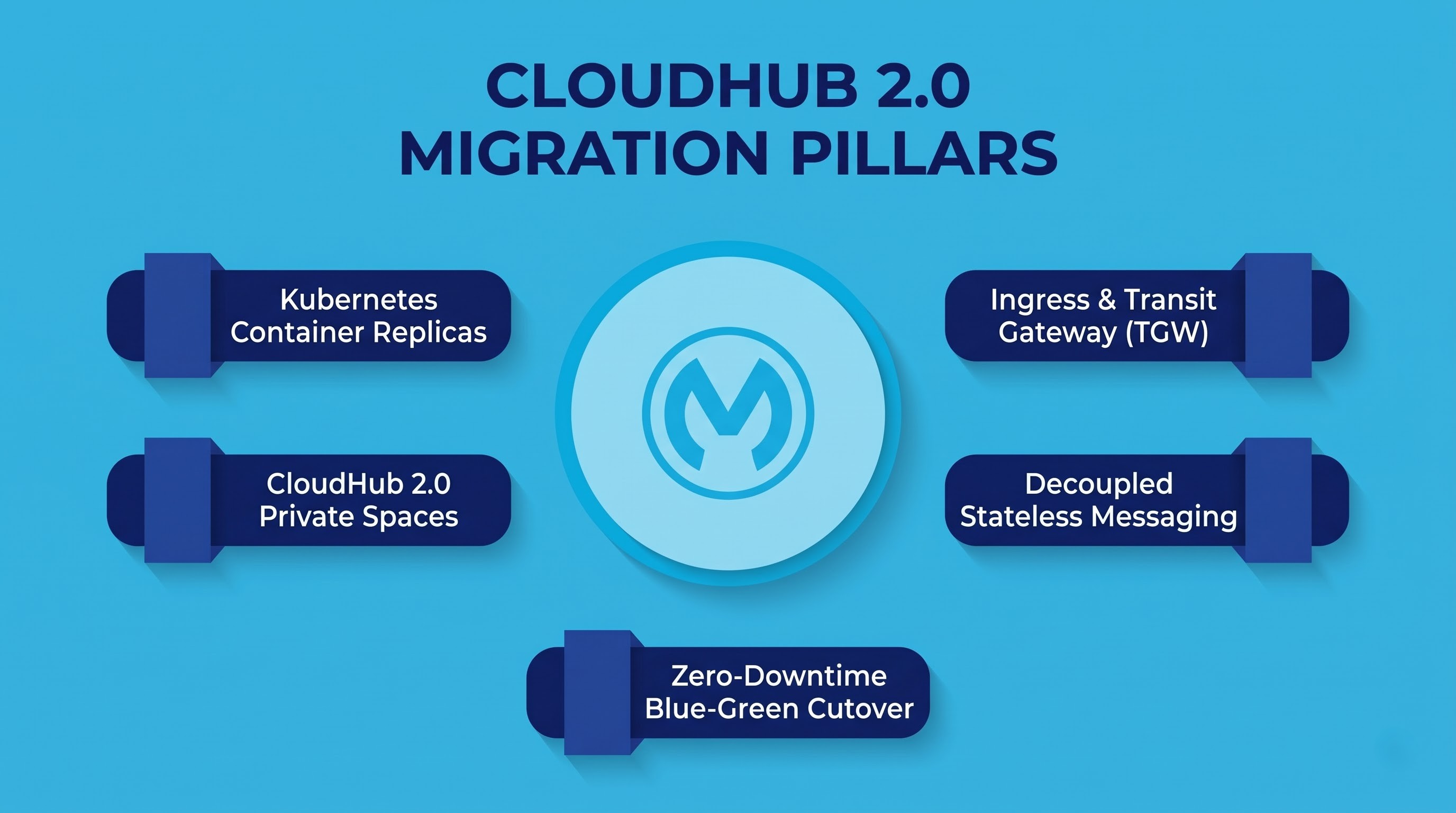
The field of enterprise integration has changed considerably toward innovative methods of container deployment and the implementation of networks based on zero trust security systems. For many years, CloudHub 1.0 has been known as the leading solution for the deployment of managed integration workloads in the cloud. It freed businesses from having to deal with hardware and hypervisor issues, setting the scene for the development of the API-led connection approach.
However, the necessity of receiving immediate responses to growing demand for applications with flexible capabilities and the need to meet regulatory requirements demonstrated some limitations of previous cloud integration solutions. CloudHub 2.0 is an architectural game changer. It represents a revolutionary reconfiguration of MuleSoft’s approach to the multi-tenancy paradigm by replacing the existing virtual machine architecture with an environment based on Kubernetes container technology.
In examining the differences between the two technologies, it is critical to study three main categories: container technology developments, the transfer from Virtual Private Cloud to Private Space, and zero-downtime migration implementation. If engineers and integration teams prepare for the migration to this platform, they should undergo structured mulesoft training provided by OnlineITGuru to get the knowledge and the skills needed to deal with containerized runtimes as well as complicated cloud environments.
Architectural Foundations: From Monolithic Virtual Machines to Container Orchestration
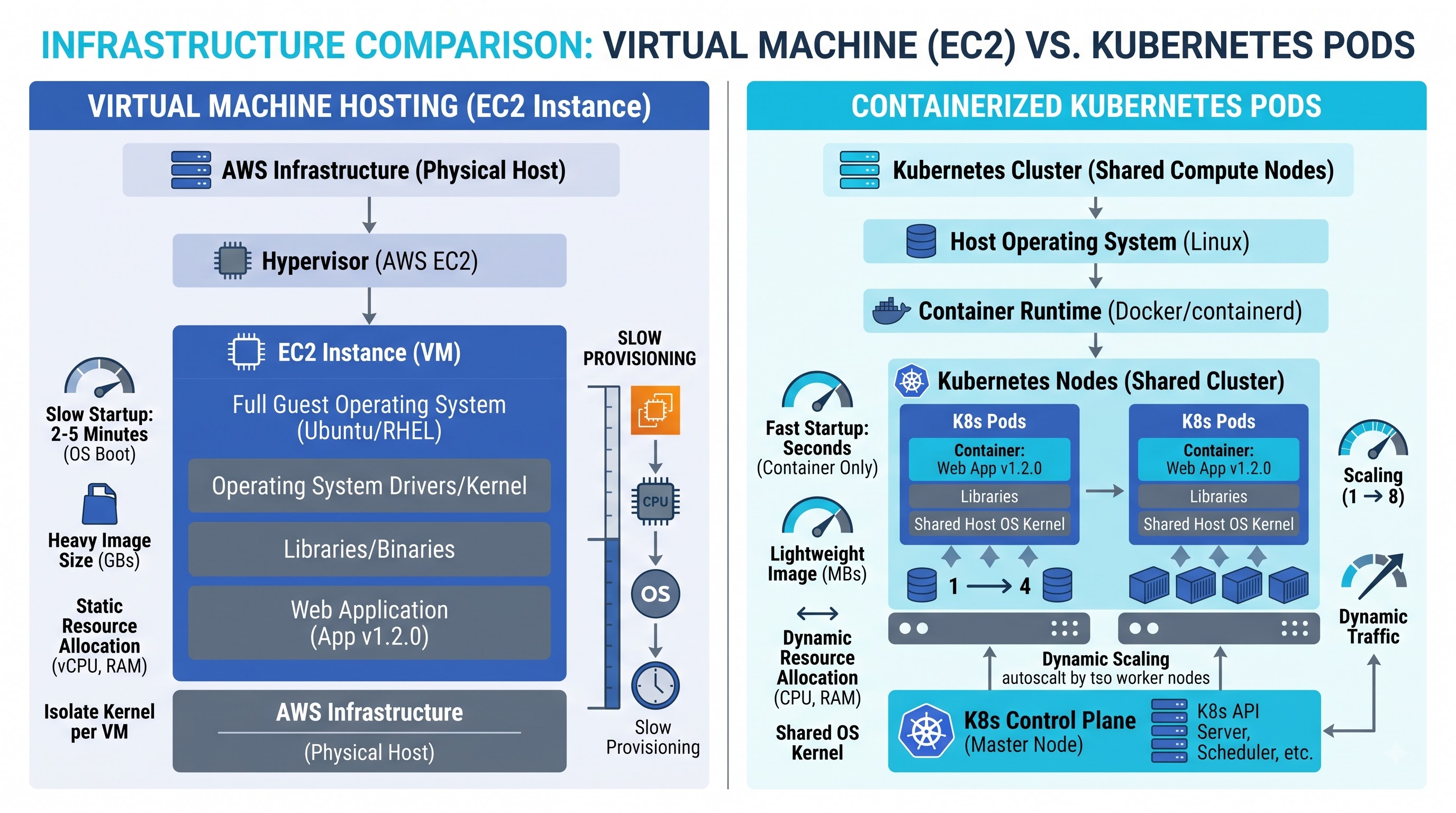
To understand how CloudHub 2.0 is designed, one must first analyze the operational architecture of CloudHub 1.0. The most essential computing entity in the earlier architecture is Mule Worker, where each worker allocated on CloudHub 1.0 essentially translates to a stand-alone EC2 instance running on Amazon Linux operating system.
Inside each EC2 instance, MuleSoft runs an additional Java Virtual Machine that executes the Mule runtime engine, which is mainly an embedded agent that serves as an interface with Anypoint control plane, and includes local instances of logging daemons. When organizations assign the fractional vCores like 0.1 or 0.2, the hypervisor allocates the CPU cycles and memory via hyper-threaded vCPUs.
Even if this architecture offered complete OS-level isolation among various applications, it did come with numerous challenges through limitations on several levels:
Resource Inefficiency and Overhead: The deployment of CloudHub 1.0 even for basic proxy services or simple integration flows entails booting, patching, and managing a complete instance of the virtual machine operating system which leads to inefficient resource use and long provisioning times. Generally, deployments, updates, and worker restarts take anywhere from five to twelve minutes.
Coarse Resource Allocation: The service has rigid core size tiers (0.1, 0.2, 1, 2, 4, 8, 16 vCores) which leaves a lot of empty space for variable-sized applications.
Static Capacity Scaling: CloudHub 1.0 is mostly static. Adding workers requires launching EC2 instances via the runtime control plane which takes too long to handle sudden bouts of corporate traffic.
Ephemeral Local Storage: Amazon EBS volumes or ephemeral instance storage is used for a CloudHub 1.0 worker. If a worker crashes or needs to restart while being updated, any state that hasn’t been persisted will be lost with the killed virtual machine.
With the new platform CloudHub 2.0, there is a change in the existing setup which is popularly used in enterprises across the globe. In the new setup of CloudHub 2.0, the working of the resources has changed from being dependent on VM working to container-based structures. As per the working of the structure of the new CloudHub 2.0, the main working unit is referred to as elastic container replicas.
The replicas in the new system contain a simplified Linux container that holds all the relevant application binaries and configuration files. The time taken to boot cold was also reduced significantly by making use of the existing network layers and there was no delay in the time taken to boot a new computer system. The working of the resources under the new system of CloudHub 2.0 does take into account the basic aspects of the native Kubernetes.
Granular Core Allocation: Companies are able to allocate replicas that are specific to their workloads using fractional vCPU allocation, including additional mid-tier allocations such as 0.5 vCores, 1.5 vCores, 2.5 vCores, or 3.5 vCores. This facilitates efficiency for developers who move to CloudHub 2.0.
Autoscaling with Horizontal Pod Autoscaling (HPA): CloudHub 2.0 allows for dynamic scaling of replicas. Instead of fixing the number of integrations to worker counts that are much bigger than the actual number needed, CloudHub 2.0 relies on Horizontal Pod Autoscaling. During peak activity periods, replicas can scale up, and scale down during low activity periods.
True Native Clustering: In CloudHub 2.0, when several replicas of the application are deployed, they will run in an automated clustering environment. Complex replication processes run seamlessly across multiple versions of the application without the need for clustering licenses or specific network setup.
Stateless Immutability: CloudHub 2.0 implements a cloud-native 12-factor principle that requires replicas to be wholly disposable and ephemeral. Persistent state of applications needs to be separated from the application container and sent to third-party services such as distributed object stores and corporate databases.
Such changes to architecture have created a new enterprise integration working pattern. Platform engineers are not faced with the issues of operating system changes or slow patching. They are used to working with a strong, declarative container platform that handles all complicated operations on its own.
Networking developments: Anypoint VPC and CloudHub 2.0 Private Spaces
Networking technology is one of the most significant features that differentiate two generations of CloudHub computers. In an enterprise environment, MuleSoft applications hardly run in isolation; they link upstream API users with the systems that are used downstream, the systems that can be either the mainframes, local databases, the Enterprise Resource Planning system such as SAP, or even different cloud environments.
CloudHub Model 1.0: The Anypoint VPC and Dedicated Load Balancers
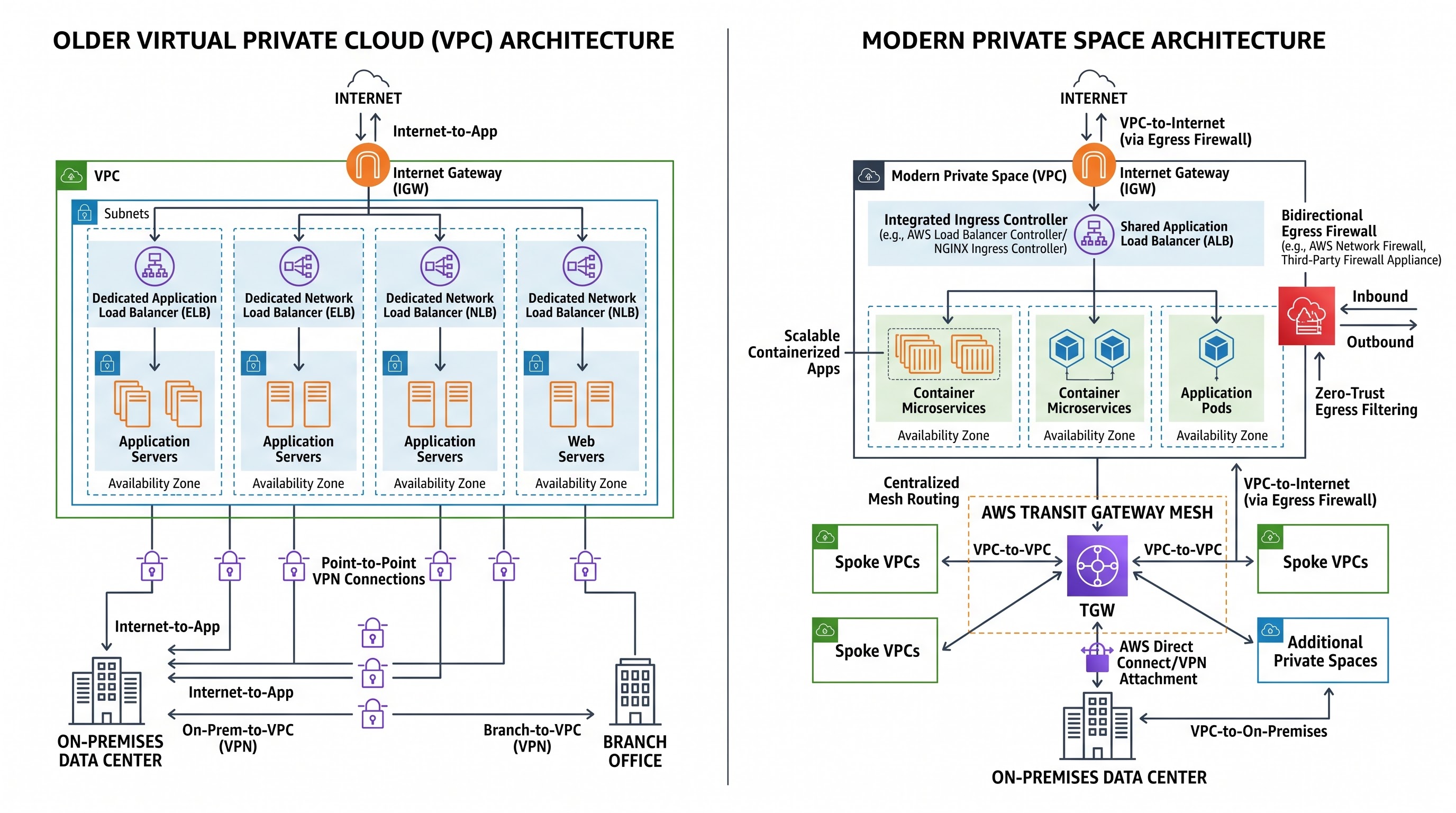
CloudHub 1.0 uses Anypoint Virtual Private Clouds (VPCs) for the purposes of network isolation. Anypoint VPC is essentially a mapping of an Amazon VPC that has been set up as part of MuleSoft’s dedicated global AWS account infrastructure. The organizations define their unique Classless Inter-Domain Routing (CIDR) blocks, which ensures that their private IP allocations do not conflict with their internal corporate networks.
In order to integrate their Anypoint VPC with their internal enterprise systems, network teams make use of either of the three standard approaches:
IPsec VPN tunnels: Establishing redundant site-to-site communications over the public internet with the use of Border Gateway Protocol (BGP) dynamic routing or static route definitions.
AWS VPC peering: Setting up direct, non-transitive peering connections between the customer's existing AWS VPCs and MuleSoft VPC in the same cloud region.
AWS Direct connect: Setting up dedicated physical network connections through the use of AWS Direct Connect gateways for high volume and low latency enterprise level traffic.
Although the model is functional, the level of administrative burden is considerable. Anypoint VPCs function at the same level of infrastructure. Any business with different business divisions or multiple operational environments (e.g., Development, QA, Staging, and Production) will have to either deploy various specialized VPCs or use one VPC across these environments, which may lead to routing problems and governance issues down the line.
In addition, any incoming traffic, as well as custom domain routing for CloudHub 1.0 will require the use of Dedicated Load Balancers (DLBs). A DLB is a managed NGINX-based proxy layer which gets deployed in the VPC and is responsible for functions like custom SSL termination, URL rewriting, and application of path-based mapping rules to internal workers.
The process of deploying a DLB involves multitasking: setting mapping rules, managing special certificate keys, allocating elastic IPs, and processing internal DNS propagation. Also, CloudHub 1.0 offers full inbound firewall filtering but does not allow routing restricting of outbound traffic.
The CloudHub 2.0 Approach: Private Spaces, Automatic Entry, and Transit Gateway Integration
In the case of this new CloudHub version, the old manual system of Anypoint VPC is completely abandoned in favor of Private Spaces. A Private Space is defined as a completely separated logical virtual private network and Kubernetes cluster created in a certain region of the public cloud.
Private spaces bring the management of networks to the next level, switching from low-level cloud operations to the advanced model of a policy-based software telemetry:
Transfer of Environment and Business Group Connections: One significant advantage of a Private Space in CloudHub 2.0 is that unlike the old Anypoint VPC, which is limited in its operations, Private Spaces enable clients to host applications with different origins in one Private Space.
Integrated Private Ingress Routing: There is no need to buy, size, and configure separate Dedicated Load Balancers. Each Private Space comes complete with integrated ingress controllers managed by the platform. The ingress layer seamlessly takes care of TLS termination, domain validation, traffic distribution, and routing with no downtimes right at the border of the Kubernetes cluster. Keystores and certificates are centrally managed via Anypoint Secrets Manager with encryption compliance maintained across all paths.
Reversible Advanced Firewall Control: The chief drawback of CloudHub 1.0 architecture was its inability to prohibit the workers from sending outbound traffic to the Internet in a hassle-free manner without establishing cumbersome third-party proxy firewalls. CloudHub 2.0 addresses this issue by incorporating its own solution to establish a software-defined firewall at the boundaries of the Private Space. The platform administrators can now set rules for incoming and outgoing traffic based on IP CIDR block and/or ports.
Enhanced AWS Transit Gateway Peering: There are improvements in connecting enterprises with the new CloudHub 2.0. The outdated practices of direct connection and point-to-point VPC pairing have been completely replaced with the AWS Transit Gateway (TGW) attachments and IPsec VPN connections. A direct connection between the Private Space and AWS Transit Gateway (TGW) through AWS Resource Access Manager (RAM) share enables companies to peer at the entire corporate WAN across multiple regions and clouds with minimal need for static routing.
Static Egress IP Management: The outbound traffic in CloudHub 2.0 is being routed through the dedicated NAT gateway public IPs that are assigned specifically for the use of the Private Space. This removes the former difficulty of CloudHub 1.0, which required users to reserve static IP addresses for every worker instance of the application. The corporate firewalls, in turn, will only need to allow one predictable IP range of the Private Space instead of tracking constantly changing IPs of the workers.
The result is a networking framework that significantly decreases the time for the provisioning of infrastructure, establishes more stringent security protocols by default and streamlines complex hybrid enterprise routing.
In-depth Architectural Comparison
A study of practical realities of both platforms serves to demonstrate how these architectural differences affect daily engineering and governance.
Computing and Virtualization
With CloudHub 1.0, workloads are handled by EC2 virtual machines, which are single-tenant hosts, running a separate loaded Linux operating system and one Mule runtime JVM. In contrast, CloudHub 2.0 allows workloads to run as containerized Kubernetes pods within a managed cluster, sharing the kernel of the operating system while at the same time ensuring complete isolation of each process, memory, and filesystem.
Deployment Speed and Scaling
To set up a new worker or update an application within CloudHub version 1.0 required spinning up an entirely new EC2 virtual machine, booting the operating system, initializing the runtime daemons, and starting the Java virtual machine. This process may take anywhere from five to fifteen minutes to complete. On the other hand, with CloudHub version 2.0, the container runtime pulls the compiled application image and deploys the pod on an existing node, cutting down initialization and redeployment time to thirty to ninety seconds. Also, while CloudHub version 1.0 uses only manual horizontal or vertical scaling, CloudHub version 2.0 provides automated horizontal pod autoscaling using real-time operational data.
Traffic Routing and Ingress Mechanisms
Accessing public and private spaces in CloudHub 1.0 needs a complex routing hierarchy. Public-use applications depend on multi-tenant shared load balancing, while private-use applications need dedicated load balancing that requires initialization, payments, and monitoring. According to CloudHub 2.0, ingress is a vital and unified part of the Private Spaces. Incoming requests utilize a strong, high-capacity NGINX ingress mesh that reads routing annotations and facilitates the blue-green cutover process.
Network Security and Outbound Perimeter
CloudHub 1.0 has the capability of using firewall filtering rules, which limits access to the defined ports and source IPs, but does not have outbound filtering. This means that any application operating within the VPC may open connections to the internet without employing a dedicated corporate proxy. CloudHub 2.0 comes to enable effective Layer 3/4 bidirectional filtering and provides the capability to develop various whitelists and blacklists for filtering incoming traffic and restrict outbound traffic exclusively to corporate IPs.
Runtime and Framework Compatibility
CloudHub 1.0 has good backward compatibility which incorporates old mule runtimes like Mule 3.x and previous versions of Mule 4. However, CloudHub 2.0 is focused on future technologies i.e. it uses Mule version of either 4.3.0 or higher. Older Mule 3 applications cannot be transferred to CloudHub 2.0 without undergoing rework to become a Mule 4 application.
State Management and File Persistence
CloudHub 1.0 allows developers to utilize EC2 worker’s local files system for a temporary scratch file operation, batch transformation, or for persistent VM queues. However, CloudHub 2.0 makes it impossible to have a temporary file as the file system has changed to an ephemeral file system that is read-only. CloudHub 2.0 requires establishment of state management through decoupled state architecture that uses asynchronous messaging through the use of enterprise message brokers such as Anypoint MQ or Apache Kafka.
Migration Strategy: The process of moving from CloudHub 1.0 to CloudHub 2.0
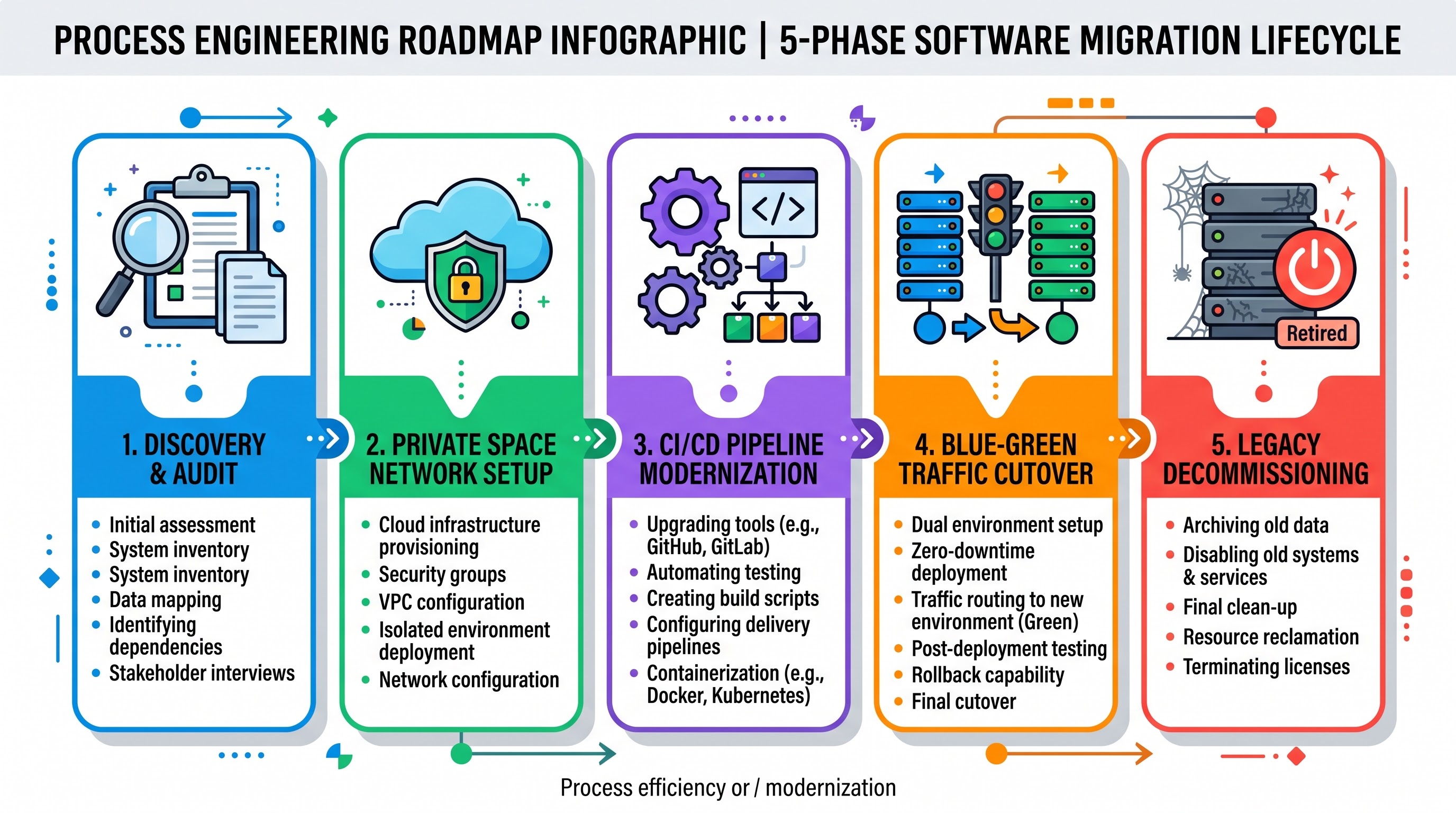
Moving a large portfolio of possibly thousands of active APIs from CloudHub 1.0 to CloudHub 2.0 is more than just clicks in a platform. Due to how different computing, networking, and security capabilities are structured, organizations have to follow a defined stage-by-stage migration plan to complete the process.
A successful migration entails going through a five-phased approach that helps to avoid operational risk and downtimes, as well as update the application architecture.
Phase 1: disclosure, portfolio evaluation, and readiness verification
The migration process begins with determining the current integration landscape. The integration team will have to list all the existing apps that function in CloudHub 1.0 and learn their eligibility for CloudHub 2.0.
Mule Engine Version Status: Understand the different instances of Mule 3 or unsupported Mule 4 (less than 4.3.0) use cases. Any applications which run on Mule 3 should have code migration and the DataWeave update before being considered for transition to CloudHub 2.0. OnlineITGuru offers comprehensive mule software training in case your development team is stuck in Mule 3 syntax and needs to have knowledge about new event models quickly.
Local disk access patterns: View the code for the use of references to local filesystems such as writing to files, reading from temporary storage, and using persistent storage on disk. The applications writing to the worker disks need to be modified to use cloud storage solutions like AWS S3 or database storage.
In-memory storage and VM Queue Usage: In the CloudHub 1.0, it has been found that developers used Mule VM queues which has the aid of worker disk storage so that they can segregate different flows. In a containerized Kubernetes environment where pods are able to terminate, reschedule or autoscale conveniently, local VM queues can lead to loss of message or corruption of data. Therefore it is required to change these patterns so that Anypoint MQ, which is an external JMS provider or distributed event buses, are used.
Network Protocol and Port Configuration: Again, CloudHub 1.0 makes use of HTTP listeners that are frequently connected to any port variable such as internal port 8081 or 8082 which helps in worker to worker internal communication. CloudHub 2.0 helps in abstracting the listener ports because of the presence of environment binding variables. There should be a replacement of all straightforward configuration in HTTP listeners to use dynamic system properties.
Detailed Compute Size Review: First of all, assessments regarding the vCore allocation have to be done. Identification of load that is running on the larger vCore and transferred to the smaller fractional allocations.
Phase 2: Base Engineering and Infrastructure Setup
Before application code can be implemented on the platform, architects need to set up networking and security architecture in the Anypoint control plane.
Base Engineering Process:
Design of Private Space: Do you need a Private Space or several Private Spaces in different geographic regions to adhere to data control policies (e.g. GDPR, HIPAA)? Provide a different list of CIDR blocks that will easily get plugged into the current IP network.
Config of Interconnect: Design advanced connectivity of the organization. If you need an interconnect with the current AWS infrastructure, then you should create the connections to AWS Transit Gateway. You can do it by using AWS RAM.
Firewall Rules: Design the basic ingress and egress firewall rules for the edge of the Private Space. Egress should be restricted to corporate approved subnets, downstream cloud services and 3rd party SaaS providers.
Domain and Edge Configuration: Do not use CloudHub 1.0 DLB configuration files to route within the domain. Configure custom domains for private space. Import your public SSL, private key and CA certificates into Anypoint Secrets Manager. Configure the ingress endpoints for the private space to route inbound host headers to the correct internal environments.
Company Egress Whitelisting Collect the static public NAT egress IPs that have been defined for the newly configured Private Space. Prior to testing the application, contact the company’s network security team to ensure the IPs will be added to the whitelist on the company’s downstream firewalls, mainframe ingress lists, and partners’ gateways.
Phase 3: Change the Codebase and Improve the CI/CD Infrastructure
An upgrade to a container native platform means an upgrade to CI/CD.
Applications deployed on CloudHub 2.0 use a customized deployment plugin and target.
The following are the elements of modernization:
Modifying Mule Maven Plugin Configuration: Upgrade the application POM files according to the latest version of Mule Maven Plugin capable of handling CloudHub 2.0. The deployment configuration block needs to change from old schema to new . Now the configuration should indicate the needed Private Space name, business group ID, replica number, replica size, deployment configurations and auto-scaling configurations.
Convert Application Properties and Configuration to Secure Encrypted Configurations Shift from plaintext application properties to an encrypted configuration managed with Anypoint Secrets Manager or other secrets managers such as HashiCorp Vault and AWS Secrets Manager.
Pipeline Automation: Create pipeline templates in GitHub Actions, Azure DevOps, GitLab CI or Jenkins. Provide success for automated testing tools and ensure adherence to API regulations and quality norms. Create, build artifacts and carry out deployment via CLI v4 of Anypoint Platform or CloudHub 2.0 Platform APIs.
In order to modernize deployments in containerized infrastructure, one has to become equipped with the knowledge about the latest Anypoint Platform technology, Secrets Manager function and configuration settings. When you train integration developers with a special mulesoft course your team gets rid of common pipeline errors and learns all the latest Mule 4 deployment techniques.
Moving to Phase 4: Steps of Migration Process
With the completed groundwork, modernization of pipelines can be executed. Businesses need to categorize their API stock into the risk-level styled waves which start from internal low-priority utility APIs and move to high-priority core System APIs first, then to Process APIs, and lastly to public Experience APIs.
Alternative Deployment Using the Blue-Green Strategy
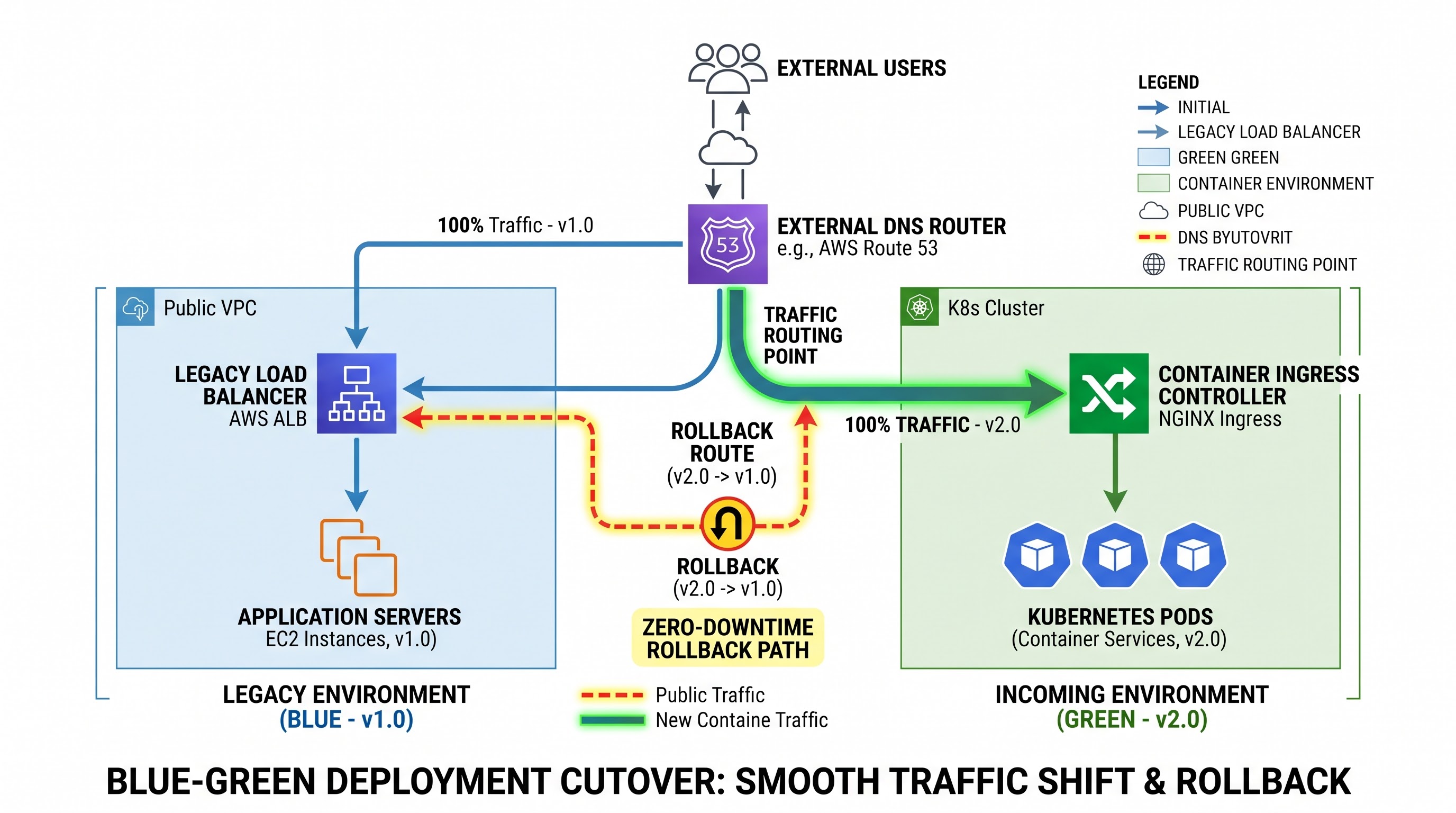
The preferred option for enterprise-critical services is to deploy the application on CloudHub 2.0 while keeping the existing version on CloudHub 1.0 active.
Platform teams can carry out regression, performance, and latency tests on the private endpoint of CloudHub 2.0 once the verification of the application's performance on the new version takes place. After confirming that both versions of the application are functioning similarly, the external API gateway, DNS provider (including Amazon Route 53, Cloudflare, or internal corporate DNS), or reverse proxy is modified to reroute traffic from CloudHub 1.0 DLB to the CloudHub 2.0 Private Space ingress.
Once the changes are made, traffic is redirected without hassle. In case of any issues arising unexpectedly, the DNS records can be easily reverted to the CloudHub 1.0 running instance in order to mitigate the risks.
Getting Your Team Ready for CloudHub 2.0
The move to CloudHub 2.0 is not just an upgrade to the facilities; it completely reshapes how teams develop, create, and manage APIs among the containerized Kubernetes clusters and modern Private Space environments. In order for your developers and architects to implement this plan without disturbing the flow of their activities, a systematic mulesoft online training course with OnlineITGuru will equip them with the knowledge of the Anypoint Platform architecture, dynamic auto-scaling, and no-downtime switching techniques.