
Optimizing Large File Deliveries: Chunking, Aggregation, and Memory Management
Last updated on Jul 31, 2026
Introduction: The Challenge of Dealing with High Volume of Data in Enterprise Integration
Modern enterprises make use of integration engines that are able to process huge amounts of data while not coming into contact with any downtime or degradation in performance. The software suites that enterprises use, especially Human Capital Management and Financial Management systems, deal with data exchanges that are of high volumes.
To establish scalable workday studio integration solutions in relation to large enterprise data sets, we need to replace the cumbersome conventional approach of DOM parsing with a more streamlined approach. At OnlineITGuru, you can learn everything there is to know about the world of enterprise-scale processes, starting from the basics of creating integration pipelines.
The operations that enterprises perform result in data payloads that are not small in size as there are files with hundreds of thousands of workers’ records, general ledger journal entries that weigh several gigabytes, benefit registration feeds, and many time keeping logs that have to be done very frequently.
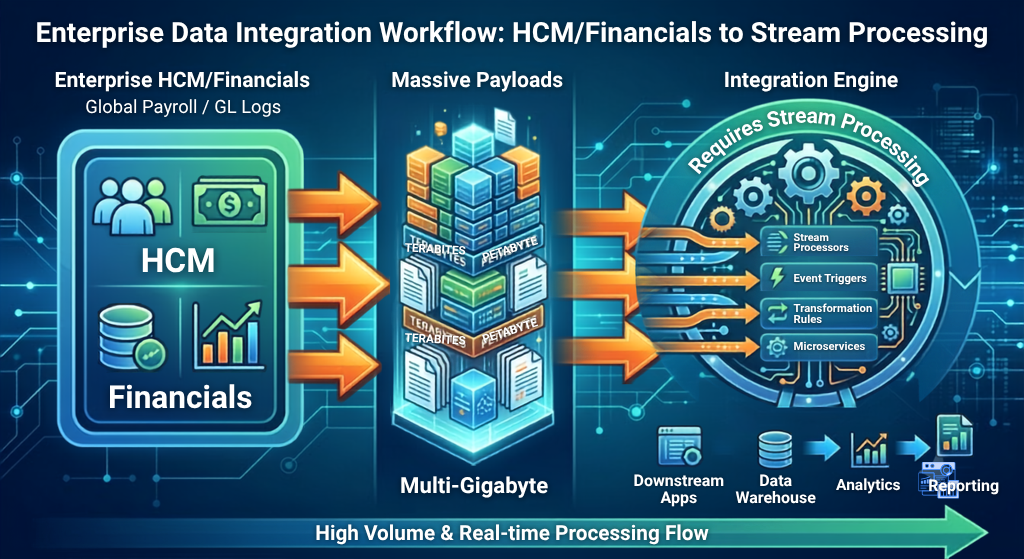
Solving the problems posed by datasets is a rather complex task. Traditional methods of integration of data in memory consume so much heap memory that processing is hindered, and communication is delayed or completely stopped. In order to come up with high-throughput workday studio integration pipelines, heavy in-memory processing techniques must be avoided. If one wants to learn Workday studio and pave the way for mastering high performance arrangements, then one may successfully put these theoretical ideas into practice by getting training from OnlineITGuru.
The Issue of In-Memory Processing
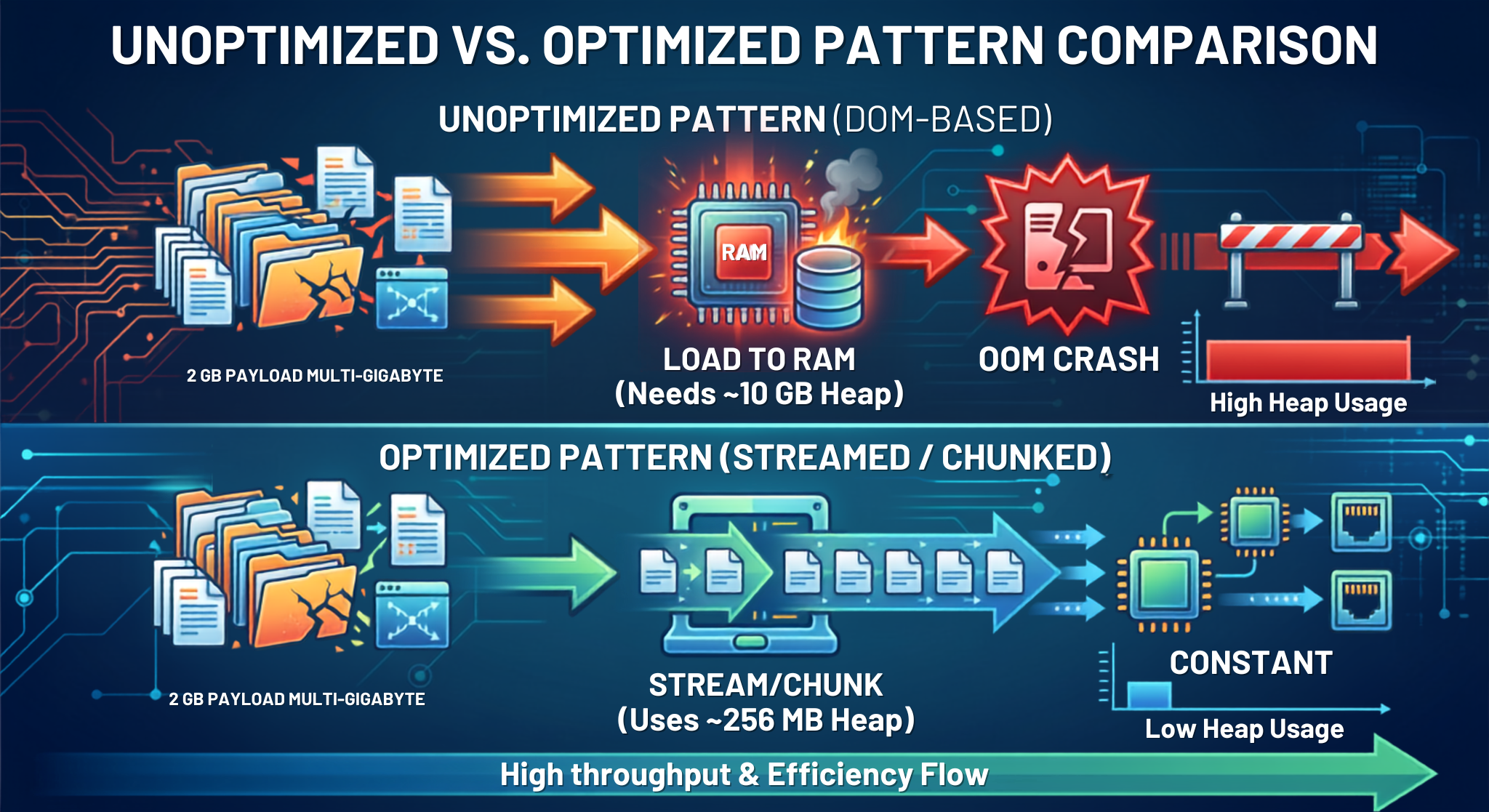
Default settings will lead developers to create integration assemblies, under which the runtime environment will try to turn the incoming XML or JSON payloads into DOM.
Any DOM process has a disadvantage of creating a memory-eating node tree that includes all data from the documents. This method of parsing allows you to enjoy easy navigation via XPath, but the cost of this structure is the need for serious memory – the document will occupy 5 times more space in the memory than it occupies on the disk.
A large enterprise report of 2 GB created with the help of the reporting tool will consume around 10-20 GB of RAM for the entire DOM structure. This is not a problem in the usual environments but in such environments as Workday – a cloud-based application, which runs its executions in strict memory limits.

The Design Objective
For reliable operation of assembly systems engaged in acquisition of high payload, three concepts should guide the system design:
Streaming: The principle of managing data in the form of a continuous input-output stream of bytes instead of reading the whole data file and loading it into memory.
Chunking: Splitting the data into manageable units.
Aggregation: Combining the created units of data back into a single output structure.
Memory Dynamics of the JVM and Assembly Execution in Workday Studio
Developers should familiarize themselves with the operation of Workday Studio assembly in the JVM environment in order to manage memory effectively.
Memory allocation landscape
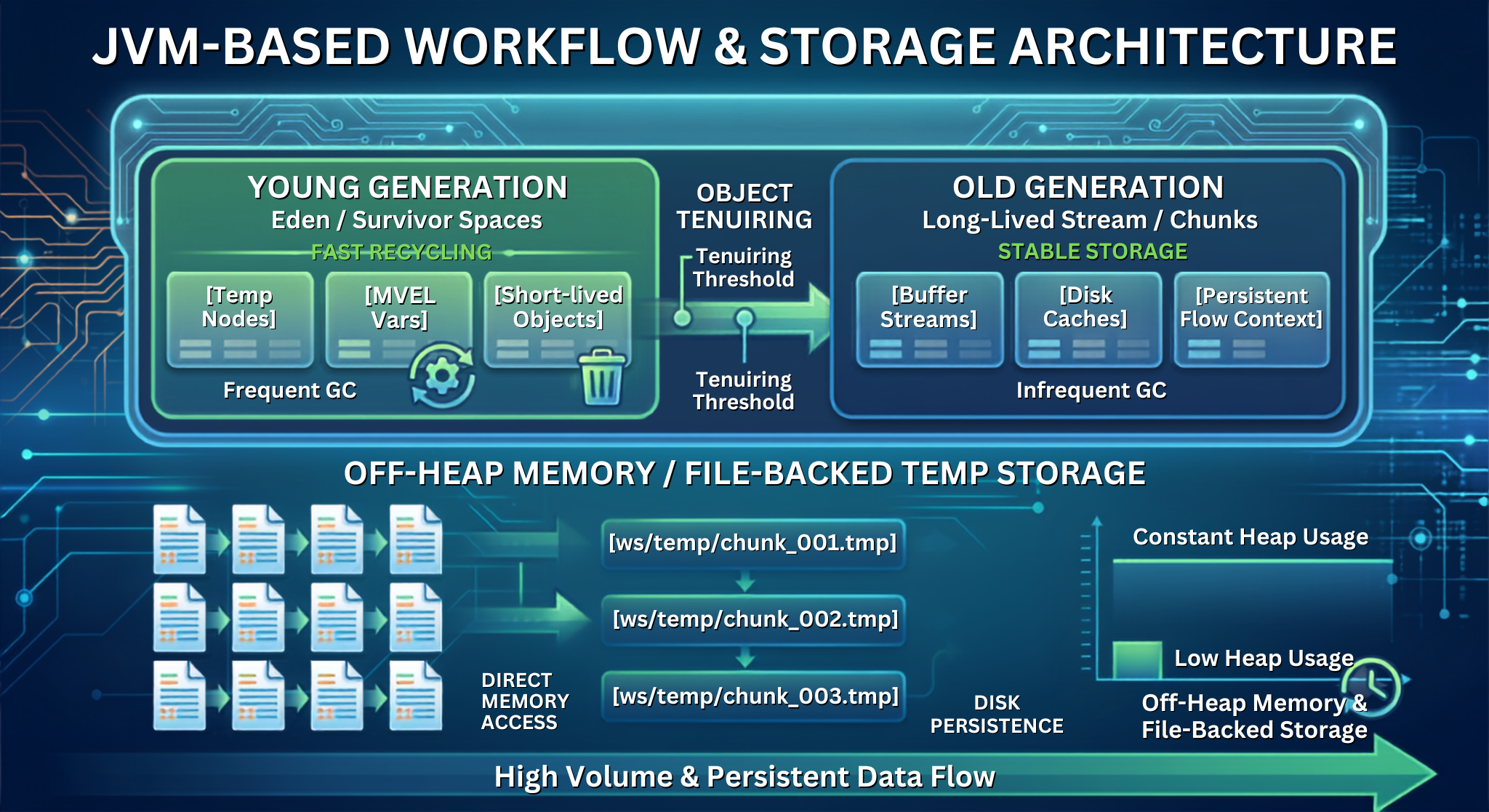
The integration nodes in Workday Studio run inside containerized JVM with a defined heap size divided into:
Regards Generation which consists of a short-lived object (e.g., evaluation results of MVEL variables). These short-lived objects move to Old generation space (long-lived objects).
The integration of a huge payload through DOM will bring an infinite number of node objects to the Eden space making it impossible.
Garbage collection (GC) which may usually just increase the frequency of pauses will cause the Old generation space to be overfilled and lead to the OutOfMemoryError.
Garbage collection doesn’t solve memory problems
Some people tend to believe that executing System.gc() in user-defined Java/MVEL code may help in resolving memory issues. Garbage collection only frees memory from non-referenced objects. In case the part of a message (props['myLargePayload'] refers to a 500MB stream, the memory allocated for its storage will remain locked for the Old generation on any recurrence of the GC.
Stream Lifecycle Best Practices
Refrain from converting input streams to Strings: Refrain from setting complete payloads to variables using .text or parts['text'].text, unless you are certain that the payload size is small (< 5 MB).
Explicitly clear variables: Ensure that large object variables are set to null or the message parts are cleared as soon as processing finishes.
Use temporary files on disk: When carrying out multi-step transformations, save intermediate status data into temporary file storage on disk instead of keeping it in memory.
Effective Chunking Strategies
Chunking involves segmenting a large payload into small pieces
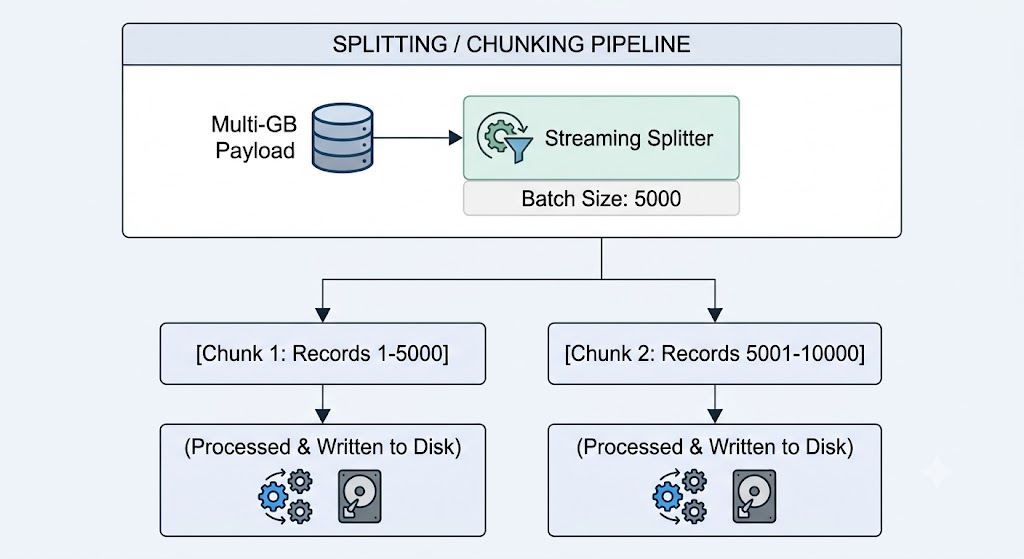
DOM Splitters versus Streaming Splitters
The Splitter feature of Workday Studio can operate in two different execution modes:
DOM mode (streaming="false"): processes the splitting XPath over an entire parsed DOM tree. Avoid the use of DOM mode for files larger than 50 million bytes.
Streaming mode (streaming="true"): makes use of a StAX (Streaming API for XML) pull-parser to move through the payload one element at a time, triggering sub-process executions for each occurrence of a specified path.
Setting Up a Streaming Splitter
In streaming mode, a payload with 100 thousand records gets processed in a low-memory environment.

The runtime bypasses the process of loading the entire Report_Data root when streaming="true" is enabled; it processes the input stream until the runtime finds a Report_Entry tag, uses the information to generate the message, delivers it to the next flow step, and removes it from the memory before proceeding to search for the next tag.
Batch-Size Optimization (Grouped Splitting)
The strategy of processing each individual record generates significant overhead due to repeated calls to the components, whereas processing the records in one lump may lead to excessive memory usage. Proper grouping of the records into batches in a throughput range of 1,000-5,000 records allows keeping an optimal level of memory performance.

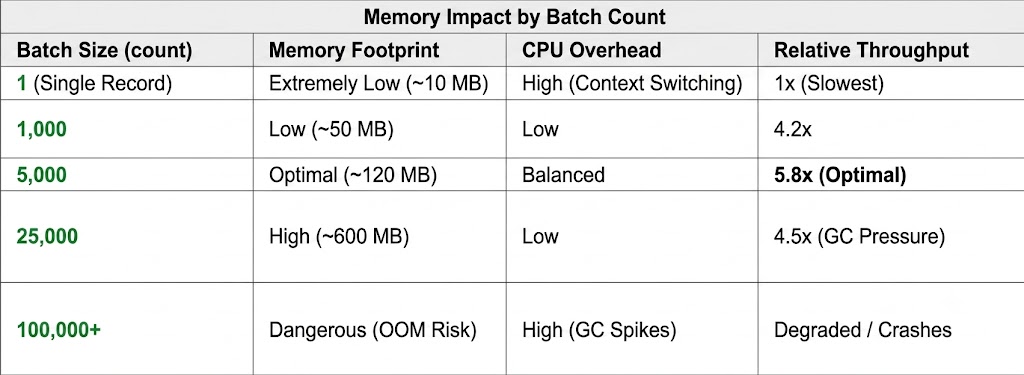
Dealing with Huge Text & CSV Payloads
Use of standard XPath splitters is not possible while working with flat files (like CSV or fixed-width text) as such files do not permit the use of XPath. Make use of the Text Splitter component instead, which can be configured by appropriately using buffer bounds.

This arrangement gives batches of 5000 lines without losing line 1 (header line of CSV) in any of the batches. Thus, any further processing such as XSLT or CSV transformations will process all batches correctly.
Streaming Transformation: Learning XSLT+ and Saxon Pipelines
Want to Become an Expert at Workday Studio Integration?
To create streaming transformations using XSLT+ and Saxon-EE, one must have a sound knowledge of MVEL logic, memory usage management, and assembly code debugging. Join the acclaimed Workday Studio training by OnlineITGuru to learn from industry veterans through practical projects.
Traditional XSLT mediators load the input XML payload as well as the stylesheet DOM into memory, and therefore they may fail to work with large files due to memory shortage. Studio introduces the enhanced performance XSLT+ mediator that deploys Saxon-EE streaming transformation engine.
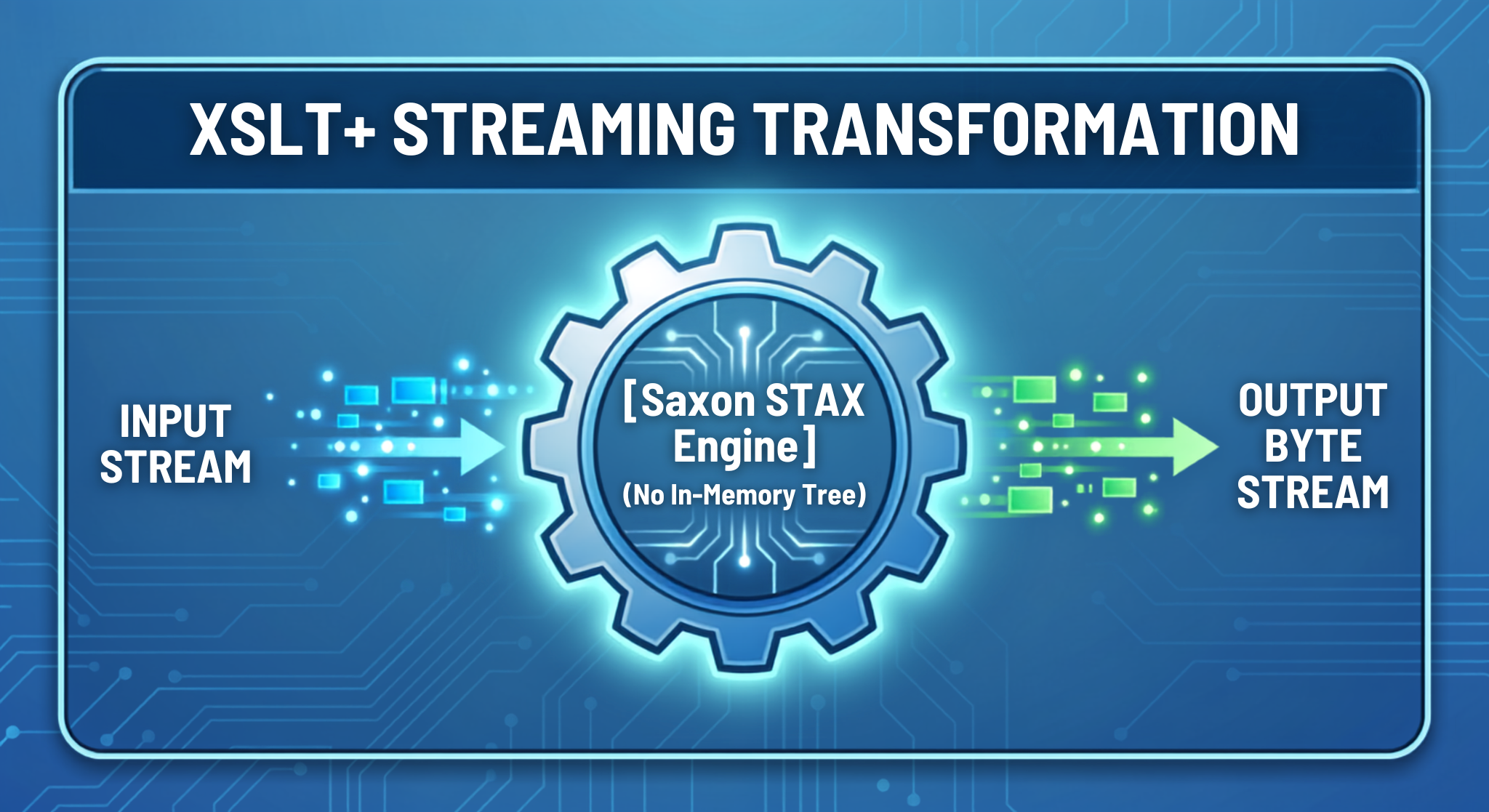
There are major differences among legacy XSLT and optimized XSLT+ with respect to their internal structure and method of processing data as well as resourcing. While legacy XSLT is based on the Xalan parsing engine which means that it is expected to load the whole XML payload in memory in the form of a document tree. The memory utilization is hence expected to grow at a rapid pace — with as much as 5-10 times the size of the file being stored in memory which limits its application to batch processing only in full-memory mode. What is more, legacy XSLT relies on older standards (XSLT-1.0 and XSLT-2.0) which do not permit the use of any streaming rules.
On the contrary, optimalized XSLT+ is based on the Saxon-EE streaming engine. This allows it to process data in real-time in a byte stream format which does not involve loading the document in RAM but rather keeps the requirements low at around 50-100 MB irrespective of file size. Hence, customers are happy to use the software as no out-of-memory errors occur even when the file is significantly large. Moreover, it supports XSLT 2.0 and 3.0 as well as native streaming mechanisms such as.
Creating XSLT 3.0 Stylesheets with Streaming Capability
For the transformation file to be streamed without delay, the stylesheet needs to comply with the streaming rules of XSLT 3.0. This means that there should be no backward axis references (preceding-sibling:: or ancestor::) and that there should be no queries that require the whole-node collection to be evaluated (count(//Record)).
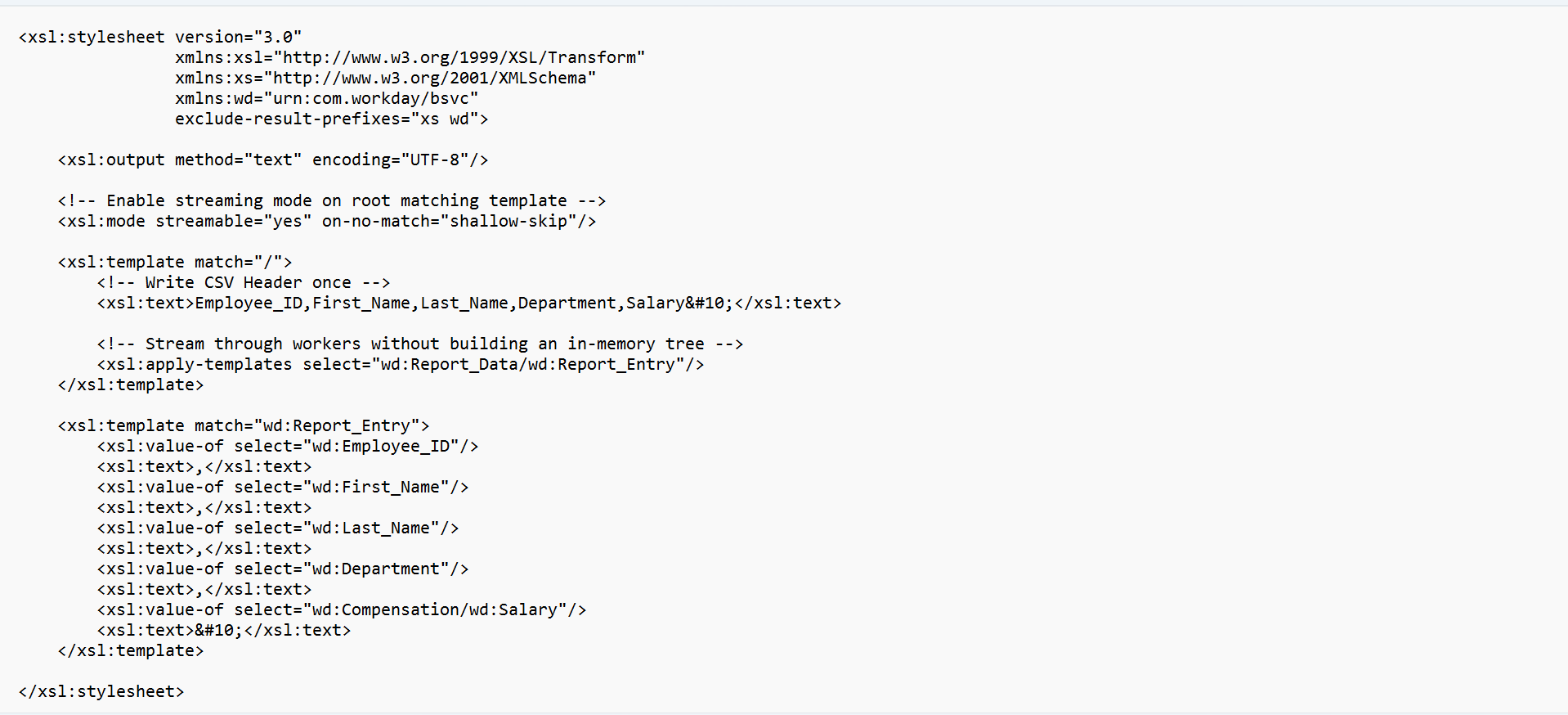
Streaming XSLT Basic Components
This tells Saxon-EE to follow streaming guidelines. If the template declaration breaks the streaming principles (like accessing parent elements), it will fail the compilation right away giving a warning rather than just changing the execution mode to DOM at runtime.
on-no-match="shallow-skip": This makes Saxon not keep unmatched children in memory and use a constant amount of RAM during the run.
High-Volume Aggregation & File Storage Patterns
After chunking and transforming data, it usually needs to be aggregated back into a single document (for example, multi-gigabyte payroll or bank export) for transportation.
Using MVEL variables or string buffers for storing transformed chunks will eventually lead to an Out of Memory error. It's better to stick with file aggregation.
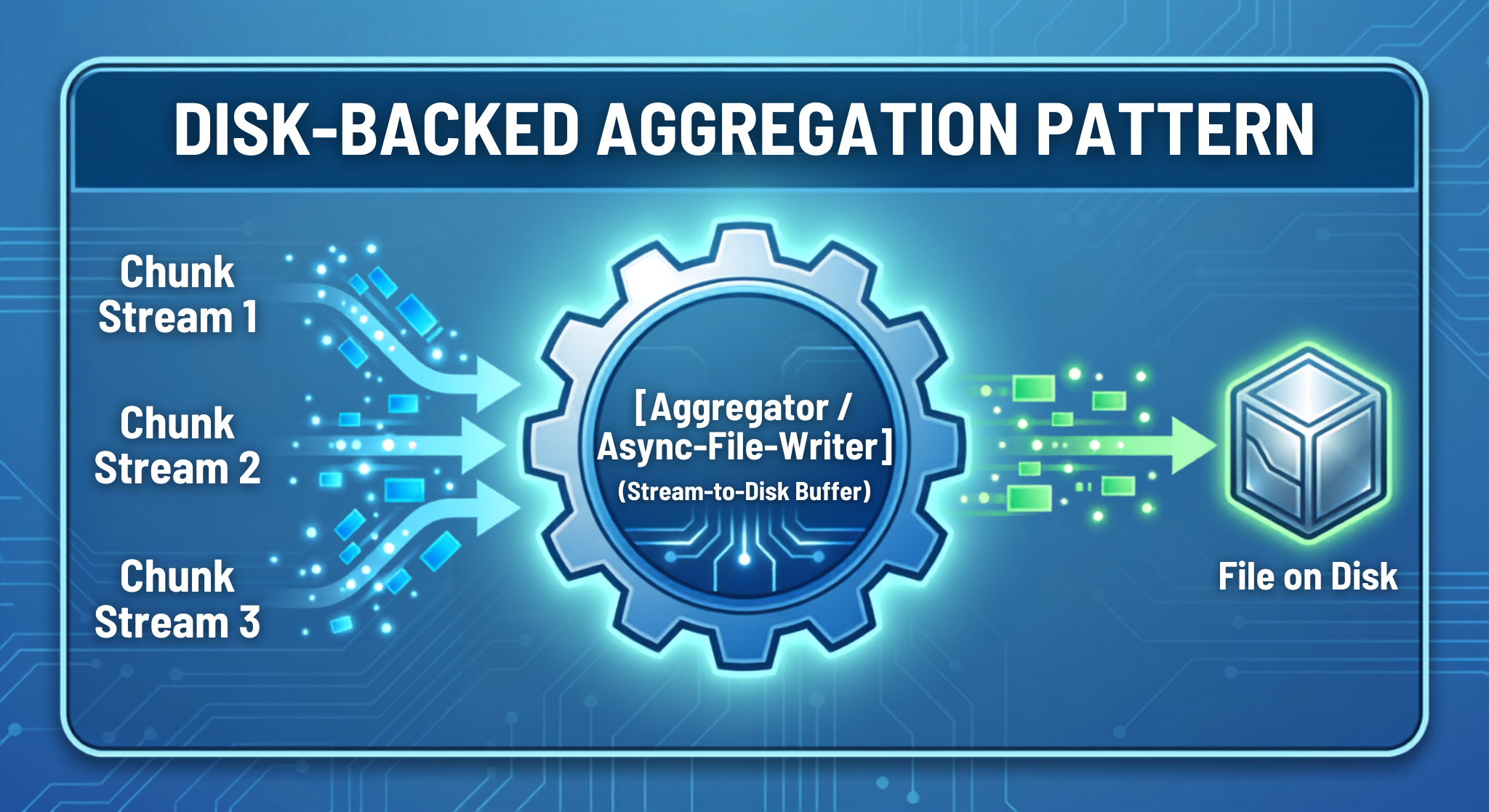
The Aggregator Mediator design pattern
The Aggregator component receives each fragment of an incoming message and channels the latter continuously to a data stream on the hard disk.

Aggregating Chunk Information
There are two methods of aggregation:
Memory strategy (strategy="memory"): This strategy is implemented to store bytes of the chunks of information in the JVM RAM. It should not be applied in cases where the output is more than 50 MB.
File strategy (strategy="file"): This strategy helps in streaming each chunk of information directly into a temp file on a disk (ws/temp/). In this method, the consumption of RAM would reach nearly zero no matter how large the output becomes (it can vary from 500 MB to 10 GB).
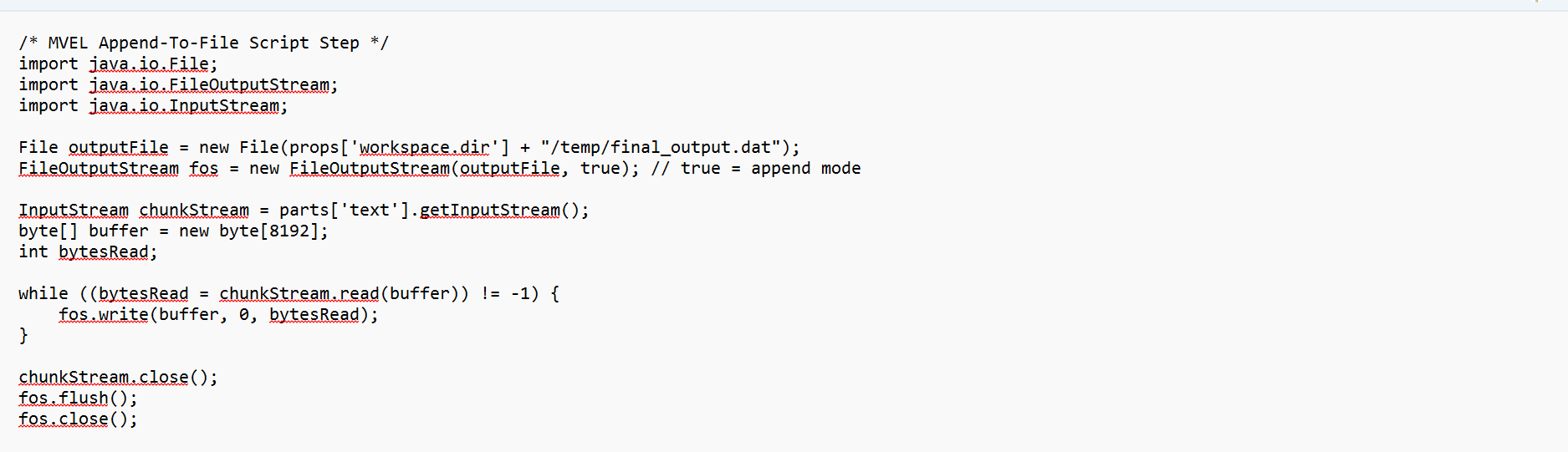
Using Java and MVEL for Aggregation on the Lower Level
When the handling information offered by the mediators is not enough, certain files can be written using Java code.
Architectures for paged web services retrieval
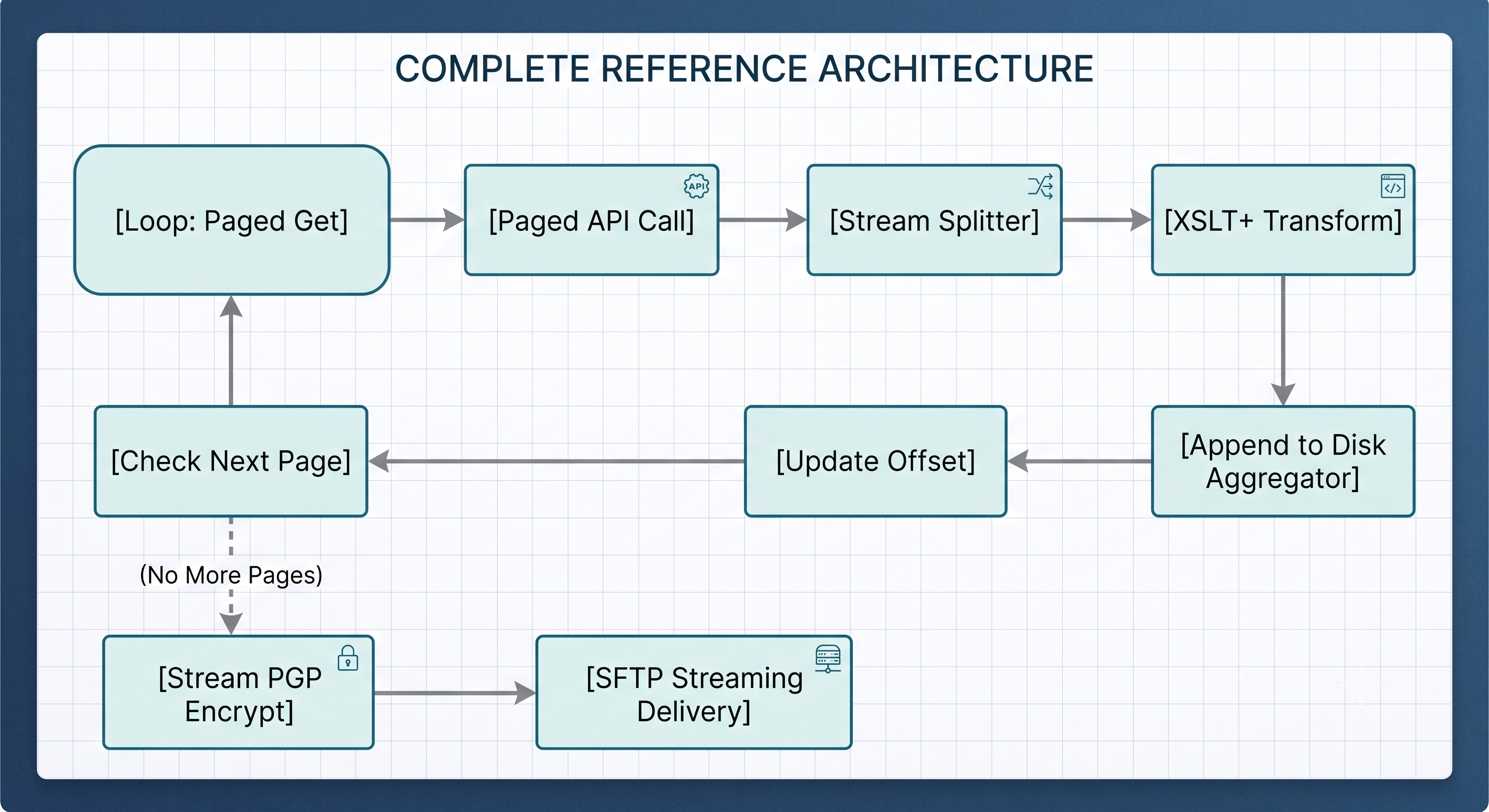
High-volume outbound integrations must avoid acquiring large datasets in one call to the API to avoid timeout errors or gateway buffer overflows in the API. For example, using the Get_Workers SOAP method to call up the records for 100,000 workers at once could lead to a timeout error or a buffer overflow error.
Instead, we should consider utilizing page-based API retrieval to obtain information in manageable chunks.
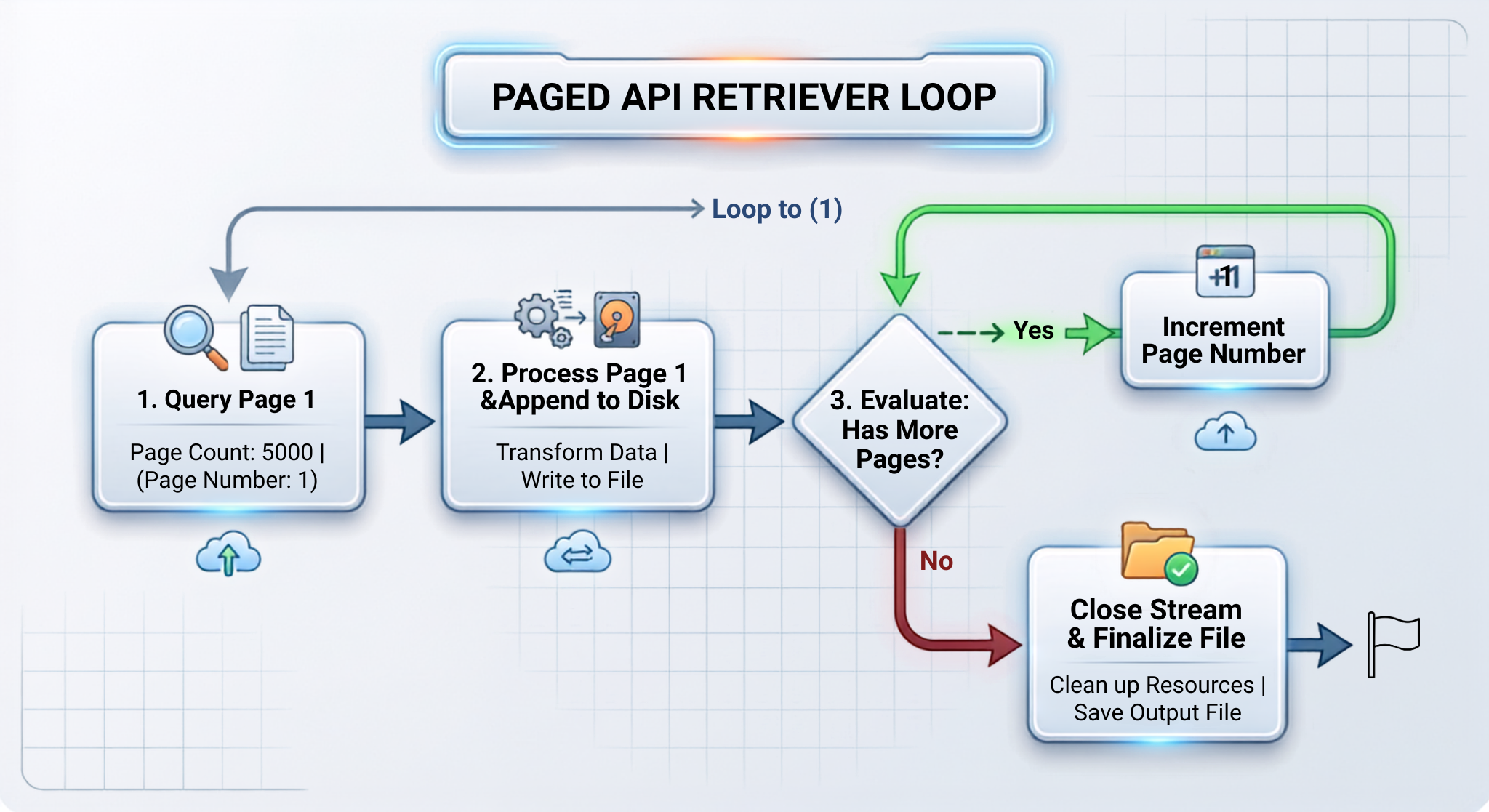
Initiating a Paged Retrieval Loop
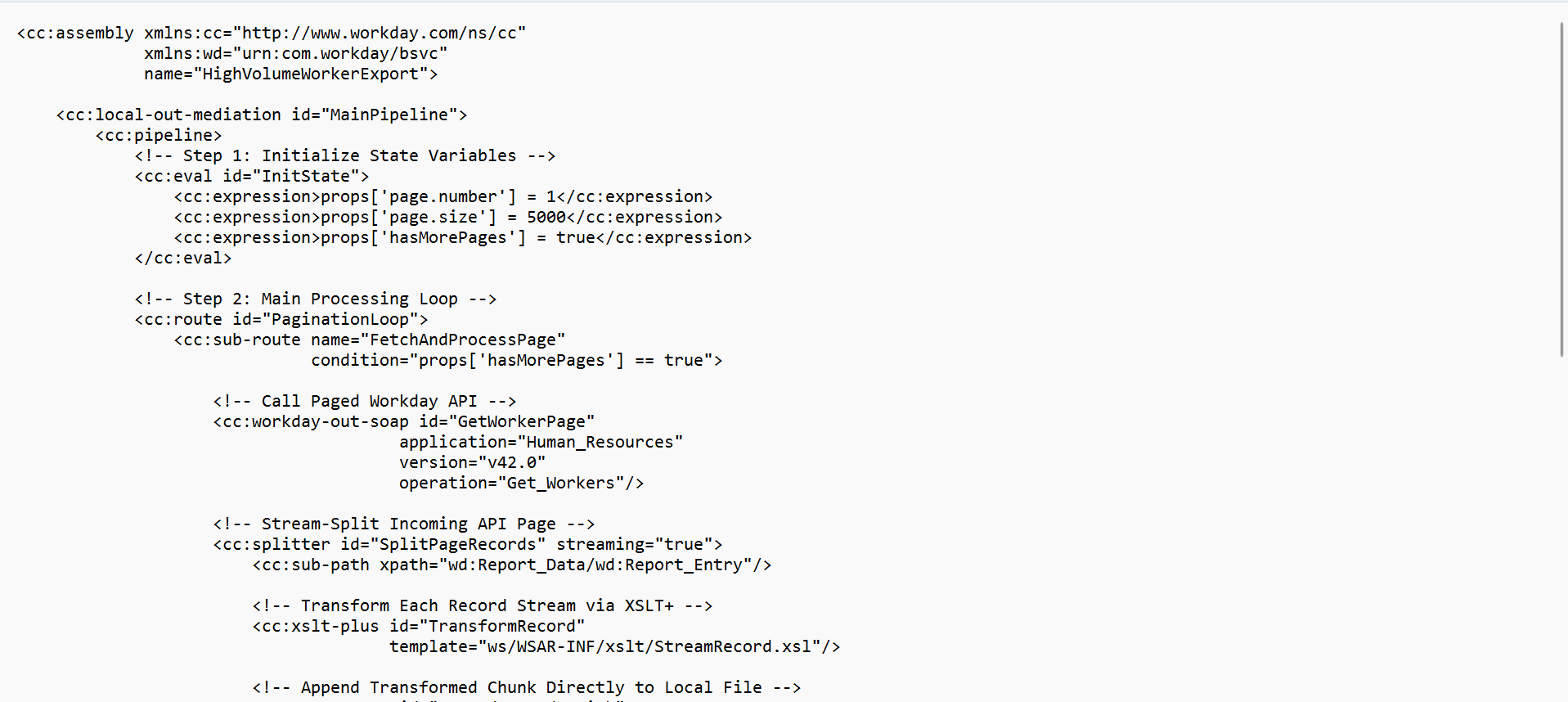
Control Variables Initialization: Initialize props['page.number'] to be 1 and props['page.size'] to be 5000.
Running a Paged Request: Supply page details in the Workday Web Service SOAP request header:

Check If Additional Pages are Available: Check the response from the API metadata for information on the existence of the other pages.

Redirect Loop: Return to API request loop using Route component as long as props['hasMorePages'] == true.
Optimization of Delivery of Large Files
When the large file is ready, there are different ways to transfer it across the different layers of the network with different configurations of connections that will not lead to losing time because of time-outs or running out of memory.
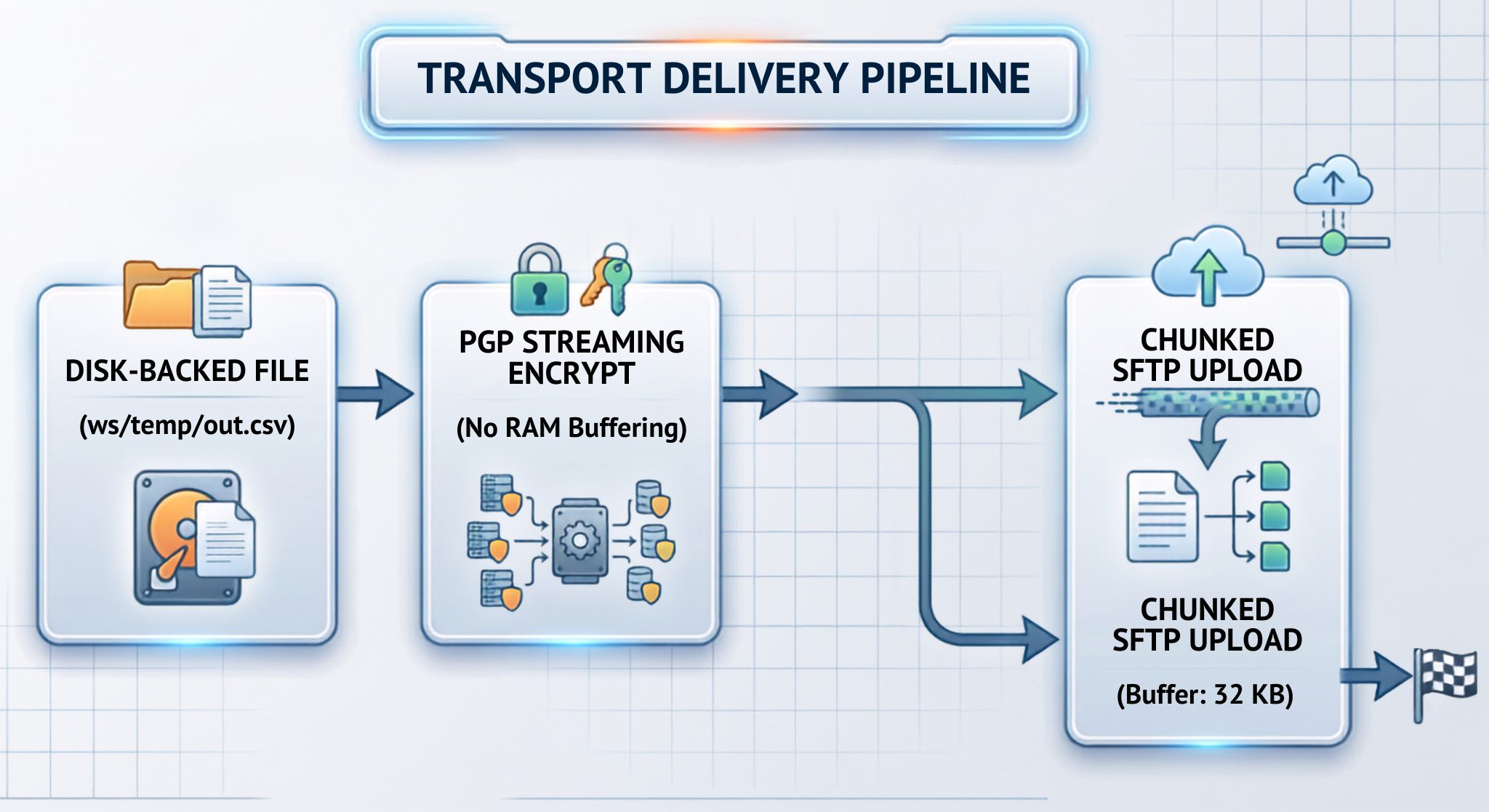
SFTP Streaming Upload
When handling large files, over multiple gigabytes through SFTP:
Do not load files in Message Part: Stream files in your local disk directly to the SFTP step.
Set the socket buffer size: Set the buffer size depending on the network packets being transferred:

When it comes to encrypting files that are several gigabytes large, the process can sometimes lead to RAM limitations if the file is altogether kept in physical memory these could slow things down with lengthy waits in the completion of the encryption process.
Use in-stream PGP components that carry out the encryption on the go as the bytes are moving through the system:

The PGP engine allows you to stream data by supplying local file URLs for input-file and output-file, making it possible for the engine to operate with very low memory consumption and without the need for using the heap of the JVM altogether.
The process of REST / HTTP multipart chunked transfer can be implemented in the case of APIs collaborating with HTTP endpoints that are used to pass large files. In this case, the settings of the HTTP client should enable chunked transfer encoding (Transfer-Encoding: chunked).
Reference Architecture: End-to-End Large Payload Processing
The reference architecture presented below is the example of a full-scale implementation of all of four optimization principles mentioned above, namely, Paged Retrieval, Streaming Splitting, Streamed XSLT+ Transformation, and Disk-Backed Aggregation.
Performance Tuning & Verification Matrix
To guarantee assemblies behave predictably under high load conditions, one needs to monitor various performance metrics while testing:
Measuring the integration performance with a different payload size shows clearly how significantly the process solution influences RAM usage, execution speed, and reliability of the product.
Speaking about the sample of the 50 MB (about 10,000 records), the standard approach using DOM splitting with standard XSLT takes 450 MB of peak memory and 45 seconds to process the data. The results are acceptable for small size files. At the same time, when switching to the workflow of streaming split with XSLT+ system, the memory usage reduces to 45 MB with processing time taking only 18 seconds.
The architectural differences are more visible when the amount of data grows more. In terms of 500 MB payload (about 100,000 records), the process with DOM spitting and the standard approach with XSLT takes 3.8 GB of memory usage and crashes with Out-Of-Memory (OOM) error and can’t be used in real production. While the streaming split with XSLT + approach has a steady 60 MB of peak memory usage and completes processing in 3.5 minutes.
Most importantly, at an enterprise level of 5 GB (more than 1,000,000 records), deploying the paged API retrieval loop together with the aggregation on the disk keeps an impressively small memory footprint of 75 MB RAM while operating successfully in 28 minutes, providing evidence that stream processing can work with practically limitless payloads with great efficacy.
Architectural Change: Transitioning from In-Memory DOM to Continuous Stream Processing
Moving from parsing documents in memory to continuous stream processing is a vital step in dealing with large quantities of enterprise data. By learning how to apply streaming splitters, pipelines, loops for paged API, and disk-based aggregators developers will be able to build Workday studio assemblies capable of processing multi-gigabyte data without being affected by OutOfMemoryError exceptions.
Want to advance your experience in the industry? Obtain expert skills in enterprise integration design, assembling from scratch, and real-time troubleshooting. Join our extensive Workday Studio Course at OnlineITGuru and learn from professionals working as certified integration architects.
In order to ensure the reliability of enterprise-level processes, continuous stream processing is necessary. By employing chunked payload splitting together with streamed XSLT 3.0 transformation, retrieved paged API data, and aggregation on the disk, integrators are able to maintain low and stable memory consumption of 50-100 MB RAM, regardless of whether the payload is 50 MB or 10 GB.
Pre-Flight Checklist for Developers Using Advanced Integrations
Before putting assemblies into production, each step of the integration should be checked off from this checklist to ensure thorough performance with no memory issues:
Check for Streaming: Ensure all parts of any Splitter contain the statement streaming=”true” so that the content is processed event-by-event using StAX/SAX, not by building an in-memory DOM.
Check for XSLT+: Replace old XSLT with XSLT+ components that can process using streamable XSLT 3.0 templates (“yes”>), allowing for real-time processing without buffering via Saxon-EE.
Disk-Based Aggregation: Configure all the necessary settings so that every step of the Aggregator uses strategy="file" and stores data in temp storage in the local workspace (ws/temp) instead of in RAM.
Paged API Retrieval: It is important to use each of the Workday Web Services and the external APIs in such a way that their calls get the necessary information in portions and not all at once.
No String Buffering: Check if raw payload streams have ever been translated into huge strings in MVEL or Java via the methods .text or parts['text'].text and if they have never been kept in the global context.
Streaming Transport: Providers of security and transport services like PGP encryption () and SFTP upload must stream the documents directly as local URL files.