
Power BI Incremental Refresh: Large Dataset Performance
Last updated on Nov 7, 2026
Introduction to the Enterprise Scaling Problem
With the growth of analysis scope on the organization’s side, data produced by modern transactional systems, enterprise resource planning software, and digital communication grows in scale dramatically. In the first instance of implementing the Business Intelligence solution, the loading of the whole historic data directly into the semantic layer is rather effective and easy enough. Power BI is based on VertiPaq in-memory analytics database engine which allows to compress the data and perform slicing, dicing, and aggregation operations on millions of rows instantly. But when the historic data grows to tens or even hundreds of millions of rows, the inefficiency of the full refresh becomes obvious.
The typical scenario of the full refresh implies loading of each row separately from the historic and live data into Power BI, clearing cache, loading data from scratch, transforming it, building relationships and rebuilding dependent objects. The process is extremely costly regarding the capacity of both Power BI and source databases if the data is presented in the gigabyte or even terabyte scale. The seconds-long process turns to the process taking hours and even failing because of gateway timeout, memory limitations, and other problems.
Furthermore, the long duration of refreshing process makes it impossible to update the dataset in real time. Due to the fact that it takes four hours to refresh a dataset, employees receive outdated information during their busiest periods. It would not be efficient to wait for the whole dataset to be loaded to obtain a few rows of fresh information. The way out of the described architectural problem can be provided by means of implementing an incremental refresh that enables automated partitioning of data into immutable archives and volatile data. Incremental refresh means processing of the information that was modified to increase performance, scheduling stability and scalability of enterprise semantic models.
Such complex theories require knowledge and knowledge requires practical architectural skills that are required for those who work in this field to enhance their learning via power bi live training.
The Principles of Incremental Refresh and Partitioning
It is necessary to understand the principles of such a high performance of incremental refresh to get the idea of how it works. If a table is imported in Import mode in Power BI, it is treated as a single object in the VertiPaq engine. When an incremental refresh is turned on, this object is divided into several partitions automatically by Power BI.
Historical partitions can further be categorized into two broad categories, that is, historical partitions and refresh partitions. In case of historical partitions, they involve the time period which will depend on the archiving strategy of the data for instance, the last five years of complete calendar years/ quarters. This is because in the case of historical data, it will always be fixed and constant without any changes, and as such Power BI will not attempt to refresh them at all.
The latest data period will fall under the refresh window where it will involve the period of last seven days/ 30 days/three months where there will be new row inserts as well as updates of the old rows. Whenever Power BI tries to carry out the refresh operation, it will always work on the latest partitions.
There is a significant reduction of resources on each end of the pipeline. The source database is no longer influenced by heavy scanning of archives, unindexed; instead, it gets optimized queries with specific dates. Meanwhile, there will be fewer resources spent on the process of refresh of the Power BI service, and this removes possible errors connected with memory usage.
Granular Policy Configuration: Archiving and Incremental Window
The creation of a good increment refresh policy is a compromise between business analysis needs and technological restrictions. An administrator should configure two periods of time: a storage period and an incremental window.
The storage period is the duration of history that can be kept within the semantic model. This can be, for example, the need of a firm to keep the information about ten years of financial transactions for year-to-year analysis. Setting up the storage period as ten years ensures that historical partitions from the first to the ninth year are loaded only once per day.
A refresh window means the time frame from the past that will be updated on each refresh. In case the organization frequently updates the historical information by changing order status, processing return orders, making correction entries, etc., then the refresh window has to be sufficient to accommodate all those changes. For example, one may keep the history of ten years but update only fourteen days.
An important feature of a database which allows us to implement complicated processes of the data update is the possibility to trace changes in the data according to a specific column such as the date of the last update. Once this feature is enabled, Power BI will calculate the maximum value of the designated tracking column within each historical partition during each refresh process. In case there were no changes made within a particular historical partition since the previous refresh, then the whole process of updating data from that historical partition will be excluded thus saving processing time.
Pre-Requisites, Date Range Constraints, and Query Folding Optimization
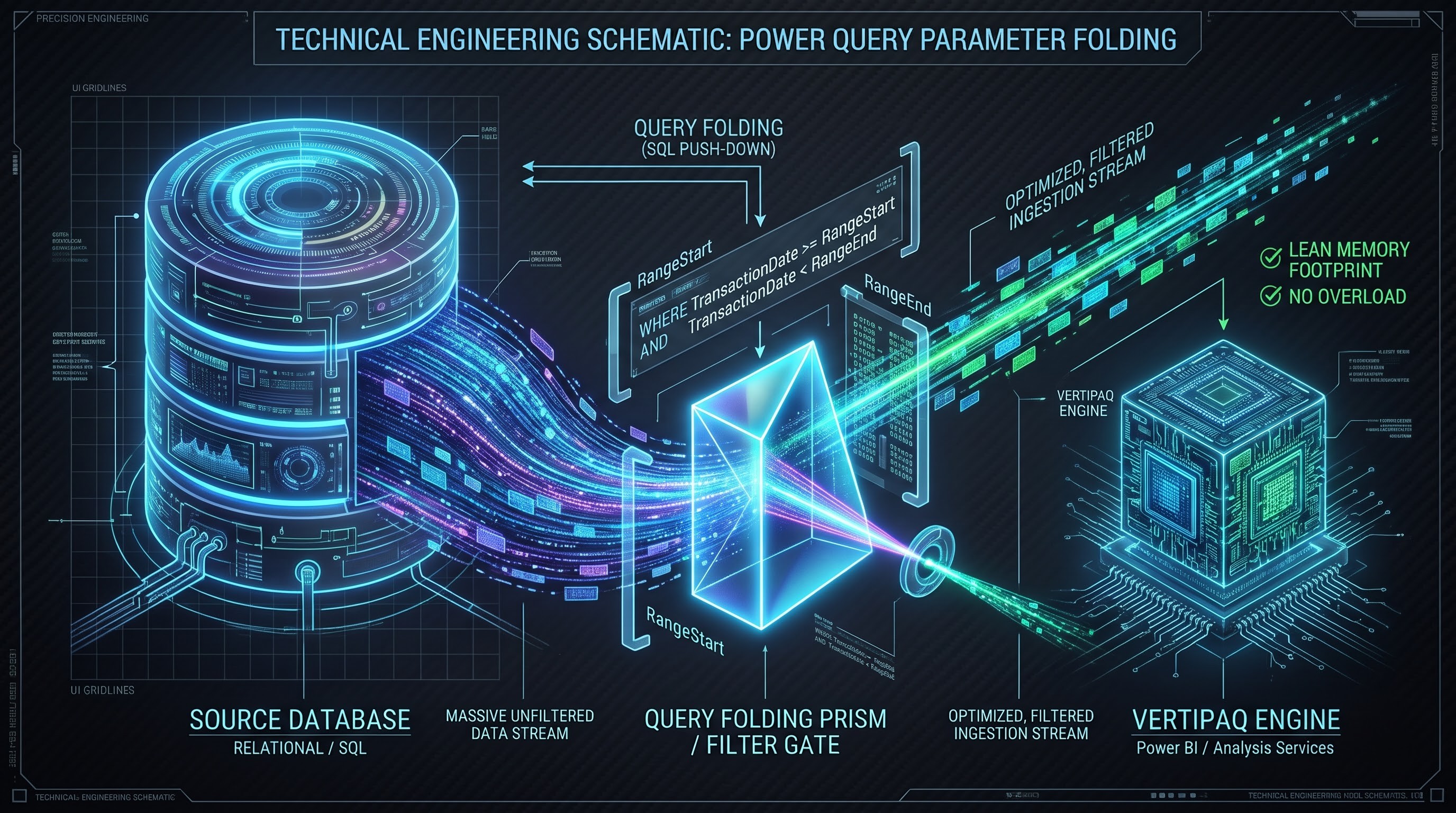
In order for the incremental refresh approach to work effectively, one must make sure that all the necessary pre-requisites regarding the model structure have been covered, particularly in the data preparation layers. In order for the approach to be implemented correctly, developers should prepare two required Power Query parameters with specific names, namely RangeStart and RangeEnd. Those are dynamic parameters, which get automatically supplied by Power BI in the course of scheduled refreshes.
Before implementing the refresh schedule in Power BI, one must prepare those date/time parameters and apply them as filters for the date column in the target fact table in Power Query. This step is very crucial because in this way, when evaluating the model in Power BI authoring mode, only a small amount of data would be requested from the large multi-gigabyte fact table.
At the same time, the employment of parameters means that there exists a technical need for folding the query. It is said that query folding occurs when Power Query generates the database query based on data transformation and filtration procedures which are executed right in the source relational database management system without importing any unstructured data into the engine of Power Query.
In cases when any of the procedures of data transformation results in impossibility of folding the query (for example, custom local transformations, inefficient text manipulations, conversion of the data type which cannot be folded), the entire procedure of incremental refresh will be broken or at least inefficient. When there is the failure of the query folding, Power BI will have to import the historical table as a whole from the source database and then to implement the RangeStart and RangeEnd filters in the local engine. In this case, all benefits of the incremental refresh are wasted, leading to the problems with memory overflow and terrible refresh performance.
Managing Complex Transformations and Calculated Columns
The scaling of data models demands that transformations must be managed so as to ensure efficiency in terms of semantic model performance. One of the examples of architectural weakness is the application of calculated columns and complex row-level transformations on a large data set.
Calculated columns created using Data Analysis Expressions are done at the time of data refresh and stored in the VertiPaq in-memory storage system. With a large data set, having tens of millions of rows, calculated columns contribute to the exponential growth of in-memory storage and hence inefficient data refresh because it takes longer than normal due to the growth of size. Since calculated columns are computed after the data has been refreshed, there is no way to optimize the data using incremental refresh partitions.
For the purpose of sustaining performance, transformations and columns creations need to be done upstream as soon as possible. This involves data cleaning, application of conditional logic and column creation using Power Query Transformation pipeline.
When there is a need for calculations, it is necessary for analysts to prefer using measures in comparison to the calculated columns, because the former are calculated right away according to the filter context of active visuals in reports and do not make any use of the memory at all.
Hybrid Architecture: Bringing in Real Time Data
With incremental refresh it is possible for us to optimize storage and batch update, but in many cases modern businesses require accessing data in real time, which means that it is not acceptable to wait until the schedule of the next batch update includes the latest transactions in such spheres as retail, logistics or financial control.
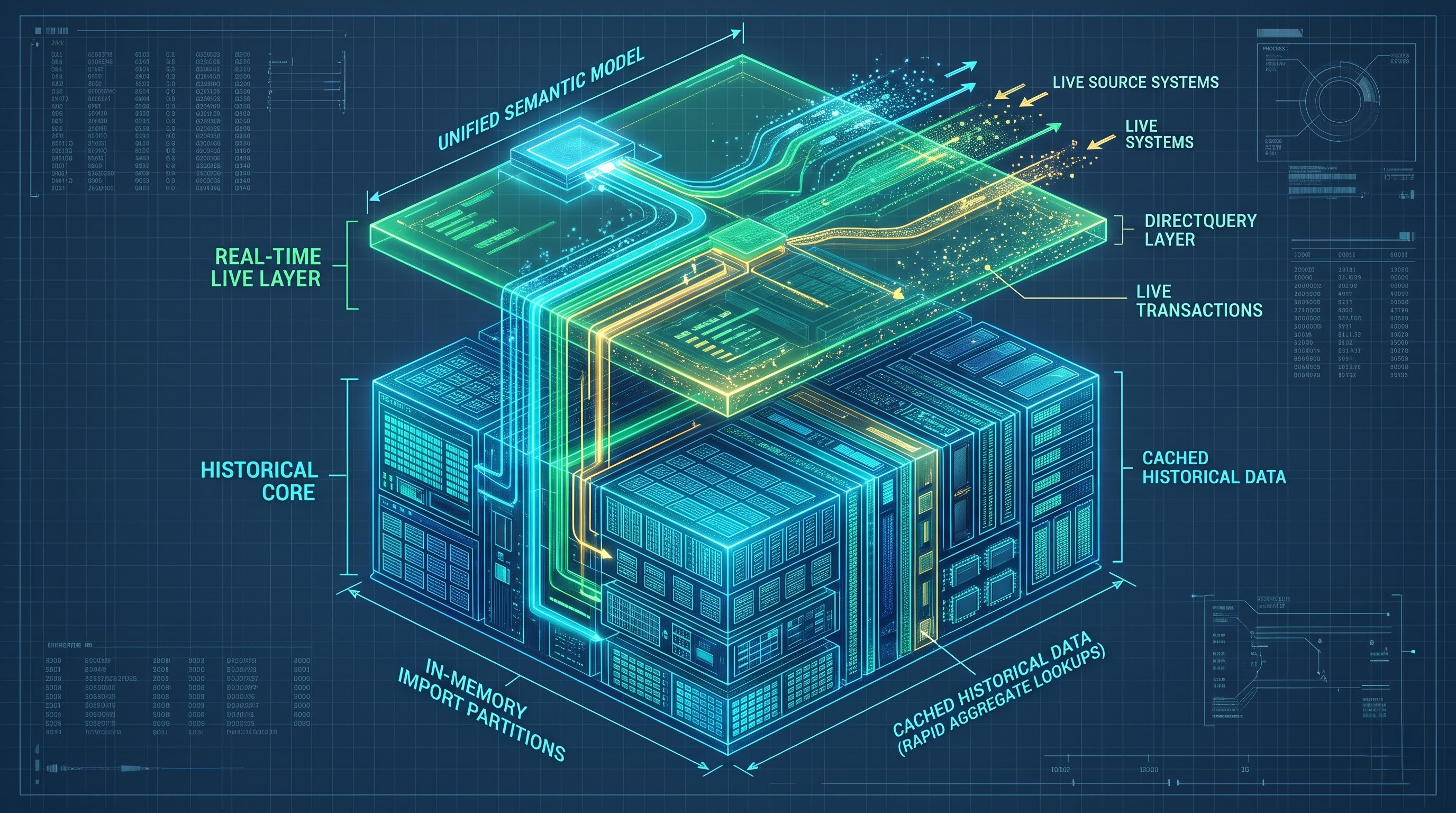
This problem is addressed in Power BI by the use of hybrid tables, which give us the opportunity to have the best of both worlds – good performance provided by cached import partitions and possibility of bringing in data in real time using DirectQuery. As part of incremental refresh setting it is necessary to pick the option of pushing the new data using the DirectQuery partition which is above historical import partitions.
Thus, both legacy and already created incremental partitions are stored in the fast memory in order to provide instant reaction time in historical and aggregate reporting. At the same time, the latest partition (today or a couple of hours ago) is queried right away from the source system via DirectQuery.
This approach allows combining the advantages of two different approaches as your users will have the fastest load time in historical reporting and second-to-second analysis of operations. Incremental refresh hybrid method is done by properly configuring the source database indexing in order to be able to make real-time DirectQuery without impacting transactional application performance.
Handling Problems with Schema Evolution, Out-of-Range Values, and Other Edge Cases
The usage of incremental refresh in the production has some edge cases, which need to be considered in advance. The most common one is the schema evolution, which means any changes in the structure of the source database.
Because of the ability of incremental refresh to keep multiple partitions created throughout the process, any changes to schema on the source will lead to partition mismatch during the scheduled refresh process. The example of the change could be an addition of new columns to the source tables where historical partitions that have been created weeks or even months ago do not contain the new column. Thus, it leads to a failure in the refresh process. To address such a problem either refresh model selectively or restructure partition may be needed.
It should be noted that one of the important edge cases for the incremental refresh is connected with the possibility of out-of-range data or timezone difference between the source and Power BI service. Because incremental refresh uses only date and timestamp filters, timestamps in local time created in the source system and evaluated in Coordinated Universal Time on the Power BI side can make some data out-of-range, generate extra partitions or miss some rows.
Furthermore, creating buffer window for the incremental refresh allows avoiding any problems with late arriving data or timezone differences.
Monitoring, Maintenance, and Enterprise Management
Having managed to deploy and publish the incremental refresh on the Power BI service, monitoring and governance will contribute greatly to the efficiency of the process in the future. In particular, administrators have to review the logs of the refresh history from time to time to learn about the time required for refresh, the appearance of any issues, and the existence of any query folding failures.
In the context of dealing with large datasets, including those with hundreds of gigabytes, partition management is rather limited when using the Power BI desktop. Generally, advanced administrators use connections to XMLA endpoints to implement partition management operations, manual refresh of partitions in case of legacy problems, or some advanced archiving logic that is much more complicated than mere policies.
The optimization of the performance of large datasets can be done not once but all the time. The combination of query folding, advanced data modeling, incremental refresh policies, and monitoring will make Power BI a very efficient and powerful enterprise analytics tool.
Considering the complexity associated with partitions, XMLA endpoints, and semantic models, power bi training online classes may play a critical role for organizations as far as architecture governance is concerned.
Deployment Pipelines, Version Control, and Governance
The deployment and version control of semantic models in enterprise environments that consist of multiple environments raises certain issues that can't be addressed by standard approaches of Power BI deployments. The deployment of such models which have an incremental refresh feature may affect the already created partitioning if no governance is applied. As part of its life cycle, the model passes through different environments from development and testing workspaces to the production environment capacity. Nevertheless, while deploying a semantic model with an incremental refresh feature to the production environment for the first time, it is necessary to perform a full refresh of partitions since otherwise it will result in full refresh of partitions which requires a lot of computational resources.
So as to mitigate the possible risks during deployment, experienced administrators adopt Power BI deployment pipelines and other lifecycle management application software, which operates through the XMLA endpoints. Using XMLA-compatible applications, scripts can be written in a manner such that they keep the existing partition architecture intact or just update partitions that have been modified via a schema change. Also, any version control application software in use must be keen on the model metadata to ensure consistency of parameters during the dates range.
Effective governance of a business involves extremely close collaboration of business intelligence designers with database administrators. Due to high dependence of the incremental refresh from the efficiency of query folding and the performance of the source database, the database team should be involved in the process of defining the partition keys, indexes, and types for the date column. In case there is no appropriate indexing of the date column used in required parameters in the source table, even if the incremental refresh strategy is implemented successfully, the source database will have to perform expensive table scans.
Security and Partitioning
For large-scale implementations of enterprise, an extra issue from a governance perspective would be how the row-level security will be deployed together with the incremental refresh of data model partitions. In case any restrictions exist due to semantic models as part of the security measures which restrict access to certain users depending on organization’s structure, regional differences, or departments, the system should ensure an effective way to apply security filters in a multipartition environment. The in-memory engine will apply security filters dynamically; however, since the incrementally refreshed table has historical and live parts, security will be applied in all partitions without any customization depending on the date range.
Nonetheless, security tables and dimensions tuning where relationships exist to the partitioned fact table become a critical stage; otherwise, badly-tuned security roles combined with a large amount of historical data will negatively impact query performance during report visualization. Consequently, security testing is required as an inevitable element of deployment.
In conclusion, making sure the future is sustainable by using large data sets through Power BI requires the use of the enterprise architecture strategy for incremental refresh, rather than toggle switches. Through the use of good data modeling skills, validation of the query folding process, good hybrid architecture, proper governance when deploying and security testing, the barriers of using large data sets in the past will be overcome.
It is only through the process of mentoring and experience that such a connection will ever be made, and it is only because of this that the need for best powerbi training online cannot be ignored.