
Power BI Mobile: Accessing Business Insights on the Go
Last updated on Nov 13, 2026

In today’s enterprise ecosystem, business velocity is directly proportional to the accessibility of information. The old way of doing business intelligence, where executives, regional managers, and field personnel had to wait until they got back to a physical desk to see metrics for performance, is dead. Organisations today need real-time visibility, ongoing surveillance of operations and the ability to make decisions in the moment, without geographical constraints. Power BI Mobile is responding to this paradigm shift by delivering the analytical power of the corporate data estate to the palm of the user’s hand.
Power BI Mobile bridges the gap between rich data stores in the cloud and the mobile devices in users’ hands, turning the smartphone and tablet into a living operations command center. The mobile app ensures you have access to critical data, whether you’re an executive overseas looking at quarterly financial scorecards, a retail manager on the sales floor tracking regional inventory limitations, or a field technician in a remote location pulling equipment health logs.
“This is a fundamental change in how companies do business,” said one executive. Analytical tools used to be siloed, confined to desktop monitors and available only to dedicated analysts or senior leaders during established office hours. The volatility in today’s market, the dispersion of the supply chain, and the competitive pressures demand that all levels of the organization respond to unfolding events on a moment’s notice. Power BI Mobile democratises access to core business metrics so that frontline workers, regional supervisors and travelling decision makers all have a single, unified source of truth.
It can also be integrated with cloud environments and on-premises data gateways, so organisations can keep their existing IT infrastructure and still get mobile agility. Power BI Mobile is data-driven enterprise redefined with high-performance data delivery, touch-first navigation, state-of-the-art artificial intelligence, and industrial-strength enterprise security. This comprehensive review will cover the underlying architecture, key feature sets, design principles, security protocols and strategic organisational benefits of using Power BI Mobile to ensure continuous operational awareness in a fast-paced global economy.
Mobile Business Intelligence: The Evolutionary Journey
Over the past decade, the business intelligence landscape has changed significantly. Reporting was previously the domain of data analysts and senior executives who used static printed reports or desktop-based analytical tools. As organisations became more geographically dispersed, supply chains more complex and market conditions more volatile, the time lag between an operational event occurring and management becoming aware of it created serious vulnerabilities.
With Mobile Business Intelligence, that lag is eliminated. Early mobile BI solutions were clunky, offering little more than static images of desktop dashboards that were hard to read on small screens. Modern mobile BI is a complete re-think of the architecture, for example the Power BI application ecosystem. It is built from the ground up for speed, touch and fast cellular networks.
The platform does not treat mobile devices as secondary windows for viewing but as primary endpoints for interaction. They can query live data, get push notifications when thresholds are breached, collaborate with their team members with annotations, and query semantic models using natural language or generative AI. This evolution helps embed the data-driven culture at every level of the organization, providing both the front-line employee and the traveling professional the same capability for analyzing data like the strategic person in the central office. For people interested in becoming experts in these tools and enterprise data transformation leaders, it is strongly advised that one participates in the best power bi online training.
Core Architecture and Platform Ecosystem
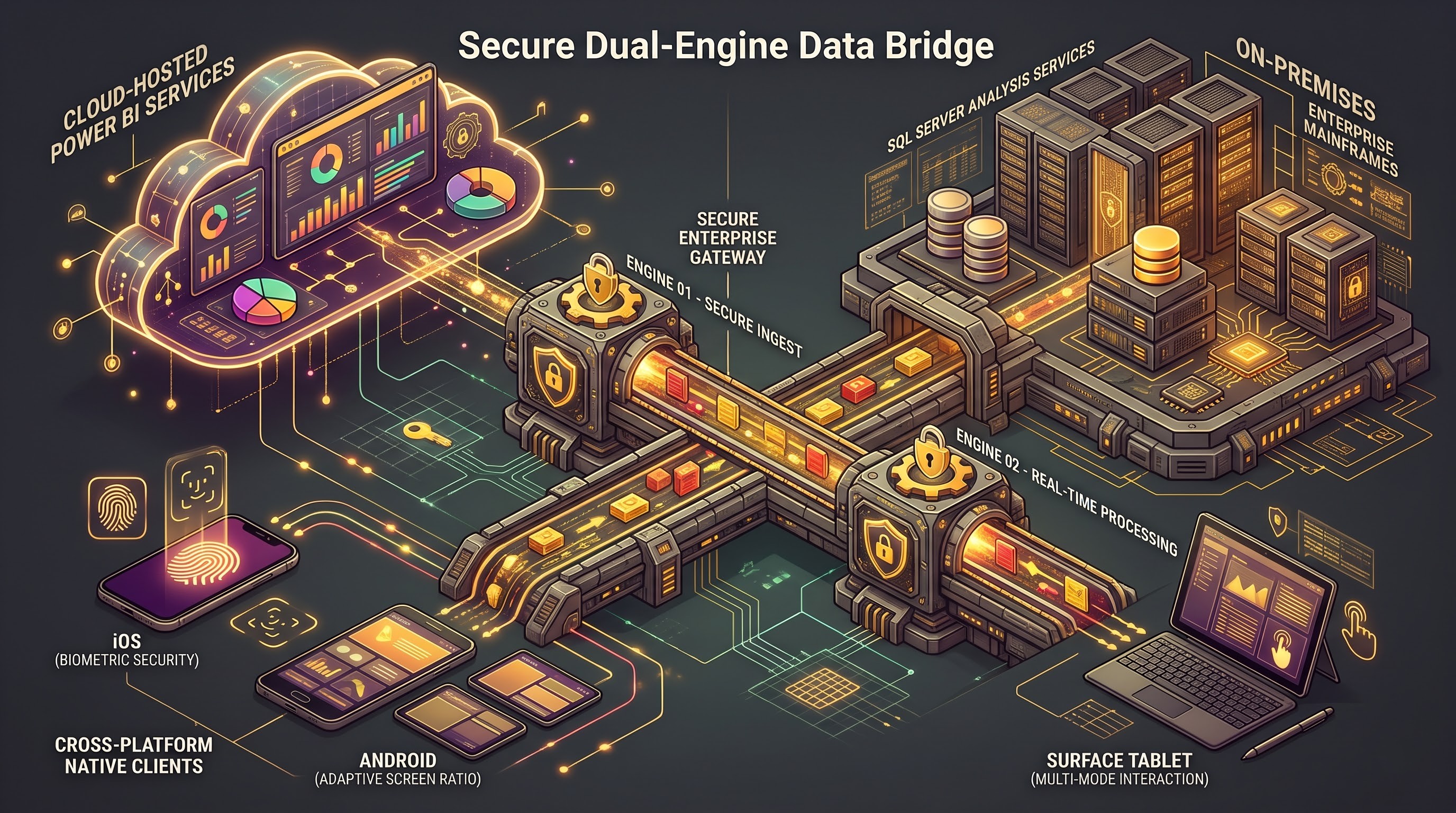
Power BI Mobile works best with the rest of the Power BI service and the Microsoft cloud infrastructure. The data models, semantic layers and governance protocols put in place in the central workspace are directly ported to the mobile apps for iOS, Android and Windows.
Availability and cross-platform consistency
Power BI Mobile still has rich clients that are designed for the interaction paradigms that are unique to each operating system. On iPhone or iPad, you get tight integration with iOS interface conventions such as biometric verification and home screen shortcuts. On Android you get a similarly native experience, optimised for a range of screen ratios and hardware configurations with support for productivity extensions. The app also allows you to easily switch between laptop and tablet modes on Windows-based mobile hardware and Microsoft Surface devices, allowing you to annotate with touch precision or stylus.
On Premise & Cloud Direct Connectivity
The mobile platform's hybrid connectivity model is a significant architectural strength. The majority of organisations are not completely cloud-native, with many still running mission-critical operational databases, enterprise resource planning systems and customer relationship management tools on on-premises servers behind the corporate firewall. That’s where Power BI Mobile comes in. Through secure gateway configurations, mobile users can securely connect to cloud datasets hosted in the Power BI service, and also back into on-premises SQL Server Analysis Services or Power BI Report Server deployments. Such an exclusive layer of connectivity will allow mobile users to see the state of the business as a whole without the need to switch from one application to another. For developers who wish to undergo practical training on how to connect cloud data sets, configure gateways, and create semantic models, the best online power bi training is invaluable.
User Experience and Interaction Models
That’s the special challenge of human-computer interaction: to present complex analytical output on a pocket-sized screen. A dashboard that is dense enough for a 27 inch desktop monitor becomes unreadable when it is reduced to a smartphone screen. Power BI Mobile solves this with purpose-built layout controls, touch-friendly gestures and intelligent interface design.
Mobile friendly layout
Report makers can have desktop depth and mobile legibility, too. Authors can create mobile-optimized layouts using the authoring tools in either the Power BI service or the desktop application. The underlying data model is the same, but the mobile layout is optimised for vertical portrait mode scrolling on phones. It removes clutter at the top of the view, pins key performance indicators and formats key trend charts for the best readability. Automated layout tools can even generate sensible mobile layouts on the fly, significantly reducing the admin burden on report authors.
Exploration and Navigation are Touch-first
Working with data on your mobile device using natural gestures. Users can pinch to zoom on data points, tap on visuals to cross filter related metrics, and swipe through curated report pages seamlessly. Instead of the cumbersome drop-down menus and cramped filter panes of desktop, mobile-friendly designs can replace them with big-button slicers and full-screen filter panels that are easy for human fingers to manipulate. The design choices are made to facilitate smooth and error-free data interaction in a high-pressure, fast-moving environment.
AI and Natural Language Processing On The Move
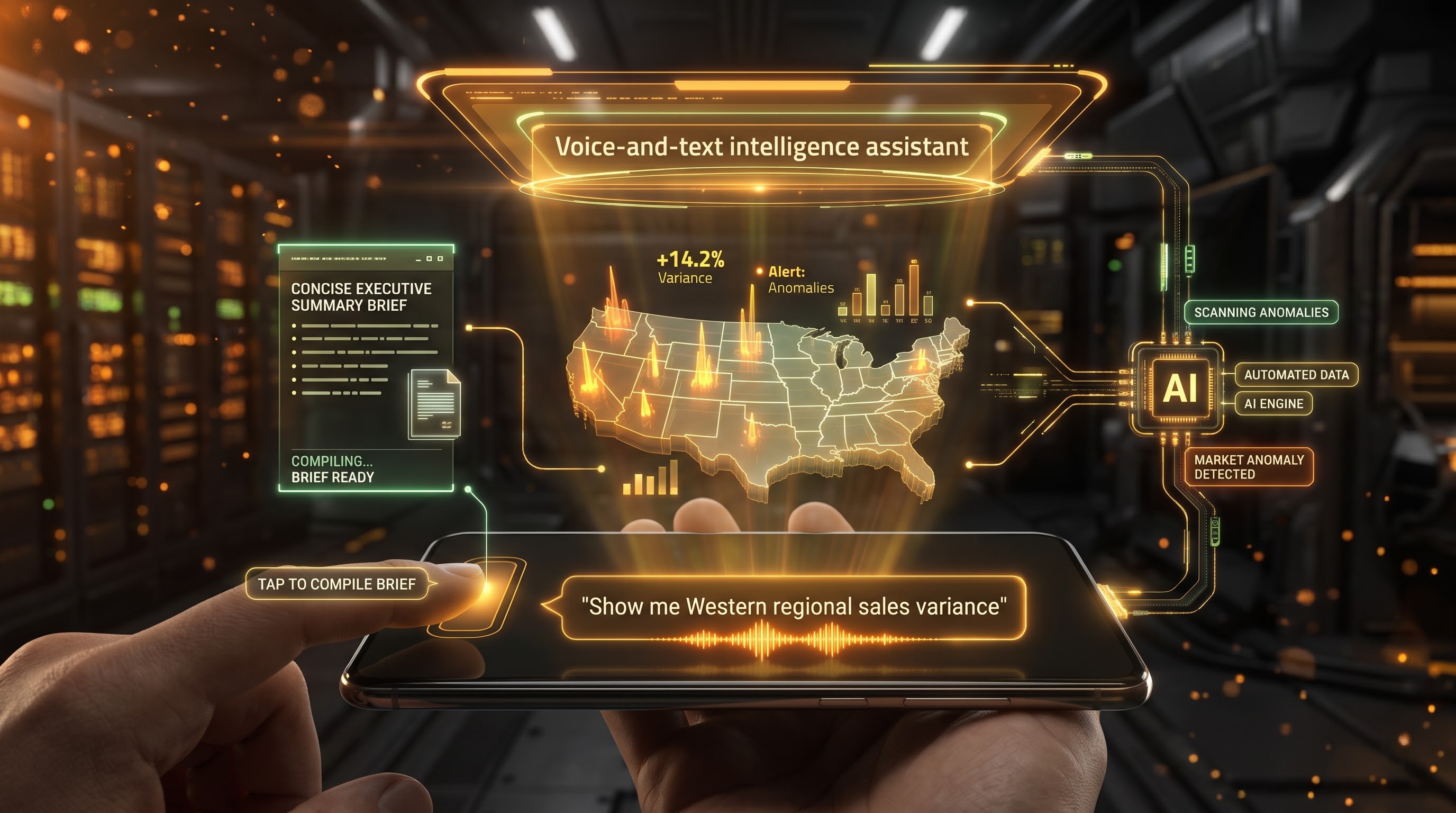
The introduction of state of the art artificial intelligence to mobile business intelligence has changed the way non-technical users interact with data. Today’s mobile analytics include generative capabilities and conversational AI assistants so users don’t have to manually drill down into multiple report layers.
Chatting to Discover Data
When you’re on the go, or walking between meetings, typing complex filter queries on a mobile keyboard is not efficient. Power BI Mobile now supports natural language interactions powered by advanced AI models. Users simply type or speak their questions in natural, everyday business language (e.g., “Show me regional sales variance for the Western territory for the last quarter”) and get the corresponding visual answer back instantly. The underlying AI engine understands semantic relationships, business terminology and security boundaries to ensure users only see insights they are specifically authorised to see.
Executive Summaries Generated Automatically
AI-powered story telling is the instant remedy for busy leaders who don't have time to pore over multi-page analytical reports. With a single tap on a mobile device, users can generate short, automatic executive summaries of complex semantic models. The briefs pinpoint surprising anomalies, new market trends and significant performance variances so decision makers can grasp the core of their data story in seconds.
Field Operations and Convergence of Physical and Digital
Power BI Mobile is not a viewer, it’s an active tool for physical-digital workflows in logistics, manufacturing, retail, field services, and more.
Location Intelligence
The app takes advantage of the built-in GPS capabilities of smartphones and tablets to deliver location-aware analytics. For example, if a sales rep or field service technician is pulling up a report related to a particular client site or branch office, the system can filter the data by geographic coordinates. Contextual filtering removes the need to manually dig through site-specific metrics, service history and inventory levels delivered as the user arrives on site.
Scan QR Code & Barcode
The Power BI mobile app also has built-in barcode and QR code scanning, to simplify physical inventory and asset management. Warehouse workers or equipment inspectors can use their device’s camera to scan a product code or machinery tag. The mobile app immediately matches the scanned identifier against the underlying data models, and opens the relevant performance report, already filtered for that item. This capability takes the risk of human error in data entry, and speeds up asset tracking processes across geographically dispersed locations.
Team and Proactive Monitoring
Business insights are of no use if they are not acted upon in a timely manner. Power BI Mobile takes reporting to the next level with an active notification-based business intelligence ecosystem.
Real Time Data Alerts & Push Notifications
Critical business events never happen at convenient times. Some KPI tiles and metric cards in Power BI Mobile will let users set up personal data alerts. If a metric goes beyond a pre-defined threshold (inventory levels falling below safety stock, a spike in server error rates, daily sales falling below target projections), the application will push an immediate notification to the user’s lock screen. This forward thinking alert system allows management to immediately take action to rectify any issues rather than finding out about discrepancies days later, in a weekly review meeting.
Mobile Annotation and Team Work
Field discoveries need to be shared quickly with larger teams. Power BI Mobile annotation tools are touch enabled. Users can draw, highlight or write text notes directly on a report snapshot with their finger or stylus. Integrated messaging and collaboration tools allow remote teams to share annotated snapshots instantly keeping them aligned and on the same page with operational priorities.
Great connectivity and access offline

Field staff and travelling executives often work in locations where internet connectivity is limited or non-existent, such as aeroplane cabins, underground locations, rural job sites or international sites with poor cell coverage. Mobile BI is much less useful if you can only connect to live online sources.
Power BI Mobile solves this issue by caching data locally on the device. The app stores the report layout and data snapshots from the last successful connections on the device. Users can favourite important reports and have them cached first. Users can work offline and still have full interactive access to their cached dashboards and reports for seamless analysis. When you reconnect the application will sync in the background with the Power BI service to bring all underlying data models to the latest state.
Enterprise Security, Compliance and Governance
But making corporate data accessible via mobile devices brings huge security challenges. Corporate data assets must be protected against unauthorised access, device theft and data leakage. Power BI Mobile has a solid security architecture with multiple layers of protection, which allows it to meet strict enterprise compliance requirements such as GDPR, HIPAA and SOC 2.
On-Device Biometric Authentication
The application is heavily controlled to prevent unauthorised access in case of a lost or unattended mobile device. You will be required to open the Power BI app through biometric validation (e.g. Face ID or Touch ID on iOS, fingerprint scan on Android, or facial recognition with Windows Hello). If an unlocked physical device falls into the wrong hands, corporate data remains locked behind biometric hurdles.
Mobile Device & Apps Management
IT administrators have complete centralised control over mobile deployments and are fully integrated with Microsoft Intune and Mobile Device Management (MDM) / Mobile Application Management (MAM) frameworks. Administrators can enforce policies for app protection, remotely wipe cached corporate data if a device is reported stolen, restrict unauthorised data sharing or copying and require corporate proxy routing to go through secure managed browsers. Additionally, any Row-Level Security (RLS) rules defined in the central data model are strictly enforced on mobile devices. This means users will only see what they are explicitly allowed to see, no matter where they are.
Strategic Benefits for the Organization

The deployment of Power BI Mobile into an organization has an obvious strategy value that directly affects operational efficiency and bottom-line results.
Shorter Decision Making Process
Geographic and time friction are being removed from the analytical process, cutting decision-making cycles from days to minutes. Field managers are not waiting for compiled reports in the evening to adjust staffing levels or fix supply bottlenecks. They can assess conditions in real time and take corrective measures immediately.
Greater accountability and alignment
Mobile scorecards and KPI trackers promote transparency and accountability. Named owners are provided with metrics that are visible on mobile devices up and down the management chain, keeping the goals of the organization top of mind for every employee. This constant alignment ensures that everything that happens on a daily basis is always in service of larger strategic goals.
Maximise ROI on Your Analytics Investment
Building complex reporting models and sophisticated enterprise data warehouses can be expensive. Limiting the use of these assets to office workers chained to their desks leaves a lot of analytical value on the table. Everyone involved in Power BI Mobile can utilize business intelligence, and this also helps in realizing the maximum return on investment by making sure that the operational team gets access to the findings from the data team. For organizations that wish to increase capacity in different teams, they can do so by preparing their employees for this through enrolling them in a best online power bi course.
Conclusion: Mobile First is the Future of Business Intelligence
Ultimately the digital transformation of the modern enterprise is defined by agility, resilience and speed of execution. As market dynamics accelerate and global supply chains become more complex, the legacy practice of binding business intelligence to static desktop environments has become a critical operational bottleneck. The days when organisations could afford the lag of waiting for executives to return to physical offices, or analysts to generate static periodic reports, are over.
Power BI Mobile can connect to deep data stores in the cloud to touch-first hardware on smartphones and tablets, turning personal devices into dynamic operational command centers. This evolution is far more than a technical port of desktop dashboards to smaller screens, it’s a profound rethinking of how humans interact with data. Carefully designed mobile-optimized layouts offer field personnel, remote technicians and travelling executives clean, high-impact key performance indicators for quick action.
Moreover, that investment in advanced technologies transforms the platform from a reporting tool to an active, intelligent partner. AI-driven Natural Language Exploration removes any analytical friction on the fly, enabling non-technical users to query complex semantic models in conversational language. Offline data caching capabilities ensure that poor cell coverage or underground field conditions will never stand in the way of business continuity. Geolocation intelligence and barcode scanning.
Importantly, this democratisation of data doesn’t mean an organization loses control. Power BI Mobile is a case study of how you can have uncompromising accessibility with rigorous enterprise governance. Multi-layered security architectures that incorporate device-level biometric verification, extensive mobile device management integration, strict Row-Level Security enforcement and strong cloud encryption allow organisations to securely extend sensitive corporate data to a mobile workforce. And full visibility for IT administrators to maintain compliance with global regulatory requirements and protect the enterprise from data leakage and lost devices.
The strategic use of Power BI Mobile transforms corporate culture from the bottom up. Everyone from frontline workers and regional supervisors to senior leaders can see operational metrics in real time and the whole organization can move from reactive to proactive and data-driven. Decisions are made there and then, not buried in bureaucratic reporting chains. Organisations gain a decisive competitive advantage by taking advantage of the full power of enterprise data and delivering actionable intelligence directly to their workforce, allowing them to deal with uncertainty, seize emerging opportunities and thrive in an ever-accelerating global economy.