
Power BI User-Defined Functions: Reusable DAX Simplified
Last updated on Nov 28, 2026
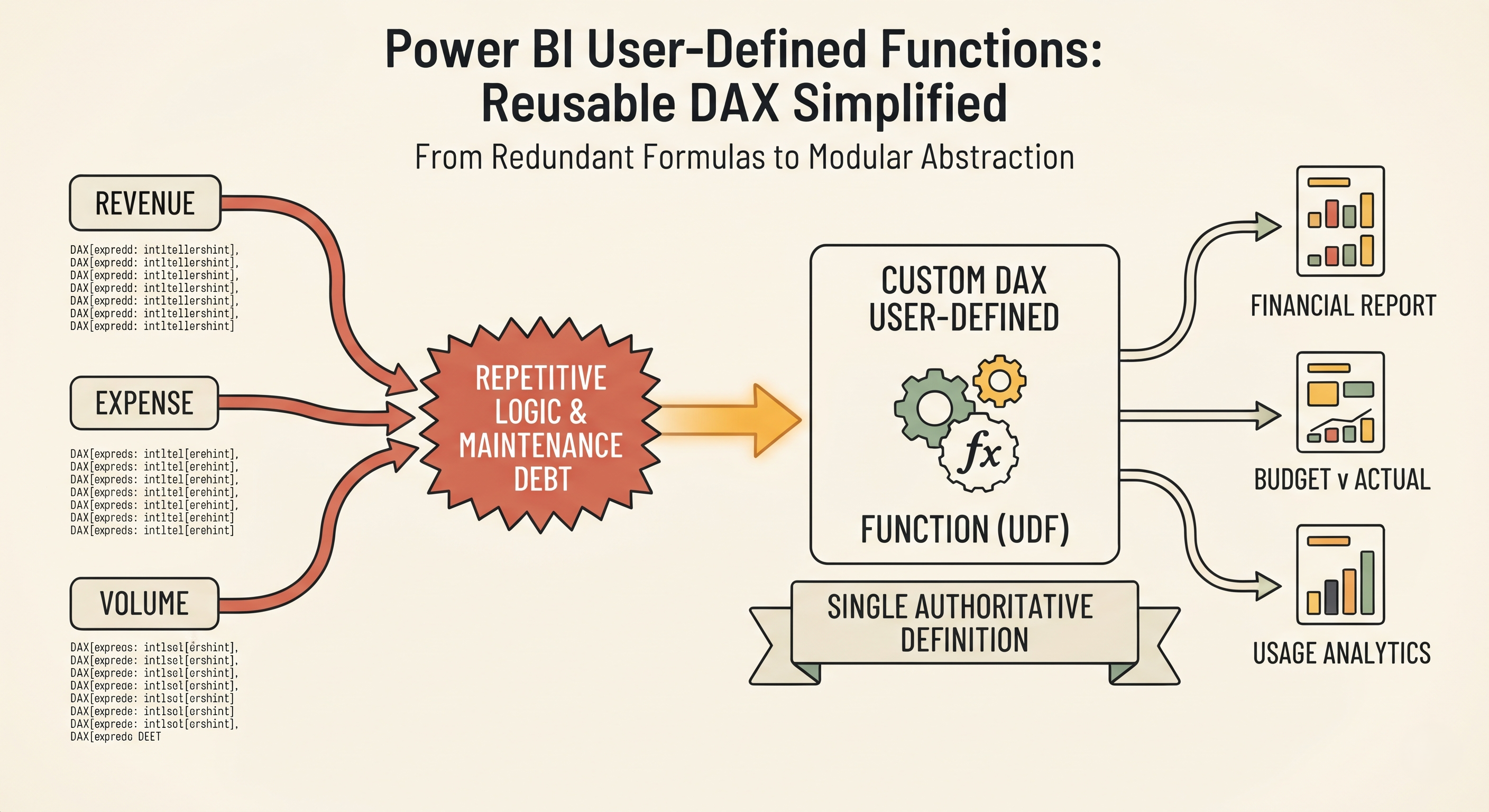
For over a decade, the heart of business intelligence modelling for Microsoft Power BI, Excel Power Pivot, and SQL Server Analysis Services has been Data Analysis Expressions, or DAX. DAX is a functional formula language that enables analysts and enterprise developers to express complex business rules, dynamic time intelligence, and multi-dimensional aggregations across massive datasets. Yet despite its functional identity, DAX was deficient in one fundamental capability that is available in virtually every modern programming and query language: the ability for model authors to define their own custom, parameterised, reusable functions.
Historically, developers who wanted to apply the same logical pattern to multiple metrics, tables, or business rules have had to resort to workarounds. They copy-pasted complex formulas measure by measure, engineered elaborate calculation groups to intercept filter contexts, or built external helper scripts to synchronise repetitive expressions. Those days are over.” With the advent and general availability of DAX user-defined functions in Power BI, semantic modellers now have a native first-class mechanism for encapsulating business logic once and calling it anywhere across a model.
In this paper, irrespective of whether you are studying semantic modeling individually or attending online classes for power bi training online classes by OnlineITGuru, we will discuss the implications of user defined functions in Power BI on the architectural structure of the semantic model, their working principle, compatibility with existing modeling features, and proper usage of the same.
The Historic Problem of Repetitive DAX Logic
To grasp why user-defined functions are such a big deal for Power BI, it's helpful to look at the structural friction that existed before them. In enterprise semantic models, business logic is rarely in isolation. For example, dozens of base metrics (gross revenue, net sales, operating expenses, inventory valuation, and headcount costs, for example) may require the same currency conversion rules, fiscal calendar adjustments, rolling period comparisons, or threshold classifications in a financial model.
Before user-defined functions, Power BI developers had to make an uncomfortable architectural trade-off every time a pattern needed to be repeated. The most common way was to duplicate formulas. The analyst would write a formula for one measure, test it thoroughly, copy it twenty times and then manually change the underlying column or measure references in each copy. It was fast in the short term, but duplication created a serious long term maintenance debt. If a tax rate changed, or an edge case required a different fallback behaviour, or a rounding rule needed adjustment, a developer would have to find every single measure that contained that logic and edit each one individually. The lack of any one measure led to silent analytical discrepancies across the executive reports.
Another workaround that was popular was calculation groups. And calculation groups changed the game in terms of time intelligence and dynamic measure formatting, allowing a single calculation item to wrap whatever measure was in the current evaluation context. However, calculation groups were designed with matrix-style permutations and visual-level overrides in mind, not general-purpose functional abstraction. They cannot take arbitrary scalar inputs such as a custom discount percentage or a minimum activity threshold, and they cannot be cleanly called within calculated columns, row-level security filters or intermediate variable steps as simple, self-documenting building blocks.
Similarly, Power Query M has had support for custom functions to ingest and transform data for years, and SQL databases have had user-defined functions and stored procedures for decades. What was missing was the semantic layer itself where business rules had to be expanded inline, not modularised into clean, composable abstractions, until user-defined functions arrived in DAX.
What are User Defined Functions in DAX?
A DAX user-defined function is a named, reusable formula that is stored directly in a Power BI semantic model. A custom function is similar to built-in functions like sum, average, or calculate, but takes zero or more input parameters, executes a defined body of DAX logic, and returns a single scalar value or an entire table. The function is a first class model object, which appears in the Model explorer, and is usable with IntelliSense autocomplete throughout the authoring environment once saved to the semantic model.
Conceptually, a user-defined function decouples the calculation structure from the specific inputs it operates on. Instead of hardcoding a particular sales column, tax rate, or date window directly into the measure, the author defines abstract placeholders (parameters) that acquire their actual values or expressions upon invocation of the function. Then, any measure, calculated column, visual calculation or even another user-defined function can call this custom logic just by calling its name and passing the required arguments.
After a preview period that started in late 2025 and ended in mid-2026, user-defined functions have become a core pillar of modern Power BI development in the Microsoft Fabric ecosystem. They align DAX to modern software engineering principles, in particular the principle of centralising logic to ensure that there is a single authoritative definition for each business rule.
Core Architecture: Parameters, Type and Evaluation Modes
To understand how user defined functions work we need to look closely at how data gets into a function when it is called. Simple macros in spreadsheets just copy and paste text from one place to another. DAX user-defined functions are tightly integrated with DAX evaluation engine, filter context and row context.
Flexible Parameter Definitions and Type Annotations
A DAX user-defined function can take from zero to two hundred fifty-six parameters. A zero-parameter function is basically a global constant or a parameterless helper rule, like returning the organization’s standard fiscal year start month or the current corporate tax multiplier. More commonly, functions take one or more inputs that represent numeric thresholds, text flags, date boundaries, measures, columns, or entire tables.
Power BI allows the developer to attach optional type hints to each parameter to make custom functions predictable and resilient to user error. Type hints are generally divided into two categories: reference types and value types. Value types are concrete scalar values, like whole numbers and decimal numbers, currency, text strings, dates and boolean flags, and materialised tables. Reference types, however, point directly to structural metadata objects in the semantic model, for example, a specific measure reference, a column reference, a table reference, or a calendar reference.
When type hints are provided, the DAX engine performs validation of incoming arguments and safe automatic type casting where appropriate. If a function expects an integer and a caller passes a decimal or a numeric string, the engine can cast it cleanly; if a caller passes an incompatible non-numeric string, the engine surfaces a clear validation error rather than producing corrupted results.
Lazy Evaluation Vs Eager Evaluation
The most important conceptual distinction in DAX user-defined functions is the way parameters are passed: eager evaluation of values vs. lazy evaluation of expressions. This is the difference between a beginner writing simple arithmetic helpers and an advanced modeller building dynamic time-intelligence and context-aware engines.
In eager evaluation (value mode) the argument passed into the function is evaluated once before the function body is executed at all, using whatever filter context exists at the time of the function call. After that fixed result is evaluated, it is passed to the function like a static variable. The function body can refer to that parameter as many times as it likes, or apply any filters to it internally, but the value never changes during that execution. Value mode is great for fixed inputs like a discount percentage, a target threshold, a currency exchange rate or a pre-aggregated baseline number.
Under lazy evaluation (also known as expression mode) the caller does not pass a precomputed result. Instead, the caller passes either an unevaluated DAX expression or a model reference to the function. The expression is evaluated when, how often and under what modified filter context is determined by the function body itself. For example, if a developer creates a custom function that compares month-to-date or prior year, the base metric must be passed in expression mode. The function body wraps the parameter in a context-changing function and moves the date filter back twelve months. The metric is recalculated in this shifted date window, not locked to the visual’s original filter context.
It is vital to understand how context transition interacts with expression parameters. If an expression parameter is evaluated within the framework of an iterator, iterating over a table (e.g., calculating customer-by-customer averages), enclosing the parameter evaluation in a context-transition trigger makes the current customer in each row an active filter, rather than producing the grand total in every row.
Function Creation and Management in Power BI
Microsoft built user-defined functions to integrate smoothly with visual desktop workflows and modern source-controlled enterprise pipelines. In Power BI Desktop and the Power BI Service, model authors can define, view, test and maintain functions across multiple connected surfaces.
Interactive Authoring Tools
The DAX query view in Power BI Desktop is the primary testing ground and workbench for developing user-defined functions. Developers are able to prototype a function in a query tab and immediately evaluate it against sample inputs or live model tables, inspect the scalar or tabular output returned, and then, with a single click, promote the tested definition directly into the semantic model. Functions already in place can be scripted out and changes to them can be safely tested in isolation. The Model explorer allows for quick query templates that can be used to verify the behaviour, and only the model is updated.
For developers who like to work with semantic model metadata as text, the Tabular Model Definition Language view (commonly referred to as the TMDL view) offers full scripting and version-control capabilities. When a report is saved in Power BI Project format, all user-defined functions are nicely serialised into a dedicated functions definition file in the project folder structure. This allows software engineering teams to follow all modifications to business logic in Git, review code in pull requests, compare changes line by line, and roll out changes using automated continuous integration pipelines.
In addition, the Model explorer has a dedicated node listing all saved functions, where authors can browse signatures, edit formulas directly in the formula bar, and manage functions in addition to tables, measures, and calculation groups. Using web modeling in Power BI Service also allows you to visualize and edit user-defined functions through your browser, thereby balancing the process done in both desktop and cloud environment - a very typical method that is frequently used in power bi live training.
Self Documenting Metadata & Namespacing
In enterprise models with dozens of custom functions, naming collisions and discoverability become practical concerns very quickly. Power BI does both through dot-separated namespacing and structured documentation comments.
You can create namespaces with periods in function names to organise functions into logical hierarchies. For example, date utilities can be put under a calendar namespace, financial helpers under a finance namespace, and statistical routines under an analytics namespace. Periods are allowed to create nice organisational prefixes. Function names must be unique in the model; cannot contain spaces or special characters; and cannot conflict with reserved DAX keywords or native functions.
Power BI supports structured triple-slash documentation comments directly above a function definition to make functions intuitive to downstream report creators. Model authors can embed rich guidance directly in model metadata using standard documentation tags for descriptions and for individual parameters. Later on when the report author types the function name into the formula bar, IntelliSense displays those custom descriptions and parameter hints alongside the native DAX documentation, effectively turning internal business logic into a self-documenting internal library.
Practical Business Use Cases for User-Defined Functions
The real benefits of DAX user-defined functions become apparent when compared to common analytical problems that used to be solved with long, fragile formulas.
Standardised Tax And Financial Calculations
Take a global retail organization that does business in dozens of jurisdictions, each with its own tax rules, promotional discount structures and rounding conventions. Traditionally each revenue, margin and invoice measure had to bake those tax and discount adjustments directly into its formula. The financial modelling team builds tax computation, net-of-discount pricing and currency normalisation into dedicated user-defined functions, creating a single source of truth. If a tax law changes in a particular jurisdiction, the change to a single central function immediately ripples the correct calculation to all the reports, dashboards and ad-hoc pivot tables connected to the semantic model.
Fiscal Calendars and Custom Time Intelligence
Many organisations run on non-standard calendars – retail four-four-five calendars, manufacturing shift schedules, mid-year fiscal calendars, etc. – where the built-in time intelligence functions just don’t cut it. The custom year-to-date, rolling twelve month or prior period comparison logic often requires twenty or thirty lines of complex filter manipulation. These user-defined functions take a measure expression as a reason. Once the architect has written that custom fiscal calendar logic, it can be applied effortlessly to revenue, unit volume, customer churn and operating profit.
Cross Channel Engagement & Behavioural Analytics
In digital product teams, it is common to have multiple event logs such as web telemetry, mobile app events, and API usage logs to track user activities. Each of these logs is stored in a separate table but follows the same structural pattern. If you want to calculate median actions per active user or identify power users above an activity threshold, you would have to repeat the same multi-step table summarisation logic for each platform without user-defined functions. Analysts pass a table reference and an activity threshold to a parameterised function that removes duplicate code and guarantees that analytical definitions are consistent across each product channel.
Dynamic Formatting, Thresholds, and Data Quality Safety Nets
User defined functions also shine in terms of standardisation of presentation and defensive programming. An organization can build helper functions to safely handle division by zero, clamp extreme outliers, normalise null values into standardised fallback labels, or apply consistent conditional formatting status indicators across dozens of key performance indicators. Rather than each analyst creating slightly different error-handling conventions, the whole team can rely on vetted, uniform building blocks.
Calculation Groups and Variables vs User-Defined Functions
Power BI has several ways to reuse logic and it’s important to pick the right tool for the job in your architecture. User-defined functions do not replace DAX variables or calculation groups, but rather complete a three-tier hierarchy of reuse.
Variables are only in scope for the single DAX expression where they are defined. They remove repeated subexpressions within a single measure or calculated column, make that formula more readable, and cache intermediate scalar or table results for a single evaluation. But it is not possible to share variables between different measures.
Calculation groups work across multiple measures simultaneously, at the visual or query level, by capturing the active measure reference and changing its filter context or format string. When a report user needs to slice a matrix by multiple time-intelligence variants – such as actuals, month-to-date, year-to-date, and year-over-year variance – across a dynamic selection of metrics, they are peerless.
User-defined functions are in the middle of these two extremes. They can be invoked explicitly by name, accept multiple heterogeneous parameters (mixing measure references, columns, tables, and scalar thresholds in a single call), and return either scalars or tables. Even better, user-defined functions and calculation groups play nicely together. You can have your calculation item call a user defined function that will execute complex logic, with parameters, against whichever measure is currently selected. This keeps the calculation group clean but pushes complicated business rules out into testable, modular functions.
Best Practices and Performance Considerations
User-defined functions are a great improvement in readability, governance and maintainability, but developers should keep in mind the performance mechanics. Wrapping DAX inside a user defined function does not magically skip the DAX query optimiser or storage engine. When a query is executed, the engine expands and evaluates the underlying logic of the active filter and row contexts.
Often, centralising repeated patterns into a user-defined function actually encourages consistent query plans and better formula cache reuse across a session, as identical expression structures are compiled uniformly rather than written with subtle variations by different authors. But careless nesting can introduce hidden complexity. Deeply nested function chaining can lead to repeatedly iterating through tables or unnecessary context switches, which can hurt query responsiveness on large datasets.
To get the most out of DAX user-defined functions in production environments, semantic modellers should embrace several tried-and-true practices:
Design for Single Responsibility Make sure each function does one thing and does it well. Avoid creating large, multi-purpose functions that become difficult to test and debug.
Explicit parameter modes and type hints . Explicitly specify whether each parameter expects eager evaluation of values or lazy evaluation of expressions . Explicit type hints ensure that the engine will catch invalid inputs early .
Maintain consistent return types in calculated columns: When calling a function within a calculated column, ensure that every conditional branch returns the same scalar data type so that column storage compression is optimal.
Thoroughly document all public functions: Use structured triple-slash comments and clearly describe the parameters so that any report author exploring the semantic model knows what the function expects, how it behaves with filter context, and what it returns.
Visual calculations don’t have visibility into fields that are not placed directly on the visual itself. So, you cannot pass external model columns or hidden measures into a user-defined function within a visual calculation context.
Avoid deep recursion or deep nesting. Use flat, transparent composition. Thus, your business function should call a small number of well-indexed helper routines. Test performance using the DAX query view with realistic data volumes before going to production.
The Future of Semantic Modelling in a Modular Way
The introduction of user-defined functions is a coming-of-age moment for DAX as an enterprise modelling language. For years organisations scaling Power BI across hundreds of report creators have been suffering from logic sprawl, where duplicate formulas drift out of sync across departments and workspaces. With Power BI, teams can apply the same rigour to analytics engineering as modern software development, natively incorporating true functional abstraction, strong parameter typing, lazy expression evaluation, and source-control-friendly definitions into the semantic layer.
When business rules are written once, well documented, systematically tested and reused everywhere, semantic models become leaner, more trustworthy and much easier to evolve as business requirements change. In today's scenario, user-defined functions have become essential for every developer working with Power BI in order to improve the maintainability of his/her models by avoiding duplication of DAX formulas. If you wish to learn about DAX and Semantic modeling in order to write DAX code that is ready for production, then the best powerbi training online provided by OnlineITGuru could be helpful for you.