
Salesforce Admin Responsibilities: What Does a Salesforce Administrator Actually Do?
Last updated on Oct 6, 2026
Salesforce is often introduced as a customer relationship management platform. In an organization simply having Salesforce does not guarantee that teams will use it effectively. Behind the dashboards customer records, automated tasks, reports, permissions and workflows is someone making the system work properly. That person is the Salesforce Administrator.
A Salesforce Admin plays a role between technology and business operations. They understand what different teams need to configure Salesforce accordingly to maintain the quality of business data, manage user access, create automation troubleshoot problems and help employees get value from the platform. In organizations the Admin becomes the person people approach when something is not working or when they want Salesforce to support a business process.
The real responsibility of a Salesforce Admin is not simply maintaining Salesforce; it is making Salesforce useful, secure, reliable and aligned with the way a business operates. The role can look different from one organization to another. A small company may have one Admin handling everything from user management to reports and automation while a larger organization may have several administrators working alongside developers, architects, analysts and business teams. Regardless of the company size the fundamentals remain similar: understand the business, configure the platform, protect the data, support users and continuously improve the system.
Understanding the Core Role of a Salesforce Admin
The responsibility of a Salesforce Admin is understanding how the organization uses Salesforce and what it expects from the platform. An Admin cannot configure the system effectively without understanding the business processes behind it. For example, a sales team may need a way to track leads, opportunities, follow-ups and customer interactions, while a service team may need case management, escalation processes, and customer support information. This is where the Admin becomes more than a support person. They listen to employees, understand their problems, identify processes, and determine whether Salesforce can provide a solution. Before changing a field or creating an automation, a good Admin first asks why the problem exists and what outcome the business actually wants.
A successful Salesforce Admin thinks about business outcomes before thinking about configuration.
For someone preparing for this profession a salesforce admin course can provide an understanding of Salesforce concepts, configuration, security, automation and data management. However platform knowledge becomes more valuable when it is combined with an understanding of business workflows. The Admin also has to balance requirements. One department may want flexibility while another may need controls. Managers may want reports while users may want fields to fill in. The Admin’s job is to find a solution that supports productivity without creating complexity.
Managing Users, Profiles, Roles and Permissions
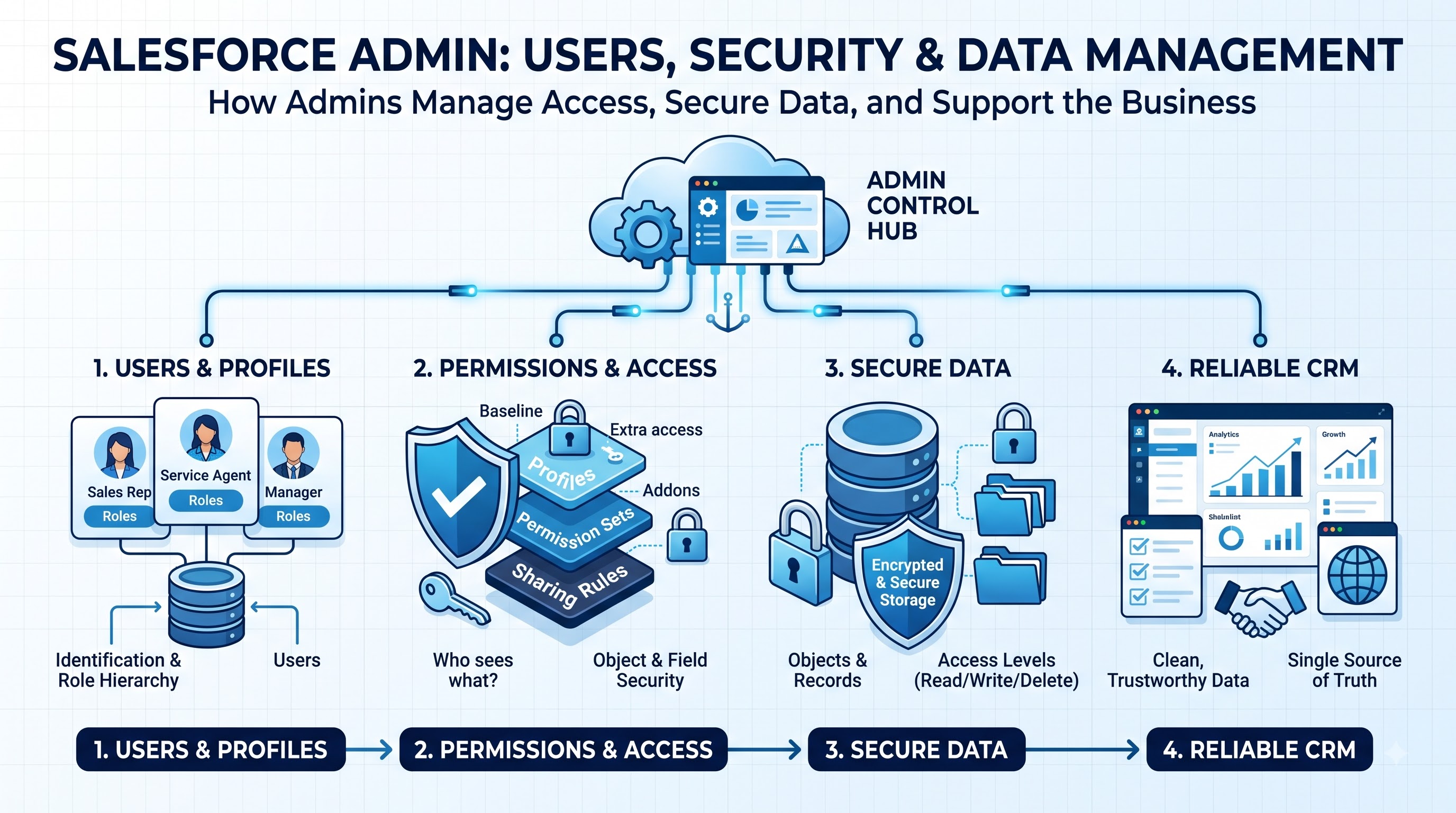
User management is one of the operational responsibilities of a Salesforce Admin. Every organization needs to control who can access Salesforce, what information users can see and which actions they are allowed to perform. An Admin handles many of these requirements through Salesforce’s security and access-control features. When a new employee joins the company the Admin may create the user’s account, assign the license, configure access and make sure the employee receives the permissions required for their role. When an employee changes departments their access may need to be updated. When someone leaves the organization the Admin may need to deactivate the account and ensure that important records and responsibilities are handled appropriately.
Salesforce provides mechanisms for controlling access, including profiles, permission sets, roles, sharing settings and object- and field-level permissions. Understanding how these controls work together is essential because giving users much access can create security risks while giving them too little access can prevent them from completing their jobs. For example a sales representative may need access to their opportunities and customer records while a sales manager may need visibility across a team. A finance-related team may require access to information that should not be available to every employee.
A good salesforce administrator course follows the principle of giving users the access they need without giving them access. This makes user and permission management both a security responsibility. An Admin must regularly review access. Make adjustments as the organization's structure changes.
Maintaining and Managing Salesforce Data
Salesforce is only as useful as the information stored inside it. If customer records are incomplete duplicated, outdated or inconsistent even the best dashboards and automation cannot produce results. This makes data management one of the responsibilities of a Salesforce Admin. Admins help establish standards for how information should be entered and maintained. They may create validation rules that prevent records, configure required fields identify duplicate records and support regular data-cleaning activities. They may also assist with importing information into Salesforce or exporting existing data when required.
Imagine a company where the same customer appears under three names in the database. Sales representatives might contact the person times managers could receive inaccurate reports and marketing campaigns could be affected. These problems are not simply issues; they can directly affect the customer experience and business decisions. An Admin therefore needs to think about data quality from the beginning. Fields should have purposes users should understand what information belongs in them and processes should make it difficult to introduce errors.
Clean CRM data creates the foundation for automation reporting, forecasting and customer relationships.
Data management can also involve monitoring patterns in the database. If users repeatedly enter information incorrectly the problem may not be the users themselves. The Salesforce configuration or process may need improvement. A strong Admin looks for the underlying reason than repeatedly correcting the same mistake.
Customizing Salesforce for Business Requirements
Every business operates differently, which means Salesforce cannot always be used effectively with a configuration. Customization allows an Admin to adapt the platform to the organization’s processes without requiring custom software development.
Salesforce Admins can work with objects, fields, page layouts, record types, list views, apps, buttons, and other configuration options to make the platform more relevant to users. For example, a company may need information on an opportunity record that's specific to its sales process. An Admin can determine how that information should be captured and where users should see it. Customization should not mean adding as many fields and features as possible. Excessive customization can make Salesforce confusing and difficult to maintain. If users have to navigate through fields every time they create a record, the system may actually reduce productivity.
The best Salesforce customization is purposeful: every configuration change should make a process clearer, faster, more accurate, or easier to manage. An Admin may also work with stakeholders before making changes. They need to understand who will use the feature, what problem it solves, whether existing functionality can solve the requirement and what impact the change could have on teams. This is why business understanding is so important. Salesforce configuration is not simply about knowing where to click. It is about making decisions that improve the way people work.
Creating Automation and Improving Workflows
Businesses rely heavily on automation, and Salesforce Admins play a role in identifying processes that can be automated. Many employees spend time performing actions such as updating records, assigning tasks, sending notifications or following approval processes. Automation can reduce this workload. Improve consistency.
Salesforce Flow is particularly important in this area. Admins can use automation to update records, create tasks, send notifications, guide users through processes and perform actions based on defined conditions.
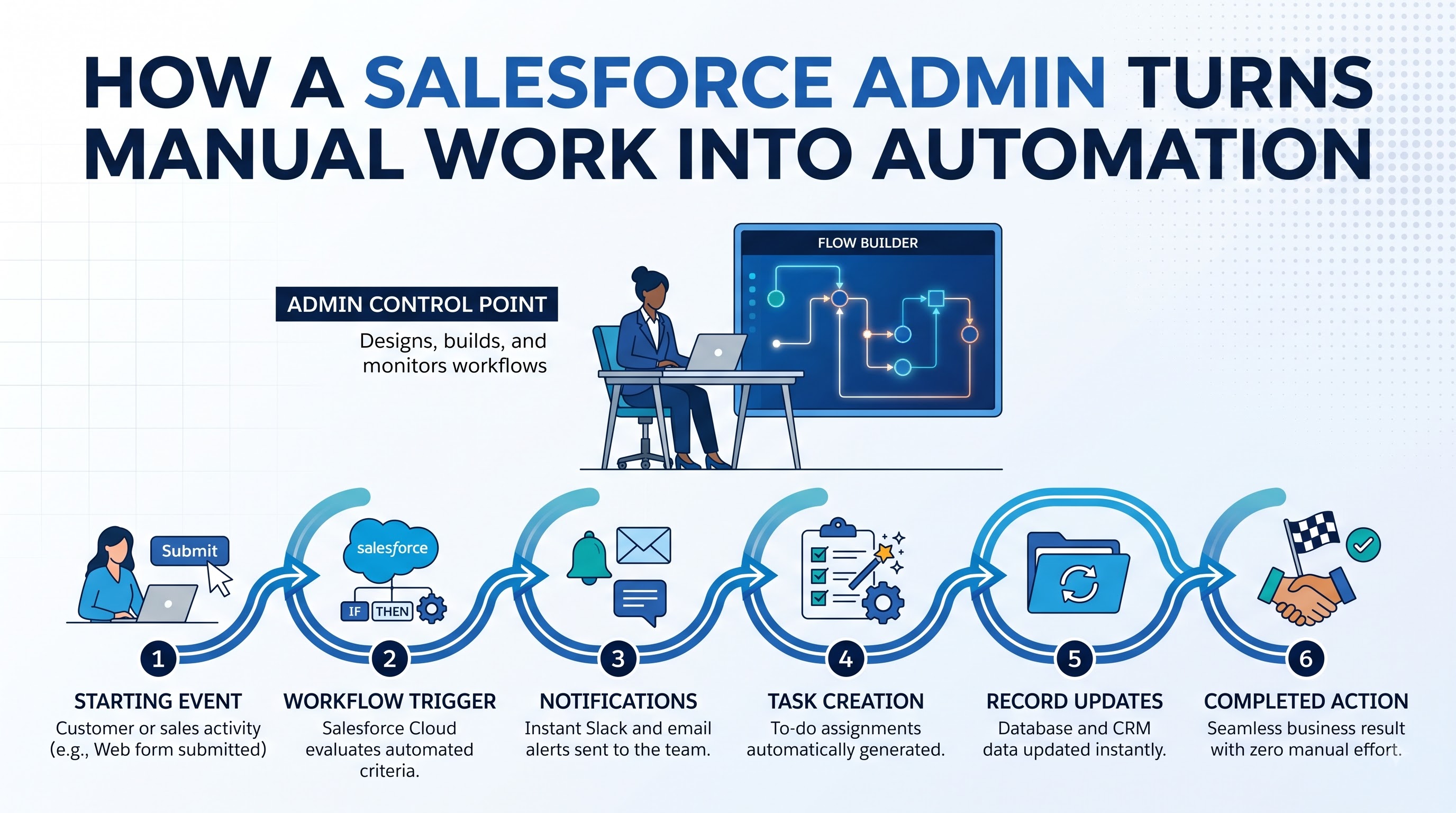
Consider a sales process. When an opportunity reaches a stage a manager may need to be notified a follow-up task may need to be created. Another record may need to be updated. Of relying on an employee to remember each step the Admin can design an automated process. However automation should not be created simply because it is technically possible. Designed automation can create unexpected record changes, confusing notifications and difficult troubleshooting situations.
Effective automation removes work without making the system harder to understand or control.
Before implementing automation an Admin should understand the process identify the trigger determine the expected outcome consider exceptions and test the solution carefully. This requires thinking much as technical knowledge.
Creating Reports and Dashboards
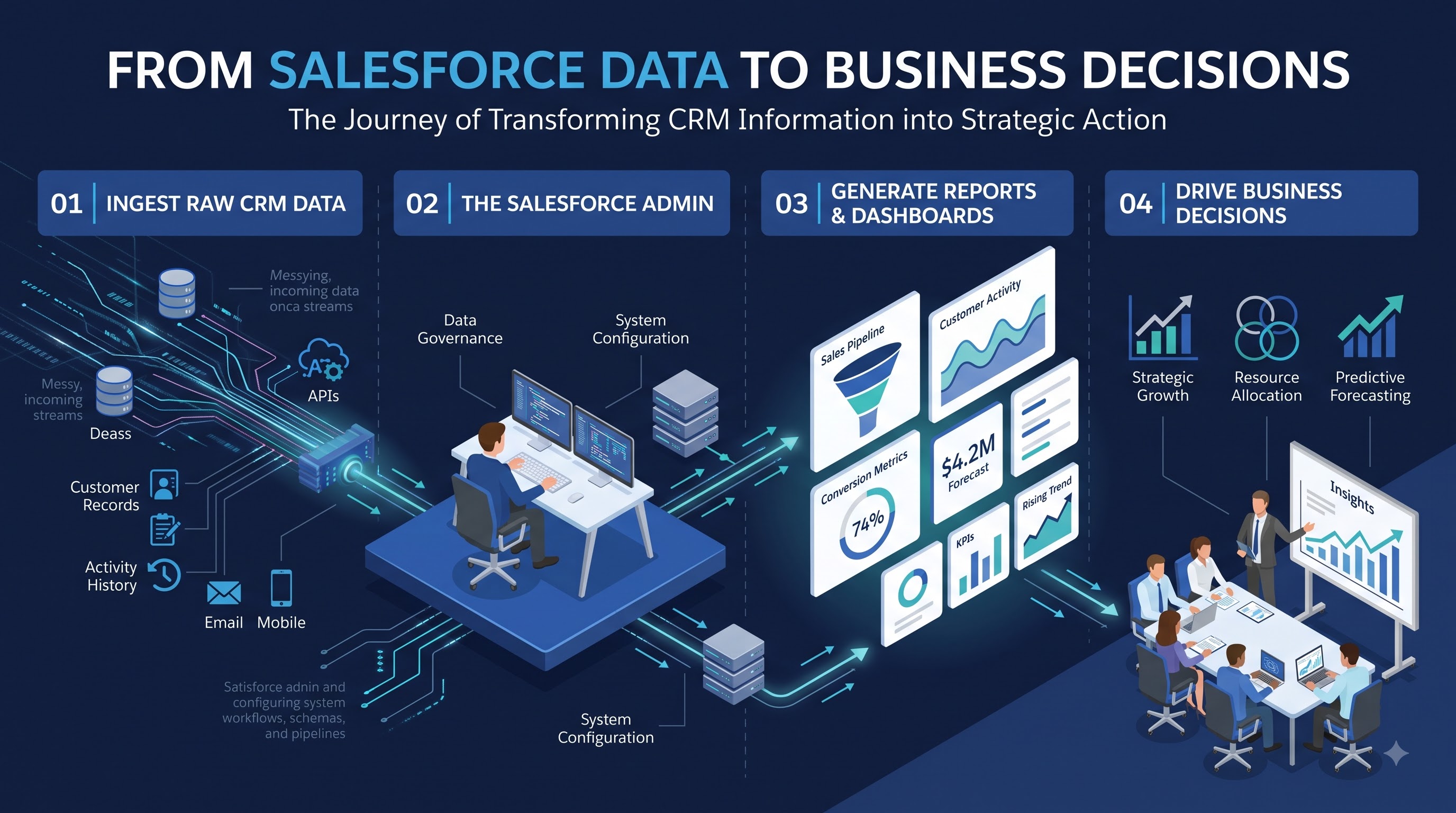
A Salesforce Admin is also responsible for helping organizations understand what is happening inside their CRM. Reports and dashboards transform Salesforce data into information that managers and employees can use to make decisions. Different users need types of information. A sales representative may want to see their opportunities and upcoming activities. A sales manager may need pipeline information across the team. Senior leadership may be interested in broader performance indicators, revenue trends, conversion rates or sales forecasts.
The Admin needs to understand these differences and create reports that answer business questions than simply displaying large amounts of data. For example a dashboard showing hundreds of records may technically contain information. It may not help a manager understand whether the sales pipeline is healthy. A better dashboard might focus on opportunities by stage, conversion rates, sales performance and important trends.
A useful Salesforce report does not merely show data; it helps someone make a decision.
The Admin may also work with stakeholders to determine which metrics matter most. This requires communication and analytical thinking because the right report depends on the business objective. Over time reporting requirements may change. New products, teams, territories or sales processes can create reporting needs. The Salesforce Admin therefore needs to evaluate whether existing dashboards still provide information.
Troubleshooting and Supporting Salesforce Users
Even a designed Salesforce environment will bring up questions and problems. Users might forget passwords lose access to records face validation errors not understand a process or say that an automation did not work the way it should. Salesforce Admins are usually the people to look into these issues. User support needs patience and a methodical way of solving problems. An Admin has to find out what the user was trying to do, what actually happened, if the problem is for one person or many users and if the issue is because of permissions, settings, data, automation, or a misunderstanding by the user.
Sometimes the fix is easy. A user might not have the permission. Might be looking at the wrong view. In some cases, the issue might require looking deeper into automation or settings. Training is another part of user support. When a new Salesforce feature comes out, users need to understand how to use it. Why they should use it. An Admin might create guides, hold training sessions, prepare examples, or offer one-on-one help. Even if the Salesforce system is set up correctly, it can still fail if users don’t know how to use it. This makes communication one of the important skills for an Admin. The ability to explain an idea in business terms can be just as important as knowing Salesforce features.
Keeping Salesforce Secure and the System Healthy
Security must always be watched carefully in Salesforce administration. Companies store customer data, sales data, operations data and private information in their CRM systems. That means the Admin must be careful about who can see what and how that information is being used. Security work includes checking permissions, sharing settings, field access, login rules, user accounts and other controls. Admins should also review access needs regularly. Make sure permissions stay correct when employees change roles. System health is also very important. Over time, Salesforce environments grow as companies add fields, automation, integrations, reports and processes. Without attention the system can become too complicated and hard to manage.
An Admin might look at settings remove things that are no longer used improve slow automation clean up unused reports and find ways to simplify the system.
Regular maintenance helps stop configuration issues from becoming bigger problems. Security and system health require a mindset. Waiting until a user says there is a problem is not enough. Good Admins check the environment often. They look for chances to make improvements before issues get worse.
Working with Developers and Business Teams
Salesforce administration rarely happens alone. In companies Admins work closely with developers, solution architects, business analysts, sales teams, marketing teams, customer service teams and managers. An Admin might receive a request from a business team that seems simple but has parts. For example a team might want a process inside Salesforce. The Admin needs to understand what the team wants, check if standard Salesforce features can handle it and decide whether just configuring is enough or if coding or integration is needed.
Admins also play a role in testing and launching features. Before a new feature goes live it may need to be tested in a sandbox environment. Users might help test to make sure the solution actually works for them. This teamwork means that learning about Salesforce is part of being good at the job. Real-world Admins also need to talk with people, gather requirements, write down details, test solutions and work with people who have levels of tech knowledge.
The best Salesforce Admins act as translators between business teams and tech teams. They know enough about technology to talk with developers but also understand enough about the business to explain what users really need.
The Changing Role of a Salesforce Admin
The role of a Salesforce Admin keeps changing as CRM technology becomes more advanced. Automation, artificial intelligence, analytics, integrations and data rules are now more important in today’s Salesforce setups. This does not mean traditional tasks are disappearing. Managing users, keeping data clean, handling security, customizing, reporting and fixing issues are still essential. What is changing is how much Admins are expected to contribute. By just responding to requests today’s Admins are often expected to spot opportunities to make things better. They might study how teams work, find steps that can be automated, improve data quality and help the company use Salesforce effectively. Artificial intelligence is opening possibilities for CRM teams. Admins need to learn how new AI features can help users while also thinking about data quality, rules, security and how to use these features correctly. The future Salesforce Admin is not just someone who takes care of the platform; they are becoming business tech problem-solvers.
Learning never stops. Salesforce keeps adding features and companies keep changing how they work. An Admin who stays curious and keeps learning can grow with these changes. They can give help to the business.
A Salesforce Admin Is Much More Than a System Manager
The job of a Salesforce Admin goes beyond adding users or fixing login issues. They help the company keep a Salesforce environment that's secure, accurate, fast and easy to use. From managing permissions and cleaning data to building automation creating reports customizing the system helping users and working with tech teams the Admin touches parts of the business. Their choices affect how productive teams are, how clean the data is, how visible customers are and how employees use the CRM every day.
A good Admin also understands that Salesforce must evolve as the company grows. When business processes change the system needs to change. This requires curiosity, strong problem-solving skills, clear communication, technical knowledge and a desire to keep improving. The real value of a Salesforce Admin is not measured by how things are set up. It’s measured by how they help people and processes work through Salesforce. For anyone wanting to start in this field salesforce administrator training can provide a foundation for understanding the system and its main features.. The true advantage comes from using that knowledge along with experience, business thinking, strong communication and the ability to solve real business challenges.